
The latest info on influencer marketing trends, micro influencer news, and the world of social media

TikTok Shop vs Amazon is a choice about how your product earns an order and what it costs to deliver it. Start with TikTok Shop when a clear demonstration and a workable creator program can explain why someone should buy. Start with Amazon when shoppers already search for the problem your product solves and you can compete with a convincing listing, price, and delivery offer.
For ecommerce sellers, the next step is to compare one product across both channels. Calculate the costs attached to its orders, check the fulfillment options available to your account, and estimate how much cash you must advance before receiving payouts.
Start with the platform where you have the clearest path to both a purchase and a profitable delivery. A product that is easy to demonstrate may justify a TikTok Shop test, while a product with identifiable search demand may justify an Amazon test. These are selection criteria, not predictions about which marketplace will produce more sales.
TikTok's seller platform supports selling through creators, shoppable videos, and LIVE. That gives sellers several ways to show a product being used and answer questions through content.
Consider a home organizer with an unusual adjustable design. A demonstration could show the problem it solves, how it fits into a cabinet, and what it holds. Your first test would establish whether those demonstrations lead to purchases at an acquisition cost your margin can support.
TikTok also has product search. Its Shop Tab and search documentation describes search, recommendations, and other shopping surfaces. A content strategy should therefore sit alongside accurate product information and available inventory.
Amazon is a practical starting point when you can identify what buyers would search for and explain why your offer deserves consideration.
For that same organizer, investigate the products shown for relevant cabinet-storage searches. Compare dimensions, materials, customer questions, price, and delivery promises. Your opportunity needs to be more specific than listing another organizer.
A small team should choose the workload it can execute consistently. Existing content skills favor a content-led experiment; existing marketplace operations favor a listing-led experiment. Either channel still needs a viable product and reliable delivery.
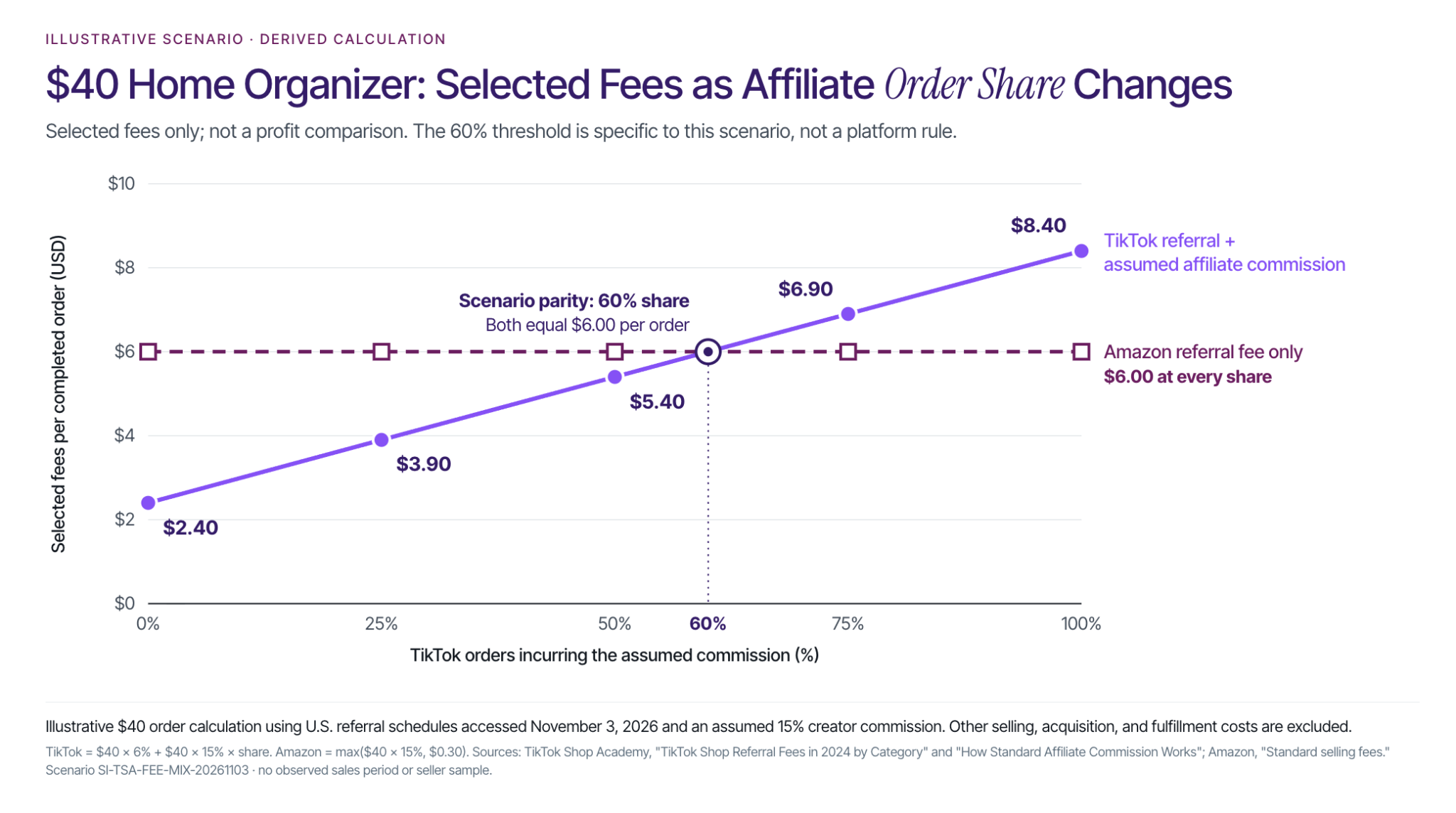
Compare the same item, selling price, and order definition before comparing percentages. Separate the marketplace's referral fee from the cost of acquiring and fulfilling an order.
TikTok Shop's U.S. category referral-fee schedule, checked November 3, 2026, lists 6% for Home Supplies: Home Organizers. Its calculation includes customer-paid shipping and adds back platform-funded discounts before excluding tax. Categories and special terms can differ, so confirm the applicable rate in your account.
Amazon's U.S. selling-fee schedule lists 15% for Home and Kitchen, with a $0.30 minimum. It also lists an Individual plan at $0.99 per item sold and a Professional plan at $39.99 per month, each with referral fees in addition. Amazon's fee base includes shipping and gift wrapping, and its fee category can differ from the customer-facing category.
When allocating plan costs, use the plan you actually buy. Divide a monthly subscription across the relevant sales volume; do not add the Individual per-item charge to the Professional subscription.
TikTok's standard affiliate commission guidance distinguishes sales through creator content from merchant self-selling. Creator commissions apply to qualifying affiliate purchases, while merchant self-selling through its own videos or LIVE does not incur that affiliate commission.
Consider an illustrative $40 home organizer classified in the categories above. Assume one item per completed order, no discounts, refunds, buyer-paid shipping, gift wrapping, or tax in the modeled fee bases, and no special incentives. Use a hypothetical 15% creator commission on the TikTok orders that incur it.
The TikTok referral fee is $2.40 on every modeled order. The assumed creator commission is another $6.00 on each commission-bearing order. Averaged across all completed TikTok orders:
Amazon's referral fee alone is $6.00 per modeled order. These selected fees reach parity when 60% of TikTok orders incur the assumed commission: 2.40+(6.00 × 60%) = $6.00.
This is a comparison of referral fees and one assumed affiliate expense. Add selling-plan charges, advertising, content, fulfillment, storage, returns, and other costs before comparing profit. Orders without affiliate commissions can still require marketing spend.
The practical lesson is to measure the share of orders that actually incur commission. Applying your headline affiliate rate to every order can overstate that expense; ignoring affiliate charges understates it.
For a chosen period, start with sales revenue after seller-funded discounts and refunds. Subtract product costs, marketplace charges, fulfillment, return-related losses, creator commissions, advertising, and other variable costs, using consistent treatment on both channels.
Allocate samples and content-production costs separately across the test. Subtract fixed channel costs to evaluate the overall result, and keep company overhead visible before calling it profit. If a refund already reduced revenue, do not subtract the same refund again as an expense.
This calculation tells you how much room remains to acquire another order. A lower referral rate is useful only in the context of the rest of that order's economics.
Choose what you want creator activity to accomplish before choosing how to pay for it. Producing reusable content, generating social exposure, and driving commission-attributed purchases are different objectives, even when one collaboration supports several.
For TikTok Shop, plan the demonstrations you need and how you will assess them. Useful briefs might ask a creator to show installation, compare sizes, or explain the product's limitations. Avoid requiring an experience or result that the creator cannot honestly report.
For Amazon, start by addressing the questions that could prevent a purchase. Product photography, dimensions, use cases, and clear explanations can help a shopper assess the offer. If you also commission external creator content, give that activity its own budget and measurement plan.
Stack Influence publishes this guide and provides automated product seeding, coordinating creator purchases, social posts, verification, and campaign tracking. Its described workflow reimburses creators after verified social posts.
That campaign cost belongs in your acquisition or content budget. It is separate from the marketplace referral fee and any later affiliate commission. Stack Influence's TikTok campaign workflow distinguishes initial product-compensated collaborations from subsequently inviting selected creators into TikTok Shop's affiliate program.
Before starting, document deliverables, product costs, service fees, usage rights, and any paid-ad permissions. This lets you assess what the campaign purchased and prevents an assumed content license from becoming part of your business case.
The FTC's influencer disclosure guidance explains that free products and payments can create a relationship that must be disclosed with an endorsement. Keep social deliverables separate from Amazon customer reviews: Amazon's Community Guidelines prohibit exchanging compensation, including refunds or free products, for customer reviews.
Confirm the registration route for your business and the requirements for the actual product. Passing account verification does not establish that every planned item or fulfillment method is eligible.
TikTok's U.S. corporation and partnership registration guide asks for business, owner, representative, tax, and banking information for that route. Amazon's seller registration guide likewise covers identity and payment details and explains that an LLC is not universally required.
Once you choose TikTok Shop, Stack Influence's seller setup guide provides a walkthrough of the onboarding work. Confirm the current requirements in Seller Center as you proceed.
With Fulfillment by Amazon, Amazon can store, pick, pack, and ship eligible products and handle customer service and returns. Estimate fulfillment, storage, and any applicable inbound, aged-inventory, or return charges for the actual product.
You can also use Fulfilled by Merchant, either across your catalog or alongside FBA. That keeps inventory and delivery work with your operation and its providers.
TikTok's customer order shipping requirements describe Seller Shipping, TikTok Shipping, and Fulfilled by TikTok. Seller Shipping may be available only to selected sellers, so check the options enabled for your account before assuming an existing warehouse arrangement will work.
For either marketplace, price the service you can actually use. Then confirm who handles tracking, cancellations, returns, damaged parcels, and inventory reconciliation. A fulfillment quote is incomplete if it leaves those responsibilities unresolved.
A profitable order can still require cash before its proceeds are available. Your funding plan needs the dates when suppliers and fulfillment providers get paid, as well as the dates when marketplace proceeds reach your bank.
TikTok's settlement and reserve policy makes payout timing and reserve levels dependent on seller evaluations and account status. Amazon's seller payments guide also describes reserves and scheduled disbursements. Neither recorded sales nor an account balance automatically equals money available for replenishment.
Assume you fulfill 20 orders per day and pay $12 for replacement inventory plus $6 for fulfillment when each order occurs. That is $18 per order and $360 of cash outlay per day.
Define the funding gap as the time between paying those expenses and receiving usable proceeds. Assume steady order volume, no supplier credit, no proceeds from these orders during the gap, and sufficient proceeds arriving afterward to cover those modeled costs.
The calculation is 20 orders × $18 × gap in days. Every additional day adds $360 to this modeled cash requirement.
These are hypothetical funding gaps, not TikTok or Amazon payout schedules. The estimate excludes initial inventory, supplier lead time, advertising, marketplace fees, returns, additional reserves, and other commitments. Model partial reserves and those other cash flows separately to estimate your full funding requirement.
Use your own payment terms and observed payout timing. If your supplier requires payment weeks before inventory arrives, begin the forecast at that earlier payment date.

Use a limited product test to replace assumptions with your own order data. Keep the inventory exposure and spending commitment small enough that you can investigate an unexpected result.
For eligible brands, Amazon Attribution can measure external marketing activity that leads to shopping activity on Amazon. It is available to eligible Professional sellers enrolled in Brand Registry, among other advertiser groups.
An attributed Amazon purchase is still an Amazon order. A rise in Amazon sales during a TikTok campaign is a signal to investigate, not proof that the campaign caused every additional purchase. Keep reimbursed creator purchases identifiable so campaign participation is not mistaken for independent customer demand.
Add a second channel when the first test gives you an economic and operational reason to do so. Stack Influence's guide to coordinating TikTok Shop and Amazon can help organize the combined workflow once you have made that decision.
Choose TikTok Shop when you can demonstrate the product convincingly, fund creator or content activity, and fulfill the demand your test produces. Choose Amazon when you have a credible offer for identifiable shopping demand and an operating plan that leaves room for acquisition costs.
Start with one product, one clear budget, and a cash forecast. Expand when completed orders show that the channel deserves more inventory and attention.

October handed creators new formats and new pressure at the same time. Instagram opened the door to 90-minute videos, YouTube started paying some Shorts creators just for posting consistently, and YouTube and Threads both made originality count for more in what gets recommended. Creators who build these shifts into their plans early get the reach before everyone else catches on.
This guide is updated every week with the latest social media news, feature releases, and creator economy trends, pulled from primary sources and verified before anything goes live. Newest updates sit at the top.
Want it earlier? Our Creator Chronicle newsletter delivers the same creator economy news to your inbox every Thursday, before it hits this page. Subscribe here.
Also worth bookmarking:
Social media news moves fast, and this page is refreshed every Thursday with the newest platform updates, algorithm changes, and creator economy trends. Bookmark it and check back weekly so you're never the last to know.
October's updates pointed in one direction: platforms are rewarding original work, steady posting, and real audiences over reposts and padded follower counts. That's also what brands look for when they choose creators to partner with.
If landing brand partnerships is part of your plan, Stack Influence matches creators with brands through gifted product campaigns. It's a gifted, product-seeding model, so creators receive products rather than cash payments.
October was the month the holiday season stopped being a forecast. Prime Big Deal Days kicked off the run to Black Friday, inventory cutoffs landed back to back, and AI shopping agents moved closer to checkout at Walmart and TikTok. This close to peak, missing one change can cost you a deal slot, a stocked listing, or a sale an agent hands to a competitor.
This guide is updated every week with the latest eCommerce news and seller-relevant platform changes across Amazon, Shopify, Walmart, Meta, and TikTok Shop, newest items first.
Want these updates before they hit this page? Subscribe to The Merchant Memo and get the week's biggest seller news in your inbox first.
Also worth bookmarking:
This page grows every week, so the deeper into the year we get, the more useful it becomes as a single scan of the Amazon seller news, TikTok Shop updates, and broader eCommerce trends that actually moved margins. Bookmark it and check back after each weekly update lands.
October's biggest thread ran through two kinds of buyers at once. AI tools at Walmart, TikTok, and Meta now pull your product data straight into the shopping experience, while human shoppers, especially Gen Z, still check creator reviews before they trust a brand. Several launch playbooks above, from 150 creators posting at a new brand's launch to creator activity lifting Amazon sales by month three, lean on the same input: a steady supply of real creator content.
If you're a seller building that supply before the holiday rush, Stack Influence connects Amazon, Walmart, Shopify, and TikTok Shop brands with everyday creators for gifted-product collaborations that produce exactly that kind of content.
Want every update like this as it breaks, rather than waiting for it to hit this page? Subscribe to The Merchant Memo for the weekly version in your inbox.
The creator economy trends shaping 2026 are changing what brands buy and how creators earn. Shopping integrations, content licensing, AI tools, and more demanding measurement are expanding the work surrounding a social post. The practical question is which opportunities justify your time and help you build dependable income.
For content creators, the priority is to understand the full deal: what you must produce, where the content can appear, how payment works, and what results you can reasonably influence. Ecommerce sellers benefit from the same clarity because it makes partnerships easier to brief, evaluate, and renew.
These six shifts explain what to watch and how to respond, followed by a worked example for comparing two creator offers.

The opportunity is expanding, but market size is a poor substitute for a personal business plan. In its April 2026 advertising market update, IAB reported that US creator advertising spending reached $37 billion in 2025 and projected $44 billion for 2026. The latter remains a forecast, and both figures measure advertising investment rather than all creator income.
CreatorIQ's State of Creator Compensation report shows why that distinction matters. Its analysis of 2025 direct payments, covering approximately 14,400 creators, reported this distribution:
Together, the top 10% received 62%. This describes CreatorIQ's payment dataset, not every creator's earnings or the entire US market.
For a creator, a more useful starting point is your own recent work. Review what you earned, how many hours each assignment required, which expenses you covered, and whether the relationship produced another opportunity. A campaign with an attractive headline payment can become less appealing after extensive revisions or an unexpectedly broad usage request.
For sellers, separate the job you need done from the audience size you want to reach. A product demonstration, a sponsored post, and permission to run advertising are different purchases. Define the work first so creators can quote against the same expectations.
Creators increasingly have ways to connect product recommendations with shopping. In YouTube's September 2026 Shopping update, the company reported more than 1.3 million affiliate participants and 13 times the Shopping gross merchandise volume of two years earlier. Those are program-level figures; merchandise sales are not creator commissions or profit.
Live demonstrations are another format to consider. In its October 2026 TikTok Shop update, TikTok reported that US LIVE Shopping sales more than doubled in the first half of 2026 compared with the first half of 2025. That aggregate growth does not establish what a particular livestream will earn.
The useful response is to make purchase decisions easier. Start with the question someone needs answered before buying:
Choose the format around that question. A short video can answer one objection; a longer demonstration can explain several tradeoffs; a livestream can make room for follow-up questions. Treat those as creative options to test, not a universal ranking of formats.
Before accepting an affiliate offer, check the eligible products, commission basis, attribution window, cancellations, and payment timing. Before a seller recruits creators, check stock, product information, and the destination page. Content cannot resolve an unavailable product or an unclear offer.
A brand may want your video for its advertising, website, or other channels as well as your audience. CreatorIQ's State of Creator Marketing 2026-2027 found that 99% of surveyed brands repurposed creator content. The July-August 2026 study surveyed 2,000 decision makers across nine countries, including 1,036 brand respondents, so this is a survey finding rather than a census of ecommerce sellers.
Paid distribution can also use a creator's identity. Meta's explanation of Instagram Partnership Ads describes advertising that amplifies content using a creator's or another partner's handle.
That creates a practical distinction between making the content, publishing it, and authorizing its further use. Before production, record:
A creator can present these as separate parts of an offer without pretending there is one universal licensing rate. A seller can request the uses the campaign actually needs and budget for them before production starts.
For example, an organic product demonstration and a package containing that demonstration plus paid advertising permission should have visibly different scopes, even if the parties ultimately agree on one combined price. Stack Influence's guide to UGC licensing rights provides a deeper checklist for that discussion.
AI adoption is already visible in creator workflows. In CreatorIQ and Influencers.club's 2026 State of Creators survey, 72% of respondents said they had used AI tools to support their work. The survey included 5,095 creators across 100 countries and was fielded from May 29 to June 29, 2026.
Adoption alone does not tell you which tools improve your work. Choose a repetitive task, such as organizing notes, drafting caption alternatives, or preparing an edit outline. Compare the time saved with the time spent correcting the output, then keep the tool only if the complete process improves.
Preserve the evidence behind product claims. An AI-generated script should not introduce a feature you have not verified, invent your experience, or turn a modest observation into a promised result. For a seller, provide accurate product information and identify claims requiring approval before the creator drafts.
Platform disclosure rules also distinguish types of AI use. YouTube's guidance on disclosing GenAI content lists outlines and captions among examples of production assistance that do not require its AI disclosure, while realistic generated or altered scenes can require disclosure. Check the actual content against the platform's guidance rather than assuming every use of AI is treated alike.
For collaborations, agree in advance on synthetic voices, altered likenesses, and generated demonstrations. The creator and seller should both know what viewers will actually see.
The need for consistent work remains clear. The same 2026 creator research identified a lack of consistent brand deals as the leading reported barrier to growing a creator business. That supports taking repeat opportunities seriously; it does not establish that every creator should pursue a retainer.
Start with a follow-up that serves the audience. After an initial product demonstration, propose content addressing actual questions, showing a different use case, or revisiting the product after more experience. Give the seller a specific reason for another collaboration and a clear description of the additional work.
Renewal should remain a decision. Review communication, production effort, audience response, payment reliability, and whether the product still belongs in your content. Repeating an unsuitable partnership simply repeats its costs.
It can also help to develop income sources with different dependencies. A creator might combine commissioned content with selected affiliate offers, an audience-supported resource, or a service. Choose an addition that fits demonstrated audience demand and your available time; launching several unfamiliar offers at once creates more work before it creates revenue.
An opt-in email list or another direct communication channel can support those relationships. Give people a specific reason to subscribe, such as useful category guidance, and maintain a schedule you can sustain.
For ecommerce sellers, continuity starts with a credible next assignment. Share what the first campaign taught you, explain the next objective, and give the creator room to propose how to achieve it.
The expansion of creator work makes a single success metric less useful. In CreatorIQ's 2026 brand and agency findings, brands ranked revenue or sales attribution as the most effective way to demonstrate business impact, while agencies ranked affiliate or social commerce tracking first.
Use that as a reason to agree on the report before starting, rather than assuming every partnership should be paid only on sales. Record three things:
For sales activity, distinguish orders placed from orders that remain commission-eligible after cancellations or returns. For advertising, distinguish results achieved through paid distribution from organic response. For a content-production assignment, evaluate whether the assets meet the agreed use, even when the creator does not control the advertising budget or landing page.
Attributed sales show which activity received credit under a tracking system. They do not, by themselves, establish how many purchases would have happened without it. Sellers should avoid presenting attributed revenue as incremental profit, and creators should describe exactly what their screenshots measure.
Close each assignment with a short record of the content, results, costs, working time, and unanswered questions. That gives both sides a more useful basis for renewal than a collection of disconnected reach and revenue numbers.
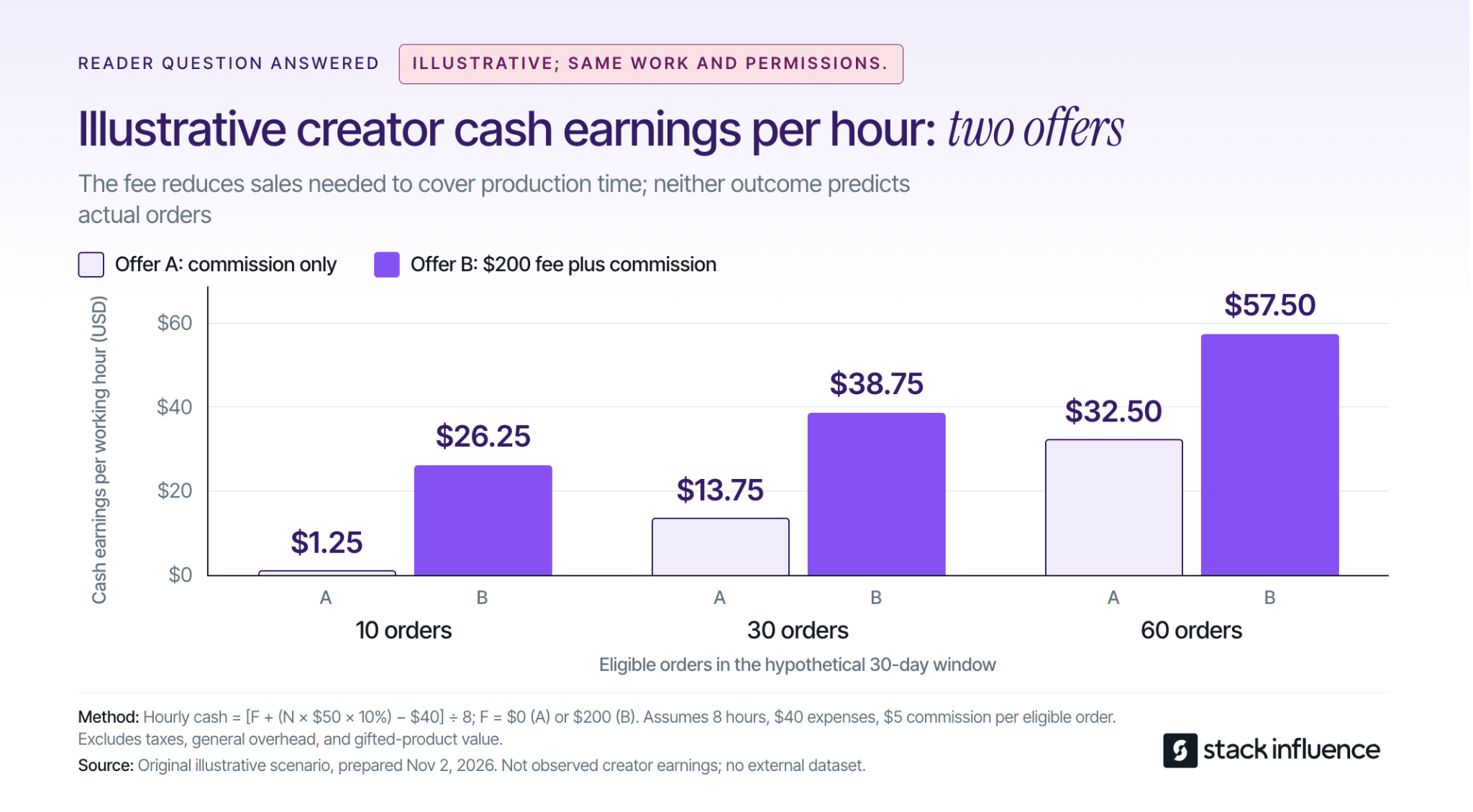
These trends become useful when they change a real decision. Consider two hypothetical offers for the same video and the same usage permissions. This is an illustrative calculation, not a rate recommendation, platform benchmark, or Stack Influence campaign result.
Assume the assignment takes eight hours, including planning, production, revisions, and reporting, with $40 in unreimbursed production expenses. Each eligible order contains $50 of commissionable product sales, excluding tax and shipping, and pays a 10% commission, or $5. Compare 10, 30, and 60 eligible orders within the same 30-day measurement window, after cancellations and returns.
Offer A pays commission only. Offer B adds a guaranteed $200 production fee to the same commission. Assume all agreed payments are collected, there are no additional platform or payment fees, and the work requires no other cash expenses. The calculation excludes income taxes, general business overhead, and the personal value of any gifted product.
Cash earnings per working hour equal: (fixed fee + eligible orders × $5 - $40) ÷ eight hours.
For example, 30 orders generate $150 in commissions. After the $40 expense, Offer A leaves $110; adding the $200 fee leaves $310 under Offer B. Dividing each by eight hours produces the hourly figures above.
Under these assumptions, reaching a $25 hourly target requires 48 eligible orders with Offer A or eight with Offer B. The agreed fee makes less of the compensation depend on sales performance. This is cash remaining after the specified expense, not take-home pay or fully costed business profit.
A real comparison must also account for scope. If the higher fee brings extra revisions, longer exclusivity, or broader advertising rights, update the hours, expenses, and terms before deciding. For sellers, evaluate the fee and commission against product margins and campaign objectives; the creator's earnings calculation does not establish seller profitability.
Choose one improvement that addresses a weakness in your current work. A creator who already receives offers may benefit most from clearer permissions or better economics. Someone building a portfolio may need a stronger demonstration of product understanding.
During the first week, review recent assignments or sample content. Identify the audience question you answer well, the time the work requires, and the commercial role it could serve.
During the second week, prepare one clearly scoped offer. State the content, publication expectations, permissions, revisions, payment structure, and reporting responsibilities. Sellers can use the same exercise to improve a campaign brief.
During the remaining weeks, test the offer on a manageable scale and record what happens. Continue based on the quality of the work and the economics, not solely on a jump in views.
Product seeding can provide product experience and portfolio material when the item and assignment fit your interests. Stack Influence's guide to influencer seeding explains why an unsolicited gift and a defined product-for-content arrangement involve different expectations.
Through Stack Influence's creator program, creators can explore product collaborations with a purchase-and-post workflow. Its automated product-seeding process describes post verification and reimbursement. Review the individual campaign's requirements, expenses, and permissions before accepting, and distinguish reimbursement from an additional cash fee for your work.
Disclosure still matters when compensation includes a product. The FTC's guidance for social media influencers explains that free or discounted products can create a material connection that should be disclosed clearly with the endorsement. A social content assignment should also remain distinct from any marketplace customer review.
The most useful response to the creator economy in 2026 is a more deliberate working model. Choose relevant products, define what the brand is buying, preserve honest experience, and measure the cash and time involved. Then use the results to decide which formats, income sources, and relationships deserve another investment.
The top Shopify stores worth studying depend on what you want to improve. Gymshark offers useful examples of product discovery, Ruggable helps shoppers work through complex choices, and Brooklinen shows how to present coordinated purchases. Glossier, Allbirds, Hiut Denim, Elizabeth Bay, and Blueland provide further lessons in product education, brand positioning, and repeat buying.
For ecommerce sellers, the useful exercise is to identify the customer question behind each storefront choice, then adapt the answer to your own catalog. This guide reviews eight examples and explains what to study, what you can apply, and how to judge whether a change helps your business.
These stores were selected for their documented Shopify association and the useful purchasing decisions their public pages illustrate. The order is editorial, based on the range of lessons covered. Storefront observations were checked on October 29, 2026; the recommendations are editorial analysis, with historical results identified separately.
Gymshark is a useful reference for sellers whose customers shop by activity, fit, or intended use. Its official storefront offers routes for running, lifting, hybrid training, and Pilates, alongside product categories and fit distinctions such as short and tall leggings. Shopify's Gymshark case study documents the brand's move to Shopify Plus.
The lesson is to make your catalog understandable in the customer's vocabulary. A shopper may know the activity they are buying for before knowing your collection names. Offering both routes lets product organization serve different levels of familiarity.
A smaller activewear seller could start with a few genuinely different use cases and a short guide explaining which products suit each one. For example, distinguish running pockets, coverage, and intended fit only where the products support those claims. Watch whether shoppers can reach a suitable product without repeatedly returning to search or contacting support.
Ruggable is worth studying when a purchase involves dimensions, location, and product construction. Its rug storefront organizes browsing by room, size, and rug type, with links to sizing and comparison guides. Those routes correspond to practical questions a buyer needs to answer before choosing a design.
For your store, identify which choice carries the greatest risk of a wrong purchase. A furniture seller might need a doorway measurement guide; an accessories seller might need a compatibility explanation. Put that help beside the relevant choice, with the exact dimensions or requirements customers need.
Shopify's Ruggable case study reports a change from three checkout pages to one. Its timing and conversion impact are unspecified. Page count does not establish fewer fields or faster purchases.
The practical next step is to walk through your own purchasing flow and identify confusing transitions, missing information, and repeated decisions. Evaluate any checkout change against completed purchases and customer problems, while preserving information buyers need.
Brooklinen provides a useful model for selling products that belong together. Its bedding and bath storefront presents bundles and explains differences in material feel, including its percale and Luxe ranges. Shopify also documents Brooklinen's use of Shopify Plus and B2B.
The transferable idea is to organize an offer around a complete customer task. A shopper furnishing a bed needs to understand what is included, which sizes match, and which choices remain. A bundle can answer those questions when its components and options are clearly described.
Start with one coherent combination of complementary products. Explain each component, show the combined price, and make exclusions obvious. If shoppers can customize the bundle, check that size, color, and quantity selections remain understandable throughout the process.
Evaluate the offer against both order value and contribution after variable costs. A larger basket is useful only when the extra products, discounts, fulfillment, and likely returns support the economics of the order.
Glossier demonstrates how product education can sit within the buying journey. Shopify includes the brand among its enterprise commerce customers, while the Boy Brow product page combines shade selection, ingredient information, application steps, and related sets.
Study the questions those elements answer: What does the product do? Which version should I choose? How do I use it? What else would I need? Answering them on the product page gives an unfamiliar shopper a way to assess the purchase.
For your own product, develop a short demonstration around the point customers find difficult to understand. Show the actual application, scale, assembly, texture, or setup, then add written instructions so the information remains available without watching a video. Treat any proposed performance claim as something your product evidence must support.
When commissioning creator content, specify the question the demonstration needs to answer. A useful brief describes the action and required detail, while leaving room for the creator to show their real experience.
Allbirds is a useful reference for explaining materials in familiar terms. Its footwear storefront discusses materials such as wool, tree fiber, and sugarcane, and provides routes to material and shoe-care information. The relevant lesson is how the store helps shoppers connect product construction with everyday use.
Review your own descriptions for specifications that need interpretation. A technical material name may need a supporting explanation of texture, care, fit, or intended conditions. Keep that explanation within what your product documentation and testing can substantiate.
There is also an operational lesson. Shopify's Allbirds inventory case study describes using store inventory to fulfill online demand. For a seller with multiple stock locations, accurate availability deserves attention alongside the product presentation.
Before sending more visitors to a featured item, check that the promoted size or variant is actually available through the promised fulfillment route. Strong product education should lead to an offer the customer can buy.
Hiut Denim shows how a specialist brand can give buyers concrete reasons to consider its products. Shopify includes it in its collection of Shopify store examples. The brand's own website connects its manufacturing story with fit, fabric, measurement, and washing guidance.
The useful connection is between the story and the product. A claim about craftsmanship becomes easier to evaluate when buyers can understand the materials, construction, care requirements, and people involved. Practical guidance then helps them choose a suitable item.
For a smaller seller, start with the details that are true and relevant to the purchase. Explain why you selected a component, how a product is made, or what care it requires. Use original production photos or demonstrations when they clarify the explanation, and avoid turning a supplier's generic description into a claim of proprietary expertise.
This approach is especially useful when shoppers need to understand a premium price. Give them specific information they can assess against their own priorities.
Elizabeth Bay offers a useful example of connecting different products through a shared collection theme. Its storefront pairs jewelry, clothing, and accessories categories with named collections. Shopify also identifies Elizabeth Bay as a store built with its platform.
The brand's The Last Picnic collection brings together tops, necklaces, and a ring under one creative concept. The seller lesson is to give customers a clear way to understand how individual products fit the same occasion, aesthetic, or interest.
For your own store, choose a theme that connects products naturally. A travel-themed collection, for example, could bring together a tote, jewelry case, and lightweight layer, with clear descriptions explaining each item's role. Keep ordinary category navigation available for shoppers who already know what they want.
Carry the collection's idea through its product imagery, descriptions, and creator briefs. If creators feature several items together, direct visitors to a page where those specific products are easy to find. Evaluate whether shoppers explore related items and purchase across categories, then check the margins on those orders before expanding the approach.
Blueland provides a clear example of separating a first purchase from replenishment. Its cleaning-products storefront gives shoppers distinct routes to starter kits, refills, and bundles. That structure is useful for products where a returning customer needs different components from a new customer.
If your product has reusable and replaceable parts, explain which components are needed initially and which are purchased again. Make compatibility and pack contents easy to check. A returning buyer should be able to identify the correct refill without reconstructing the entire product system.
Shopify's Blueland case study reports that, in 2024, average order value (AOV) on Shop was 4% higher than on the website. With website AOV indexed to 100, Shop equals 104: 100 × 1.04.
This compares two channels during the reported year. It does not establish higher profit or prove the channel caused customers to spend more. For your own store, compare the value and costs of orders alongside the number of customers a channel brings.
The most useful reference is the store that helps you solve a problem you can identify in your own customer journey. Start with product questions, support conversations, search terms, and observed difficulties. Choose a change whose purpose you can explain in one sentence.
Look for a recurring uncertainty: which size fits, what a bundle contains, how a product works, or which refill is compatible. Then choose the example above that addresses the same kind of decision.
Consider a hypothetical seller offering packing cubes in different sizes. Customers may understand the material but struggle to picture what fits inside each cube. A useful adaptation would be a demonstration showing the actual contents, exterior measurements, and how the cubes sit in a suitcase, supported by a written packing list.
The hypothesis would be specific: showing capacity may help shoppers choose the appropriate set. You would still need to observe whether it changes purchasing behavior and whether the chosen set meets expectations after delivery.
Scope the first change so your team can produce and maintain it. A sizing guide, a clearer bundle description, or a demonstration on one product page can give you something concrete to evaluate.
If the change requires a different page layout, Stack Influence's Shopify theme selection guide explains how to assess a theme against your catalog, content, and operational needs. Preview the proposed layout with your real products and longest descriptions before committing to it.
If the missing piece is a demonstration from a relevant creator, the guide to planning a Shopify product-seeding pilot covers product allocation, deliverables, permissions, and measurement. Agree on the specific storefront uses you need before commissioning or collecting content.
For the packing-cube example, the brief could ask a creator to show the set being packed, identify the suitcase size, and describe any limitations they encounter. The deliverable should help a prospective buyer judge fit and capacity.
Write down what you expect the improvement to do and which metric will reflect that outcome. Product-selection help might be evaluated through purchases, relevant support questions, and returns due to a wrong size or variant. A bundle test should also account for order economics.
Keep the definitions consistent. For a session-based purchase measure, divide sessions containing a purchase by eligible sessions in the same measured group. Compare the same traffic sources, device groups, and time periods where possible, and record promotions or inventory changes that could affect the result.
When a controlled test is practical, assign comparable visitors to the original and changed versions. If you can only compare periods before and after a change, treat the result as directional because demand, traffic quality, and seasonality may also have changed. Allow enough time to observe the outcome your decision depends on, including later returns where relevant.
Use this short decision record:
Use these Shopify store examples to identify a purchasing decision your own site could explain more clearly. Choose the closest reference, adapt one idea to your product and customer, and decide in advance how you will evaluate it. The practical outcome is a store improvement with a clear purpose and evidence you can use for the next decision.
The best times to post on TikTok are starting points to test against your own audience. If you need an hour for your next upload, the daily recommendations below give you concrete options. Your longer-term goal is to find a few publishing windows that suit the people you want to reach and the content you can consistently make.
For content creators, that requires three decisions: which benchmark to try, whose time zone to use, and how many different windows you can realistically compare. A crowded calendar of supposedly perfect hours can leave you with less useful evidence than a small, manageable test.

Use the daily leaders in Buffer's September 2026 analysis as initial candidates. The company analyzed 7.1 million TikTok posts published through its platform, covering multiple formats, and compared median engagement rates:
Buffer presents these clock times as applicable across time zones, but does not explain the adjustment in detail. Our recommendation is to apply a chosen clock time to the audience region you want to serve, record that assumption, and test it.
A different starting point comes from Sprout Social's March 2026 research, which highlights Tuesday through Thursday, 2–6 p.m. in the audience's local time. Its disclosed research covers approximately 2 billion engagements across social networks; that is not a TikTok-only sample. Its findings favor weekdays, illustrating why published schedules can disagree.
Choose one plausible candidate for a day you already intend to publish. If you can make a good video for Friday evening, you do not need to add a Tuesday morning upload simply because it appears on a list.
These are observations from the publishers' samples. They do not establish that moving the same video to a listed hour will cause a particular increase in views, or that the schedule applies equally to every creator niche.
Use your own account evidence to narrow the choices. TikTok's introduction to TikTok Studio describes analytics for account performance, content performance, and audience behavior, while noting differences between app and web tools.
Work through the information available in your version:
For creators already using a Business Account, TikTok's current Web Business Suite documentation identifies an Audience section within Analytics that includes activity and location information. Use the tools already available to you; choosing a posting hour does not require changing your account type.
Activity information helps you select a candidate. Your post results help you evaluate it. A busy audience hour does not tell you how a particular tutorial, comedy clip, or product demonstration will perform.
Also decide whether you are serving your current audience or trying to reach a different one. A creator based in California who makes content for New York restaurant workers should write the intended audience and location into the plan before choosing an hour.
If useful activity information is missing, start with one benchmark and a simple posting log. Treat the first rounds as information gathering. Do not interpret a blank report as evidence that your audience is inactive.
A recommendation such as “post in the evening” becomes useful only after you identify the viewer's location. Write the audience time, your publishing time, and the calendar date before scheduling.
Consider an illustrative creator with viewers in New York and Los Angeles on October 27, 2026. NIST's U.S. time-zone reference lists Eastern daylight time as UTC−4 and Pacific daylight time as UTC−7. Los Angeles is therefore three hours behind New York in this example:
These are clock conversions, not measured audience peaks. If your own evidence points to 6 p.m. in Los Angeles, 9 p.m. in New York is the matching publishing time. Choosing 6 p.m. on a New York clock would test a different audience hour.
For a split audience, decide which regional opportunity each post is intended to test. You could compare a window serving the earlier region with one serving the later region, while checking whether the resulting viewers match your intended audience. Averaging the two clocks together does not establish an optimum.
Keep the date attached when converting to UTC, the international time reference. In this example, 9 p.m. on Tuesday, October 27 in New York is 1 a.m. UTC on Wednesday, October 28. A date mismatch can make you attribute a Tuesday upload to Wednesday when reviewing a report.
Recheck future scheduled posts around clock changes. NIST's 2026 daylight saving time rules place the U.S. change back to standard time on November 1. Use the actual locations and publishing date when converting, particularly for audiences in different countries or regions that follow different rules.
Finally, check the labels in both your analytics and scheduling interface. If the report's time zone is unclear, compare a known posting timestamp with its reporting entry before relying on the hour labels. Do not assume every TikTok analytics screen uses one universal time zone.
The number of windows you compare determines how thinly you spread your posting effort. Start with a question narrow enough to answer, such as whether lunchtime or evening deserves more of your existing publishing slots.
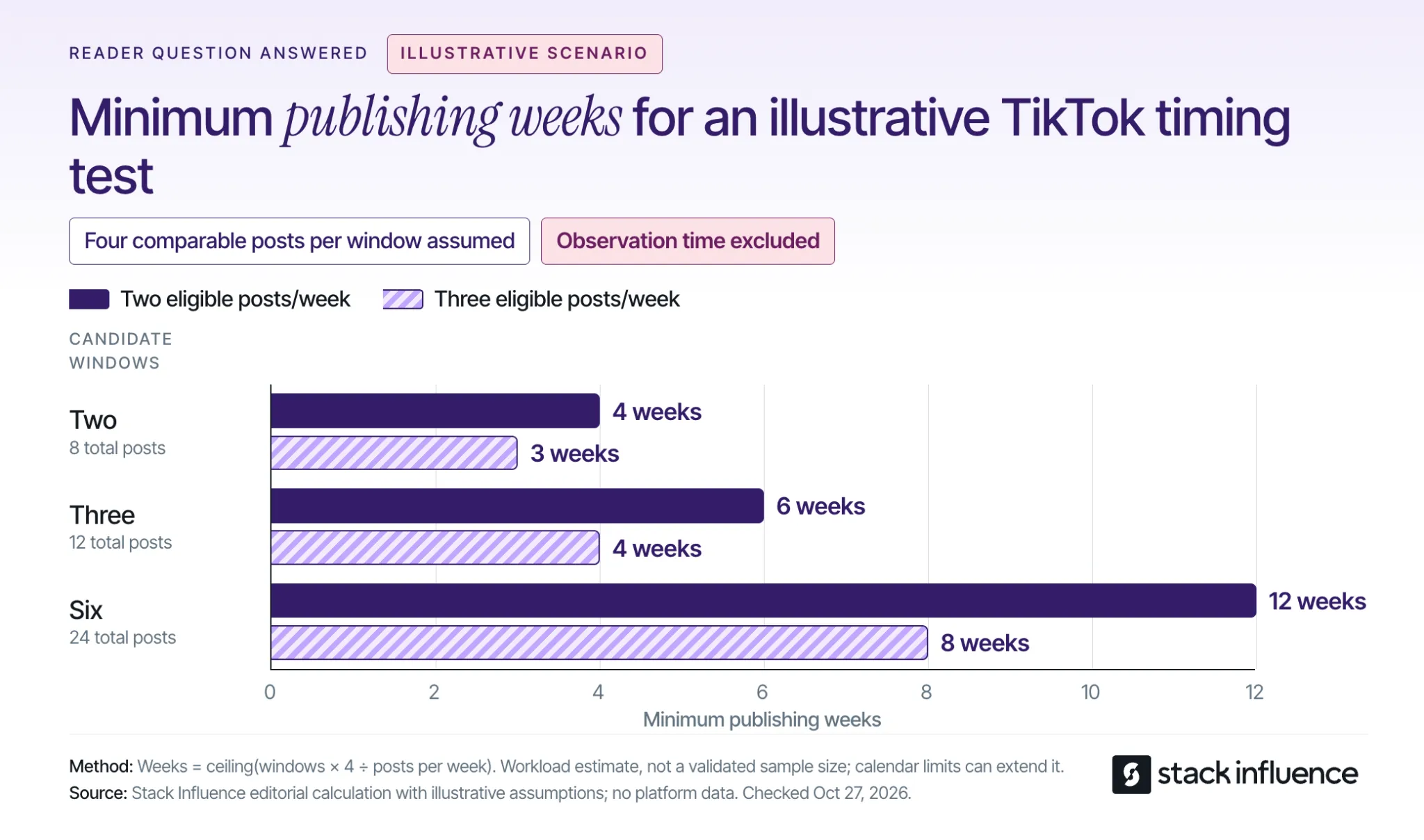
The following calculation is an illustrative planning exercise. Assume every post qualifies for the comparison and you budget four comparable posts per candidate window. Four is a workload assumption, not a scientifically validated sample size or a guarantee of a reliable winner.
Minimum publishing weeks equal the number of windows multiplied by four posts, divided by your eligible posts per week, rounded up:
The calculation shows the practical cost of adding more candidate hours. At three eligible posts per week, expanding from two windows to six increases the minimum publishing phase from three weeks to eight. That does not make the longer test better if the extra windows are poorly motivated.
These are capacity estimates. Fixed weekday availability, missed uploads, and keeping topics comparable can lengthen the calendar. The estimates also exclude the waiting period needed for the final post to reach your chosen reporting age.
Select a publishing pace you can sustain before setting a test deadline. If making extra videos would weaken the work, reduce the number of windows or allow more time. There is no need to test every hour in a benchmark list.
Use videos with similar purposes and production demands, and distribute comparable topics across the windows. If all your strongest tutorials go out at lunch and your rushed updates go out at night, the results cannot isolate timing.
Keep the weekday mix similar too. Comparing only Sunday mornings with Friday evenings changes both the day and the hour. That may answer which complete publishing slot works better, but it cannot identify which of those two differences mattered.
Stack Influence's four-week posting-time test provides a rotation example for creators who want a day-balanced protocol. Adapt the pace to your workload, and remember that an organic posting test still leaves differences in content and audience response that you cannot fully control.
Define success before you start. For a discovery-focused series, you might choose views at a fixed post age. For community growth, you might choose follows attributed to each post, if that information is available. Keep supporting measures separate so you can understand the result without changing the goal after seeing it.
Set the same reporting checkpoints for every post. For example, record results after 24 hours and again after seven days. These are editorial measurement choices for your comparison, not claimed TikTok distribution deadlines; extend the later checkpoint if your content needs a longer observation period.
Comparing a week-old video with yesterday's upload mixes posting time with time spent collecting views. Wait until the final post reaches the same age before making the final comparison.
Use a compact record for each upload:
A creator analytics dashboard can keep these records together when you are managing several series. A simple log is sufficient if it helps you compare like with like and record why you changed the calendar.
Inspect individual posts as well as a summary such as the median. Sort the results and take the middle value, averaging the two middle values when the count is even. Keep the total results visible too, because the typical post and a breakout post tell you different things about a window's possible value.
If one exceptional video accounts for the apparent advantage, keep testing before treating the hour as dependable. Also check whether the stronger results came from the intended audience and whether viewers stayed with the content, using the attention measures available to you.
When you compare response rates, retain the denominator. Shares per 1,000 views, for example, equal shares divided by views, multiplied by 1,000. That describes response relative to views; it does not replace the number of views or establish how many unique people watched.
Keep identifiable paid distribution separate from the organic comparison. If you cannot separate it, flag the affected post and avoid using its combined results to claim that the publishing hour caused the difference.
You may finish a small pilot without a clear winner. In that case, choose a workable schedule and collect more comparable evidence. If both windows produce weak attention, review the topic, opening, and pacing before spending another month searching for a better minute to publish.
Choose two plausible posting windows, write down whose clock each uses, and calculate how long the comparison will take at your normal pace. Then prepare a small set of comparable videos and decide when you will record their results.
The useful outcome is a schedule you can explain and repeat. Keep refining it when your audience or content changes, with enough room in the process to make good videos and respond to timely ideas.

The best SEO for Shopify starts with identifying what is holding your store back: pages shoppers cannot find, descriptions that do not answer their questions, repetitive catalog maintenance, or a poor mobile experience. Choose an app after you identify that problem.
For ecommerce sellers, a useful setup combines Shopify's native controls, clear collection and product pages, search performance reporting, and software that handles a defined workload. This guide compares four SEO apps by that workload, then shows how to improve a collection and judge the results without mistaking an app score for business progress.

Choose the app that addresses your most frequent SEO task at a price and workload limit your store can support. A small catalog with a few missing descriptions needs a different workflow from a store processing thousands of product images.
Start by checking what is already available. Shopify's built-in SEO features include automatically generated sitemaps and canonical tags, along with editable titles, meta descriptions, URLs, and image alt text. Canonical tags identify a preferred page version when similar URLs exist.
The following comparison uses official app listings checked on October 26, 2026. Each option addresses a distinct recurring job, and each is assessed by workflow, entry paid plan, and practical limits. The order follows those jobs and does not represent a scored ranking.
These selected entry paid subscriptions range from US4.99toUS19. The listings describe monthly prices with recurring charges billed every 30 days, in USD. Features and allowances differ, and image overages can add cost; the prices compare the subscription commitment rather than equivalent functionality or SEO effectiveness.
Before installing an app, write down the task it will own, the pages it will affect, and how you will verify its output. Ask about export or reversal options for bulk changes. Start with a manageable sample and inspect the result before extending the workflow across the catalog.
Choose a collection with a clear product offering and a real reason for shoppers to compare its items. Completing one useful page gives you a concrete model for the next collection and exposes which tasks would benefit from automation.
Imagine a store selling insulated lunch bags. The following examples illustrate page selection; they are not measured keyword-demand estimates:
Check current search results for the terms relevant to your products and examine what the displayed pages help people do. Then choose the destination that can complete that task. A blog post should not become the default destination for every query just because it is easier to publish.
For an existing store, start with queries already associated with the collection in Search Console, then compare them with customer questions and your actual assortment. Keep related wording together when it describes the same shopping need. Create another page only when you can explain its separate purpose.
Shopify's collection settings instructions describe the editing path: open Products, select Collections, choose the collection, and edit its Search engine listing. Review the page title and meta description, then save your changes.
For the hypothetical lunch-bag store, assuming the assortment supports these details, a starting draft could be:
Adapt the wording to the products you actually sell. Avoid adding unsupported temperature-retention claims or using the same generic introduction across unrelated collections. If the existing URL already describes the collection accurately, changing it is unlikely to be the first task worth prioritizing.
Next, make the page useful beyond its metadata. Put the product choices where shoppers can reach them, then add concise guidance about capacity, cleaning, materials, and differences between models. Keep essential product facts in visible text even when photography or video also explains them.
Shopify's keyword and alt-text guidance recommends natural wording and image descriptions that explain what is shown. For example, "Open blue lunch bag holding two food containers" is useful when that is what the photograph depicts. Repeating "best insulated lunch bag" across every image does not explain those images.
Google's ecommerce navigation guidance recommends linking from categories to products and explains that Googlebot generally does not submit searches into a store's search box. Make your collection and product links available through ordinary navigation.
Give each product page the details needed to make the final choice. In the lunch-bag example, that could include internal measurements, a photograph showing container fit, care instructions, and a demonstration of the carrying strap. Show the evidence behind a claim instead of adding another paragraph of generic enthusiasm.
A genuinely useful care or packing guide can support the collection through a relevant contextual link. It can also become a resource you share with relevant publications or partners because it answers a real question. Choose the subject for its usefulness to shoppers before deciding how often to publish.
Technical checks should establish whether your important pages can be discovered, understood, and used. Start with a representative collection and product page, then investigate broader patterns if you find a problem.
Follow Shopify's sitemap submission instructions to verify your store in Search Console and submit its automatically generated sitemap. The file is available at the root path /sitemap.xml. Submission helps discovery, but it does not guarantee indexing or a completion date.
For an important missing page, use Google's URL Inspection tool to examine the indexed version, reported indexing status, and selected canonical URL. The live test checks the current page separately; a successful live test does not prove the page has already been indexed.
Respond to the actual finding. An accidentally excluded page, a missing navigation link, and an unexpected canonical choice require different investigations. Ask your developer to investigate unfamiliar template or indexing rules before making changes across every product.
Google's product structured-data documentation describes how product information can qualify for richer search appearances. It also explains that on-page structured data and a Merchant Center feed can work together to help Google understand and verify product details.
Check that the information your theme, apps, and product feed output agrees with the visible product page. Focus on price, currency, availability, and the specific product being described. Give one person responsibility for coordinating changes so conflicting app settings do not go unnoticed.
Inspect the rendered result after a theme update or SEO-app change. A setting marked "enabled" is only the start of the check; the useful result is accurate information appearing on the actual page.
Open the collection and product page on a phone. Check the gallery, filters, variant selector, delivery information, and path to purchase. Note slow interactions or content that moves while you are trying to use it.
Google's page experience guidance says Core Web Vitals are used by its ranking systems, while good scores do not guarantee top rankings. Use performance reports to investigate specific loading, responsiveness, or layout problems, and judge proposed fixes alongside the shopping experience.
If a theme or app change is involved, use the practical checks in Stack Influence's Shopify theme guide to test with real products and integrations. Preview the changes before publishing and keep a record of what changed.
Measure whether relevant people are finding the pages you improved. Google's Search Console Performance report provides clicks, impressions, click-through rate, and average position, with options to examine different pages and queries. Click-through rate, or CTR, is clicks divided by impressions.
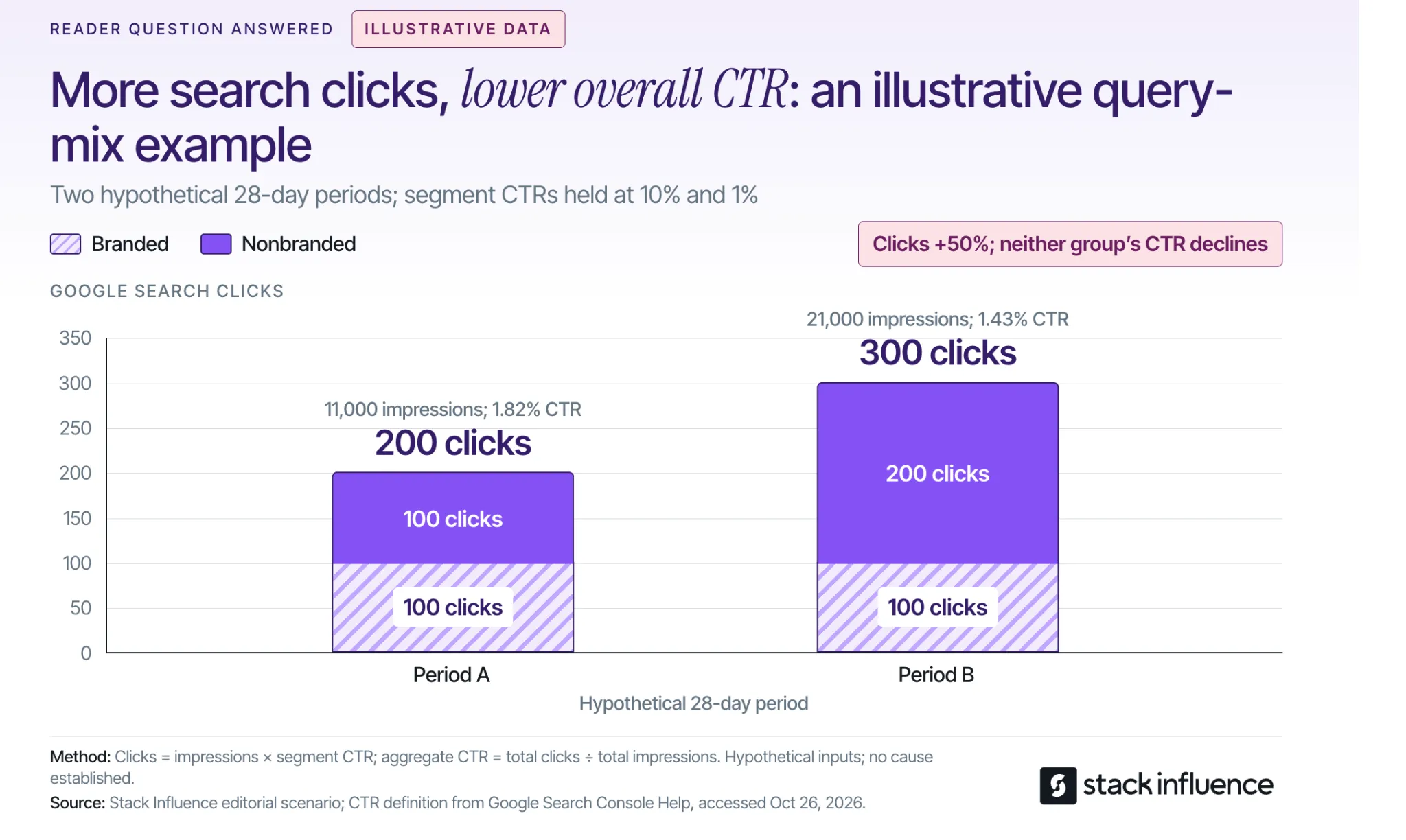
Compare the same market, device category, search type, and page group across comparable periods. Separate branded searches, which include your brand name, from relevant nonbranded searches where practical. Also inspect individual queries before deciding that a changed average calls for a rewrite.
Consider this illustrative dataset for the same hypothetical store, using two 28-day periods of US mobile web-search data. It assumes complete, mutually exclusive branded and nonbranded groups; these are teaching assumptions, not observed Shopify results or a forecast.
Total clicks increased from 200 to 300, or 50%, while overall CTR fell. Neither group's CTR deteriorated; the store appeared more often for the lower-CTR nonbranded group. The calculation shows why a changing query mix can make the overall percentage misleading when considered alone.
In real reporting, preserve the limitations of the data. Google's explanation of Search Console discrepancies notes that anonymized queries and truncated data can prevent filtered totals from reconciling with unfiltered totals. Treat branded versus nonbranded analysis as an approximation when those limits apply.
If a relevant page is not indexed, investigate the indexing explanation. If it appears for unsuitable queries, revisit its purpose and content. If an appropriate query produces impressions but weak click response, inspect the actual results, competing offers, and displayed title before choosing an edit.
After the visit, use store analytics to examine organic landing-page sessions and purchase activity within a consistent attribution setup. Search Console clicks and website sessions are separate measurements. If visitors reach the right products but struggle to buy, Stack Influence's guide to improving Shopify conversion rates provides a separate path for investigating product clarity and shopping friction.
Record publication dates, template changes, promotions, and major stock changes alongside the results. These details help explain what else changed during the comparison and prevent you from crediting every movement to the SEO app.
Start with one collection, the products it contains, and a clearly defined recurring task. Improve the pages, verify what search engines and shoppers can access, and choose software when it makes that work easier to maintain.
The best SEO setup for your Shopify store is one you can operate consistently: useful pages, accurate product information, controlled changes, and measurements that tell you what to do next.
A folder full of saved videos can leave you with nothing you actually want to film. The missing piece is often a specific premise: who the video helps, what happens on screen, and why someone would keep watching.
Useful YouTube video ideas connect a subject with a visible payoff. “Photography” is a subject. “Fix a dark phone photo using one window” is a video you can plan, shoot, and evaluate.
For content creators starting out or refreshing an established channel, the 24 ideas below offer concrete places to begin. Adapt the examples to your interests, equipment, and experience, then use the filming brief to choose your next upload.

Start with a difficulty you can explain through a real example. A useful first upload can come from something you recently learned, provided you describe your experience accurately.
Photograph the same subject in two positions near a window, then show the difference. Explain where you stood and what changed so viewers can try the setup themselves.
Show the original clip, your editing decisions, and the finished version. Focus on one outcome, such as making a confusing cooking sequence easy to follow, instead of touring every feature in your editor.
Use your own gameplay to demonstrate a mechanic that confused you. Show the unsuccessful attempt and the corrected approach, including the circumstances where your advice applies.
Choose a visible problem, such as pancakes with an uneven texture or a crooked paper fold. Change one relevant factor between attempts so the viewer can understand your explanation without guessing what caused the difference.
Demonstrations have a useful research basis. In Google and Kantar’s Future of Video research, 70% preferred video over text or audio for building something, 69% for learning a skill, and 63% for cooking. The survey covered 2,160 U.S. weekly video viewers ages 18–64, January 28–February 10, 2025. These are medium preferences; demand for your particular topic still needs checking.
Give viewers enough context to understand the result. State what you tested, what stayed constant, and what your experience can reasonably establish.
Record the same sentence with your phone microphone and another microphone you already own. Keep the room, speaking distance, and editing consistent, and let viewers hear the samples before your verdict.
Show what you noticed while using a backpack, notebook, kitchen tool, or other familiar item. Include the awkward moments and useful details that would be invisible in a first impression.
Film setup and the first task the product is supposed to help with. Include a confusing instruction or adjustment when it materially changes what a beginner should expect.
Try three desk arrangements for a narrow workspace or three ways to carry the same daily essentials. Define the constraint first so your comparison has a practical purpose beyond showing several options.
For creators pursuing user-generated content (UGC) work, demonstrations can become samples when building a UGC portfolio. Label self-directed samples accurately and show the specific filming or storytelling skill each demonstrates.
Make the outcome clear enough that someone who has never seen your channel can follow the stakes. Keep the unexpected decisions and setbacks that explain how the attempt unfolded.
Try a guitar transition, drawing technique, or unfamiliar recipe. Establish your starting point and show what improved, what remained difficult, and what you would change on the next attempt.
Cook from five pantry ingredients or finish a game level without a usual upgrade. Explain the rule at the beginning, then preserve the moments where that rule forces an interesting decision.
Repair a thrifted frame, repurpose a container, or refresh an old sketchbook cover. Show the starting condition and the choices behind the finished result, including changes you abandoned.
Build a filming corner or organize a collection using materials you have. Define a finish line before recording so the video ends with an identifiable result rather than an unfinished activity log.
Use a Short when the idea works as a self-contained demonstration, reveal, or answer. YouTube’s guidance on video length and formats explains that useful length depends on the content, audience, and purpose.
Demonstrate a camera setting, a craft step, or a game shortcut in a situation where it matters. Give the answer immediately, then use the remaining footage to make it understandable.
Show a gift-wrapping improvement or a reorganized drawer, followed by the change that made it work. Viewers should leave with an explanation they can use, not only a reveal.
Place equal-sized paper sheets across the same gap, one flat and one folded, and invite viewers to predict which holds more coins. Show the test and result in the same Short, noting the fold and support conditions.
Style one scarf for three situations or show three practical arrangements for the same storage basket. Make each use distinct so the video demonstrates versatility instead of repeating a shot.
Choose what the viewer needs to see, then decide whether a presenter adds anything. These examples complement more specialized faceless YouTube channel ideas.
Record yourself organizing reference images for an art project or completing a software task. Explain decisions as they occur, and use a clean demonstration workspace so viewers can follow your actions.
Use your own drawings, objects, or board setup to explain a chess tactic or another concept you understand. Build the explanation around one question and verify any factual claims before recording.
Demonstrate folding a pocket notebook, preparing ingredients, or assembling a simple craft. Keep the important movements visible and include the intermediate steps a beginner would otherwise have to infer.
Create a draw-with-me or quiet study session using your own footage and audio. Tell viewers what activity they can join, then preserve enough real working time for them to participate.
Build follow-ups around the next useful question. A recognizable series can keep the subject consistent while each episode adds a fresh test, explanation, or experience.
Take a specific question, such as whether a technique works with thicker paper, and demonstrate the answer. If your channel is new, start with a question from a friend or your own experience.
Investigate why a familiar board-game rule exists or how an unusual design feature developed. Use reliable sources and your own explanation to help fellow enthusiasts understand something they already encounter.
Ask a potter how they choose a beginner’s clay or a photographer how they select a location. Keep the conversation focused and include demonstrations where they clarify the answer.
Return to something you previously used or recommended and show whether it still earns a place in your routine. Explain what changed, including situations where your original assessment needs updating.
Find promising ideas by combining recurring viewer questions with evidence of interest in the subject. Look for a specific missing explanation or constraint you can address through your own work.
Open YouTube Studio, select Analytics, and explore the Trends tab. YouTube documents recent top searches and content gaps, including searches that lack sufficiently useful results. Available insights vary by country, language, device, and data availability.
YouTube is phasing out the Inspiration tab beginning in August 2026. Where available on desktop, Ask Studio can help explore comment themes and brainstorm follow-ups. Try asking: “Which questions recur around my recent tutorials, and which could I answer with a demonstration?” Check the underlying comments before treating the suggestions as audience demand.
Without channel data, inspect relevant searches and discussions manually. Record the exact problem: “the instructions skip setup,” “I only have a phone,” or “does this work in a small room?” An unanswered detail gives your version a purpose beyond repeating an existing video.
Choose your next idea by answering four questions before writing a full script. The brief helps you assess whether the premise is useful and whether you can execute it with the time and access you have.
For example, “my filming setup” becomes “make a small bedroom work for phone videos using what you already own.” The viewer is clear, the result is visible, and the shoot has a manageable scope. Creators still defining their audience can use the broader guide to becoming a content creator to establish that foundation.
Write a working title and opening scene next. If the title promises a comparison, plan comparable footage; if it promises a transformation, capture the starting condition. Complete this brief for two or three candidates and film the one you can deliver most convincingly.
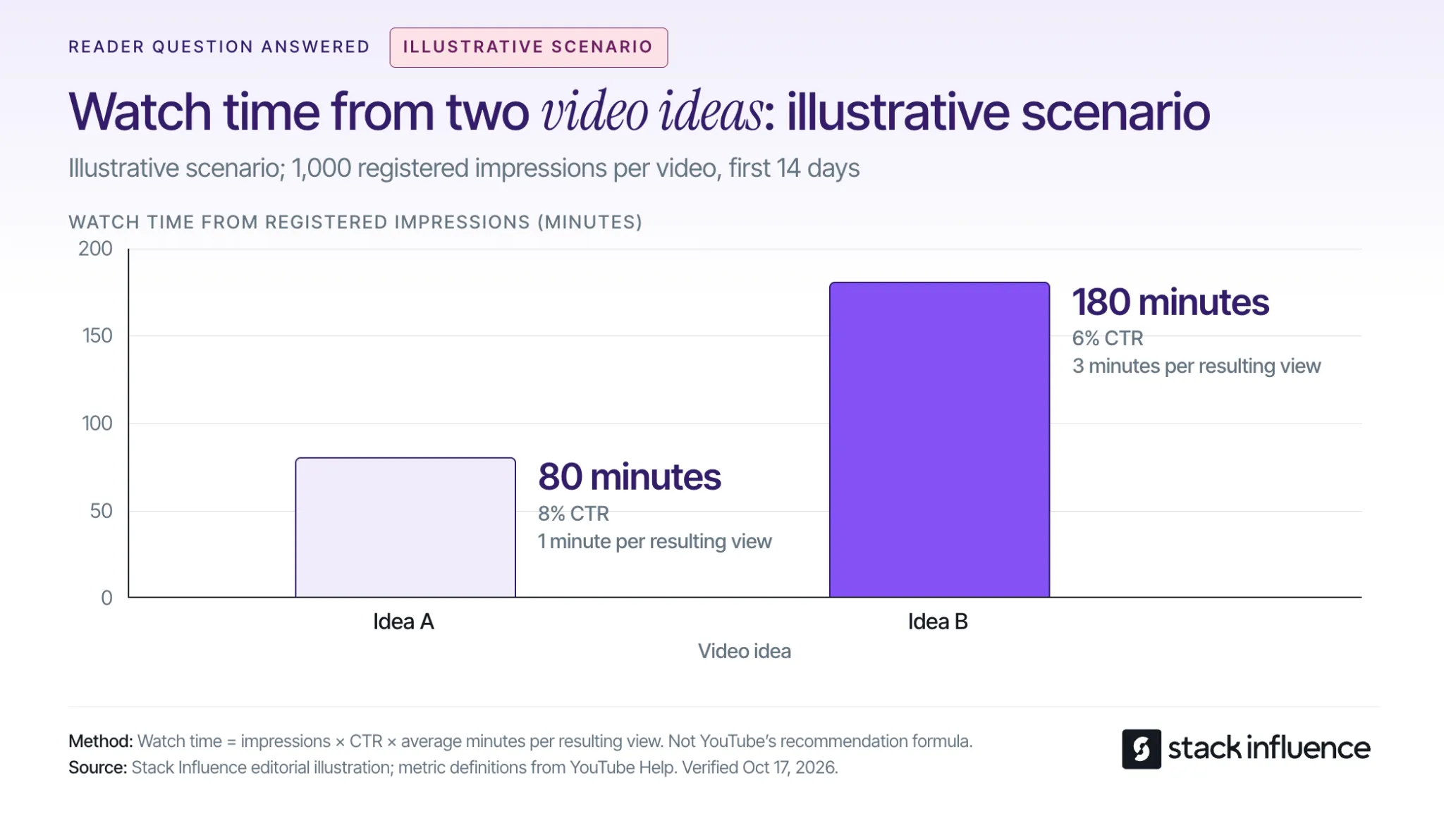
Evaluate whether people chose the video, stayed for its promised value, and showed interest in a follow-up. Compare similar formats and traffic sources over matching periods so differences in exposure do not become mistaken conclusions about the idea.
As a starting review window, compare each upload’s first 14 days, extending observation when traffic is still developing. YouTube’s impressions and click-through-rate guidance explains that CTR covers registered thumbnail impressions and varies with audience and traffic source. It represents only part of a video’s total viewing.
Use the audience retention report to inspect where viewers leave and which moments hold attention. YouTube notes that retention usually takes one to two days to process. A frequently replayed moment deserves inspection because viewers may be interested or may need a clearer explanation.
A useful topic can receive an unclear title, while a compelling thumbnail can promise more than the video delivers. For eligible videos, YouTube’s title and thumbnail A/B testing evaluates alternatives using watch time and can take up to two weeks. Shorts are excluded from that tool.
Consider an illustrative scenario with two long videos of similar length, each receiving 1,000 registered thumbnail impressions over 14 days. Assume comparable traffic sources and that all views attributed to those registered impressions qualify as engaged views:
The calculation is impressions × CTR × average minutes watched. All inputs are assumptions for the same impressions-derived viewing groups, with outside traffic excluded. This example shows why the idea with the higher CTR can produce less watch time; it is an illustration, not a channel benchmark or YouTube ranking formula.
For Shorts, inspect engaged views and the stayed-to-watch measure in YouTube’s content analytics. The documentation also records a public-view counting change from August 24, 2026, across formats, so a jump across that date may reflect the counting change.
Keep the next decision specific: clarify the title, move the demonstration earlier, answer a repeated question, or test another premise. The wider guide to growing a YouTube channel covers the distribution and community work surrounding those decisions.
Creators interested in brand partnerships can use demonstrations and real-use reviews to show how they explain a product. A UGC video is useful as a work sample when it makes the creator’s production choices and the product’s use clear.
When negotiating commercial work, agree on posting, revisions, and UGC pricing and usage rights. The FTC’s disclosure guidance calls for disclosing paid relationships and free products; disclosures for video endorsements should appear in the video itself.
Stack Influence is a micro-influencer marketing platform for ecommerce brands built around gifted-first product seeding. Its creator campaign process connects product selection, social content, and post approval. Review each campaign’s required channel and deliverables before committing, and choose products you can discuss through actual experience.
The most useful YouTube video ideas are specific enough to shoot and clear enough for someone else to understand. Pick one premise, complete the four-question filming brief, and capture the evidence that delivers its promise.
Use the finished video and audience response to decide what to make next. If creator partnerships are part of your plan, explore Stack Influence opportunities that match your interests and campaign requirements while building a portfolio that shows what you can make.
A DTC brand marketing strategy connects three decisions: why someone should buy, how you will reach that person, and how much you can spend to win their business. Start with a specific customer problem and an offer that can support its acquisition costs. Then connect discovery, product education, checkout, and follow-up around the same promise.
For ecommerce sellers, the practical goal is a repeatable way to attract suitable customers and serve them well. The plan below shows how to build that system, evaluate offers, and sequence the first 90 days.
Define the buying situation you want to serve. A description such as “health-conscious adults” gives a creative team little direction. “Office workers who want a convenient afternoon snack without keeping several bulky packages at their desk” identifies a situation, an alternative, and a possible reason to choose your product.
Shopify's marketing-plan guidance recommends defining your message, understanding customers, choosing suitable tactics, and setting measurable goals. Put that sequence into practice by reviewing customer questions, purchase feedback, support conversations, and the alternatives shoppers consider.
For a new brand, interview prospective buyers and treat your initial positioning as a hypothesis. For an established store, compare what repeat customers value with the reasons first-time buyers hesitate.
Write down five decisions:
That last answer might be a useful bundle, customization, product guidance, or replenishment convenience. Choose something your operations can deliver consistently.
For example, a hypothetical refillable-cleaning brand could target apartment dwellers with limited storage. Its initial offer could combine a reusable bottle with compact refills, while its content demonstrates mixing and storage. “Less cupboard clutter” becomes a concrete message to test, without claiming that every shopper values sustainability or that every refill product performs identically.
Set an acquisition limit before committing to a promotional offer. For this plan, first-order contribution before acquisition means product revenue after discounts, less the variable costs of fulfilling that order and the expected cost of refunds and returns.
Customer acquisition cost, or CAC, divides acquisition spending by new paying customers. Decide which costs you include, such as media, creator campaigns, production, and acquisition staff time, and use that scope consistently. Stack Influence's guide to calculating customer acquisition cost explains those cost and customer boundaries in more detail.
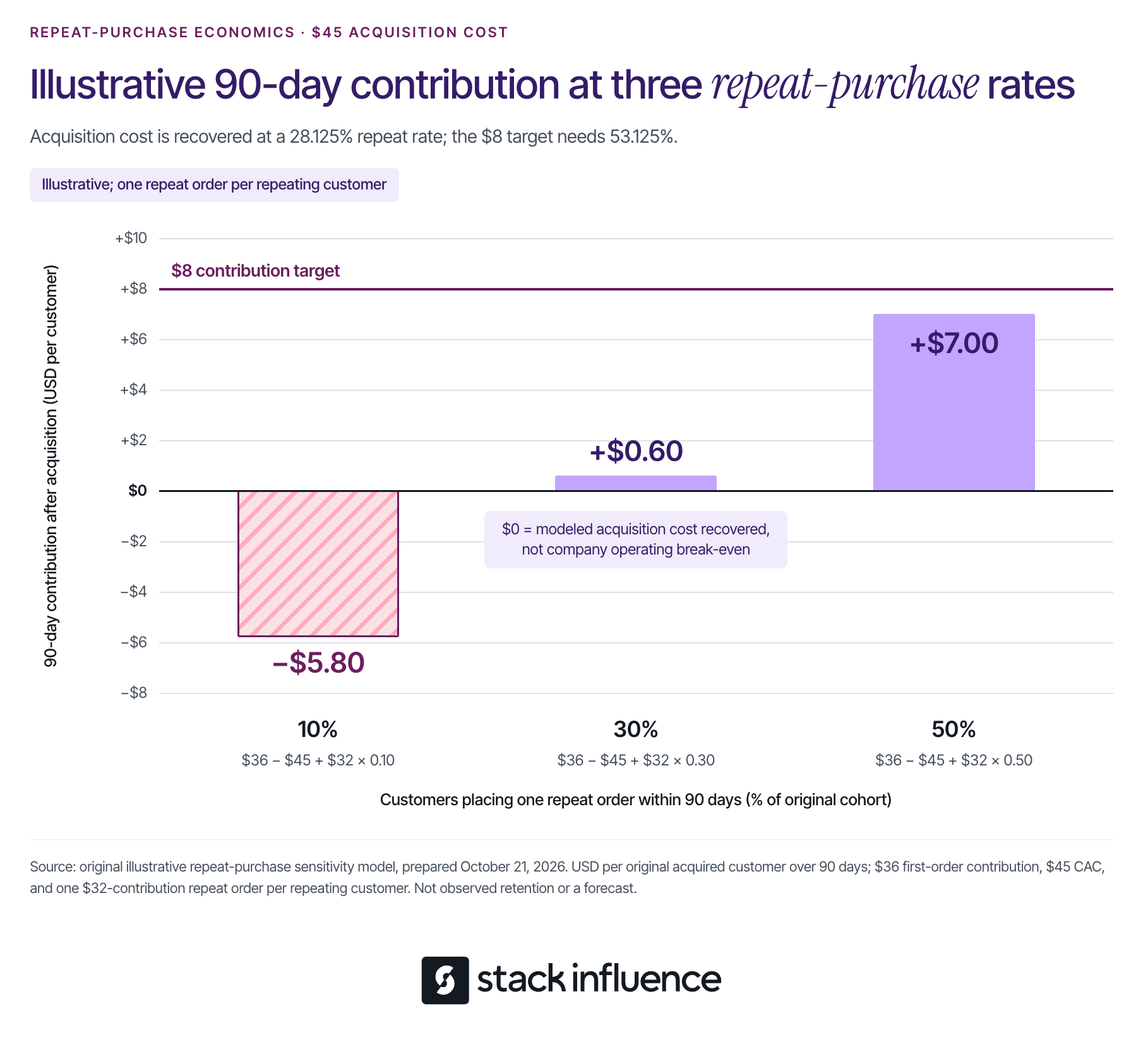
Consider an illustrative first order with $80 in product revenue, excluding sales tax and customer shipping payments. Assume these variable costs:
The costs total $44, leaving $36 before acquisition. The refund allowance is deducted once; the starting revenue has not already been reduced by that allowance.
Suppose you want to retain $8 per first order after acquisition to help cover fixed overhead and profit. Your allowable acquisition cost is $80 − $44 − $8 = $28.
Now apply a 10% discount. Revenue falls to $72. Holding the same $44 in costs constant, allowable acquisition cost becomes $72 − $44 − $8 = $20.
The offer comparison is:
A 10% price discount therefore reduces acquisition capacity by $8, or approximately 28.6%. These are hypothetical amounts, not ecommerce benchmarks; processing and return costs are deliberately held constant to isolate the discount's effect.
A discount could still work if it changes conversion, actual CAC, or subsequent purchasing enough to compensate. Evaluate those outcomes against the revised ceiling. If your dashboard reports media-only CAC, leave room within the ceiling for the other acquisition expenses.
Also model bundles, shipping incentives, and added services using their actual costs. A higher order value is useful only when the contribution and buying experience justify the change.
Give each channel a specific responsibility, then select a manageable initial combination. For a small team, one principal acquisition test, a matching landing page, and a relevant email follow-up sequence provide a focused starting point.
Prioritize search when customers already describe the problem or product category clearly. Build product pages and supporting content around the questions that determine a purchase, such as compatibility, ingredients, dimensions, setup, or comparisons with alternatives.
For eligible products, Google's free-listing guidance explains how product information can appear across Google. Participation does not guarantee display, and product data, shipping information, return policies, and applicable requirements need attention.
Paid search can become a controlled test of specific buying queries. Separate branded searches from broader category searches when interpreting performance, because the customer starting points differ.
Consider social content and creator partnerships when showing the product resolves a question more effectively than describing it. The cleaning-brand example could test a mixing demonstration, a storage comparison, and a realistic cleaning routine.
Choose the placement based on where relevant customers engage and what your team can produce consistently. Set the audience, creative question, destination, and spending limit before launch.
Use permission-based email to continue a useful conversation: explain product selection, answer a common objection, help someone use their purchase, or offer replenishment at an appropriate time.
Budget for content production, creator participation, product costs, tracking, and follow-up alongside media. Record an owner and a success measure for each activity so an attractive channel does not become an unsupported commitment.
Write creator briefs around the questions shoppers need answered. For the hypothetical cleaning product, “show how the refill dissolves and where you store the remaining packs” gives the creator a useful task. A request to “make an authentic viral video” gives little direction.
Select micro influencers or nano influencers whose content and product use fit the situation. Follower count alone does not establish that fit.
A practical brief should identify:
Keep genuine experience central. The FTC's disclosure guidance for social media influencers explains that free or discounted products can create a relationship that needs disclosure. It also says disclosures should accompany the endorsement and be difficult to miss.
Stack Influence's automated product-seeding workflow supports campaigns in which creators purchase products and receive reimbursement after verified social posts. The platform supports creator sourcing, coordination, and completed-post accountability. Confirm campaign costs, product requirements, and content permissions when planning your specific program.
Track completed content and customer acquisition separately. Exclude reimbursed creator purchases from the new customers you count when evaluating audience acquisition.
For implementation details, the Shopify creator-seeding pilot guide covers inventory, agreements, content permissions, and measurement. Use the resulting content where it answers a buying question and where the agreed permissions allow.
Send visitors to a page that develops the message they just saw. A demonstration about compact storage should lead to clear information about pack dimensions, included components, preparation, and the space the product occupies.
Review the purchase path on a phone. A prospective customer should be able to understand what they receive, the total expected cost, delivery information, and important limitations before committing.
Use a short diagnostic sequence:
These are investigative starting points, not proof of a particular cause. Customer feedback and direct inspection should determine the next change.
When traffic permits, test one substantial change at a time. If you change the price, page, audience, and creative simultaneously, it becomes difficult to understand which change affected the result.
Plan what happens after delivery before increasing acquisition spend. Help customers get the intended value from the product, resolve problems, and identify the next purchase only when it makes sense.
For a consumable, that could mean setup instructions followed by a replenishment message based on actual usage. For a durable product, useful follow-up might involve care, accessories, or referrals. A subscription or recurring discount should solve a real customer need.
Group customers by when they first purchased and follow their subsequent orders. Shopify's customer cohort analysis documentation describes grouping customers by first-order date and examining repeat purchasing over later intervals.
Compare cohorts at the same elapsed time after acquisition. Add order costs and acquisition costs separately to evaluate contribution; customer spending alone is not profit.
For each cohort, track new customers, first-order contribution, acquisition spending, repeat-order contribution, and refunds. Define a 90-day repeat-purchaser rate as the share of the original customers who make at least one additional purchase within 90 days of their first order.
Return to the full-price example, but suppose a separate acquisition test costs $45 per new customer. First-order contribution is still $36, so acquisition initially exceeds that contribution by $9.
For this illustrative sensitivity analysis, assume every repeating customer places exactly one additional order within 90 days. That order contributes $32 after its variable costs, discounts, and incremental retention expenses; customers who do not repeat contribute no additional amount.
Average 90-day contribution after acquisition per original customer equals $36 − 45+(32 × repeat-purchaser rate).
The outcomes are:
The model recovers acquisition costs at a 28.125% repeat-purchaser rate. Retaining the earlier 8contributiontargetrequires53.125%,because(45 + $8 − $36) ÷ $32 = 53.125%.
Even the 50% scenario misses that target. Positive contribution after acquisition can still be insufficient to cover fixed overhead and the desired profit.
These scenarios are neither forecasts nor industry targets. Replace them with completed cohort observations, account for additional orders and costs, and check the cash needed while waiting for repeat purchases.
Use the following schedule as an implementation sequence. It is not a deadline for proving profitability or observing every customer's full purchase cycle.
Choose the customer problem, hero product, reason to buy direct, and initial message. Calculate the contribution target and acquisition ceiling, set a maximum test budget, and protect the inventory and cash required for existing commitments.
Prepare the landing page, creator brief where relevant, and post-purchase instructions. Agree on campaign naming and customer definitions, and verify that purchase tracking works.
Launch the principal acquisition test and review the complete journey. Document the creative, audience, offer, costs, customer count, and observation window.
Use an explicit decision rule: continue when the evidence supports the economics; revise when a specific problem is identifiable; pause when the agreed loss limit is reached. A few purchases are a reason to keep learning, not sufficient evidence for a major expansion.

Resolve the most important buying or product-experience problem, then assess the revised offer. Review available customer cohorts at equal ages and retain the same cost definitions.
Shopify's marketing attribution documentation explains that its any-click model can allocate more credit than the number of orders received. Reconcile actual store orders and costs instead of adding overlapping attributed results together.
Customers acquired during this plan will not all have 90 days of history by day 90. Mark incomplete cohorts clearly and continue observing them before using long-term contribution to justify a higher acquisition ceiling.
A useful DTC brand marketing strategy produces a clear next decision. Improve an offer that cannot support acquisition, strengthen content that leaves the buying question unanswered, or repair an experience that discourages customers from returning.
Begin with one complete customer journey. Expand the parts that show credible progress toward your contribution and customer-experience goals, with enough cash and operational capacity to support the next test.
Multichannel selling means offering products through more than one sales channel, such as your own online store and a marketplace. For an established ecommerce seller, the practical question is which additional channel can bring worthwhile demand without creating more cost and operational work than the business can support.
Start with one new channel, a manageable product selection, and a clear financial test. Connect inventory and order handling, confirm that customers can receive the right product, and measure how expansion changes contribution across the whole business. Sales recorded on a new platform are only part of that calculation.
Multichannel selling gives customers multiple places to buy from your business. Shopify's multichannel selling overview includes owned websites, online marketplaces, and physical selling locations within that definition.
A brand selling through its website and Amazon uses two sales channels. A creator's Instagram post directing shoppers to that website supplies a marketing touchpoint. A warehouse shipping those website orders supplies fulfillment. Keeping those roles separate helps you decide what to connect and what to measure.
The potential benefits include reaching buyers who prefer another purchasing destination and reducing dependence on one outlet. The tradeoff is another set of listings, operating requirements, costs, and customer requests. Expansion becomes useful when the extra demand and contribution justify that work.
Multichannel describes the presence of multiple sales channels. Omnichannel describes a connected shopping experience across them, such as a customer ordering online and collecting the purchase in a store.
Selling on two marketplaces does not by itself create a shared customer account, cart, or returns experience. Decide which connections customers actually need and which the participating platforms support. A reliable order process is a practical starting point.
Choose a channel because it supports a buying behavior you can serve. Start with evidence from customer questions, existing traffic, product searches, and your current sales patterns. A competitor's presence can suggest an opportunity, but it cannot establish your likely demand or margin.
Consider these options against a specific business goal:
Write a brief channel hypothesis: which buyer you expect to reach, what they will buy, why this destination helps, and what evidence would justify continuing. Include the spending limit and the person responsible for the pilot.
If the immediate task is a simultaneous new-product launch, the workflow for coordinating a CPG launch across marketplaces addresses that separate situation. Here, the focus is adding a channel to an operating business.
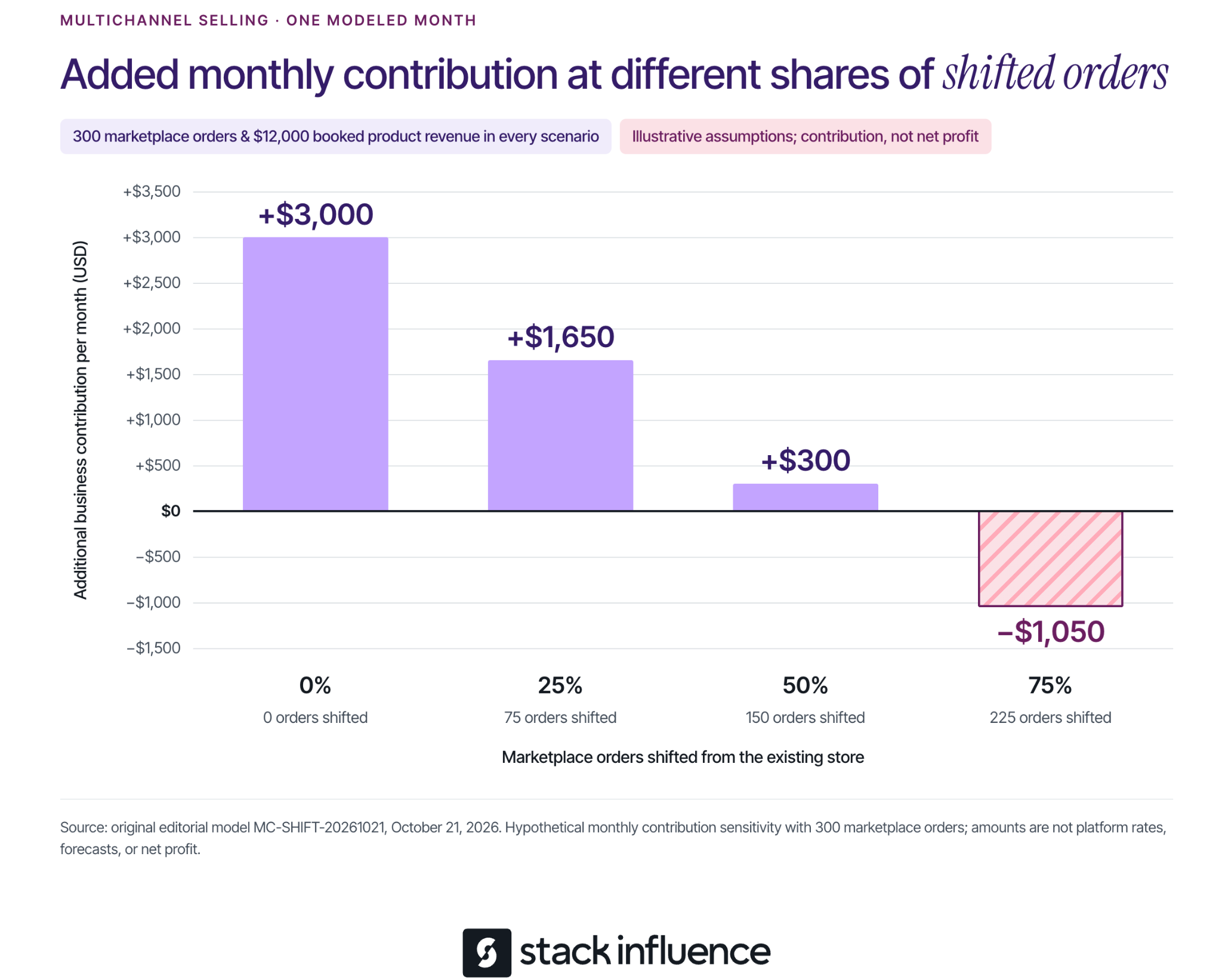
Estimate the work before committing to an integration. Record time spent checking orders, resolving mismatches, updating tracking, and reconciling exceptions. Software still requires an owner who notices failures and keeps the connections working.
Consider a hypothetical monthly workload example. Manual administration takes six minutes per new-channel order. A connected workflow takes two minutes per order plus four hours of recurring maintenance each month.
The per-order times include routine administration and average exception handling for the same service requirements. This example excludes picking, packing, marketing, software fees, and one-time implementation work. These are planning assumptions, not measured software results.
The resulting workloads are:
Calculate manual hours as orders × 6 ÷ 60. Calculate connected-workflow hours as orders × 2 ÷ 60 + 4.
Under these assumptions, the connected workflow adds two hours at the lowest volume and saves 16 hours at the highest. Replace the assumed times with your team's observations, then consider software charges and implementation costs separately. A tool can also be valuable for reducing errors, but that benefit needs its own evidence.
For a Shopify-based operation, Shopify Marketplace Connect supports synchronizing listings, orders, and inventory with supported marketplaces. Check the exact marketplace connection and required workflow before committing.
Amazon also describes multichannel selling tools in Seller Central, with a gradual rollout to sellers in its U.S. store. The initial experience includes connecting other channel accounts, importing and linking listings, viewing sales and orders, and fulfilling across channels. Confirm what your account currently offers; the announcement also describes capabilities that are still expanding.
Compare tools using actual tasks: product mapping, inventory updates, order routing, tracking, returns, error alerts, and usable exports. Request a demonstration of your difficult case, such as a bundle or partial shipment, instead of evaluating only the cleanest order.
Give each product an accurate record and each order a defined path. Assign named owners for catalog accuracy, stock availability, warehouse handoff, and customer support. A small team can combine these roles, but the responsibilities should remain explicit.
Match each channel listing to the correct internal SKU, size, color, and pack quantity. Shopify's instructions for linking existing marketplace listings explain that order and inventory syncing begins for linked listings.
Review suggested matches before relying on them. A single item and a multipack may have similar titles while consuming different inventory quantities. Keep the product facts consistent while adapting titles, images, and descriptions to each channel's presentation requirements.
Choose the system that determines available-to-sell inventory and document how reservations, damaged goods, returns, and replenishment affect it. Confirm that the stock shown to a channel can actually fulfill its orders.
Check what happens during delayed updates or a failed connection. Set a stock buffer appropriate to observed demand and synchronization behavior, and give the responsible person a way to pause the affected listing. Avoid assuming that an inventory total is current simply because it appears in a dashboard.
An order should reach the warehouse once. Shopify's Marketplace Connect fulfillment guidance warns that overlapping connections can create duplicate orders in a third-party fulfillment app.
Fulfillment can be shared across sales channels where the arrangements permit it. Amazon's Multi-Channel Fulfillment overview describes using FBA inventory to fulfill orders from other channels, including a seller's website. The website remains the sales channel even when Amazon ships the package.
Confirm the originating channel's shipping, packaging, tracking, and returns requirements before selecting a fulfillment route. Write down who responds to late delivery, cancellations, damaged items, and refund requests, including exceptions that the integration does not resolve automatically.
Start with a product group whose stock, packaging, and costs you understand. Include a representative variant or bundle if it is central to your catalog. Expanding every SKU immediately makes it harder to identify the source of a mapping or fulfillment problem.
Before increasing promotion, validate the workflow through platform-approved test methods or legitimate early orders:
Set spending and inventory limits for the pilot. Agree which failures pause promotion and who can make that decision. Review early operating exceptions frequently, then assess economics after the relevant costs and returns become visible.
Calculate contribution using revenue after discounts and the costs required to serve those orders. Include landed product cost, channel and payment fees, fulfillment, expected returns, and variable service costs. Then deduct incremental promotion, software, and operating expenses without counting any expense twice.
Keep a separate cash schedule for inventory purchases, advertising payments, refunds, and settlements. Positive contribution does not mean cash arrives before the next payment is due.
Assume a business adds a marketplace alongside an existing owned store. Each one-item order produces $40 in product revenue after discounts, excluding sales tax and before the modeled returns allowance.
For both channels, assume $12 in landed product cost, $6 in fulfillment, and a $2 allowance for net refunds, return handling, and variable service. There is no separate shipping revenue. Assume transaction and channel fees of $2 per store order and $6 per marketplace order.
These hypothetical amounts are not any platform's current prices. Under this simplified model, the store contributes $18 per order and the marketplace contributes $14 before paid promotion and fixed overhead:
Now assume the marketplace generates 300 orders in a month. That produces $12,000 in booked product revenue and $4,200 in contribution before additional monthly spending. Add $900 in promotion and $300 in software and operating capacity, for $1,200 in new monthly expenses.
The remaining question is how many marketplace orders would otherwise have occurred on the store. Call these shifted orders. Each shifted order replaces an $18 store contribution with a $14 marketplace contribution.
The sensitivity calculation is:
Additional monthly contribution = (300 × $14) − (shifted orders × $18) − $1,200.
The outcomes are:
All four scenarios record the same $12,000 in marketplace revenue. Their value to the business differs because the amount of replacement demand differs.
This example assumes unchanged baseline advertising and shared overhead, sufficient inventory and capacity at the stated costs, and no other sales changes. Every nonshifted order is assumed additional; future repeat purchases, financing, income tax, and other unlisted costs are excluded. It measures incremental contribution, not net profit, and is separate from the earlier workload example.
The shift percentages are sensitivity assumptions, not facts you can read from a channel dashboard. Compare total product sales and contribution across channels, while considering seasonality, stockouts, discounts, and changes in existing marketing. Where feasible, a planned comparison across products or markets can strengthen the estimate.
Keep the uncertainty visible. A new customer identifier on one platform does not establish that the buyer is new to the brand or that the purchase would otherwise never have occurred. Use a range of plausible assumptions when the evidence cannot support a precise figure.

Once the order process works, match promotion to the destination. Product demonstrations can answer buying questions, but shoppers still need the correct variant, current offer, and delivery information when they arrive.
For brands using micro influencers, Stack Influence's automated product-seeding workflow supports creator coordination, purchase and posting steps, post verification, and reimbursement. Define the campaign's purchase destination, content requirements, and permission for any planned reuse before scheduling activity.
A creator's social post, a listing asset, and a paid advertisement can require different permissions and edits. The FTC's influencer disclosure guidance explains that free products and other material brand relationships require clear disclosure when the creator endorses the product.
Track campaign-funded purchases separately from independent customer demand. Include the reconciled campaign cost in the channel decision, and keep content production, attributed orders, and additional business contribution as separate measures. That makes the marketing results more useful when deciding whether to expand.
Continue when the order process is dependable and the contribution remains worthwhile under reasonable assumptions about costs and shifted demand. Expand the product selection or promotional budget in increments your inventory and team can support.
Adjust when there is a specific, testable constraint, such as an unprofitable bundle, excessive returns, or a costly manual task. Give the change an owner and a review point. Pause expansion when fulfillment failures persist or the economics depend on assumptions the evidence does not support.
The next step is to select one channel, document its operating responsibilities, and build the pilot around the products you understand best. Multichannel selling becomes manageable when every new purchasing destination has a clear purpose, a reliable workflow, and a defensible contribution to the business.
An Amazon review strategy should help you collect honest customer feedback and use it to improve the next purchase experience. For ecommerce sellers, the practical starting point is to make eligible review requests consistent, evaluate Amazon Vine for suitable products, and investigate the problems customers repeatedly describe.
Begin with one product. Check whether your team is missing eligible orders, whether the listing sets accurate expectations, and whether the product delivers on those expectations. Each problem calls for a different action. This guide explains how to choose that action, run the process, and measure progress without treating a request, a rating, and a written review as the same result.
Choose your first action from the product's current situation. A listing with very few orders needs a different plan from a busy listing whose customers repeatedly describe the same problem.
These activities can run together. The distinction helps you avoid spending on a review service when the immediate problem is an unfinished listing or an unowned operational task.
Set the rules before assigning the work. Amazon's seller review-policy guidance prohibits buying reviews, exchanging incentives for reviews, requesting review changes or removal, and directing positive feedback to Amazon while diverting negative feedback elsewhere. It also makes sellers responsible for associated employees and contracted third parties.
Apply that review to agency instructions, packaging inserts, messaging software, and creator briefs. Remove requests for five stars, review-linked gift cards, and instructions that make a benefit depend on a customer posting feedback. Ask a provider to show the actual workflow before authorizing it.
Next, inspect the product as a customer would. Can someone identify its dimensions, compatible uses, included components, and important limitations before purchasing? Open a current production unit and compare the contents and instructions with the listing. Record discrepancies so the person responsible can correct them.
Amazon's built-in request is a useful starting point because it supplies the message instead of requiring your team to write one. Amazon's Request a Review instructions describe one standardized email requesting both a product review and seller feedback, available once per order between 5 and 30 days after delivery.
Use the feature's actual availability to determine whether an order can receive the request. A date calculation alone should not override an unavailable button.
For a manual workflow, open Manage Orders in Seller Central, select the shipped order, open its order details, and use Request a Review when available. Assign a person to check eligible orders regularly enough that they do not age out of the window.
Keep a simple operating record containing the order identifier, product, delivery date, eligibility check, request date, and any reason the request could not be sent. Record confirmed requests separately from attempts that failed. If multiple products share an order, maintain one order-level request record so different product owners do not duplicate the work.
Amazon's buyer communication rules also permit qualifying review requests through Buyer-Seller Messaging, but prohibit repeated requests and requests conditional on a positive experience. Choose one route for each order. When using Request a Review, do not add another review-request email to the same buyer for that order.
Choose a consistent send point within the permitted window that gives customers a reasonable opportunity to use the product. Treat that timing as an operational choice to evaluate, rather than assuming one day works best for every category. Do not use a satisfaction survey to decide who gets asked.
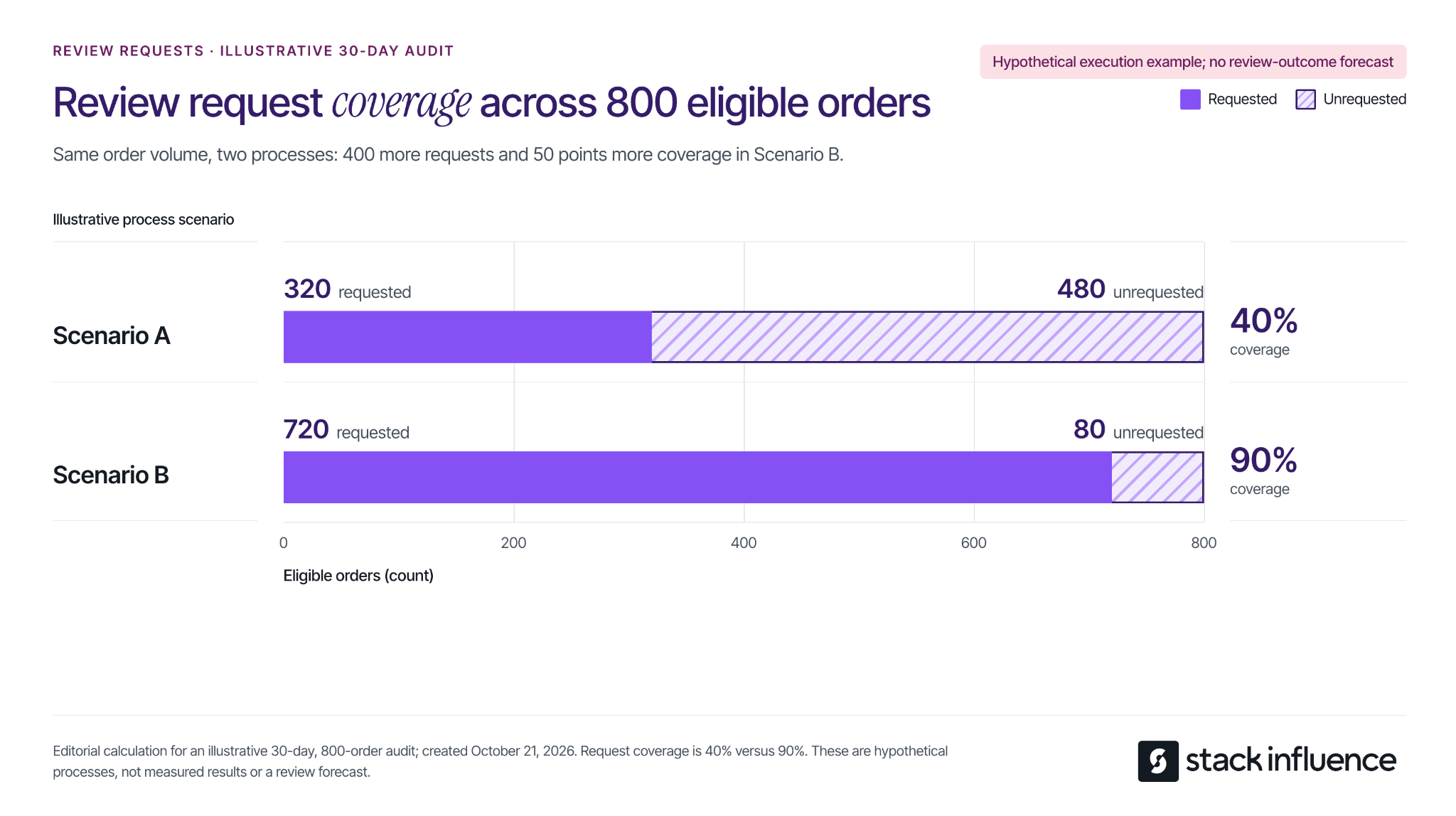
Calculate request coverage as unique eligible orders receiving a request divided by all unique orders confirmed eligible during the same audit period, multiplied by 100. Preserve the eligibility record, including for orders already requested; a current list of unrequested orders is not the full denominator.
Consider an illustrative 30-day audit for one product, with 800 eligible ordinary-customer orders. Compare two alternative request processes for that same order volume:
The difference is 400 additional requests and 50 percentage points of coverage. These are hypothetical process examples, not Amazon benchmarks or measured seller results. Review outcomes remain unmeasured.
This calculation identifies an execution gap your team can investigate. Check missed batches, unavailable actions, and duplicate-request controls before changing software. If coverage is already consistent, shift attention to product experience and customer demand instead of sending more messages to the same people.
Vine gives eligible products access to Amazon-invited reviewers who can share independent opinions. Check the current Amazon Vine requirements and fees: participation requires a Professional selling account, eligible FBA offers, and either a qualifying Brand Representative or Reseller role for a registered brand, or generic products in the catalog.
Existing products must have fewer than 30 reviews; eligible prelaunch FBA listings can also participate. Confirm the specific ASIN's eligibility before reserving inventory.
The published US enrollment fees per parent product are:
Budget separately for the units provided and applicable fulfillment costs. A zero enrollment fee does not make the entire activity cost-free. Recheck the fee and enrollment terms when making the commitment.
An Amazon community manager's explanation of Vine confirms that enrollment does not guarantee every unit will be claimed or a specific number of reviews published. Plan around the inventory and budget you can commit without requiring a particular rating or review count in return.
Before enrolling, inspect the same product version customers will receive, including the instructions and packaging. If you already know assembly is confusing or a component is missing, correct that issue first. Vine feedback should help evaluate a product that is ready for customers.
Keep three figures separate in your working record: units enrolled, units claimed, and reviews published. That distinction helps explain what has happened without calling every enrolled unit a completed review. For a broader launch, the Amazon product launch checklist connects this decision with listing readiness, available inventory, and promotional timing.
Read critical feedback for the underlying problem, then assign an action that can be checked. A low rating alone does not tell you whether the issue concerns product performance, unclear expectations, or instructions.
For each review you investigate, record the product version, review date, described problem, supporting detail, responsible owner, and proposed change. Preserve the customer's meaning when summarizing. If the available text is ambiguous, mark the cause as unconfirmed rather than filling in the gaps.
Imagine a seller examining 30 written reviews that mention a problem. For this hypothetical exercise, assign each review to one primary issue, even if it mentions several:
The first two categories account for 21 of 30 reviews, or 70% of this illustrative sample. That makes instructions and size communication useful starting points for investigation. It does not mean 70% of customers encountered those problems, and the sample is not an estimate of the product's defect rate.
Translate the categories into work. Ask someone unfamiliar with the product to follow the current setup instructions. Compare listing dimensions with a measured unit and add a clear scale reference where needed. Investigate durability complaints against the stated use conditions, and check component counts against the packing specification.
The classification is a prioritization aid, not proof of the cause. A size complaint may reveal an unclear listing, a manufacturing discrepancy, or a product that does not suit that customer's use. Check the underlying evidence before deciding which change to make.
Give each action an owner, a completion date, and an observable result, such as revised instructions being included in newly packed units. Track when changed inventory reaches customers. Reviews posted immediately after a packaging update may still describe units packed before that update.
Where available, Amazon's Customer Reviews tool provides a Contact Customer option for ratings below three stars, allowing eligible brands to offer support or a courtesy refund. Access requires a Professional selling account and a Brand Representative role for a brand enrolled in Brand Registry.
Use the available support workflow to resolve the problem. Keep any remedy independent of whether the customer changes a review, and do not request an edit or removal. Record the service action and the operational lesson separately so a resolved support case is not reported as an improved rating.
Creator partnerships can help explain how a product works, show its dimensions in context, and answer questions prospective buyers have. Define the deliverable as the intended social content and specify the applicable usage permissions and disclosure requirements.
Amazon's rules on promotional customer reviews distinguish ordinary customer feedback from review-linked rewards and promotional relationships. A generally available customer discount is different from a benefit tied to writing a review. Calling a creator's review optional does not by itself resolve the compensation or conflict-of-interest questions.
For campaign planning, keep gifted or reimbursed creator participants outside the customer-review solicitation workflow. Do not include an Amazon customer review as a creator deliverable or condition future opportunities on one. This is an operational recommendation for keeping the two activities clearly defined.
For social endorsements, the FTC's influencer disclosure guidance explains that free products and other material relationships need clear disclosure with the endorsement. That disclosure addresses the social content; it does not authorize a customer review that Amazon otherwise prohibits.
Stack Influence's automated product-seeding workflow supports creator coordination and completed social content. When that work is part of your marketing plan, specify the buyer question each demonstration should answer and evaluate the resulting posts and assets. Keep customer-review counts outside the promised campaign deliverables.

Use the first month to establish a dependable routine and identify what needs fixing. The schedule below is an editorial operating suggestion, not a deadline for reaching a review target.
Keep ratings, written reviews, and seller feedback in separate fields. Amazon's Community Guidelines allow star ratings without written text and distinguish product evaluation from seller-service feedback. Label each count exactly as the source presents it.
Record the date and product scope whenever you capture a visible count. Treat the difference between two snapshots as a net change, not necessarily the number of newly submitted reviews. Avoid comparing a parent-level count with a single variation's orders as if the populations automatically match.
Review request coverage alongside order volume, recent written feedback, and completed fixes. A same-month ratio of new visible reviews to orders does not establish which requests produced those reviews. If you cannot connect the populations and timing, describe the figures separately rather than presenting a response rate.
After a change, compare feedback over equivalent observation periods and consider differences in sales volume, product versions, and available evidence. An improvement following a change is a reason to investigate further; timing alone does not prove the change caused it.
Start with the gap your records can demonstrate. Close missed request opportunities, resolve the Vine decision, or assign a recurring product problem to someone who can fix it. Keep the process neutral and make each action visible in the operating record.
A useful Amazon review strategy leaves you with more than a review-count target. It gives your team a consistent way to invite honest feedback, understand what customers experienced, and make the next purchase better informed.
To drive traffic to your Shopify store, make your products discoverable in search, give relevant audiences a reason to visit, and bring interested shoppers back. Start with one active acquisition channel, such as search ads or creator demonstrations, while building your search presence and email list.
The right starting point depends on how people buy your product. A shopper searching for a specific replacement part needs a different route than someone discovering a kitchen organizer through a demonstration. Match the channel, message, and destination, then measure whether those visits produce worthwhile orders.
Start with a product or closely related collection and one customer problem. This makes it easier to choose a useful message and see which traffic source responds.
Use these starting points:
For example, a drawer-organizer seller could target searches about expandable organizers and publish a demonstration of fitting an awkward drawer. Both routes should lead to a page with dimensions, compatibility details, and the demonstrated product.
Before promoting that page, check it on a phone: confirm that the item is available, the price and delivery information are clear, and checkout works. If visits already arrive but orders do not, use the guide to diagnose Shopify conversion problems to locate the obstacle before expanding the campaign.
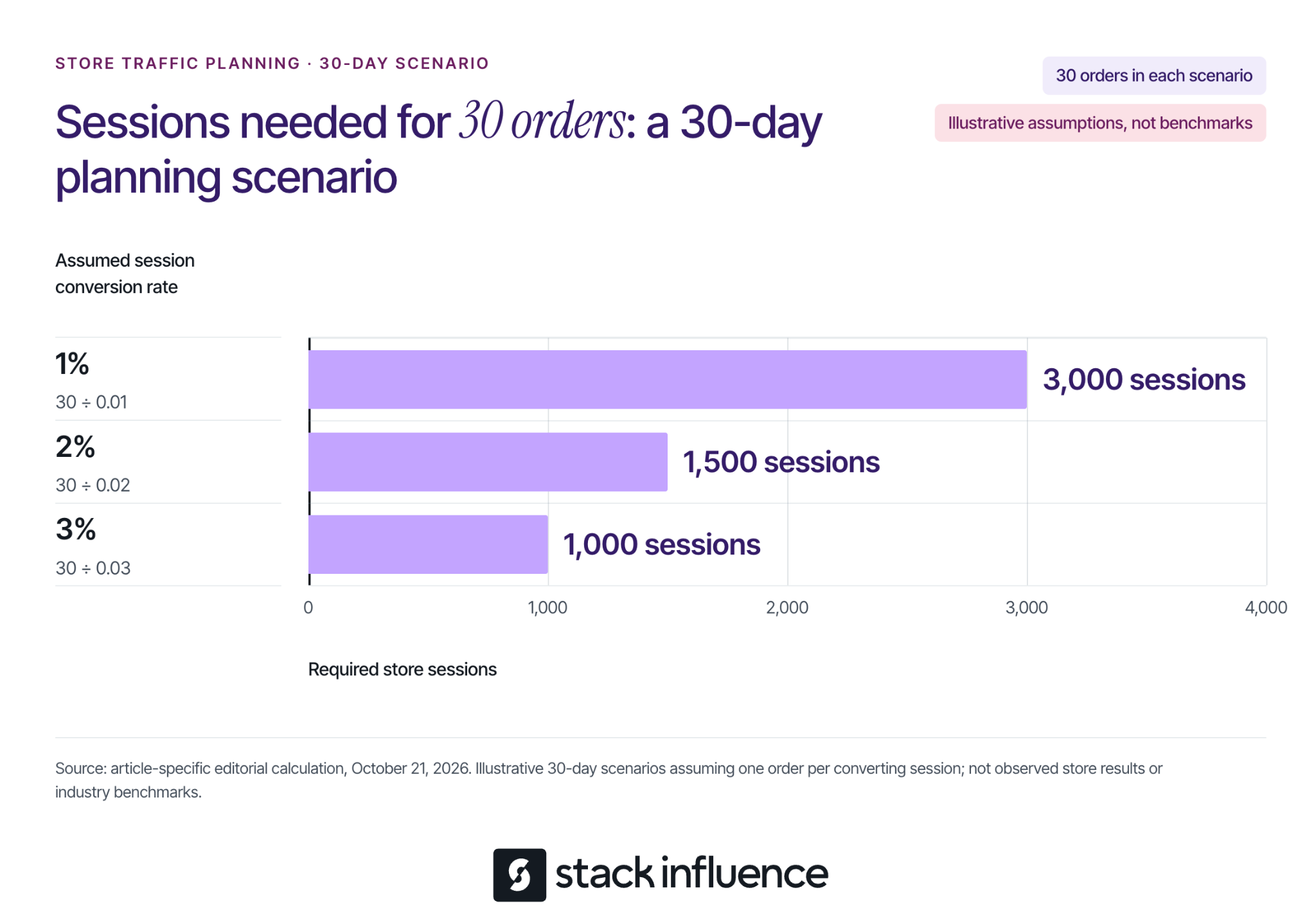
An order goal makes a traffic target more useful than a vague request for more visitors. Shopify's marketing performance documentation defines online store conversion rate as the percentage of sessions that result in an order.
For planning, divide your target orders by an assumed session conversion rate expressed as a decimal. Suppose you want 30 orders during a 30-day campaign and assume one order per converting session:
These are illustrative planning assumptions, not Shopify benchmarks, measured results, or guaranteed outcomes. They show why the same order target can require very different traffic volumes. The calculation does not establish that a channel can supply those sessions at an affordable cost.
Use your own source-specific history when available. For a new store, keep several scenarios until you have enough observations to replace assumptions. Do not assume a campaign reaching unfamiliar shoppers will convert like an email sent to people who already know your products.
Search gives you a way to meet shoppers who are already describing a need. Work on the pages that best answer that need before publishing a large volume of loosely related content.
Use a product page for a specific item, a collection page for a relevant selection, and a guide for a question that needs explanation. For the organizer example, an expandable-drawer-organizer collection serves a shopping task; a guide to measuring kitchen drawers serves a preparation task.
On each priority page, write a distinctive title, explain the product in concrete terms, and answer material questions about size, materials, use, and limitations. Shopify's keyword placement guidance identifies titles, meta descriptions, image alt text, and body content as editable places for relevant wording. Keep that wording natural, and use alt text to describe the image.
A useful guide can explain how to measure drawer interiors, account for obstructions, and choose a suitable organizer. Include original measurements or demonstrations where you have them, then link to products that actually fit the advice. Avoid publishing an article that answers a popular question with no useful connection to what you sell.
Check discovery as well as content. Shopify automatically maintains a sitemap; its sitemap submission instructions explain how to submit sitemap.xml through Google Search Console after verifying your store. Make sure the storefront is accessible to crawlers, and do not treat submission as a promise of immediate indexing or rankings.
Google product listings offer another search-discovery route. Shopify's free Google listings guidance explains how eligible stores sync products to Merchant Center through the Google & YouTube channel.
Before connecting, review the Google & YouTube channel requirements, including store accessibility, payment setup, policies, contact information, and applicable product and shipping requirements. If you already manage a Merchant Center feed, review that setup before introducing another connection.
Then check that free listings are enabled, review product issues, and keep prices and availability consistent with your store. Google's free listings documentation explains that these placements promote product pages and that eligibility does not guarantee display. It also directs merchants to the Products section's Needs attention tab to identify data problems.
Free placement means no advertising charge for that listing. Preparing accurate product information and maintaining the feed still require work.
A shopper who does not know your product needs a reason to investigate it. Build the content around a recognizable problem and make the next step specific.
Choose a platform where you can demonstrate the product and participate consistently. For the organizer example, film the drawer before installation, show the measurement and fitting process, and explain who should choose a different size.
Use a call to action that continues the demonstration, such as checking the dimensions or viewing the available sizes. Choose a supported link placement, test it on mobile, and send visitors to the matching product or collection. Review store visits alongside views and engagement so you can tell whether the content produces traffic.
Answer relevant questions in comments and communities without turning every response into a promotion. Where links are permitted, share a useful guide or product explanation that resolves the question.
Consider micro influencers whose content and audience match the buying situation. Review their recent demonstrations and audience questions, then confirm what they will publish, where the store link will appear, and what the audience will find after clicking.
Commissioning a UGC video for your brand's own channels does not automatically include distribution to the creator's audience. Specify both deliverables when you need both, and agree on the intended uses and duration before republishing content or running it in ads.
For U.S. endorsements, the FTC's influencer disclosure guidance covers material connections including free products and payment. Make the relationship clear with the endorsement, and ensure the content reflects the creator's actual experience.
Stack Influence's Shopify creator campaigns support sourcing and vetting creators, coordinating product seeding, verifying completed posts, and collecting content. Confirm the campaign's purchase-and-reimbursement or gifting process, deliverables, permissions, and costs before launch.
Keep creator sample purchases and reimbursements separate from genuine customer-acquisition results. The Shopify product-seeding pilot guide provides a more detailed workflow for planning those operational and measurement boundaries.
Approach a complementary business, specialist publisher, or community organizer with a useful collaboration. An organizer brand could contribute a measurement guide to a home-organization newsletter, with a relevant store link if the publisher agrees.
Give the partner a distinct tagged link and agree on any payment, commission, or reciprocal promotion. Evaluate referred visits and customers against the full arrangement cost. An audience's relevance matters more to this test than the size of the mailing list alone.
Email gives interested people another route to your store after their first encounter. Invite visitors to subscribe for something relevant, such as restock notices, product guidance, or early access to a launch.
Follow Shopify's subscriber management guidance: send promotional campaigns to people who agreed to receive marketing, and use relevant subscriber segments. Buying a list is not a substitute for building that permission.
Start with a welcome message that delivers what the signup promised and links to a useful next step. Follow with messages based on actual interests or purchase history, instead of sending every subscriber the same product recommendation.
Shopify Messaging's marketing automation templates include welcome messages and separate workflows for abandoned browsing, carts, and checkouts. Review each automation's eligibility, recipients, message, and destination before activating it, and avoid overlapping reminders from multiple apps.
A return visit is not necessarily a repeat purchase. Someone who first discovered you through a creator and later buys through an email is still a first-time customer. Track that distinction when deciding whether a channel mainly brings people back, acquires customers, or does both.
Use paid traffic to test a specific product, audience, and promise. Search ads are a logical test when you can identify purchase-related queries; paid social is a logical test when a demonstration can introduce the product. Choose according to the buying situation and evaluate the resulting orders.
Before setting a budget, estimate what an order leaves after discounts, expected refunds, product cost, fulfillment, shipping subsidies, payment fees, and other applicable variable costs. This contribution must help cover acquisition spending and fixed overhead. Revenue alone does not tell you how much traffic you can afford.
Consider a separate illustrative 30-day campaign with 1,000 tracked sessions, a 2% conversion rate, and one order per converting session. That produces 20 modeled orders. Assume each order leaves $25 before acquisition spending, so the campaign generates $500 of pre-acquisition contribution:
In this model, $0.50 per tracked session is the first-order break-even ceiling before fixed overhead. These values are assumptions, not typical advertising prices or promised conversion rates. The model excludes repeat purchases and holds the conversion rate and order contribution constant across all three scenarios.
Include relevant media, creative, and campaign-management costs once when calculating acquisition spending. Cost per tracked session is not automatically the platform's cost per click, because clicks and recorded store sessions are different measurements. Use a working budget below your ceiling if you need room for overhead and uncertainty.

Use 30 days as an operating schedule, not a promise of enough data or a deadline for SEO results. Keep the product, audience, destination, spending limit, and success measure explicit.
Tag links consistently so you can separate campaigns. For an illustrative Instagram creator placement, use utm_source=instagram, utm_medium=influencer, utm_campaign=drawer-fit-pilot, and utm_content=creator-a-demo. Use the same campaign name across related placements and a distinct content value for each; check that the destination works after adding the parameters.
Shopify's marketing reports include a Performance by marketing channel report for comparing paid, organic, and referring traffic. Keep the reporting period and attribution model consistent, and reconcile costs separately when a report shows missing spend. A dash for unavailable cost data is not zero spending.
Organize the work into four passes:
Attribution describes assigned credit, not proof that every reported order was caused by a campaign. Reconcile customer and order records before adding results from different platforms, and record concurrent promotions or stock problems that could affect the comparison.
If the sample is small, carry forward the uncertainty instead of declaring a winner. Keep longer-term search work moving while you learn from the active test.
Choose one customer problem, one destination, and one active route to that page. Build the search and email foundations alongside it. Your next investment should follow what you learn about relevant visits, completed purchases, and acquisition costs, with a clear explanation of what you expect the next test to resolve.