





Multichannel selling means offering products through more than one sales channel, such as your own online store and a marketplace. For an established ecommerce seller, the practical question is which additional channel can bring worthwhile demand without creating more cost and operational work than the business can support.
Start with one new channel, a manageable product selection, and a clear financial test. Connect inventory and order handling, confirm that customers can receive the right product, and measure how expansion changes contribution across the whole business. Sales recorded on a new platform are only part of that calculation.
Key Takeaways
- Choose the next channel using customer fit, product eligibility, order economics, and your ability to support it.
- Assign responsibility for inventory, fulfillment, returns, and integration failures before increasing order volume.
- Include recurring administration and maintenance when evaluating software. Time savings depend on the workload.
- Measure additional business contribution after new costs and orders shifted from existing channels. Channel revenue alone cannot show that benefit.
What Is Multichannel Selling?
Multichannel selling gives customers multiple places to buy from your business. Shopify's multichannel selling overview includes owned websites, online marketplaces, and physical selling locations within that definition.
A brand selling through its website and Amazon uses two sales channels. A creator's Instagram post directing shoppers to that website supplies a marketing touchpoint. A warehouse shipping those website orders supplies fulfillment. Keeping those roles separate helps you decide what to connect and what to measure.
The potential benefits include reaching buyers who prefer another purchasing destination and reducing dependence on one outlet. The tradeoff is another set of listings, operating requirements, costs, and customer requests. Expansion becomes useful when the extra demand and contribution justify that work.
Multichannel Vs. Omnichannel
Multichannel describes the presence of multiple sales channels. Omnichannel describes a connected shopping experience across them, such as a customer ordering online and collecting the purchase in a store.
Selling on two marketplaces does not by itself create a shared customer account, cart, or returns experience. Decide which connections customers actually need and which the participating platforms support. A reliable order process is a practical starting point.
Choose Your Next Channel Around a Specific Customer Need
Choose a channel because it supports a buying behavior you can serve. Start with evidence from customer questions, existing traffic, product searches, and your current sales patterns. A competitor's presence can suggest an opportunity, but it cannot establish your likely demand or margin.
Consider these options against a specific business goal:
- An owned storefront can support detailed merchandising, product education, and direct customer relationships. If this is your next step, review how Shopify works for ecommerce sellers before planning the store workflow.
- A marketplace such as Amazon, Walmart, or eBay may suit shoppers who already use that destination to compare and buy products. Assess the relevant category, competitive offers, eligibility, and delivery expectations.
- A social shopping channel may suit an offer that benefits from demonstrations and ongoing creator content. Shopify's TikTok Shop setup guidance identifies separate store, verification, and product requirements for that connection.
- Physical selling or wholesale may suit products that benefit from local discovery, hands-on evaluation, or retailer relationships. Account for the different order sizes and operating commitments.
Write a brief channel hypothesis: which buyer you expect to reach, what they will buy, why this destination helps, and what evidence would justify continuing. Include the spending limit and the person responsible for the pilot.
If the immediate task is a simultaneous new-product launch, the workflow for coordinating a CPG launch across marketplaces addresses that separate situation. Here, the focus is adding a channel to an operating business.
Match Your Workflow to the Extra Order Volume
Estimate the work before committing to an integration. Record time spent checking orders, resolving mismatches, updating tracking, and reconciling exceptions. Software still requires an owner who notices failures and keeps the connections working.
Consider a hypothetical monthly workload example. Manual administration takes six minutes per new-channel order. A connected workflow takes two minutes per order plus four hours of recurring maintenance each month.
The per-order times include routine administration and average exception handling for the same service requirements. This example excludes picking, packing, marketing, software fees, and one-time implementation work. These are planning assumptions, not measured software results.
The resulting workloads are:
- At 30 orders per month, manual administration takes 3 hours; the connected workflow takes 5 hours.
- At 150 orders per month, manual administration takes 15 hours; the connected workflow takes 9 hours.
- At 300 orders per month, manual administration takes 30 hours; the connected workflow takes 14 hours.
Calculate manual hours as orders × 6 ÷ 60. Calculate connected-workflow hours as orders × 2 ÷ 60 + 4.
Under these assumptions, the connected workflow adds two hours at the lowest volume and saves 16 hours at the highest. Replace the assumed times with your team's observations, then consider software charges and implementation costs separately. A tool can also be valuable for reducing errors, but that benefit needs its own evidence.
Choose Software Around the Tasks You Need
For a Shopify-based operation, Shopify Marketplace Connect supports synchronizing listings, orders, and inventory with supported marketplaces. Check the exact marketplace connection and required workflow before committing.
Amazon also describes multichannel selling tools in Seller Central, with a gradual rollout to sellers in its U.S. store. The initial experience includes connecting other channel accounts, importing and linking listings, viewing sales and orders, and fulfilling across channels. Confirm what your account currently offers; the announcement also describes capabilities that are still expanding.
Compare tools using actual tasks: product mapping, inventory updates, order routing, tracking, returns, error alerts, and usable exports. Request a demonstration of your difficult case, such as a bundle or partial shipment, instead of evaluating only the cleanest order.
Connect Inventory and Fulfillment Before Promoting Listings
Give each product an accurate record and each order a defined path. Assign named owners for catalog accuracy, stock availability, warehouse handoff, and customer support. A small team can combine these roles, but the responsibilities should remain explicit.
Map Products and Variants Carefully
Match each channel listing to the correct internal SKU, size, color, and pack quantity. Shopify's instructions for linking existing marketplace listings explain that order and inventory syncing begins for linked listings.
Review suggested matches before relying on them. A single item and a multipack may have similar titles while consuming different inventory quantities. Keep the product facts consistent while adapting titles, images, and descriptions to each channel's presentation requirements.
Decide Which System Owns Available Stock
Choose the system that determines available-to-sell inventory and document how reservations, damaged goods, returns, and replenishment affect it. Confirm that the stock shown to a channel can actually fulfill its orders.
Check what happens during delayed updates or a failed connection. Set a stock buffer appropriate to observed demand and synchronization behavior, and give the responsible person a way to pause the affected listing. Avoid assuming that an inventory total is current simply because it appears in a dashboard.
Give Each Order One Fulfillment Route
An order should reach the warehouse once. Shopify's Marketplace Connect fulfillment guidance warns that overlapping connections can create duplicate orders in a third-party fulfillment app.
Fulfillment can be shared across sales channels where the arrangements permit it. Amazon's Multi-Channel Fulfillment overview describes using FBA inventory to fulfill orders from other channels, including a seller's website. The website remains the sales channel even when Amazon ships the package.
Confirm the originating channel's shipping, packaging, tracking, and returns requirements before selecting a fulfillment route. Write down who responds to late delivery, cancellations, damaged items, and refund requests, including exceptions that the integration does not resolve automatically.
Run a Small Pilot Through the Full Order Lifecycle
Start with a product group whose stock, packaging, and costs you understand. Include a representative variant or bundle if it is central to your catalog. Expanding every SKU immediately makes it harder to identify the source of a mapping or fulfillment problem.
Before increasing promotion, validate the workflow through platform-approved test methods or legitimate early orders:
- Confirm the correct product, quantity, price, and delivery promise at checkout.
- Check that the order enters the intended system once and reserves the appropriate inventory.
- Confirm the warehouse receives the correct SKU and shipping instructions.
- Check that tracking reaches the buyer and the originating channel.
- Verify cancellation, refund, and return procedures, including when stock becomes sellable again.
- Reconcile the order, fees, refunds, and settlement in your financial records.
Set spending and inventory limits for the pilot. Agree which failures pause promotion and who can make that decision. Review early operating exceptions frequently, then assess economics after the relevant costs and returns become visible.
Measure the Contribution the New Channel Actually Adds
Calculate contribution using revenue after discounts and the costs required to serve those orders. Include landed product cost, channel and payment fees, fulfillment, expected returns, and variable service costs. Then deduct incremental promotion, software, and operating expenses without counting any expense twice.
Keep a separate cash schedule for inventory purchases, advertising payments, refunds, and settlements. Positive contribution does not mean cash arrives before the next payment is due.
Work Through an Illustrative Channel Expansion
Assume a business adds a marketplace alongside an existing owned store. Each one-item order produces $40 in product revenue after discounts, excluding sales tax and before the modeled returns allowance.
For both channels, assume $12 in landed product cost, $6 in fulfillment, and a $2 allowance for net refunds, return handling, and variable service. There is no separate shipping revenue. Assume transaction and channel fees of $2 per store order and $6 per marketplace order.
These hypothetical amounts are not any platform's current prices. Under this simplified model, the store contributes $18 per order and the marketplace contributes $14 before paid promotion and fixed overhead:
- Store contribution: $40 − $12 − $6 − $2 − $2 = $18.
- Marketplace contribution: $40 − $12 − $6 − $2 − $6 = $14.
Now assume the marketplace generates 300 orders in a month. That produces $12,000 in booked product revenue and $4,200 in contribution before additional monthly spending. Add $900 in promotion and $300 in software and operating capacity, for $1,200 in new monthly expenses.
The remaining question is how many marketplace orders would otherwise have occurred on the store. Call these shifted orders. Each shifted order replaces an $18 store contribution with a $14 marketplace contribution.
The sensitivity calculation is:
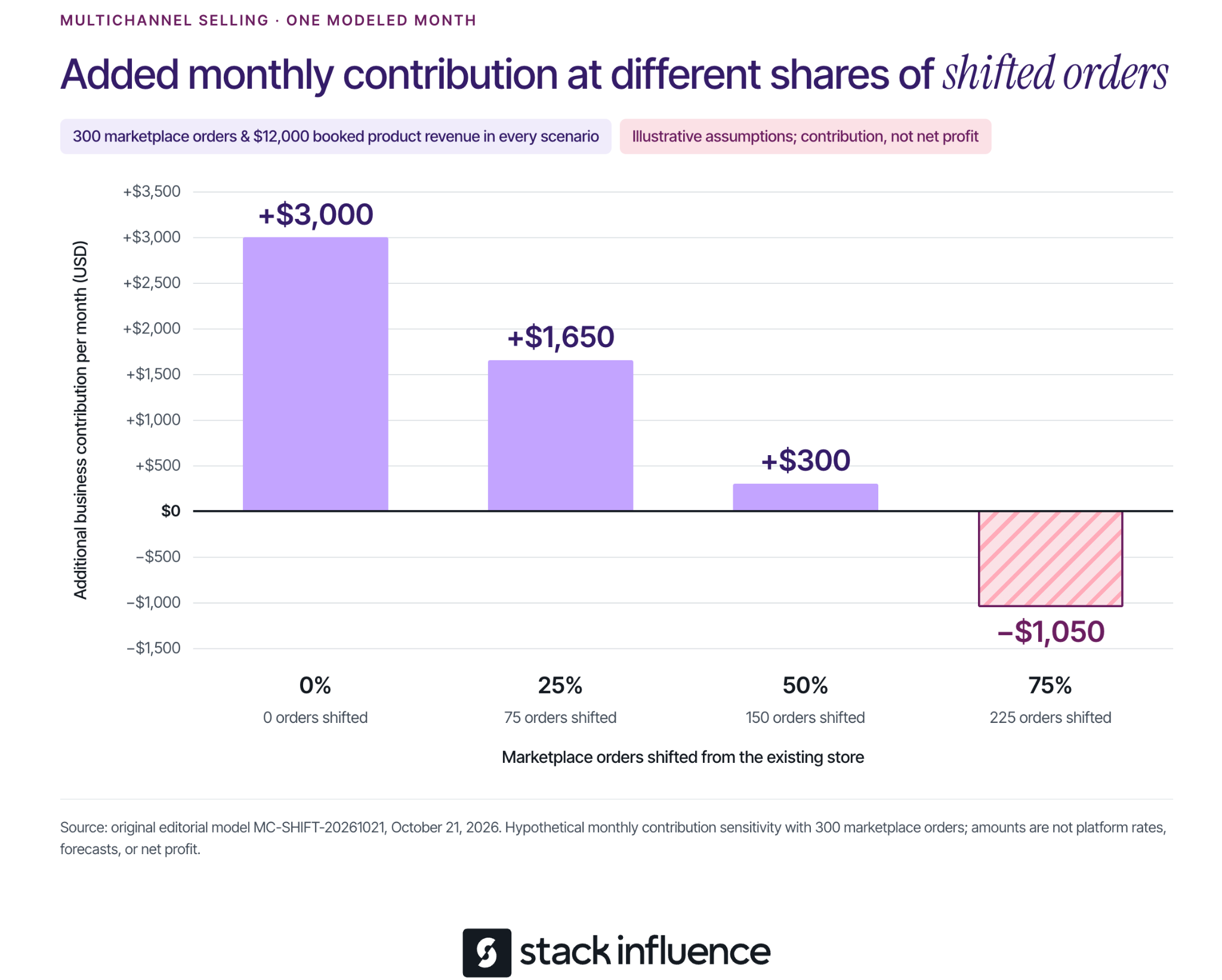
Additional monthly contribution = (300 × $14) − (shifted orders × $18) − $1,200.
The outcomes are:
- If 0% shift, there are 0 shifted orders and $0 in displaced store contribution. Additional monthly contribution is $3,000.
- If 25% shift, there are 75 shifted orders and $1,350 in displaced store contribution. Additional monthly contribution is $1,650.
- If 50% shift, there are 150 shifted orders and $2,700 in displaced store contribution. Additional monthly contribution is $300.
- If 75% shift, there are 225 shifted orders and $4,050 in displaced store contribution. Additional monthly contribution is negative $1,050.
All four scenarios record the same $12,000 in marketplace revenue. Their value to the business differs because the amount of replacement demand differs.
This example assumes unchanged baseline advertising and shared overhead, sufficient inventory and capacity at the stated costs, and no other sales changes. Every nonshifted order is assumed additional; future repeat purchases, financing, income tax, and other unlisted costs are excluded. It measures incremental contribution, not net profit, and is separate from the earlier workload example.
Estimate Shifted Demand Honestly
The shift percentages are sensitivity assumptions, not facts you can read from a channel dashboard. Compare total product sales and contribution across channels, while considering seasonality, stockouts, discounts, and changes in existing marketing. Where feasible, a planned comparison across products or markets can strengthen the estimate.
Keep the uncertainty visible. A new customer identifier on one platform does not establish that the buyer is new to the brand or that the purchase would otherwise never have occurred. Use a range of plausible assumptions when the evidence cannot support a precise figure.
Build Demand Around the Channel's Buying Experience

Once the order process works, match promotion to the destination. Product demonstrations can answer buying questions, but shoppers still need the correct variant, current offer, and delivery information when they arrive.
For brands using micro influencers, Stack Influence's automated product-seeding workflow supports creator coordination, purchase and posting steps, post verification, and reimbursement. Define the campaign's purchase destination, content requirements, and permission for any planned reuse before scheduling activity.
A creator's social post, a listing asset, and a paid advertisement can require different permissions and edits. The FTC's influencer disclosure guidance explains that free products and other material brand relationships require clear disclosure when the creator endorses the product.
Track campaign-funded purchases separately from independent customer demand. Include the reconciled campaign cost in the channel decision, and keep content production, attributed orders, and additional business contribution as separate measures. That makes the marketing results more useful when deciding whether to expand.
Decide Whether to Expand, Adjust, or Pause
Continue when the order process is dependable and the contribution remains worthwhile under reasonable assumptions about costs and shifted demand. Expand the product selection or promotional budget in increments your inventory and team can support.
Adjust when there is a specific, testable constraint, such as an unprofitable bundle, excessive returns, or a costly manual task. Give the change an owner and a review point. Pause expansion when fulfillment failures persist or the economics depend on assumptions the evidence does not support.
The next step is to select one channel, document its operating responsibilities, and build the pilot around the products you understand best. Multichannel selling becomes manageable when every new purchasing destination has a clear purpose, a reliable workflow, and a defensible contribution to the business.


