
The latest info on influencer marketing trends, micro influencer news, and the world of social media

A folder full of saved videos can leave you with nothing you actually want to film. The missing piece is often a specific premise: who the video helps, what happens on screen, and why someone would keep watching.
Useful YouTube video ideas connect a subject with a visible payoff. “Photography” is a subject. “Fix a dark phone photo using one window” is a video you can plan, shoot, and evaluate.
For content creators starting out or refreshing an established channel, the 24 ideas below offer concrete places to begin. Adapt the examples to your interests, equipment, and experience, then use the filming brief to choose your next upload.

Start with a difficulty you can explain through a real example. A useful first upload can come from something you recently learned, provided you describe your experience accurately.
Photograph the same subject in two positions near a window, then show the difference. Explain where you stood and what changed so viewers can try the setup themselves.
Show the original clip, your editing decisions, and the finished version. Focus on one outcome, such as making a confusing cooking sequence easy to follow, instead of touring every feature in your editor.
Use your own gameplay to demonstrate a mechanic that confused you. Show the unsuccessful attempt and the corrected approach, including the circumstances where your advice applies.
Choose a visible problem, such as pancakes with an uneven texture or a crooked paper fold. Change one relevant factor between attempts so the viewer can understand your explanation without guessing what caused the difference.
Demonstrations have a useful research basis. In Google and Kantar’s Future of Video research, 70% preferred video over text or audio for building something, 69% for learning a skill, and 63% for cooking. The survey covered 2,160 U.S. weekly video viewers ages 18–64, January 28–February 10, 2025. These are medium preferences; demand for your particular topic still needs checking.
Give viewers enough context to understand the result. State what you tested, what stayed constant, and what your experience can reasonably establish.
Record the same sentence with your phone microphone and another microphone you already own. Keep the room, speaking distance, and editing consistent, and let viewers hear the samples before your verdict.
Show what you noticed while using a backpack, notebook, kitchen tool, or other familiar item. Include the awkward moments and useful details that would be invisible in a first impression.
Film setup and the first task the product is supposed to help with. Include a confusing instruction or adjustment when it materially changes what a beginner should expect.
Try three desk arrangements for a narrow workspace or three ways to carry the same daily essentials. Define the constraint first so your comparison has a practical purpose beyond showing several options.
For creators pursuing user-generated content (UGC) work, demonstrations can become samples when building a UGC portfolio. Label self-directed samples accurately and show the specific filming or storytelling skill each demonstrates.
Make the outcome clear enough that someone who has never seen your channel can follow the stakes. Keep the unexpected decisions and setbacks that explain how the attempt unfolded.
Try a guitar transition, drawing technique, or unfamiliar recipe. Establish your starting point and show what improved, what remained difficult, and what you would change on the next attempt.
Cook from five pantry ingredients or finish a game level without a usual upgrade. Explain the rule at the beginning, then preserve the moments where that rule forces an interesting decision.
Repair a thrifted frame, repurpose a container, or refresh an old sketchbook cover. Show the starting condition and the choices behind the finished result, including changes you abandoned.
Build a filming corner or organize a collection using materials you have. Define a finish line before recording so the video ends with an identifiable result rather than an unfinished activity log.
Use a Short when the idea works as a self-contained demonstration, reveal, or answer. YouTube’s guidance on video length and formats explains that useful length depends on the content, audience, and purpose.
Demonstrate a camera setting, a craft step, or a game shortcut in a situation where it matters. Give the answer immediately, then use the remaining footage to make it understandable.
Show a gift-wrapping improvement or a reorganized drawer, followed by the change that made it work. Viewers should leave with an explanation they can use, not only a reveal.
Place equal-sized paper sheets across the same gap, one flat and one folded, and invite viewers to predict which holds more coins. Show the test and result in the same Short, noting the fold and support conditions.
Style one scarf for three situations or show three practical arrangements for the same storage basket. Make each use distinct so the video demonstrates versatility instead of repeating a shot.
Choose what the viewer needs to see, then decide whether a presenter adds anything. These examples complement more specialized faceless YouTube channel ideas.
Record yourself organizing reference images for an art project or completing a software task. Explain decisions as they occur, and use a clean demonstration workspace so viewers can follow your actions.
Use your own drawings, objects, or board setup to explain a chess tactic or another concept you understand. Build the explanation around one question and verify any factual claims before recording.
Demonstrate folding a pocket notebook, preparing ingredients, or assembling a simple craft. Keep the important movements visible and include the intermediate steps a beginner would otherwise have to infer.
Create a draw-with-me or quiet study session using your own footage and audio. Tell viewers what activity they can join, then preserve enough real working time for them to participate.
Build follow-ups around the next useful question. A recognizable series can keep the subject consistent while each episode adds a fresh test, explanation, or experience.
Take a specific question, such as whether a technique works with thicker paper, and demonstrate the answer. If your channel is new, start with a question from a friend or your own experience.
Investigate why a familiar board-game rule exists or how an unusual design feature developed. Use reliable sources and your own explanation to help fellow enthusiasts understand something they already encounter.
Ask a potter how they choose a beginner’s clay or a photographer how they select a location. Keep the conversation focused and include demonstrations where they clarify the answer.
Return to something you previously used or recommended and show whether it still earns a place in your routine. Explain what changed, including situations where your original assessment needs updating.
Find promising ideas by combining recurring viewer questions with evidence of interest in the subject. Look for a specific missing explanation or constraint you can address through your own work.
Open YouTube Studio, select Analytics, and explore the Trends tab. YouTube documents recent top searches and content gaps, including searches that lack sufficiently useful results. Available insights vary by country, language, device, and data availability.
YouTube is phasing out the Inspiration tab beginning in August 2026. Where available on desktop, Ask Studio can help explore comment themes and brainstorm follow-ups. Try asking: “Which questions recur around my recent tutorials, and which could I answer with a demonstration?” Check the underlying comments before treating the suggestions as audience demand.
Without channel data, inspect relevant searches and discussions manually. Record the exact problem: “the instructions skip setup,” “I only have a phone,” or “does this work in a small room?” An unanswered detail gives your version a purpose beyond repeating an existing video.
Choose your next idea by answering four questions before writing a full script. The brief helps you assess whether the premise is useful and whether you can execute it with the time and access you have.
For example, “my filming setup” becomes “make a small bedroom work for phone videos using what you already own.” The viewer is clear, the result is visible, and the shoot has a manageable scope. Creators still defining their audience can use the broader guide to becoming a content creator to establish that foundation.
Write a working title and opening scene next. If the title promises a comparison, plan comparable footage; if it promises a transformation, capture the starting condition. Complete this brief for two or three candidates and film the one you can deliver most convincingly.
Evaluate whether people chose the video, stayed for its promised value, and showed interest in a follow-up. Compare similar formats and traffic sources over matching periods so differences in exposure do not become mistaken conclusions about the idea.
As a starting review window, compare each upload’s first 14 days, extending observation when traffic is still developing. YouTube’s impressions and click-through-rate guidance explains that CTR covers registered thumbnail impressions and varies with audience and traffic source. It represents only part of a video’s total viewing.
Use the audience retention report to inspect where viewers leave and which moments hold attention. YouTube notes that retention usually takes one to two days to process. A frequently replayed moment deserves inspection because viewers may be interested or may need a clearer explanation.
A useful topic can receive an unclear title, while a compelling thumbnail can promise more than the video delivers. For eligible videos, YouTube’s title and thumbnail A/B testing evaluates alternatives using watch time and can take up to two weeks. Shorts are excluded from that tool.
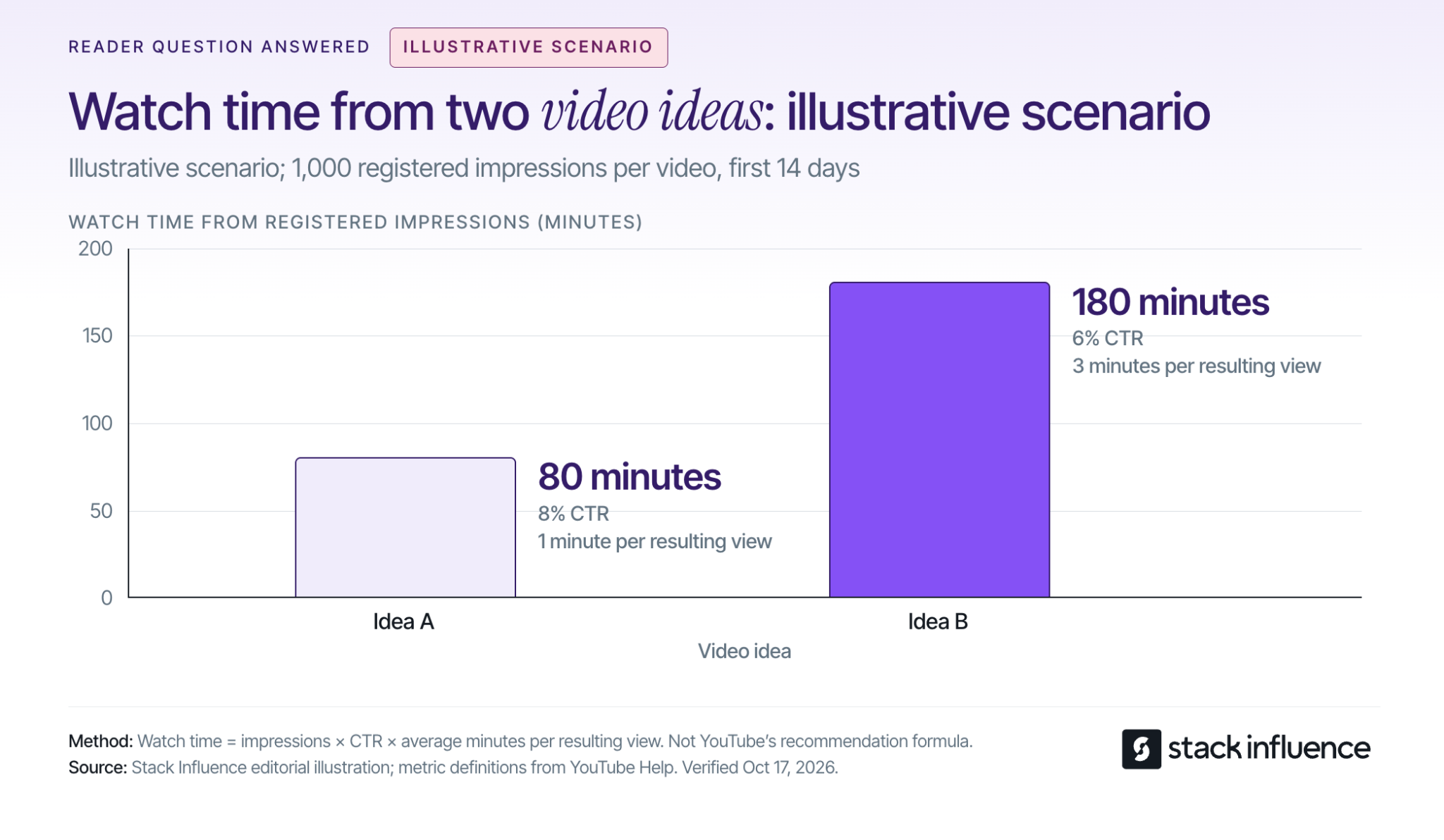
Consider an illustrative scenario with two long videos of similar length, each receiving 1,000 registered thumbnail impressions over 14 days. Assume comparable traffic sources and that all views attributed to those registered impressions qualify as engaged views:
The calculation is impressions × CTR × average minutes watched. All inputs are assumptions for the same impressions-derived viewing groups, with outside traffic excluded. This example shows why the idea with the higher CTR can produce less watch time; it is an illustration, not a channel benchmark or YouTube ranking formula.
For Shorts, inspect engaged views and the stayed-to-watch measure in YouTube’s content analytics. The documentation also records a public-view counting change from August 24, 2026, across formats, so a jump across that date may reflect the counting change.
Keep the next decision specific: clarify the title, move the demonstration earlier, answer a repeated question, or test another premise. The wider guide to growing a YouTube channel covers the distribution and community work surrounding those decisions.
Creators interested in brand partnerships can use demonstrations and real-use reviews to show how they explain a product. A UGC video is useful as a work sample when it makes the creator’s production choices and the product’s use clear.
When negotiating commercial work, agree on posting, revisions, and UGC pricing and usage rights. The FTC’s disclosure guidance calls for disclosing paid relationships and free products; disclosures for video endorsements should appear in the video itself.
Stack Influence is a micro-influencer marketing platform for ecommerce brands built around gifted-first product seeding. Its creator campaign process connects product selection, social content, and post approval. Review each campaign’s required channel and deliverables before committing, and choose products you can discuss through actual experience.
The most useful YouTube video ideas are specific enough to shoot and clear enough for someone else to understand. Pick one premise, complete the four-question filming brief, and capture the evidence that delivers its promise.
Use the finished video and audience response to decide what to make next. If creator partnerships are part of your plan, explore Stack Influence opportunities that match your interests and campaign requirements while building a portfolio that shows what you can make.

A DTC brand marketing strategy connects three decisions: why someone should buy, how you will reach that person, and how much you can spend to win their business. Start with a specific customer problem and an offer that can support its acquisition costs. Then connect discovery, product education, checkout, and follow-up around the same promise.
For ecommerce sellers, the practical goal is a repeatable way to attract suitable customers and serve them well. The plan below shows how to build that system, evaluate offers, and sequence the first 90 days.
Define the buying situation you want to serve. A description such as “health-conscious adults” gives a creative team little direction. “Office workers who want a convenient afternoon snack without keeping several bulky packages at their desk” identifies a situation, an alternative, and a possible reason to choose your product.
Shopify's marketing-plan guidance recommends defining your message, understanding customers, choosing suitable tactics, and setting measurable goals. Put that sequence into practice by reviewing customer questions, purchase feedback, support conversations, and the alternatives shoppers consider.
For a new brand, interview prospective buyers and treat your initial positioning as a hypothesis. For an established store, compare what repeat customers value with the reasons first-time buyers hesitate.
Write down five decisions:
That last answer might be a useful bundle, customization, product guidance, or replenishment convenience. Choose something your operations can deliver consistently.
For example, a hypothetical refillable-cleaning brand could target apartment dwellers with limited storage. Its initial offer could combine a reusable bottle with compact refills, while its content demonstrates mixing and storage. “Less cupboard clutter” becomes a concrete message to test, without claiming that every shopper values sustainability or that every refill product performs identically.
Set an acquisition limit before committing to a promotional offer. For this plan, first-order contribution before acquisition means product revenue after discounts, less the variable costs of fulfilling that order and the expected cost of refunds and returns.
Customer acquisition cost, or CAC, divides acquisition spending by new paying customers. Decide which costs you include, such as media, creator campaigns, production, and acquisition staff time, and use that scope consistently. Stack Influence's guide to calculating customer acquisition cost explains those cost and customer boundaries in more detail.
Consider an illustrative first order with $80 in product revenue, excluding sales tax and customer shipping payments. Assume these variable costs:
The costs total $44, leaving $36 before acquisition. The refund allowance is deducted once; the starting revenue has not already been reduced by that allowance.
Suppose you want to retain $8 per first order after acquisition to help cover fixed overhead and profit. Your allowable acquisition cost is $80 − $44 − $8 = $28.
Now apply a 10% discount. Revenue falls to $72. Holding the same $44 in costs constant, allowable acquisition cost becomes $72 − $44 − $8 = $20.
The offer comparison is:
A 10% price discount therefore reduces acquisition capacity by $8, or approximately 28.6%. These are hypothetical amounts, not ecommerce benchmarks; processing and return costs are deliberately held constant to isolate the discount's effect.
A discount could still work if it changes conversion, actual CAC, or subsequent purchasing enough to compensate. Evaluate those outcomes against the revised ceiling. If your dashboard reports media-only CAC, leave room within the ceiling for the other acquisition expenses.
Also model bundles, shipping incentives, and added services using their actual costs. A higher order value is useful only when the contribution and buying experience justify the change.
Give each channel a specific responsibility, then select a manageable initial combination. For a small team, one principal acquisition test, a matching landing page, and a relevant email follow-up sequence provide a focused starting point.
Prioritize search when customers already describe the problem or product category clearly. Build product pages and supporting content around the questions that determine a purchase, such as compatibility, ingredients, dimensions, setup, or comparisons with alternatives.
For eligible products, Google's free-listing guidance explains how product information can appear across Google. Participation does not guarantee display, and product data, shipping information, return policies, and applicable requirements need attention.
Paid search can become a controlled test of specific buying queries. Separate branded searches from broader category searches when interpreting performance, because the customer starting points differ.
Consider social content and creator partnerships when showing the product resolves a question more effectively than describing it. The cleaning-brand example could test a mixing demonstration, a storage comparison, and a realistic cleaning routine.
Choose the placement based on where relevant customers engage and what your team can produce consistently. Set the audience, creative question, destination, and spending limit before launch.
Use permission-based email to continue a useful conversation: explain product selection, answer a common objection, help someone use their purchase, or offer replenishment at an appropriate time.
Budget for content production, creator participation, product costs, tracking, and follow-up alongside media. Record an owner and a success measure for each activity so an attractive channel does not become an unsupported commitment.
Write creator briefs around the questions shoppers need answered. For the hypothetical cleaning product, “show how the refill dissolves and where you store the remaining packs” gives the creator a useful task. A request to “make an authentic viral video” gives little direction.
Select micro influencers or nano influencers whose content and product use fit the situation. Follower count alone does not establish that fit.
A practical brief should identify:
Keep genuine experience central. The FTC's disclosure guidance for social media influencers explains that free or discounted products can create a relationship that needs disclosure. It also says disclosures should accompany the endorsement and be difficult to miss.
Stack Influence's automated product-seeding workflow supports campaigns in which creators purchase products and receive reimbursement after verified social posts. The platform supports creator sourcing, coordination, and completed-post accountability. Confirm campaign costs, product requirements, and content permissions when planning your specific program.
Track completed content and customer acquisition separately. Exclude reimbursed creator purchases from the new customers you count when evaluating audience acquisition.
For implementation details, the Shopify creator-seeding pilot guide covers inventory, agreements, content permissions, and measurement. Use the resulting content where it answers a buying question and where the agreed permissions allow.
Send visitors to a page that develops the message they just saw. A demonstration about compact storage should lead to clear information about pack dimensions, included components, preparation, and the space the product occupies.
Review the purchase path on a phone. A prospective customer should be able to understand what they receive, the total expected cost, delivery information, and important limitations before committing.
Use a short diagnostic sequence:
These are investigative starting points, not proof of a particular cause. Customer feedback and direct inspection should determine the next change.
When traffic permits, test one substantial change at a time. If you change the price, page, audience, and creative simultaneously, it becomes difficult to understand which change affected the result.
Plan what happens after delivery before increasing acquisition spend. Help customers get the intended value from the product, resolve problems, and identify the next purchase only when it makes sense.
For a consumable, that could mean setup instructions followed by a replenishment message based on actual usage. For a durable product, useful follow-up might involve care, accessories, or referrals. A subscription or recurring discount should solve a real customer need.
Group customers by when they first purchased and follow their subsequent orders. Shopify's customer cohort analysis documentation describes grouping customers by first-order date and examining repeat purchasing over later intervals.
Compare cohorts at the same elapsed time after acquisition. Add order costs and acquisition costs separately to evaluate contribution; customer spending alone is not profit.
For each cohort, track new customers, first-order contribution, acquisition spending, repeat-order contribution, and refunds. Define a 90-day repeat-purchaser rate as the share of the original customers who make at least one additional purchase within 90 days of their first order.
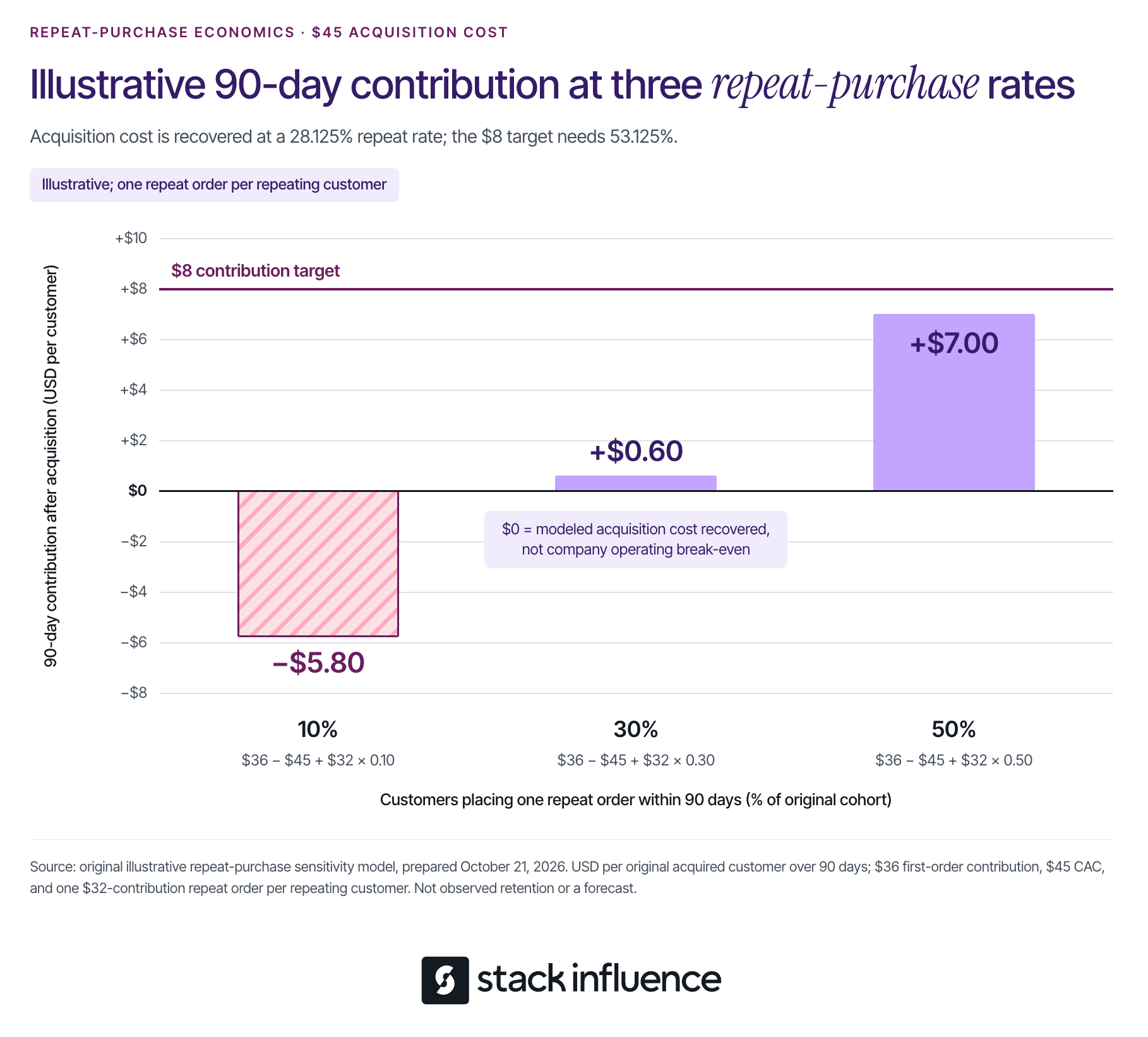
Return to the full-price example, but suppose a separate acquisition test costs $45 per new customer. First-order contribution is still $36, so acquisition initially exceeds that contribution by $9.
For this illustrative sensitivity analysis, assume every repeating customer places exactly one additional order within 90 days. That order contributes $32 after its variable costs, discounts, and incremental retention expenses; customers who do not repeat contribute no additional amount.
Average 90-day contribution after acquisition per original customer equals $36 − 45+(32 × repeat-purchaser rate).
The outcomes are:
The model recovers acquisition costs at a 28.125% repeat-purchaser rate. Retaining the earlier 8contributiontargetrequires53.125%,because(45 + $8 − $36) ÷ $32 = 53.125%.
Even the 50% scenario misses that target. Positive contribution after acquisition can still be insufficient to cover fixed overhead and the desired profit.
These scenarios are neither forecasts nor industry targets. Replace them with completed cohort observations, account for additional orders and costs, and check the cash needed while waiting for repeat purchases.
Use the following schedule as an implementation sequence. It is not a deadline for proving profitability or observing every customer's full purchase cycle.
Choose the customer problem, hero product, reason to buy direct, and initial message. Calculate the contribution target and acquisition ceiling, set a maximum test budget, and protect the inventory and cash required for existing commitments.
Prepare the landing page, creator brief where relevant, and post-purchase instructions. Agree on campaign naming and customer definitions, and verify that purchase tracking works.
Launch the principal acquisition test and review the complete journey. Document the creative, audience, offer, costs, customer count, and observation window.
Use an explicit decision rule: continue when the evidence supports the economics; revise when a specific problem is identifiable; pause when the agreed loss limit is reached. A few purchases are a reason to keep learning, not sufficient evidence for a major expansion.

Resolve the most important buying or product-experience problem, then assess the revised offer. Review available customer cohorts at equal ages and retain the same cost definitions.
Shopify's marketing attribution documentation explains that its any-click model can allocate more credit than the number of orders received. Reconcile actual store orders and costs instead of adding overlapping attributed results together.
Customers acquired during this plan will not all have 90 days of history by day 90. Mark incomplete cohorts clearly and continue observing them before using long-term contribution to justify a higher acquisition ceiling.
A useful DTC brand marketing strategy produces a clear next decision. Improve an offer that cannot support acquisition, strengthen content that leaves the buying question unanswered, or repair an experience that discourages customers from returning.
Begin with one complete customer journey. Expand the parts that show credible progress toward your contribution and customer-experience goals, with enough cash and operational capacity to support the next test.
Multichannel selling means offering products through more than one sales channel, such as your own online store and a marketplace. For an established ecommerce seller, the practical question is which additional channel can bring worthwhile demand without creating more cost and operational work than the business can support.
Start with one new channel, a manageable product selection, and a clear financial test. Connect inventory and order handling, confirm that customers can receive the right product, and measure how expansion changes contribution across the whole business. Sales recorded on a new platform are only part of that calculation.
Multichannel selling gives customers multiple places to buy from your business. Shopify's multichannel selling overview includes owned websites, online marketplaces, and physical selling locations within that definition.
A brand selling through its website and Amazon uses two sales channels. A creator's Instagram post directing shoppers to that website supplies a marketing touchpoint. A warehouse shipping those website orders supplies fulfillment. Keeping those roles separate helps you decide what to connect and what to measure.
The potential benefits include reaching buyers who prefer another purchasing destination and reducing dependence on one outlet. The tradeoff is another set of listings, operating requirements, costs, and customer requests. Expansion becomes useful when the extra demand and contribution justify that work.
Multichannel describes the presence of multiple sales channels. Omnichannel describes a connected shopping experience across them, such as a customer ordering online and collecting the purchase in a store.
Selling on two marketplaces does not by itself create a shared customer account, cart, or returns experience. Decide which connections customers actually need and which the participating platforms support. A reliable order process is a practical starting point.
Choose a channel because it supports a buying behavior you can serve. Start with evidence from customer questions, existing traffic, product searches, and your current sales patterns. A competitor's presence can suggest an opportunity, but it cannot establish your likely demand or margin.
Consider these options against a specific business goal:
Write a brief channel hypothesis: which buyer you expect to reach, what they will buy, why this destination helps, and what evidence would justify continuing. Include the spending limit and the person responsible for the pilot.
If the immediate task is a simultaneous new-product launch, the workflow for coordinating a CPG launch across marketplaces addresses that separate situation. Here, the focus is adding a channel to an operating business.
Estimate the work before committing to an integration. Record time spent checking orders, resolving mismatches, updating tracking, and reconciling exceptions. Software still requires an owner who notices failures and keeps the connections working.
Consider a hypothetical monthly workload example. Manual administration takes six minutes per new-channel order. A connected workflow takes two minutes per order plus four hours of recurring maintenance each month.
The per-order times include routine administration and average exception handling for the same service requirements. This example excludes picking, packing, marketing, software fees, and one-time implementation work. These are planning assumptions, not measured software results.
The resulting workloads are:
Calculate manual hours as orders × 6 ÷ 60. Calculate connected-workflow hours as orders × 2 ÷ 60 + 4.
Under these assumptions, the connected workflow adds two hours at the lowest volume and saves 16 hours at the highest. Replace the assumed times with your team's observations, then consider software charges and implementation costs separately. A tool can also be valuable for reducing errors, but that benefit needs its own evidence.
For a Shopify-based operation, Shopify Marketplace Connect supports synchronizing listings, orders, and inventory with supported marketplaces. Check the exact marketplace connection and required workflow before committing.
Amazon also describes multichannel selling tools in Seller Central, with a gradual rollout to sellers in its U.S. store. The initial experience includes connecting other channel accounts, importing and linking listings, viewing sales and orders, and fulfilling across channels. Confirm what your account currently offers; the announcement also describes capabilities that are still expanding.
Compare tools using actual tasks: product mapping, inventory updates, order routing, tracking, returns, error alerts, and usable exports. Request a demonstration of your difficult case, such as a bundle or partial shipment, instead of evaluating only the cleanest order.
Give each product an accurate record and each order a defined path. Assign named owners for catalog accuracy, stock availability, warehouse handoff, and customer support. A small team can combine these roles, but the responsibilities should remain explicit.
Match each channel listing to the correct internal SKU, size, color, and pack quantity. Shopify's instructions for linking existing marketplace listings explain that order and inventory syncing begins for linked listings.
Review suggested matches before relying on them. A single item and a multipack may have similar titles while consuming different inventory quantities. Keep the product facts consistent while adapting titles, images, and descriptions to each channel's presentation requirements.
Choose the system that determines available-to-sell inventory and document how reservations, damaged goods, returns, and replenishment affect it. Confirm that the stock shown to a channel can actually fulfill its orders.
Check what happens during delayed updates or a failed connection. Set a stock buffer appropriate to observed demand and synchronization behavior, and give the responsible person a way to pause the affected listing. Avoid assuming that an inventory total is current simply because it appears in a dashboard.
An order should reach the warehouse once. Shopify's Marketplace Connect fulfillment guidance warns that overlapping connections can create duplicate orders in a third-party fulfillment app.
Fulfillment can be shared across sales channels where the arrangements permit it. Amazon's Multi-Channel Fulfillment overview describes using FBA inventory to fulfill orders from other channels, including a seller's website. The website remains the sales channel even when Amazon ships the package.
Confirm the originating channel's shipping, packaging, tracking, and returns requirements before selecting a fulfillment route. Write down who responds to late delivery, cancellations, damaged items, and refund requests, including exceptions that the integration does not resolve automatically.
Start with a product group whose stock, packaging, and costs you understand. Include a representative variant or bundle if it is central to your catalog. Expanding every SKU immediately makes it harder to identify the source of a mapping or fulfillment problem.
Before increasing promotion, validate the workflow through platform-approved test methods or legitimate early orders:
Set spending and inventory limits for the pilot. Agree which failures pause promotion and who can make that decision. Review early operating exceptions frequently, then assess economics after the relevant costs and returns become visible.
Calculate contribution using revenue after discounts and the costs required to serve those orders. Include landed product cost, channel and payment fees, fulfillment, expected returns, and variable service costs. Then deduct incremental promotion, software, and operating expenses without counting any expense twice.
Keep a separate cash schedule for inventory purchases, advertising payments, refunds, and settlements. Positive contribution does not mean cash arrives before the next payment is due.
Assume a business adds a marketplace alongside an existing owned store. Each one-item order produces $40 in product revenue after discounts, excluding sales tax and before the modeled returns allowance.
For both channels, assume $12 in landed product cost, $6 in fulfillment, and a $2 allowance for net refunds, return handling, and variable service. There is no separate shipping revenue. Assume transaction and channel fees of $2 per store order and $6 per marketplace order.
These hypothetical amounts are not any platform's current prices. Under this simplified model, the store contributes $18 per order and the marketplace contributes $14 before paid promotion and fixed overhead:
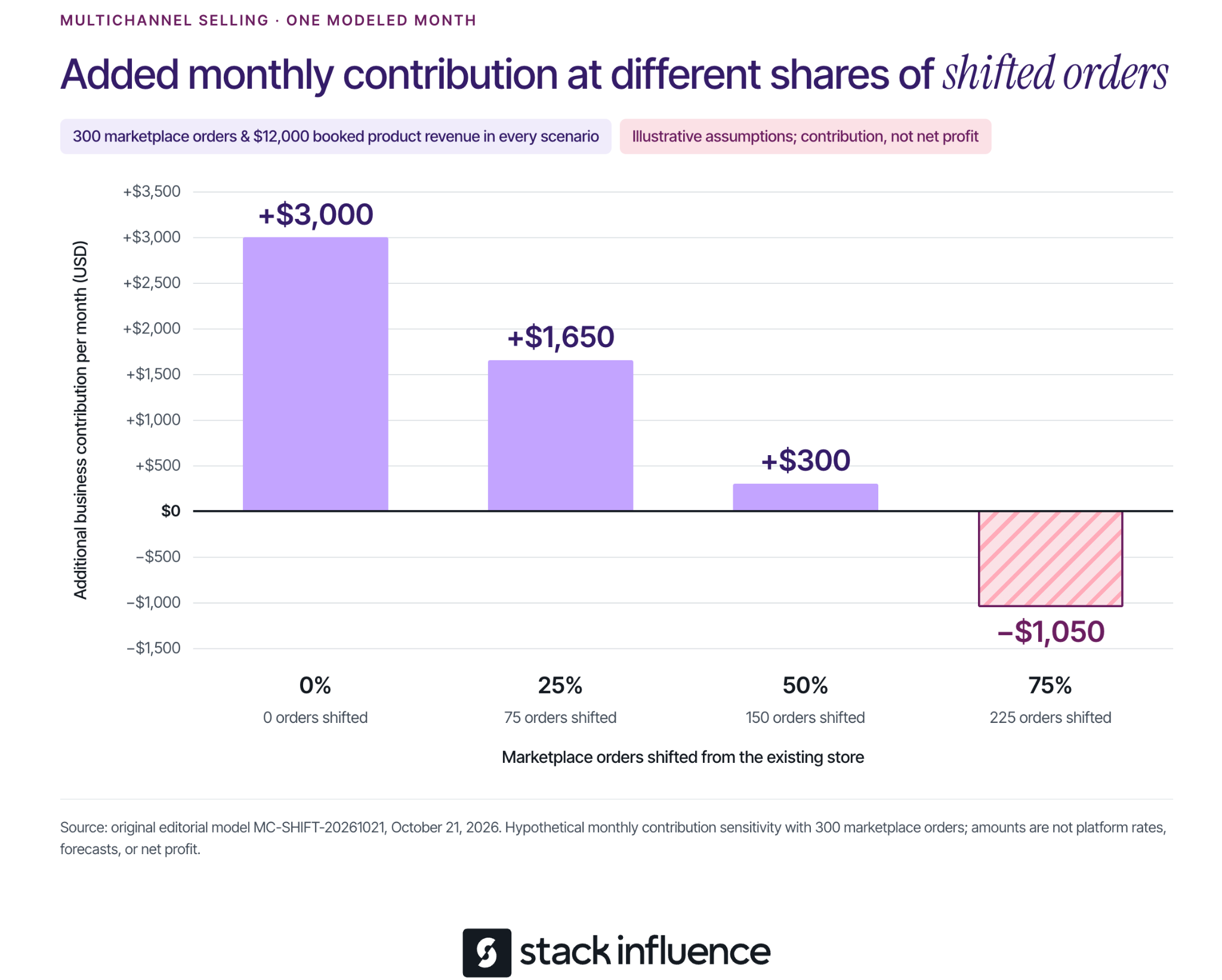
Now assume the marketplace generates 300 orders in a month. That produces $12,000 in booked product revenue and $4,200 in contribution before additional monthly spending. Add $900 in promotion and $300 in software and operating capacity, for $1,200 in new monthly expenses.
The remaining question is how many marketplace orders would otherwise have occurred on the store. Call these shifted orders. Each shifted order replaces an $18 store contribution with a $14 marketplace contribution.
The sensitivity calculation is:
Additional monthly contribution = (300 × $14) − (shifted orders × $18) − $1,200.
The outcomes are:
All four scenarios record the same $12,000 in marketplace revenue. Their value to the business differs because the amount of replacement demand differs.
This example assumes unchanged baseline advertising and shared overhead, sufficient inventory and capacity at the stated costs, and no other sales changes. Every nonshifted order is assumed additional; future repeat purchases, financing, income tax, and other unlisted costs are excluded. It measures incremental contribution, not net profit, and is separate from the earlier workload example.
The shift percentages are sensitivity assumptions, not facts you can read from a channel dashboard. Compare total product sales and contribution across channels, while considering seasonality, stockouts, discounts, and changes in existing marketing. Where feasible, a planned comparison across products or markets can strengthen the estimate.
Keep the uncertainty visible. A new customer identifier on one platform does not establish that the buyer is new to the brand or that the purchase would otherwise never have occurred. Use a range of plausible assumptions when the evidence cannot support a precise figure.

Once the order process works, match promotion to the destination. Product demonstrations can answer buying questions, but shoppers still need the correct variant, current offer, and delivery information when they arrive.
For brands using micro influencers, Stack Influence's automated product-seeding workflow supports creator coordination, purchase and posting steps, post verification, and reimbursement. Define the campaign's purchase destination, content requirements, and permission for any planned reuse before scheduling activity.
A creator's social post, a listing asset, and a paid advertisement can require different permissions and edits. The FTC's influencer disclosure guidance explains that free products and other material brand relationships require clear disclosure when the creator endorses the product.
Track campaign-funded purchases separately from independent customer demand. Include the reconciled campaign cost in the channel decision, and keep content production, attributed orders, and additional business contribution as separate measures. That makes the marketing results more useful when deciding whether to expand.
Continue when the order process is dependable and the contribution remains worthwhile under reasonable assumptions about costs and shifted demand. Expand the product selection or promotional budget in increments your inventory and team can support.
Adjust when there is a specific, testable constraint, such as an unprofitable bundle, excessive returns, or a costly manual task. Give the change an owner and a review point. Pause expansion when fulfillment failures persist or the economics depend on assumptions the evidence does not support.
The next step is to select one channel, document its operating responsibilities, and build the pilot around the products you understand best. Multichannel selling becomes manageable when every new purchasing destination has a clear purpose, a reliable workflow, and a defensible contribution to the business.
An Amazon review strategy should help you collect honest customer feedback and use it to improve the next purchase experience. For ecommerce sellers, the practical starting point is to make eligible review requests consistent, evaluate Amazon Vine for suitable products, and investigate the problems customers repeatedly describe.
Begin with one product. Check whether your team is missing eligible orders, whether the listing sets accurate expectations, and whether the product delivers on those expectations. Each problem calls for a different action. This guide explains how to choose that action, run the process, and measure progress without treating a request, a rating, and a written review as the same result.
Choose your first action from the product's current situation. A listing with very few orders needs a different plan from a busy listing whose customers repeatedly describe the same problem.
These activities can run together. The distinction helps you avoid spending on a review service when the immediate problem is an unfinished listing or an unowned operational task.
Set the rules before assigning the work. Amazon's seller review-policy guidance prohibits buying reviews, exchanging incentives for reviews, requesting review changes or removal, and directing positive feedback to Amazon while diverting negative feedback elsewhere. It also makes sellers responsible for associated employees and contracted third parties.
Apply that review to agency instructions, packaging inserts, messaging software, and creator briefs. Remove requests for five stars, review-linked gift cards, and instructions that make a benefit depend on a customer posting feedback. Ask a provider to show the actual workflow before authorizing it.
Next, inspect the product as a customer would. Can someone identify its dimensions, compatible uses, included components, and important limitations before purchasing? Open a current production unit and compare the contents and instructions with the listing. Record discrepancies so the person responsible can correct them.
Amazon's built-in request is a useful starting point because it supplies the message instead of requiring your team to write one. Amazon's Request a Review instructions describe one standardized email requesting both a product review and seller feedback, available once per order between 5 and 30 days after delivery.
Use the feature's actual availability to determine whether an order can receive the request. A date calculation alone should not override an unavailable button.
For a manual workflow, open Manage Orders in Seller Central, select the shipped order, open its order details, and use Request a Review when available. Assign a person to check eligible orders regularly enough that they do not age out of the window.
Keep a simple operating record containing the order identifier, product, delivery date, eligibility check, request date, and any reason the request could not be sent. Record confirmed requests separately from attempts that failed. If multiple products share an order, maintain one order-level request record so different product owners do not duplicate the work.
Amazon's buyer communication rules also permit qualifying review requests through Buyer-Seller Messaging, but prohibit repeated requests and requests conditional on a positive experience. Choose one route for each order. When using Request a Review, do not add another review-request email to the same buyer for that order.
Choose a consistent send point within the permitted window that gives customers a reasonable opportunity to use the product. Treat that timing as an operational choice to evaluate, rather than assuming one day works best for every category. Do not use a satisfaction survey to decide who gets asked.
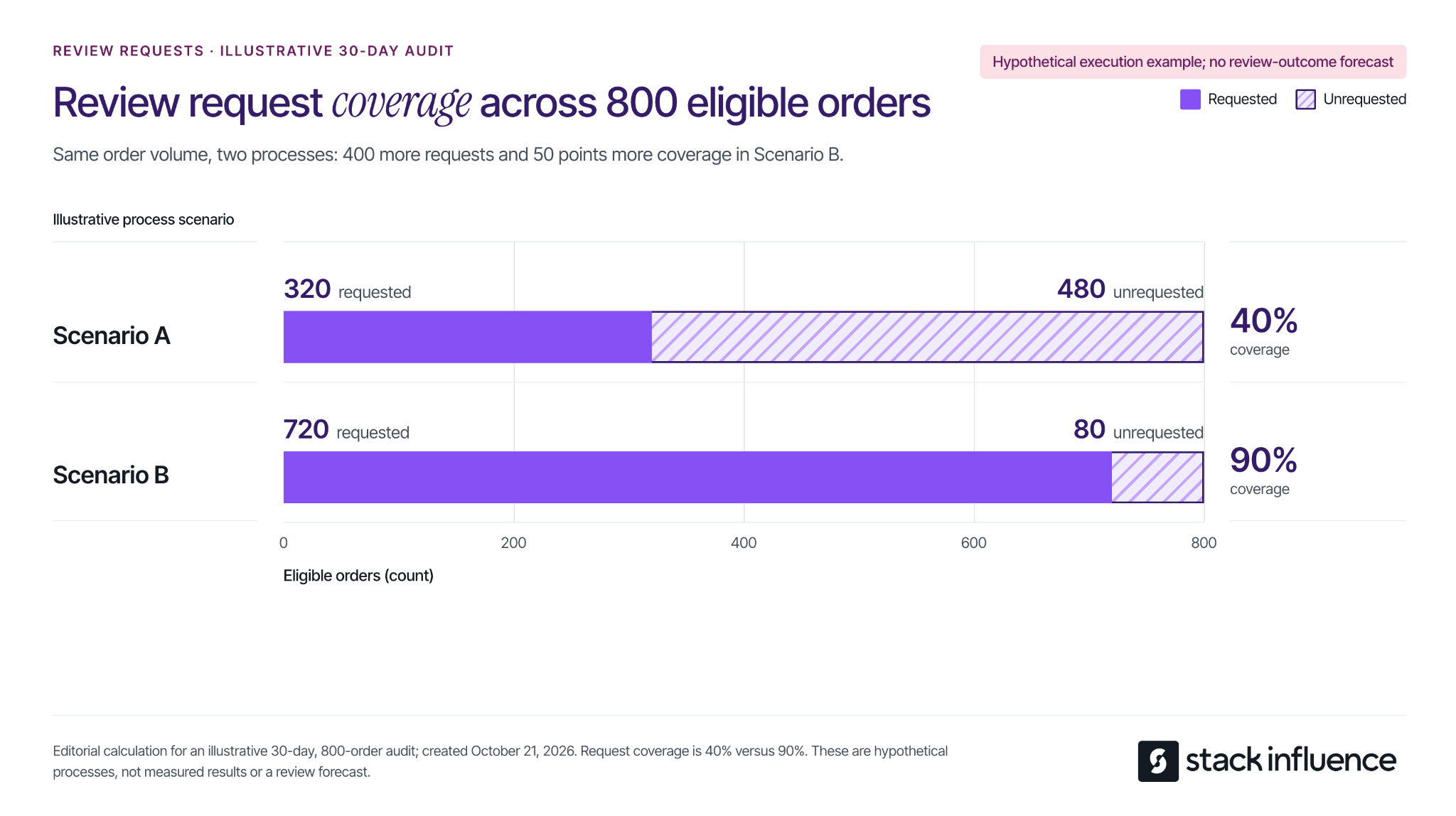
Calculate request coverage as unique eligible orders receiving a request divided by all unique orders confirmed eligible during the same audit period, multiplied by 100. Preserve the eligibility record, including for orders already requested; a current list of unrequested orders is not the full denominator.
Consider an illustrative 30-day audit for one product, with 800 eligible ordinary-customer orders. Compare two alternative request processes for that same order volume:
The difference is 400 additional requests and 50 percentage points of coverage. These are hypothetical process examples, not Amazon benchmarks or measured seller results. Review outcomes remain unmeasured.
This calculation identifies an execution gap your team can investigate. Check missed batches, unavailable actions, and duplicate-request controls before changing software. If coverage is already consistent, shift attention to product experience and customer demand instead of sending more messages to the same people.
Vine gives eligible products access to Amazon-invited reviewers who can share independent opinions. Check the current Amazon Vine requirements and fees: participation requires a Professional selling account, eligible FBA offers, and either a qualifying Brand Representative or Reseller role for a registered brand, or generic products in the catalog.
Existing products must have fewer than 30 reviews; eligible prelaunch FBA listings can also participate. Confirm the specific ASIN's eligibility before reserving inventory.
The published US enrollment fees per parent product are:
Budget separately for the units provided and applicable fulfillment costs. A zero enrollment fee does not make the entire activity cost-free. Recheck the fee and enrollment terms when making the commitment.
An Amazon community manager's explanation of Vine confirms that enrollment does not guarantee every unit will be claimed or a specific number of reviews published. Plan around the inventory and budget you can commit without requiring a particular rating or review count in return.
Before enrolling, inspect the same product version customers will receive, including the instructions and packaging. If you already know assembly is confusing or a component is missing, correct that issue first. Vine feedback should help evaluate a product that is ready for customers.
Keep three figures separate in your working record: units enrolled, units claimed, and reviews published. That distinction helps explain what has happened without calling every enrolled unit a completed review. For a broader launch, the Amazon product launch checklist connects this decision with listing readiness, available inventory, and promotional timing.
Read critical feedback for the underlying problem, then assign an action that can be checked. A low rating alone does not tell you whether the issue concerns product performance, unclear expectations, or instructions.
For each review you investigate, record the product version, review date, described problem, supporting detail, responsible owner, and proposed change. Preserve the customer's meaning when summarizing. If the available text is ambiguous, mark the cause as unconfirmed rather than filling in the gaps.
Imagine a seller examining 30 written reviews that mention a problem. For this hypothetical exercise, assign each review to one primary issue, even if it mentions several:
The first two categories account for 21 of 30 reviews, or 70% of this illustrative sample. That makes instructions and size communication useful starting points for investigation. It does not mean 70% of customers encountered those problems, and the sample is not an estimate of the product's defect rate.
Translate the categories into work. Ask someone unfamiliar with the product to follow the current setup instructions. Compare listing dimensions with a measured unit and add a clear scale reference where needed. Investigate durability complaints against the stated use conditions, and check component counts against the packing specification.
The classification is a prioritization aid, not proof of the cause. A size complaint may reveal an unclear listing, a manufacturing discrepancy, or a product that does not suit that customer's use. Check the underlying evidence before deciding which change to make.
Give each action an owner, a completion date, and an observable result, such as revised instructions being included in newly packed units. Track when changed inventory reaches customers. Reviews posted immediately after a packaging update may still describe units packed before that update.
Where available, Amazon's Customer Reviews tool provides a Contact Customer option for ratings below three stars, allowing eligible brands to offer support or a courtesy refund. Access requires a Professional selling account and a Brand Representative role for a brand enrolled in Brand Registry.
Use the available support workflow to resolve the problem. Keep any remedy independent of whether the customer changes a review, and do not request an edit or removal. Record the service action and the operational lesson separately so a resolved support case is not reported as an improved rating.
Creator partnerships can help explain how a product works, show its dimensions in context, and answer questions prospective buyers have. Define the deliverable as the intended social content and specify the applicable usage permissions and disclosure requirements.
Amazon's rules on promotional customer reviews distinguish ordinary customer feedback from review-linked rewards and promotional relationships. A generally available customer discount is different from a benefit tied to writing a review. Calling a creator's review optional does not by itself resolve the compensation or conflict-of-interest questions.
For campaign planning, keep gifted or reimbursed creator participants outside the customer-review solicitation workflow. Do not include an Amazon customer review as a creator deliverable or condition future opportunities on one. This is an operational recommendation for keeping the two activities clearly defined.
For social endorsements, the FTC's influencer disclosure guidance explains that free products and other material relationships need clear disclosure with the endorsement. That disclosure addresses the social content; it does not authorize a customer review that Amazon otherwise prohibits.
Stack Influence's automated product-seeding workflow supports creator coordination and completed social content. When that work is part of your marketing plan, specify the buyer question each demonstration should answer and evaluate the resulting posts and assets. Keep customer-review counts outside the promised campaign deliverables.

Use the first month to establish a dependable routine and identify what needs fixing. The schedule below is an editorial operating suggestion, not a deadline for reaching a review target.
Keep ratings, written reviews, and seller feedback in separate fields. Amazon's Community Guidelines allow star ratings without written text and distinguish product evaluation from seller-service feedback. Label each count exactly as the source presents it.
Record the date and product scope whenever you capture a visible count. Treat the difference between two snapshots as a net change, not necessarily the number of newly submitted reviews. Avoid comparing a parent-level count with a single variation's orders as if the populations automatically match.
Review request coverage alongside order volume, recent written feedback, and completed fixes. A same-month ratio of new visible reviews to orders does not establish which requests produced those reviews. If you cannot connect the populations and timing, describe the figures separately rather than presenting a response rate.
After a change, compare feedback over equivalent observation periods and consider differences in sales volume, product versions, and available evidence. An improvement following a change is a reason to investigate further; timing alone does not prove the change caused it.
Start with the gap your records can demonstrate. Close missed request opportunities, resolve the Vine decision, or assign a recurring product problem to someone who can fix it. Keep the process neutral and make each action visible in the operating record.
A useful Amazon review strategy leaves you with more than a review-count target. It gives your team a consistent way to invite honest feedback, understand what customers experienced, and make the next purchase better informed.
To drive traffic to your Shopify store, make your products discoverable in search, give relevant audiences a reason to visit, and bring interested shoppers back. Start with one active acquisition channel, such as search ads or creator demonstrations, while building your search presence and email list.
The right starting point depends on how people buy your product. A shopper searching for a specific replacement part needs a different route than someone discovering a kitchen organizer through a demonstration. Match the channel, message, and destination, then measure whether those visits produce worthwhile orders.
Start with a product or closely related collection and one customer problem. This makes it easier to choose a useful message and see which traffic source responds.
Use these starting points:
For example, a drawer-organizer seller could target searches about expandable organizers and publish a demonstration of fitting an awkward drawer. Both routes should lead to a page with dimensions, compatibility details, and the demonstrated product.
Before promoting that page, check it on a phone: confirm that the item is available, the price and delivery information are clear, and checkout works. If visits already arrive but orders do not, use the guide to diagnose Shopify conversion problems to locate the obstacle before expanding the campaign.
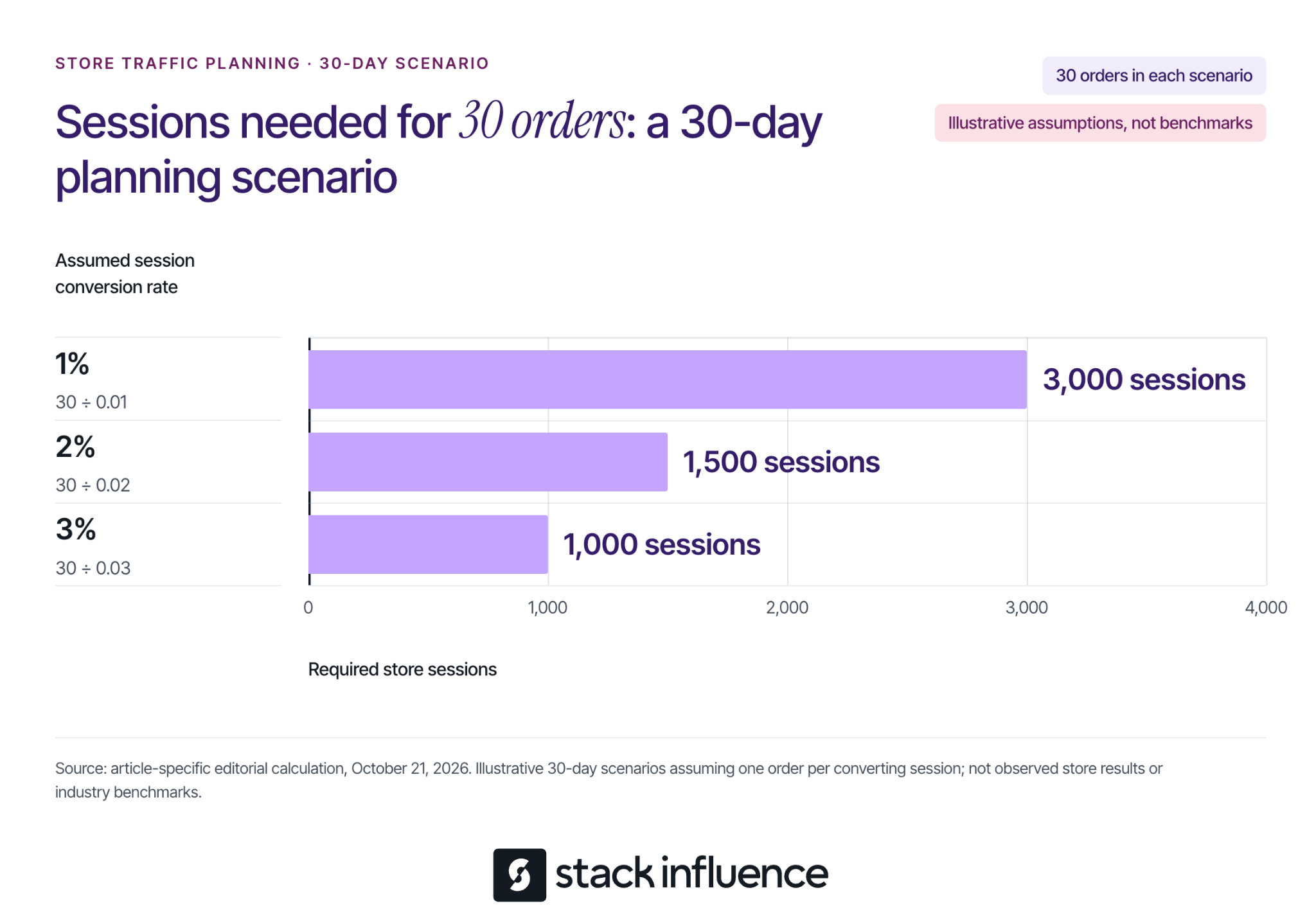
An order goal makes a traffic target more useful than a vague request for more visitors. Shopify's marketing performance documentation defines online store conversion rate as the percentage of sessions that result in an order.
For planning, divide your target orders by an assumed session conversion rate expressed as a decimal. Suppose you want 30 orders during a 30-day campaign and assume one order per converting session:
These are illustrative planning assumptions, not Shopify benchmarks, measured results, or guaranteed outcomes. They show why the same order target can require very different traffic volumes. The calculation does not establish that a channel can supply those sessions at an affordable cost.
Use your own source-specific history when available. For a new store, keep several scenarios until you have enough observations to replace assumptions. Do not assume a campaign reaching unfamiliar shoppers will convert like an email sent to people who already know your products.
Search gives you a way to meet shoppers who are already describing a need. Work on the pages that best answer that need before publishing a large volume of loosely related content.
Use a product page for a specific item, a collection page for a relevant selection, and a guide for a question that needs explanation. For the organizer example, an expandable-drawer-organizer collection serves a shopping task; a guide to measuring kitchen drawers serves a preparation task.
On each priority page, write a distinctive title, explain the product in concrete terms, and answer material questions about size, materials, use, and limitations. Shopify's keyword placement guidance identifies titles, meta descriptions, image alt text, and body content as editable places for relevant wording. Keep that wording natural, and use alt text to describe the image.
A useful guide can explain how to measure drawer interiors, account for obstructions, and choose a suitable organizer. Include original measurements or demonstrations where you have them, then link to products that actually fit the advice. Avoid publishing an article that answers a popular question with no useful connection to what you sell.
Check discovery as well as content. Shopify automatically maintains a sitemap; its sitemap submission instructions explain how to submit sitemap.xml through Google Search Console after verifying your store. Make sure the storefront is accessible to crawlers, and do not treat submission as a promise of immediate indexing or rankings.
Google product listings offer another search-discovery route. Shopify's free Google listings guidance explains how eligible stores sync products to Merchant Center through the Google & YouTube channel.
Before connecting, review the Google & YouTube channel requirements, including store accessibility, payment setup, policies, contact information, and applicable product and shipping requirements. If you already manage a Merchant Center feed, review that setup before introducing another connection.
Then check that free listings are enabled, review product issues, and keep prices and availability consistent with your store. Google's free listings documentation explains that these placements promote product pages and that eligibility does not guarantee display. It also directs merchants to the Products section's Needs attention tab to identify data problems.
Free placement means no advertising charge for that listing. Preparing accurate product information and maintaining the feed still require work.
A shopper who does not know your product needs a reason to investigate it. Build the content around a recognizable problem and make the next step specific.
Choose a platform where you can demonstrate the product and participate consistently. For the organizer example, film the drawer before installation, show the measurement and fitting process, and explain who should choose a different size.
Use a call to action that continues the demonstration, such as checking the dimensions or viewing the available sizes. Choose a supported link placement, test it on mobile, and send visitors to the matching product or collection. Review store visits alongside views and engagement so you can tell whether the content produces traffic.
Answer relevant questions in comments and communities without turning every response into a promotion. Where links are permitted, share a useful guide or product explanation that resolves the question.
Consider micro influencers whose content and audience match the buying situation. Review their recent demonstrations and audience questions, then confirm what they will publish, where the store link will appear, and what the audience will find after clicking.
Commissioning a UGC video for your brand's own channels does not automatically include distribution to the creator's audience. Specify both deliverables when you need both, and agree on the intended uses and duration before republishing content or running it in ads.
For U.S. endorsements, the FTC's influencer disclosure guidance covers material connections including free products and payment. Make the relationship clear with the endorsement, and ensure the content reflects the creator's actual experience.
Stack Influence's Shopify creator campaigns support sourcing and vetting creators, coordinating product seeding, verifying completed posts, and collecting content. Confirm the campaign's purchase-and-reimbursement or gifting process, deliverables, permissions, and costs before launch.
Keep creator sample purchases and reimbursements separate from genuine customer-acquisition results. The Shopify product-seeding pilot guide provides a more detailed workflow for planning those operational and measurement boundaries.
Approach a complementary business, specialist publisher, or community organizer with a useful collaboration. An organizer brand could contribute a measurement guide to a home-organization newsletter, with a relevant store link if the publisher agrees.
Give the partner a distinct tagged link and agree on any payment, commission, or reciprocal promotion. Evaluate referred visits and customers against the full arrangement cost. An audience's relevance matters more to this test than the size of the mailing list alone.
Email gives interested people another route to your store after their first encounter. Invite visitors to subscribe for something relevant, such as restock notices, product guidance, or early access to a launch.
Follow Shopify's subscriber management guidance: send promotional campaigns to people who agreed to receive marketing, and use relevant subscriber segments. Buying a list is not a substitute for building that permission.
Start with a welcome message that delivers what the signup promised and links to a useful next step. Follow with messages based on actual interests or purchase history, instead of sending every subscriber the same product recommendation.
Shopify Messaging's marketing automation templates include welcome messages and separate workflows for abandoned browsing, carts, and checkouts. Review each automation's eligibility, recipients, message, and destination before activating it, and avoid overlapping reminders from multiple apps.
A return visit is not necessarily a repeat purchase. Someone who first discovered you through a creator and later buys through an email is still a first-time customer. Track that distinction when deciding whether a channel mainly brings people back, acquires customers, or does both.
Use paid traffic to test a specific product, audience, and promise. Search ads are a logical test when you can identify purchase-related queries; paid social is a logical test when a demonstration can introduce the product. Choose according to the buying situation and evaluate the resulting orders.
Before setting a budget, estimate what an order leaves after discounts, expected refunds, product cost, fulfillment, shipping subsidies, payment fees, and other applicable variable costs. This contribution must help cover acquisition spending and fixed overhead. Revenue alone does not tell you how much traffic you can afford.
Consider a separate illustrative 30-day campaign with 1,000 tracked sessions, a 2% conversion rate, and one order per converting session. That produces 20 modeled orders. Assume each order leaves $25 before acquisition spending, so the campaign generates $500 of pre-acquisition contribution:
In this model, $0.50 per tracked session is the first-order break-even ceiling before fixed overhead. These values are assumptions, not typical advertising prices or promised conversion rates. The model excludes repeat purchases and holds the conversion rate and order contribution constant across all three scenarios.
Include relevant media, creative, and campaign-management costs once when calculating acquisition spending. Cost per tracked session is not automatically the platform's cost per click, because clicks and recorded store sessions are different measurements. Use a working budget below your ceiling if you need room for overhead and uncertainty.

Use 30 days as an operating schedule, not a promise of enough data or a deadline for SEO results. Keep the product, audience, destination, spending limit, and success measure explicit.
Tag links consistently so you can separate campaigns. For an illustrative Instagram creator placement, use utm_source=instagram, utm_medium=influencer, utm_campaign=drawer-fit-pilot, and utm_content=creator-a-demo. Use the same campaign name across related placements and a distinct content value for each; check that the destination works after adding the parameters.
Shopify's marketing reports include a Performance by marketing channel report for comparing paid, organic, and referring traffic. Keep the reporting period and attribution model consistent, and reconcile costs separately when a report shows missing spend. A dash for unavailable cost data is not zero spending.
Organize the work into four passes:
Attribution describes assigned credit, not proof that every reported order was caused by a campaign. Reconcile customer and order records before adding results from different platforms, and record concurrent promotions or stock problems that could affect the comparison.
If the sample is small, carry forward the uncertainty instead of declaring a winner. Keep longer-term search work moving while you learn from the active test.
Choose one customer problem, one destination, and one active route to that page. Build the search and email foundations alongside it. Your next investment should follow what you learn about relevant visits, completed purchases, and acquisition costs, with a clear explanation of what you expect the next test to resolve.
A useful YouTube Shorts strategy starts with a specific viewer, a repeatable reason to watch, and a way to decide what to improve. Choose a few related series, make each video deliver one clear payoff, and compare results before expanding your schedule.
For the next 30 days, your goal is to learn which ideas attract the audience you want and give those people a reason to return. This guide provides a practical publishing plan, a sample script, and two worked examples for interpreting your results.

Start by completing this sentence: “I make Shorts for people who want to ___, and each video helps them ___.”
For example: “I make Shorts for beginner creators filming products at home, and each video helps them solve one filming problem.” That promise gives you a useful boundary. A lighting demonstration belongs; an unrelated celebrity reaction needs a separate reason to be there.
Next, choose one primary outcome for the month. You might prioritize subscribers interested in your niche, viewers continuing to a longer tutorial, or a portfolio of clear demonstrations. Record other results, but use your main objective to decide which ideas deserve another attempt.
YouTube’s Shorts discovery guidance explains that recommendations reflect viewer personalization and performance, including the choice to watch, viewing duration, and satisfaction signals. That supports a practical starting point: make the intended audience and the value of each video easy to recognize.
For the beginner filming channel, try these editorial examples:
Write four distinct ideas for each series. This creates a 12-video starting plan without requiring 12 unrelated concepts. For product demonstrations, Stack Influence’s guide to making a product review video offers additional planning and filming guidance.
YouTube’s advice on learning what content to create recommends grouping videos by characteristics such as series or audience and checking whether an exceptional upload is distorting the comparison. Keep your series labels consistent so you can revisit those patterns.
Write the payoff before the opening line. Decide what viewers should understand, see, or be able to do when the video ends. Then choose the opening image that makes that outcome immediately relevant.
A creator demonstrating a desk setup could open with the actual problem: a distracting background visible in the finished shot. The rest of the Short should show the adjustment and its result. An introduction about the creator’s day would add little to that particular promise.
Here is an illustrative 30-second script:
Use those timings as a drafting aid. Give an important demonstration enough time to make sense.
During editing, check the video with sound on and off. Keep speech understandable, correct captions, and make the key action visible on a phone. Cut repeated explanations, but retain the context needed to understand the result.
Write a title that names the actual problem, such as “Clean Up a Busy Product Video Background.” Use relevant topic words and hashtags only where they describe the video. Avoid making the title promise a transformation that the footage never demonstrates.
Use the time required to deliver the idea clearly. YouTube’s three-minute Shorts guidance says standard-channel uploads made on or after October 15, 2024 can qualify as Shorts when they are square or vertical and no longer than three minutes.
The available duration gives you room for a fuller demonstration. It does not tell you how much time your particular explanation needs.
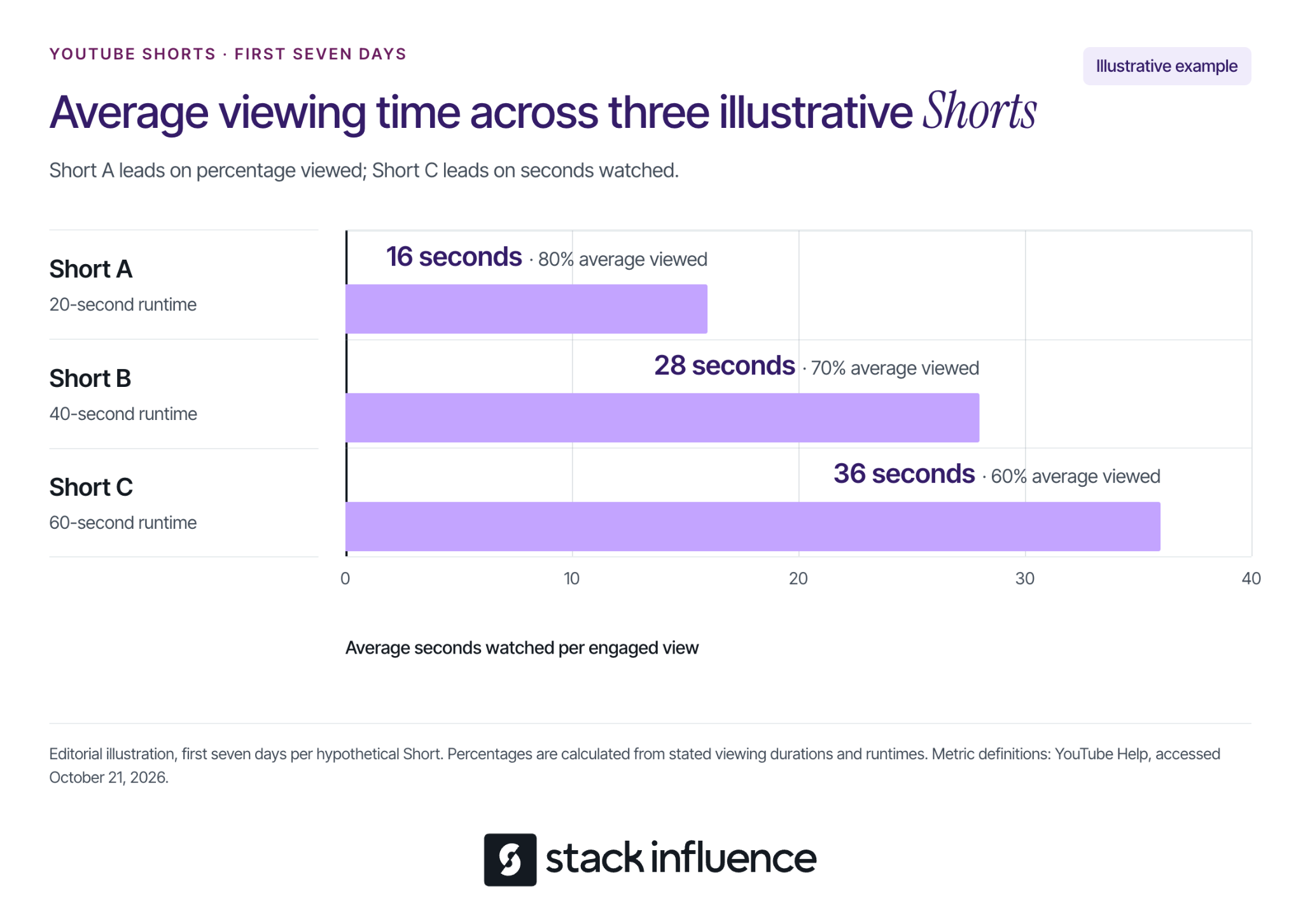
When comparing lengths, distinguish average view duration from average percentage viewed. YouTube’s retention metric definitions base both measures on people who stayed to watch, using engaged views and their associated watch time.
Consider this illustrative example. Assume three different Shorts from one channel, organic viewing only, each measured over its first seven days, with no repeat viewing:
The calculation is average view duration divided by runtime, multiplied by 100. For Short B, 28 ÷ 40 × 100 = 70%.
Short A has the highest percentage viewed. Short C has the most seconds watched per engaged view. Neither measure, on its own, establishes the best video or the best length for future uploads.
These invented figures teach the distinction; they are not performance targets. For your channel, compare similar subjects and formats, then examine where viewers leave. A detailed test and a single visual tip can reasonably need different amounts of time.
Use three Shorts per week as an adjustable starting schedule. Across four weeks, that gives each of your three series four uploads. Reduce the schedule if it leaves insufficient time to make the videos useful.
YouTube states that no minimum posting cadence is required for videos to perform well. Its Shorts upload schedule tips recommend considering production time and sustainability, including filming in batches.
Publish one Short from each series. Keep the production process manageable, and record what each upload was intended to achieve.
For every Short, save its series, topic, opening, runtime, publication date, production time, and intended next action. Add a review date seven days after publication. A simple content calendar can keep filming, editing, and review dates together.
Publish another installment of each series. Choose one main adjustment, such as showing the result before explaining the problem.
Keep other major choices reasonably similar where practical. If you simultaneously change the topic, length, style, and opening, it becomes harder to identify which change deserves another test. Separate uploads still reach different audiences, so this is an observational learning exercise.
Publish a third installment of each series using questions from comments or gaps you noticed while reviewing the earlier clips. Turn a specific question into a complete demonstration.
If people ask how the same setup works in a smaller room, show that situation. Keep a record of the question that inspired the video so you can judge whether the response addressed it.
Publish the fourth installment of each series, concentrating on the clearest lessons from earlier uploads. Give each installment a distinct problem, example, or result.
Batch related filming tasks together, such as recording several demonstrations while the same camera and lighting are ready. Review music permissions and any restrictions shown in Studio before publishing.
Review only videos whose first seven days have elapsed when making that comparison. The final week’s uploads may need a later review after their full windows close.
Choose which series to continue, which needs a different opening or payoff, and which requires too much production effort for your current goals. Seven days is a suggested review interval, not a deadline for a Short’s performance to finish developing.
Open YouTube Studio, go to Analytics, and select Content and then Shorts. YouTube’s Shorts analytics guidance explains the available reports, including feed appearances, the choice to view versus swipe away, and subscriber changes.
YouTube’s explanation of Shorts view counting states that, since March 31, 2025, Shorts views count starts and replays without a minimum watch-time requirement. Keep that distinction in mind when a large public count looks more impressive than the rest of the results.
Read the measures in this order:
A high average percentage viewed describes the group that stayed. It does not establish that most people encountering the Short stopped scrolling. Do not calculate Stayed to watch by dividing engaged views by public views.
If your goal is building a subscriber audience, calculate a custom ratio: subscribers gained per 1,000 engaged views.
Use subscribers gained attributed to the selected videos. YouTube’s subscriber metric documentation distinguishes video-specific reporting from channel-wide subscriptions. Keep the subscriber and engaged-view figures at the same video and reporting-window scope.
Here is a separate illustrative scenario. Assume four Shorts per series from one channel, no paid promotion, and each Short measured over its own first seven days:
For each series, divide the sum of subscribers gained by the sum of engaged views, then multiply by 1,000. Quick Fixes therefore produces 24 ÷ 4,000 × 1,000 = 6. Pool the underlying counts instead of averaging the individual videos’ ratios.
Product Tests generates the most subscriptions in this example, while Quick Fixes generates more subscriptions relative to engaged views. Your decision also needs production effort and the audience you want to serve.
These figures are invented, and the ratio is an editorial analysis tool. It is neither an official recommendation signal nor a unique-person conversion rate. Inspect individual uploads before treating a series-level pattern as worth repeating.
Choose a next video that continues the same task. A Short demonstrating cleaner framing could lead to a complete home filming setup. The connection should be understandable from the Short itself.
YouTube lets creators add a related video to a Short after upload. The feature requires advanced feature access, and the destination must be a public or unlisted video from your channel that follows Community Guidelines.
In YouTube Studio, open Content, select the Short, choose a Related Video, and save. Point viewers toward that continuation with a specific invitation, such as “The full setup walkthrough is linked with this Short.”
Check the route you are asking viewers to use. YouTube’s link-sharing guidance says ordinary URLs in Shorts descriptions and comments are not clickable; related-video links and channel profile links are clickable.
If you also create longer videos, review the Viewers across formats report to see audience overlap. An overlap does not establish that a particular Short caused someone to watch a longer video.
Turn a disappointing result into a specific hypothesis. Compare against your own relevant uploads and inspect the video before changing your entire strategy.
These are hypotheses to investigate, not diagnoses proven by a single metric. Keep a brief decision note: “Next time I will change ___ because the video and its results suggest ___.”
For creators pursuing brand collaborations, retain demonstrations that show how you explain a product honestly and clearly. Keep their actual results and reporting periods with the clips so your portfolio does not depend on a single public view count.
If product collaborations are part of that goal, review how Stack Influence creator collaborations work and check the requirements of each available opportunity.
Start with one audience promise, three useful series, and a schedule you can sustain. Make each Short worth watching on its own, then compare the viewing experience with the audience outcome you wanted.
At your next review, choose one change you can explain and test again. That gives your YouTube Shorts strategy a practical direction for the following month.
Average order value (AOV) measures how much revenue an order generates on average. Calculate it by dividing revenue by the matching number of orders for a defined period.
For ecommerce sellers, the useful question is how to increase that amount while preserving conversion and the money left after variable costs. A bigger basket can come from a better product combination, a different customer mix, or a costly promotion. Each calls for a different decision.

Calculate average order value by dividing the revenue from a defined group of orders by the number of those orders. Keep the dates, currency, sales channel, and inclusion rules consistent.
Average order value = revenue from included orders ÷ number of included orders
For an illustrative example, suppose your store records $36,000 in merchandise revenue after discounts from 600 paid customer orders during a 30-day period. Shipping and taxes are excluded, and there are no later adjustments in this initial calculation.
AOV = $36,000 ÷ 600 = $60 per order
Count orders rather than customers or individual items. One customer placing three orders contributes three orders to the denominator. An order containing three products still contributes one.
Shopify's Sales reports definition of average order value uses original product revenue after discounts, excluding taxes, shipping, and subsequent order adjustments such as returns. Check the definition of the specific report you use before comparing its number with another dashboard.
For your own operating analysis, document which order statuses qualify. A view restricted to paid customer orders can differ from a platform's default reporting. When working from line-item exports, deduplicate by order ID so multiple products do not inflate the denominator.
Track later refunds with a separate, clearly labeled measure. If the same 600 original orders subsequently generate 1,200inmerchandiserefunds,refund-adjustedrevenueperoriginalorderbecomes(36,000 − $1,200) ÷ 600 = $58.
Keep those refunds attached to the original group of orders when evaluating its outcome. Subtracting refunds from older purchases from this week's revenue would answer a different question. Give comparison groups the same opportunity for returns to appear.
A good AOV supports your store's economics and matches what customers reasonably need to buy. A universal dollar target cannot account for different catalogs, prices, margins, and purchase frequencies.
For context, Littledata's October 2026 AOV benchmark reports a median store AOV of $108 across 427 qualifying Shopify stores using Littledata, measured from July 13 through October 10, 2026. Category medians ranged from $70 for Beauty & Skincare, based on 38 stores, to $215 for Home & Furniture, based on 62 stores.
Those figures are medians of store-level AOVs, not the median individual order or a representative average for all ecommerce. They are reported in US dollars, but the sample is not identified as US-only. Use them to frame a comparison, not to set a mandatory target.
Start with your own comparable periods and segments: similar products, promotion intensity, countries, channels, and customer types. Review the median order value and common basket combinations as well. A few unusually large orders can lift the mean without describing what most shoppers buy.
An increase in blended AOV can come entirely from a change in which customers place orders. Compare segment results before concluding that an upsell or promotion increased spending within those segments.
Consider two illustrative periods with 1,000 paid orders each. Orders from new customers average $40 in both periods, while orders from returning customers average $80. These groups are mutually exclusive and cover all orders; amounts are merchandise revenue after discounts, excluding tax and shipping, with no later adjustments.
The returning-customer share rises from 20% to 40% of orders. Blended AOV increases by $8, or 16.7%, even though new-customer AOV stays at $40 and returning-customer AOV stays at $80.
Calculate the combined figure as total revenue divided by total orders. Averaging the two segment AOVs equally would produce $60 and misrepresent both periods because the order counts differ.
This change might still be commercially valuable. The point is to identify its mechanism: a different mix of orders, rather than increased average spending within either customer group. Apply the same check when your mix of channels, countries, or product categories changes.
Choose the tactic from the purchase decision you want to improve. Make the additional value understandable, then test whether customers choose it at acceptable economics.
A bundle should make a recognizable task easier. A cleaning starter set could combine a reusable bottle with compatible refills; a coffee tasting set could help shoppers compare several varieties.
Calculate the set's selling price after discounts, component costs, packaging, and fulfillment before choosing the offer. Check whether customers who would have purchased every component separately will simply receive a new discount. For replenishable products, compare a multipack with the single-unit option and make the unit pricing clear.
If you use Shopify, its product-bundle documentation explains that creating bundles requires a bundles app. Confirm the chosen setup handles your intended products and inventory before promoting the offer.
A cross-sell adds a complementary product; an upsell offers a higher-value version of the original choice. Match the recommendation to the item already selected and explain the benefit precisely.
For example, suggest a lid that fits the selected storage container, or explain why a larger capacity would suit a particular use case. Keep optional accessories clearly optional. A shopper should understand what the extra spend buys without opening several comparison pages.
Track how often the addition is purchased, the contribution it adds, and whether the recommendation interferes with checkout. A higher attachment rate is useful only when the full order economics support it.
Set a shipping threshold using common basket sizes, plausible additions, and the cost of subsidizing delivery. A threshold chosen solely as a percentage above AOV overlooks the economics of the extra items.
Suppose, illustratively, that an extra $12 of merchandise leaves a 50% contribution margin after its incremental variable costs but before a new $5 shipping subsidy. The additional contribution is $12 × 50% − $5 = $1. The basket-level break-even addition is $5 ÷ 50% = $10.
That calculation covers an order that actually adds merchandise. A customer who already qualified without changing the basket could receive the $5 subsidy with no additional revenue. Include those orders, shipping zones, and any conversion change when evaluating the offer.
Baymard's research on reducing cart abandonment identifies late-appearing costs as a checkout problem and recommends showing full costs and shipping eligibility clearly. Make the threshold and exclusions visible before the final checkout step.
Show the relationship between products through accurate photos, short demonstrations, and clear descriptions. Explain compatibility, quantities, size, and intended use so shoppers can evaluate the larger purchase.
When creators are part of your acquisition strategy, Stack Influence's guide to Shopify AOV and influencer content explains how to connect a demonstrated product combination with its purchase destination. Use that approach to develop a testable offer and brief.
Keep reimbursed campaign-participation orders separate when measuring ordinary customer basket behavior. Content delivery, campaign purchases, and audience purchases answer different questions. An engaging demonstration alone does not establish an increase in AOV.
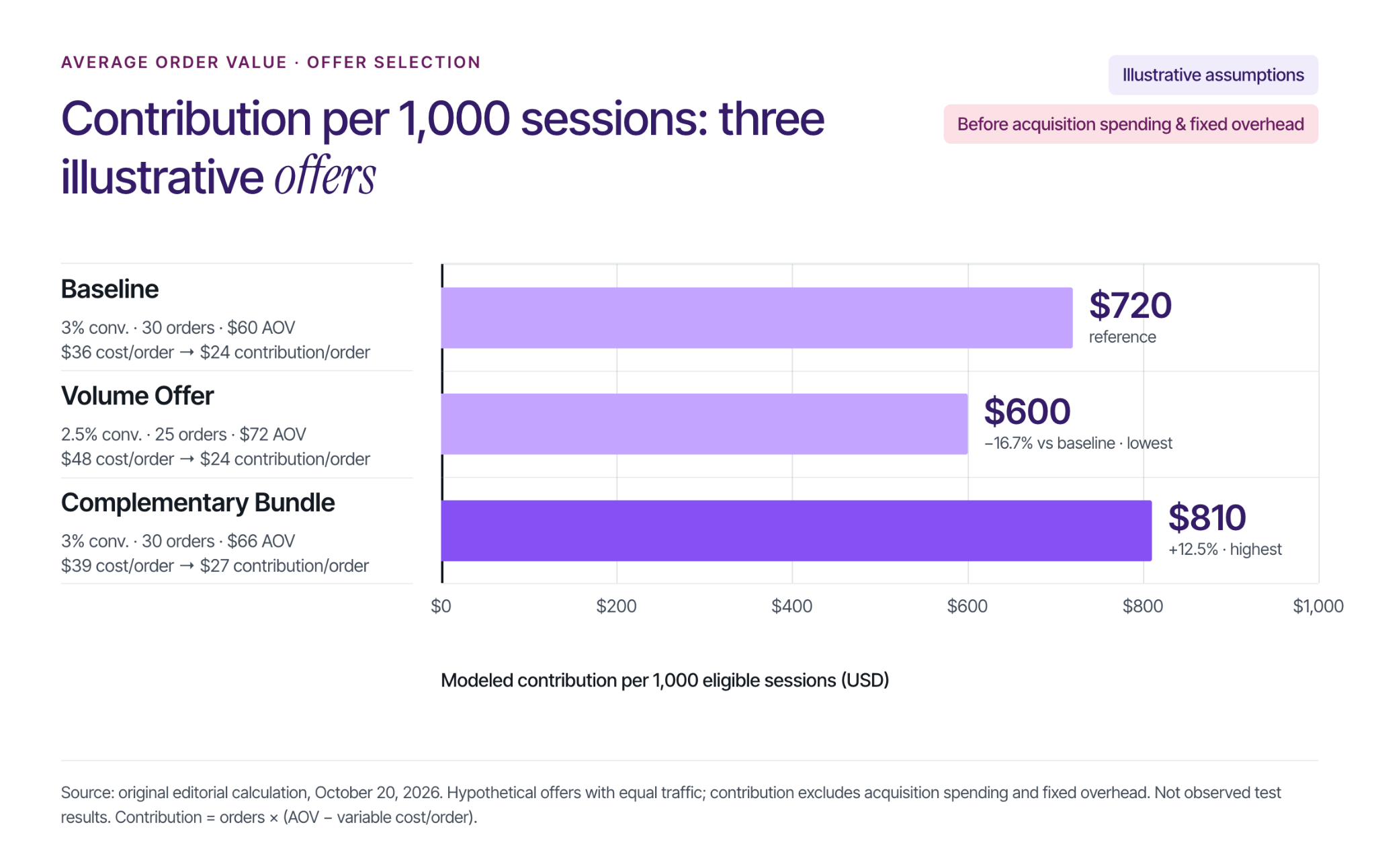
Compare the money each offer leaves after variable costs across the same amount of eligible traffic. This connects basket size with the likelihood of an order and the cost of fulfilling it.
For the following model:
Contribution per order = AOV − average variable cost per order
Contribution per 1,000 sessions = orders per 1,000 sessions × contribution per order
Consider three illustrative offers, each receiving 1,000 eligible sessions. Every converting session creates one order, so the modeled session conversion rate also equals orders divided by sessions. All dollar amounts are hypothetical US dollars, discounts are already reflected in AOV, taxes are excluded, and customer shipping payments are zero.
Variable costs combine merchandise, payment fees, packaging, fulfillment, seller-paid shipping, and an allowance for the net economic effect of returns. Revenue has no later refund deduction, so that return allowance is counted once. Acquisition spending is assumed equal across offers and excluded, along with fixed overhead.
The volume offer raises AOV by 20% while reducing contribution per 1,000 sessions by 16.7%. The bundle raises AOV by 10% and contribution by 12.5%. These are assumed scenarios that demonstrate the calculation, not forecasts of how either tactic will perform.
The amounts shown are contribution before acquisition spending and overhead, rather than net profit. Include customer acquisition cost in the broader decision, especially when an offer requires additional media or creator spending.
Define the test before launching the offer so the result answers a specific business question. Use the following sequence:
The 1,000-session examples above are a convenient comparison scale, not a recommended sample size. Plan the observation period and sample around your traffic, variability, and the improvement that would matter commercially. A short fluctuation does not establish a reliable winner.
If basket value rises while fewer shoppers finish buying, use the Shopify conversion troubleshooting guide to investigate where the purchase journey changed. Check the offer's explanation, compatibility, total cost, and checkout experience before adding another incentive.
Calculate a consistent baseline, check the customer mix behind it, and choose one useful addition or upgrade to test. Record the full variable costs before launch, then evaluate contribution across comparable traffic. That process turns average order value into a practical decision tool for building more valuable orders.
A popular Reel can leave your follower count almost unchanged. Someone enjoyed the post, but did not see a reason to keep hearing from you.
Learning how to get more followers on Instagram means improving both discovery and the decision to follow. For content creators, that starts with a recognizable subject, useful original work, and a profile that makes the next post worth anticipating. This guide explains what to change, how to choose a sustainable posting pace, and which numbers reveal whether your audience is actually growing.

Grow organically by publishing original content for a specific audience, helping that audience discover it, and showing what they can expect after following. Before increasing output, identify where your recent posts are falling short.
Use the Next-Post Decision to choose an action from four situations. Compare similar posts from your own account at the same age; “high” and “low” mean relative to your usual results, not an industry threshold.
If your account is new, start with three posts addressing one audience problem. Use early results to form questions, not to declare a winning strategy.
For this comparison, follow response means attributed follows relative to accounts reached, where those metrics are available. It is a diagnostic measure, not proof that a particular creative choice caused growth.
Check distribution eligibility, too. Instagram’s ranking explanation, reproduced by WebWire, directs creators to Account Status to review recommendation eligibility and available appeal options. Review any issues it identifies before assuming a weak post needs a different hashtag.
If you are still configuring your account, Stack Influence’s Instagram setup guide for creators provides the broader starting point. Use a public profile when discovery is your objective and review what personal information you make visible.
Start with enough regular output to learn what works without lowering the quality of each post. Three feed posts per week is a practical initial experiment for a solo creator, not an Instagram requirement.
Buffer’s Instagram posting-frequency research reports the following estimated differences in weekly follower-growth rates compared with weeks without feed posts:
The underlying analysis by Buffer’s Julian Winternheimer compared the same accounts over time. Its final model used 1,880,815 account-week observations from 84,848 accounts and was published in July 2025. The analysis selected a trailing year of data; exact collection dates were not disclosed.
These are observed-data estimates relative to no-post weeks, not absolute growth forecasts or proof that frequency caused the difference. Feed photos, carousels, and Reels were pooled, so the figures do not establish an ideal Reels-only schedule.
Try two Reels and one carousel if that mix suits your subject. Batch the research and filming, leave time to answer comments, and increase output only when you can maintain the work.
Instagram’s Best Practices guidance in the Professional Dashboard includes personalized advice on creation, engagement, and reach. Combine that guidance with your results instead of adopting someone else’s publishing quota.
Your profile should help a new visitor recognize what following you would add to their feed. Check the name, bio, pinned posts, and recent work together.
Describe a specific audience and recurring benefit. “Small-space cooking for people who hate washing dishes” gives a visitor more information than “Food lover sharing my journey.”
Use recognizable subject words naturally in your name field, bio, and captions. Name the actual recipe, technique, location, or problem rather than relying on vague motivational language or a pile of hashtags.
You can have several interests, but give them a common thread. A creator covering travel, photography, and budgeting could organize all three around affordable weekend trips.
Choose pinned posts that answer three visitor questions: what do you make, why should I trust it, and what should I watch next?
A cooking creator might pin a useful recipe, a technique demonstration, and the introduction to a recurring dinner series. The posts should represent what the account will continue publishing.
Check the follow request inside the content as well. “Follow for one-pan dinners you can make after work” gives a relevant expectation, provided the account actually delivers it.
Build each post around a complete useful experience, then connect it to a subject you can explore repeatedly. The viewer should receive value immediately and understand why another post from you could also be useful.
Originality matters here. In its January 2026 platform update, Meta reported that original posts accounted for 75% of Instagram recommendations in the United States in Q4 2025. That platform-wide figure does not predict any individual post’s reach.
Open with the problem, result, demonstration, or observation that makes the video worth watching. Then provide the promised explanation without an unrelated introduction.
For a home creator, “This drawer keeps jamming because the organizer is too tall” creates a clear question and a visible demonstration. A long introduction about deciding to reorganize the kitchen postpones the useful part.
Use clear audio, readable captions, and framing that makes the demonstration easy to follow. Remove material that repeats a point without adding evidence or personality.
Meta’s Reels Insights announcement explains how watch-time feedback can help creators improve their openings. Review the watch-time measures and follows available in your account, then use Stack Influence’s Instagram Reels content ideas to turn the strongest subject into another useful video.
A carousel can suit a comparison, checklist, annotated example, or explanation that readers may want to revisit. Give the first slide a specific promise and make each subsequent slide advance the answer.
For example, a photography creator could explain how to improve window-light portraits using a sequence of original examples. The follow-up series could address different rooms, weather conditions, and common mistakes.
Stack Influence’s Instagram post ideas for creators can help expand a theme beyond one format. Choose the format that explains the idea clearly rather than turning every subject into a video.
According to Meta’s Trial Reels guide, trials initially show a Reel to non-followers and provide initial engagement metrics after approximately 24 hours. Creators can subsequently share the Reel with everyone.
If the Trial option is available in your account, use it to explore a different opening or a nearby audience question. Keep the experiment relevant to content you would be willing to make again.
A trial is not a controlled experiment with identical audiences. Treat its results as a useful signal, then look for the pattern to recur before rebuilding your entire content plan.
Collaborate with creators whose audiences have a reason to care about your work. The useful overlap may be a shared problem rather than an identical niche.
A small-space cooking creator and a budget meal-planning creator could jointly demonstrate a compact weekly preparation routine. Each contributes something the other audience can use.
Meta’s Instagram Collabs announcement explains that accepted co-authored posts can appear on each collaborator’s profile and reach their audiences. That creates a distribution opportunity; it does not guarantee that viewers will follow both creators.
Before filming, agree on:
Stack Influence’s social media collaboration tips provide additional planning considerations.
You can also introduce an existing TikTok, YouTube, or newsletter audience to your Instagram work. Explain what they will find there, such as annotated examples or a weekly question session, instead of repeatedly posting a bare follow request.
Avoid unrelated giveaways, follow-for-follow exchanges, and purchased audiences. Those tactics make it harder to tell whether people want the content you intend to keep creating.
Plan the posts that come after a successful piece of content. If a Reel attracts people interested in beginner photography, the next posts should help those beginners continue.
Build recognizable series around an audience need: one lighting correction, one affordable recipe, or one outfit adjustment per installment. Repeat the subject and the usefulness while changing the example.
Use Stories to extend the conversation with questions, behind-the-scenes decisions, or responses to confusion. A reply can become the starting point for a future public post, with permission if you identify the person.
Answer substantive comments and participate thoughtfully in related creators’ discussions. Explain your experience or add a useful distinction; generic promotional comments give people little reason to investigate your account.
Keep the audience promise visible when accepting brand partnerships, too. A product demonstration should still answer a question your followers would recognize.
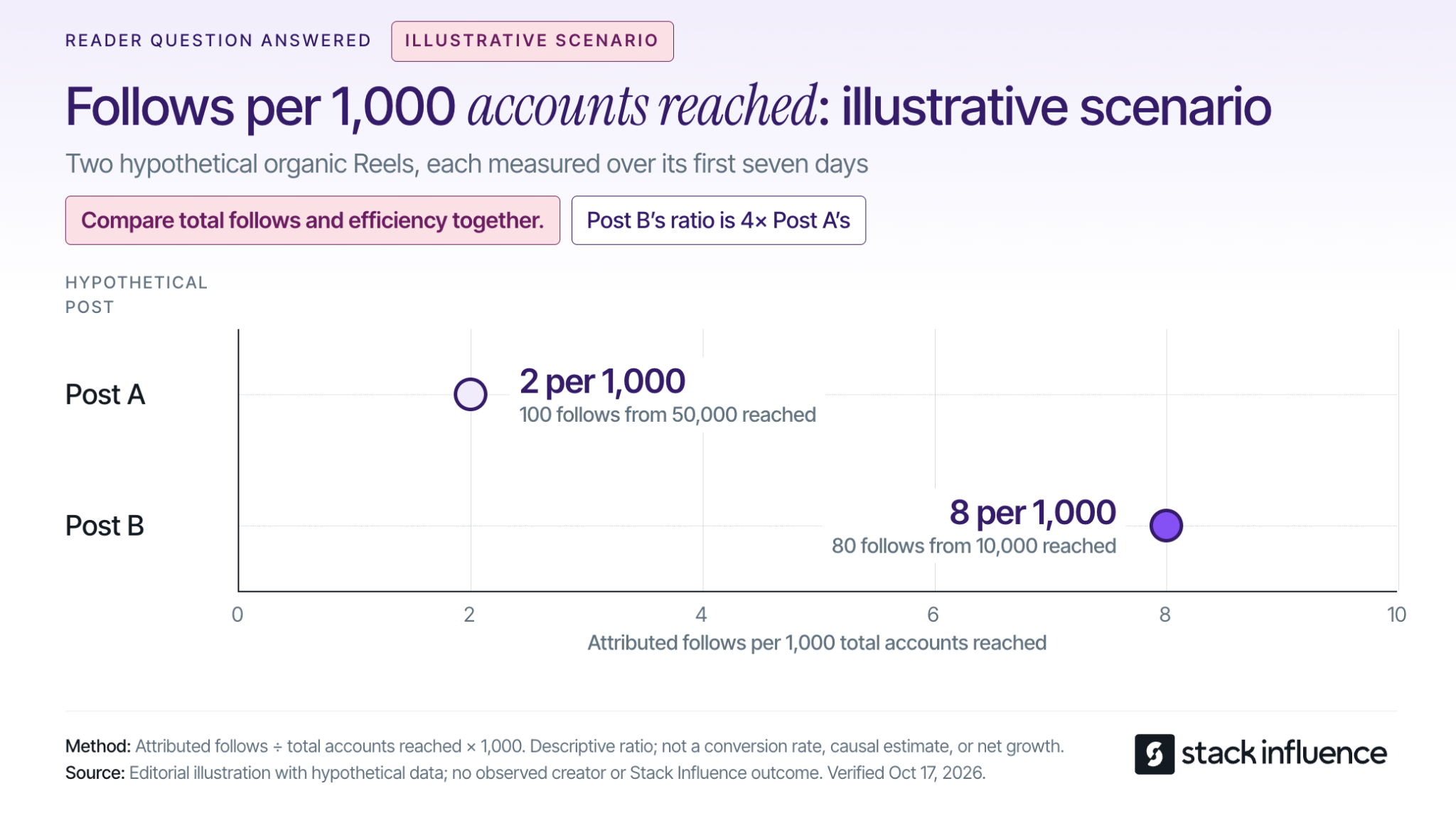
Measure which content earns follows and whether those gains survive at the account level. Reach, attributed follows, and net follower growth answer different questions.
Use available Insights to record each post’s topic, format, publication date, accounts reached, and attributed follows. Add watch-time measures for Reels and label paid distribution separately.
Compare posts at a consistent age, such as seven days after publication, and separate different formats. Stack Influence’s creator analytics dashboard guide explains how to keep those comparisons organized.
Use this descriptive calculation where Instagram supplies the necessary metrics:
Follows per 1,000 accounts reached = attributed follows ÷ accounts reached × 1,000.
Consider an illustrative scenario using two hypothetical organic Reels, each measured over its first seven days:
Post A brings in more total follows. Post B produces four times as many follows relative to its reach.
The Next-Post Decision suggests exploring how to distribute Post B’s useful premise more widely while investigating what made Post A travel. Neither number alone establishes an overall winner.
These invented values demonstrate the calculation; they are not Instagram benchmarks or Stack Influence campaign results. Accounts reached includes followers and non-followers, so this ratio is not a non-follower conversion rate.
If post-level follows are unavailable, review available post metrics alongside account-level growth. Do not assign every new follower in a week to one Reel.
Net follower change equals follows minus unfollows over the same period. Percentage net growth equals net follower change divided by the starting follower count, multiplied by 100.
Review those account-level numbers weekly and look for patterns across several weeks. Also read the comments and questions: are you attracting the audience your content is intended to help?
Unfollows can have several causes, so one disappointing week does not identify a faulty post. Likewise, account-wide unfollows do not reveal exactly how many people recruited by a particular Reel later left.
Use the numbers to choose the next question to test. Change one major creative variable at a time where practical, such as the opening or audience problem, and repeat the comparison before drawing a firm conclusion.
Creators can work on content quality, reliability, and audience relevance while their following grows. A clear niche also makes it easier to explain what you could contribute to a brand partnership.
For a concrete example, Stack Influence’s creator FAQ says creators with at least 200 Instagram followers and original content can apply. Application eligibility does not guarantee campaign selection.
Stack Influence’s creator campaign process connects product selection, purchase, approved social content, and reimbursement. This gifted-first product-seeding workflow gives creators a way to explore product collaborations, with campaign requirements to review before participating.
For nano influencers, micro influencers, and UGC creators, the practical task is to demonstrate that you can explain a relevant product clearly and complete the agreed work. A portfolio of thoughtful demonstrations can develop alongside the audience.
When a product relationship is involved, disclose it clearly. The FTC’s social media disclosure guidance explains that free products can create a material connection and that disclosures should accompany the endorsement.
Knowing how to get more followers on Instagram becomes useful when it changes what you publish next. Choose one audience problem, make the profile’s promise clear, and plan three posts that explore that problem from different angles.
After each has had the same time to circulate, compare reach, attributed follows, and the account’s net growth. Use the Next-Post Decision to choose what to expand, clarify, or replace, so your next followers have a reason to stay.
Your video is ready, but the posting advice points in different directions. One guide recommends weekday afternoons. Another favors weekend mornings. For content creators, the useful answer is a schedule you can test against the people you actually want to reach.
Learning when to post on TikTok starts with your audience's activity, then improves through comparisons of similar posts published at different hours. Below, you'll find current day-by-day starting points, a way to handle time zones, and a four-week test that helps you decide which windows deserve a regular place in your calendar.
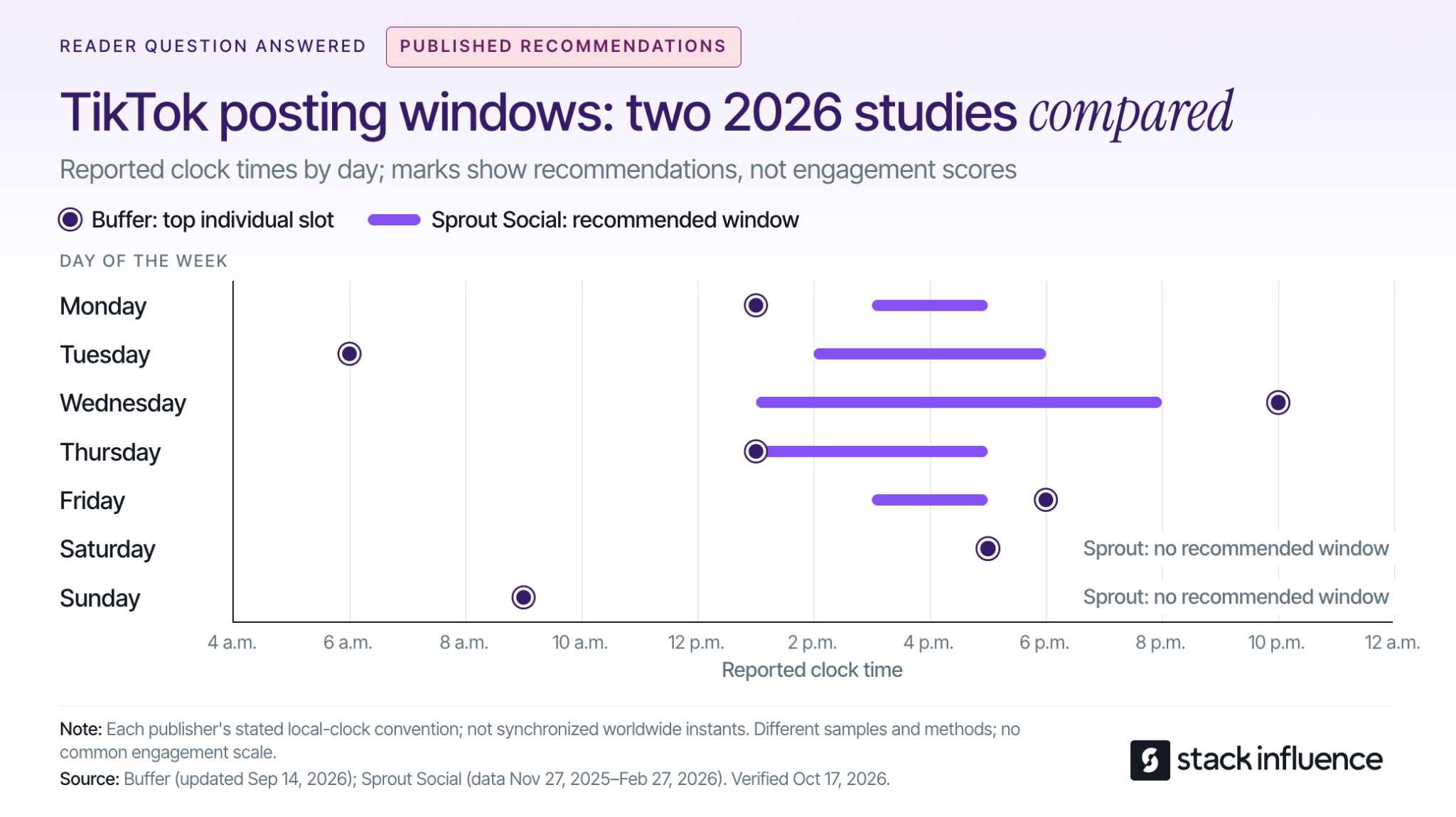
Post during a window when your intended viewers are active, then test whether that window produces the results you want. If you do not have enough account data yet, use a published day-specific time as a starting point. There is no universal hour that guarantees views, followers, or brand deals.
The daily options below compare Buffer's September 2026 TikTok analysis with Sprout Social's March 2026 posting-time research. Each entry gives Buffer's top individual slot followed by Sprout's recommended window:
Buffer presents its clock times as usable across time zones; Sprout explicitly specifies audience-local time. Use your intended audience's local clock when turning these recommendations into a test, and do not interpret the list as a schedule in U.S. Eastern time.
The disagreement matters. Buffer evaluates median engagement rates for posts published through its platform, while Sprout studies engagement among its own customers. Different samples and methods can produce different recommendations; a missing weekend window in one report does not mean your viewers disappear on Saturdays.
Choose one practical option for your next post. For the next comparison, choose a contrasting window supported by your audience data or the other study. Averaging all the listed hours together would create a new recommendation that neither study tested.
TikTok considers viewing behavior and other interactions alongside content and user information. Its official explanation of how TikTok recommends content lists watching, skipping, sharing, and commenting among the signals, and says interactions generally receive greater weight for most users than other factors.
Time zone and day also appear among TikTok's user-information signals. The practical implication is to improve timing alongside the video's opening, relevance, and pacing. Moving a confusing tutorial to a busy hour does not resolve the reason people stop watching it.
Also distinguish the audience you already have from the audience you want to attract. Follower activity can help you serve an existing community, while recommendations and search can introduce your content to new people. Your current followers are useful evidence, but they are not a complete map of future viewers.
For evergreen tutorials, TikTok search discovery is another reason to track performance beyond publication day. Keep the video understandable to someone who finds it later, with a clear topic and an answer that remains useful.
Start with the activity data available in your own account. TikTok's creator-tools instructions give the app path as Profile, Menu, then TikTok Studio, and explain that features vary across app, browser, and region.
Within Analytics, look for audience activity information. The official TikTok Studio guide identifies Viewers as the area containing viewer demographics and activity times. Inspect follower insights too, where available, but do not assume every interface uses the same tab names.
Before picking an hour, check three things:
If your viewers are in a different region, write the audience time zone directly into your calendar. A note that says “evening” becomes ambiguous when you travel or coordinate with a brand elsewhere. Confirm the conversion for the actual publishing date when daylight-saving changes could affect it.
For a split audience, test a window serving each major region rather than forcing both into one compromise hour. Judge the results against your goal: reaching a new regional audience may matter more than maximizing existing-follower activity.
If activity data is unavailable, begin with the benchmarks above and keep a simple posting log. You can refine your schedule as useful account evidence accumulates.
A Two-Window Rotation compares two publishing windows while balancing the content and weekdays assigned to each. It is a practical pilot for creators, not a controlled experiment that isolates every cause of performance.
Decide what success means before publishing. Use views when discovery is the priority, shares when you want people to pass the content along, or attributable follows when audience growth is the goal.
Keep that outcome consistent through the test. Switching from views to likes after seeing the results makes it easier to choose whichever answer looks most flattering.
Choose Window A from your audience activity, if available, and Window B from a plausible alternative. Make the windows meaningfully different, such as lunchtime and evening. A small first test is unlikely to tell you much about a difference of only a few minutes.
Prepare videos with similar purposes, production effort, and length. If you are also experimenting with TikTok video length, keep that experiment separate so the timing comparison remains interpretable.
A creator teaching editing techniques might compare different tutorials in the same series. Comparing a sponsored product demonstration with a trending comedy clip would mix several explanations for the result.
If three posts per week fits your normal workload, this example produces twelve posts over four weeks:
Each window receives six posts, including two on each selected weekday. That structure reduces the risk of confusing a Friday effect with an evening effect.
Choose your posting cadence before starting. Planning how often to publish on TikTok is a separate decision from choosing the hour. If three weekly posts would reduce quality, extend the test instead of increasing production simply to finish faster.
Log the publish date, time zone, window, topic, video length, and whether the post received paid support. Assign topics to windows before seeing results, so your strongest ideas do not consistently land in one slot.
Record unusual events, including a major collaboration, an unexpected news spike, or a missed publishing time. Keep those posts visible in your records, but inspect whether the apparent winner depends on the exception.
If a timely idea cannot wait for its assigned slot, publish when it is useful and label it separately. A testing calendar should support good editorial decisions without making every post part of the experiment.
The stronger window is the one that repeatedly performs better on your chosen outcome when comparable posts have had equal time to accumulate results. Compare more than the highest-viewed video, and treat a small pilot as directional evidence.
Use an early checkpoint, such as 24 hours, and a later checkpoint, such as ten days. These are practical reporting choices for this test, not TikTok ranking thresholds. A video published yesterday should not compete against a video that has been collecting views for two weeks.
Metricool's 2026 TikTok study findings report that posts accumulated 96% of their reported total reach within the first ten days. Subtracting that reported share from 100% leaves 4% outside the first ten days. The release does not define an unlimited lifetime total, so interpret the finding within the study's measurement scope.
That gives you a reason to include a later checkpoint rather than making every decision immediately after publishing. It does not establish a universal expiration date for a video. With the four-week rotation, the final comparison happens after the last post reaches the same ten-day checkpoint as the others.
For each window, calculate the median of your chosen per-post outcome and inspect the individual results. Also retain totals and standout posts: they help distinguish repeatable performance from occasional upside.
Use a small set of supporting measures to understand the result:
These measures answer different questions. A window can deliver more views while another produces more followers for the same number of views. Choose according to the goal you set before the test.
Keep paid distribution separate. If a brand runs your post through TikTok Spark Ads, separate identifiable paid activity or leave that post out of the organic comparison. Ad-supported reach cannot establish that the original publishing hour worked better.
Look for a pattern that survives comparison across weekdays and similar topics. Six posts per window can reveal useful clues, but they cannot prove a universal best time or reliably separate a small timing effect from normal variation.
If the apparent advantage rests on one video, continue testing before changing your calendar. If the windows are close, choose the one you can sustain and spend the next round improving the content. Retest when your audience, content focus, or available publishing schedule materially changes.

For micro influencers, nano influencers, and creators handling brand deals, publishing time is also a delivery commitment. Agree on the date and time zone, approval requirements, and any launch restrictions before reserving a slot. Leave room for receiving and using the product before filming.
Stack Influence's creator campaign process connects product selection, social content, and post approval within a gifted-first product-seeding workflow. For creators, the useful scheduling habit is to confirm campaign requirements first, then select an audience-relevant window within those terms.
Distinguish a post on your account from user-generated content, or UGC, delivered for a brand to publish. If your assignment is asset delivery only, your deadline and the brand's publishing time are separate decisions. Confirm who controls the final upload.
Build disclosure into preparation. TikTok's commercial-content guidance requires its disclosure setting for promotional content, including third-party promotions involving an incentive, and says enabling the setting does not affect feed distribution.
For endorsements reaching U.S. consumers, the FTC's influencer disclosure guidance also explains that free products can create a relationship requiring disclosure. Put a clear disclosure with the endorsement rather than relying only on a platform label or burying it in your profile.
Prepare the final file, caption, and approvals before the chosen window. A scheduling workflow for creators can help you publish consistently without interrupting filming or other work. When using a scheduler, confirm the account, date, time zone, and available publishing options before leaving the post queued.
Knowing when to post on TikTok means having a reason for the next publishing decision. Start with relevant benchmarks, check your audience, and compare two realistic windows using similar content and equal reporting periods.
Choose your two windows before preparing the next batch of videos. Keep the one that produces useful, repeatable results and fits your workload, so you can plan future content and brand partnerships with greater confidence.

A shopper asks for a dishwasher-safe lunch container that fits a small work bag. Your product might meet those requirements, but can a shopper verify that from your listing, select the right size, and buy from your store?
That is the practical challenge behind ChatGPT shopping. For ecommerce sellers, the work is not simply getting a brand name mentioned. It is connecting accurate product information with a relevant recommendation, a purchasable merchant offer, and a measurable order.
Start by separating those outcomes before investing in another integration or content campaign.
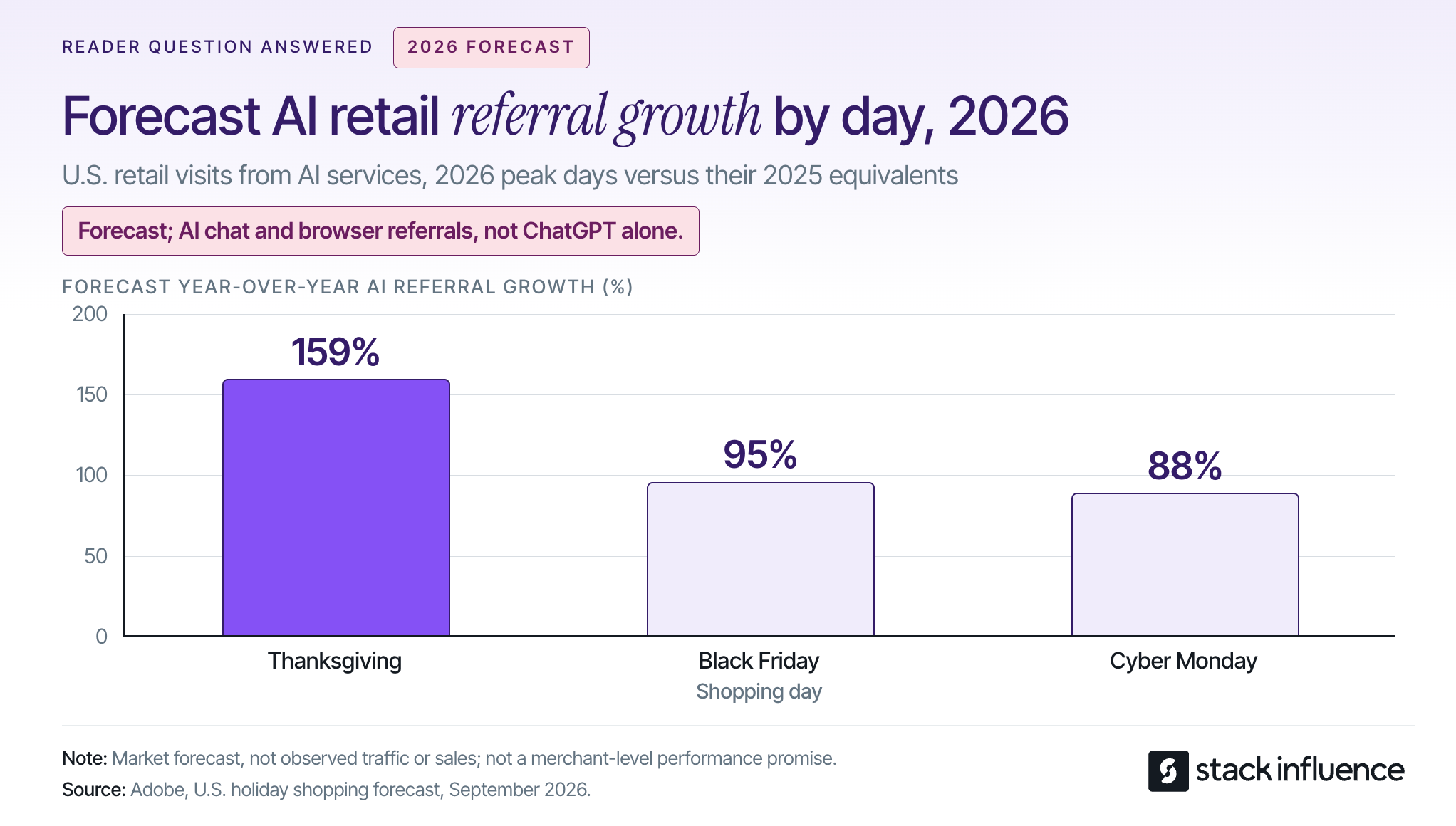
ChatGPT shopping is a product-discovery experience that lets people describe their needs, compare products, and follow merchant purchase options. OpenAI's product-discovery announcement describes visual browsing, image-based discovery, and side-by-side comparisons supported by the Agentic Commerce Protocol, or ACP.
The more detailed shopping research experience asks follow-up questions, examines merchant and public product information, and builds a buyer's guide around the shopper's constraints. For a seller, a precise compatibility detail can therefore be more useful to a buyer than another broad claim that a product is premium.
Checkout requires a separate distinction. On March 24, 2026, OpenAI announced its emphasis on product discovery and merchant-owned checkout, rather than making its initial Instant Checkout experience the universal purchase path.
As checked on October 14, 2026, OpenAI's shopping help page still describes Instant Checkout for some eligible products and merchants. Do not assume every account has the same purchase options, or build a seller plan around universal in-chat checkout.
There is a reason to establish a baseline now. In its September 28 forecast, Adobe projected AI-referred retail traffic growth of 159% on Thanksgiving, 95% on Black Friday, and 88% on Cyber Monday in 2026, compared with the corresponding 2025 days. Those are forecasts across AI chat and browser services, not observed ChatGPT sales or ChatGPT's market share.
Use that outlook to prioritize measurement, not to assume your store will receive the same growth.
Keep organic discovery separate from paid campaigns: OpenAI's advertising guidance states that ads do not let advertisers influence or rank its answers.
The Product, Offer, Order Test is a practical diagnostic framework for this guide, not a description of OpenAI's internal ranking system. It asks three different questions so that a visibility report does not get mistaken for a revenue report.
Check whether the recommended item meets the shopper's stated requirements. Matching a brand name is insufficient when the shopper needs a particular capacity, material, compatibility, or maintenance method.
Build product explanations around questions that can be answered with evidence. The same discipline used to develop social proof for an ecommerce brand applies here: identify the uncertainty, then provide the relevant demonstration or verified specification.
A product appearing does not mean your store is the purchase destination. OpenAI's explanation of merchant selection says a product can have multiple merchant options, with factors including availability, price, quality, and whether a merchant is the maker or primary seller.
Record the destination domain and selected variant, not just the brand mentioned. A manufacturer, authorized retailer, and marketplace seller can all care about the same product while receiving different commercial outcomes.
Use your actual order records to establish whether referred visitors purchased, what they purchased, and what happened afterward. Include refunds and fulfillment costs in the commercial assessment.
The framework's decision rule is simple: repair the earliest verified failure. More content will not fix an unavailable variant, and more product appearances will not prove that your store captured the purchase.
Start with the product-data route your commerce platform supports, then check eligibility and the quality of the information being distributed. Submitting a feed, enabling a channel, and being recommended for a particular shopping request are different events.
According to Shopify's Selling on ChatGPT documentation, discovery is active by default for eligible stores. Requirements include selling to U.S. customers, eligible Shopify Catalog products, acceptance of the agentic storefront terms, and completed store policies.
Review Sales channels > Agentic in Shopify admin. ChatGPT purchases use the store's online checkout, in an in-app browser or a new browser tab, rather than a ChatGPT direct-checkout switch.
For your operating plan, assign catalog maintenance separately from Shopify influencer marketing. Creator partnerships can produce useful demonstrations, but publishing a social post is not the same task as maintaining product data.
OpenAI's merchant onboarding page says Shopify and Etsy catalogs are already integrated without an additional merchant application. Other merchants can apply to share product feeds; the page still describes a waitlist and a planned self-service portal, not immediate onboarding for everyone.
Check your platform or feed provider before commissioning custom development. Ask which supported integration it uses, who handles rejected records, and how corrections reach the destination.
For Amazon sellers and other marketplace-only businesses, begin with the listing information you control and the merchant destinations that actually appear in tests. Do not confuse a product's marketplace visibility with evidence that your own seller offer has been selected.
A useful starting point is a small group of commercially important products with stable inventory. Compare each product's feed record, visible page, images, and checkout selection before expanding the catalog review.
OpenAI's stable product-feed specification calls for one row per purchasable item or variant. Its native discovery format requires nine fields: item_id, title, description, url, brand, seller_name, image_url, availability, and price.
Use the supported Stable schema, not the Draft schema. Preserve identifiers as strings, provide accessible product and image URLs, and follow the relevant variant grouping rules; an existing platform integration may use a different supported mapping.
Consider a lunch container sold in two sizes. If a small-size price leads to a page with the large size selected, a technically populated record still creates a confusing purchase path.
Your acceptance test should open the submitted URL, confirm the intended variant, and compare the price and stock status with the record. Give one person responsibility for checking discrepancies after promotions, stock changes, or a product-page redesign.
Replace vague statements with facts buyers can check. For the lunch container, publish dimensions, capacity, materials, included pieces, care instructions, and any relevant limitations, using only information you can substantiate.
Keep important details in visible text rather than only inside an image or video. When repurposing user-generated content (UGC) across platforms, identify the demonstrated variant and add an accurate written explanation so the evidence remains understandable outside the original social post.
Do not let one creator's experience become a universal product specification. A video showing that a container fits one bag does not establish compatibility with every bag described as compact.
OpenAI's crawler documentation distinguishes OAI-SearchBot, which supports search visibility, from GPTBot, which concerns model-training crawling. A site can allow the former while disallowing the latter.
Ask your technical team to inspect robots.txt, relevant firewall rules, and whether important pages can be fetched. Avoid blanket changes that disable site protection; validate the permitted crawler configuration instead.
For the Google side of your SEO program, Google's AI-feature guidance emphasizes ordinary eligibility, visible content, and structured data that matches the page, without requiring special AI files or schema. That is Google's guidance, not a published ChatGPT ranking formula.
Creator content can supply concrete product demonstrations, but OpenAI's published guidance does not establish that purchasing UGC or running influencer campaigns causes ChatGPT recommendations. Treat creator content as useful buyer information rather than a guaranteed placement mechanism.
Give micro influencers and nano influencers a real question to investigate. For the lunch container, a useful brief might ask the creator to demonstrate packing, closing, carrying, and cleaning the exact model supplied, while describing limitations honestly.
Stack Influence's automated product-seeding workflow connects creator participation, product purchases, communication, post verification, and payment. In that gifted-first workflow, payment follows completed social posts, giving the brand a defined content deliverable rather than a promise of AI visibility.
Evaluate that deliverable on its own terms. Does the content answer the intended question, identify the correct product, and have permission for the planned reuse?
Keep the commercial relationship visible. The FTC's endorsement guidance explains that free products supplied with an expectation of promotion create a relationship that needs appropriate disclosure, and that brands have responsibilities for monitoring endorsements.
Do not relabel a gifted creator endorsement as an independent customer review. A transparent demonstration can be useful without pretending to be something it is not.

Apply the Product, Offer, Order Test with a diagnostic record and a separate commercial report. The first identifies information problems; the second measures actual customer activity.
Create a fixed set of realistic shopping requests covering use cases, budget constraints, product comparisons, and practical limitations. Record the date, region, relevant account settings, prompt wording, product shown, merchant offered, and landing-page accuracy.
Here is an illustrative audit, not observed campaign data. Suppose you run 20 prompts twice under documented conditions, producing 40 responses: the intended product appears in 24, your merchant offer appears within 12 of those, and nine of those offers accurately match the purchasable variant, price, and availability.
The cumulative results are 60% product presence, 30% merchant presence, and 22.5% accurate purchasable-offer presence across the 40 responses. Conditional merchant capture is 12 divided by 24, or 50% of responses containing the intended product.
These nested checks are not independent conversion stages or consumer market shares. No visits or orders occurred merely because the tests were run, and repeated prompts are not a representative sample of all shoppers.
The useful finding is the gap between product presence and a correct offer from your store. Inspect the failing responses before deciding whether the next task belongs to merchandising, catalog maintenance, or content production.
Shopify's agentic storefront documentation says AI-channel orders appear in admin with channel or referrer attribution. Use the attribution actually present in your store and analytics, rather than assuming every AI-influenced order carries an identifiable source.
Keep a report of identifiable ChatGPT referrals, resulting orders, net sales after refunds, and contribution after product, fulfillment, and payment costs. Track catalog and content work separately so you can distinguish an acquisition expense from an asset reused across several channels.
When calculating customer acquisition cost, use a consistent new-customer definition and avoid crediting both an influencer campaign and ChatGPT with the full value of the same purchase.
Treat the resulting numbers as attributed activity, not automatic proof of incremental sales. For example, a shopper who discovers a product in ChatGPT but later types your store's address creates a different attribution problem from someone who follows a merchant link and purchases immediately.
Review diagnostic failures weekly and commercial outcomes over a longer, consistent window. Use a prior 30-day baseline when reliable tracking exists, then compare a consistent 30-day period after changes. Extend the observation period when orders are sparse, and annotate promotions, stockouts, and other changes.
Use the first month to establish reliable records and repair obvious failures, not to promise a ranking deadline. Start with ten priority products so the work remains inspectable.
During the first week, confirm the integration route, eligibility, search access, and baseline test results. In the second week, reconcile product identities, variants, prices, stock information, and destination URLs.
Use the third week to address missing buyer answers and prepare demonstrations where they would genuinely help. A Shopify product-seeding pilot can organize the creator work, but its production schedule should remain separate from catalog fixes.
In the fourth week, repeat the diagnostic sample and reconcile identifiable referrals with order records. Continue the sales observation period beyond the first month when needed; the planning schedule is not an OpenAI onboarding, indexing, or recommendation guarantee.
ChatGPT shopping deserves a seller strategy built around product relevance, accurate merchant offers, and actual customer outcomes. A mention is useful information, but it is not the finish line.
Choose ten products, apply the Product, Offer, Order Test, and fix the first observable gap. Where buyers still need to see the product in use, plan a focused creator brief that produces an honest, reusable demonstration and makes the purchase decision easier.
A Walmart ad campaign can generate orders while leaving too little money to replenish inventory. Before deciding how much traffic to buy, an ecommerce seller needs to know what each additional order can afford to cost.
This guide explains Walmart Sponsored Products eligibility, campaign setup, targeting, bidding, and measurement for U.S. Marketplace sellers. The central decision is practical: can your product support the cost of the clicks you are buying? Platform details were checked on October 14, 2026; other Walmart markets can have different requirements.

Walmart Sponsored Products are cost-per-click ads that promote individual product listings across Walmart's site and app. According to Walmart Connect's Sponsored Products overview, shoppers can encounter them in search results, carousels, item-page placements, My Items, and Stock up experiences; clicks lead to product detail pages.
Placement depends on product relevance as well as the bid. Walmart documents its advanced second-price auction, so a submitted bid should not be confused with the amount ultimately charged for every click.
Sponsored Products are one part of the broader Walmart advertising landscape. Keep them distinct from Sponsored Brands, Sponsored Videos, display advertising, and external creator campaigns: buying a product placement does not automatically create a branded video campaign.
Use the Click-to-Contribution Test to connect three inputs before choosing a budget: contribution before advertising, the contribution you want to retain, and the expected conversion rate of paid clicks. This is a planning calculation, not a Walmart performance benchmark.
First, subtract variable order costs from revenue. Include product cost, marketplace fees, fulfillment, and a realistic returns allowance. Then reserve the amount the order needs to contribute toward overhead and profit after advertising.
The calculation is:
Affordable CPC = (contribution before advertising minus required retained contribution) × paid-click conversion rate.
Consider an illustrative one-unit order generating $36 in revenue, excluding sales tax, with no additional discounts. Assume total variable costs of $24 and a requirement to retain $4 after advertising. Contribution before ads is $12, leaving $8 available for advertising per acquired order.
Using those assumptions:
Walmart's documented item-bid requirements list minimum bids of $0.20 for automatic campaigns and $0.30 for keyword-bid campaigns. At the illustrated 2% conversion rate, your calculated ceiling sits below both minimum bid settings.
That does not prove every auction click will cost more than $0.16. It means you cannot enforce that conservative ceiling by entering a fixed bid at or below it. Improve the offer's economics or conversion potential, or explicitly fund a limited learning test rather than assuming more budget will make the target achievable.
In this example, spending $12 to acquire a $36 order breaks even before overhead, producing 3.0x ROAS. Spending no more than $8 preserves the $4 contribution requirement and calls for 4.5x ROAS. Neither figure is a universal target for Walmart sellers.
Also distinguish cost per order from customer acquisition cost. An attributed purchase may come from a returning customer, and broader acquisition costs can include creative production, software, and campaign labor.
Walmart's Sponsored Search eligibility guidance specifies three product conditions for Sponsored Products: the item must be published on Walmart.com, in stock, and winning the Buy Box. Eligible variants can participate when they meet those conditions.
The same guidance lists additional brand-owner requirements for Sponsored Brands and Sponsored Videos. Do not import those requirements into Sponsored Products, or mistake access to Ad Center for confirmation that every item can advertise.
Check the customer-facing offer before launch. Verify the selected variant, price, delivery promise, main image, dimensions, and included components. The work of Walmart product listing optimization should answer the questions a shopper will have after clicking.
The published product eligibility conditions do not state a minimum review count. For a Walmart launch with zero reviews, focus on a clear, accurate offer and controlled testing rather than waiting for an invented review threshold. Eligibility allows participation; it does not establish that the product will convert profitably.
Walmart Sponsored Products costs depend on clicks, auction outcomes, and the budget you authorize. There is no single CPC or campaign spend that will be appropriate for every seller.
Walmart's campaign-creation documentation lists a $10 minimum daily budget for third-party Marketplace sellers and a $50 minimum total budget when a total budget is used. For first-party suppliers, the listed minimums are $50 daily and $100 total; these are different advertiser categories.
Do not confuse a minimum with a recommendation. Walmart's campaign setup guidance recommends at least $100 per day to support visibility and momentum, but that recommendation is not the Marketplace seller entry minimum. Choose spending from your economics and test objective, not from an assumed requirement to spend more.
Budget behavior also deserves attention. Walmart's API budget rules allow unspent daily budget to roll forward and describe a maximum daily spend of twice the configured daily amount. For an API-managed campaign, do not assume the daily setting alone is an absolute calendar-day spending cap; confirm the applicable behavior and available total-budget controls.
An effective learning budget needs a stop condition. Decide what cumulative spend, exposure, or loss will trigger a review before launching, and keep that rule separate from the longer-term ROAS target.
Start with a defined question, such as whether a specific product group can acquire orders below its allowable advertising cost. Mixing discovery, brand defense, and clearance into one campaign makes the result harder to interpret.
Follow Walmart's setup sequence: sign into Ad Center with the appropriate Seller Center credentials, create a Sponsored Products campaign, and select its dates, budget settings, eligible items, and targeting approach. Confirm the controls displayed in your account before activation.
Group products with comparable shopper intent and economics. A low-priced refill and a premium starter kit may attract related searches while supporting very different CPCs. Separate them when a shared bidding decision would force one product's economics onto the other.
Use a campaign name that identifies the product group, targeting approach, and purpose. Record the starting offer, bids, budget, inventory status, and reporting window so subsequent changes have a clear baseline.
With automatic or manual targeting, you decide whether Walmart selects search opportunities from product information or you choose the campaign's keywords. Walmart's suggested-bid documentation supports broad, phrase, and exact keyword match types, with suggestions that can differ by match type.
Use automatic targeting for discovery and manual campaigns for deliberately selected queries. Review actual search terms before expanding a promising keyword, and distinguish searches containing your own brand from broader category searches.
Bidding is a separate choice. Fixed bidding and dynamic bidding concern how bids are handled, not whether you personally selected the keywords. Dynamic bidding can adjust bids, but automation does not replace the Click-to-Contribution Test or guarantee a target return.
Review any placement bid multipliers and automated bid adjustments before assuming your base bid enforces an economic CPC ceiling. A suggested bid above your affordable CPC is a reason to investigate the product or query, not automatic permission to spend beyond the product's economics.
Walmart introduced negative keywords for Sponsored Products on July 29, 2026. Its release specifies manual campaigns and automatic campaigns using fixed bidding, with negative exact and negative phrase matching.
Negative exact blocks the specified search term; negative phrase blocks searches containing the excluded phrase in order. For example, a home-storage seller could exclude "car organizer" when vehicle-related searches do not match the advertised product.
This creates a real setup tradeoff: an automatic campaign needing these exclusions must use a supported bidding configuration. Do not assume the same negative-keyword controls are available after changing its bidding strategy.
Exclude clear mismatches promptly. For a relevant term with no orders, consider accumulated clicks, spend, and attribution maturity before deciding it has failed. Otherwise, a short reporting delay can be mistaken for evidence that a useful query should be blocked.
Check the stage where performance breaks before changing the campaign. Walmart's campaign optimization guidance recommends reviewing listing quality, Buy Box performance, and price competitiveness before increasing spend.
With few impressions, check campaign status, dates, remaining budget, item eligibility, and relevance before concluding that the bid is too low. With impressions but weak click-through, examine whether the image, price, and product presentation match the search.
With clicks but few orders, investigate the complete offer: the selected variant, delivered value, purchase questions, and fulfillment promise. Higher bids cannot repair an incorrect compatibility statement or an unavailable product.
When orders occur but contribution is weak, return to the Click-to-Contribution Test. The next action may be a lower bid, narrower query selection, improved costs, or a different product rather than a larger daily budget.
ROAS is attributed sales divided by advertising spend; advertising cost of sales, or ACoS, reverses that relationship. Neither metric measures net profit or proves that advertising created sales that would not otherwise have happened.
Track delivery and outcomes separately. Impressions, click-through rate, CPC, and item availability help diagnose access and traffic. Attributed orders, revenue, contribution, and returns help evaluate the commercial result; calculate conversion rate using a consistent click and order scope.
Walmart's Sponsored Search reporting definitions include 3-day, 14-day, and 30-day sales attribution measures, and distinguish advertised-item sales from other same-brand item sales. Label the window and sales fields used in every comparison instead of assuming that all reports represent the same revenue.
Co
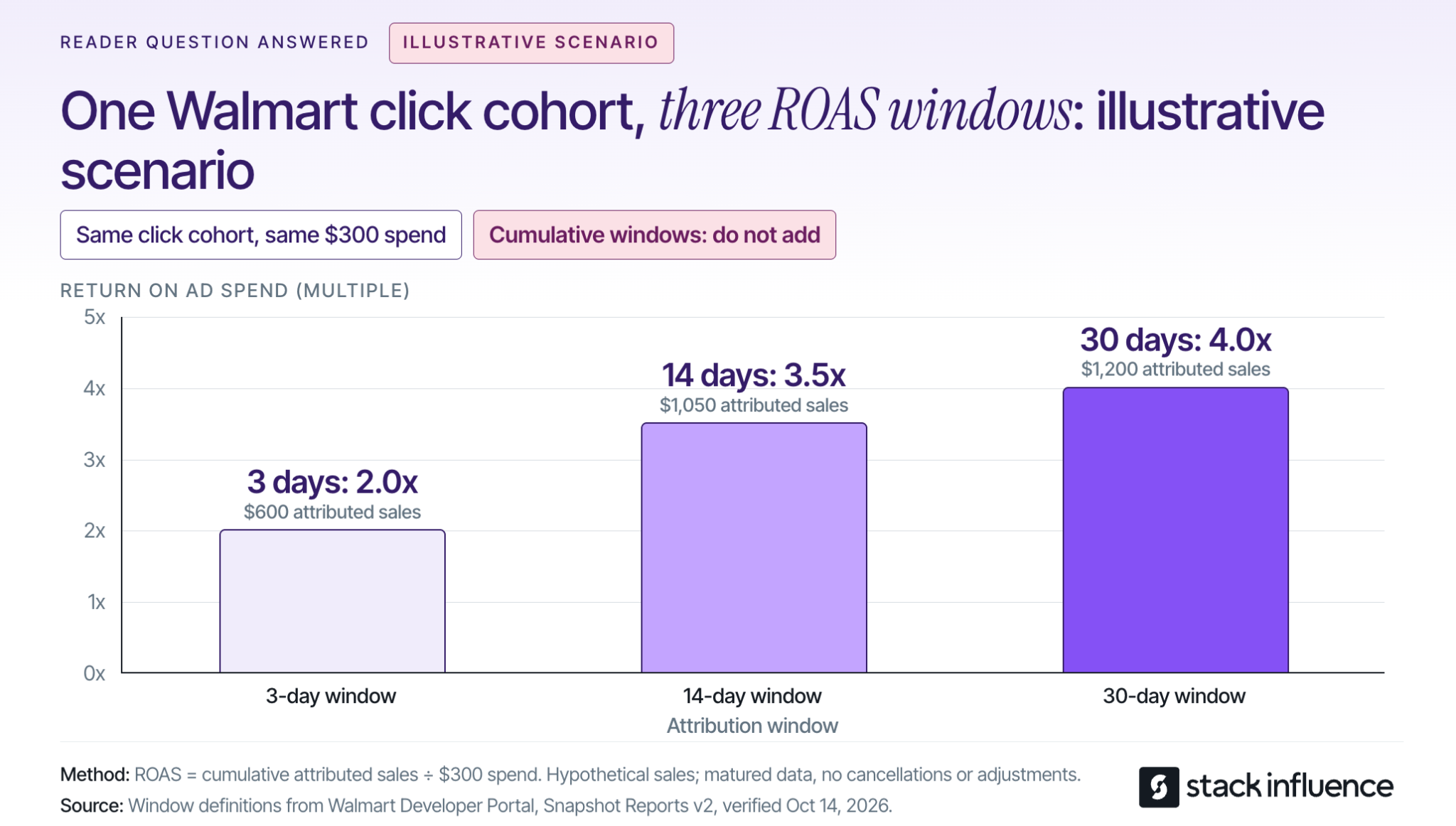
nsider a separate illustrative campaign with $300 in spend from one fixed cohort of ad clicks. Assume the same advertised-item online sales scope, fully matured reporting through 30 days, and no subsequent cancellations or reporting adjustments.
Suppose cumulative attributed sales are $600 within three days of each click, $1,050 within 14 days, and $1,200 within 30 days. The corresponding ROAS values are 2.0x, 3.5x, and 4.0x: each revenue amount divided by the same $300 spend.
These are illustrative inputs, not observed Walmart results. The campaign did not become twice as efficient because someone selected a longer window; more purchases qualified for attribution under that definition. The windows are nested, so do not add their sales together.
Compare equivalent click-date periods using the same window, and allow the latest clicks time to mature. A reporting extract can be current while its most recent conversion data remains incomplete.
Reconcile attributed revenue with the products sold and their margins. Other-item revenue can have different economics from the item that earned the click. Refunds, fulfillment costs, marketplace fees, and creator-production expenses can also change the business result without changing a headline ROAS ratio in the same way.
Review campaign delivery daily during launch and search-term decisions on a regular schedule, such as weekly. Make larger allocation decisions using sufficiently mature conversion data and an explicit test budget; this is a recommended operating cadence, not a promise that a fixed number of days will produce statistical certainty.
Finally, compare total channel sales and contribution with advertising spend while recording price, promotions, inventory, and other marketing changes. A before-and-after increase is useful context, but it does not isolate the causal effect of Sponsored Products.
Use creator content to answer the product questions that paid placements expose. For a storage product, the useful demonstration might show its capacity, assembly, or actual dimensions rather than simply repeat that the product is available at Walmart.
Stack Influence's Walmart creator-campaign workflow supports micro-influencer activation, product seeding, coordination, and social content. Its gifted-first, completions-only model makes the completed creator post the operational deliverable, not a guaranteed Walmart order or a guaranteed advertising result.
When working with micro influencers, nano influencers, or UGC creators, specify the demonstration, posting deliverable, and intended reuse. Check permissions before repurposing UGC across platforms, especially when footage will be used in advertising rather than only in an organic social post.
The FTC's influencer disclosure guidance explains that free or discounted products can create a material connection requiring disclosure. Product reimbursement should not be treated as a reason to hide the commercial relationship.
For eligible external campaigns, Walmart's Sales Rewards and Attribution program provides tracking URLs for qualifying items. Keep those results separate from Sponsored Products reporting, and distinguish brand-funded creator purchases from independently acquired customer orders.
Walmart Sponsored Products work best as a measurable purchase of relevant traffic, not as a substitute for a competitive offer. Start with eligible items, establish an affordable CPC, select compatible targeting and bidding controls, and judge the result using consistent attribution and contribution calculations.
Before launching, write down the item group, spending limit, expected conversion assumptions, and the evidence that will justify expansion. When product education is the missing piece, plan a focused Stack Influence creator campaign around the unanswered buying questions, with content delivery and sales measurement kept distinct.
A memorable influencer campaign is not automatically a useful model for your next launch. Ecommerce sellers need to understand what the creators actually did, while content creators need to know what made the partnership valuable and workable.
These influencer marketing campaign examples separate reported results from ideas you can adapt. They cover product seeding, ongoing creator activation, affiliate partnerships, participatory content, coordinated storytelling, and community engagement.
The goal is not to copy the biggest campaign. It is to identify a mechanism that fits your product, your audience, and the resources on both sides of the partnership.
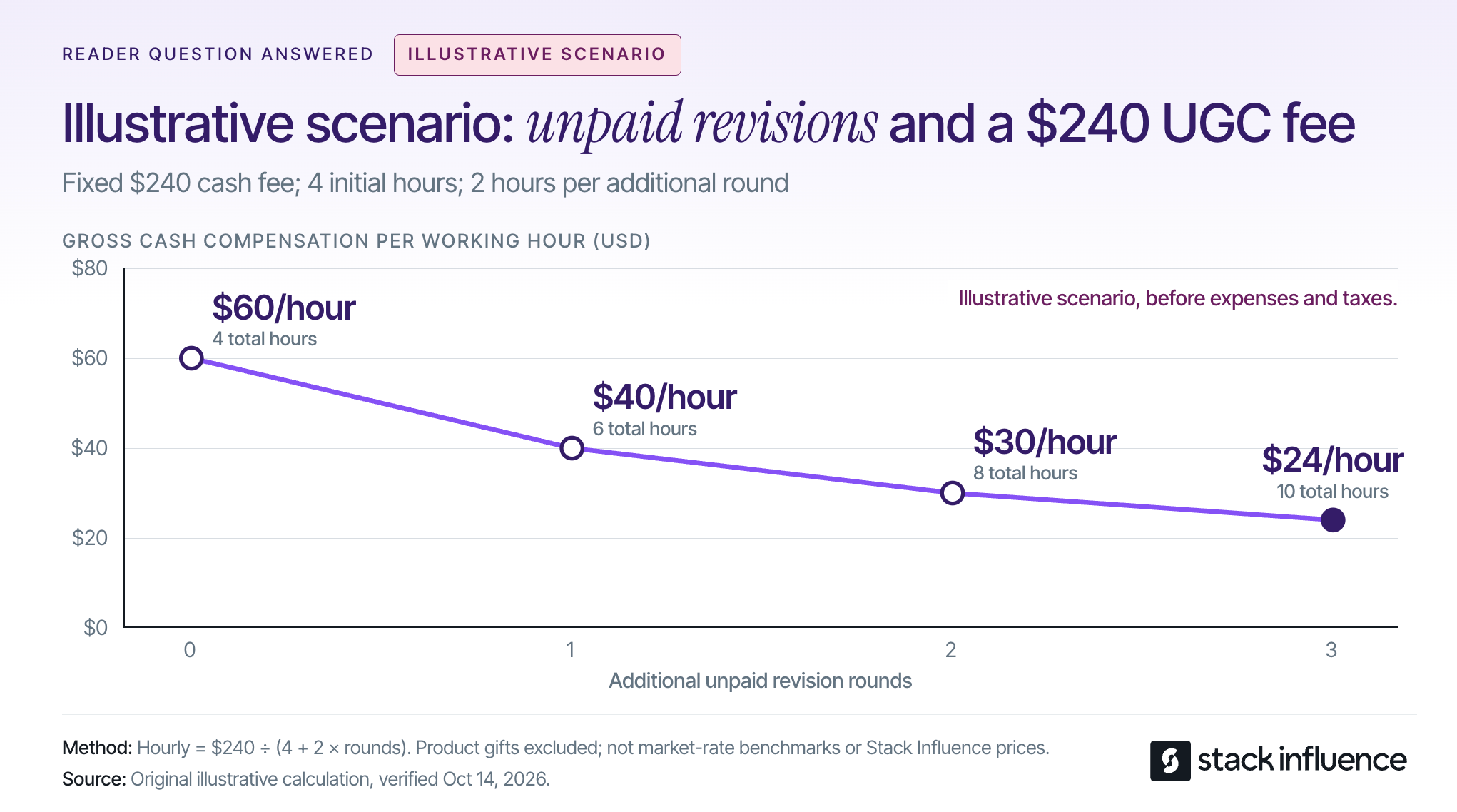
An influencer marketing campaign coordinates creator content around a defined audience and an intended action. The examples below show different ways to organize that relationship, rather than six versions of the same sponsored post.
These are company- or platform-reported cases, not a controlled comparison. The suggested adaptations are recommendations for your next campaign, not claims about undisclosed original briefs.
Targus illustrates how a product launch can involve a coordinated group of creators rather than one headline sponsorship. Stack Influence’s published Targus campaign record describes a three-month campaign with 120 creator promotions. Average monthly unit sales increased from a starting level of 56 to 221 during the campaign.
The practical lesson is to make the product understandable in situations that matter to buyers. For a backpack launch, an adapted brief could ask different creators to demonstrate commuting, organizing work equipment, or packing for a short trip.
That is a proposed application, not a description of Targus’s original creative instructions. Each creator should have a reason to use the product and a specific question their content can answer.
For sellers, the useful output is a collection of relevant demonstrations. For creators, the opportunity is to contribute a recognizable use case rather than recite a feature list. The sales movement is informative, but it does not establish how many additional purchases the campaign alone caused.
Magic Spoon provides a longer-duration example. Stack Influence’s 12-month Magic Spoon campaign record reports 3,448 creator promotions, with average monthly unit sales moving from a starting level of 1,937 to 7,867 during the measured campaign.
The transferable idea is sustained activation around a core product. Instead of spending the entire creative effort on one announcement, a seller can plan successive batches of content addressing different occasions, customer questions, and product uses.
Duration changes the operational interpretation of the numbers. Targus’s 120 promotions across three months equal 40 promotions per month on average. Magic Spoon’s 3,448 promotions across 12 months equal approximately 287.3 per month.
Those figures are calculated campaign-period averages, not observed monthly schedules or counts of unique creators. They help frame coordination volume, but they do not show which campaign was more efficient.
A seller adapting this model should plan product availability, creator communication, and review capacity together. Creators considering recurring partnerships should clarify whether each assignment requires a new concept, a new deliverable, or an extension of an existing agreement.
Solgaard shows how creator partnerships can connect product experiences with ongoing sales incentives. In Shopify’s Solgaard case study, the travel-goods brand used Shopify Collabs to manage ambassador relationships, product gifting, commissions, referral links, and discount codes.
Shopify reports average month-over-month creator-generated revenue growth exceeding 287% during the last six months of 2022. Separately, the case study reports more than $50,000 in sales since the program’s launch at the time of reporting.
Those are historical program results, not a growth forecast or an industry benchmark.
The useful adaptation is to connect the relationship and the purchase path. A creator can explain how a product fits a real situation, direct interested viewers to a trackable destination, and continue participating through a clearly defined commission arrangement.
For Shopify influencer marketing, decide in advance how discounts, returns, commission eligibility, and reporting will work. Creators should understand when a sale earns compensation and whether content production has a separate fee. Affiliate participation and unlimited content production should not become the same obligation by accident.
e.l.f.’s original TikTok campaign demonstrates the difference between watching branded content and joining it. The brand built its #eyeslipsface challenge around original music and a recognizable participation format.
In its October 11, 2019 campaign announcement, e.l.f. reported more than one billion views and more than 400,000 participating videos. Those numbers describe the campaign’s position at that reporting date, not its eventual lifetime total.
The lesson is not that another brand should expect similar reach. It is that an audience needs an understandable way to participate.
An ecommerce adaptation could invite creators to demonstrate an original, repeatable product-use format that other people can interpret in their own way. Keep the participation instructions simple, and use original or appropriately licensed creative materials.
For creators, distinctive interpretation matters more than reproducing another person’s performance. For sellers, participation and views belong in an awareness scorecard; neither number automatically establishes purchase intent.
CeraVe’s Michael Cera campaign illustrates coordinated storytelling rather than a batch of interchangeable endorsements. The brand’s February 2024 campaign announcement describes a three-week campaign involving the actor, digital creators, and dermatologists, culminating in a Super Bowl reveal.
The campaign played with the connection between the actor’s name and the brand while ultimately reinforcing CeraVe’s dermatologist-developed positioning. Its value as an example is the sequencing and division of roles, not a disclosed creator-only sales result.
A smaller seller can adapt that structure without copying the celebrity production or the fictional premise. One creator might introduce a customer problem, another demonstrate the product, and another answer practical questions near launch.
Keep product claims accurate and commercial relationships clear throughout the sequence.
Creators should know which part of the story they own, what information is already public, and what must be coordinated with other posts. A shared launch date is not enough when one piece of content depends on another.
Knorr’s #ModTheVeg campaign put creators inside gaming culture rather than treating gaming audiences as a generic advertising segment. The campaign involved streamers and game modifications that gave vegetables a more prominent role in play.
In Unilever’s December 2024 campaign report, the company reported that more than 10,000 people played the modifications and that audiences watched 26,000 hours of streamer content within 48 hours.
Those outcomes describe participation and viewing, not ecommerce orders.
The transferable principle is to contribute to something a community already enjoys doing. A home-organization brand, for example, could collaborate around creators’ existing workspace-reset routines instead of asking for unrelated product shoutouts.
For sellers, start with the activity and identify the product’s useful role within it. For creators, explain why the collaboration belongs in your content. An audience relationship is more specific than a demographic label or follower count.

Choose a campaign example by the action it enables, then adapt its workload and requirements. The Borrow-Resize-Verify Method turns inspiration into a brief without treating a published case study as a promise.
Identify what made participation or purchasing easier.
Targus offers a product-demonstration model. Solgaard connects creator relationships with trackable purchasing. e.l.f. supplies a repeatable participation format. CeraVe shows how separate creator contributions can form a sequence.
Choose one primary mechanism for the first test. Combining awareness, affiliate sales, content production, and a community challenge in one brief can make it difficult to determine what the creator is actually responsible for delivering.
For content creators, a useful brand-deal pitch translates the mechanism into a specific contribution: a customer question you can answer, a product use you can demonstrate, or an audience activity you can support.
Translate the idea into product quantities, creator assignments, production time, and review capacity.
Budget for the applicable combination of product costs, shipping or reimbursement, creator compensation, campaign management, content usage, and paid distribution. Evaluate micro influencers and nano influencers on product relevance and proposed contribution, not just a smaller version of a celebrity’s reach.
When evaluating influencer marketing platforms or an influencer marketing agency, ask who owns sourcing, product coordination, follow-up, content collection, and reporting.
Stack Influence’s automated product-seeding workflow connects vetted creator activation, product coordination, and completed-post accountability through a gifted-first model. That operational structure is relevant when a seller needs to manage participation through delivery rather than simply collect creator names.
The monthly averages in the Targus and Magic Spoon examples illustrate why workload needs its own planning decision. Do not commit to a campaign volume your team cannot support through completion.
Write down the deliverable format, publishing location, dates, compensation, revision allowance, tracking destination, and intended reuse.
Define the relevant UGC licensing terms, including channels, duration, and permitted edits. A creator should be able to distinguish an organic post, a commissioned UGC video, and a paid-ad assignment before accepting the brief.
The FTC’s endorsement guidance explains that material connections need clear disclosure, including products supplied for free or reimbursed after purchase. Include disclosure instructions and check the resulting endorsements.
Record paid usage and platform authorization separately. For example, TikTok’s Spark Ads documentation requires authorization to advertise using another creator’s organic post.
A planned UGC advertising workflow should connect the agreed content use, necessary permissions, asset delivery, and media launch. Discovering a missing permission after the video is finished is an avoidable production problem.
A campaign can look successful publicly while its production process becomes uneconomical for the creator. Revision scope deserves attention before the first draft, not after disagreements arise.
Consider an illustrative scenario: a creator receives a fixed $240 cash fee for one commissioned UGC video. Assume the initial work, including planning, filming, editing, and administration, takes four hours. Each additional unpaid revision round adds two hours, while the fee and agreed usage remain unchanged.
With no additional rounds, gross cash compensation is $60 per working hour. One extra round brings total work to six hours and compensation to $40 per hour.
Two extra rounds mean eight hours of work and $30 per hour. Three mean ten hours and $24 per hour.
These are illustrative calculations before expenses and taxes, not recommended market rates or Stack Influence pricing. The calculation is the fixed cash fee divided by total working hours; product gifts are not counted as cash compensation.
For sellers, consolidate feedback and distinguish corrections from a newly requested concept. For creators, agree on included revisions and the process for pricing additional scope.
The commercial lesson works in both directions: a clear brief protects the brand’s production schedule and the creator’s ability to deliver sustainable work.
Measure the campaign against its intended action, then connect delivery, audience response, shopping activity, and costs. A content-production project and an affiliate sales program should not be judged by the same headline metric.
For a content-production campaign, accepted assets that meet the agreed usage requirements are a primary output. For a sales campaign, completed posts are a delivery checkpoint, while qualified visits, orders, and contribution after costs are closer to the commercial outcome.
Record planned and completed deliverables alongside the actual publication dates. An early post and a late post need comparable exposure periods before their results can be compared fairly.
For Shopify campaigns, decide how tagged links and creator-specific codes will feed a single order-level report. Reconcile discounts, returns, and commissions rather than adding together every tool’s claimed revenue.
A code identifies a redemption, but it does not by itself establish where the shopper first discovered the product. Treat that distinction as a reporting limitation, not a reason to abandon measurement.
For eligible Amazon sellers, the Amazon Attribution guide explains how tags connect off-Amazon clicks with subsequent shopping activity. Amazon documents a 14-day, last-touch attribution model, so the most recent qualifying click receives conversion credit within that window.
That model is not a complete record of every creator exposure. The Amazon Brand Referral Bonus described in the same guide is also a separate brand program, not the creator’s affiliate compensation.
In product-seeding reports, separate creator purchases and reimbursements from purchases made by the audience wherever the available records allow. Otherwise, the act of supplying products to participants can be confused with independent customer demand.
Do not treat the entire change in account sales as campaign-generated revenue. Inventory availability, price changes, paid advertising, seasonality, and other promotions may change during the same period.
Before launching, define the reporting window, the conversion model, and how returns will be handled. Compare publication cohorts after equivalent observation periods, and allow the applicable attribution window to mature.
A carefully designed holdout or another credible comparison can strengthen causal interpretation. Without that, report attributed sales and overall sales movement separately, and describe the limitations.
This is why the six examples should inform campaign design rather than become a performance leaderboard. Their products, periods, distribution, and success measures differ.
The most useful influencer marketing campaign examples reveal a repeatable mechanism: explain a product, support an ongoing partnership, invite participation, coordinate a story, or contribute to a community.
Use the Borrow-Resize-Verify Method to select one mechanism and build a brief around it. Sellers should define the commercial job, operational owner, and measurement plan; creators should define their contribution, compensation, and boundaries.
For a product-led campaign, start by mapping the creator journey from product access to completed content. Evaluating that workflow with Stack Influence can help turn campaign inspiration into an executable product-seeding plan, while a clear agreement gives creators the conditions to do their best work.