




Instagram's Collab feature is one of the most underused growth tools available to content creators, and the how-to question around it is more common than you might expect. Knowing how to accept a collaboration on Instagram takes about thirty seconds once you understand where the notification lives and what each option means. But the more valuable knowledge is the strategic layer behind the feature: who to collaborate with, what types of posts benefit most from the Collab format, and how to use the dual-audience distribution it creates to build your following and attract brand partnerships simultaneously. This guide covers the complete mechanics of Instagram collaboration posts, step-by-step instructions for accepting and sending collaboration invites, and the strategic framework for using Collab posts as a systematic growth and monetization tool rather than a one-off feature.
Key Takeaways
- To accept a collaboration on Instagram, open the notification in your Direct Messages or Activity tab, where the collaboration invite appears as a pending request with Accept and Decline options.
- Instagram Collab posts display on both creators' profiles and appear in both creators' followers' feeds, effectively doubling the organic distribution of a single piece of content without any paid amplification.
- The Collab feature works for feed posts, Reels, and carousels, making it applicable across the most important content formats for audience growth and brand partnership demonstration.
- Strategic Collab partners for micro influencers and nano influencers are creators in adjacent but non-competing niches, whose audiences share interest in your content category without fully overlapping with your existing followers.
- Brands increasingly use the Collab post feature to co-author content with creators rather than simply sponsoring posts, because Collab posts carry the brand account's identity while benefiting from the creator's audience trust and engagement rate.
How Do You Accept a Collaboration on Instagram Step by Step?

When another creator or brand sends you a Collab request on Instagram, the invite arrives in two places simultaneously: your Direct Messages inbox as a message from the account that invited you, and your Activity notifications as a tagged content notification. The notification will show a preview of the post or Reel and present two options: Accept and Decline. Tapping Accept adds you as a co-author, and the post publishes to both profiles at the same time.
The full step-by-step process to accept a collaboration on Instagram:
- Open Instagram and navigate to your Direct Messages by tapping the paper airplane icon in the top right of your home feed.
- Find the message from the account that sent the Collab invite. It will appear as a pending post invite with a thumbnail of the content.
- Tap the message to open the Collab invite preview. You can view the full post content, caption, and tags before deciding.
- Tap Accept to confirm your co-authorship. The post will immediately publish to both profiles if the other creator has already shared it, or queue to publish when the original creator publishes it if it is still in draft.
- Alternatively, navigate to your Activity notifications (the heart icon) and find the collaboration tag notification, which also contains Accept and Decline options.
- After accepting, verify the post appears on your profile grid and that your username appears alongside the original creator's username on the post.
According to Instagram's help documentation, invited collaborators have the option to accept or decline a collaboration, and if accepted, the post will be shared to both accounts' grids and shown to both accounts' followers. The original creator retains full control over the post content and can remove the collaborator or delete the post at any time.
What Is an Instagram Collab Post and Why Does It Matter for Creators?
Instagram's Collab feature, launched in late 2021, allows two accounts to co-author a single post that appears simultaneously on both profiles, displays both usernames at the top of the post, and reaches both accounts' follower bases through the algorithm. It is not a tag or a mention. It is a shared ownership structure that gives the content equal representation across both accounts.
The distribution mechanic is the feature's most powerful element. A Collab post between a creator with 12,000 followers and a brand with 80,000 followers does not just notify a small percentage of each account's followers. It appears in the regular feeds of both accounts' full follower bases, and the engagement signals it generates, likes, comments, saves, and shares, contribute to both accounts' algorithmic performance data simultaneously.
Three reasons the Collab feature matters strategically for creators:
- Audience reach multiplication: A single piece of content reaches two separate follower bases in their native feed context rather than requiring either creator to share the other's content as a Story or repost. The distribution is organic, not borrowed.
- Social proof compounding: When a post displays two creator usernames, viewers who trust the original account transfer a portion of that trust to the collaborating account. For [nano influencers](INTERNAL: nano influencer Instagram Collab growth strategy) partnering with larger accounts, the social proof benefit of appearing as a co-author next to a well-known account can be more valuable than the follower count gain from the Collab itself.
- Brand partnership professionalization: Brands that use the Collab feature for sponsored content maintain their own account's visual presence on the post rather than simply appearing in caption tags. For [micro influencers](INTERNAL: micro influencer brand Collab post strategy) working with brand partners, this creates a more formal, partnership-branded piece of content that both parties can use for portfolio documentation.
How Do You Send a Collab Invite to Another Creator or Brand?
Understanding how to accept a collaboration on Instagram is only half of the Collab workflow. Knowing how to initiate one gives creators control over their partnership strategy rather than waiting passively for invites to arrive. Sending a Collab invite from your own post is straightforward but requires the post to be in creation mode rather than already published.
The Collab post feature is only available when you create a new post, not when editing an existing published post. To invite a collaborator, you must add them during the creation process before tapping the final Share button.
Step-by-step instructions to send a Collab invite:
- Create a new post or Reel from the Instagram camera or upload button as you normally would.
- On the caption and settings screen, before tapping Share, tap "Tag people."
- In the tagging interface, look for the "Invite Collaborator" option, which appears alongside the standard tag option.
- Search for the account you want to invite as a collaborator and tap their username to add them.
- Return to the caption screen and complete your caption, hashtags, and other settings.
- Tap Share. The post publishes to your profile immediately, and the invited collaborator receives a notification to accept or decline.
- The post displays a pending collaborator indicator until the invited account accepts. Once they accept, their username appears on the post and it publishes to their profile.
Brands using Instagram for [Shopify influencer marketing](INTERNAL: Shopify influencer marketing collaboration guide) or product campaigns frequently send Collab invites to creators as part of a sponsored content arrangement, because the Collab format gives the brand's account co-authorship of the creator's high-performing content. Understanding the sender workflow is important for creators who want to initiate peer-to-peer Collabs rather than always receiving them.
Who Should You Collab With to Actually Grow Your Account?
The most common mistake creators make with Instagram's Collab feature is treating it as a reciprocity exchange with friends or existing followers rather than as a strategic audience expansion tool. A Collab post between two accounts whose audiences overlap significantly produces minimal follower growth because you are reaching people who already know about you. The highest-return Collab partnerships are with accounts in adjacent niches whose followers share your content category interest but have not yet discovered your specific account.
The Collab Partner Selection Framework is a four-question checklist that helps creators identify which accounts are worth pursuing for Collab partnerships versus which ones feel natural but produce limited strategic value.
The four questions of the Collab Partner Selection Framework are:
- Audience adjacency: Does this account's audience likely share my content interest category without fully overlapping with my existing followers? A fitness creator should target a nutrition creator rather than another fitness creator of similar size for maximum non-overlapping exposure.
- Engagement quality: Does this account have a genuinely engaged audience, as reflected in comment quality and save rate, rather than inflated follower counts with passive engagement? A 15,000-follower account with 5% engagement rate is a stronger Collab partner than a 60,000-follower account with 0.5% engagement rate.
- Content compatibility: Can we produce a single piece of content that serves both audiences without forcing either account's typical content style? Collab posts that feel forced or off-brand for one of the creators underperform because viewers from that account sense the mismatch.
- Mutual value clarity: Is there a clear reason for both accounts to participate? Collab posts where one account is significantly larger should involve an explicit value exchange, whether that is a fee, a product, or a reciprocal future Collab, rather than assuming the smaller account is lucky to be featured.
Running potential Collab partners through the Collab Partner Selection Framework before reaching out saves time and prevents the awkward conversation that comes from pitching a Collab to an account that has no strategic reason to participate.
How Do Brands Use Instagram Collab Posts for Influencer Campaigns?
The brand-side use of Instagram's Collab feature has grown significantly since 2022, and understanding how brands approach it helps creators negotiate better terms for Collab-based sponsorships versus standard sponsored post arrangements. A Collab post is structurally different from a standard sponsored post in ways that affect both the value the brand receives and the rate a creator should charge.
In a standard sponsored post, the creator's account is the sole author and the brand is mentioned in the caption or tagged in the image. In a Collab post arrangement, the brand becomes a co-author, meaning the post appears on the brand's own profile grid in addition to the creator's, and the brand can access the post's performance analytics directly through their own account. This additional visibility and data access represents measurably more value than a standard tag mention.
Key considerations for creators when brands request Collab posts as part of a campaign:
- Rate adjustment: A Collab post should be priced higher than a standard sponsored post because the brand receives profile grid placement, permanent co-authorship credit, and direct analytics access. The premium is typically 20 to 40% above your standard sponsored post rate.
- Content control clarity: Agree in writing on who controls the post's caption, hashtags, and visual content before the Collab invite is sent. In a Collab post, only the original author (the creator who initiates the post) can edit the caption after publishing. If the brand sends the Collab invite from their account, they retain editing control.
- Portfolio documentation: Collab posts with brands appear on your profile permanently alongside the brand's username, which strengthens your media kit and your professional credibility for future brand deals. This is a long-term value that justifies accepting well-structured Collab arrangements even at modest fee levels when the brand partner has strong name recognition.
- Removal rights: Clarify whether you retain the right to remove yourself from the Collab if the content later creates a brand conflict or if the brand relationship ends. Instagram allows collaborators to remove themselves from a Collab post without deleting the original post, which is a creator protection worth understanding before accepting.
Stack Influence's internal campaign data shows that [creator partnerships](INTERNAL: creator partnership Instagram Collab campaign guide) structured as Collab posts generate an average of 35% more total impressions than equivalent standard sponsored post campaigns because both account follower bases receive organic feed distribution. Brands that have switched from standard tag sponsorships to Collab post structures with the same creator roster report consistent improvement in campaign reach without any increase in creator fee spend.
Measuring Instagram Collab Post Performance: The Dual Reach Attribution Model
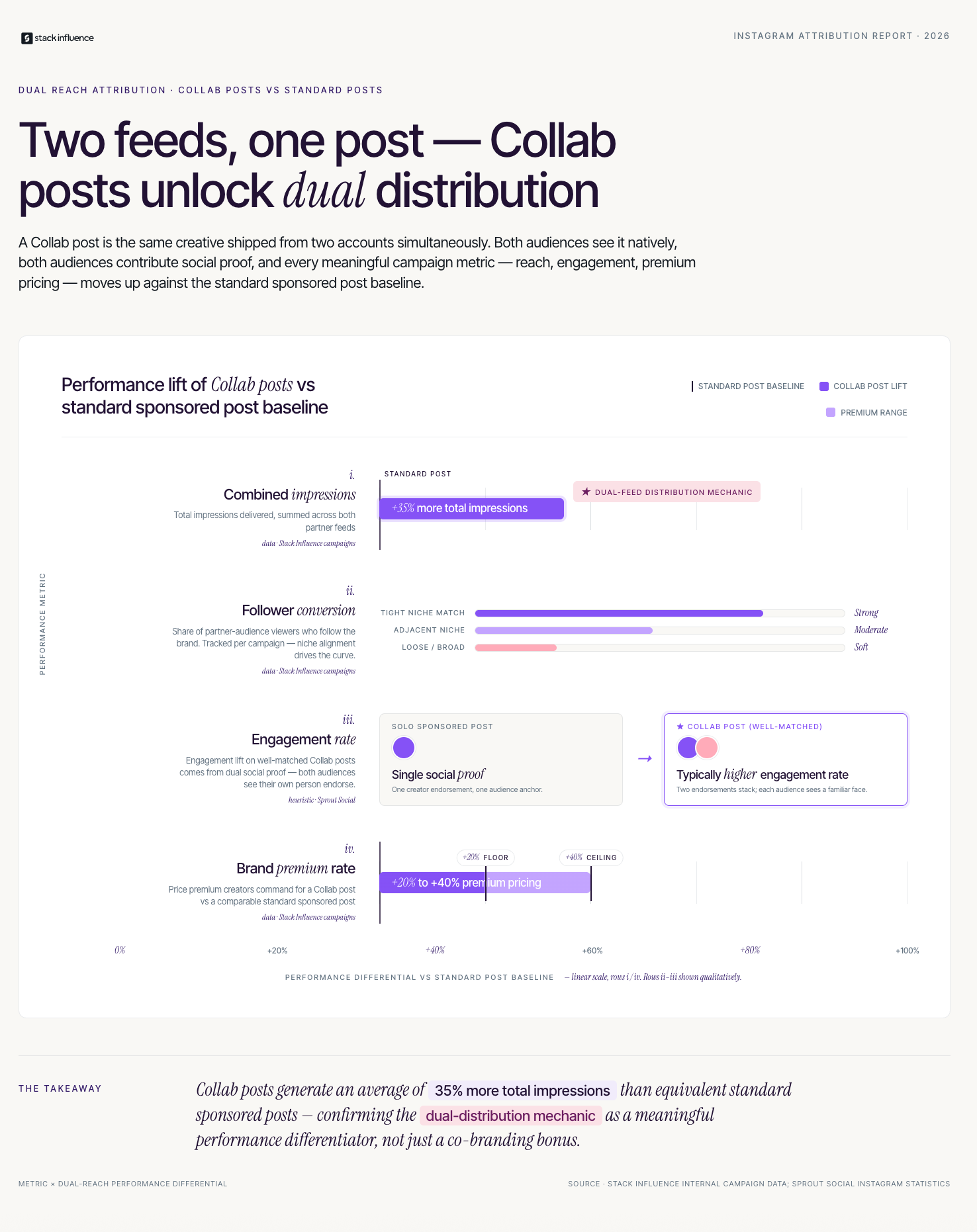
Evaluating whether an Instagram Collab post actually delivered value requires measuring performance across both accounts simultaneously, not just from your own analytics dashboard. The Dual Reach Attribution Model is a three-metric framework for understanding what a Collab post actually generated, because in-app analytics only show your account's contribution to the post's total performance.
The three metrics of the Dual Reach Attribution Model:
- Combined reach estimate: Ask your Collab partner to share the total reach figure from their account's analytics for the same post. Add your account's reach figure to theirs to estimate the unduplicated combined audience the post reached. This is the most important data point because it quantifies the primary value of the Collab format over a standard single-author post.
- Follower conversion rate by account: Track new followers gained on the day of the Collab post and in the 48 hours following it. Compare this to your baseline new follower rate on non-Collab days. Divide new followers by the estimated reach from the partner account to calculate a rough follower conversion rate from the Collab partner's audience. This tells you whether the Collab partner's audience is genuinely interested in your content or simply passing through.
- Engagement rate comparison: Compare the engagement rate (likes plus comments plus saves divided by reach) of your Collab posts to your non-Collab posts of the same content format over the same 30-day period. Collab posts with well-matched partners typically generate higher engagement rates than solo posts because the combined social proof of two accounts creates stronger viewer engagement signals.
Based on Stack Influence's work with [UGC creators](INTERNAL: UGC creator Instagram partnership performance guide) building brand partnerships, creators who document their Collab post performance data in their media kit, including combined reach estimates and follower conversion rates from partner audiences, receive brand partnership inquiries at measurably higher rates than creators who present only single-account follower and engagement statistics. The Collab performance data demonstrates audience trust depth in a way that solo post metrics cannot.
What Most Guides About Instagram Collaboration Miss for Creators
Most tutorials on how to accept a collaboration on Instagram focus entirely on the technical steps and stop there. What they consistently leave out is the professional and strategic infrastructure that separates creators who use Collab posts as a systematic growth tool from those who use them occasionally and wonder why the results are inconsistent.
The first missing layer is the outreach workflow. Waiting for Collab invites to arrive means your growth pace is determined by who chooses to invite you. Creators who build a proactive Collab outreach practice, identifying relevant partner accounts monthly, reaching out with a clear mutual value pitch, and tracking which partnership types produce the strongest follower and engagement results, consistently outgrow creators who post content and wait. The [creator economy](INTERNAL: creator economy Instagram Collab growth guide) rewards proactive relationship-building over passive content creation.
The second missing layer is Collab post content design. Most creators simply take their existing solo content and invite a collaborator as an afterthought. Collab posts that perform significantly better are ones designed from the start with both audiences in mind, where the content premise, the visual format, and the call to action are all constructed to be equally relevant to both follower bases.
Three things other Instagram Collab guides consistently leave out:
- Collab posts strengthen brand partnership pitches: A media kit that includes examples of successful Collab posts with well-known accounts or recognized brands demonstrates that you can function as part of a co-authored content strategy, not just a solo posting schedule. Brands evaluating you for [influencer campaigns](INTERNAL: influencer campaign Instagram Collab format guide) value this capability.
- The first-author advantage: The account that creates and sends the Collab invite retains editorial control of the post. For creators who want to ensure the caption, hashtags, and visual presentation align with their brand standards, initiating Collab invites rather than accepting them gives you production authority over your own profile content.
- [Influencer marketing platforms](INTERNAL: influencer marketing platform Instagram Collab tool guide) increasingly support Collab post structures: Managed campaign platforms that facilitate brand and creator partnerships are building Collab post workflows into their campaign management tools, which means creators who understand the technical and strategic mechanics of Collab posts are more attractive participants in professionally managed campaigns.
Conclusion
Knowing how to accept a collaboration on Instagram is a thirty-second technical skill. Building a practice around Instagram Collab posts that consistently grows your audience, attracts brand partnerships, and demonstrates professional content capability is the strategic work that compounds over time. The Collab Partner Selection Framework gives you the criteria for identifying which relationships are worth pursuing. The Dual Reach Attribution Model gives you the measurement system to evaluate whether those relationships are actually delivering growth. And the professional workflow tips around rate-setting and content control give you the negotiating clarity to use Collab posts as a genuine business asset rather than a casual content experiment.
If you are ready to connect with brands building structured Instagram partnership campaigns, Stack Influence matches micro influencers and content creators with eCommerce brands running product seeding and creator campaigns designed for authentic Instagram collaboration.