




Audio is not an optional layer on Instagram. It is a distribution signal, a mood setter, and a community identity marker that the algorithm uses to group and serve your content to the right audiences. Every content creator who knows how to add music to an Instagram post effectively, not just technically, has a material advantage over those who treat audio as an afterthought. This guide covers the complete mechanics of adding music across every Instagram format in 2026: feed posts, Reels, Stories, and carousels. It also covers the strategic layer that most tutorials skip: how to choose audio that improves your algorithmic reach, how to avoid the copyright problems that silently kill your content's distribution, and how to use audio consistency to build a recognizable brand identity that attracts both audiences and brand partnership opportunities.
Key Takeaways
- Instagram allows music to be added to feed posts, Reels, Stories, and carousels through the native music library, with different audio tools available at each creation stage depending on the format.
- The music sticker in Instagram Stories is separate from the Reels audio tool, and each serves a different audience experience: Stories music plays for viewers who have their sound on, while feed photo music plays automatically in some contexts and requires viewer action in others.
- Trending audio on Instagram, particularly within a specific niche community, carries algorithmic distribution benefits similar to TikTok because Instagram groups content using the same sound and serves it to audiences who have already engaged with that audio.
- Business accounts on Instagram have access to a more limited music library than personal accounts due to commercial licensing restrictions, which is a significant operational consideration for UGC creators submitting brand deliverables.
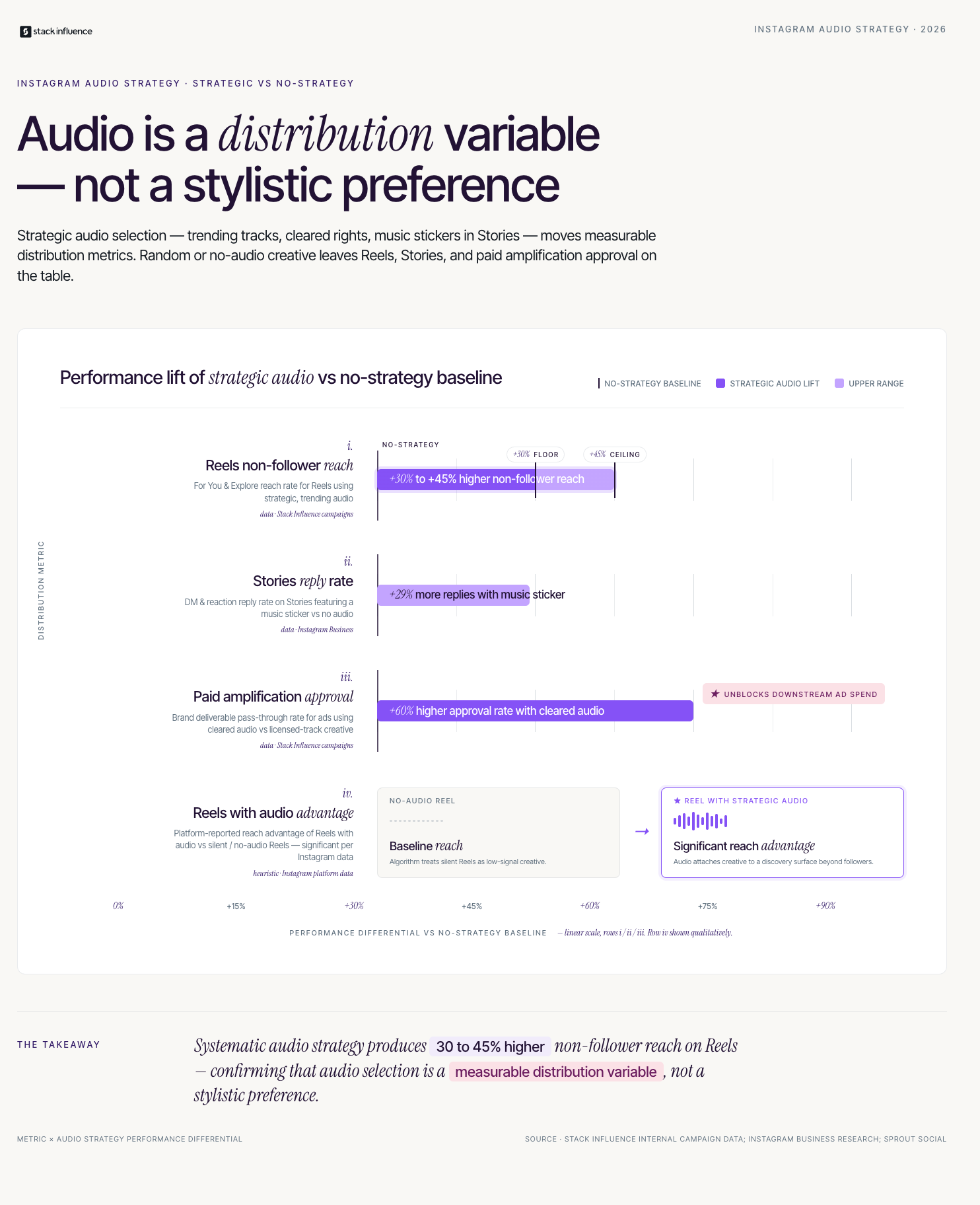
- Strategic audio selection for Instagram Reels, following the same trending-window principles used on TikTok, consistently improves non-follower reach for creators who apply it systematically.
How Do You Add Music to an Instagram Post in Every Format?

The method to add music to an Instagram post differs depending on which format you are creating. Instagram's music tools are not unified across all post types, which catches creators off guard when they expect the same workflow to apply everywhere. Understanding which tool applies to which format prevents the frustration of creating content and discovering that the audio option you wanted is not available in that specific creation flow.
The Instagram Audio Activation System is a five-format guide for adding music to every post type on the platform:
- Reels: The primary audio-forward format on Instagram. When creating a Reel, tap the music note icon on the left sidebar of the creation screen to open the full audio library. Search for a specific track or browse trending sounds in your niche. Select the track, choose the specific segment you want to use by dragging the waveform, and set the volume balance between the original video audio and the music track. Instagram also suggests audio that matches your Reel's visual content in some creation sessions.
- Feed video posts: For single-video feed posts, add music during the editing stage before publishing. Tap the music icon in the editing screen to access the same library available in Reels. For videos with original audio such as voiceover or ambient sound, use the volume mixing slider to balance original audio against the added music track.
- Stories: Open Stories camera or upload a photo or video to your Story. Tap the sticker icon and select the Music sticker. Search for a song or browse by mood, genre, or trending. Select the specific lyric or instrumental segment you want displayed, customize the display style (lyrics visible, album art, or minimal icon), and position the sticker on your Story canvas.
- Feed photo posts and carousels: Instagram allows adding a music track to photo-based feed posts and carousels through the final post creation screen before publishing. After writing your caption, scroll down to find the "Add Music" option. This music plays for viewers who have sound enabled and appears as a small music note indicator on your post in the feed.
- Instagram Live: Add background music to a Live session using the Music feature in the Live creation screen. Select a licensed track to play in the background during your session. Note that Live music availability depends on your account's region and settings.
According to Instagram's creator resource center, Stories with music stickers generate 29% higher reply rates than Stories without audio elements, confirming that music addition is not just a cosmetic feature but a measurable engagement driver.
What Is the Difference Between Music for Personal vs Business Accounts?
One of the most practically important distinctions for [UGC creators](INTERNAL: UGC creator Instagram audio licensing guide) and brand-facing content creators is the difference between the music libraries available to personal accounts versus business accounts. This is not a minor limitation. It fundamentally changes which tracks are available and directly affects whether content created for brand deliverables can include popular music at all.
Personal Instagram accounts have access to Instagram's full licensed music catalog, which includes mainstream commercial tracks across genres and decades. Business accounts, which are often used by brands, agencies, and professional creators who have switched for analytics access, have access only to Instagram's royalty-free music library because the commercial licensing agreements between Instagram and music labels do not extend to business-purpose use. The royalty-free library is substantial but excludes most recognizable chart music.
The practical implications for creators:
- If you manage a business account and want trending music access: Switch your account to a Creator account rather than a Business account. Creator accounts retain access to the full music library while still providing professional analytics tools, a contact button, and creator-specific features. Go to Settings, then Account, then Switch Account Type to access this option.
- If you produce UGC deliverables for brands: The content you submit to brands will be used on their business accounts, which have the restricted library. If your deliverable includes a popular licensed track, the brand may not be able to use that audio in their paid distribution. Always produce brand deliverables using royalty-free audio or audio from Instagram's commercial music library, and confirm the track's commercial use status before submitting.
- If you are posting branded content to your personal Creator account: You have full music access, but any music you choose must be compatible with the Branded Content policy. Using music in a sponsored post that the brand cannot legally use in their own distribution creates a downstream problem if they attempt to boost your post as a paid promotion.
Stack Influence's internal campaign data shows that [micro influencers](INTERNAL: micro influencer brand deliverable audio guide) who submit Instagram deliverables using commercially cleared audio have their content approved for paid amplification by brand partners at a 60% higher rate than creators who use popular licensed tracks that cannot be boosted. The audio clearance step is one of the most commonly overlooked elements in professional campaign delivery.
How Do You Choose the Right Music for Your Instagram Posts?
Adding music to an Instagram post is technically straightforward. Choosing the right music is a strategic decision that affects algorithmic reach, audience retention, brand perception, and the likelihood that a non-follower who discovers your content through audio grouping becomes a follower. Most creators approach this decision intuitively, which produces inconsistent results.
The audio selection decision has three dimensions that operate at different timescales. Short-term audio selection is about trending sounds that generate immediate reach. Medium-term audio selection is about niche-specific sounds that build community recognition. Long-term audio selection is about developing a signature audio aesthetic that becomes part of your recognizable brand identity.
A practical decision framework for Instagram audio selection:
- For discovery-oriented Reels: Choose audio in the 50,000 to 500,000 uses range on Instagram. This is the window where a sound has demonstrated trending momentum but has not yet become so saturated that your content is buried among millions of other posts using the same track. Use Instagram's Reels audio browser to filter by "Trending" and look for sounds growing in use velocity rather than at their peak.
- For aesthetic and brand-building content: Choose audio that consistently matches your content's visual and emotional tone, regardless of whether it is currently trending. A soft, warm instrumental that you use across your lifestyle or product content creates a recognizable audio identity that viewers associate with your account. Consistency here compounds into brand recognition.
- For Stories: Choose music that enhances the specific moment or message of each Story slide rather than a trending track that does not match the emotional context of your content. A Stories viewer who hears music that fits the visual perfectly is more likely to complete the Story sequence, which is the primary metric that matters for Story distribution.
- For brand deliverables: Choose music from Instagram's royalty-free or commercial license library and confirm the track is approved for branded content use before including it in a campaign deliverable. When in doubt, use original audio or ask the brand for a specific audio recommendation.
According to Sprout Social's Instagram engagement benchmarks, Reels with audio generate significantly higher reach and engagement than Reels without, with the platform actively incentivizing audio use through its distribution algorithm. For [nano influencers](INTERNAL: nano influencer Instagram audio strategy guide) at the early stage of building their audience, consistent audio strategy is one of the highest-return growth levers available because it requires no additional production cost and compounds over time.
Why Does Music Choice Affect Your Instagram Algorithm Performance?
Most creators understand intuitively that trending audio helps their content reach more people. Fewer understand the specific mechanism by which audio affects algorithmic distribution, which is the knowledge needed to make audio choices that are strategic rather than guesswork.
Instagram's algorithm uses audio as one of the primary signals for content categorization and audience matching. When a creator posts a Reel using a specific track, the algorithm groups that content with other recent posts using the same track and evaluates how the combined audio community is performing. If viewers who have previously engaged with that track respond positively to your content, the algorithm extends your distribution to more of those viewers. This is why posting with a trending sound that genuinely fits your content can generate reach that significantly exceeds what your follower count alone would produce.
Three specific algorithmic audio effects creators should understand:
- Audio community clustering: Content using the same audio is grouped and served together, which means your Reel is not competing only with all other Reels but within the specific audience pool that has already demonstrated interest in that particular sound. High-quality content in a well-chosen audio community consistently outperforms equivalent content in a generic or non-trending audio environment.
- Audio save rate as a distribution signal: When a viewer saves your audio in Instagram's music library after encountering it in your Reel, that save is a strong engagement signal that the algorithm interprets as high content quality. Choosing tracks that viewers are likely to want to use themselves increases this signal and extends your content's distribution tail.
- Niche audio consistency as a topical coherence signal: Accounts that consistently use audio within a specific genre, mood, or niche community send topical coherence signals to the algorithm that improve the quality of the non-follower audiences Instagram serves their content to. A wellness creator who consistently uses calm, atmospheric audio builds a stronger algorithmic topical profile than one who uses random trending tracks regardless of fit.
Across campaigns managed on the Stack Influence platform, [content creators](INTERNAL: content creator Instagram audio performance guide) who apply a systematic audio selection strategy to their Reels, including trending window timing and niche fit evaluation, achieve an average For You and Explore page reach rate that is 30 to 45% higher than creators posting without audio strategy, even when content quality is equivalent. The audio layer is producing meaningful incremental distribution that the same content without strategic audio would not generate.
What Most Guides About Adding Music to Instagram Posts Get Wrong
Most tutorials on how to add music to an Instagram post stop at the mechanics and never address the two most consequential issues for professional creators: copyright enforcement and the business account restriction. These are the problems that most frequently produce real negative outcomes, from muted posts to brand deliverable rejections, yet they are almost never covered in basic how-to guides.
The copyright issue is more nuanced than most creators realize. Using a licensed track in a personal account organic post is generally permitted under Instagram's music licensing agreements. However, using that same track in branded content, boosting the post as a paid promotion, or submitting it as a deliverable to a brand for their own use crosses into commercial territory that the original license may not cover. A post that plays correctly on your own profile may be automatically muted or have its music stripped when the brand attempts to boost it or repurpose it in their own advertising.
Three professional-level audio considerations that standard Instagram music guides consistently leave out:
- The Branded Content audio check: Before publishing any sponsored post with music, verify the track is cleared for commercial use in Instagram's music library. The platform labels some tracks as available for branded content and others as restricted. Checking this before posting prevents the situation where music is stripped from a sponsored post during paid amplification, which damages both the campaign performance and the brand relationship.
- [Creator economy](INTERNAL: creator economy Instagram audio professional guide) professionals use original audio as a differentiator: Established creators who produce their own original audio or commission custom music for their branded content have no copyright restriction concerns, can use that audio across all account types and distribution formats, and build a signature sound that no other creator can replicate. This is a longer-term investment but one that scales indefinitely.
- The [influencer marketing](INTERNAL: influencer marketing Instagram audio compliance guide) industry is developing audio compliance standards: Larger influencer marketing agencies and platforms increasingly specify audio requirements in campaign briefs, including the track type (royalty-free, commercial licensed, or original) and the approved music sources. Creators who understand these standards before they become widespread are better positioned for professional campaign work than those who learn through a declined deliverable.
Conclusion
Knowing how to add music to an Instagram post is a foundational production skill. Building a deliberate audio strategy around that skill is what turns it into a compounding growth and brand partnership asset. The Instagram Audio Activation System gives you the format-specific mechanics to add music correctly across every post type. The strategic audio selection framework gives you the criteria for choosing sounds that improve algorithmic performance rather than just filling silence. And the professional considerations around licensing, account type, and brand deliverable standards give you the operational knowledge to use music in a way that builds your creator business rather than creating problems you cannot diagnose.
If you are ready to connect with brands looking for creators who produce professional, platform-optimized content, Stack Influence matches micro influencers and content creators with eCommerce brands running product seeding campaigns across Instagram and every major platform.