




A creator accepting your product is not the same as a creator agreeing to publish. A package marked delivered is not the same as usable content. And an order placed to obtain a reimbursed sample is not evidence that a new customer discovered your store.
Micro influencer seeding for Shopify brands works best when those distinctions are settled before inventory leaves the warehouse. This guide explains how to organize a controlled pilot, protect customer-facing stock, coordinate creators, and evaluate content and sales without overstating the results.
Key Takeaways
- Separate no-obligation gifts from product-exchange campaigns with agreed deliverables before inviting creators.
- Set seeding limits by product variant, not just total units or campaign budget.
- Compare creator batches after equal time since delivery, rather than judging every batch on the same calendar date.
- Track usable content and genuine customer purchases separately from gifts, reimbursements, and attributed revenue.
Micro Influencer Seeding for Shopify Brands: Five Release Gates
Start with one product, one primary objective, and a batch your team can fulfill and follow through to completion. Expand only after the pilot reveals whether the product, creator agreement, and measurement setup work together.
Micro influencer seeding means providing products to smaller, relevant content creators to encourage product experience, social content, and potential customer discovery. In Shopify's explanation of product seeding, traditional seeding carries no obligation to publish. Product-exchange campaigns are different: the creator accepts specified deliverables in return for the agreed product or reimbursement.
Shopify describes micro influencers as creators with roughly 10,000 to 100,000 followers and nano influencers as those with roughly 1,000 to 10,000. Those labels help organize discovery, but neither establishes product fit or willingness to accept your offer.
Use five release gates to decide when each creator can move forward:
- Stock: The selected variant is available without consuming the inventory floor set for customers.
- Fit: The creator wants that product and can show a relevant use case.
- Agreement: Both parties understand the compensation, posting expectations, timeline, and usage permissions.
- Delivery: The creator has received a usable product, and any shipping problem has an owner.
- Measurement: The post, permissions, links, and reporting window can be connected to the correct creator.
A failed gate means hold or resolve the issue, not automatically send another parcel.
Stack Influence's automated product-seeding workflow illustrates the agreement distinction: creators purchase products, and reimbursement follows verified social posts. Its gifted-first, completions-only model connects compensation to completed participation rather than treating every product shipment as an earned post. Completed content still does not guarantee customer sales.
Which Products and Variants Should You Release?
Release products that creators can genuinely use and that customers will still be able to buy when the content appears. Check the exact variant and fulfillment location before approving a gift or purchase instruction.
Shopify's inventory-state documentation distinguishes Available inventory from Committed, Unavailable, and Incoming inventory. On-hand stock is therefore not automatically available for a new seeding batch.
Then apply your own customer inventory floor. This is a planning buffer for expected customer demand, not another deduction for units Shopify has already marked unavailable or committed.
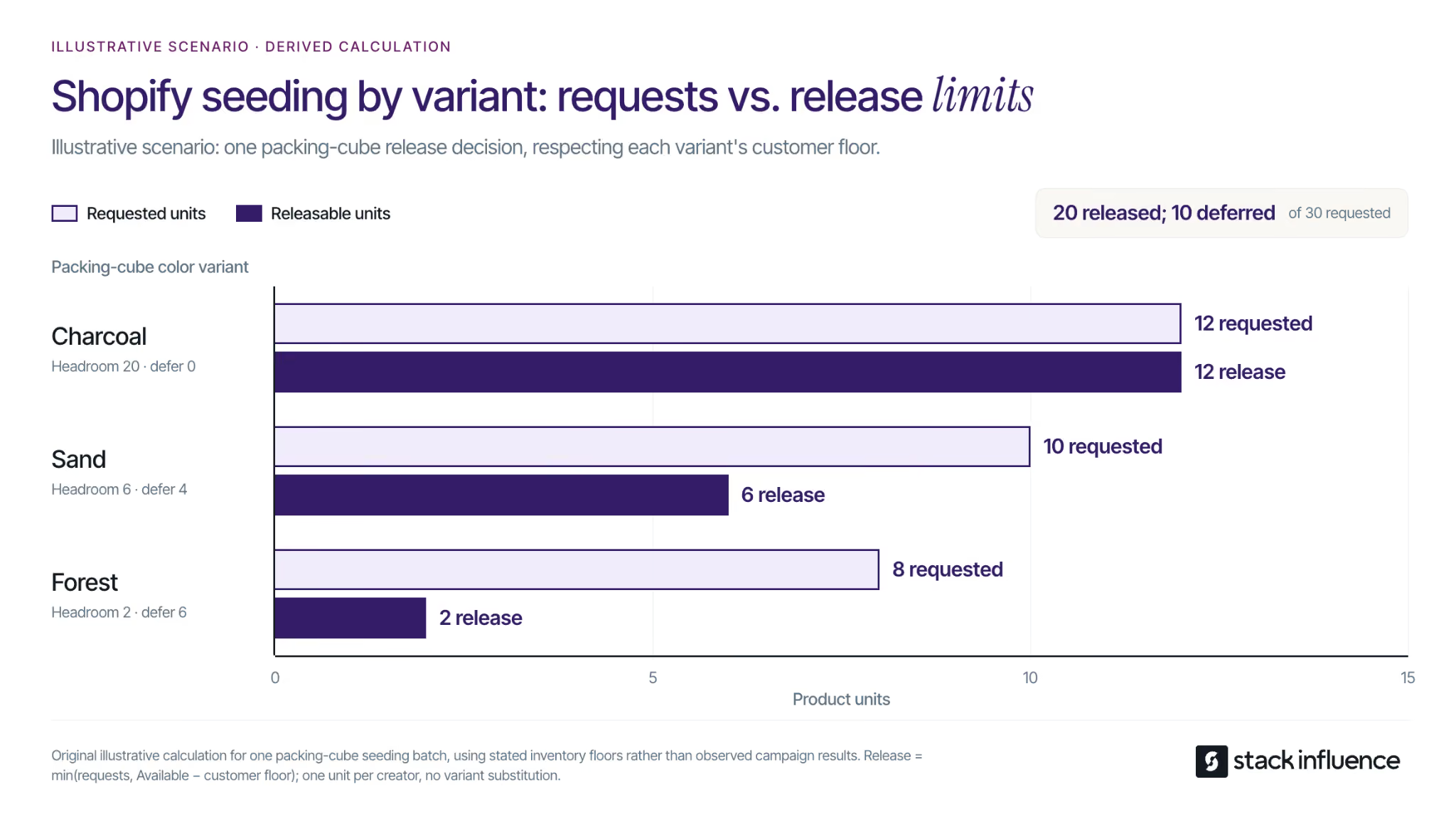
Consider an illustrative packing-cube pilot with one unit per creator, no replenishment during the release decision, and three colors. The following floors are planning assumptions within Available inventory, not quantities already removed from it:
- Charcoal: 80 available units, a 60-unit customer floor, and 12 creator requests. Release 12 of the 20 units above the floor.
- Sand: 30 available units, a 24-unit customer floor, and 10 creator requests. Release 6 and defer 4.
- Forest: 18 available units, a 16-unit customer floor, and 8 creator requests. Release 2 and defer 6.
Release quantity equals the smaller of creator requests and available units above the floor, with a minimum of zero. The batch releases 20 of 30 requested units and defers 10.
Unused charcoal capacity does not automatically solve the other shortages. Ask whether affected creators genuinely want that color before substituting it. These are illustrative allocation calculations, not a Shopify rule or a campaign benchmark.
Choose the floor using your own demand, replenishment, and launch commitments. Recheck stock before each release instead of assuming yesterday's allocation still holds.
Find Creators Who Can Demonstrate the Product
Recruit around a customer situation, not an arbitrary follower target. For packing cubes, a creator who regularly demonstrates compact packing may offer a clearer product story than a larger account that mainly posts destination photographs.
Start with customers who already publish relevant content, people who tag your brand, and creators discussing the problem your product solves. A structured approach to finding micro influencers can widen that shortlist through topic searches and manual profile research.
Review recent demonstrations, substantive audience questions, and the creator's consistency. Ask for relevant audience information rather than inferring audience location from the creator's address. Also confirm that viewers in the intended market can purchase from your Shopify store.
Make the Offer Unambiguous
A useful outreach message explains why the product is relevant, what the creator receives, and whether anything is required in return.
For a voluntary gift, an original example is: “Your carry-on packing demonstrations caught our attention. We would like to send you our packing cubes to try, with no posting requirement. Would you like to see the available colors?”
For a product exchange, disclose the proposed deliverable and compensation before asking for acceptance. State whether the request includes an original file, a public post, a tracked link, or paid advertising rights. Let the creator decline or propose a different arrangement.
Follow up respectfully, but do not turn an unanswered gift invitation into an assumed commitment. Ask for delivery information through your approved fulfillment process only after the creator accepts.
Build the Shopify Fulfillment and Tracking Record
Give every participant a campaign identifier that connects the creator, selected variant, agreement, order, delivery date, and final content. Keep a delivery record separate from a posting record so a fulfilled order cannot be mistaken for a finished collaboration.
Use Collabs Gifts for an Opt-In Workflow
According to Shopify's Collabs gifting instructions, gifts go to creator connections. In Shopify admin, open Apps > Collabs > Programs > Gifts, create a product gift, and specify the product, quantity, and permitted variant options.
You can allow creators to choose a variant, but first restrict the offer to stock you can release. Send the gift to the intended connections; after a creator claims it, an order appears in Shopify admin for fulfillment. Shopify applies free shipping to Collabs gifts, so include the seller's shipping expense in the campaign budget.
The gift setup does not replace a deliverable agreement. A claim, a shipment, and a completed post remain different events.
For managed execution, Stack Influence's Shopify creator campaign workflow coordinates sourcing, product seeding, post verification, and creator-content collection. Confirm which team owns storefront order identification, delivery exceptions, and the final reporting reconciliation.
Prepare the Customer Path Before Posts Go Live
Send viewers to the product or collection that matches the demonstration. Test the mobile page, variant availability, shipping information, discount behavior, and checkout path before distributing links.
Google Analytics' campaign URL guidance explains how UTM parameters identify referral campaigns. One working convention is utm_source=instagram, utm_medium=organic_social, utm_campaign=packing_cube_seed_pilot, and utm_content=creator017_demo. Apply the same naming rules throughout the batch and verify that redirects preserve the parameters.
Keep the creator's private gift-redemption route separate from any customer-facing discount or affiliate code. Record gift and reimbursed creator order IDs so they can be excluded from the campaign's genuine customer-acquisition analysis.
Agree on Honest Content and Its Intended Uses
Specify the buyer question the content should answer, then leave room for the creator's actual experience. “Show how the cubes fit inside your usual carry-on” is a useful demonstration brief; a required claim that the product is perfect is not.
For endorsements reaching U.S. consumers, the FTC's influencer disclosure guidance treats free or discounted products as material connections. Disclosures should accompany the endorsement, and video disclosures belong in the video rather than only in its description. The creator must not describe experience they have not had or make unsupported product claims.
A Social Post Is Not a Blanket Content License
Document whether permission covers your Shopify product pages, email, organic social, paid advertising, editing, and the intended usage period. The U.S. Copyright Office's permission guidance explains how to seek authorization from the copyright owner. Receiving a product does not transfer ownership of the creator's work to your brand.
Ask for a clean original file when it is included in the agreement. A practical UGC repurposing workflow should carry the relevant permissions into every new placement, rather than relying on a screenshot of an informal approval.
Music needs its own check. TikTok's Commercial Music Library guidance addresses music cleared for commercial TikTok activity; do not assume that clearance extends to your Shopify website or another advertising platform. Obtain suitable rights or use an appropriately cleared replacement track.
What Should a Seeding Pilot Cost?
Budget the complete economic cost of the pilot, then compare it with the outcome you actually intended to buy. Product retail value, creator fees, and total campaign cost are not interchangeable.
For direct gifts, include landed product cost, packaging, fulfillment, shipping, replacements, creator cash compensation, licensing, software, and internal work. For purchase-and-reimbursement campaigns, reconcile the incoming creator payment and outgoing reimbursement before calculating net campaign cost; do not count the reimbursement and the same product expense twice without accounting for the purchase receipt.
As an illustrative direct-gifting budget, suppose 20 parcels each require $12 of product cost, $3 of packing and fulfillment, and $6 of shipping. Add $240 of coordination work and a $120 allowance for replacement handling. Total planned cost is $780: 20 × $21 + $240 + $120.
With an assumed 12 usable, licensed assets, that is $65 per usable asset. With an assumed eight genuine new customers, allocating the entire pilot cost to acquisition produces a $97.50 customer acquisition cost. These are planning assumptions, not observed results or Stack Influence prices, and the two calculations are alternative views of the same spend.
Use the customer acquisition cost guide to distinguish attributed purchases from new customers. Evaluate customer-order contribution after discounts, refunds, product costs, fulfillment, payment fees, and commissions, without subtracting any expense twice.
Do not call hypothetical asset replacement value sales revenue. A content-focused pilot can be useful without immediate acquisition payback, but that objective and spending limit should be agreed in advance.
Measure Creator Batches on Equal Clocks

Evaluate execution from usable product delivery and evaluate customer response from the live post. These are different clocks: warehouse delays should not make a creator look late, and a newly published post should not be compared with one that has collected traffic for weeks.
For a product-exchange campaign, define the agreed due date relative to usable delivery and document any extensions. For voluntary gifts, use a consistent observation window rather than calling an unposted gift an overdue deliverable.
Why Can a New Batch Look Worse Than It Is?
A newer batch can appear to have a lower posting rate simply because its creators have had less time. Compare cumulative posting at equal days after delivery before changing the creator selection process.
Consider a separate illustrative measurement example with two batches of 20 creators each. Every creator receives one usable product, nobody leaves either group, and a creator counts once when their first qualifying post appears.
Batch A produces 6 posts by day 7, 12 by day 14, and 16 by day 21: cumulative posting rates of 30%, 60%, and 80%. Batch B produces 8, 12, and 16 posts at the same ages: 40%, 60%, and 80%.
Suppose Batch B was delivered 14 days after Batch A. On one calendar reporting date, Batch A is 21 days old and shows 80%, while Batch B is only seven days old and shows 40%. That comparison suggests a gap that disappears by equal day-21 follow-up in this scenario.
The numbers are illustrative, not expected campaign performance. In a live report, leave future observations pending rather than filling them with assumed outcomes. Compare only creators who have reached the selected observation age, and report delivery failures separately.
Connect Execution to Commercial Results
Use three separate decision measures:
- Posting rate: Creators with a qualifying post within the chosen window divided by creators with usable delivery and complete follow-up for that window.
- Content yield: Creators providing at least one usable asset licensed for the intended placement divided by creators with usable delivery and complete follow-up; track additional assets separately.
- Customer outcome: Genuine new customers, net customer sales, and contribution after variable costs, with gift and reimbursed sample orders excluded from acquisition reporting.
Shopify's marketing-report documentation distinguishes attribution models including first click, last click, and any click. Any-click reporting can assign credit to multiple channels for the same order, so those channel totals must not be added together as unique sales.
Reconcile links and codes against order IDs, customer history, refunds, and campaign costs. Review a consistent post-publication window, such as 30 days for an initial read, then revisit after the relevant return period. Choose the final window for your purchase cycle rather than treating 30 days as universal.
Attributed sales show credited interactions, not proof that every purchase was caused by seeding. For stronger causal evidence, plan a suitable controlled test; a small before-and-after pilot is primarily a learning exercise.
Decide What the Next Batch Should Change
Change the bottleneck the evidence identifies. Low acceptance points toward the offer or creator fit; unclaimed gifts suggest friction after acceptance; delivery problems require a fulfillment fix. Strong posting with weak usable-content yield calls for a clearer brief or permission scope.
When posts produce visits but little purchasing, inspect the actual product page, price, stock, and shipping proposition before replacing the creators. When an asset explains the product well but generates few direct orders, test its licensed storefront use separately rather than declaring the entire relationship unsuccessful.
Return to the Five Release Gates before increasing volume. Broader Shopify influencer marketing planning can then connect reliable seeding participants with affiliate or ambassador relationships. Continued participation should be mutually agreed, not assumed because someone accepted an earlier gift.
Make the Next Shipment an Informed Decision
Micro influencer seeding for Shopify brands should produce more than a list of delivered parcels. A useful pilot reveals which products creators want, which agreements produce the intended content, and whether customer response justifies continued spending.
Choose one product, set its variant-level inventory floors, and define the evidence required before approving the next batch. When coordinating those handoffs becomes the constraint, evaluate a managed product-seeding workflow with Stack Influence so your team can focus on the content and customer decisions that follow.