




A creator’s laptop-stand video can answer several buying questions: how the stand unfolds, what the setup looks like, and how it packs away. But a shopper studying a product page needs a different edit from someone encountering the product in a social feed.
For ecommerce sellers and content creators, learning how to repurpose UGC content across platforms means turning one useful source into several purposeful versions. The process involves more than resizing: each version needs the right permission, product demonstration, framing, disclosure, and next step.
Start with the buyer’s question, then build the version that answers it.
Key Takeaways
- Adapt the opening, crop, captions, and call to action to each destination rather than uploading an identical file everywhere.
- Confirm content rights, music clearance, and creator-ad authorization separately before publishing.
- Keep each edited version connected to its source, approved uses, expiration terms, and live placement.
- Measure useful placements and business outcomes without treating summed platform reach as unique cross-platform reach.
Start With the Reuse Release Card

Choose one useful asset, confirm its intended uses, prepare a clean master, create destination-specific versions, and measure each published placement separately. UGC repurposing is the adaptation of customer or creator material into another useful format or context; unchanged cross-posting is only one possible distribution tactic.
For this workflow, use a Reuse Release Card: a short record connecting one source asset to one intended placement. Create a separate card when the destination, publishing account, or commercial use changes.
Record five fields:
- Source: The original file, creator, product variant, and specific demonstration or statement being reused.
- Use: The platform, placement, publishing account, and whether the version is organic content or advertising.
- Clearance: The applicable content license, editing permissions, music clearance, usage period, and creator-ad authorization.
- Version: The approved opening, crop, captions, disclosure, call to action, and final file.
- Result: The live URL or ad identifier, tracking method, primary metric, and reporting window.
Consider an illustrative laptop-stand campaign. One card could cover a vertical Instagram demonstration published organically by the brand, while another covers a product-page edit showing the unfolding mechanism. The footage may be shared, but the intended use and acceptance criteria are different.
This distinction matters when content arrives through influencer campaigns. Stack Influence’s UGC production workflow connects ecommerce brands with vetted micro influencers through gifted-first product seeding and campaign coordination. Completed creator content becomes an input to the reuse process; the campaign agreement determines which subsequent uses are authorized.
Apply the same discipline to spontaneous customer posts and commissioned UGC. Do not present a paid or gifted creator partnership as an unsolicited customer recommendation.
Build a Clean Master Before Making Platform Versions
Request the original footage or a high-quality master before editing. Keep an untouched copy, a transcript, and an editable version without platform-added music or graphics when those files are included in the agreement.
Do not remove a creator’s attribution or identifying mark without permission. Ask for a clean export instead of treating a downloaded social post as the production master.
Break the footage into useful components: an opening, the product in use, a specific question answered, and a closing action. For the laptop stand, those components might be unfolding it, showing the support mechanism, placing the laptop, and packing the stand away.
Several user-generated content formats can come from that material. A demonstration may become a video, a sequence of still images, or a short written explanation paired with an approved photograph.
How Much Does Resizing Actually Remove?
Resizing removes no content when the entire image is scaled proportionally, but cropping to a different shape can remove substantial frame area. The important question is whether the new frame still shows the evidence the shopper needs.
Consider a 1080 × 1920 vertical master. With a centered crop that retains the full 1080-pixel width and adds no padding, zoom, or generated background:
- 9:16, 1080 × 1920: Retains 100% of the original frame area.
- 4:5, 1080 × 1350: Retains approximately 70.3%.
- 1:1, 1080 × 1080: Retains approximately 56.3%.
These are geometric calculations, not performance benchmarks. A square crop can preserve every important detail, but it can also cut away the hands demonstrating a mechanism or the product being discussed.
Keep essential action within the area shared by your planned crops. When that would make the demonstration cramped, capture another angle rather than forcing every output from one composition.
According to TikTok’s in-feed ad specifications, vertical 9:16 is recommended for non-Spark ads, while safe zones depend on factors including dimensions and caption length. Treat the 1080 × 1920 master as a practical working canvas, not a universal requirement for every platform or placement.
Which Permissions Must Travel With Every Version?
Every repurposed version should have a documented basis for its intended use, including relevant editing rights, music clearance, and permission to use a creator’s identity in advertising where applicable. Receiving a file, obtaining a social tag, and receiving advertising authorization are different events.
The U.S. Copyright Office’s permission guidance explains that creating a new version of someone else’s work generally requires the copyright owner’s authorization, subject to applicable exceptions. Crediting a creator is not a substitute for resolving the rights needed for a commercial campaign.
Define the Use, Not Just the Deliverable
Record whether the agreement covers organic social posts, paid advertising, product pages, email, and marketplace placements. Specify the usage period, territory, permitted edits, translation rights, and any agreed approval requirements.
A practical UGC rights-management record should connect those terms to the actual files and placements. Avoid a single “approved” label that leaves the publishing team guessing whether it means approved for Instagram, approved for ads, or approved for all contracted uses.
Creators should also distinguish delivery of a finished video from delivery of raw footage and additional edit rights. Put the agreed scope in writing before the brand starts producing derivatives.
Clear Music Separately
A creator’s permission does not establish the rights to every sound in the recording. Check music licenses against the destination and the intended commercial use.
TikTok’s Commercial Music Library guidance directs businesses toward commercially cleared music for TikTok activities and says other sounds require appropriate licensing. Do not assume that a track cleared for TikTok is also cleared for a Meta advertisement, a website, or an email-linked video.
Preserve Disclosures and the Creator’s Meaning
The FTC’s disclosure guidance covers material connections such as payment and free products. For video endorsements, the disclosure belongs in the video, not only in its accompanying description.
Check the final edit after cropping, shortening, and translation. A disclosure that was visible in the original may disappear from a cutdown, and removing a qualifier can change what the creator actually said.
Keep the demonstration truthful rather than editing it into a stronger claim.
Adapt Each Version to Its Destination
Change the creative because the viewer’s task changes, not simply because another platform is available. The following laptop-stand example is an editing plan, not a claim that any particular duration or format will outperform another.
TikTok and Instagram Reels
Open with the product doing something useful. For this example, test a 20-second edit that begins with the stand unfolding, shows the finished setup, and closes with the next action available in that placement.
Rebuild captions for the new frame and preview them alongside interface controls. Replace destination-specific language such as “link in bio” when the version will appear somewhere that uses a different purchase path.
Keep the creator’s natural delivery when it helps explain the product. A new introduction can make the edit self-contained without turning every sentence into advertising copy.
YouTube Shorts
Make the video answer a complete question without relying on the original post’s caption. “How does this laptop stand fold flat?” provides a clearer editing objective than “reuse the Reel.”
YouTube’s Shorts documentation explains that eligible square or vertical videos up to three minutes are categorized as Shorts under its current upload rules. That allowance is a ceiling, not a reason to lengthen a demonstration that already works.
Give the viewer enough context to understand the mechanism and the result. Remove references to an earlier Instagram post or a conversation the YouTube viewer has not seen.
Facebook and Instagram Feeds
Prepare a 4:5 or square candidate when the selected placement accepts that format, then judge whether the tighter composition improves clarity. Do not approve a crop that removes the product feature being demonstrated.
A carousel is another option. Show the stand folded, being opened, supporting the laptop, and packed away, with each panel answering a different question.
Use a sharp, approved still rather than a blurry frame simply because it came from the same video. The goal is useful product information, not the maximum number of exports.
Build the asset around a useful idea, such as a compact desk setup or a packing checklist. Pair the approved product image with a descriptive headline and a destination that delivers on that promise.
For paid static creative, Pinterest’s standard image ad specifications recommend a 2:3 aspect ratio, such as 1000 × 1500 pixels. Treat that as guidance for the specified format, not as a universal rule for all Pinterest content.
A frame showing the finished desk setup may be more useful here than the opening shot chosen for a demonstration video.
Shopify and Amazon Product Pages
Prioritize evidence that helps someone evaluate the exact product: assembly, operation, included parts, dimensions, or packing. Remove social-only introductions and calls to action that send shoppers away from the buying task.
Shopify’s product-media documentation supports uploaded videos and YouTube or Vimeo embeds, with display depending on the theme’s capabilities. Check the finished product page on mobile instead of approving the file in isolation.
For Amazon, specify the intended placement and the account responsible for uploading before commissioning the edit. Treat product-detail content, brand-controlled placements, and creator-published content as separate handoffs; the Amazon UGC services guide explains why destination readiness belongs in the brief.
Do not assume that a social post’s completion means the content has been accepted for an Amazon placement.
Use an approved still or thumbnail to introduce the demonstration, then link to the relevant product page or hosted video. Keep the email focused on one buyer question.
Mailchimp’s video-email guidance explains that most email clients do not support embedded video and recommends a linked thumbnail approach. A creator video can therefore support an email campaign without playing inside the inbox.
Make the landing experience match the email promise. A message about folding the stand should open a page where that demonstration is easy to find.
Paid Creator Ads
Separate a brand-account ad using licensed creator footage from advertising that uses a creator’s account identity or existing post. The content license and platform authorization should match the actual campaign setup.
Meta’s partnership-ad permission guidance describes content-level permission for promoting individual creator posts, Stories, or Reels. TikTok’s Spark Ads documentation similarly explains the use of another creator’s organic post with their authorization.
Record the applicable authorization with the Reuse Release Card rather than assuming the video file provides it.
When testing a new opening, keep other controllable elements consistent where practical. Changing the hook, offer, audience, and landing page simultaneously makes the resulting comparison harder to interpret.
Run a Release Check, Not Just an Export Check
A finished file is not yet a finished placement. Review the version in its publishing environment, including the crop, disclosure, captions, product variant, destination link, and account identity.
Use a shared naming pattern such as LS01-instagram-organic-fold-demo-v02. Keep the source identifier stable and record the live URL or ad identifier after publishing.
This makes changes easier to manage. When an offer expires or a licensed use ends, the team can locate the affected placements instead of searching every channel for a vaguely named video.
Assign someone to review upcoming permission deadlines and follow the agreed renewal or removal terms. A contract may treat continued organic publication differently from an active paid campaign, so do not substitute a blanket rule for the agreement.
Stack Influence’s content-syndication workflow describes reuse across advertising, marketplace listings, websites, and other marketing materials. The practical handoff is a cleared source plus a destination-specific version, not an assumption that every placement has identical requirements.
For creators, scope additional versions before producing them. Define the number of edits, aspect ratios, revision rounds, raw-file delivery, and licensing when pricing UGC content and usage rights.
For brands, budget for those adaptations as work. Reusing footage can avoid another shoot while still requiring editing, approvals, and publishing.
Measure Assets, Placements, and Purchases Separately
Keep three reporting layers: what content exists, where it was used, and what happened after publication. Combining those layers can make a large export folder look like a successful campaign even when little content reached buyers.
For production, count source assets, approved versions, and live placements separately. A version that fails a rights or product-accuracy check should not count as deployed content.
For creative performance, review relevant leading indicators such as viewing retention and qualified clicks. For commercial performance, examine purchases, revenue, and other outcomes that match the placement’s objective.
Compare like with like. A product-page demonstration and an organic discovery video do not need the same primary metric.
Why Can’t You Add Platform Reach Together?
Adding platform reach does not establish unique cross-platform reach because the same person may appear in more than one platform’s audience. The arithmetic requires an overlap figure, not just two totals.
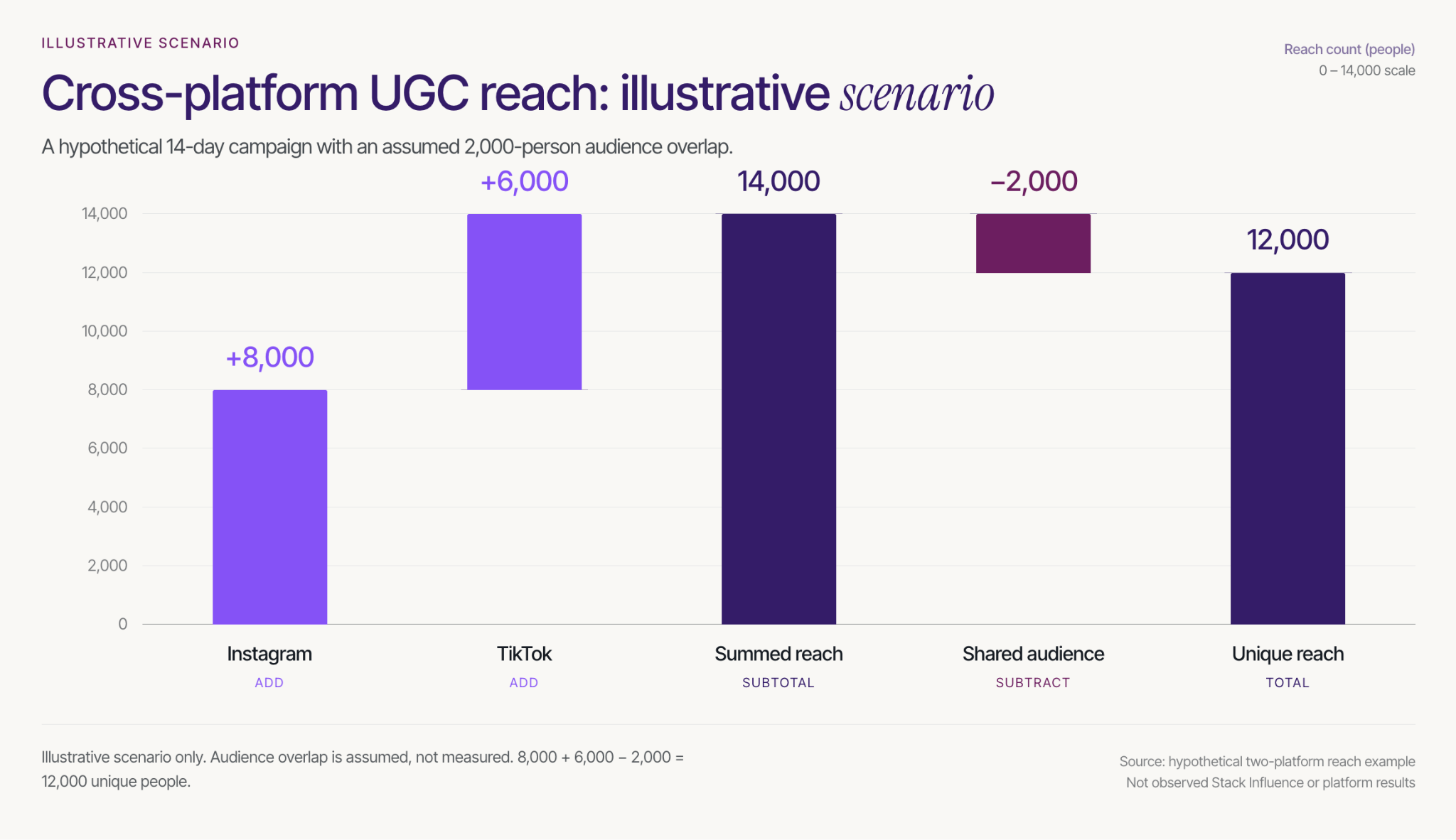
Consider an illustrative 14-day campaign with only two platforms. Assume Instagram reaches 8,000 unique people, TikTok reaches 6,000 unique people, and exactly 2,000 people are present in both audiences.
Adding the platform figures gives 14,000. Subtracting the assumed overlap gives 12,000 unique people across the two platforms: 8,000 + 6,000 − 2,000.
The overlap is an explicit assumption in this example, not an observed Stack Influence result. Two platform totals alone cannot reveal it, so label their sum as summed platform reach rather than deduplicated reach.
Connect Each Placement to Its Buying Path
For your own storefront, use a consistent campaign-tagging convention and distinguish versions wherever the placement supports separate links. Keep the source asset identifier in the reporting record so different edits can be compared without losing their common origin.
For eligible Amazon campaigns, Amazon Attribution connects tagged non-Amazon marketing links with shopping activity and uses a 14-day, last-touch attribution model. Use distinct tags for the tactics or creatives you need to evaluate.
Review delivery and creative signals weekly, then allow the selected conversion window and reporting delay to mature before making a final comparison. A creator edit that attracts attention may still send poorly matched traffic to the product page.
Treat attributed orders as credit assigned under a measurement model, not proof that repurposing caused incremental sales. Avoid adding overlapping conversion totals from different reporting systems, and use a controlled test when the decision requires a stronger causal answer.
Repurpose One Useful Product Story First
The practical answer to how to repurpose UGC content across platforms is to preserve the useful product evidence while changing its presentation for the next viewer.
Start with one source asset and prepare three purposeful placements, not three copies of the same post. Complete the Reuse Release Card, confirm the permissions, and measure the result appropriate to each destination.
For ecommerce sellers, that creates a clearer path from creator content to usable marketing. For content creators, it creates a clearer deliverable to scope and price. Build that first reusable content package before expanding the campaign.