




Your video is ready, but the posting advice points in different directions. One guide recommends weekday afternoons. Another favors weekend mornings. For content creators, the useful answer is a schedule you can test against the people you actually want to reach.
Learning when to post on TikTok starts with your audience's activity, then improves through comparisons of similar posts published at different hours. Below, you'll find current day-by-day starting points, a way to handle time zones, and a four-week test that helps you decide which windows deserve a regular place in your calendar.
Key Takeaways
- Use published posting times to select test windows, then let comparable results from your own account guide your schedule.
- Plan around your intended audience's time zone and confirm the time zone displayed in your analytics and scheduler.
- Rotate similar videos between two windows so differences in topic, format, and weekday do not dominate the comparison.
- Compare posts at the same age, and keep paid promotion separate from organic timing results.
When Should You Post on TikTok?
Post during a window when your intended viewers are active, then test whether that window produces the results you want. If you do not have enough account data yet, use a published day-specific time as a starting point. There is no universal hour that guarantees views, followers, or brand deals.
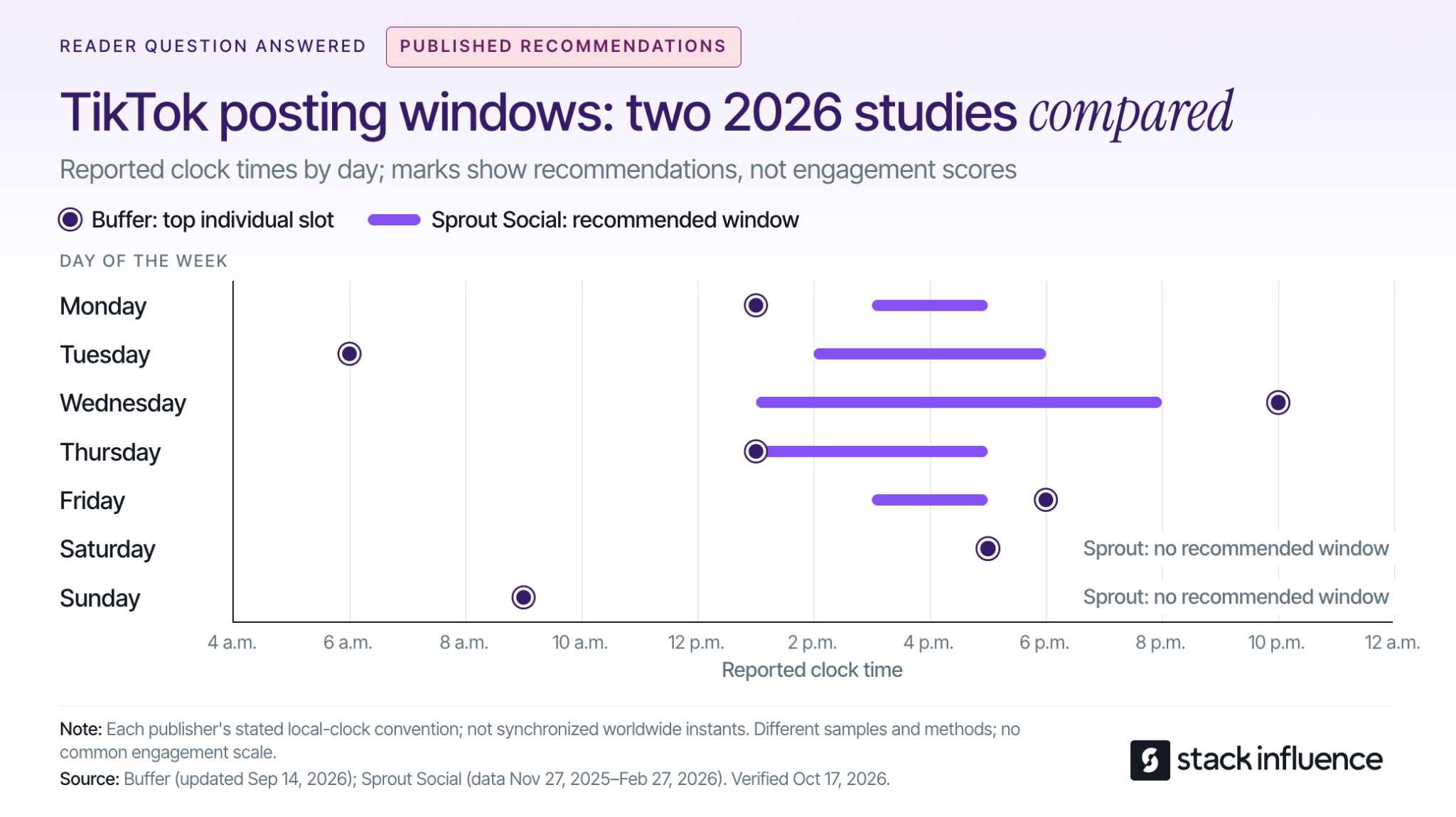
The daily options below compare Buffer's September 2026 TikTok analysis with Sprout Social's March 2026 posting-time research. Each entry gives Buffer's top individual slot followed by Sprout's recommended window:
- Monday: 1 p.m.; 3–5 p.m.
- Tuesday: 6 a.m.; 2–6 p.m.
- Wednesday: 10 p.m.; 1–8 p.m.
- Thursday: 1 p.m.; 1–5 p.m.
- Friday: 6 p.m.; 3–5 p.m.
- Saturday: 5 p.m.; no recommended window from Sprout.
- Sunday: 9 a.m.; no recommended window from Sprout.
Buffer presents its clock times as usable across time zones; Sprout explicitly specifies audience-local time. Use your intended audience's local clock when turning these recommendations into a test, and do not interpret the list as a schedule in U.S. Eastern time.
The disagreement matters. Buffer evaluates median engagement rates for posts published through its platform, while Sprout studies engagement among its own customers. Different samples and methods can produce different recommendations; a missing weekend window in one report does not mean your viewers disappear on Saturdays.
Choose one practical option for your next post. For the next comparison, choose a contrasting window supported by your audience data or the other study. Averaging all the listed hours together would create a new recommendation that neither study tested.
What Does TikTok Actually Consider?
TikTok considers viewing behavior and other interactions alongside content and user information. Its official explanation of how TikTok recommends content lists watching, skipping, sharing, and commenting among the signals, and says interactions generally receive greater weight for most users than other factors.
Time zone and day also appear among TikTok's user-information signals. The practical implication is to improve timing alongside the video's opening, relevance, and pacing. Moving a confusing tutorial to a busy hour does not resolve the reason people stop watching it.
Also distinguish the audience you already have from the audience you want to attract. Follower activity can help you serve an existing community, while recommendations and search can introduce your content to new people. Your current followers are useful evidence, but they are not a complete map of future viewers.
For evergreen tutorials, TikTok search discovery is another reason to track performance beyond publication day. Keep the video understandable to someone who finds it later, with a clear topic and an answer that remains useful.
Find the Audience Behind the Clock
Start with the activity data available in your own account. TikTok's creator-tools instructions give the app path as Profile, Menu, then TikTok Studio, and explain that features vary across app, browser, and region.
Within Analytics, look for audience activity information. The official TikTok Studio guide identifies Viewers as the area containing viewer demographics and activity times. Inspect follower insights too, where available, but do not assume every interface uses the same tab names.
Before picking an hour, check three things:
- Audience location: Identify the region you want the post to reach, especially if your followers span several countries.
- Displayed time zone: Read the analytics and scheduling settings rather than assuming the chart uses UTC or your current location.
- Repeated activity: Look for a pattern across available days, rather than treating one unusual spike as a permanent schedule.
If your viewers are in a different region, write the audience time zone directly into your calendar. A note that says “evening” becomes ambiguous when you travel or coordinate with a brand elsewhere. Confirm the conversion for the actual publishing date when daylight-saving changes could affect it.
For a split audience, test a window serving each major region rather than forcing both into one compromise hour. Judge the results against your goal: reaching a new regional audience may matter more than maximizing existing-follower activity.
If activity data is unavailable, begin with the benchmarks above and keep a simple posting log. You can refine your schedule as useful account evidence accumulates.
Use a Two-Window Rotation for Four Weeks
A Two-Window Rotation compares two publishing windows while balancing the content and weekdays assigned to each. It is a practical pilot for creators, not a controlled experiment that isolates every cause of performance.
1. Choose One Primary Outcome
Decide what success means before publishing. Use views when discovery is the priority, shares when you want people to pass the content along, or attributable follows when audience growth is the goal.
Keep that outcome consistent through the test. Switching from views to likes after seeing the results makes it easier to choose whichever answer looks most flattering.
2. Select Two Windows and Comparable Videos
Choose Window A from your audience activity, if available, and Window B from a plausible alternative. Make the windows meaningfully different, such as lunchtime and evening. A small first test is unlikely to tell you much about a difference of only a few minutes.
Prepare videos with similar purposes, production effort, and length. If you are also experimenting with TikTok video length, keep that experiment separate so the timing comparison remains interpretable.
A creator teaching editing techniques might compare different tutorials in the same series. Comparing a sponsored product demonstration with a trending comedy clip would mix several explanations for the result.
3. Rotate the Windows Across the Same Weekdays
If three posts per week fits your normal workload, this example produces twelve posts over four weeks:
- Weeks one and three: Monday in Window A, Wednesday in Window B, Friday in Window A.
- Weeks two and four: Monday in Window B, Wednesday in Window A, Friday in Window B.
Each window receives six posts, including two on each selected weekday. That structure reduces the risk of confusing a Friday effect with an evening effect.
Choose your posting cadence before starting. Planning how often to publish on TikTok is a separate decision from choosing the hour. If three weekly posts would reduce quality, extend the test instead of increasing production simply to finish faster.
4. Record Exceptions and Keep the Comparison Stable
Log the publish date, time zone, window, topic, video length, and whether the post received paid support. Assign topics to windows before seeing results, so your strongest ideas do not consistently land in one slot.
Record unusual events, including a major collaboration, an unexpected news spike, or a missed publishing time. Keep those posts visible in your records, but inspect whether the apparent winner depends on the exception.
If a timely idea cannot wait for its assigned slot, publish when it is useful and label it separately. A testing calendar should support good editorial decisions without making every post part of the experiment.
How Do You Know Which Posting Time Wins?
The stronger window is the one that repeatedly performs better on your chosen outcome when comparable posts have had equal time to accumulate results. Compare more than the highest-viewed video, and treat a small pilot as directional evidence.
Compare Posts at the Same Age
Use an early checkpoint, such as 24 hours, and a later checkpoint, such as ten days. These are practical reporting choices for this test, not TikTok ranking thresholds. A video published yesterday should not compete against a video that has been collecting views for two weeks.
Metricool's 2026 TikTok study findings report that posts accumulated 96% of their reported total reach within the first ten days. Subtracting that reported share from 100% leaves 4% outside the first ten days. The release does not define an unlimited lifetime total, so interpret the finding within the study's measurement scope.
That gives you a reason to include a later checkpoint rather than making every decision immediately after publishing. It does not establish a universal expiration date for a video. With the four-week rotation, the final comparison happens after the last post reaches the same ten-day checkpoint as the others.
Check Typical Results and Audience Response
For each window, calculate the median of your chosen per-post outcome and inspect the individual results. Also retain totals and standout posts: they help distinguish repeatable performance from occasional upside.
Use a small set of supporting measures to understand the result:
- Discovery: Views at the same post age, plus viewer geography or traffic source where available.
- Attention: Average watch time and completion information where available, compared within similar video lengths.
- Response: Shares per 1,000 views, calculated as shares divided by views, multiplied by 1,000.
- Audience growth: Follows attributed to the post per 1,000 views, when that attribution is available.
These measures answer different questions. A window can deliver more views while another produces more followers for the same number of views. Choose according to the goal you set before the test.
Keep paid distribution separate. If a brand runs your post through TikTok Spark Ads, separate identifiable paid activity or leave that post out of the organic comparison. Ad-supported reach cannot establish that the original publishing hour worked better.
Decide Whether the Evidence Is Clear Enough
Look for a pattern that survives comparison across weekdays and similar topics. Six posts per window can reveal useful clues, but they cannot prove a universal best time or reliably separate a small timing effect from normal variation.
If the apparent advantage rests on one video, continue testing before changing your calendar. If the windows are close, choose the one you can sustain and spend the next round improving the content. Retest when your audience, content focus, or available publishing schedule materially changes.
Fit Brand Collaborations Into Your Posting Windows

For micro influencers, nano influencers, and creators handling brand deals, publishing time is also a delivery commitment. Agree on the date and time zone, approval requirements, and any launch restrictions before reserving a slot. Leave room for receiving and using the product before filming.
Stack Influence's creator campaign process connects product selection, social content, and post approval within a gifted-first product-seeding workflow. For creators, the useful scheduling habit is to confirm campaign requirements first, then select an audience-relevant window within those terms.
Distinguish a post on your account from user-generated content, or UGC, delivered for a brand to publish. If your assignment is asset delivery only, your deadline and the brand's publishing time are separate decisions. Confirm who controls the final upload.
Build disclosure into preparation. TikTok's commercial-content guidance requires its disclosure setting for promotional content, including third-party promotions involving an incentive, and says enabling the setting does not affect feed distribution.
For endorsements reaching U.S. consumers, the FTC's influencer disclosure guidance also explains that free products can create a relationship requiring disclosure. Put a clear disclosure with the endorsement rather than relying only on a platform label or burying it in your profile.
Prepare the final file, caption, and approvals before the chosen window. A scheduling workflow for creators can help you publish consistently without interrupting filming or other work. When using a scheduler, confirm the account, date, time zone, and available publishing options before leaving the post queued.
Build a Schedule You Can Explain
Knowing when to post on TikTok means having a reason for the next publishing decision. Start with relevant benchmarks, check your audience, and compare two realistic windows using similar content and equal reporting periods.
Choose your two windows before preparing the next batch of videos. Keep the one that produces useful, repeatable results and fits your workload, so you can plan future content and brand partnerships with greater confidence.