




A folder full of saved videos can leave you with nothing you actually want to film. The missing piece is often a specific premise: who the video helps, what happens on screen, and why someone would keep watching.
Useful YouTube video ideas connect a subject with a visible payoff. “Photography” is a subject. “Fix a dark phone photo using one window” is a video you can plan, shoot, and evaluate.
For content creators starting out or refreshing an established channel, the 24 ideas below offer concrete places to begin. Adapt the examples to your interests, equipment, and experience, then use the filming brief to choose your next upload.
Key Takeaways
- Choose an idea with a clear viewer question and something specific you can demonstrate.
- Tutorials, comparisons, real attempts, and focused stories give new viewers a reason to watch before they know you.
- Match the format to the payoff: one complete moment can suit a Short, while a process may need a longer video.
- Evaluate the topic, title and thumbnail, and viewing experience separately before deciding what to repeat.
YouTube Video Ideas That Solve a Specific Problem
Start with a difficulty you can explain through a real example. A useful first upload can come from something you recently learned, provided you describe your experience accurately.
1. Fix a Phone Photo With One Window
Photograph the same subject in two positions near a window, then show the difference. Explain where you stood and what changed so viewers can try the setup themselves.
2. Turn One Rough Clip Into a Finished Edit
Show the original clip, your editing decisions, and the finished version. Focus on one outcome, such as making a confusing cooking sequence easy to follow, instead of touring every feature in your editor.
3. Explain a Game Mechanic Through One Situation
Use your own gameplay to demonstrate a mechanic that confused you. Show the unsuccessful attempt and the corrected approach, including the circumstances where your advice applies.
4. Recreate a Beginner Mistake and Its Fix
Choose a visible problem, such as pancakes with an uneven texture or a crooked paper fold. Change one relevant factor between attempts so the viewer can understand your explanation without guessing what caused the difference.
Demonstrations have a useful research basis. In Google and Kantar’s Future of Video research, 70% preferred video over text or audio for building something, 69% for learning a skill, and 63% for cooking. The survey covered 2,160 U.S. weekly video viewers ages 18–64, January 28–February 10, 2025. These are medium preferences; demand for your particular topic still needs checking.
Make Comparisons Viewers Can See
Give viewers enough context to understand the result. State what you tested, what stayed constant, and what your experience can reasonably establish.
5. Compare Two Tools on the Same Task
Record the same sentence with your phone microphone and another microphone you already own. Keep the room, speaking distance, and editing consistent, and let viewers hear the samples before your verdict.
6. Review Something After a Week of Real Use
Show what you noticed while using a backpack, notebook, kitchen tool, or other familiar item. Include the awkward moments and useful details that would be invisible in a first impression.
7. Go From Unboxing to the First Useful Result
Film setup and the first task the product is supposed to help with. Include a confusing instruction or adjustment when it materially changes what a beginner should expect.
8. Compare Three Solutions to One Constraint
Try three desk arrangements for a narrow workspace or three ways to carry the same daily essentials. Define the constraint first so your comparison has a practical purpose beyond showing several options.
For creators pursuing user-generated content (UGC) work, demonstrations can become samples when building a UGC portfolio. Label self-directed samples accurately and show the specific filming or storytelling skill each demonstrates.
Turn a Real Attempt Into a Story
Make the outcome clear enough that someone who has never seen your channel can follow the stakes. Keep the unexpected decisions and setbacks that explain how the attempt unfolded.
9. Document Your First Serious Attempt at a Skill
Try a guitar transition, drawing technique, or unfamiliar recipe. Establish your starting point and show what improved, what remained difficult, and what you would change on the next attempt.
10. Try a Challenge With One Constraint
Cook from five pantry ingredients or finish a game level without a usual upgrade. Explain the rule at the beginning, then preserve the moments where that rule forces an interesting decision.
11. Transform One Neglected Object
Repair a thrifted frame, repurpose a container, or refresh an old sketchbook cover. Show the starting condition and the choices behind the finished result, including changes you abandoned.
12. Complete a Small Project in One Afternoon
Build a filming corner or organize a collection using materials you have. Define a finish line before recording so the video ends with an identifiable result rather than an unfinished activity log.
Build Shorts Around One Complete Payoff
Use a Short when the idea works as a self-contained demonstration, reveal, or answer. YouTube’s guidance on video length and formats explains that useful length depends on the content, audience, and purpose.
13. Answer One Small Question
Demonstrate a camera setting, a craft step, or a game shortcut in a situation where it matters. Give the answer immediately, then use the remaining footage to make it understandable.
14. Reveal a Before and After With the Decisive Step
Show a gift-wrapping improvement or a reorganized drawer, followed by the change that made it work. Viewers should leave with an explanation they can use, not only a reveal.
15. Let Viewers Predict a Test Result
Place equal-sized paper sheets across the same gap, one flat and one folded, and invite viewers to predict which holds more coins. Show the test and result in the same Short, noting the fold and support conditions.
16. Show One Object in Three Uses
Style one scarf for three situations or show three practical arrangements for the same storage basket. Make each use distinct so the video demonstrates versatility instead of repeating a shot.
Create Videos Without Showing Your Face
Choose what the viewer needs to see, then decide whether a presenter adds anything. These examples complement more specialized faceless YouTube channel ideas.
17. Narrate a Screen Walkthrough
Record yourself organizing reference images for an art project or completing a software task. Explain decisions as they occur, and use a clean demonstration workspace so viewers can follow your actions.
18. Make a Small Visual Explainer
Use your own drawings, objects, or board setup to explain a chess tactic or another concept you understand. Build the explanation around one question and verify any factual claims before recording.
19. Film a Hands-Only Tutorial
Demonstrate folding a pocket notebook, preparing ingredients, or assembling a simple craft. Keep the important movements visible and include the intermediate steps a beginner would otherwise have to infer.
20. Record a Shared Practice Session
Create a draw-with-me or quiet study session using your own footage and audio. Tell viewers what activity they can join, then preserve enough real working time for them to participate.
Give Viewers a Reason to Return
Build follow-ups around the next useful question. A recognizable series can keep the subject consistent while each episode adds a fresh test, explanation, or experience.
21. Test a Question From the Comments
Take a specific question, such as whether a technique works with thicker paper, and demonstrate the answer. If your channel is new, start with a question from a friend or your own experience.
22. Explain the Story Behind a Niche Detail
Investigate why a familiar board-game rule exists or how an unusual design feature developed. Use reliable sources and your own explanation to help fellow enthusiasts understand something they already encounter.
23. Interview Someone About One Practical Decision
Ask a potter how they choose a beginner’s clay or a photographer how they select a location. Keep the conversation focused and include demonstrations where they clarify the answer.
24. Revisit an Earlier Recommendation
Return to something you previously used or recommended and show whether it still earns a place in your routine. Explain what changed, including situations where your original assessment needs updating.
How Do You Find Ideas People Actually Want?
Find promising ideas by combining recurring viewer questions with evidence of interest in the subject. Look for a specific missing explanation or constraint you can address through your own work.
Open YouTube Studio, select Analytics, and explore the Trends tab. YouTube documents recent top searches and content gaps, including searches that lack sufficiently useful results. Available insights vary by country, language, device, and data availability.
YouTube is phasing out the Inspiration tab beginning in August 2026. Where available on desktop, Ask Studio can help explore comment themes and brainstorm follow-ups. Try asking: “Which questions recur around my recent tutorials, and which could I answer with a demonstration?” Check the underlying comments before treating the suggestions as audience demand.
Without channel data, inspect relevant searches and discussions manually. Record the exact problem: “the instructions skip setup,” “I only have a phone,” or “does this work in a small room?” An unanswered detail gives your version a purpose beyond repeating an existing video.
Use a Four-Question Filming Brief
Choose your next idea by answering four questions before writing a full script. The brief helps you assess whether the premise is useful and whether you can execute it with the time and access you have.
- Who is watching? Name the viewer and their situation, such as a beginner filming indoors with a phone.
- What will they get? Describe the answer, experience, or finished result the video promises.
- What can you show? Identify the comparison, attempt, demonstration, or original material that supports that promise.
- What will production require? List the equipment, access, research, recording, and editing the idea actually needs.
For example, “my filming setup” becomes “make a small bedroom work for phone videos using what you already own.” The viewer is clear, the result is visible, and the shoot has a manageable scope. Creators still defining their audience can use the broader guide to becoming a content creator to establish that foundation.
Write a working title and opening scene next. If the title promises a comparison, plan comparable footage; if it promises a transformation, capture the starting condition. Complete this brief for two or three candidates and film the one you can deliver most convincingly.
How Can You Tell Whether a Video Idea Worked?
Evaluate whether people chose the video, stayed for its promised value, and showed interest in a follow-up. Compare similar formats and traffic sources over matching periods so differences in exposure do not become mistaken conclusions about the idea.
As a starting review window, compare each upload’s first 14 days, extending observation when traffic is still developing. YouTube’s impressions and click-through-rate guidance explains that CTR covers registered thumbnail impressions and varies with audience and traffic source. It represents only part of a video’s total viewing.
Use the audience retention report to inspect where viewers leave and which moments hold attention. YouTube notes that retention usually takes one to two days to process. A frequently replayed moment deserves inspection because viewers may be interested or may need a clearer explanation.
Separate the Idea From Its Title and Thumbnail
A useful topic can receive an unclear title, while a compelling thumbnail can promise more than the video delivers. For eligible videos, YouTube’s title and thumbnail A/B testing evaluates alternatives using watch time and can take up to two weeks. Shorts are excluded from that tool.
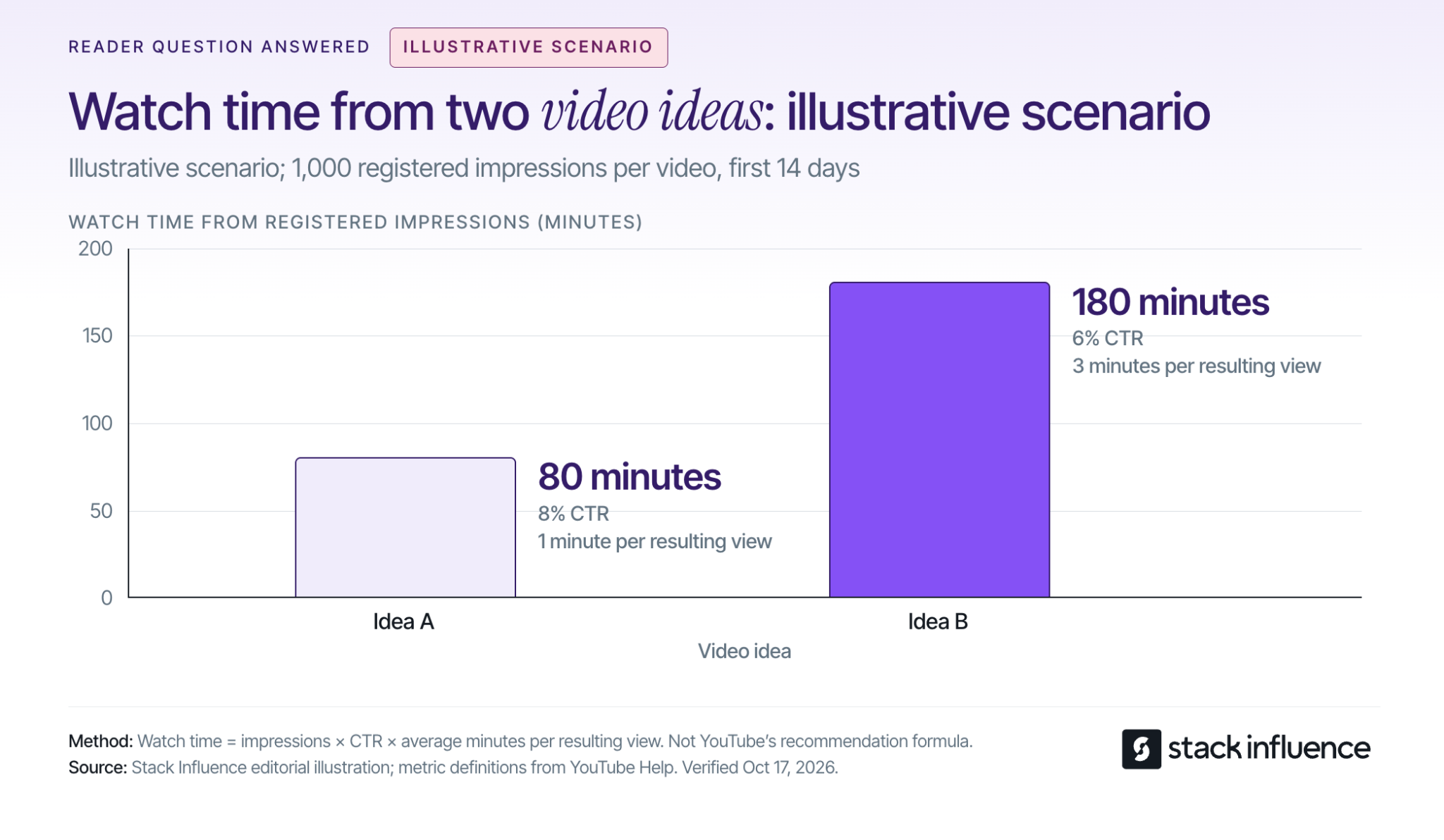
Consider an illustrative scenario with two long videos of similar length, each receiving 1,000 registered thumbnail impressions over 14 days. Assume comparable traffic sources and that all views attributed to those registered impressions qualify as engaged views:
- Idea A: An 8% CTR produces 80 views. At an average of one minute watched per resulting view, that produces 80 minutes of watch time.
- Idea B: A 6% CTR produces 60 views. At an average of three minutes watched per resulting view, that produces 180 minutes of watch time.
The calculation is impressions × CTR × average minutes watched. All inputs are assumptions for the same impressions-derived viewing groups, with outside traffic excluded. This example shows why the idea with the higher CTR can produce less watch time; it is an illustration, not a channel benchmark or YouTube ranking formula.
For Shorts, inspect engaged views and the stayed-to-watch measure in YouTube’s content analytics. The documentation also records a public-view counting change from August 24, 2026, across formats, so a jump across that date may reflect the counting change.
Keep the next decision specific: clarify the title, move the demonstration earlier, answer a repeated question, or test another premise. The wider guide to growing a YouTube channel covers the distribution and community work surrounding those decisions.
Use Product Videos to Demonstrate Creator Skills
Creators interested in brand partnerships can use demonstrations and real-use reviews to show how they explain a product. A UGC video is useful as a work sample when it makes the creator’s production choices and the product’s use clear.
When negotiating commercial work, agree on posting, revisions, and UGC pricing and usage rights. The FTC’s disclosure guidance calls for disclosing paid relationships and free products; disclosures for video endorsements should appear in the video itself.
Stack Influence is a micro-influencer marketing platform for ecommerce brands built around gifted-first product seeding. Its creator campaign process connects product selection, social content, and post approval. Review each campaign’s required channel and deliverables before committing, and choose products you can discuss through actual experience.
Choose a Premise and Start Filming
The most useful YouTube video ideas are specific enough to shoot and clear enough for someone else to understand. Pick one premise, complete the four-question filming brief, and capture the evidence that delivers its promise.
Use the finished video and audience response to decide what to make next. If creator partnerships are part of your plan, explore Stack Influence opportunities that match your interests and campaign requirements while building a portfolio that shows what you can make.