



Shopify is worth considering when you want a branded online store with the core selling tools managed in one platform. Whether it is worth paying for depends on your required features, payment costs, operating capacity, and plan for attracting customers.
If you are comparing Shopify reviews, start with the business you intend to run. A solo founder, a wholesale team, and a shopper waiting for an order are describing different experiences, even when their comments appear under the same company name.
This review evaluates Shopify as an ecommerce platform using current official documentation and selected public feedback. It gives sellers a practical way to assess costs, interpret complaints, and test essential workflows before committing.
Key Takeaways
- Shopify’s main appeal is bringing store operations together; assess that convenience alongside plan limits, app dependencies, and ongoing costs.
- Estimate processing costs using transaction count and card mix. The fixed charge per payment matters more when order values are small.
- Read reviews by role, date, and business requirements before drawing conclusions from an overall rating.
- Test checkout, fulfillment, staff access, and cash requirements before choosing a longer billing commitment or expanding acquisition spending.
Is Shopify Worth It for Ecommerce Sellers?

Shopify deserves a place on your shortlist if selling products is central to your business and you want a maintained commerce system. Its value is easier to assess when you identify the work it must handle every week: updating products, accepting orders, coordinating fulfillment, and understanding performance.
Shopify’s Basic plan documentation describes an online store, theme editing, product and order management, a built-in blog, and reporting. For a small team, having these functions within one platform can reduce the number of separate systems it must assemble.
The strongest reasons to consider Shopify are practical:
- Store management: You want a consistent place to maintain your catalog and handle everyday orders.
- Brand presentation: You need a storefront organized around your products, positioning, and customer experience.
- Operational focus: You would rather spend your team’s time on merchandising and fulfillment than assembling the underlying commerce software.
The tradeoffs deserve equal attention. Required apps can expand the budget, specialized workflows can require development, and features available on one plan may be unavailable on another. A store that looks straightforward in a demonstration can become more complicated once it includes your shipping rules, customer types, and integrations.
If control over the underlying software is a firm requirement, include WooCommerce’s open-source WordPress platform in your evaluation. Compare the actual hosting, maintenance, integrations, and development responsibilities your team would take on. A lower software entry cost does not settle the total operating-cost comparison.
Our assessment: Shopify is a strong candidate when its supported workflows match your business and the cost of operating them fits your margins. Make that match explicit before treating a positive review as a buying recommendation.
How Should You Read Conflicting Shopify Reviews?
Read Shopify reviews as evidence of particular experiences, then translate those experiences into questions you can investigate for your store.
For example, the Shopify reviews on Capterra include an October 2026 founder review praising everyday store management while identifying paid apps and customization as cost considerations. The page also shows reviewer roles and usage duration. Those details make an individual review more useful than its star rating alone, but the selected feedback does not establish how frequently every merchant encounters the same issue.
The Shopify page on Trustpilot includes both merchant account experiences and shoppers’ complaints about purchases from individual stores. A missing-order complaint matters to the customer, but it answers a different question from whether a seller can manage inventory efficiently.
Apply four checks:
- Identify the reviewer’s role. Were they operating a store, building one for a client, or buying a product?
- Check the context. Look for the date, country, plan, business model, and time spent using the software.
- Name the underlying requirement. Translate “too expensive” into app charges, payment costs, development work, or an unnecessary plan upgrade.
- Verify the current behavior. Check the relevant documentation and reproduce the workflow that matters to you.
Do not average ratings across review sites as though they came from one survey. Different audiences and collection methods can produce different results. Use the comments to improve your evaluation checklist.
What Does Shopify Cost in Practice?
Shopify’s subscription is one part of the budget. Payment processing, apps, implementation, fulfillment, and customer acquisition determine what operating the store actually requires.
Start With Standard Subscription Prices
The U.S. prices on Shopify’s pricing page, checked November 10, 2026, are:
- Basic: $39 per month, or a $29 monthly equivalent with annual billing.
- Grow: $105 per month, or a $79 monthly equivalent with annual billing.
- Advanced: $399 per month, or a $299 monthly equivalent with annual billing.
Shopify’s billing overview explains that annual billing collects the year upfront. An advertised monthly equivalent therefore represents a different cash commitment from paying each month. The same documentation states that credit card transaction fees are not returned when you refund an order.
Use ongoing prices for your operating budget, then assess any introductory offer separately. Before upgrading, identify the feature you need or calculate the fee savings using your own payment mix.
Order Size Changes Payment Costs
For Basic, the published U.S. standard online card rate is 2.9% plus $0.30 per transaction. Shopify’s U.S. card-rate documentation distinguishes standard cards from premium cards and additional international charges, so that rate should not be applied to every payment indiscriminately.
Consider an illustrative month with $20,000 in captured payments, all using the Basic standard online rate, with Shopify Payments as the sole provider. Assume one payment per order, no refunds, and no additional charges. Here, average order value means the complete amount charged to the customer.
- At a $20 average order value, 1,000 payments produce $880 in processing fees, or 4.40% of payment volume.
- At a $50 average order value, 400 payments produce $700 in processing fees, or 3.50%.
- At a $200 average order value, 100 payments produce $610 in processing fees, or 3.05%.
The calculation is payment volume multiplied by 0.029, plus payment count multiplied by $0.30. The $270 difference between the first and last scenarios comes entirely from making more payments at the same total volume. These are calculations, not observed merchant results, and they exclude subscription and app costs.
For a low-priced product, evaluate your actual basket sizes before deciding that a headline percentage is affordable. Bundling may change the economics, but it also changes the offer and must make sense to customers.
Check the Payment Arrangement and App Budget
Shopify’s payment-provider fee rules distinguish using Shopify Payments alone from using an external processor or combining providers. In the documented direct-provider combination, third-party payments incur plan transaction fees, while Shopify Payments transactions carry a 1.25% premium above their standard rates. Confirm which arrangement applies to your store.
For each required app, record its subscription, usage charges, pricing thresholds, and the job it performs. Include implementation work and the people responsible for maintaining it. Then budget inventory, fulfillment, returns, and marketing separately so the platform invoice does not become a misleading estimate of total business costs.
Stack Influence’s guide to Shopify costs and operating-budget components provides a broader budgeting reference. Use current provider terms for the final numbers in your own forecast.
Which Shopify Capabilities Need a Closer Check?
The most consequential limitation is the one that blocks your actual workflow. Check these requirements before selecting a plan or commissioning a build.
Staff Access
Shopify’s user-limit documentation lists no additional staff accounts on Basic, five on Grow, and 15 on Advanced. The store owner and eligible collaborator accounts are separate categories.
Map the people who need access and the work each person must perform. A founder managing everything alone has a different requirement from a team with separate fulfillment, support, and merchandising roles. Avoid planning around shared logins.
Reporting and Wholesale Requirements
Some older platform reviews contain outdated feature restrictions. The current Basic reporting description includes all reports and custom reports through data explorations.
Shopify’s B2B features by plan also lists native B2B capabilities on Basic, Grow, Advanced, and Plus. The first three allow up to three active catalog assignments across active B2B markets; assigning catalogs directly to individual companies remains a Plus feature.
Write down the report or wholesale rule you actually need. “Supports B2B” is too broad to establish whether a particular company-pricing arrangement will work.
Checkout Customization
Shopify’s checkout customization documentation distinguishes standard branding changes from advanced functionality. Eligible apps that customize the information, shipping, and payment pages require Shopify Plus, while other customization options are available on Basic and higher.
Describe the exact change before asking for an implementation quote. A different logo, a new field, and a custom step are different requirements. Confirm the supported method, plan, app, and maintenance owner before treating a design mockup as a deliverable your current plan can support.
What About Support and Payment Holds?
Support access and access to sales proceeds deserve separate checks. A store may be functioning while a payment issue still requires attention.
Identify Who Supports Each Component
Shopify’s support documentation lists 24/7 chat for all plans and additional contact options for specified subscriptions. It also directs merchants to third-party developers for support with their apps and paid themes.
Record who handles checkout, your theme, fulfillment integrations, and any business-critical app. Ask how you would report an urgent problem and what information the support team would need. Availability around the clock does not establish a guaranteed resolution time.
Check Cash Requirements Alongside Payment Eligibility
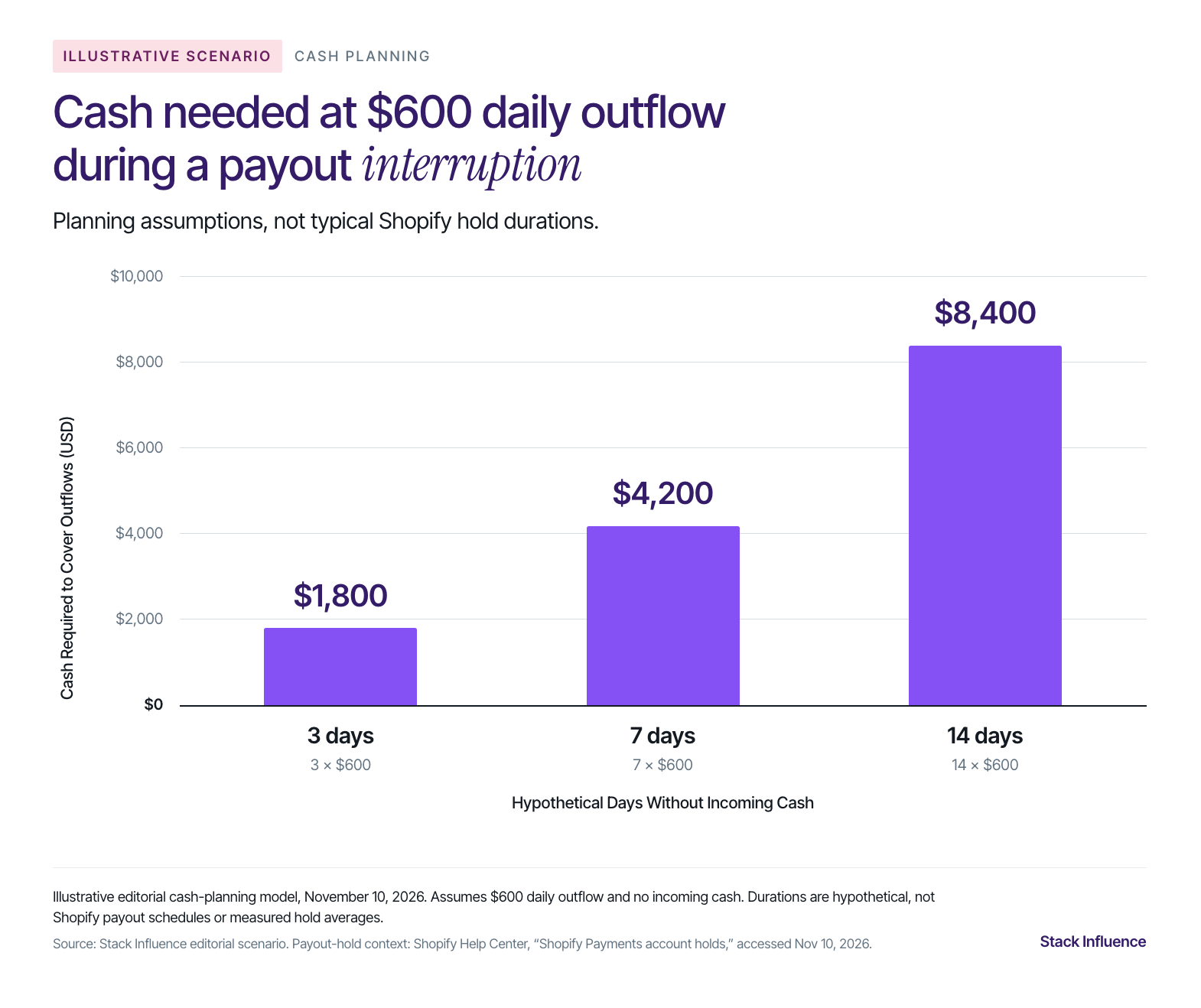
Shopify explains that Shopify Payments account holds can prevent payouts while a store remains accessible. Customers can often continue checking out, although some holds also affect new orders. The store owner’s account notice provides the relevant instructions.
Before relying on incoming payouts to fund fulfillment, confirm payment eligibility, complete requested verification, and understand your obligations if receipts are delayed.
For a simple cash-planning exercise, assume your business has $600 in committed cash outflows per calendar day and receives no incoming cash during a hypothetical interruption. The cash needed to cover those outflows would be:
- Three days: $600 multiplied by 3, or $1,800.
- Seven days: $600 multiplied by 7, or $4,200.
- Fourteen days: $600 multiplied by 14, or $8,400.
The daily spending and interruption lengths are illustrative assumptions, not Shopify payout schedules or estimates of typical hold duration. The calculation assumes spending stays constant and that all relevant obligations are included in the daily amount. Compare the result with cash already available, then add any separate commitments your daily estimate excludes.
This exercise answers an operating question a star rating cannot: could your business continue meeting its obligations while payment access is being resolved?
Test Shopify Against Your Store Before You Commit
Use a small but realistic store configuration to evaluate fit. A polished demo with generic products will not reveal whether your fulfillment rules, payment setup, and required apps work together.
Shopify’s store-launch guidance recommends test orders to check checkout, order processing, inventory, shipping, and taxes. Its payment test mode can simulate successful and failed transactions; turn test mode off before accepting real payments.
Build your evaluation around six checks:
- Load representative products. Include your most demanding variant, bundle, or product-information requirement. Verify that customers can select the correct item and that the resulting order contains the information fulfillment needs.
- Test real delivery situations. Use representative customer addresses and baskets. Confirm the shipping options, charges, delivery messaging, and tax configuration your business requires.
- Run the purchase journey on a phone. Follow the route from the intended landing page through product selection and checkout. Test a discount, a failed payment, and the customer notification sequence using supported test methods.
- Validate required apps and integrations. Confirm which system controls inventory, order status, and customer data. Check one complete workflow, including how failures or duplicate records would be handled.
- Check team access and reporting. Confirm that each role can perform its job with appropriate permissions. Produce a sample report and inspect the export fields needed by your finance or operations process.
- Record the ongoing commitment. List the plan, apps, processor arrangement, support owners, and implementation costs. Identify any essential requirement that remains unresolved and the cost of resolving it.
For a migration, add checks for product identifiers, historical data, URLs, redirects, and integrations before scheduling a cutover. Have the people who will operate the store review the results, because a feature being available does not establish that it fits their process.
A reasonable commitment follows when essential workflows pass, costs are understood, and the team can maintain the setup. Treat an unresolved checkout or fulfillment requirement as work to complete before expanding the launch.
Build a Customer Acquisition Plan Alongside the Store
Your platform decision should include a concrete route to your first or next customers. Decide which product to promote, who needs it, why they should visit, and which page will answer their buying questions.
Stack Influence’s guide to driving traffic to a Shopify store connects those choices to practical acquisition channels and measurement. Use your own margins and campaign observations when deciding what you can afford to spend.
For products that benefit from demonstrations, Stack Influence’s Shopify influencer marketing solutions support creator sourcing, product seeding, social-post verification, and creator-content collection. A defined creator pilot can give a brand a manageable way to evaluate that workflow once its storefront and fulfillment are ready.
Before repurposing content, confirm the permissions for the intended placement, including any paid advertising. Track reimbursed campaign-participant purchases separately from independent customer orders, and distinguish content produced, visits generated, and customer acquisition outcomes. This keeps the campaign evaluation connected to the business you are building.
Make the Decision With Your Own Store Requirements
Shopify’s value comes from how well its capabilities fit the work your business needs to perform. Use public reviews to identify questions, current documentation to check the rules, and a realistic store test to assess the workflow.
Choose a plan after you understand the payment economics, ongoing app costs, team requirements, and cash commitments. Then pair the working storefront with a measurable customer-acquisition plan.