




To drive traffic to your Shopify store, make your products discoverable in search, give relevant audiences a reason to visit, and bring interested shoppers back. Start with one active acquisition channel, such as search ads or creator demonstrations, while building your search presence and email list.
The right starting point depends on how people buy your product. A shopper searching for a specific replacement part needs a different route than someone discovering a kitchen organizer through a demonstration. Match the channel, message, and destination, then measure whether those visits produce worthwhile orders.
Key Takeaways
- Choose your first channel around the buying situation: an existing search, a product demonstration, a trusted recommendation, or a return visit.
- Build product and collection pages around real shopper questions, and check eligibility for Google's free product listings.
- Give social posts and creator campaigns a clear route to the relevant product page. Content production and audience distribution are separate deliverables.
- Set traffic goals using your own conversion assumptions, then compare acquisition spending with the contribution those orders leave after variable costs.
Choose Your First Channel by the Buying Situation
Start with a product or closely related collection and one customer problem. This makes it easier to choose a useful message and see which traffic source responds.
Use these starting points:
- People already search for the product: Prioritize relevant product and collection pages, Google free listings, and a tightly scoped search-ad test if you have a budget.
- The value becomes clear when someone sees it work: Test demonstrations through organic social or relevant creators. Show the problem, the product in use, and the reason to visit.
- You already have interested subscribers or customers: Send a relevant email about a restock, useful application, or complementary product while continuing to attract new audiences.
- A specialist community influences the purchase: Explore a useful newsletter feature, a complementary brand partnership, or participation in a community that permits business contributions.
For example, a drawer-organizer seller could target searches about expandable organizers and publish a demonstration of fitting an awkward drawer. Both routes should lead to a page with dimensions, compatibility details, and the demonstrated product.
Before promoting that page, check it on a phone: confirm that the item is available, the price and delivery information are clear, and checkout works. If visits already arrive but orders do not, use the guide to diagnose Shopify conversion problems to locate the obstacle before expanding the campaign.
Turn an Order Goal Into a Traffic Target
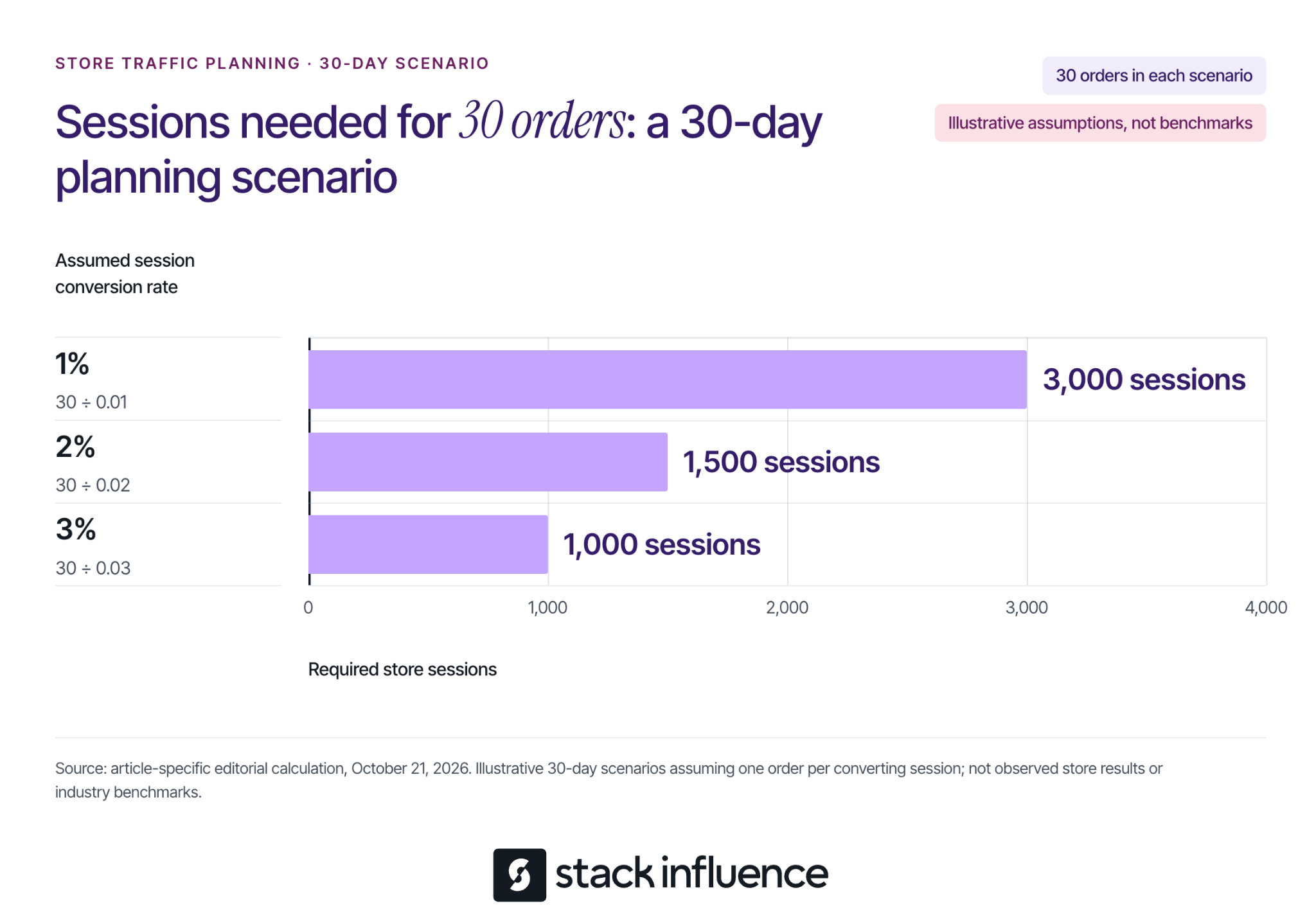
An order goal makes a traffic target more useful than a vague request for more visitors. Shopify's marketing performance documentation defines online store conversion rate as the percentage of sessions that result in an order.
For planning, divide your target orders by an assumed session conversion rate expressed as a decimal. Suppose you want 30 orders during a 30-day campaign and assume one order per converting session:
- At a 1% conversion rate, 30 ÷ 0.01 requires 3,000 sessions.
- At a 2% conversion rate, 30 ÷ 0.02 requires 1,500 sessions.
- At a 3% conversion rate, 30 ÷ 0.03 requires 1,000 sessions.
These are illustrative planning assumptions, not Shopify benchmarks, measured results, or guaranteed outcomes. They show why the same order target can require very different traffic volumes. The calculation does not establish that a channel can supply those sessions at an affordable cost.
Use your own source-specific history when available. For a new store, keep several scenarios until you have enough observations to replace assumptions. Do not assume a campaign reaching unfamiliar shoppers will convert like an email sent to people who already know your products.
Capture Search Demand With SEO and Free Listings
Search gives you a way to meet shoppers who are already describing a need. Work on the pages that best answer that need before publishing a large volume of loosely related content.
Match the Search to the Right Page
Use a product page for a specific item, a collection page for a relevant selection, and a guide for a question that needs explanation. For the organizer example, an expandable-drawer-organizer collection serves a shopping task; a guide to measuring kitchen drawers serves a preparation task.
On each priority page, write a distinctive title, explain the product in concrete terms, and answer material questions about size, materials, use, and limitations. Shopify's keyword placement guidance identifies titles, meta descriptions, image alt text, and body content as editable places for relevant wording. Keep that wording natural, and use alt text to describe the image.
A useful guide can explain how to measure drawer interiors, account for obstructions, and choose a suitable organizer. Include original measurements or demonstrations where you have them, then link to products that actually fit the advice. Avoid publishing an article that answers a popular question with no useful connection to what you sell.
Check discovery as well as content. Shopify automatically maintains a sitemap; its sitemap submission instructions explain how to submit sitemap.xml through Google Search Console after verifying your store. Make sure the storefront is accessible to crawlers, and do not treat submission as a promise of immediate indexing or rankings.
Make Eligible Products Available for Free Listings
Google product listings offer another search-discovery route. Shopify's free Google listings guidance explains how eligible stores sync products to Merchant Center through the Google & YouTube channel.
Before connecting, review the Google & YouTube channel requirements, including store accessibility, payment setup, policies, contact information, and applicable product and shipping requirements. If you already manage a Merchant Center feed, review that setup before introducing another connection.
Then check that free listings are enabled, review product issues, and keep prices and availability consistent with your store. Google's free listings documentation explains that these placements promote product pages and that eligibility does not guarantee display. It also directs merchants to the Products section's Needs attention tab to identify data problems.
Free placement means no advertising charge for that listing. Preparing accurate product information and maintaining the feed still require work.
Create Visits With Demonstrations and Relevant Partners
A shopper who does not know your product needs a reason to investigate it. Build the content around a recognizable problem and make the next step specific.
Give Organic Social a Clear Destination
Choose a platform where you can demonstrate the product and participate consistently. For the organizer example, film the drawer before installation, show the measurement and fitting process, and explain who should choose a different size.
Use a call to action that continues the demonstration, such as checking the dimensions or viewing the available sizes. Choose a supported link placement, test it on mobile, and send visitors to the matching product or collection. Review store visits alongside views and engagement so you can tell whether the content produces traffic.
Answer relevant questions in comments and communities without turning every response into a promotion. Where links are permitted, share a useful guide or product explanation that resolves the question.
Design Creator Campaigns Around the Visit
Consider micro influencers whose content and audience match the buying situation. Review their recent demonstrations and audience questions, then confirm what they will publish, where the store link will appear, and what the audience will find after clicking.
Commissioning a UGC video for your brand's own channels does not automatically include distribution to the creator's audience. Specify both deliverables when you need both, and agree on the intended uses and duration before republishing content or running it in ads.
For U.S. endorsements, the FTC's influencer disclosure guidance covers material connections including free products and payment. Make the relationship clear with the endorsement, and ensure the content reflects the creator's actual experience.
Stack Influence's Shopify creator campaigns support sourcing and vetting creators, coordinating product seeding, verifying completed posts, and collecting content. Confirm the campaign's purchase-and-reimbursement or gifting process, deliverables, permissions, and costs before launch.
Keep creator sample purchases and reimbursements separate from genuine customer-acquisition results. The Shopify product-seeding pilot guide provides a more detailed workflow for planning those operational and measurement boundaries.
Reach Adjacent Audiences Through Partnerships
Approach a complementary business, specialist publisher, or community organizer with a useful collaboration. An organizer brand could contribute a measurement guide to a home-organization newsletter, with a relevant store link if the publisher agrees.
Give the partner a distinct tagged link and agree on any payment, commission, or reciprocal promotion. Evaluate referred visits and customers against the full arrangement cost. An audience's relevance matters more to this test than the size of the mailing list alone.
Bring Interested Shoppers Back With Email
Email gives interested people another route to your store after their first encounter. Invite visitors to subscribe for something relevant, such as restock notices, product guidance, or early access to a launch.
Follow Shopify's subscriber management guidance: send promotional campaigns to people who agreed to receive marketing, and use relevant subscriber segments. Buying a list is not a substitute for building that permission.
Start with a welcome message that delivers what the signup promised and links to a useful next step. Follow with messages based on actual interests or purchase history, instead of sending every subscriber the same product recommendation.
Shopify Messaging's marketing automation templates include welcome messages and separate workflows for abandoned browsing, carts, and checkouts. Review each automation's eligibility, recipients, message, and destination before activating it, and avoid overlapping reminders from multiple apps.
A return visit is not necessarily a repeat purchase. Someone who first discovered you through a creator and later buys through an email is still a first-time customer. Track that distinction when deciding whether a channel mainly brings people back, acquires customers, or does both.
Put a Spending Ceiling on Paid Traffic
Use paid traffic to test a specific product, audience, and promise. Search ads are a logical test when you can identify purchase-related queries; paid social is a logical test when a demonstration can introduce the product. Choose according to the buying situation and evaluate the resulting orders.
Before setting a budget, estimate what an order leaves after discounts, expected refunds, product cost, fulfillment, shipping subsidies, payment fees, and other applicable variable costs. This contribution must help cover acquisition spending and fixed overhead. Revenue alone does not tell you how much traffic you can afford.
Consider a separate illustrative 30-day campaign with 1,000 tracked sessions, a 2% conversion rate, and one order per converting session. That produces 20 modeled orders. Assume each order leaves $25 before acquisition spending, so the campaign generates $500 of pre-acquisition contribution:
- At $0.30 of acquisition spending per tracked session, spending is $300 and contribution after acquisition is $200.
- At $0.50 per tracked session, spending is $500 and contribution after acquisition is $0.
- At $0.70 per tracked session, spending is $700 and contribution after acquisition is negative $200.
In this model, $0.50 per tracked session is the first-order break-even ceiling before fixed overhead. These values are assumptions, not typical advertising prices or promised conversion rates. The model excludes repeat purchases and holds the conversion rate and order contribution constant across all three scenarios.
Include relevant media, creative, and campaign-management costs once when calculating acquisition spending. Cost per tracked session is not automatically the platform's cost per click, because clicks and recorded store sessions are different measurements. Use a working budget below your ceiling if you need room for overhead and uncertainty.
Run a Focused 30-Day Traffic Test

Use 30 days as an operating schedule, not a promise of enough data or a deadline for SEO results. Keep the product, audience, destination, spending limit, and success measure explicit.
Tag links consistently so you can separate campaigns. For an illustrative Instagram creator placement, use utm_source=instagram, utm_medium=influencer, utm_campaign=drawer-fit-pilot, and utm_content=creator-a-demo. Use the same campaign name across related placements and a distinct content value for each; check that the destination works after adding the parameters.
Shopify's marketing reports include a Performance by marketing channel report for comparing paid, organic, and referring traffic. Keep the reporting period and attribution model consistent, and reconcile costs separately when a report shows missing spend. A dash for unavailable cost data is not zero spending.
Organize the work into four passes:
- Days 1 to 7: Check the landing page and tracking, establish your assumptions, and fix discovery or feed issues. Record an existing baseline if one is available.
- Days 8 to 14: Launch one active acquisition test and an appropriate email follow-up. Confirm that visits reach the intended page and that orders can be completed.
- Days 15 to 21: Investigate the biggest observed obstacle. If content gets attention but few visits, inspect the offer and link path; if visits arrive without orders, inspect audience fit and purchase friction.
- Days 22 to 30: Compare sessions, purchasing sessions, genuine first-time customers, and contribution after campaign costs. Decide whether to continue, change one material element, or stop the test.
Attribution describes assigned credit, not proof that every reported order was caused by a campaign. Reconcile customer and order records before adding results from different platforms, and record concurrent promotions or stock problems that could affect the comparison.
If the sample is small, carry forward the uncertainty instead of declaring a winner. Keep longer-term search work moving while you learn from the active test.
Choose Your Next Move From the Evidence
Choose one customer problem, one destination, and one active route to that page. Build the search and email foundations alongside it. Your next investment should follow what you learn about relevant visits, completed purchases, and acquisition costs, with a clear explanation of what you expect the next test to resolve.