




Shopify stores rarely have a single conversion problem. A low purchase rate can come from weak traffic intent, a confusing product page, slow mobile performance, unexpected costs, limited payment options, or a mismatch between the promise in an ad and the page a shopper reaches.
For ecommerce founders and marketing teams, learning how to increase conversion rate on Shopify means finding the exact stage where buyer confidence breaks down, then fixing that stage without damaging margin or attracting lower-quality orders. This guide provides a diagnostic framework, eleven practical improvements, a measurement model, and a 30-day implementation plan.
Key Takeaways
- Diagnose before redesigning: Use product-view, add-to-cart, checkout-start, and purchase data to locate the largest funnel leak.
- Improve confidence, not just buttons: Product clarity, real-life proof, delivery expectations, and transparent policies usually matter more than cosmetic changes.
- Segment the headline rate: Compare conversion by channel, device, landing page, product, and new versus returning visitors.
- Protect unit economics: A higher conversion rate is not automatically better when it depends on excessive discounts, low-margin bundles, or poor-quality traffic.
- Test connected hypotheses: Change one meaningful element at a time and measure the expected funnel stage, revenue per session, margin, and returns.
What Is a Shopify Conversion Rate?
A Shopify conversion rate is the percentage of online-store sessions that result in a completed purchase. Shopify calculates the metric from sessions, not unique customers, so one shopper can create multiple sessions. The basic formula is completed-purchase sessions divided by total online-store sessions, multiplied by 100.
Shopify’s conversion-rate reporting documentation separates sessions into cart additions, checkout reaches, and completed checkouts. That breakdown is more actionable than the headline percentage because it shows whether the problem begins before the cart, inside the cart, or during checkout.
A universal target is misleading. Shopify’s current ecommerce conversion-rate guide explains that category, price point, device mix, purchase type, and traffic source can produce very different baselines. A premium furniture store with mostly new mobile visitors should not expect the same rate as a replenishable consumer product sold to returning email subscribers.
Use external benchmarks only for orientation. Your real benchmark is the store’s own rate for comparable traffic, products, devices, offers, and periods. Sellers who need a broader foundation can review how Shopify works for ecommerce sellers.
Where Is Your Shopify Store Losing Buyers?
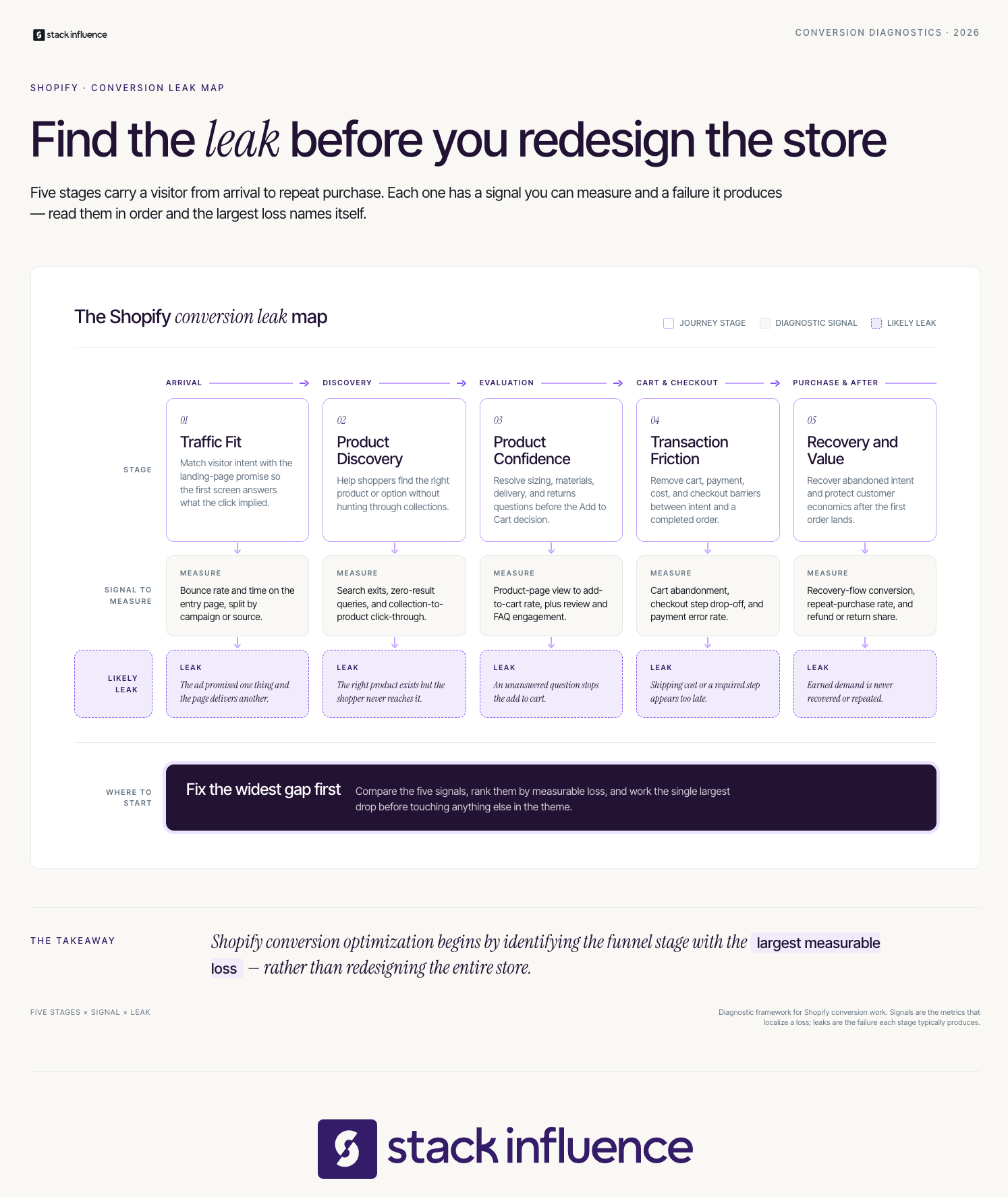
The fastest way to improve Shopify conversion is to locate the largest measurable drop-off, identify the buyer question behind it, and make the smallest change capable of answering that question. The Shopify Conversion Leak Map connects each funnel stage to a likely cause, diagnostic evidence, and appropriate fix.
The map has five layers:
- Traffic Fit: Visitors arrive with a specific expectation. A weak landing-page match, broad targeting, or misleading creative produces visits without purchase intent.
- Product Discovery: Shoppers cannot quickly find the right product, variant, size, bundle, or category. Search, filters, collection structure, and navigation are the main levers.
- Product Confidence: Visitors view a product but do not add it to the cart. The page may leave unanswered questions about benefits, fit, use, quality, proof, shipping, or returns.
- Transaction Friction: Shoppers add to cart or start checkout but do not finish. Unexpected costs, slow delivery, forced account creation, payment friction, errors, or unclear policies are common causes.
- Recovery and Value: The order does not happen during the first session, or it happens only because of an unprofitable discount. Recovery flows, remarketing, contribution margin, returns, and repeat purchases determine whether the conversion is valuable.
A practical ecommerce user-flow map connects off-site discovery, product evaluation, checkout, and post-purchase behavior. Do not redesign the theme until the data shows which layer is failing.
11 Ways to Increase Conversion Rate on Shopify
1. Match Every Landing Page to Its Traffic Source
A visitor should immediately see continuity between the message that earned the click and the page that receives it. Carry the same product, benefit, creator, offer, imagery, and audience language from the ad, email, search result, or social post into the landing page.
For paid and creator campaigns, route traffic to the relevant product or collection, preserve campaign context with UTM parameters, and answer the objections raised by that creative. Stack Influence’s Shopify influencer marketing playbook connects creator selection, offers, tracking, content rights, and contribution margin.
2. Turn the Product Page Into a Decision Page
A product page should help the shopper decide. Lead with the primary outcome, identify who the product is for, explain why it differs, show it in use, simplify variant selection, and place essential purchase information near the call to action.
Baymard Institute’s 2026 product-page UX benchmark found that only 48% of leading desktop ecommerce sites, 38% of mobile sites, and 36% of apps achieved a decent or good product-page experience. The research suggests that accumulated usability problems, not one dramatic defect, often push shoppers away.
Audit the page for six decision questions:
- What problem does this solve?
- Why should I believe the claim?
- Which option is right for me?
- What exactly will I receive?
- When will it arrive?
- What happens if it does not work for me?
Add demonstrations, dimensions, ingredients, compatibility details, comparison images, FAQs, and return terms where relevant. When the product page is the leak, a focused custom website development pass on the product template often surfaces structural wins faster than copy edits can. Remove brand language that does not help the shopper choose.
3. Reveal Shipping, Delivery, and Returns Earlier
Do not make shoppers begin checkout to discover the real cost or delivery timeline. Put shipping thresholds, estimated delivery ranges, return windows, subscription terms, and major exclusions on the product page or cart.
Baymard’s cart-abandonment research reports that 40% of surveyed abandonments involved extra costs being too high, while 20% involved slow delivery and 12% involved an inability to calculate the total cost in advance. Those findings make cost transparency a product-page issue, not merely a checkout issue.
Before defaulting to free shipping, test an attainable, clearly stated threshold. Measure conversion, average order value, shipping expense, margin, and carts just below the threshold.
4. Add Proof That Resolves Specific Objections
Generic praise is weak social proof. Strong proof shows a believable customer or creator using the product in the situation the buyer cares about, then addresses a concrete concern such as fit, setup, taste, texture, durability, sizing, or results.
Useful proof formats include:
- Reviews filtered by use case or customer type
- Customer photos beside relevant claims
- Short creator demonstrations near the purchase area
- Comparison clips showing setup or use
- Question-and-answer content from support requests
A UGC creator produces customer-style photos or videos that brands can use across product pages, ads, email, and social channels when the necessary rights are secured. Stack Influence’s UGC workflow for ecommerce is built around vetted creator activation, content collection, rights management, and reuse.
Stack Influence works with roughly 600,000 vetted creators through a gifted-first product-seeding model. Its completions-only workflow connects creator participation with finished content. From Stack Influence’s campaign experience, the most reusable product-page assets demonstrate the product and answer a buyer question, rather than simply show attractive packaging.
Keep endorsements truthful and disclose material brand relationships. The Federal Trade Commission’s endorsement guidance for influencers and reviews explains the disclosure and truth-in-advertising principles brands and creators should follow.
5. Fix Mobile Performance Before Adding More Apps
A feature that slows or destabilizes the product page can cost more conversions than it creates. Audit heavy scripts, oversized media, duplicate tracking, app embeds, pop-ups, review widgets, personalization tools, and theme code before installing another conversion app.
Shopify’s Web Performance reports measure loading speed, responsiveness, and visual stability by device, page type, and URL. Google’s Core Web Vitals thresholds define good performance as LCP at 2.5 seconds or less, INP at 200 milliseconds or less, and CLS at 0.1 or less at the 75th percentile.
Prioritize high-traffic commercial pages. Compress media, reserve space for images and widgets, remove unused apps, delay nonessential scripts, and retest after theme or app changes.
6. Make Product Discovery Faster
Stores with several products, variants, or use cases need navigation that reflects how customers shop. Organize collections around meaningful needs, use plain category labels, expose relevant filters, improve search synonyms, and prevent out-of-stock items from dominating results.
Use search terms to find weak relevance, missing synonyms, unclear naming, and assortment gaps. Related or complementary recommendations should help shoppers complete a task, not distract from a strong purchase decision.
7. Clarify the Offer Without Training Shoppers to Wait
A good offer reduces decision difficulty while preserving perceived value. Bundles, subscriptions, samples, guarantees, free-shipping thresholds, and first-order incentives can improve conversion when they solve a real buying concern.
Avoid stacking countdowns, welcome discounts, spin wheels, bundle popups, and exit offers. Test one offer architecture at a time, then compare conversion, discount rate, order value, margin, returns, and repeat purchases.
8. Reduce Cart and Checkout Friction
The cart should confirm the shopper’s decision and make the next step obvious. Show selected variants, quantities, item prices, discounts, delivery expectations, and total costs as early as possible. Remove unrelated navigation or upsells that compete with checkout.
Shopify describes Shop Pay as an accelerated checkout that saves customer contact, payment, shipping, and billing information. Also review Apple Pay, Google Pay, local payment methods, guest checkout behavior, address entry, error messages, and mobile keyboard types.
Baymard’s abandonment findings show that 19% of surveyed abandonments involved distrust about sharing credit-card information, 18% involved required account creation, 17% involved a long or complicated checkout, 17% involved errors or crashes, and 9% involved insufficient payment methods. Test the complete purchase journey on common phones, browsers, locations, discount conditions, and product combinations.
9. Recover High-Intent Sessions
Not every abandonment is a rejection. Shoppers compare products, switch devices, wait for payday, look for a delivery answer, or become distracted. Recovery works best when it restores context instead of immediately increasing the discount.
Shopify’s abandoned-checkout automation can send a customer back to the saved cart. Build the sequence around the likely obstacle:
- Remind the shopper what was left behind.
- Restate the strongest product reason.
- Answer a common shipping, fit, or return question.
- Use an incentive only when the economics and customer segment justify it.
Separate browse, cart, and checkout abandonment because each stage represents a different level of intent.
10. Build Trust With Operational Details
Trust is created by consistency across the store. Use a recognizable domain, clear contact information, accurate inventory, visible policies, realistic delivery language, secure payment options, and product claims that the evidence supports.
Check for broken links, inconsistent pricing, outdated banners, missing variant images, poor media, contradictory return terms, and hard-to-find support pages. Preserve creator context and never present compensated content as an independent customer review.
11. Test One Commercial Hypothesis at a Time
A useful CRO test connects a customer problem, a proposed change, a funnel metric, and a business outcome. “Change the button color” is not a strategy. “Make delivery timing visible beside Add to Cart to reduce shipping uncertainty and improve add-to-cart rate” is a testable hypothesis.
Use quantitative data to find where the leak occurs, then qualitative evidence to understand why. Microsoft Clarity’s Shopify funnel guidance explains how heatmaps and session replays can expose hesitation, missed elements, and drop-offs across the customer journey.
Document the audience, page, evidence, hypothesis, primary metric, guardrails, dates, concurrent changes, result, and next action. Do not run several major changes together and assign the result to one. Low-traffic stores should prioritize high-confidence usability fixes and customer research before small split tests.
The Shopify CRO Metric Stack
Conversion rate is an outcome metric, not a complete operating system. The Shopify CRO Metric Stack connects acquisition quality, funnel behavior, purchase outcomes, unit economics, and retention so a local improvement does not hide a broader business problem.
Acquisition Quality
Track sessions by source, campaign, landing page, device, location, and new versus returning visitor. These dimensions explain who entered the funnel and what promise brought them there.
A source can add orders while lowering the blended rate. That can still be healthy when revenue per session, acquisition cost, contribution margin, and new-customer volume remain strong. Shopify similarly recommends evaluating conversion by device, traffic source, visitor type, product, and category instead of relying only on a blended rate.
Funnel Behavior
Track product views, collection-to-product clicks, onsite searches, zero-result searches, add-to-cart rate, cart-to-checkout rate, and checkout completion. Shopify’s funnel reporting lets sellers compare cart additions, reached checkouts, and completed checkouts over time.
A product-page improvement may first raise add-to-cart rate while a separate checkout problem limits purchases.
Purchase Outcomes
Measure purchase conversion rate, orders, units per order, average order value, revenue per session, payment failures, and discount usage. Compare the result by product and customer segment rather than relying only on a storewide average.
Revenue per session is a useful companion. A lower conversion rate with a higher order value can produce more revenue, while an aggressive discount may raise conversion and reduce profit.
Economics and Customer Quality
Track gross margin, shipping cost, payment fees, discount cost, returns, refunds, customer acquisition cost, and contribution margin. A test fails commercially when it produces more low-margin orders, more returns, or customers who never buy again.
For creator campaigns, Stack Influence’s Shopify campaign workflow connects creator status, content assets, social metrics, and store-side measurement. Evaluate traffic by campaign, landing page, first-order margin, and customer quality.
Retention
Track repeat purchase rate, time to second order, subscription continuation, lifetime value, and post-purchase performance. CRO should acquire customers the brand wants to keep.
Use one source of truth and comparable windows. Monitor weekly for breakage, review monthly for optimization, and assess strategic changes over longer periods that account for promotions, seasonality, inventory, and campaign mix. Shopify’s conversion guidance recommends frequent monitoring for major anomalies and a regular optimization cadence for deeper changes.
The Overlooked Variable: Traffic Quality Changes the Rate
A falling conversion rate does not always mean the store became worse. Shopify notes that traffic source, device mix, price point, category, and purchase type change the expected rate. Expanding from loyal email subscribers into colder paid, organic, or creator audiences can reduce the blended percentage while still adding profitable customers.
This is why sitewide conversion should never be the only score for a campaign. Segment creator, paid social, search, email, and direct traffic. Compare each source’s landing-page match, add-to-cart rate, checkout completion, average order value, new-customer share, contribution margin, and assisted conversions.
Creator traffic needs context because shoppers may discover through a post and purchase later through search or another device. Use consistent UTMs, creator-specific pages or codes, campaign comparisons, and customer surveys without claiming perfect attribution.
Product seeding can support both acquisition and onsite conversion when the resulting assets are reused strategically. The guide to influencer product-seeding strategies covers creator activation, while the resource on micro-influencers and UGC in ecommerce explains how creator content can become reusable social proof.
A 30-Day Shopify Conversion Optimization Plan
A focused month should produce a diagnosis, several low-risk fixes, and one controlled test, not a rushed redesign.
Days 1 to 7: Establish the Baseline
- Record conversion by device, source, landing page, product, and customer type.
- Map product views, cart additions, reached checkouts, and completed checkouts.
- Review support tickets, returns, onsite searches, customer reviews, and common pre-purchase questions.
- Watch mobile sessions for the highest-traffic product pages.
- Identify one primary leak and one guardrail metric.
Days 8 to 14: Remove Critical Friction
- Fix broken elements, contradictory information, checkout errors, and missing variant media.
- Review Core Web Vitals by page type and remove avoidable performance costs.
- Move shipping, delivery, return, and subscription information earlier.
- Test the full purchase path on real mobile devices and common payment methods.
Days 15 to 21: Improve Buyer Confidence
- Rewrite the hero product page around customer outcomes and objections.
- Add demonstrations, contextual reviews, creator content, and comparison information.
- Simplify variant selection and clarify what is included.
- Align major campaign landing pages with the promise in each traffic source.
Days 22 to 30: Test and Institutionalize
- Launch one hypothesis tied to the diagnosed leak.
- Configure abandoned-checkout recovery around the likely objection.
- Review primary, guardrail, margin, and customer-quality metrics.
- Record the result, keep or reverse the change, and choose the next highest-confidence hypothesis.
- Create a recurring monthly CRO review owned by one person or team.
Increase Shopify Conversion by Making Buying Easier
Learning how to increase conversion rate on Shopify is not about collecting tricks. It is about matching traffic to the right page, making the product easier to understand and trust, removing transaction friction, and measuring whether the resulting orders are economically valuable.
Start with the Shopify Conversion Leak Map, fix the largest evidence-backed problem, and protect margin with the Shopify CRO Metric Stack. When the missing ingredient is credible product demonstration, evaluate a managed product-seeding workflow that can supply reusable creator content for product pages, ads, and retention campaigns.
.jpg)