



To make an Amazon affiliate link, sign in with the Amazon account connected to Associates, open the product page, and generate a tagged link using SiteStripe on desktop or Mobile GetLink in the Amazon Shopping app. An ordinary, untagged product URL does not attach your affiliate tracking information.
For ecommerce sellers, decide who will publish the link before creating it. A creator seeking affiliate commission should generate their own Associates link. A brand measuring traffic to its listings may need Amazon Attribution. This guide covers the link creation steps, then explains how to check the destination, disclose the relationship, and read the results.
Key Takeaways
- Generate your link through Amazon’s tools using the account connected to Associates.
- Confirm the product variation and selected tracking ID before copying the link.
- Add a clear disclosure and test the published destination without placing a personal test order.
- Choose Associates or Amazon Attribution according to the campaign’s purpose, and avoid combining tags to seek duplicate program rewards.
How to Make an Amazon Affiliate Link on Desktop
Prepare the intended publishing page or profile first so you know which account and tracking ID should be used.
1. Set Up Your Associates Account
Apply to the U.S. Amazon Associates program if you have not already joined. Submit the exact websites or social profiles you intend to use, and keep that list current.
Amazon’s application review process requires at least three qualifying sales within the first 180 days before review; personal orders do not count. Submitted properties must have substantial original content and be publicly accessible. Creating your first link and receiving final application approval are separate milestones.
2. Open the Product You Actually Mean to Recommend
Open the Amazon product detail page and select the relevant model, size, color, or pack quantity. Compare it with the item shown in your content or campaign brief.
For example, a demonstration of a two-pack should send shoppers to that two-pack when it is available. A link that opens successfully can still create a poor shopping experience if it leads to a different configuration.
3. Generate the Link With SiteStripe
Amazon’s SiteStripe instructions describe this process:
- Sign in to Amazon with the account associated with Associates.
- On the product page, select Get Link: Text in SiteStripe.
- Check the Associate ID and tracking ID. The initially generated link uses the last IDs selected, so confirm them for this placement.
- Copy the short or full link.
Amazon’s generated short link already includes the tracking information. Preserve the copied URL instead of adding another tag.
4. Save the Link With Its Publishing Details
Keep a simple record containing the product and variation, publishing location, link owner, selected tracking ID, generated URL, and date checked.
This is useful when several people manage a campaign. Someone updating a product demonstration should be able to identify the matching link without reconstructing the original setup. Save a new entry when a replacement product or materially different placement requires a different link.
How to Make an Amazon Affiliate Link on Mobile

Use the Amazon Shopping app when you need to create a product link from your phone. Amazon’s Mobile GetLink guidance supports the following steps on iPhone and Android:
- Sign in with the Amazon account connected to Associates.
- Open the intended product detail page.
- Tap Share.
- Select the correct Store ID and Tracking ID if multiple options appear.
- Tap Copy Associates Link.
Choose the affiliate-specific copy option rather than assuming an ordinary Share action creates a tagged link.
Mobile GetLink supports product detail pages, with exclusions including eBooks, Audible, digital magazines, digital music, and Luxury Stores. If the option is absent, check your login, page type, and product category.
Once the URL is ready, follow the relevant publishing workflow. For example, the guide to adding an Amazon link to an Instagram Story covers the next step of placing the link in that format.
Use Tracking IDs to Separate Placements
Create separate tracking IDs for placements you want to evaluate independently. Amazon’s tracking ID documentation explains that these IDs let you compare different sites or merchandising approaches while earnings remain associated with the same Associates account.
Choose the reporting question before creating the link. If you want to compare a product comparison article with a setup tutorial, using one dedicated ID for each makes their reported activity easier to distinguish. An additional ID does not create a separate membership or authorize a new publishing property.
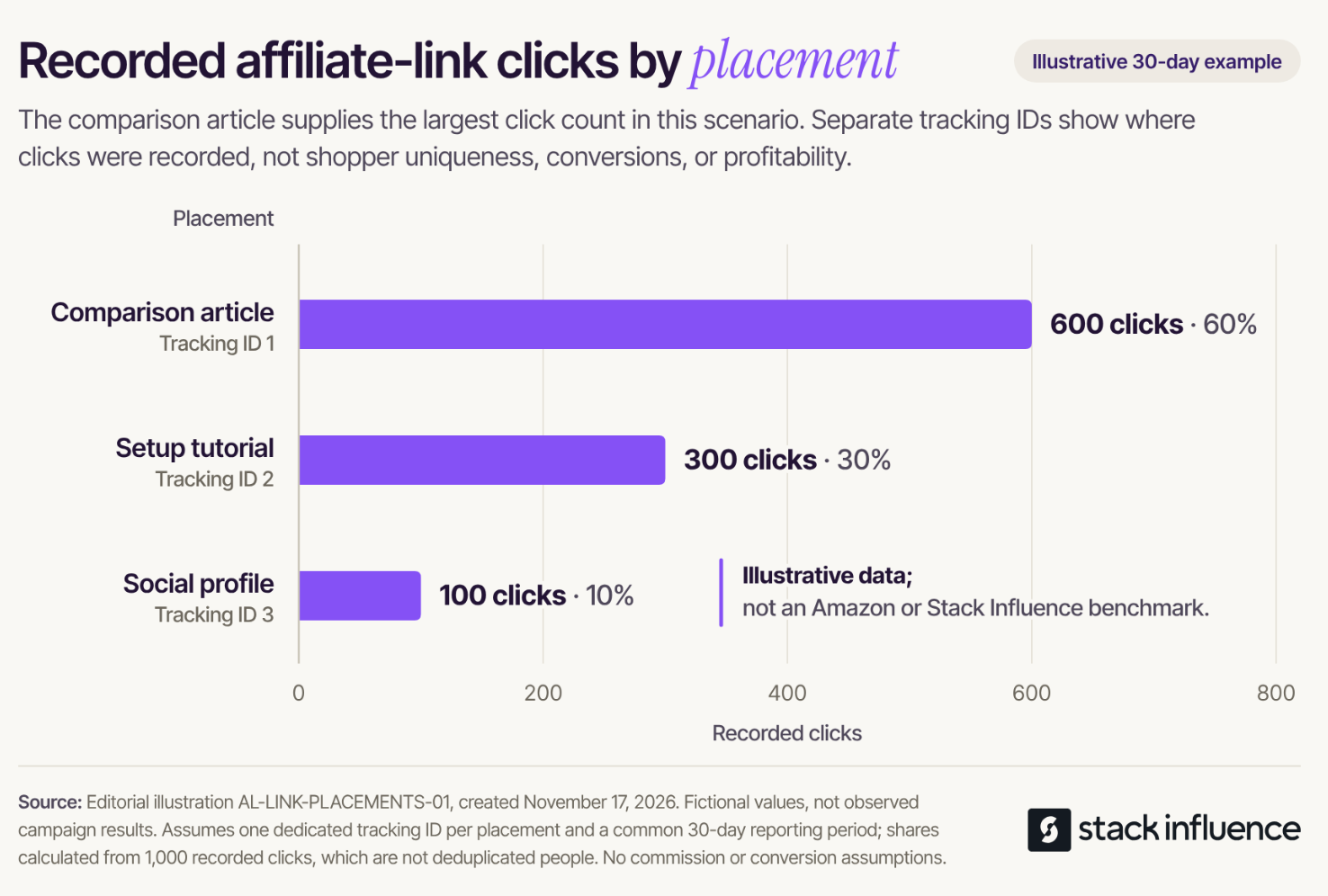
Consider an illustrative 30-day reporting period with three placements, each using its own tracking ID:
- Comparison article: 600 recorded clicks, or 60% of the total.
- Setup tutorial: 300 recorded clicks, or 30% of the total.
- Social profile: 100 recorded clicks, or 10% of the total.
The total is 1,000 clicks, calculated as 600 + 300 + 100. Each share equals the placement’s clicks divided by 1,000.
In this invented example, the comparison article contributes the most recorded clicks. That finding identifies where traffic came from; it does not establish the most profitable placement, unique shopper counts, or the content that caused a purchase. These numbers illustrate a reporting method, not typical Amazon performance.
Choose the Right Link for a Seller Campaign
The person publishing the recommendation and the person measuring the brand campaign may need different tools. Settle the intended arrangement before anyone creates or distributes URLs.
When a Creator Wants Affiliate Commission
Have the creator generate the Associates link through their own account. Amazon’s program rules restrict creating links carrying your tag for a site that is not your own.
Confirm the creator’s publishing property and intended reporting arrangement. Sharing your seller account access is unnecessary for the creator’s affiliate link generation.
When Your Brand Wants to Measure External Marketing
Use the Amazon Attribution workflow if your account qualifies and your goal is to measure traffic from marketing outside Amazon. Amazon’s guide includes sellers enrolled in Brand Registry with brand representative status among eligible users.
Create the campaign and relevant ad groups, then use the generated attribution URL in the corresponding placement. This is a separate measurement setup from copying an Associates link.
Eligible brands can also enroll in Brand Referral Bonus, which uses Amazon Attribution and can provide credits against referral fees. Stack Influence’s guide to Brand Referral Bonus setup and credits explains that seller workflow in more detail.
Do not splice an Associates tag into an Attribution URL to seek commissions from both programs on the same traffic. Agree on the supported link arrangement before publication, particularly when a creator expects affiliate income.
Add Disclosures and Check the Placement Rules
A working link still needs an appropriate disclosure and publishing context. Review these before sharing the URL publicly or handing it to a campaign partner.
Identify the Affiliate Relationship Clearly
Amazon’s Associate disclosure guidance requires a clear disclosure with the link and the following identification on your site, or associated with your social account:
As an Amazon Associate I earn from qualifying purchases.
For the recommendation itself, use clear wording that explains the financial relationship. An illustrative sentence is:
I may earn a commission if you buy through this Amazon link.
Place the disclosure where readers will notice it alongside the recommendation. The FTC’s affiliate marketing guidance explains that “affiliate link” alone may not adequately communicate that the publisher earns money.
If a brand also paid the creator or supplied a free product, disclose that connection accurately. The FTC’s social media disclosure guidance covers those relationships and explains that video disclosures belong in the video, not only its description.
Check Paid Placements and Purchase Incentives
Amazon’s policy update effective April 14, 2026 expanded disqualified purchases to include referrals through paid or boosted advertisements linking to Amazon, with limited exceptions. Do not assume an organic affiliate post can be boosted while retaining the same commission eligibility.
For a paid seller campaign, evaluate the appropriate advertising and Attribution setup. Confirm any specific exception with Amazon before relying on it.
The Associates participation requirements also prohibit incentives for using affiliate links. Do not make a campaign participant’s reimbursement conditional on using an Associates link. Product acquisition for a campaign and subsequent audience referrals should be planned separately.
Check the Published Link and Fix Common Problems
Test the link where readers will encounter it, not only in the document where you stored it. Open the published button, text link, or social placement and confirm that it reaches the intended product and variation.
Check the visible recommendation too. If the content promises a particular bundle, the destination should support that promise. Repeat this check after replacing a product or changing the link in a publishing tool.
Check the Tracking Information
Amazon’s link verification guidance explains how to inspect a published link for the intended Store ID or tracking ID, commonly in the tag parameter. Keep the original generated link available for comparison.
Amazon’s Link Checker is intended for manually created or modified links outside Associates Central. It is not a universal validation tool for links generated within Associates Central.
A disappearing tag is a different issue. Amazon’s tracking visibility explanation says the identifier does not need to remain visible after the initial click for the shopping session to be tracked.
Restore a Missing SiteStripe
Confirm that the browser is signed in with the Amazon account associated with Associates. If necessary, enable the toolbar through Account Settings, then Associates SiteStripe Options in Associates Central.
Test Without Buying Through Your Link
Use destination and tracking checks rather than a purchase as your test. Amazon’s personal-use policy explanation states that purchases through your own links do not earn commission.
Do not recruit friends, relatives, or employees to place commission-testing orders. Keep technical verification separate from customer acquisition.
Read the Report Before You Scale
Review both activity and earnings using matching periods. Amazon’s reporting guidance distinguishes clicks, ordered items, shipped items, and commission income, and supports tracking-ID-level reporting.
A click confirms recorded activity, while commission income reflects qualifying results. Avoid treating a large click count as proof that a link placement is commercially effective.
A separate illustrative example compares two placements during the same fictional 30-day period. Assume each has a dedicated tracking ID, comparable click measurement, and finalized commission amounts that include all relevant adjustments:
- Product roundup: 500 clicks and $25 in commission income.
- Demonstration page: 100 clicks and $20 in commission income.
Calculate earnings per click as commission income divided by recorded clicks:
- Product roundup: $25 ÷ 500 = $0.05 per click.
- Demonstration page: $20 ÷ 100 = $0.20 per click.
In this illustration, the demonstration page earns four times as much per recorded click, although the roundup earns more total commission. The smaller sample and different audiences mean this comparison does not prove the demonstration format caused the difference or will outperform at a larger scale.
For a seller reviewing a creator’s report, affiliate commission is the publisher’s income. It is not your product revenue or profit. Confirm the reporting period, relevant tracking ID, and which products the report covers before using it to evaluate your brand campaign.
For the broader commercial decision, the explanation of how Amazon affiliate marketing works for sellers develops the distinction between affiliate income, campaign costs, and seller outcomes.
Start With One Correctly Configured Link
Choose the intended publisher and product, generate the link through the appropriate Amazon tool, and check the published destination and disclosure. Keep the selected tracking ID with your placement record.
Once those basics are in place, use the report to decide what deserves further testing. A reliable link setup gives you a clearer starting point for evaluating a recommendation, a creator partnership, or a seller campaign.