



.avif)
An advertising invoice and an Amazon bonus report do not run on the same clock. Ecommerce sellers can earn a referral benefit before it appears as usable fee savings, and confusing the two can distort a campaign budget.
The Amazon Brand Referral Bonus rewards qualifying sales from non-Amazon marketing. The useful question is not just how to earn it, but how to connect each campaign to a credit that actually reduces referral fees.
This guide covers the program’s mechanics, setup, creator-campaign considerations, and a practical way to reconcile the financial benefit.
Key Takeaways
- Amazon describes an average bonus of 10% of qualifying sales, not a guaranteed 10% rebate on every order.
- Eligible sellers need program enrollment and properly implemented Amazon Attribution links for qualifying non-Amazon campaigns.
- The 14-day attribution window and roughly two-month bonus-processing period serve different purposes.
- Track campaign revenue, bonus earnings, and applied fee credits separately so the same benefit is not counted twice.
What Is the Amazon Brand Referral Bonus?

The Amazon Brand Referral Bonus is a program that gives eligible seller brand owners credits against referral fees for qualifying sales generated through non-Amazon marketing. Amazon’s Brand Referral Bonus reporting overview describes a credit averaging 10% of qualifying sales measured with Amazon Attribution.
It is a seller incentive, not a customer coupon or a payment for clicks. A referral fee is Amazon’s selling fee associated with a sale; the bonus offsets future referral fees rather than immediately refunding the customer or paying the seller cash.
For creator campaigns, separate the event you purchased from the event Amazon rewards. Stack Influence’s automated product-seeding workflow connects gifted-first creator participation with completed social posts and campaign coordination. A completed post fulfills a content deliverable; it does not establish that a qualifying audience purchase occurred.
That distinction should shape the campaign report before the first creator publishes.
How Much Can the Bonus Reduce Your Fees?
The bonus depends on qualifying sales and the applicable rate, not on total campaign revenue alone. Amazon’s bonus calculation guidance explains that rates vary by product category and sales price. Use the category-specific information in Seller Central rather than applying the advertised average indiscriminately.
A basic planning calculation is:
Estimated bonus = qualifying sales value × applicable bonus rate
When different products have different rates, calculate each eligible sales group separately and add the results. Shipping, gift wrapping, cancellations, and returns can affect the amount, so a simplified forecast should not replace Amazon’s actual bonus report.
An Illustrative $24,000 Campaign
Assume a campaign produces $24,000 in sales, all subject to a hypothetical 15% referral fee. Assume only 60% of those sales, or $14,400, qualify for a hypothetical 10% bonus. There are no taxes, discounts, returns, shipping charges, or gift-wrap charges in this simplified example.
The calculation is:
- Ordinary referral fees: $24,000 × 15% = $3,600.
- Bonus earned on qualifying sales: $14,400 × 10% = $1,440.
- Economic referral-fee burden after the full credit is eventually applied: $3,600 − $1,440 = $2,160.
The bonus equals 6% of total campaign sales, even though the assumed bonus rate is 10%. The resulting economic referral-fee burden is 9% of total sales, not 5%.
This is an illustrative scenario, not an Amazon category-rate quote or a Stack Influence campaign result. It also excludes product costs, Amazon FBA or other fulfillment costs, and marketing expenses. The credit is applied against future fees, so the calculation does not describe an immediate reduction on the original orders.
Who Qualifies for the Program?
Amazon’s public guidance identifies sellers in its U.S. store with a Professional selling plan and a brand enrolled in Amazon Brand Registry as the intended participants. Brand Registry enrollment and Brand Referral Bonus enrollment are separate checks.
The Amazon Brand Registry requirements include qualifying trademark rights and a brand name or logo permanently affixed to products or packaging. A registered trademark or an eligible pending application may satisfy the trademark requirement, subject to Amazon’s country-specific rules.
Do not confuse access to Amazon Attribution with eligibility for the bonus. Amazon’s Attribution product overview describes a free measurement tool with a broader audience, including eligible vendors and additional marketplaces. Access to that tool does not establish that a particular account or marketplace qualifies for Brand Referral Bonus.
Qualifying traffic can come from channels such as search, social media, and email. Amazon advertising itself is excluded; an Amazon-sold ad does not become eligible merely because its placement appears outside Amazon.
Before buying traffic, also check inventory, the selected variation, delivery information, and the offer shoppers will see. An Amazon listing optimization check helps separate a traffic problem from a product-page problem.
Build a Sale-to-Credit Trail in Four Steps
The Sale-to-Credit Trail is a practical campaign checklist, not an Amazon product feature. It links four pieces of evidence: enrollment, placement, purchase, and fee-credit application. Keeping those records together makes it easier to identify where an expected bonus disappeared.
1. Save Your Enrollment Evidence
Open the Brand Referral Bonus enrollment page while signed into the intended seller account. Complete the current enrollment prompts and confirm the account’s participation status before relying on future campaign credits.
Record the account, marketplace, brand, activation date, and person responsible for checking the program. Give the campaign manager access to those details without sharing account passwords.
Treat enrollment as a prerequisite, not a reporting task to complete after a campaign finishes. Keep the terms and rate information used for your forecast with the campaign records.
2. Give Each Meaningful Placement a Tracking Identity
In the Amazon Ads console, find Amazon Attribution under Measurement and Reporting and create a campaign. Amazon’s Attribution setup guide explains how to select products, create ad groups, choose a product detail page or Brand Store destination, and generate tagged links.
Design the naming convention around decisions you will actually make. For example, distinguish a creator’s organic placement from a paid advertisement using the same video. Keep the product, publisher, creator or creative identifier, and launch period recognizable.
Maintain a simple link register containing the placement name, destination, generated URL, owner, and launch date. The supporting Amazon Attribution guide provides additional context for connecting external campaigns with Amazon measurement.
A normal product URL with a UTM parameter is not a substitute for a generated Amazon Attribution tag.
3. Validate the Published Purchase Path
Put the generated link into the actual clickable placement, not merely a planning document. Test the route a shopper will use, including any intermediate landing page, link-in-bio page, redirect, or mobile handoff.
Check that the final destination shows the intended product and variation. Do not shorten, rebuild, or replace links without confirming that the measurement parameters survive.
Amazon advises allowing one to two days to validate initial reporting. Check clicks first, then shopping activity; do not place artificial orders to make a test appear successful.
4. Connect Purchases to the Credit Record
Preserve the campaign’s reporting period and the corresponding bonus records. Do not close the analysis as soon as advertising stops.
Amazon documents a 14-day, last-touch attribution model. A later qualifying click can receive credit for a purchase, and the conversion must occur within the applicable window. Let the final click cohort mature before treating campaign sales as complete.
Keep the Sale-to-Credit Trail open until you can distinguish an estimated benefit from a credited and applied benefit. That final reconciliation is what turns campaign reporting into a usable fee-saving record.
Can Creator Campaigns Earn the Bonus?
Creator campaigns can support bonus-eligible sales when qualifying non-Amazon activity uses the required tracking and satisfies the program’s rules. The creator’s follower count does not determine whether a sale qualifies.
Amazon’s program announcement also describes potential bonuses on additional same-brand purchases within 14 days of the qualifying click. That does not mean unrelated products elsewhere on Amazon become eligible brand sales.
Choose micro influencers or nano influencers around the product demonstration and audience relevance. A focused approach to finding influencers for an Amazon product helps the brief connect a real buying question with a credible explanation.
For each placement, specify the destination, tracking arrangement, disclosure, and publication requirement. A UGC creator delivering a video file has not necessarily agreed to publish it, and content delivery alone does not send traffic anywhere. Keep paid reuse permissions distinct when planning to repurpose UGC across platforms.
Keep Creator Commissions Separate From Seller Credits
The Amazon Influencer Program policy places that program within Amazon Associates and describes commission income for participating creators. Brand Referral Bonus is a different seller-side benefit.
Do not assume an Amazon storefront link, an affiliate link, and a seller’s Attribution link are interchangeable. Agree on the intended link arrangement before publishing, and verify the applicable rules before budgeting for overlapping commissions and referral credits.
The FTC’s disclosure guidance treats free or discounted products as potential material connections that need clear disclosure in endorsements. Product seeding does not remove that responsibility.
Stack Influence’s Amazon creator-campaign workflow supports creator sourcing, coordination, product seeding, and completed content. In the brief, assign separate responsibility for Amazon enrollment, tracking validation, and fee-credit reconciliation rather than assuming content completion covers those tasks.
When Are Bonus Credits Applied?
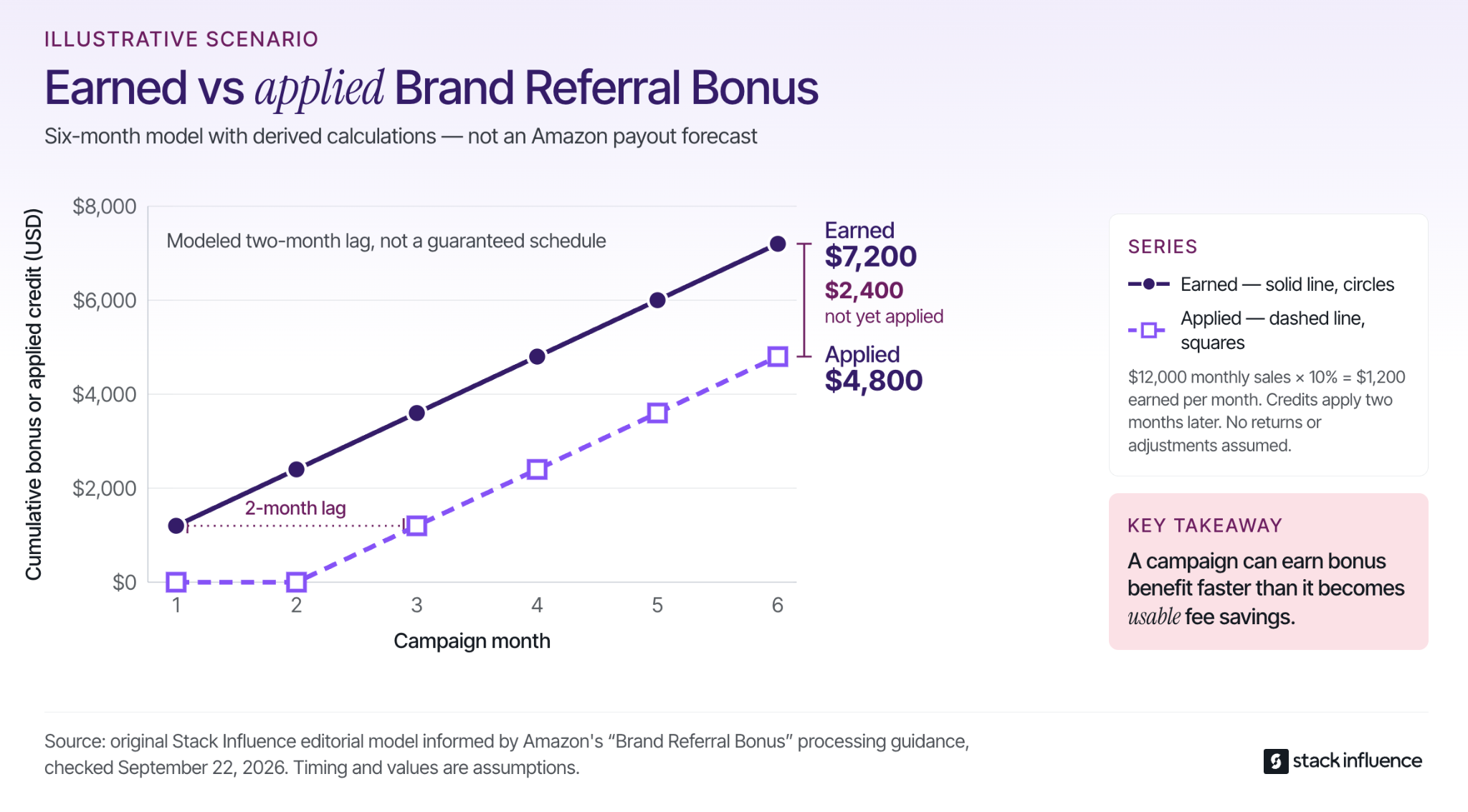
Amazon generally describes a two-month processing period before the bonus is credited, allowing for cancellations and returns. Its credit-application example shows how a bonus earned from an earlier sale can offset referral fees on later transactions.
That is different from the attribution window. The attribution window determines which shopping activity can receive campaign credit; the processing period concerns when the financial benefit becomes available.
Amazon’s Brand Referral Bonus reporting announcement describes reporting for earned bonuses, monthly credited amounts, and transactions where the bonus offsets referral fees. Save those records alongside the campaign rather than looking only for a separate cash deposit.
An Illustrative Six-Month Credit Lag
Assume a new campaign generates $12,000 in qualifying sales every month at a hypothetical 10% bonus rate, earning $1,200 monthly. Assume no starting bonus balance, no returns or adjustments, an exact two-month delay for modeling purposes, and enough future referral fees to use each credit as soon as it becomes available.
Across Months 1 through 6, cumulative earned bonuses would be $1,200, $2,400, $3,600, $4,800, $6,000, and $7,200.
Cumulative applied credits would be $0, $0, $1,200, $2,400, $3,600, and $4,800.
At the end of Month 6, the model contains $7,200 earned but only $4,800 applied, leaving a $2,400 timing gap. This is a planning illustration, not Amazon’s promised payment schedule.
A growing bonus balance can therefore coexist with a smaller current-period fee reduction. Budget using the timing you can support, not just the bonus the campaign may eventually earn.
Measure Contribution Without Inflating Revenue
Treat Brand Referral Bonus as a fee benefit, not additional product revenue. Maintain an economic view of the campaign and a separate view of when credits actually offset fees.
For a campaign cohort, a useful analytical calculation is:
Attributed contribution = net customer sales − variable product and marketplace costs − all-in campaign costs + confirmed bonus not already reflected in those costs
State whether the bonus is earned, credited, or applied. For cash planning, distinguish a confirmed future benefit from credits already used. If your fee expense is already net of the bonus, do not add the same bonus again.
The Amazon Ads reporting explanation describes viewing Brand Referral Bonus information alongside Attribution performance. Use that convenience for analysis, but reconcile it with the seller-side financial record.
Include creative production, creator compensation, net product-seeding costs, management, licensing, and paid amplification when those expenses belong to the campaign. An agency invoice or advertising dashboard may not capture every cost.
Keep campaign-funded creator purchases separate from independently funded shopper demand wherever records support that distinction. Reconcile the related reimbursements and settlements carefully rather than subtracting the same transaction twice.
Use Three Different Decision Questions
Ask whether the links worked, whether qualifying sales produced credits, and whether the campaign created additional profitable demand. Those questions require different evidence.
Clicks and product-page activity diagnose the purchase path. Eligible sales and bonus records establish the fee benefit. A credible comparison or controlled test is needed to estimate what would have happened without the campaign.
A tagged sale is not automatically a new customer. Use the appropriate customer acquisition cost definition rather than labeling every attributed purchase as acquisition.
Likewise, do not add promoted-product sales to a total that already includes them, or sum overlapping platform reports as if they represented separate orders. Comparing Amazon PPC with external traffic requires consistent cost and measurement boundaries, not a bonus-adjusted revenue number.
Why Is an Expected Bonus Missing?
A missing bonus can reflect a broken tracking path, an eligibility issue, an immature reporting period, or a credit that has not yet been applied. Diagnose the point of failure before changing the campaign.
When clicks are missing, inspect the published link and confirm that you are viewing the matching campaign and date range. When clicks appear without product activity, check the destination and product mapping rather than assuming every visitor should convert.
When attributed sales appear without the expected bonus, verify program enrollment, marketplace, product eligibility, applicable rates, and the program’s processing status. Do not assume every sale in an Attribution report is bonus eligible.
When the program shows an earned benefit but you cannot find cash, inspect the referral-fee credits and transaction records. The Sale-to-Credit Trail should identify which report supports each stage and which stage remains unresolved.
For a support request, collect the account and marketplace, campaign and ad-group identifiers, product identifiers, reporting dates, and relevant bonus records. A specific reconciliation question is more actionable than asking why the advertised average did not appear.
Make the Fee Saving Traceable
The Amazon Brand Referral Bonus is most useful when it is treated as a measurable fee benefit rather than a headline percentage. Verify eligibility, preserve the tracking path, allow reporting to mature, and connect earned bonuses with the fees they eventually offset.
Start with one campaign and complete its Sale-to-Credit Trail before increasing the budget. For a creator-led campaign, use those requirements to plan a Stack Influence product-seeding workflow that produces accountable content and a financial result your team can explain.
.jpg)