




An attractive Shopify BFCM offer can fall apart when the creator post, product page, and checkout promise different things. For ecommerce sellers, Black Friday Cyber Monday preparation means aligning the deal customers see with the inventory, discounts, delivery, and returns the store can support.
This guide explains how to choose an offer, prepare creator content, configure Shopify, and measure the result. It also covers the 2026 changes that make copying last year's setup risky.
Key Takeaways
- Choose a promotion around a specific buying reason, such as gifting or replenishment, and calculate the contribution each order must retain.
- Keep the offer, eligibility rules, dates, and customer promises consistent across creator content, email, product pages, and checkout.
- Test overlapping discounts, bundle prices, purchase tracking, and the promotion's closing state before sending campaign traffic.
- Evaluate BFCM using fulfilled orders, acquisition costs, returns, and subsequent purchases alongside attributed revenue.
Choose What Your Shopify BFCM Offer Should Accomplish

The 2026 Black Friday to Cyber Monday window runs from November 27 through November 30, following the timing explained in Shopify's Cyber Monday guide. Set your own early-access and closing times explicitly, including the store's time zone.
Start by deciding what the promotion should accomplish. A giftable discovery set, a refill multipack, and a clearance offer solve different customer problems and require different inventory decisions.
Shopify reported approximately $14.6 billion in worldwide merchant sales during BFCM 2025. That aggregate includes online and offline activity and is based on Shopify's GMV definition; it is context for the event, not a forecast for an individual store.
Give Everyday Products a Clear Buying Reason
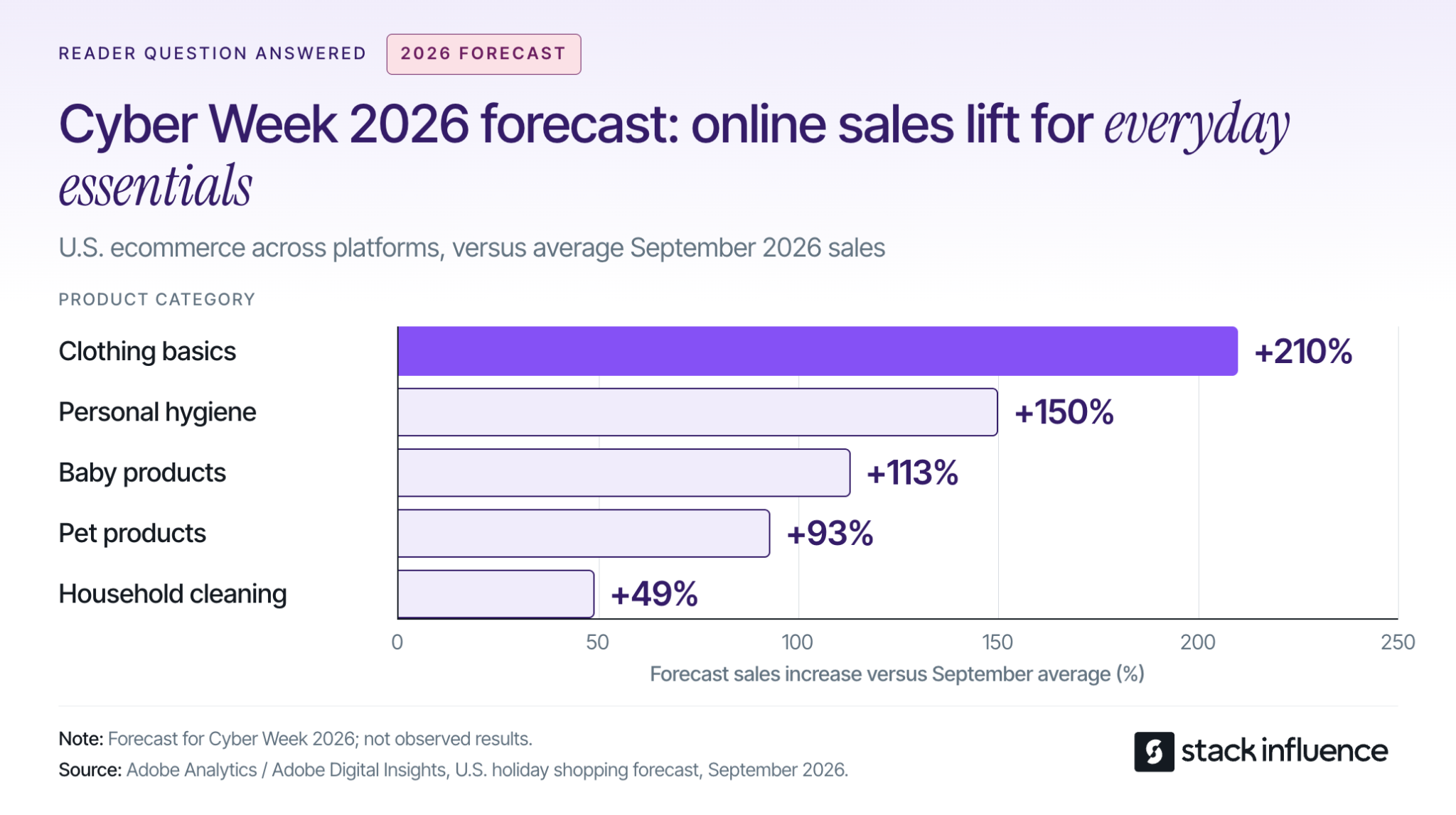
Adobe's September 2026 holiday forecast anticipates the following increases in U.S. online sales during Cyber Week compared with average September 2026 sales levels:
- Clothing basics: 210%.
- Personal hygiene products: 150%.
- Baby products: 113%.
- Pet products: 93%.
- Household cleaning items: 49%.
These are forecasts across U.S. ecommerce, not observed Shopify results or year-over-year growth. Adobe's Cyber Week covers Thanksgiving through Cyber Monday.
For a replenishment brand, the practical implication is to evaluate stock-up offers alongside gifts. A cleaning brand might demonstrate how a refill pack works with the customer's existing bottle, while a clothing brand might explain the fit and contents of a basics multipack.
Build Shopify bundles around useful complementary products, then calculate their economics. Adding unwanted items can increase the displayed basket value without improving the customer's reason to buy.
Set a Contribution Requirement Before Choosing the Discount
Estimate merchandise revenue after discounts and expected refunds, then add shipping collected. Subtract product cost, fulfillment, postage, payment fees, expected return-handling costs, and the contribution you want to retain; the remainder is the acquisition budget the order can support.
Account for returned inventory that can be resold, and avoid deducting the same refund twice. Include creator reimbursements, campaign fees, and paid distribution in the campaign budget when applicable.
Use your own historical repeat-purchase data before accepting a loss on the first order. If that history is weak, build the promotion around economics you can defend without assuming future purchases.
Keep One Offer Record Across Your Campaign
Create a shared offer record that connects what customers see with what Shopify actually applies. Give the person responsible for campaign changes ownership of four fields:
- Customer promise: The product or bundle, buying reason, advertised savings, and delivery statement.
- Eligibility: Included variants, minimum spend, customer segments, markets, exclusions, and permitted discount combinations.
- Timing: Launch and end times, time zone, creative deadlines, and the message customers should see after the sale.
- Operating limits: Available inventory, acquisition budget, fulfillment capacity, and the conditions that require promotion to pause.
Use this record to brief creators, configure discounts, and approve emails. If the offer changes, update the affected placements before they send shoppers to an inconsistent checkout.
Produce Content That Explains the Purchase
Stack Influence's Shopify creator workflow coordinates creator sourcing, vetting, product seeding, post verification, and UGC collection. Its gifted-first model connects product access with agreed content requirements, and its completions-only campaign model centers payment accountability on completed creator posts.
For BFCM, the operational lesson is to plan from the date content must be usable. Allow time for delivery, genuine product use, content completion, permission checks, and placement on the store before the offer launches.
Brief micro influencers and nano influencers around questions the product page needs to answer. Ask a creator to show scale, demonstrate setup, explain a bundle's contents, or show how a product fits a routine; choose the demonstration that matters for the buying decision.
Keep reusable product footage separate from short-lived promotional overlays. Where editing permissions allow, the same demonstration can remain useful after the BFCM discount expires.
Record UGC licensing permissions for storefront placement, email, paid ads, edits, and duration before republishing creator content. Confirm any additional platform authorization needed to run ads through a creator's identity.
The FTC's influencer disclosure guidance treats free or discounted products as potential material connections that require disclosure with an endorsement. Put clear disclosure instructions in the brief, including disclosure within video content when applicable.
Brands using automated product seeding should assign responsibility for the purchase or shipment, content deadline, verification, and reimbursement. Those responsibilities belong in the schedule even when software coordinates the campaign.
Configure the Promotion in Shopify
Translate the offer record into product, discount, and scheduling settings. Finish the configuration before approving creative that names a price, threshold, or deadline.
Audit Every Discount That Can Meet in One Cart
Shopify's discount-combination rules require each discount to permit the relevant combination. Review the BFCM offer together with welcome codes, creator codes, loyalty rewards, and shipping discounts.
For eligible combinations, product discounts apply first, order discounts use the revised subtotal, and shipping discounts apply last. Multiple percentage-based order discounts use the same subtotal: a combinable 10% order discount and 20% order discount can produce 30% off.
Check excluded products, customer eligibility, and minimum-spend conditions using realistic carts. Write the final customer price into the offer record so the campaign team approves the discount customers can actually receive.
Verify the Bundle Product and Its Price
Shopify's Bundles documentation explains that product-specific discounts must include the parent bundle product; selecting only its components does not apply that discount to the bundle. It also states that changing a component price does not automatically update the bundle price.
Check the advertised saving against the current bundle price and the actual items included. Confirm that the available variants, inventory, and shipping costs support the offer.
Schedule the Opening and the Closing State
Shopify's Rollouts requirements make rollouts available on Basic and higher plans, subject to store-setup restrictions. The Rollouts overview distinguishes permanent Launch changes from temporary Events that roll back when they end.
Discounts retain their own active dates independently of a rollout. Check those dates against the event schedule instead of assuming that ending the event always ends every offer.
Preview the store before the promotion, while it is active, and after it closes. The final state should remove expired messaging, restore the intended prices, and give late visitors a useful destination.
Test the Purchase Path That Changed in 2026
Test the journey customers will take from campaign click to confirmed order. Start with a phone, the actual campaign landing page, and the payment methods your customers use.
Baymard's checkout research identifies high extra costs, slow delivery, account requirements, and complicated checkout among reported reasons shoppers abandon orders. Make shipping costs, delivery expectations, and return terms visible before the final payment step.
Shopify's test-order guidance covers discounts, payment behavior, shipping rates, notifications, and refunds. Check both signed-in and signed-out purchases, including an unsuccessful payment and a subsequent successful attempt; restore live payment settings after testing because payment test mode prevents normal live purchases.
Run the promotion against the cases most likely to expose a problem:
- A new customer arriving through a creator link and trying a welcome code.
- A returning customer buying a bundle with a loyalty offer.
- A shopper whose address changes shipping availability or charges.
- A cart containing an excluded item or the last available variant.
- A visitor arriving after the advertised deadline.
If your store previously used Shopify Scripts, verify the replacement discount, shipping, and payment behavior. Shopify's Scripts transition guidance confirms that published Scripts were deactivated on June 30, 2026 and no longer work.
Check inventory at locations that fulfill online orders and review the continue-selling setting for out-of-stock products. Keep any intentional backorder promise clear to the customer.
Verify that the completed order produces the expected purchase event and confirmation. Use the findings to prioritize Shopify conversion fixes, then repeat the affected purchase path after changing an app, theme, discount, or shipping rule.
Coordinate Messages With Inventory and Fulfillment
Give each channel a job and a destination. Creator posts can demonstrate the product, email can explain access and offer terms, and paid campaigns can distribute approved creative to the intended audience.
Set a content-ready deadline before the campaign starts, then work backward through production and delivery. For a November 27 launch, November 20 is a practical example of an internal readiness deadline; it is a planning choice, not a promised creator turnaround time.
Use the final week to verify links, prices, subscriber segments, and customer-facing terms. Schedule a genuinely different Cyber Monday message only when the inventory or offer gives customers a useful reason to return.
For email and SMS, build promotional audiences from people who have agreed to receive the relevant messages, following Shopify's customer-contact guidance. Suppress recent purchasers where the next message would repeat an offer they already used.
Review the recipient settings in Shopify Messaging's abandoned-checkout automation. A recovery message should explain how to finish the purchase and resolve uncertainty; adding another discount requires another margin and combination check.
Plan the Work That Arrives After the Order
Before increasing promotion, confirm how many orders the team can dispatch within the advertised window. Reserve stock for replacement shipments and decide who updates campaign messaging when a promoted variant sells out.
Define escalation rules in the offer record. For example, if the oldest unfulfilled order is about to miss the stated dispatch window, resolve capacity or adjust the promise before buying more traffic to the affected product.
In its 2025 returns research, NRF and Happy Returns reported these planned holiday responses among surveyed retailers:
- Increase focus on third-party logistics partners: 49%.
- Hire seasonal staff to handle returns: 43%.
- Extend return windows: 37%.
The retailer survey included 358 ecommerce professionals at U.S. merchants with more than $500 million in revenue. These are separate planned responses for the 2025 holiday period, not Shopify benchmarks or measured results.
For a smaller store, the useful question is which return tasks need extra capacity. Assign ownership for customer communication, inspection, refunds, and inventory updates rather than adopting a large retailer's staffing plan.
Publish the holiday return window, exclusions, procedure, and refund expectations before purchase. Connect ecommerce returns management with the product explanation so customers understand what they will receive and how problems will be handled.
What Should You Measure During and After BFCM?
Measure whether the campaign brings in worthwhile orders that the business can fulfill, then revisit the result as reversals and repeat purchases develop. Attributed revenue helps explain customer journeys, while contribution and cash reporting answer different operating questions.
Keep Attribution Comparable
Give each creator and placement a consistent campaign link. For example, use instagram as the source, influencer as a documented creator medium, bfcm_2026_refill as the campaign, and a distinct creator-and-asset identifier as the content value.
Check that the link reaches the correct destination and preserves its UTM parameters, then confirm how Shopify groups the chosen medium. Record the attribution model and reporting window before comparing channels.
Shopify's marketing-report documentation notes a September 2026 change: Performance by marketing channel now includes all online-store traffic, rather than only traffic attributed to a marketing activity. Comparisons with older exports can therefore change because the report's scope changed.
Keep dates, currency, channel scope, and attribution settings consistent. Do not add together channel totals from an any-click model that can give multiple channels full credit for the same sale, or treat matching totals across separate advertising platforms as a requirement.
Track creator purchases intended for reimbursement separately from ordinary customer orders. Otherwise, seeding transactions can make a campaign appear to have acquired more independent customers than it did.
Reconcile Sales With the Costs of Serving Orders
Shopify's sales-report definitions calculate net sales as gross sales minus discounts and sales reversals. Reversals include more than physical returns, and they appear when processed, so a weekend sales snapshot cannot capture every later adjustment.
During the event, review orders, conversion, effective discount, acquisition cost, inventory, dispatch backlog, and customer-support issues together. Rising sales with falling contribution or a growing late-order queue calls for a different response from falling traffic with a healthy checkout.
Afterward, connect BFCM orders with their later refunds and returns. Recalculate contribution after product costs, payment and fulfillment expenses, creator costs, and paid media; keep that calculation distinct from Shopify's product gross-profit metric.
Use an initial operational review immediately after the event and later customer-cohort reviews at 30, 60, and 90 days where the product's purchase cycle makes those windows useful. Keep the final profit assessment open until the relevant return window has matured.
Look for which creator demonstrations brought qualified traffic, which offers attracted returning customers, and which products caused avoidable support or returns. Use those findings to refine ongoing Shopify influencer marketing and follow-up content.
Year-over-year growth alone does not establish that the campaign caused the difference. Where volume permits, use a properly designed holdout or controlled experiment to evaluate incremental impact; otherwise, state the limits of the attribution evidence.
Prepare to Run the Sale
A useful Shopify BFCM plan connects the buying reason, creator demonstration, checkout behavior, and work that follows the purchase. Before launch, complete a realistic mobile order and confirm who owns discount exceptions, fulfillment delays, and the post-sale review.
If producing the required demonstrations is the remaining bottleneck, use Stack Influence to plan creator sourcing, product seeding, and content completion around the offer. The next step is a campaign your team can explain, execute, and evaluate with confidence.