




An Amazon review strategy should help you collect honest customer feedback and use it to improve the next purchase experience. For ecommerce sellers, the practical starting point is to make eligible review requests consistent, evaluate Amazon Vine for suitable products, and investigate the problems customers repeatedly describe.
Begin with one product. Check whether your team is missing eligible orders, whether the listing sets accurate expectations, and whether the product delivers on those expectations. Each problem calls for a different action. This guide explains how to choose that action, run the process, and measure progress without treating a request, a rating, and a written review as the same result.
Key Takeaways
- Use a neutral, consistent request process for eligible customer orders, with one request route per order and no incentives or filtering for satisfied buyers.
- Evaluate Vine against current account and product eligibility, inventory costs, and your readiness to receive independent feedback.
- Track request coverage separately from published reviews. More requests do not establish how many additional reviews they caused.
- Turn recurring complaints into specific product, instruction, or listing changes, while keeping promotional creator content separate from customer-review collection.
Start With the Problem Your Review Strategy Needs to Solve
Choose your first action from the product's current situation. A listing with very few orders needs a different plan from a busy listing whose customers repeatedly describe the same problem.
- If customers are buying but requests are inconsistent, establish an owner and a repeatable Request a Review routine.
- If the product has little feedback, check whether Vine is available and whether the product is ready for independent evaluation.
- If reviews expose recurring problems, investigate those issues before increasing promotional spending.
These activities can run together. The distinction helps you avoid spending on a review service when the immediate problem is an unfinished listing or an unowned operational task.
Set the rules before assigning the work. Amazon's seller review-policy guidance prohibits buying reviews, exchanging incentives for reviews, requesting review changes or removal, and directing positive feedback to Amazon while diverting negative feedback elsewhere. It also makes sellers responsible for associated employees and contracted third parties.
Apply that review to agency instructions, packaging inserts, messaging software, and creator briefs. Remove requests for five stars, review-linked gift cards, and instructions that make a benefit depend on a customer posting feedback. Ask a provider to show the actual workflow before authorizing it.
Next, inspect the product as a customer would. Can someone identify its dimensions, compatible uses, included components, and important limitations before purchasing? Open a current production unit and compare the contents and instructions with the listing. Record discrepancies so the person responsible can correct them.
Make Review Requests Consistent and Neutral
Amazon's built-in request is a useful starting point because it supplies the message instead of requiring your team to write one. Amazon's Request a Review instructions describe one standardized email requesting both a product review and seller feedback, available once per order between 5 and 30 days after delivery.
Use the feature's actual availability to determine whether an order can receive the request. A date calculation alone should not override an unavailable button.
Set Up One Request Route Per Order
For a manual workflow, open Manage Orders in Seller Central, select the shipped order, open its order details, and use Request a Review when available. Assign a person to check eligible orders regularly enough that they do not age out of the window.
Keep a simple operating record containing the order identifier, product, delivery date, eligibility check, request date, and any reason the request could not be sent. Record confirmed requests separately from attempts that failed. If multiple products share an order, maintain one order-level request record so different product owners do not duplicate the work.
Amazon's buyer communication rules also permit qualifying review requests through Buyer-Seller Messaging, but prohibit repeated requests and requests conditional on a positive experience. Choose one route for each order. When using Request a Review, do not add another review-request email to the same buyer for that order.
Choose a consistent send point within the permitted window that gives customers a reasonable opportunity to use the product. Treat that timing as an operational choice to evaluate, rather than assuming one day works best for every category. Do not use a satisfaction survey to decide who gets asked.
Measure the Orders Your Process Actually Reaches
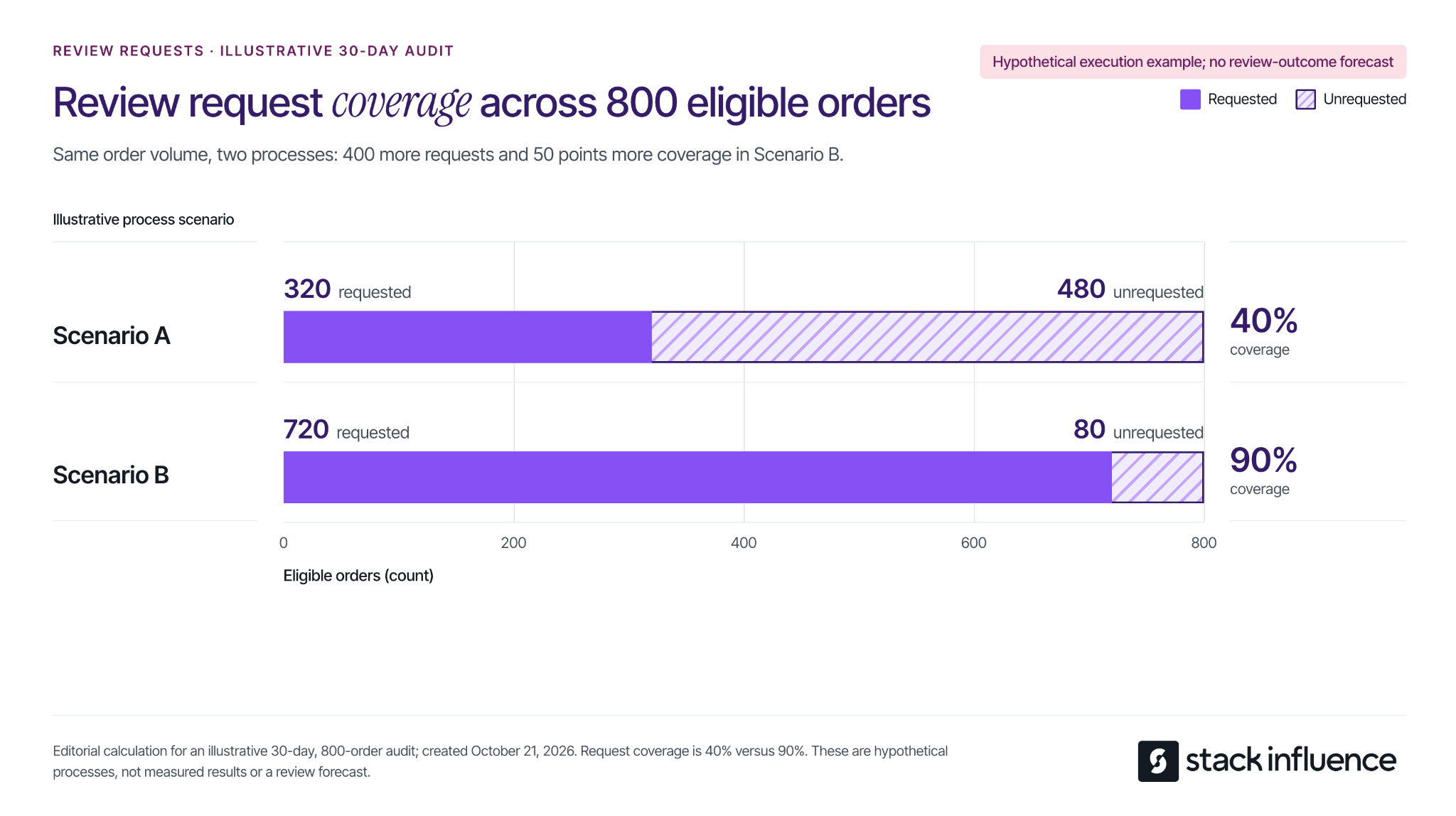
Calculate request coverage as unique eligible orders receiving a request divided by all unique orders confirmed eligible during the same audit period, multiplied by 100. Preserve the eligibility record, including for orders already requested; a current list of unrequested orders is not the full denominator.
Consider an illustrative 30-day audit for one product, with 800 eligible ordinary-customer orders. Compare two alternative request processes for that same order volume:
- Scenario A: 320 orders receive a request and 480 remain unrequested, producing 40% coverage.
- Scenario B: 720 orders receive a request and 80 remain unrequested, producing 90% coverage.
The difference is 400 additional requests and 50 percentage points of coverage. These are hypothetical process examples, not Amazon benchmarks or measured seller results. Review outcomes remain unmeasured.
This calculation identifies an execution gap your team can investigate. Check missed batches, unavailable actions, and duplicate-request controls before changing software. If coverage is already consistent, shift attention to product experience and customer demand instead of sending more messages to the same people.
Use Amazon Vine With Clear Expectations and a Budget
Vine gives eligible products access to Amazon-invited reviewers who can share independent opinions. Check the current Amazon Vine requirements and fees: participation requires a Professional selling account, eligible FBA offers, and either a qualifying Brand Representative or Reseller role for a registered brand, or generic products in the catalog.
Existing products must have fewer than 30 reviews; eligible prelaunch FBA listings can also participate. Confirm the specific ASIN's eligibility before reserving inventory.
The published US enrollment fees per parent product are:
- Up to 2 units: $0.
- 3 to 10 units: $75.
- 11 to 30 units: $200.
Budget separately for the units provided and applicable fulfillment costs. A zero enrollment fee does not make the entire activity cost-free. Recheck the fee and enrollment terms when making the commitment.
An Amazon community manager's explanation of Vine confirms that enrollment does not guarantee every unit will be claimed or a specific number of reviews published. Plan around the inventory and budget you can commit without requiring a particular rating or review count in return.
Before enrolling, inspect the same product version customers will receive, including the instructions and packaging. If you already know assembly is confusing or a component is missing, correct that issue first. Vine feedback should help evaluate a product that is ready for customers.
Keep three figures separate in your working record: units enrolled, units claimed, and reviews published. That distinction helps explain what has happened without calling every enrolled unit a completed review. For a broader launch, the Amazon product launch checklist connects this decision with listing readiness, available inventory, and promotional timing.
Turn Critical Reviews Into Specific Improvements
Read critical feedback for the underlying problem, then assign an action that can be checked. A low rating alone does not tell you whether the issue concerns product performance, unclear expectations, or instructions.
For each review you investigate, record the product version, review date, described problem, supporting detail, responsible owner, and proposed change. Preserve the customer's meaning when summarizing. If the available text is ambiguous, mark the cause as unconfirmed rather than filling in the gaps.
Work Through a Small Feedback Sample
Imagine a seller examining 30 written reviews that mention a problem. For this hypothetical exercise, assign each review to one primary issue, even if it mentions several:
- Unclear setup instructions: 12 reviews, or 40% of the sample.
- Size expectations not met: 9 reviews, or 30%.
- Durability complaints: 6 reviews, or 20%.
- Missing components: 3 reviews, or 10%.
The first two categories account for 21 of 30 reviews, or 70% of this illustrative sample. That makes instructions and size communication useful starting points for investigation. It does not mean 70% of customers encountered those problems, and the sample is not an estimate of the product's defect rate.
Translate the categories into work. Ask someone unfamiliar with the product to follow the current setup instructions. Compare listing dimensions with a measured unit and add a clear scale reference where needed. Investigate durability complaints against the stated use conditions, and check component counts against the packing specification.
The classification is a prioritization aid, not proof of the cause. A size complaint may reveal an unclear listing, a manufacturing discrepancy, or a product that does not suit that customer's use. Check the underlying evidence before deciding which change to make.
Give each action an owner, a completion date, and an observable result, such as revised instructions being included in newly packed units. Track when changed inventory reaches customers. Reviews posted immediately after a packaging update may still describe units packed before that update.
Resolve Customer Problems Without Negotiating Reviews
Where available, Amazon's Customer Reviews tool provides a Contact Customer option for ratings below three stars, allowing eligible brands to offer support or a courtesy refund. Access requires a Professional selling account and a Brand Representative role for a brand enrolled in Brand Registry.
Use the available support workflow to resolve the problem. Keep any remedy independent of whether the customer changes a review, and do not request an edit or removal. Record the service action and the operational lesson separately so a resolved support case is not reported as an improved rating.
Keep Creator Campaigns Focused on Social Content
Creator partnerships can help explain how a product works, show its dimensions in context, and answer questions prospective buyers have. Define the deliverable as the intended social content and specify the applicable usage permissions and disclosure requirements.
Amazon's rules on promotional customer reviews distinguish ordinary customer feedback from review-linked rewards and promotional relationships. A generally available customer discount is different from a benefit tied to writing a review. Calling a creator's review optional does not by itself resolve the compensation or conflict-of-interest questions.
For campaign planning, keep gifted or reimbursed creator participants outside the customer-review solicitation workflow. Do not include an Amazon customer review as a creator deliverable or condition future opportunities on one. This is an operational recommendation for keeping the two activities clearly defined.
For social endorsements, the FTC's influencer disclosure guidance explains that free products and other material relationships need clear disclosure with the endorsement. That disclosure addresses the social content; it does not authorize a customer review that Amazon otherwise prohibits.
Stack Influence's automated product-seeding workflow supports creator coordination and completed social content. When that work is part of your marketing plan, specify the buyer question each demonstration should answer and evaluate the resulting posts and assets. Keep customer-review counts outside the promised campaign deliverables.
Run a 30-Day Review Process You Can Maintain

Use the first month to establish a dependable routine and identify what needs fixing. The schedule below is an editorial operating suggestion, not a deadline for reaching a review target.
- Days 1 to 3: Choose one product, inspect the listing and current production unit, check existing request workflows, and record the starting review and rating counts.
- Days 4 to 7: Assign the request owner, establish the eligibility and request log, and make a Vine decision if applicable.
- Each week: Check request execution, investigate new feedback, follow up on assigned improvements, and document changes to the product or listing.
- Day 30: Recalculate coverage, review completed improvements, and choose the next operational priority.
Keep ratings, written reviews, and seller feedback in separate fields. Amazon's Community Guidelines allow star ratings without written text and distinguish product evaluation from seller-service feedback. Label each count exactly as the source presents it.
Record the date and product scope whenever you capture a visible count. Treat the difference between two snapshots as a net change, not necessarily the number of newly submitted reviews. Avoid comparing a parent-level count with a single variation's orders as if the populations automatically match.
Review request coverage alongside order volume, recent written feedback, and completed fixes. A same-month ratio of new visible reviews to orders does not establish which requests produced those reviews. If you cannot connect the populations and timing, describe the figures separately rather than presenting a response rate.
After a change, compare feedback over equivalent observation periods and consider differences in sales volume, product versions, and available evidence. An improvement following a change is a reason to investigate further; timing alone does not prove the change caused it.
Choose One Improvement to Make This Week
Start with the gap your records can demonstrate. Close missed request opportunities, resolve the Vine decision, or assign a recurring product problem to someone who can fix it. Keep the process neutral and make each action visible in the operating record.
A useful Amazon review strategy leaves you with more than a review-count target. It gives your team a consistent way to invite honest feedback, understand what customers experienced, and make the next purchase better informed.