




The best times to post on TikTok are starting points to test against your own audience. If you need an hour for your next upload, the daily recommendations below give you concrete options. Your longer-term goal is to find a few publishing windows that suit the people you want to reach and the content you can consistently make.
For content creators, that requires three decisions: which benchmark to try, whose time zone to use, and how many different windows you can realistically compare. A crowded calendar of supposedly perfect hours can leave you with less useful evidence than a small, manageable test.
Key Takeaways
- Start with a day-specific benchmark when account data is limited, then use comparable results from your own posts to refine it.
- Label every proposed time with the audience's time zone. An evening upload on the East Coast can still be an afternoon upload on the West Coast.
- Choose fewer test windows when you publish less often. Repeated comparisons take time, even when the arithmetic looks simple.
- Judge posts at the same age and against a goal chosen in advance. A single breakout video is insufficient evidence for changing your entire schedule.
Best Times to Post on TikTok by Day

Use the daily leaders in Buffer's September 2026 analysis as initial candidates. The company analyzed 7.1 million TikTok posts published through its platform, covering multiple formats, and compared median engagement rates:
- Monday: 1 p.m.
- Tuesday: 6 a.m.
- Wednesday: 10 p.m.
- Thursday: 1 p.m.
- Friday: 6 p.m.
- Saturday: 5 p.m.
- Sunday: 9 a.m.
Buffer presents these clock times as applicable across time zones, but does not explain the adjustment in detail. Our recommendation is to apply a chosen clock time to the audience region you want to serve, record that assumption, and test it.
A different starting point comes from Sprout Social's March 2026 research, which highlights Tuesday through Thursday, 2–6 p.m. in the audience's local time. Its disclosed research covers approximately 2 billion engagements across social networks; that is not a TikTok-only sample. Its findings favor weekdays, illustrating why published schedules can disagree.
Choose one plausible candidate for a day you already intend to publish. If you can make a good video for Friday evening, you do not need to add a Tuesday morning upload simply because it appears on a list.
These are observations from the publishers' samples. They do not establish that moving the same video to a listed hour will cause a particular increase in views, or that the schedule applies equally to every creator niche.
Start With the Audience You Want to Reach
Use your own account evidence to narrow the choices. TikTok's introduction to TikTok Studio describes analytics for account performance, content performance, and audience behavior, while noting differences between app and web tools.
Work through the information available in your version:
- Open TikTok Studio and find the analytics available to your account.
- Review audience, viewer, or follower insights. If activity by hour or day is available, record the recurring busy periods.
- Check which group the report describes. People who follow you and people who viewed your content are different populations.
- Record the report's date range and displayed time zone alongside your notes.
For creators already using a Business Account, TikTok's current Web Business Suite documentation identifies an Audience section within Analytics that includes activity and location information. Use the tools already available to you; choosing a posting hour does not require changing your account type.
Activity information helps you select a candidate. Your post results help you evaluate it. A busy audience hour does not tell you how a particular tutorial, comedy clip, or product demonstration will perform.
Also decide whether you are serving your current audience or trying to reach a different one. A creator based in California who makes content for New York restaurant workers should write the intended audience and location into the plan before choosing an hour.
If useful activity information is missing, start with one benchmark and a simple posting log. Treat the first rounds as information gathering. Do not interpret a blank report as evidence that your audience is inactive.
Convert the Recommendation Into a Real Publishing Time
A recommendation such as “post in the evening” becomes useful only after you identify the viewer's location. Write the audience time, your publishing time, and the calendar date before scheduling.
Consider an illustrative creator with viewers in New York and Los Angeles on October 27, 2026. NIST's U.S. time-zone reference lists Eastern daylight time as UTC−4 and Pacific daylight time as UTC−7. Los Angeles is therefore three hours behind New York in this example:
- A 6 p.m. New York upload occurs at 3 p.m. in Los Angeles.
- A 9 p.m. New York upload occurs at 6 p.m. in Los Angeles.
- An 11 p.m. New York upload occurs at 8 p.m. in Los Angeles.
These are clock conversions, not measured audience peaks. If your own evidence points to 6 p.m. in Los Angeles, 9 p.m. in New York is the matching publishing time. Choosing 6 p.m. on a New York clock would test a different audience hour.
For a split audience, decide which regional opportunity each post is intended to test. You could compare a window serving the earlier region with one serving the later region, while checking whether the resulting viewers match your intended audience. Averaging the two clocks together does not establish an optimum.
Keep the date attached when converting to UTC, the international time reference. In this example, 9 p.m. on Tuesday, October 27 in New York is 1 a.m. UTC on Wednesday, October 28. A date mismatch can make you attribute a Tuesday upload to Wednesday when reviewing a report.
Recheck future scheduled posts around clock changes. NIST's 2026 daylight saving time rules place the U.S. change back to standard time on November 1. Use the actual locations and publishing date when converting, particularly for audiences in different countries or regions that follow different rules.
Finally, check the labels in both your analytics and scheduling interface. If the report's time zone is unclear, compare a known posting timestamp with its reporting entry before relying on the hour labels. Do not assume every TikTok analytics screen uses one universal time zone.
Choose a Timing Test You Can Actually Finish
The number of windows you compare determines how thinly you spread your posting effort. Start with a question narrow enough to answer, such as whether lunchtime or evening deserves more of your existing publishing slots.
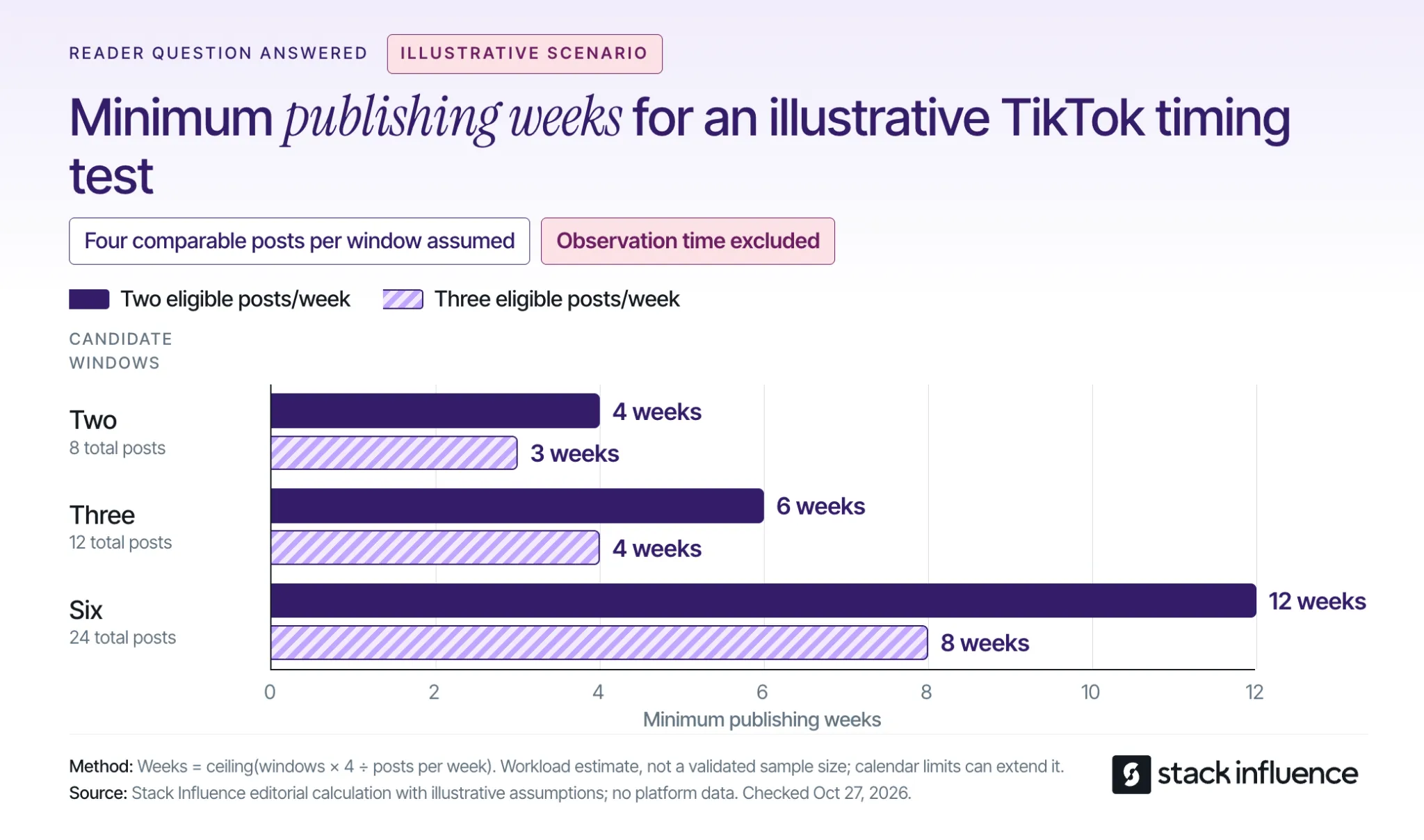
The following calculation is an illustrative planning exercise. Assume every post qualifies for the comparison and you budget four comparable posts per candidate window. Four is a workload assumption, not a scientifically validated sample size or a guarantee of a reliable winner.
Minimum publishing weeks equal the number of windows multiplied by four posts, divided by your eligible posts per week, rounded up:
- Two windows require eight posts: at two posts per week, allow four publishing weeks; at three per week, allow three.
- Three windows require twelve posts: at two posts per week, allow six publishing weeks; at three per week, allow four.
- Six windows require twenty-four posts: at two posts per week, allow twelve publishing weeks; at three per week, allow eight.
The calculation shows the practical cost of adding more candidate hours. At three eligible posts per week, expanding from two windows to six increases the minimum publishing phase from three weeks to eight. That does not make the longer test better if the extra windows are poorly motivated.
These are capacity estimates. Fixed weekday availability, missed uploads, and keeping topics comparable can lengthen the calendar. The estimates also exclude the waiting period needed for the final post to reach your chosen reporting age.
Select a publishing pace you can sustain before setting a test deadline. If making extra videos would weaken the work, reduce the number of windows or allow more time. There is no need to test every hour in a benchmark list.
Keep the Comparison Interpretable
Use videos with similar purposes and production demands, and distribute comparable topics across the windows. If all your strongest tutorials go out at lunch and your rushed updates go out at night, the results cannot isolate timing.
Keep the weekday mix similar too. Comparing only Sunday mornings with Friday evenings changes both the day and the hour. That may answer which complete publishing slot works better, but it cannot identify which of those two differences mattered.
Stack Influence's four-week posting-time test provides a rotation example for creators who want a day-balanced protocol. Adapt the pace to your workload, and remember that an organic posting test still leaves differences in content and audience response that you cannot fully control.
Read the Results Before Changing Your Schedule
Define success before you start. For a discovery-focused series, you might choose views at a fixed post age. For community growth, you might choose follows attributed to each post, if that information is available. Keep supporting measures separate so you can understand the result without changing the goal after seeing it.
Set the same reporting checkpoints for every post. For example, record results after 24 hours and again after seven days. These are editorial measurement choices for your comparison, not claimed TikTok distribution deadlines; extend the later checkpoint if your content needs a longer observation period.
Comparing a week-old video with yesterday's upload mixes posting time with time spent collecting views. Wait until the final post reaches the same age before making the final comparison.
Use a compact record for each upload:
- Publication: Date, clock time, time zone, and assigned window.
- Audience: Intended region and the audience evidence behind that choice.
- Content: Topic, format, duration, and any material production differences.
- Results: The primary outcome at each predetermined post age.
- Context: Paid distribution, a collaboration, a timely event, or a missed slot.
- Decision: Keep testing, favor the window, or choose the more convenient option because the evidence remains unclear.
A creator analytics dashboard can keep these records together when you are managing several series. A simple log is sufficient if it helps you compare like with like and record why you changed the calendar.
Look for a Repeatable Pattern
Inspect individual posts as well as a summary such as the median. Sort the results and take the middle value, averaging the two middle values when the count is even. Keep the total results visible too, because the typical post and a breakout post tell you different things about a window's possible value.
If one exceptional video accounts for the apparent advantage, keep testing before treating the hour as dependable. Also check whether the stronger results came from the intended audience and whether viewers stayed with the content, using the attention measures available to you.
When you compare response rates, retain the denominator. Shares per 1,000 views, for example, equal shares divided by views, multiplied by 1,000. That describes response relative to views; it does not replace the number of views or establish how many unique people watched.
Keep identifiable paid distribution separate from the organic comparison. If you cannot separate it, flag the affected post and avoid using its combined results to claim that the publishing hour caused the difference.
You may finish a small pilot without a clear winner. In that case, choose a workable schedule and collect more comparable evidence. If both windows produce weak attention, review the topic, opening, and pacing before spending another month searching for a better minute to publish.
Put the Next Two Windows on Your Calendar
Choose two plausible posting windows, write down whose clock each uses, and calculate how long the comparison will take at your normal pace. Then prepare a small set of comparable videos and decide when you will record their results.
The useful outcome is a schedule you can explain and repeat. Keep refining it when your audience or content changes, with enough room in the process to make good videos and respond to timely ideas.