




A Shopify theme determines how an online store presents products, organizes navigation, handles mobile interactions, and gives marketers reusable page sections. For ecommerce brands, choosing one is less about finding the prettiest demo and more about matching the storefront to the catalog, conversion journey, content pipeline, and technical constraints.
This guide explains what a Shopify theme controls, how free, paid, and custom routes differ, how to test candidates with real products, and how to measure performance after launch. It is written for founders and ecommerce teams that want a theme they can operate and improve, not merely admire on launch day.
Key Takeaways
- Choose for fit: Catalog structure, merchandising needs, content formats, technical compatibility, and maintenance requirements matter more than demo aesthetics.
- Test with real content: Preview themes with your longest titles, largest collections, most complex variants, apps, videos, and mobile traffic paths before purchasing.
- Treat quality as multidimensional: Speed, accessibility, navigation, product-page clarity, and app compatibility all affect the shopping experience.
- Control theme debt: Prefer settings, sections, and app blocks before adding custom code that may complicate updates.
- Measure the full system: Evaluate delivery, behavior, conversion, economics, and operational efficiency rather than judging a redesign by conversion rate alone.
What Is a Shopify Theme?
A Shopify theme is the presentation and interaction layer of a Shopify Online Store. It controls templates, typography, colors, navigation, product layouts, collection pages, and reusable content modules. It does not replace Shopify’s commerce backend, product data, inventory, payments, or the apps that add specialized business functions.
Shopify themes use Liquid, templates, sections, blocks, CSS, JavaScript, and configuration files to turn store data into customer-facing pages. Shopify’s theme section documentation explains that sections are reusable modules, while blocks let merchants add, remove, and reorder content inside them. JSON templates and section groups can contain up to 25 sections, with up to 50 blocks in each section, although those limits should not be treated as design targets.
A theme also stays separate from much of the store’s underlying content. Shopify’s theme-switching guidance confirms that products, collections, menus, pages, and blog posts remain when a merchant switches themes, while section settings, global styles, templates, wording, and code customizations can be theme-specific. The broader guide to how Shopify works for ecommerce sellers explains where the storefront fits within the full commerce system.
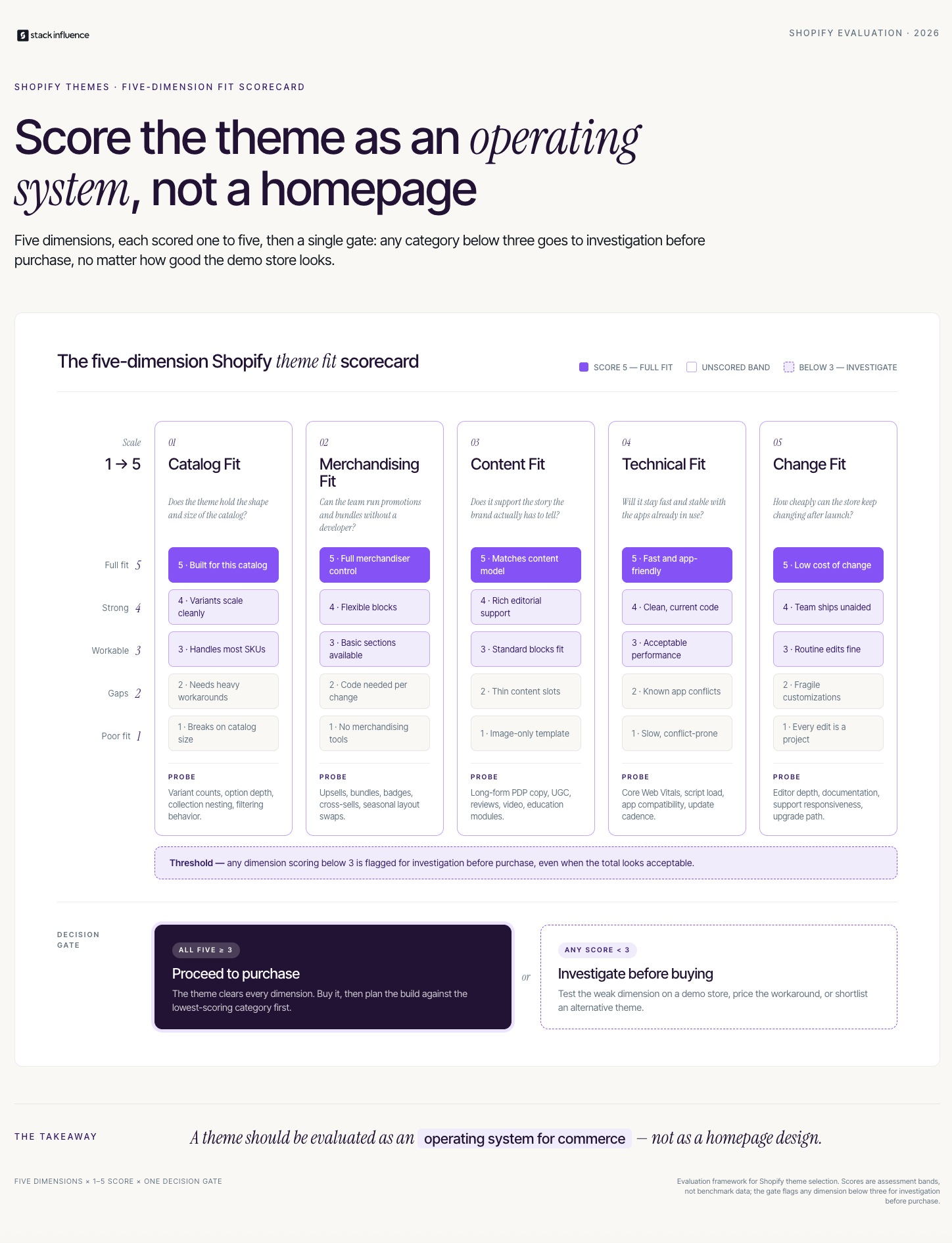
The Theme Fit Scorecard: Choose Function Before Style
The Theme Fit Scorecard turns theme selection into a business decision. Score each candidate from one to five across five dimensions, then investigate any category below three before committing. One critical workflow gap can make a visually impressive theme more expensive than a simpler theme that supports the store’s actual selling process.
The Shopify Theme Store offers hundreds of designs with filters for industry, catalog size, price, and features. Use those filters only after documenting store requirements.
1. Catalog Fit
Catalog fit measures whether shoppers can understand and narrow the assortment. Test the largest collection and most complex product across search, filters, sorting, menus, swatches, related items, variants, and sold-out states.
2. Merchandising Fit
Merchandising fit measures how clearly the theme explains value and supports purchase. Review media, pricing, bundles, subscriptions, shipping details, size guides, comparisons, recommendations, and add-to-cart controls. Nielsen Norman Group’s ecommerce product-page guidance emphasizes product details, availability, price, supporting media, and a clear purchase path.
3. Content Fit
Content fit measures whether marketers can publish recurring formats such as landing pages, FAQs, comparisons, customer photos, creator videos, testimonials, and buying guides. Map the next 90 days of planned content and identify where social proof, vertical video, and demonstrations will appear.
4. Technical Fit
Technical fit covers mobile behavior, performance, accessibility, app blocks, analytics, translations, structured data, and integrations. Confirm app support, then test the exact combination in a draft theme because several compatible apps can still conflict when used together.
5. Change Fit
Change fit measures how safely the store can evolve. Review update history, support, release notes, editor flexibility, and the custom code required for routine work. A theme that needs a developer for every landing page can become an operational bottleneck.
Free, Paid, or Custom: Which Shopify Theme Route Fits?
Free themes suit stores that can express their brand and selling model through standard Shopify sections, while paid themes can justify their cost through specialized layouts and built-in merchandising features. Custom development is appropriate when a differentiated customer journey creates real business value that available themes and apps cannot deliver cleanly.
Free Shopify Themes
Shopify-developed free themes provide a credible starting point for new stores, redesigns, and brands validating requirements. Shopify’s current Horizon theme collection includes 10 free themes built on one system, with expanded design flexibility and AI-assisted editing. A free theme can remain a long-term choice when it supports the catalog, content, apps, and brand system without extensive workarounds.
Paid Shopify Themes
Paid themes are developed by third-party theme developers and often package category-specific layouts or commerce features into the theme. Shopify lets merchants preview and customize up to 19 paid themes at once before purchase. Trial themes cannot be code-edited, and purchases from the Theme Store are licensed to the store where they were bought.
Evaluate total ownership cost, not purchase price alone. Built-in swatches, quick views, promotional blocks, or advanced navigation may reduce app and development costs.
Custom or Heavily Customized Themes
Custom development is most defensible when the storefront itself is part of the product advantage. Examples include product builders, unusual bundles, specialized B2B journeys, interactive education, or editorial commerce that general-purpose themes cannot deliver cleanly.
A disciplined custom approach can start with a maintained theme, preserve native Shopify patterns, and add only high-value sections, templates, or app extensions.
How Should You Test a Shopify Theme Before Buying?
Test a Shopify theme by loading it with representative products, content, apps, and edge cases, then reviewing complete shopping journeys on real mobile and desktop devices. The goal is to expose operational friction before purchase, not simply confirm that the homepage can resemble the theme demo.
Shopify saves theme-editor customizations made during a paid-theme trial if the theme is later purchased. Use that trial environment to build a realistic prototype rather than changing only the logo and colors.
Run a content-first sandbox test:
- Homepage: Replace demo assets with actual photography, copy, promotions, and products.
- Collection page: Test the largest collection, filters, sorting, badges, swatches, and mobile navigation.
- Product page: Use the longest title, most variants, largest gallery, video, apps, reviews, and sold-out state.
- Search and navigation: Try common terms, misspellings, categories, attributes, and small-screen menus.
- Cart journey: Test discounts, gifts, upsells, quantities, accelerated payments, and checkout handoff.
- Content landing page: Build a campaign page with education, creator media, FAQs, proof, and one call to action.
- International experience: Review translations, currencies, regional content, and longer text strings.
- Accessibility path: Use keyboard navigation, focus states, text resizing, contrast, and labeled controls.
Brands planning creator acquisition should test content formats before campaigns begin. Stack Influence’s Shopify influencer marketing playbook connects product seeding, content, traffic, and measurement, while the guide to top UGC formats identifies common photos, videos, tutorials, and testimonials.
Speed, Accessibility, and App Compatibility Are Selection Criteria
A theme’s technical quality should be evaluated before customization and again after real apps, fonts, scripts, images, and videos are installed. Theme demos and benchmark shops are controlled environments, while production stores accumulate third-party code and media.
Shopify’s Theme Store requirements set a minimum average Lighthouse performance score of 60 and accessibility score of 90 across home, product, and collection pages on desktop and mobile. Those thresholds are useful screening criteria, but they are an acceptance floor rather than proof that a finished store will remain fast and accessible.
Google’s Core Web Vitals guidance defines good field performance as Largest Contentful Paint within 2.5 seconds, Interaction to Next Paint of 200 milliseconds or less, and Cumulative Layout Shift of 0.1 or less at the 75th percentile. Test by page type and device because a fast homepage can hide a slow product template.
Image handling deserves particular attention. The HTTP Archive’s 2025 Web Almanac performance chapter found that 62% of mobile pages and 65% of desktop pages failed to set explicit dimensions on at least one image, down from 66% and 69% in 2024. Missing dimensions can make surrounding content shift as images load.
Accessibility also requires human review. The World Wide Web Consortium’s WCAG overview organizes accessibility around perceivable, operable, understandable, and robust experiences. Check keyboard navigation, focus, form labels, contrast, text resizing, image alternatives, and recoverable errors.
Use a prelaunch technical checklist:
- Measure home, collection, product, search, cart, and landing pages separately.
- Test mobile devices on ordinary networks, not only fast office Wi-Fi.
- Review app embeds and remove scripts that no longer support active workflows.
- Size and compress media, especially hero images and autoplay video.
- Retest analytics, consent, search, reviews, subscriptions, bundles, and localization after updates.
- Keep the previously published theme ready for rollback.
Design the Theme Around Your Acquisition Channels
A storefront should be designed for the traffic it expects to receive. Search visitors, returning email subscribers, paid-social prospects, and creator-referred shoppers arrive with different context, so the theme needs reusable modules that continue the promise made by each channel.
The guide to getting Shopify traffic covers search, creators, social media, email, advertising, and referrals. Translate those channels into destination requirements such as editorial pages, landing templates, mobile media, comparisons, offers, and product-level proof.
Creator traffic makes this especially visible. A shopper clicking from a demonstration should land on a page that repeats the product, use case, offer, and proof. The guide to UGC versus brand-generated content helps assign page roles to each asset type.
From Stack Influence’s experience with ecommerce brands, creator assets can remain unused when teams have no defined storefront modules for them. The Stack Influence micro-influencer platform supports vetted creator activation, gifted-first product seeding, campaign coordination, UGC generation, and completed-post accountability, while the theme turns approved assets into a coherent shopping experience.
Prepare a content deployment map before choosing the theme:
- Homepage: Brand story, hero products, campaigns, proof, and category entry points.
- Collection pages: Filters, buying guidance, category education, and relevant proof.
- Product pages: Demonstrations, creator media, FAQs, comparisons, and purchase controls.
- Landing pages: One audience, promise, product path, and focused navigation.
- Post-purchase pages: Education, complementary products, community, and content prompts.
The operational guide to influencer seeding helps ecommerce teams plan how products become creator relationships and reusable content. Theme selection should happen with that lifecycle in mind, not after assets accumulate.
Customize Without Creating Theme Debt
Theme debt is the future cost created when quick fixes make a store harder to update, test, or operate. The safest customization path moves from native settings to modular extensions, then uses custom code only when the business value is clear and the change can be maintained.
Use this order of operations:
- Adjust product data, copy, imagery, navigation, and theme settings.
- Configure existing sections and blocks.
- Add supported app blocks or app embeds.
- Create reusable sections or templates for repeated needs.
- Apply narrowly scoped CSS or Liquid changes with documentation.
- Build a custom app extension or specialized feature when required.
This sequence keeps routine merchandising inside the theme editor and reserves development for differentiated features. It also helps identify whether the store has a theme gap, content gap, or app gap before code is added.
Shopify’s theme update guidance says editor-based settings, layouts, templates, and app-extension configurations can be carried into an updated theme. Code edits are included only when they do not conflict with the update; otherwise, merchants must move them manually. Save custom code, document its purpose, and review every updated draft before publishing.
How Do You Measure Whether a Theme Is Working?

Measure a Shopify theme through a connected stack of delivery, behavior, conversion, economic, and operational metrics. A redesign should improve the complete shopping system, but theme changes rarely happen in isolation, so teams should separate observed movement from proven causation and segment results by device, channel, page type, and customer group.
Use the Theme Performance Stack:
- Delivery metrics: Core Web Vitals, availability, JavaScript errors, image weight, and app failures.
- Behavior metrics: Search, filters, product depth, media interaction, and navigation exits.
- Conversion metrics: Add-to-cart, checkout start, checkout completion, and purchase conversion.
- Economic metrics: Revenue per session, average order value, contribution margin, acquisition cost, and returns.
- Operational metrics: Publishing time, developer hours, app count, update effort, and content reuse.
Establish a baseline and annotate promotions, pricing, inventory problems, media shifts, email sends, and creator campaigns. Compare like-for-like periods with enough traffic to reduce noise, and do not treat simultaneous movement as proof of causation.
Investigate the chain between metrics. Faster pages matter when engagement or exits improve, while higher add-to-cart rates can still be unprofitable if discounts, returns, or acquisition costs rise. Measurement should reveal the next constraint.
Shopify Theme Selection Mistakes That Create Regret
Most theme regret comes from evaluating the demo rather than the operating system behind it. Avoid these recurring mistakes:
- Choosing the homepage first: Product, collection, search, and cart templates carry more of the shopping journey.
- Testing only ideal content: Long titles, uneven photography, large catalogs, and sold-out products reveal the real layout.
- Assuming apps repair every gap: Each app adds cost, scripts, configuration, and another dependency.
- Copying a competitor: Similar products can require different education, navigation, offers, and content.
- Customizing before validating: Extensive code can disguise a poor underlying match.
- Treating launch as completion: Themes, apps, browsers, content, and customer behavior keep changing.
A good Shopify theme makes common decisions easy, uncommon decisions possible, and technical risk visible.
Choose a Theme You Can Operate
A strong Shopify theme makes the store easier to shop, easier to market, and easier to improve. Choose it through catalog fit, merchandising fit, content fit, technical fit, and change fit; test it with real products and edge cases; then measure the full system after launch.
The practical next step is to write a one-page requirements brief, score three realistic themes, and build the same product and campaign page in each. Once the storefront is prepared to receive creator traffic, ecommerce teams can evaluate a managed product-seeding workflow through Stack Influence to build the content pipeline that feeds those pages.