
The latest info on influencer marketing trends, micro influencer news, and the world of social media

A popular Reel can leave your follower count almost unchanged. Someone enjoyed the post, but did not see a reason to keep hearing from you.
Learning how to get more followers on Instagram means improving both discovery and the decision to follow. For content creators, that starts with a recognizable subject, useful original work, and a profile that makes the next post worth anticipating. This guide explains what to change, how to choose a sustainable posting pace, and which numbers reveal whether your audience is actually growing.

Grow organically by publishing original content for a specific audience, helping that audience discover it, and showing what they can expect after following. Before increasing output, identify where your recent posts are falling short.
Use the Next-Post Decision to choose an action from four situations. Compare similar posts from your own account at the same age; “high” and “low” mean relative to your usual results, not an industry threshold.
If your account is new, start with three posts addressing one audience problem. Use early results to form questions, not to declare a winning strategy.
For this comparison, follow response means attributed follows relative to accounts reached, where those metrics are available. It is a diagnostic measure, not proof that a particular creative choice caused growth.
Check distribution eligibility, too. Instagram’s ranking explanation, reproduced by WebWire, directs creators to Account Status to review recommendation eligibility and available appeal options. Review any issues it identifies before assuming a weak post needs a different hashtag.
If you are still configuring your account, Stack Influence’s Instagram setup guide for creators provides the broader starting point. Use a public profile when discovery is your objective and review what personal information you make visible.
Start with enough regular output to learn what works without lowering the quality of each post. Three feed posts per week is a practical initial experiment for a solo creator, not an Instagram requirement.
Buffer’s Instagram posting-frequency research reports the following estimated differences in weekly follower-growth rates compared with weeks without feed posts:
The underlying analysis by Buffer’s Julian Winternheimer compared the same accounts over time. Its final model used 1,880,815 account-week observations from 84,848 accounts and was published in July 2025. The analysis selected a trailing year of data; exact collection dates were not disclosed.
These are observed-data estimates relative to no-post weeks, not absolute growth forecasts or proof that frequency caused the difference. Feed photos, carousels, and Reels were pooled, so the figures do not establish an ideal Reels-only schedule.
Try two Reels and one carousel if that mix suits your subject. Batch the research and filming, leave time to answer comments, and increase output only when you can maintain the work.
Instagram’s Best Practices guidance in the Professional Dashboard includes personalized advice on creation, engagement, and reach. Combine that guidance with your results instead of adopting someone else’s publishing quota.
Your profile should help a new visitor recognize what following you would add to their feed. Check the name, bio, pinned posts, and recent work together.
Describe a specific audience and recurring benefit. “Small-space cooking for people who hate washing dishes” gives a visitor more information than “Food lover sharing my journey.”
Use recognizable subject words naturally in your name field, bio, and captions. Name the actual recipe, technique, location, or problem rather than relying on vague motivational language or a pile of hashtags.
You can have several interests, but give them a common thread. A creator covering travel, photography, and budgeting could organize all three around affordable weekend trips.
Choose pinned posts that answer three visitor questions: what do you make, why should I trust it, and what should I watch next?
A cooking creator might pin a useful recipe, a technique demonstration, and the introduction to a recurring dinner series. The posts should represent what the account will continue publishing.
Check the follow request inside the content as well. “Follow for one-pan dinners you can make after work” gives a relevant expectation, provided the account actually delivers it.
Build each post around a complete useful experience, then connect it to a subject you can explore repeatedly. The viewer should receive value immediately and understand why another post from you could also be useful.
Originality matters here. In its January 2026 platform update, Meta reported that original posts accounted for 75% of Instagram recommendations in the United States in Q4 2025. That platform-wide figure does not predict any individual post’s reach.
Open with the problem, result, demonstration, or observation that makes the video worth watching. Then provide the promised explanation without an unrelated introduction.
For a home creator, “This drawer keeps jamming because the organizer is too tall” creates a clear question and a visible demonstration. A long introduction about deciding to reorganize the kitchen postpones the useful part.
Use clear audio, readable captions, and framing that makes the demonstration easy to follow. Remove material that repeats a point without adding evidence or personality.
Meta’s Reels Insights announcement explains how watch-time feedback can help creators improve their openings. Review the watch-time measures and follows available in your account, then use Stack Influence’s Instagram Reels content ideas to turn the strongest subject into another useful video.
A carousel can suit a comparison, checklist, annotated example, or explanation that readers may want to revisit. Give the first slide a specific promise and make each subsequent slide advance the answer.
For example, a photography creator could explain how to improve window-light portraits using a sequence of original examples. The follow-up series could address different rooms, weather conditions, and common mistakes.
Stack Influence’s Instagram post ideas for creators can help expand a theme beyond one format. Choose the format that explains the idea clearly rather than turning every subject into a video.
According to Meta’s Trial Reels guide, trials initially show a Reel to non-followers and provide initial engagement metrics after approximately 24 hours. Creators can subsequently share the Reel with everyone.
If the Trial option is available in your account, use it to explore a different opening or a nearby audience question. Keep the experiment relevant to content you would be willing to make again.
A trial is not a controlled experiment with identical audiences. Treat its results as a useful signal, then look for the pattern to recur before rebuilding your entire content plan.
Collaborate with creators whose audiences have a reason to care about your work. The useful overlap may be a shared problem rather than an identical niche.
A small-space cooking creator and a budget meal-planning creator could jointly demonstrate a compact weekly preparation routine. Each contributes something the other audience can use.
Meta’s Instagram Collabs announcement explains that accepted co-authored posts can appear on each collaborator’s profile and reach their audiences. That creates a distribution opportunity; it does not guarantee that viewers will follow both creators.
Before filming, agree on:
Stack Influence’s social media collaboration tips provide additional planning considerations.
You can also introduce an existing TikTok, YouTube, or newsletter audience to your Instagram work. Explain what they will find there, such as annotated examples or a weekly question session, instead of repeatedly posting a bare follow request.
Avoid unrelated giveaways, follow-for-follow exchanges, and purchased audiences. Those tactics make it harder to tell whether people want the content you intend to keep creating.
Plan the posts that come after a successful piece of content. If a Reel attracts people interested in beginner photography, the next posts should help those beginners continue.
Build recognizable series around an audience need: one lighting correction, one affordable recipe, or one outfit adjustment per installment. Repeat the subject and the usefulness while changing the example.
Use Stories to extend the conversation with questions, behind-the-scenes decisions, or responses to confusion. A reply can become the starting point for a future public post, with permission if you identify the person.
Answer substantive comments and participate thoughtfully in related creators’ discussions. Explain your experience or add a useful distinction; generic promotional comments give people little reason to investigate your account.
Keep the audience promise visible when accepting brand partnerships, too. A product demonstration should still answer a question your followers would recognize.
Measure which content earns follows and whether those gains survive at the account level. Reach, attributed follows, and net follower growth answer different questions.
Use available Insights to record each post’s topic, format, publication date, accounts reached, and attributed follows. Add watch-time measures for Reels and label paid distribution separately.
Compare posts at a consistent age, such as seven days after publication, and separate different formats. Stack Influence’s creator analytics dashboard guide explains how to keep those comparisons organized.
Use this descriptive calculation where Instagram supplies the necessary metrics:
Follows per 1,000 accounts reached = attributed follows ÷ accounts reached × 1,000.
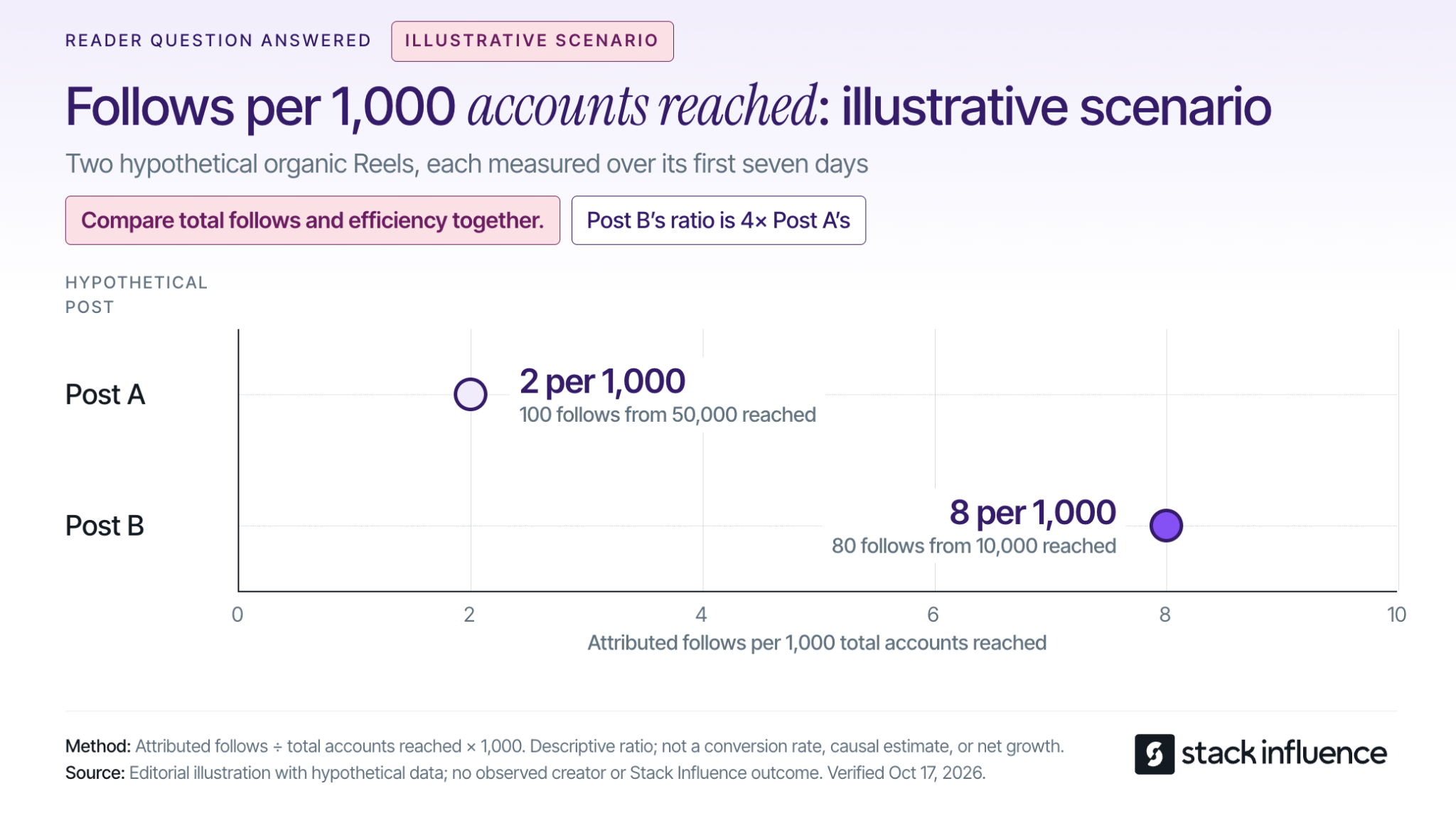
Consider an illustrative scenario using two hypothetical organic Reels, each measured over its first seven days:
Post A brings in more total follows. Post B produces four times as many follows relative to its reach.
The Next-Post Decision suggests exploring how to distribute Post B’s useful premise more widely while investigating what made Post A travel. Neither number alone establishes an overall winner.
These invented values demonstrate the calculation; they are not Instagram benchmarks or Stack Influence campaign results. Accounts reached includes followers and non-followers, so this ratio is not a non-follower conversion rate.
If post-level follows are unavailable, review available post metrics alongside account-level growth. Do not assign every new follower in a week to one Reel.
Net follower change equals follows minus unfollows over the same period. Percentage net growth equals net follower change divided by the starting follower count, multiplied by 100.
Review those account-level numbers weekly and look for patterns across several weeks. Also read the comments and questions: are you attracting the audience your content is intended to help?
Unfollows can have several causes, so one disappointing week does not identify a faulty post. Likewise, account-wide unfollows do not reveal exactly how many people recruited by a particular Reel later left.
Use the numbers to choose the next question to test. Change one major creative variable at a time where practical, such as the opening or audience problem, and repeat the comparison before drawing a firm conclusion.
Creators can work on content quality, reliability, and audience relevance while their following grows. A clear niche also makes it easier to explain what you could contribute to a brand partnership.
For a concrete example, Stack Influence’s creator FAQ says creators with at least 200 Instagram followers and original content can apply. Application eligibility does not guarantee campaign selection.
Stack Influence’s creator campaign process connects product selection, purchase, approved social content, and reimbursement. This gifted-first product-seeding workflow gives creators a way to explore product collaborations, with campaign requirements to review before participating.
For nano influencers, micro influencers, and UGC creators, the practical task is to demonstrate that you can explain a relevant product clearly and complete the agreed work. A portfolio of thoughtful demonstrations can develop alongside the audience.
When a product relationship is involved, disclose it clearly. The FTC’s social media disclosure guidance explains that free products can create a material connection and that disclosures should accompany the endorsement.
Knowing how to get more followers on Instagram becomes useful when it changes what you publish next. Choose one audience problem, make the profile’s promise clear, and plan three posts that explore that problem from different angles.
After each has had the same time to circulate, compare reach, attributed follows, and the account’s net growth. Use the Next-Post Decision to choose what to expand, clarify, or replace, so your next followers have a reason to stay.
Your video is ready, but the posting advice points in different directions. One guide recommends weekday afternoons. Another favors weekend mornings. For content creators, the useful answer is a schedule you can test against the people you actually want to reach.
Learning when to post on TikTok starts with your audience's activity, then improves through comparisons of similar posts published at different hours. Below, you'll find current day-by-day starting points, a way to handle time zones, and a four-week test that helps you decide which windows deserve a regular place in your calendar.
Post during a window when your intended viewers are active, then test whether that window produces the results you want. If you do not have enough account data yet, use a published day-specific time as a starting point. There is no universal hour that guarantees views, followers, or brand deals.
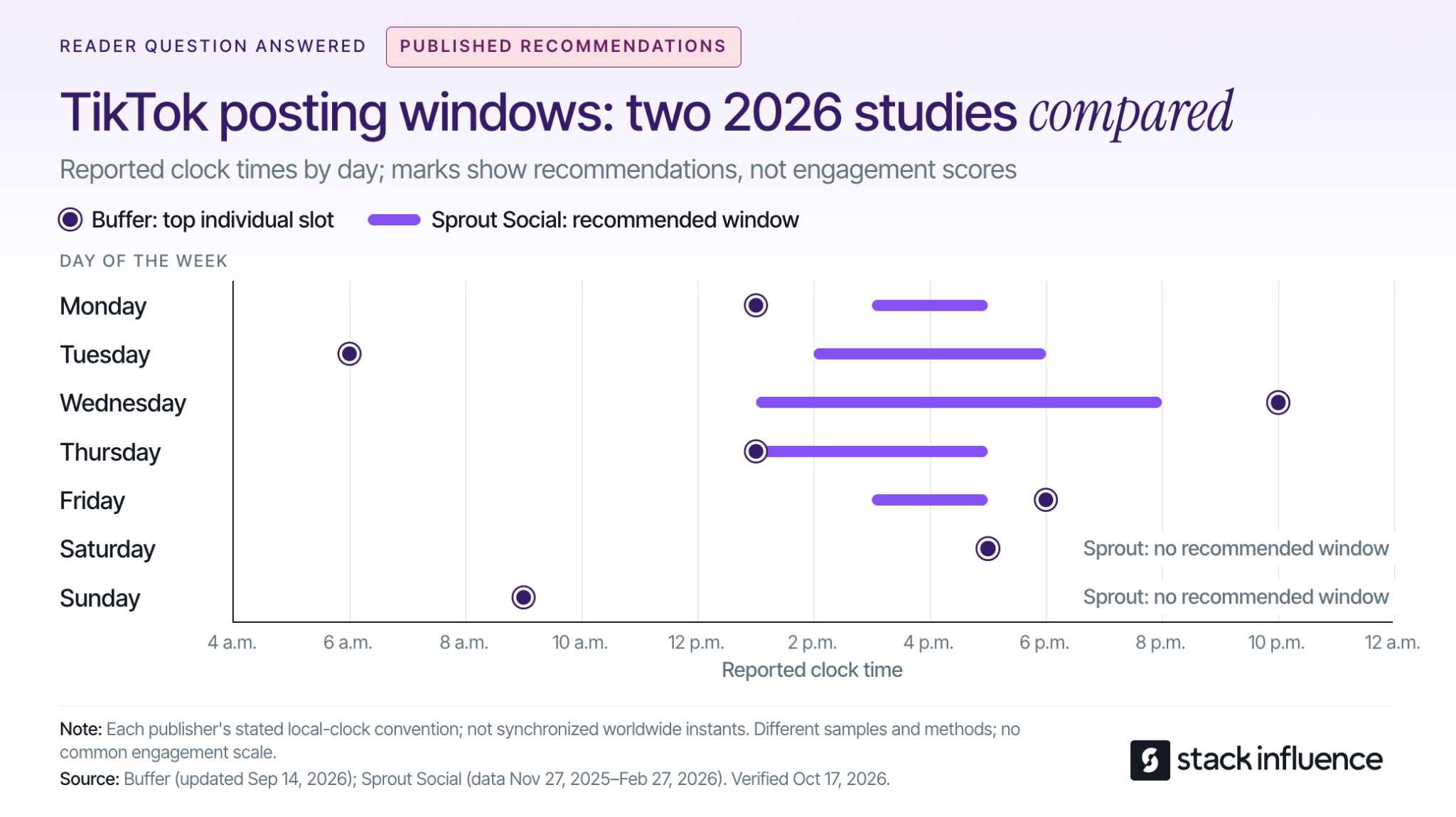
The daily options below compare Buffer's September 2026 TikTok analysis with Sprout Social's March 2026 posting-time research. Each entry gives Buffer's top individual slot followed by Sprout's recommended window:
Buffer presents its clock times as usable across time zones; Sprout explicitly specifies audience-local time. Use your intended audience's local clock when turning these recommendations into a test, and do not interpret the list as a schedule in U.S. Eastern time.
The disagreement matters. Buffer evaluates median engagement rates for posts published through its platform, while Sprout studies engagement among its own customers. Different samples and methods can produce different recommendations; a missing weekend window in one report does not mean your viewers disappear on Saturdays.
Choose one practical option for your next post. For the next comparison, choose a contrasting window supported by your audience data or the other study. Averaging all the listed hours together would create a new recommendation that neither study tested.
TikTok considers viewing behavior and other interactions alongside content and user information. Its official explanation of how TikTok recommends content lists watching, skipping, sharing, and commenting among the signals, and says interactions generally receive greater weight for most users than other factors.
Time zone and day also appear among TikTok's user-information signals. The practical implication is to improve timing alongside the video's opening, relevance, and pacing. Moving a confusing tutorial to a busy hour does not resolve the reason people stop watching it.
Also distinguish the audience you already have from the audience you want to attract. Follower activity can help you serve an existing community, while recommendations and search can introduce your content to new people. Your current followers are useful evidence, but they are not a complete map of future viewers.
For evergreen tutorials, TikTok search discovery is another reason to track performance beyond publication day. Keep the video understandable to someone who finds it later, with a clear topic and an answer that remains useful.
Start with the activity data available in your own account. TikTok's creator-tools instructions give the app path as Profile, Menu, then TikTok Studio, and explain that features vary across app, browser, and region.
Within Analytics, look for audience activity information. The official TikTok Studio guide identifies Viewers as the area containing viewer demographics and activity times. Inspect follower insights too, where available, but do not assume every interface uses the same tab names.
Before picking an hour, check three things:
If your viewers are in a different region, write the audience time zone directly into your calendar. A note that says “evening” becomes ambiguous when you travel or coordinate with a brand elsewhere. Confirm the conversion for the actual publishing date when daylight-saving changes could affect it.
For a split audience, test a window serving each major region rather than forcing both into one compromise hour. Judge the results against your goal: reaching a new regional audience may matter more than maximizing existing-follower activity.
If activity data is unavailable, begin with the benchmarks above and keep a simple posting log. You can refine your schedule as useful account evidence accumulates.
A Two-Window Rotation compares two publishing windows while balancing the content and weekdays assigned to each. It is a practical pilot for creators, not a controlled experiment that isolates every cause of performance.
Decide what success means before publishing. Use views when discovery is the priority, shares when you want people to pass the content along, or attributable follows when audience growth is the goal.
Keep that outcome consistent through the test. Switching from views to likes after seeing the results makes it easier to choose whichever answer looks most flattering.
Choose Window A from your audience activity, if available, and Window B from a plausible alternative. Make the windows meaningfully different, such as lunchtime and evening. A small first test is unlikely to tell you much about a difference of only a few minutes.
Prepare videos with similar purposes, production effort, and length. If you are also experimenting with TikTok video length, keep that experiment separate so the timing comparison remains interpretable.
A creator teaching editing techniques might compare different tutorials in the same series. Comparing a sponsored product demonstration with a trending comedy clip would mix several explanations for the result.
If three posts per week fits your normal workload, this example produces twelve posts over four weeks:
Each window receives six posts, including two on each selected weekday. That structure reduces the risk of confusing a Friday effect with an evening effect.
Choose your posting cadence before starting. Planning how often to publish on TikTok is a separate decision from choosing the hour. If three weekly posts would reduce quality, extend the test instead of increasing production simply to finish faster.
Log the publish date, time zone, window, topic, video length, and whether the post received paid support. Assign topics to windows before seeing results, so your strongest ideas do not consistently land in one slot.
Record unusual events, including a major collaboration, an unexpected news spike, or a missed publishing time. Keep those posts visible in your records, but inspect whether the apparent winner depends on the exception.
If a timely idea cannot wait for its assigned slot, publish when it is useful and label it separately. A testing calendar should support good editorial decisions without making every post part of the experiment.
The stronger window is the one that repeatedly performs better on your chosen outcome when comparable posts have had equal time to accumulate results. Compare more than the highest-viewed video, and treat a small pilot as directional evidence.
Use an early checkpoint, such as 24 hours, and a later checkpoint, such as ten days. These are practical reporting choices for this test, not TikTok ranking thresholds. A video published yesterday should not compete against a video that has been collecting views for two weeks.
Metricool's 2026 TikTok study findings report that posts accumulated 96% of their reported total reach within the first ten days. Subtracting that reported share from 100% leaves 4% outside the first ten days. The release does not define an unlimited lifetime total, so interpret the finding within the study's measurement scope.
That gives you a reason to include a later checkpoint rather than making every decision immediately after publishing. It does not establish a universal expiration date for a video. With the four-week rotation, the final comparison happens after the last post reaches the same ten-day checkpoint as the others.
For each window, calculate the median of your chosen per-post outcome and inspect the individual results. Also retain totals and standout posts: they help distinguish repeatable performance from occasional upside.
Use a small set of supporting measures to understand the result:
These measures answer different questions. A window can deliver more views while another produces more followers for the same number of views. Choose according to the goal you set before the test.
Keep paid distribution separate. If a brand runs your post through TikTok Spark Ads, separate identifiable paid activity or leave that post out of the organic comparison. Ad-supported reach cannot establish that the original publishing hour worked better.
Look for a pattern that survives comparison across weekdays and similar topics. Six posts per window can reveal useful clues, but they cannot prove a universal best time or reliably separate a small timing effect from normal variation.
If the apparent advantage rests on one video, continue testing before changing your calendar. If the windows are close, choose the one you can sustain and spend the next round improving the content. Retest when your audience, content focus, or available publishing schedule materially changes.

For micro influencers, nano influencers, and creators handling brand deals, publishing time is also a delivery commitment. Agree on the date and time zone, approval requirements, and any launch restrictions before reserving a slot. Leave room for receiving and using the product before filming.
Stack Influence's creator campaign process connects product selection, social content, and post approval within a gifted-first product-seeding workflow. For creators, the useful scheduling habit is to confirm campaign requirements first, then select an audience-relevant window within those terms.
Distinguish a post on your account from user-generated content, or UGC, delivered for a brand to publish. If your assignment is asset delivery only, your deadline and the brand's publishing time are separate decisions. Confirm who controls the final upload.
Build disclosure into preparation. TikTok's commercial-content guidance requires its disclosure setting for promotional content, including third-party promotions involving an incentive, and says enabling the setting does not affect feed distribution.
For endorsements reaching U.S. consumers, the FTC's influencer disclosure guidance also explains that free products can create a relationship requiring disclosure. Put a clear disclosure with the endorsement rather than relying only on a platform label or burying it in your profile.
Prepare the final file, caption, and approvals before the chosen window. A scheduling workflow for creators can help you publish consistently without interrupting filming or other work. When using a scheduler, confirm the account, date, time zone, and available publishing options before leaving the post queued.
Knowing when to post on TikTok means having a reason for the next publishing decision. Start with relevant benchmarks, check your audience, and compare two realistic windows using similar content and equal reporting periods.
Choose your two windows before preparing the next batch of videos. Keep the one that produces useful, repeatable results and fits your workload, so you can plan future content and brand partnerships with greater confidence.

A shopper asks for a dishwasher-safe lunch container that fits a small work bag. Your product might meet those requirements, but can a shopper verify that from your listing, select the right size, and buy from your store?
That is the practical challenge behind ChatGPT shopping. For ecommerce sellers, the work is not simply getting a brand name mentioned. It is connecting accurate product information with a relevant recommendation, a purchasable merchant offer, and a measurable order.
Start by separating those outcomes before investing in another integration or content campaign.
ChatGPT shopping is a product-discovery experience that lets people describe their needs, compare products, and follow merchant purchase options. OpenAI's product-discovery announcement describes visual browsing, image-based discovery, and side-by-side comparisons supported by the Agentic Commerce Protocol, or ACP.
The more detailed shopping research experience asks follow-up questions, examines merchant and public product information, and builds a buyer's guide around the shopper's constraints. For a seller, a precise compatibility detail can therefore be more useful to a buyer than another broad claim that a product is premium.
Checkout requires a separate distinction. On March 24, 2026, OpenAI announced its emphasis on product discovery and merchant-owned checkout, rather than making its initial Instant Checkout experience the universal purchase path.
As checked on October 14, 2026, OpenAI's shopping help page still describes Instant Checkout for some eligible products and merchants. Do not assume every account has the same purchase options, or build a seller plan around universal in-chat checkout.
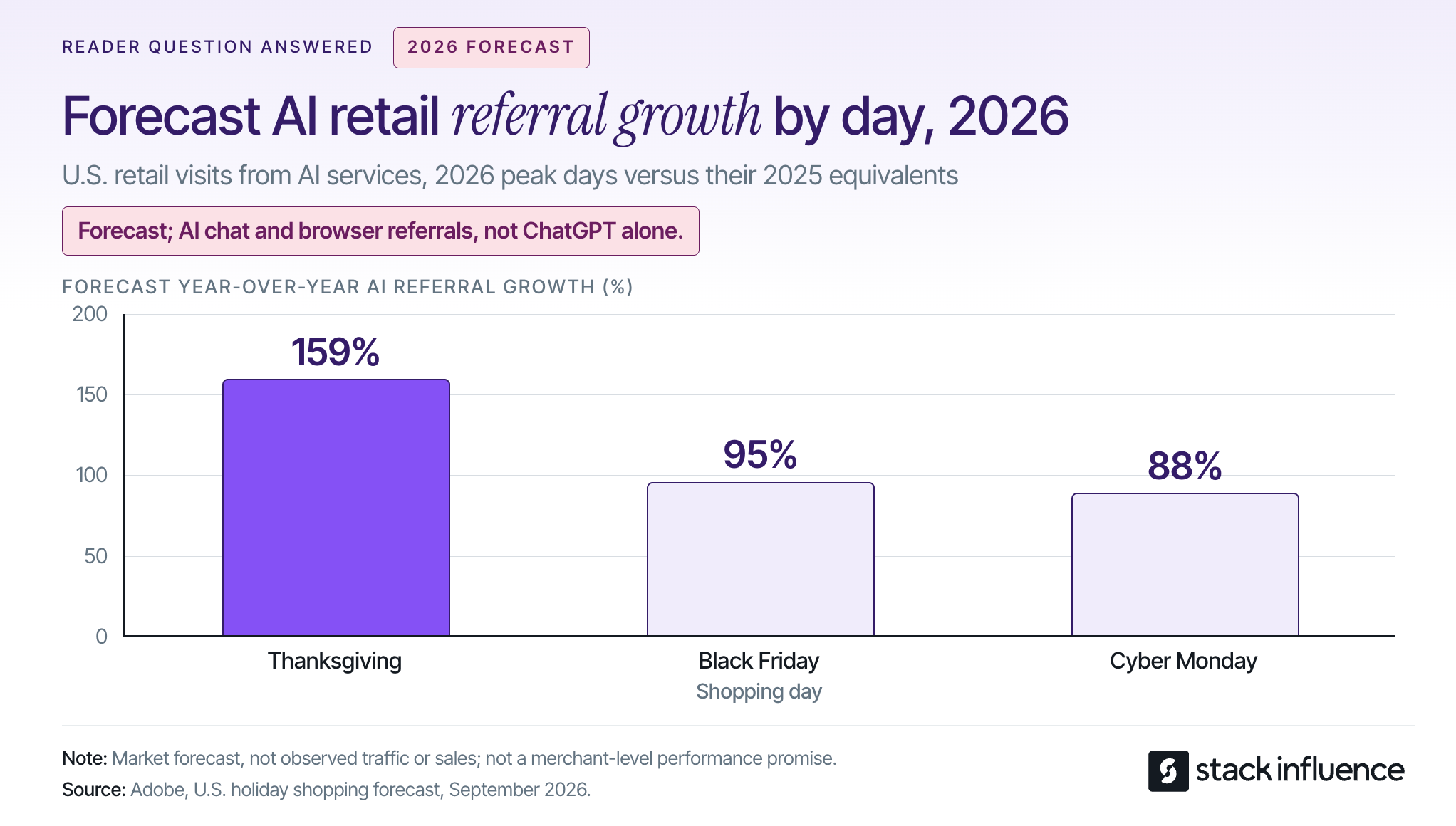
There is a reason to establish a baseline now. In its September 28 forecast, Adobe projected AI-referred retail traffic growth of 159% on Thanksgiving, 95% on Black Friday, and 88% on Cyber Monday in 2026, compared with the corresponding 2025 days. Those are forecasts across AI chat and browser services, not observed ChatGPT sales or ChatGPT's market share.
Use that outlook to prioritize measurement, not to assume your store will receive the same growth.
Keep organic discovery separate from paid campaigns: OpenAI's advertising guidance states that ads do not let advertisers influence or rank its answers.
The Product, Offer, Order Test is a practical diagnostic framework for this guide, not a description of OpenAI's internal ranking system. It asks three different questions so that a visibility report does not get mistaken for a revenue report.
Check whether the recommended item meets the shopper's stated requirements. Matching a brand name is insufficient when the shopper needs a particular capacity, material, compatibility, or maintenance method.
Build product explanations around questions that can be answered with evidence. The same discipline used to develop social proof for an ecommerce brand applies here: identify the uncertainty, then provide the relevant demonstration or verified specification.
A product appearing does not mean your store is the purchase destination. OpenAI's explanation of merchant selection says a product can have multiple merchant options, with factors including availability, price, quality, and whether a merchant is the maker or primary seller.
Record the destination domain and selected variant, not just the brand mentioned. A manufacturer, authorized retailer, and marketplace seller can all care about the same product while receiving different commercial outcomes.
Use your actual order records to establish whether referred visitors purchased, what they purchased, and what happened afterward. Include refunds and fulfillment costs in the commercial assessment.
The framework's decision rule is simple: repair the earliest verified failure. More content will not fix an unavailable variant, and more product appearances will not prove that your store captured the purchase.
Start with the product-data route your commerce platform supports, then check eligibility and the quality of the information being distributed. Submitting a feed, enabling a channel, and being recommended for a particular shopping request are different events.
According to Shopify's Selling on ChatGPT documentation, discovery is active by default for eligible stores. Requirements include selling to U.S. customers, eligible Shopify Catalog products, acceptance of the agentic storefront terms, and completed store policies.
Review Sales channels > Agentic in Shopify admin. ChatGPT purchases use the store's online checkout, in an in-app browser or a new browser tab, rather than a ChatGPT direct-checkout switch.
For your operating plan, assign catalog maintenance separately from Shopify influencer marketing. Creator partnerships can produce useful demonstrations, but publishing a social post is not the same task as maintaining product data.
OpenAI's merchant onboarding page says Shopify and Etsy catalogs are already integrated without an additional merchant application. Other merchants can apply to share product feeds; the page still describes a waitlist and a planned self-service portal, not immediate onboarding for everyone.
Check your platform or feed provider before commissioning custom development. Ask which supported integration it uses, who handles rejected records, and how corrections reach the destination.
For Amazon sellers and other marketplace-only businesses, begin with the listing information you control and the merchant destinations that actually appear in tests. Do not confuse a product's marketplace visibility with evidence that your own seller offer has been selected.
A useful starting point is a small group of commercially important products with stable inventory. Compare each product's feed record, visible page, images, and checkout selection before expanding the catalog review.
OpenAI's stable product-feed specification calls for one row per purchasable item or variant. Its native discovery format requires nine fields: item_id, title, description, url, brand, seller_name, image_url, availability, and price.
Use the supported Stable schema, not the Draft schema. Preserve identifiers as strings, provide accessible product and image URLs, and follow the relevant variant grouping rules; an existing platform integration may use a different supported mapping.
Consider a lunch container sold in two sizes. If a small-size price leads to a page with the large size selected, a technically populated record still creates a confusing purchase path.
Your acceptance test should open the submitted URL, confirm the intended variant, and compare the price and stock status with the record. Give one person responsibility for checking discrepancies after promotions, stock changes, or a product-page redesign.
Replace vague statements with facts buyers can check. For the lunch container, publish dimensions, capacity, materials, included pieces, care instructions, and any relevant limitations, using only information you can substantiate.
Keep important details in visible text rather than only inside an image or video. When repurposing user-generated content (UGC) across platforms, identify the demonstrated variant and add an accurate written explanation so the evidence remains understandable outside the original social post.
Do not let one creator's experience become a universal product specification. A video showing that a container fits one bag does not establish compatibility with every bag described as compact.
OpenAI's crawler documentation distinguishes OAI-SearchBot, which supports search visibility, from GPTBot, which concerns model-training crawling. A site can allow the former while disallowing the latter.
Ask your technical team to inspect robots.txt, relevant firewall rules, and whether important pages can be fetched. Avoid blanket changes that disable site protection; validate the permitted crawler configuration instead.
For the Google side of your SEO program, Google's AI-feature guidance emphasizes ordinary eligibility, visible content, and structured data that matches the page, without requiring special AI files or schema. That is Google's guidance, not a published ChatGPT ranking formula.
Creator content can supply concrete product demonstrations, but OpenAI's published guidance does not establish that purchasing UGC or running influencer campaigns causes ChatGPT recommendations. Treat creator content as useful buyer information rather than a guaranteed placement mechanism.
Give micro influencers and nano influencers a real question to investigate. For the lunch container, a useful brief might ask the creator to demonstrate packing, closing, carrying, and cleaning the exact model supplied, while describing limitations honestly.
Stack Influence's automated product-seeding workflow connects creator participation, product purchases, communication, post verification, and payment. In that gifted-first workflow, payment follows completed social posts, giving the brand a defined content deliverable rather than a promise of AI visibility.
Evaluate that deliverable on its own terms. Does the content answer the intended question, identify the correct product, and have permission for the planned reuse?
Keep the commercial relationship visible. The FTC's endorsement guidance explains that free products supplied with an expectation of promotion create a relationship that needs appropriate disclosure, and that brands have responsibilities for monitoring endorsements.
Do not relabel a gifted creator endorsement as an independent customer review. A transparent demonstration can be useful without pretending to be something it is not.

Apply the Product, Offer, Order Test with a diagnostic record and a separate commercial report. The first identifies information problems; the second measures actual customer activity.
Create a fixed set of realistic shopping requests covering use cases, budget constraints, product comparisons, and practical limitations. Record the date, region, relevant account settings, prompt wording, product shown, merchant offered, and landing-page accuracy.
Here is an illustrative audit, not observed campaign data. Suppose you run 20 prompts twice under documented conditions, producing 40 responses: the intended product appears in 24, your merchant offer appears within 12 of those, and nine of those offers accurately match the purchasable variant, price, and availability.
The cumulative results are 60% product presence, 30% merchant presence, and 22.5% accurate purchasable-offer presence across the 40 responses. Conditional merchant capture is 12 divided by 24, or 50% of responses containing the intended product.
These nested checks are not independent conversion stages or consumer market shares. No visits or orders occurred merely because the tests were run, and repeated prompts are not a representative sample of all shoppers.
The useful finding is the gap between product presence and a correct offer from your store. Inspect the failing responses before deciding whether the next task belongs to merchandising, catalog maintenance, or content production.
Shopify's agentic storefront documentation says AI-channel orders appear in admin with channel or referrer attribution. Use the attribution actually present in your store and analytics, rather than assuming every AI-influenced order carries an identifiable source.
Keep a report of identifiable ChatGPT referrals, resulting orders, net sales after refunds, and contribution after product, fulfillment, and payment costs. Track catalog and content work separately so you can distinguish an acquisition expense from an asset reused across several channels.
When calculating customer acquisition cost, use a consistent new-customer definition and avoid crediting both an influencer campaign and ChatGPT with the full value of the same purchase.
Treat the resulting numbers as attributed activity, not automatic proof of incremental sales. For example, a shopper who discovers a product in ChatGPT but later types your store's address creates a different attribution problem from someone who follows a merchant link and purchases immediately.
Review diagnostic failures weekly and commercial outcomes over a longer, consistent window. Use a prior 30-day baseline when reliable tracking exists, then compare a consistent 30-day period after changes. Extend the observation period when orders are sparse, and annotate promotions, stockouts, and other changes.
Use the first month to establish reliable records and repair obvious failures, not to promise a ranking deadline. Start with ten priority products so the work remains inspectable.
During the first week, confirm the integration route, eligibility, search access, and baseline test results. In the second week, reconcile product identities, variants, prices, stock information, and destination URLs.
Use the third week to address missing buyer answers and prepare demonstrations where they would genuinely help. A Shopify product-seeding pilot can organize the creator work, but its production schedule should remain separate from catalog fixes.
In the fourth week, repeat the diagnostic sample and reconcile identifiable referrals with order records. Continue the sales observation period beyond the first month when needed; the planning schedule is not an OpenAI onboarding, indexing, or recommendation guarantee.
ChatGPT shopping deserves a seller strategy built around product relevance, accurate merchant offers, and actual customer outcomes. A mention is useful information, but it is not the finish line.
Choose ten products, apply the Product, Offer, Order Test, and fix the first observable gap. Where buyers still need to see the product in use, plan a focused creator brief that produces an honest, reusable demonstration and makes the purchase decision easier.

A Walmart ad campaign can generate orders while leaving too little money to replenish inventory. Before deciding how much traffic to buy, an ecommerce seller needs to know what each additional order can afford to cost.
This guide explains Walmart Sponsored Products eligibility, campaign setup, targeting, bidding, and measurement for U.S. Marketplace sellers. The central decision is practical: can your product support the cost of the clicks you are buying? Platform details were checked on October 14, 2026; other Walmart markets can have different requirements.

Walmart Sponsored Products are cost-per-click ads that promote individual product listings across Walmart's site and app. According to Walmart Connect's Sponsored Products overview, shoppers can encounter them in search results, carousels, item-page placements, My Items, and Stock up experiences; clicks lead to product detail pages.
Placement depends on product relevance as well as the bid. Walmart documents its advanced second-price auction, so a submitted bid should not be confused with the amount ultimately charged for every click.
Sponsored Products are one part of the broader Walmart advertising landscape. Keep them distinct from Sponsored Brands, Sponsored Videos, display advertising, and external creator campaigns: buying a product placement does not automatically create a branded video campaign.
Use the Click-to-Contribution Test to connect three inputs before choosing a budget: contribution before advertising, the contribution you want to retain, and the expected conversion rate of paid clicks. This is a planning calculation, not a Walmart performance benchmark.
First, subtract variable order costs from revenue. Include product cost, marketplace fees, fulfillment, and a realistic returns allowance. Then reserve the amount the order needs to contribute toward overhead and profit after advertising.
The calculation is:
Affordable CPC = (contribution before advertising minus required retained contribution) × paid-click conversion rate.
Consider an illustrative one-unit order generating $36 in revenue, excluding sales tax, with no additional discounts. Assume total variable costs of $24 and a requirement to retain $4 after advertising. Contribution before ads is $12, leaving $8 available for advertising per acquired order.
Using those assumptions:
Walmart's documented item-bid requirements list minimum bids of $0.20 for automatic campaigns and $0.30 for keyword-bid campaigns. At the illustrated 2% conversion rate, your calculated ceiling sits below both minimum bid settings.
That does not prove every auction click will cost more than $0.16. It means you cannot enforce that conservative ceiling by entering a fixed bid at or below it. Improve the offer's economics or conversion potential, or explicitly fund a limited learning test rather than assuming more budget will make the target achievable.
In this example, spending $12 to acquire a $36 order breaks even before overhead, producing 3.0x ROAS. Spending no more than $8 preserves the $4 contribution requirement and calls for 4.5x ROAS. Neither figure is a universal target for Walmart sellers.
Also distinguish cost per order from customer acquisition cost. An attributed purchase may come from a returning customer, and broader acquisition costs can include creative production, software, and campaign labor.
Walmart's Sponsored Search eligibility guidance specifies three product conditions for Sponsored Products: the item must be published on Walmart.com, in stock, and winning the Buy Box. Eligible variants can participate when they meet those conditions.
The same guidance lists additional brand-owner requirements for Sponsored Brands and Sponsored Videos. Do not import those requirements into Sponsored Products, or mistake access to Ad Center for confirmation that every item can advertise.
Check the customer-facing offer before launch. Verify the selected variant, price, delivery promise, main image, dimensions, and included components. The work of Walmart product listing optimization should answer the questions a shopper will have after clicking.
The published product eligibility conditions do not state a minimum review count. For a Walmart launch with zero reviews, focus on a clear, accurate offer and controlled testing rather than waiting for an invented review threshold. Eligibility allows participation; it does not establish that the product will convert profitably.
Walmart Sponsored Products costs depend on clicks, auction outcomes, and the budget you authorize. There is no single CPC or campaign spend that will be appropriate for every seller.
Walmart's campaign-creation documentation lists a $10 minimum daily budget for third-party Marketplace sellers and a $50 minimum total budget when a total budget is used. For first-party suppliers, the listed minimums are $50 daily and $100 total; these are different advertiser categories.
Do not confuse a minimum with a recommendation. Walmart's campaign setup guidance recommends at least $100 per day to support visibility and momentum, but that recommendation is not the Marketplace seller entry minimum. Choose spending from your economics and test objective, not from an assumed requirement to spend more.
Budget behavior also deserves attention. Walmart's API budget rules allow unspent daily budget to roll forward and describe a maximum daily spend of twice the configured daily amount. For an API-managed campaign, do not assume the daily setting alone is an absolute calendar-day spending cap; confirm the applicable behavior and available total-budget controls.
An effective learning budget needs a stop condition. Decide what cumulative spend, exposure, or loss will trigger a review before launching, and keep that rule separate from the longer-term ROAS target.
Start with a defined question, such as whether a specific product group can acquire orders below its allowable advertising cost. Mixing discovery, brand defense, and clearance into one campaign makes the result harder to interpret.
Follow Walmart's setup sequence: sign into Ad Center with the appropriate Seller Center credentials, create a Sponsored Products campaign, and select its dates, budget settings, eligible items, and targeting approach. Confirm the controls displayed in your account before activation.
Group products with comparable shopper intent and economics. A low-priced refill and a premium starter kit may attract related searches while supporting very different CPCs. Separate them when a shared bidding decision would force one product's economics onto the other.
Use a campaign name that identifies the product group, targeting approach, and purpose. Record the starting offer, bids, budget, inventory status, and reporting window so subsequent changes have a clear baseline.
With automatic or manual targeting, you decide whether Walmart selects search opportunities from product information or you choose the campaign's keywords. Walmart's suggested-bid documentation supports broad, phrase, and exact keyword match types, with suggestions that can differ by match type.
Use automatic targeting for discovery and manual campaigns for deliberately selected queries. Review actual search terms before expanding a promising keyword, and distinguish searches containing your own brand from broader category searches.
Bidding is a separate choice. Fixed bidding and dynamic bidding concern how bids are handled, not whether you personally selected the keywords. Dynamic bidding can adjust bids, but automation does not replace the Click-to-Contribution Test or guarantee a target return.
Review any placement bid multipliers and automated bid adjustments before assuming your base bid enforces an economic CPC ceiling. A suggested bid above your affordable CPC is a reason to investigate the product or query, not automatic permission to spend beyond the product's economics.
Walmart introduced negative keywords for Sponsored Products on July 29, 2026. Its release specifies manual campaigns and automatic campaigns using fixed bidding, with negative exact and negative phrase matching.
Negative exact blocks the specified search term; negative phrase blocks searches containing the excluded phrase in order. For example, a home-storage seller could exclude "car organizer" when vehicle-related searches do not match the advertised product.
This creates a real setup tradeoff: an automatic campaign needing these exclusions must use a supported bidding configuration. Do not assume the same negative-keyword controls are available after changing its bidding strategy.
Exclude clear mismatches promptly. For a relevant term with no orders, consider accumulated clicks, spend, and attribution maturity before deciding it has failed. Otherwise, a short reporting delay can be mistaken for evidence that a useful query should be blocked.
Check the stage where performance breaks before changing the campaign. Walmart's campaign optimization guidance recommends reviewing listing quality, Buy Box performance, and price competitiveness before increasing spend.
With few impressions, check campaign status, dates, remaining budget, item eligibility, and relevance before concluding that the bid is too low. With impressions but weak click-through, examine whether the image, price, and product presentation match the search.
With clicks but few orders, investigate the complete offer: the selected variant, delivered value, purchase questions, and fulfillment promise. Higher bids cannot repair an incorrect compatibility statement or an unavailable product.
When orders occur but contribution is weak, return to the Click-to-Contribution Test. The next action may be a lower bid, narrower query selection, improved costs, or a different product rather than a larger daily budget.
ROAS is attributed sales divided by advertising spend; advertising cost of sales, or ACoS, reverses that relationship. Neither metric measures net profit or proves that advertising created sales that would not otherwise have happened.
Track delivery and outcomes separately. Impressions, click-through rate, CPC, and item availability help diagnose access and traffic. Attributed orders, revenue, contribution, and returns help evaluate the commercial result; calculate conversion rate using a consistent click and order scope.
Walmart's Sponsored Search reporting definitions include 3-day, 14-day, and 30-day sales attribution measures, and distinguish advertised-item sales from other same-brand item sales. Label the window and sales fields used in every comparison instead of assuming that all reports represent the same revenue.
Co
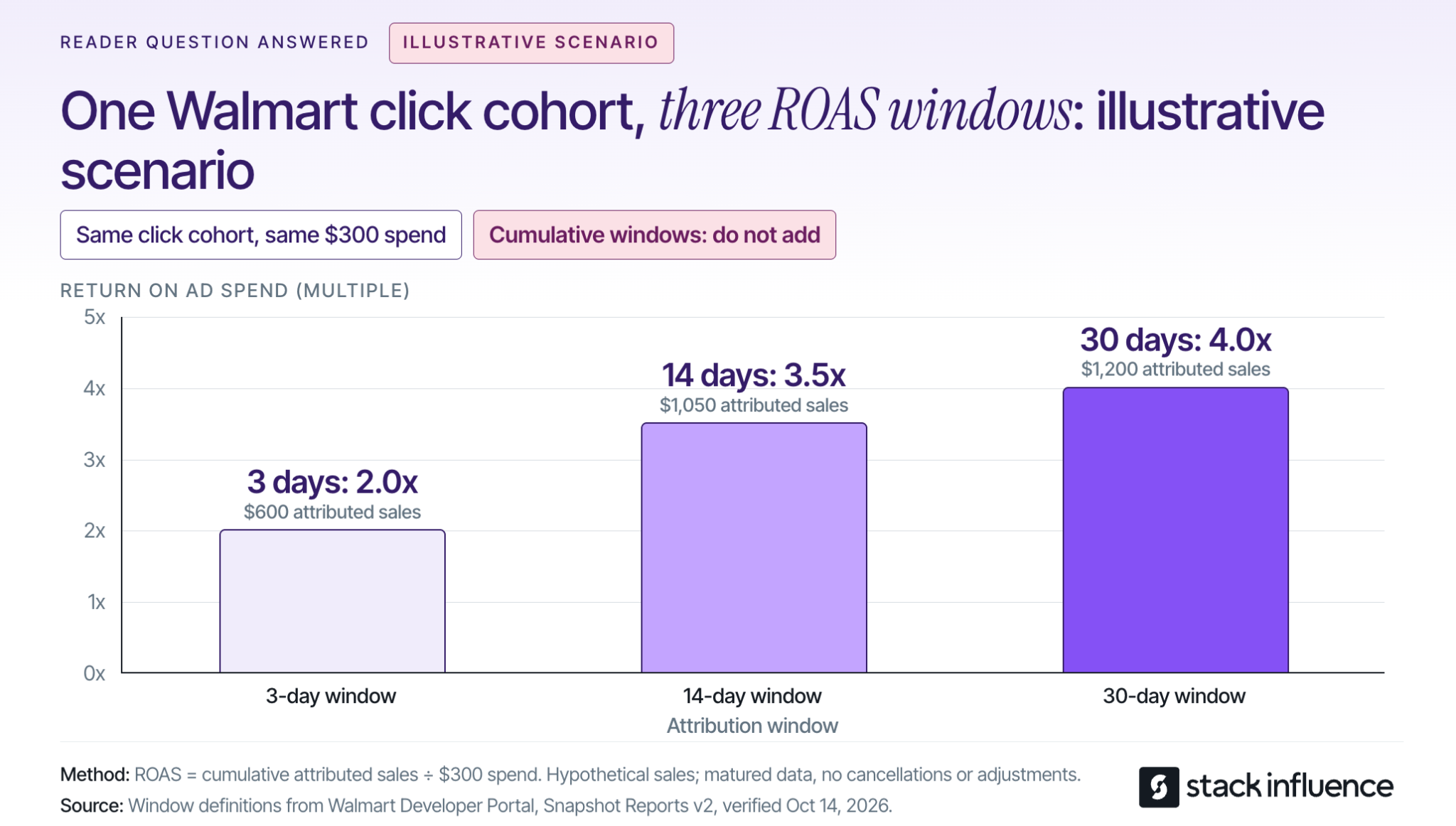
nsider a separate illustrative campaign with $300 in spend from one fixed cohort of ad clicks. Assume the same advertised-item online sales scope, fully matured reporting through 30 days, and no subsequent cancellations or reporting adjustments.
Suppose cumulative attributed sales are $600 within three days of each click, $1,050 within 14 days, and $1,200 within 30 days. The corresponding ROAS values are 2.0x, 3.5x, and 4.0x: each revenue amount divided by the same $300 spend.
These are illustrative inputs, not observed Walmart results. The campaign did not become twice as efficient because someone selected a longer window; more purchases qualified for attribution under that definition. The windows are nested, so do not add their sales together.
Compare equivalent click-date periods using the same window, and allow the latest clicks time to mature. A reporting extract can be current while its most recent conversion data remains incomplete.
Reconcile attributed revenue with the products sold and their margins. Other-item revenue can have different economics from the item that earned the click. Refunds, fulfillment costs, marketplace fees, and creator-production expenses can also change the business result without changing a headline ROAS ratio in the same way.
Review campaign delivery daily during launch and search-term decisions on a regular schedule, such as weekly. Make larger allocation decisions using sufficiently mature conversion data and an explicit test budget; this is a recommended operating cadence, not a promise that a fixed number of days will produce statistical certainty.
Finally, compare total channel sales and contribution with advertising spend while recording price, promotions, inventory, and other marketing changes. A before-and-after increase is useful context, but it does not isolate the causal effect of Sponsored Products.
Use creator content to answer the product questions that paid placements expose. For a storage product, the useful demonstration might show its capacity, assembly, or actual dimensions rather than simply repeat that the product is available at Walmart.
Stack Influence's Walmart creator-campaign workflow supports micro-influencer activation, product seeding, coordination, and social content. Its gifted-first, completions-only model makes the completed creator post the operational deliverable, not a guaranteed Walmart order or a guaranteed advertising result.
When working with micro influencers, nano influencers, or UGC creators, specify the demonstration, posting deliverable, and intended reuse. Check permissions before repurposing UGC across platforms, especially when footage will be used in advertising rather than only in an organic social post.
The FTC's influencer disclosure guidance explains that free or discounted products can create a material connection requiring disclosure. Product reimbursement should not be treated as a reason to hide the commercial relationship.
For eligible external campaigns, Walmart's Sales Rewards and Attribution program provides tracking URLs for qualifying items. Keep those results separate from Sponsored Products reporting, and distinguish brand-funded creator purchases from independently acquired customer orders.
Walmart Sponsored Products work best as a measurable purchase of relevant traffic, not as a substitute for a competitive offer. Start with eligible items, establish an affordable CPC, select compatible targeting and bidding controls, and judge the result using consistent attribution and contribution calculations.
Before launching, write down the item group, spending limit, expected conversion assumptions, and the evidence that will justify expansion. When product education is the missing piece, plan a focused Stack Influence creator campaign around the unanswered buying questions, with content delivery and sales measurement kept distinct.
A memorable influencer campaign is not automatically a useful model for your next launch. Ecommerce sellers need to understand what the creators actually did, while content creators need to know what made the partnership valuable and workable.
These influencer marketing campaign examples separate reported results from ideas you can adapt. They cover product seeding, ongoing creator activation, affiliate partnerships, participatory content, coordinated storytelling, and community engagement.
The goal is not to copy the biggest campaign. It is to identify a mechanism that fits your product, your audience, and the resources on both sides of the partnership.
An influencer marketing campaign coordinates creator content around a defined audience and an intended action. The examples below show different ways to organize that relationship, rather than six versions of the same sponsored post.
These are company- or platform-reported cases, not a controlled comparison. The suggested adaptations are recommendations for your next campaign, not claims about undisclosed original briefs.
Targus illustrates how a product launch can involve a coordinated group of creators rather than one headline sponsorship. Stack Influence’s published Targus campaign record describes a three-month campaign with 120 creator promotions. Average monthly unit sales increased from a starting level of 56 to 221 during the campaign.
The practical lesson is to make the product understandable in situations that matter to buyers. For a backpack launch, an adapted brief could ask different creators to demonstrate commuting, organizing work equipment, or packing for a short trip.
That is a proposed application, not a description of Targus’s original creative instructions. Each creator should have a reason to use the product and a specific question their content can answer.
For sellers, the useful output is a collection of relevant demonstrations. For creators, the opportunity is to contribute a recognizable use case rather than recite a feature list. The sales movement is informative, but it does not establish how many additional purchases the campaign alone caused.
Magic Spoon provides a longer-duration example. Stack Influence’s 12-month Magic Spoon campaign record reports 3,448 creator promotions, with average monthly unit sales moving from a starting level of 1,937 to 7,867 during the measured campaign.
The transferable idea is sustained activation around a core product. Instead of spending the entire creative effort on one announcement, a seller can plan successive batches of content addressing different occasions, customer questions, and product uses.
Duration changes the operational interpretation of the numbers. Targus’s 120 promotions across three months equal 40 promotions per month on average. Magic Spoon’s 3,448 promotions across 12 months equal approximately 287.3 per month.
Those figures are calculated campaign-period averages, not observed monthly schedules or counts of unique creators. They help frame coordination volume, but they do not show which campaign was more efficient.
A seller adapting this model should plan product availability, creator communication, and review capacity together. Creators considering recurring partnerships should clarify whether each assignment requires a new concept, a new deliverable, or an extension of an existing agreement.
Solgaard shows how creator partnerships can connect product experiences with ongoing sales incentives. In Shopify’s Solgaard case study, the travel-goods brand used Shopify Collabs to manage ambassador relationships, product gifting, commissions, referral links, and discount codes.
Shopify reports average month-over-month creator-generated revenue growth exceeding 287% during the last six months of 2022. Separately, the case study reports more than $50,000 in sales since the program’s launch at the time of reporting.
Those are historical program results, not a growth forecast or an industry benchmark.
The useful adaptation is to connect the relationship and the purchase path. A creator can explain how a product fits a real situation, direct interested viewers to a trackable destination, and continue participating through a clearly defined commission arrangement.
For Shopify influencer marketing, decide in advance how discounts, returns, commission eligibility, and reporting will work. Creators should understand when a sale earns compensation and whether content production has a separate fee. Affiliate participation and unlimited content production should not become the same obligation by accident.
e.l.f.’s original TikTok campaign demonstrates the difference between watching branded content and joining it. The brand built its #eyeslipsface challenge around original music and a recognizable participation format.
In its October 11, 2019 campaign announcement, e.l.f. reported more than one billion views and more than 400,000 participating videos. Those numbers describe the campaign’s position at that reporting date, not its eventual lifetime total.
The lesson is not that another brand should expect similar reach. It is that an audience needs an understandable way to participate.
An ecommerce adaptation could invite creators to demonstrate an original, repeatable product-use format that other people can interpret in their own way. Keep the participation instructions simple, and use original or appropriately licensed creative materials.
For creators, distinctive interpretation matters more than reproducing another person’s performance. For sellers, participation and views belong in an awareness scorecard; neither number automatically establishes purchase intent.
CeraVe’s Michael Cera campaign illustrates coordinated storytelling rather than a batch of interchangeable endorsements. The brand’s February 2024 campaign announcement describes a three-week campaign involving the actor, digital creators, and dermatologists, culminating in a Super Bowl reveal.
The campaign played with the connection between the actor’s name and the brand while ultimately reinforcing CeraVe’s dermatologist-developed positioning. Its value as an example is the sequencing and division of roles, not a disclosed creator-only sales result.
A smaller seller can adapt that structure without copying the celebrity production or the fictional premise. One creator might introduce a customer problem, another demonstrate the product, and another answer practical questions near launch.
Keep product claims accurate and commercial relationships clear throughout the sequence.
Creators should know which part of the story they own, what information is already public, and what must be coordinated with other posts. A shared launch date is not enough when one piece of content depends on another.
Knorr’s #ModTheVeg campaign put creators inside gaming culture rather than treating gaming audiences as a generic advertising segment. The campaign involved streamers and game modifications that gave vegetables a more prominent role in play.
In Unilever’s December 2024 campaign report, the company reported that more than 10,000 people played the modifications and that audiences watched 26,000 hours of streamer content within 48 hours.
Those outcomes describe participation and viewing, not ecommerce orders.
The transferable principle is to contribute to something a community already enjoys doing. A home-organization brand, for example, could collaborate around creators’ existing workspace-reset routines instead of asking for unrelated product shoutouts.
For sellers, start with the activity and identify the product’s useful role within it. For creators, explain why the collaboration belongs in your content. An audience relationship is more specific than a demographic label or follower count.

Choose a campaign example by the action it enables, then adapt its workload and requirements. The Borrow-Resize-Verify Method turns inspiration into a brief without treating a published case study as a promise.
Identify what made participation or purchasing easier.
Targus offers a product-demonstration model. Solgaard connects creator relationships with trackable purchasing. e.l.f. supplies a repeatable participation format. CeraVe shows how separate creator contributions can form a sequence.
Choose one primary mechanism for the first test. Combining awareness, affiliate sales, content production, and a community challenge in one brief can make it difficult to determine what the creator is actually responsible for delivering.
For content creators, a useful brand-deal pitch translates the mechanism into a specific contribution: a customer question you can answer, a product use you can demonstrate, or an audience activity you can support.
Translate the idea into product quantities, creator assignments, production time, and review capacity.
Budget for the applicable combination of product costs, shipping or reimbursement, creator compensation, campaign management, content usage, and paid distribution. Evaluate micro influencers and nano influencers on product relevance and proposed contribution, not just a smaller version of a celebrity’s reach.
When evaluating influencer marketing platforms or an influencer marketing agency, ask who owns sourcing, product coordination, follow-up, content collection, and reporting.
Stack Influence’s automated product-seeding workflow connects vetted creator activation, product coordination, and completed-post accountability through a gifted-first model. That operational structure is relevant when a seller needs to manage participation through delivery rather than simply collect creator names.
The monthly averages in the Targus and Magic Spoon examples illustrate why workload needs its own planning decision. Do not commit to a campaign volume your team cannot support through completion.
Write down the deliverable format, publishing location, dates, compensation, revision allowance, tracking destination, and intended reuse.
Define the relevant UGC licensing terms, including channels, duration, and permitted edits. A creator should be able to distinguish an organic post, a commissioned UGC video, and a paid-ad assignment before accepting the brief.
The FTC’s endorsement guidance explains that material connections need clear disclosure, including products supplied for free or reimbursed after purchase. Include disclosure instructions and check the resulting endorsements.
Record paid usage and platform authorization separately. For example, TikTok’s Spark Ads documentation requires authorization to advertise using another creator’s organic post.
A planned UGC advertising workflow should connect the agreed content use, necessary permissions, asset delivery, and media launch. Discovering a missing permission after the video is finished is an avoidable production problem.
A campaign can look successful publicly while its production process becomes uneconomical for the creator. Revision scope deserves attention before the first draft, not after disagreements arise.
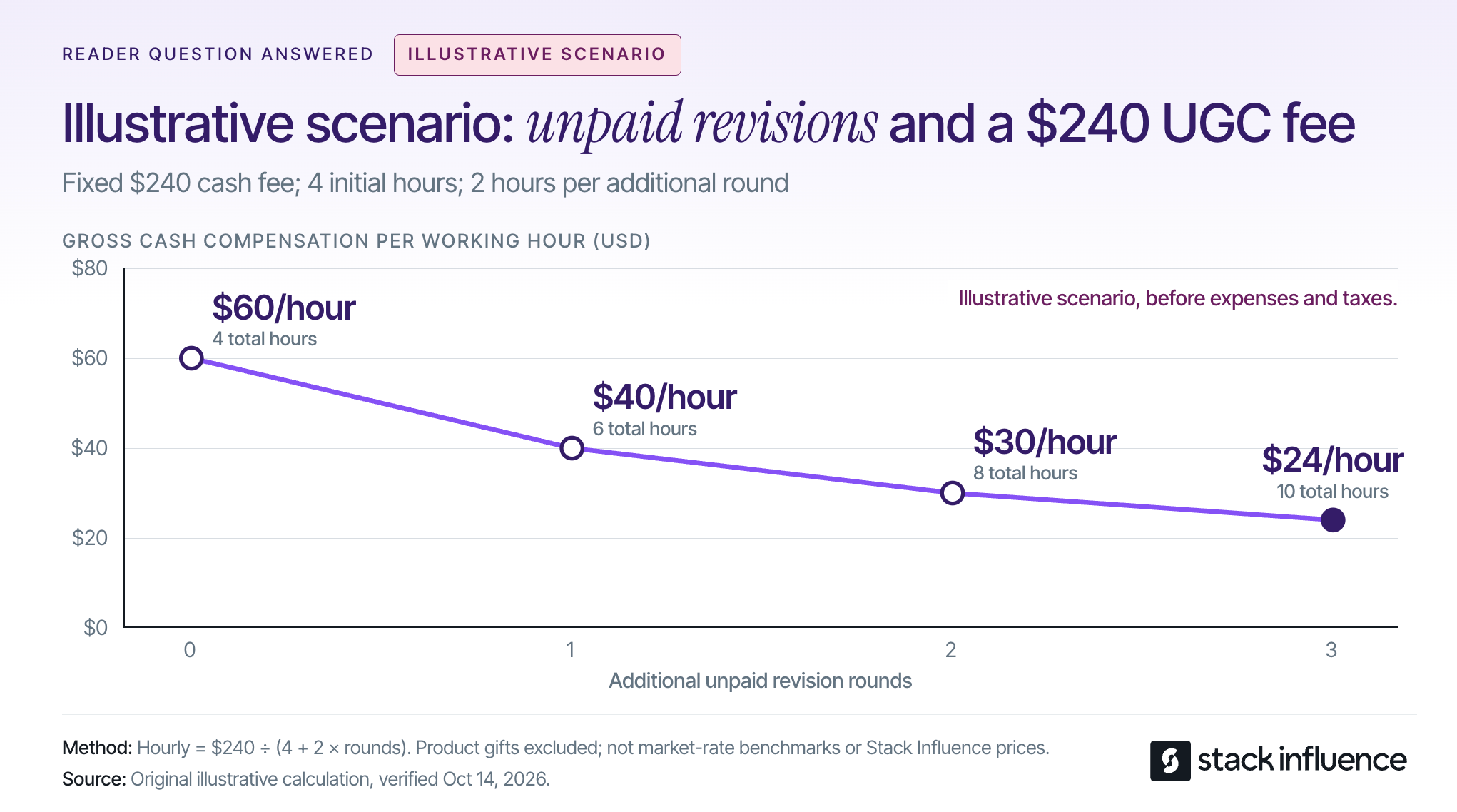
Consider an illustrative scenario: a creator receives a fixed $240 cash fee for one commissioned UGC video. Assume the initial work, including planning, filming, editing, and administration, takes four hours. Each additional unpaid revision round adds two hours, while the fee and agreed usage remain unchanged.
With no additional rounds, gross cash compensation is $60 per working hour. One extra round brings total work to six hours and compensation to $40 per hour.
Two extra rounds mean eight hours of work and $30 per hour. Three mean ten hours and $24 per hour.
These are illustrative calculations before expenses and taxes, not recommended market rates or Stack Influence pricing. The calculation is the fixed cash fee divided by total working hours; product gifts are not counted as cash compensation.
For sellers, consolidate feedback and distinguish corrections from a newly requested concept. For creators, agree on included revisions and the process for pricing additional scope.
The commercial lesson works in both directions: a clear brief protects the brand’s production schedule and the creator’s ability to deliver sustainable work.
Measure the campaign against its intended action, then connect delivery, audience response, shopping activity, and costs. A content-production project and an affiliate sales program should not be judged by the same headline metric.
For a content-production campaign, accepted assets that meet the agreed usage requirements are a primary output. For a sales campaign, completed posts are a delivery checkpoint, while qualified visits, orders, and contribution after costs are closer to the commercial outcome.
Record planned and completed deliverables alongside the actual publication dates. An early post and a late post need comparable exposure periods before their results can be compared fairly.
For Shopify campaigns, decide how tagged links and creator-specific codes will feed a single order-level report. Reconcile discounts, returns, and commissions rather than adding together every tool’s claimed revenue.
A code identifies a redemption, but it does not by itself establish where the shopper first discovered the product. Treat that distinction as a reporting limitation, not a reason to abandon measurement.
For eligible Amazon sellers, the Amazon Attribution guide explains how tags connect off-Amazon clicks with subsequent shopping activity. Amazon documents a 14-day, last-touch attribution model, so the most recent qualifying click receives conversion credit within that window.
That model is not a complete record of every creator exposure. The Amazon Brand Referral Bonus described in the same guide is also a separate brand program, not the creator’s affiliate compensation.
In product-seeding reports, separate creator purchases and reimbursements from purchases made by the audience wherever the available records allow. Otherwise, the act of supplying products to participants can be confused with independent customer demand.
Do not treat the entire change in account sales as campaign-generated revenue. Inventory availability, price changes, paid advertising, seasonality, and other promotions may change during the same period.
Before launching, define the reporting window, the conversion model, and how returns will be handled. Compare publication cohorts after equivalent observation periods, and allow the applicable attribution window to mature.
A carefully designed holdout or another credible comparison can strengthen causal interpretation. Without that, report attributed sales and overall sales movement separately, and describe the limitations.
This is why the six examples should inform campaign design rather than become a performance leaderboard. Their products, periods, distribution, and success measures differ.
The most useful influencer marketing campaign examples reveal a repeatable mechanism: explain a product, support an ongoing partnership, invite participation, coordinate a story, or contribute to a community.
Use the Borrow-Resize-Verify Method to select one mechanism and build a brief around it. Sellers should define the commercial job, operational owner, and measurement plan; creators should define their contribution, compensation, and boundaries.
For a product-led campaign, start by mapping the creator journey from product access to completed content. Evaluating that workflow with Stack Influence can help turn campaign inspiration into an executable product-seeding plan, while a clear agreement gives creators the conditions to do their best work.
An attractive Shopify BFCM offer can fall apart when the creator post, product page, and checkout promise different things. For ecommerce sellers, Black Friday Cyber Monday preparation means aligning the deal customers see with the inventory, discounts, delivery, and returns the store can support.
This guide explains how to choose an offer, prepare creator content, configure Shopify, and measure the result. It also covers the 2026 changes that make copying last year's setup risky.

The 2026 Black Friday to Cyber Monday window runs from November 27 through November 30, following the timing explained in Shopify's Cyber Monday guide. Set your own early-access and closing times explicitly, including the store's time zone.
Start by deciding what the promotion should accomplish. A giftable discovery set, a refill multipack, and a clearance offer solve different customer problems and require different inventory decisions.
Shopify reported approximately $14.6 billion in worldwide merchant sales during BFCM 2025. That aggregate includes online and offline activity and is based on Shopify's GMV definition; it is context for the event, not a forecast for an individual store.
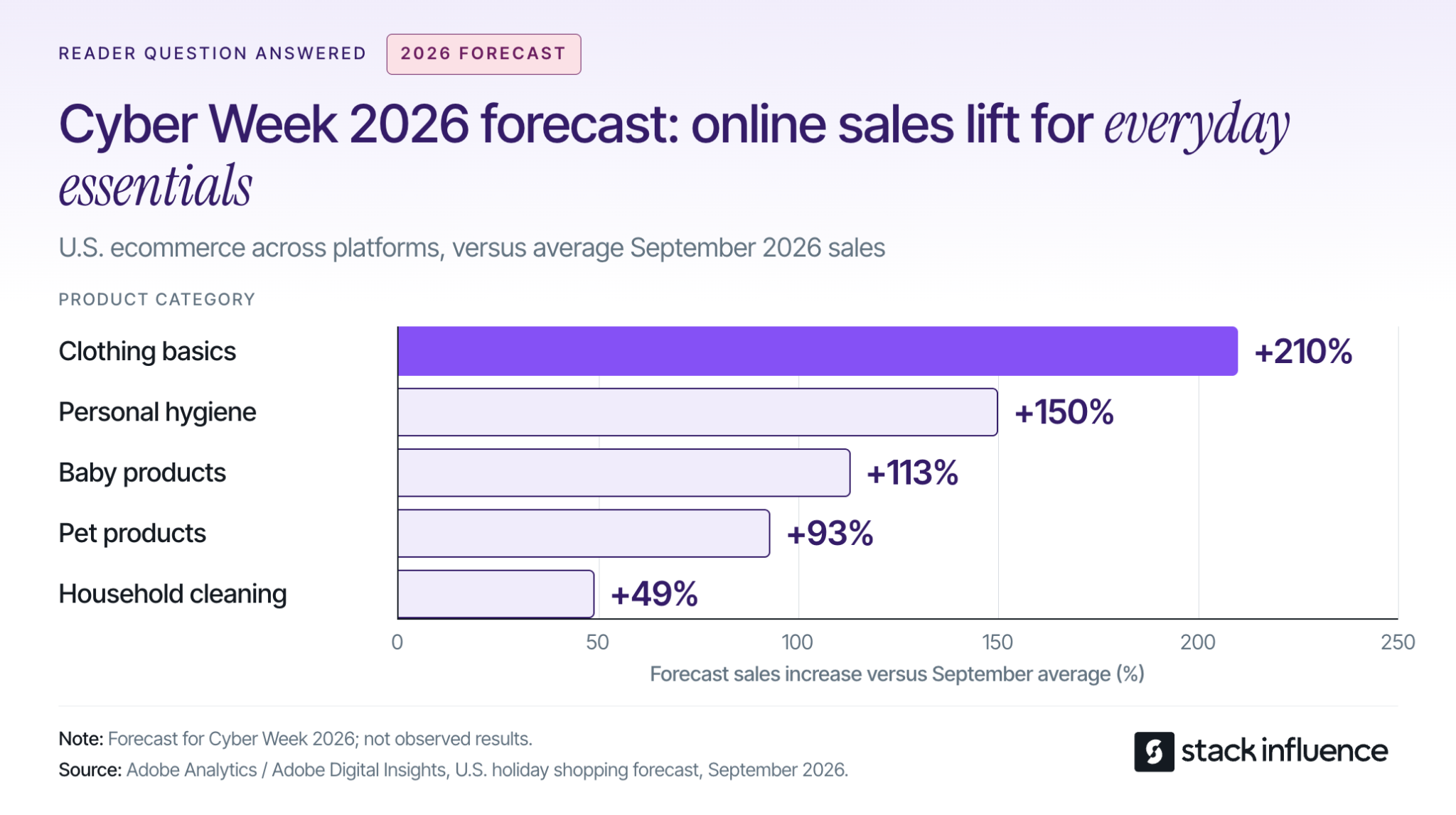
Adobe's September 2026 holiday forecast anticipates the following increases in U.S. online sales during Cyber Week compared with average September 2026 sales levels:
These are forecasts across U.S. ecommerce, not observed Shopify results or year-over-year growth. Adobe's Cyber Week covers Thanksgiving through Cyber Monday.
For a replenishment brand, the practical implication is to evaluate stock-up offers alongside gifts. A cleaning brand might demonstrate how a refill pack works with the customer's existing bottle, while a clothing brand might explain the fit and contents of a basics multipack.
Build Shopify bundles around useful complementary products, then calculate their economics. Adding unwanted items can increase the displayed basket value without improving the customer's reason to buy.
Estimate merchandise revenue after discounts and expected refunds, then add shipping collected. Subtract product cost, fulfillment, postage, payment fees, expected return-handling costs, and the contribution you want to retain; the remainder is the acquisition budget the order can support.
Account for returned inventory that can be resold, and avoid deducting the same refund twice. Include creator reimbursements, campaign fees, and paid distribution in the campaign budget when applicable.
Use your own historical repeat-purchase data before accepting a loss on the first order. If that history is weak, build the promotion around economics you can defend without assuming future purchases.
Create a shared offer record that connects what customers see with what Shopify actually applies. Give the person responsible for campaign changes ownership of four fields:
Use this record to brief creators, configure discounts, and approve emails. If the offer changes, update the affected placements before they send shoppers to an inconsistent checkout.
Stack Influence's Shopify creator workflow coordinates creator sourcing, vetting, product seeding, post verification, and UGC collection. Its gifted-first model connects product access with agreed content requirements, and its completions-only campaign model centers payment accountability on completed creator posts.
For BFCM, the operational lesson is to plan from the date content must be usable. Allow time for delivery, genuine product use, content completion, permission checks, and placement on the store before the offer launches.
Brief micro influencers and nano influencers around questions the product page needs to answer. Ask a creator to show scale, demonstrate setup, explain a bundle's contents, or show how a product fits a routine; choose the demonstration that matters for the buying decision.
Keep reusable product footage separate from short-lived promotional overlays. Where editing permissions allow, the same demonstration can remain useful after the BFCM discount expires.
Record UGC licensing permissions for storefront placement, email, paid ads, edits, and duration before republishing creator content. Confirm any additional platform authorization needed to run ads through a creator's identity.
The FTC's influencer disclosure guidance treats free or discounted products as potential material connections that require disclosure with an endorsement. Put clear disclosure instructions in the brief, including disclosure within video content when applicable.
Brands using automated product seeding should assign responsibility for the purchase or shipment, content deadline, verification, and reimbursement. Those responsibilities belong in the schedule even when software coordinates the campaign.
Translate the offer record into product, discount, and scheduling settings. Finish the configuration before approving creative that names a price, threshold, or deadline.
Shopify's discount-combination rules require each discount to permit the relevant combination. Review the BFCM offer together with welcome codes, creator codes, loyalty rewards, and shipping discounts.
For eligible combinations, product discounts apply first, order discounts use the revised subtotal, and shipping discounts apply last. Multiple percentage-based order discounts use the same subtotal: a combinable 10% order discount and 20% order discount can produce 30% off.
Check excluded products, customer eligibility, and minimum-spend conditions using realistic carts. Write the final customer price into the offer record so the campaign team approves the discount customers can actually receive.
Shopify's Bundles documentation explains that product-specific discounts must include the parent bundle product; selecting only its components does not apply that discount to the bundle. It also states that changing a component price does not automatically update the bundle price.
Check the advertised saving against the current bundle price and the actual items included. Confirm that the available variants, inventory, and shipping costs support the offer.
Shopify's Rollouts requirements make rollouts available on Basic and higher plans, subject to store-setup restrictions. The Rollouts overview distinguishes permanent Launch changes from temporary Events that roll back when they end.
Discounts retain their own active dates independently of a rollout. Check those dates against the event schedule instead of assuming that ending the event always ends every offer.
Preview the store before the promotion, while it is active, and after it closes. The final state should remove expired messaging, restore the intended prices, and give late visitors a useful destination.
Test the journey customers will take from campaign click to confirmed order. Start with a phone, the actual campaign landing page, and the payment methods your customers use.
Baymard's checkout research identifies high extra costs, slow delivery, account requirements, and complicated checkout among reported reasons shoppers abandon orders. Make shipping costs, delivery expectations, and return terms visible before the final payment step.
Shopify's test-order guidance covers discounts, payment behavior, shipping rates, notifications, and refunds. Check both signed-in and signed-out purchases, including an unsuccessful payment and a subsequent successful attempt; restore live payment settings after testing because payment test mode prevents normal live purchases.
Run the promotion against the cases most likely to expose a problem:
If your store previously used Shopify Scripts, verify the replacement discount, shipping, and payment behavior. Shopify's Scripts transition guidance confirms that published Scripts were deactivated on June 30, 2026 and no longer work.
Check inventory at locations that fulfill online orders and review the continue-selling setting for out-of-stock products. Keep any intentional backorder promise clear to the customer.
Verify that the completed order produces the expected purchase event and confirmation. Use the findings to prioritize Shopify conversion fixes, then repeat the affected purchase path after changing an app, theme, discount, or shipping rule.
Give each channel a job and a destination. Creator posts can demonstrate the product, email can explain access and offer terms, and paid campaigns can distribute approved creative to the intended audience.
Set a content-ready deadline before the campaign starts, then work backward through production and delivery. For a November 27 launch, November 20 is a practical example of an internal readiness deadline; it is a planning choice, not a promised creator turnaround time.
Use the final week to verify links, prices, subscriber segments, and customer-facing terms. Schedule a genuinely different Cyber Monday message only when the inventory or offer gives customers a useful reason to return.
For email and SMS, build promotional audiences from people who have agreed to receive the relevant messages, following Shopify's customer-contact guidance. Suppress recent purchasers where the next message would repeat an offer they already used.
Review the recipient settings in Shopify Messaging's abandoned-checkout automation. A recovery message should explain how to finish the purchase and resolve uncertainty; adding another discount requires another margin and combination check.
Before increasing promotion, confirm how many orders the team can dispatch within the advertised window. Reserve stock for replacement shipments and decide who updates campaign messaging when a promoted variant sells out.
Define escalation rules in the offer record. For example, if the oldest unfulfilled order is about to miss the stated dispatch window, resolve capacity or adjust the promise before buying more traffic to the affected product.
In its 2025 returns research, NRF and Happy Returns reported these planned holiday responses among surveyed retailers:
The retailer survey included 358 ecommerce professionals at U.S. merchants with more than $500 million in revenue. These are separate planned responses for the 2025 holiday period, not Shopify benchmarks or measured results.
For a smaller store, the useful question is which return tasks need extra capacity. Assign ownership for customer communication, inspection, refunds, and inventory updates rather than adopting a large retailer's staffing plan.
Publish the holiday return window, exclusions, procedure, and refund expectations before purchase. Connect ecommerce returns management with the product explanation so customers understand what they will receive and how problems will be handled.
Measure whether the campaign brings in worthwhile orders that the business can fulfill, then revisit the result as reversals and repeat purchases develop. Attributed revenue helps explain customer journeys, while contribution and cash reporting answer different operating questions.
Give each creator and placement a consistent campaign link. For example, use instagram as the source, influencer as a documented creator medium, bfcm_2026_refill as the campaign, and a distinct creator-and-asset identifier as the content value.
Check that the link reaches the correct destination and preserves its UTM parameters, then confirm how Shopify groups the chosen medium. Record the attribution model and reporting window before comparing channels.
Shopify's marketing-report documentation notes a September 2026 change: Performance by marketing channel now includes all online-store traffic, rather than only traffic attributed to a marketing activity. Comparisons with older exports can therefore change because the report's scope changed.
Keep dates, currency, channel scope, and attribution settings consistent. Do not add together channel totals from an any-click model that can give multiple channels full credit for the same sale, or treat matching totals across separate advertising platforms as a requirement.
Track creator purchases intended for reimbursement separately from ordinary customer orders. Otherwise, seeding transactions can make a campaign appear to have acquired more independent customers than it did.
Shopify's sales-report definitions calculate net sales as gross sales minus discounts and sales reversals. Reversals include more than physical returns, and they appear when processed, so a weekend sales snapshot cannot capture every later adjustment.
During the event, review orders, conversion, effective discount, acquisition cost, inventory, dispatch backlog, and customer-support issues together. Rising sales with falling contribution or a growing late-order queue calls for a different response from falling traffic with a healthy checkout.
Afterward, connect BFCM orders with their later refunds and returns. Recalculate contribution after product costs, payment and fulfillment expenses, creator costs, and paid media; keep that calculation distinct from Shopify's product gross-profit metric.
Use an initial operational review immediately after the event and later customer-cohort reviews at 30, 60, and 90 days where the product's purchase cycle makes those windows useful. Keep the final profit assessment open until the relevant return window has matured.
Look for which creator demonstrations brought qualified traffic, which offers attracted returning customers, and which products caused avoidable support or returns. Use those findings to refine ongoing Shopify influencer marketing and follow-up content.
Year-over-year growth alone does not establish that the campaign caused the difference. Where volume permits, use a properly designed holdout or controlled experiment to evaluate incremental impact; otherwise, state the limits of the attribution evidence.
A useful Shopify BFCM plan connects the buying reason, creator demonstration, checkout behavior, and work that follows the purchase. Before launch, complete a realistic mobile order and confirm who owns discount exceptions, fulfillment delays, and the post-sale review.
If producing the required demonstrations is the remaining bottleneck, use Stack Influence to plan creator sourcing, product seeding, and content completion around the offer. The next step is a campaign your team can explain, execute, and evaluate with confidence.
The most useful black friday marketing ideas solve a specific sales problem. A gift bundle can improve an undersized basket, a creator demonstration can explain an unfamiliar product, and clear delivery information can help a hesitant shopper decide.
For ecommerce sellers, the task is choosing a combination that works with your inventory, margins, and production time. These 12 ideas cover offer design, creator content, email, advertising, Amazon, and customer retention, with practical checks to help you turn a seasonal promotion into a campaign you can evaluate.
Use four constraints to select your campaign: margin, inventory, product familiarity, and checkout friction. Start with the constraint that most directly blocks profitable orders, then choose supporting ideas from the list below.
This constraint check gives every tactic a job. For example, an unfamiliar kitchen product might need a creator demonstration, a starter bundle, and a focused product page. A familiar replenishment product might benefit more from customer segmentation and a clear multipack offer.
Choose a headline offer you can explain in one sentence, then test it alongside welcome, loyalty, creator, and cart-recovery discounts. Set a minimum acceptable contribution after product costs, fulfillment, payment fees, expected returns, and marketing expenses.
The discount type matters. According to Shopify's discount-combination documentation, product discounts apply before order discounts, while multiple percentage order discounts use the same subtotal.
Consider an illustrative $80 merchandise subtotal, with every item eligible, the store supporting the combinations, and each discount configured to combine. Exclude shipping, taxes, and any other discounts:
The calculations are $80 × 0.80, $80 × 0.80 × 0.90, and $80 × (1 − 0.20 − 0.10), respectively. These are hypothetical checkout examples, not sales benchmarks. Confirm the final merchandise subtotal before creators or emails announce the saving.
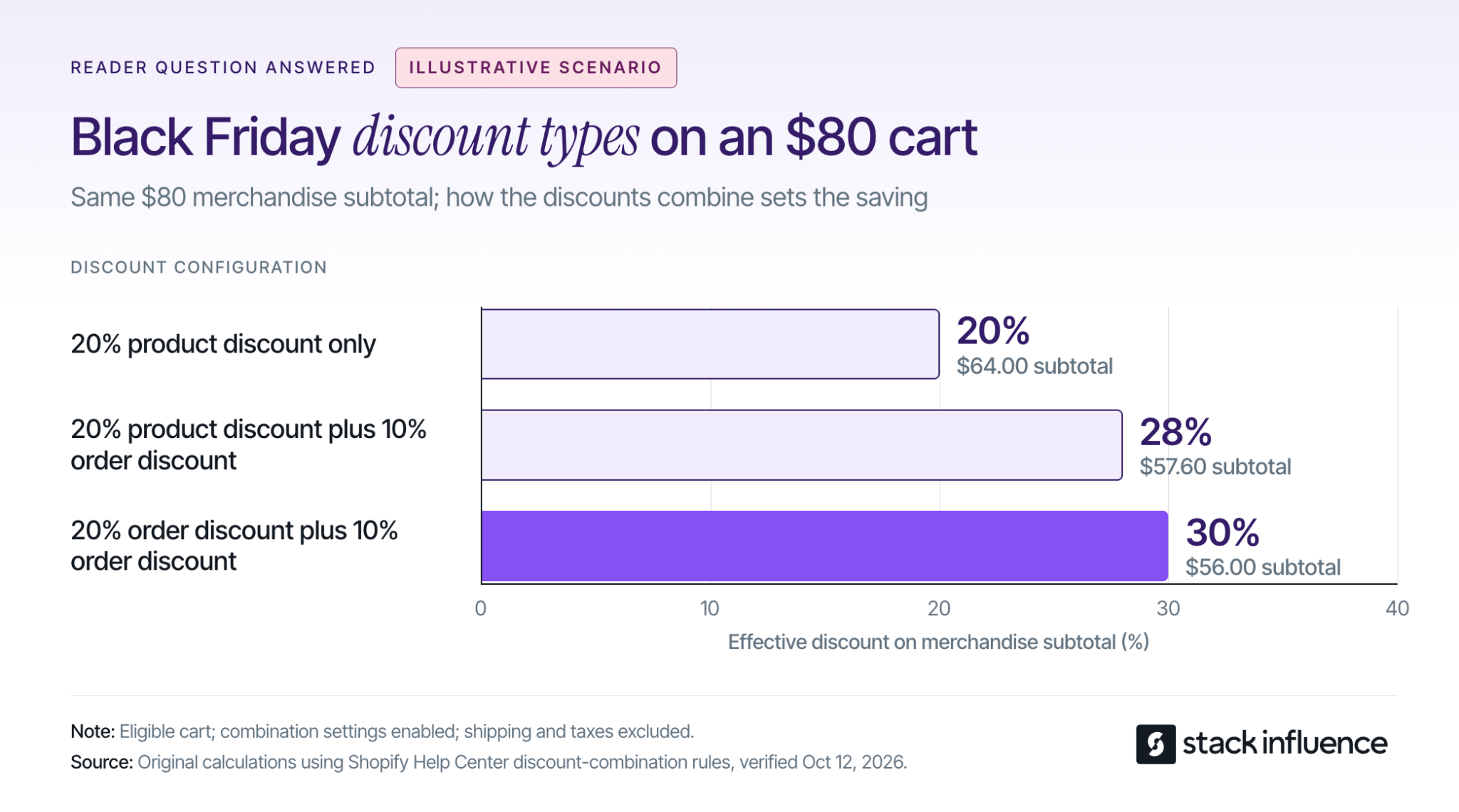
Package products that solve one recognizable problem together. A coffee brand could offer a tasting set; a skincare seller could assemble a travel routine; a home brand could create a first-apartment cleaning kit.
Shopify's product-bundle guidance describes bundles as sets of related products and notes that creating them requires a bundles app. Calculate the economics of the complete set, including packaging and fulfillment, then make the contents and savings easy to understand. Check component inventory so an unavailable accessory does not derail the entire offer.
Choose a threshold a shopper can reach by adding something useful. Review actual basket sizes and compatible add-ons before deciding how much customers must spend. A threshold that requires an irrelevant purchase can make the offer feel less attractive.
Test whether eligibility uses the basket before or after discounts, and account for any added shipping weight or gift-handling cost. Stack Influence's guide to increasing Shopify average order value with influencers explains how creator recommendations can connect complementary products to a larger basket. Track contribution per session as well as average order value so a larger basket does not conceal fewer purchases.
Ask micro influencers and nano influencers to demonstrate the product's real use: how it fits, what comes in the package, how it works, or which customer problem it addresses. Give creators enough time to try the product and report issues before setting a publishing deadline.
Stack Influence's automated product-seeding workflow connects creator purchases with completed social posts through a gifted-first model. For holiday planning, separate three milestones: product access, content completion, and permission for the planned reuse. Each milestone needs its own owner and deadline.
Keep evergreen demonstrations separate from the sale price and end date wherever the format allows. A brand can update an approved offer overlay or landing-page message without asking the creator to repeat a genuine product experience, provided the editing agreement permits it.
Include disclosure instructions in the brief. The FTC's guidance for social media influencers explains that free or discounted products create a material connection and that video disclosures belong in the video itself.
Invite loyal customers and opted-in subscribers to preview a defined selection before the public launch. Early access can mean first choice of a limited bundle, a reserved allocation, or access to a giftable set.
State when access begins, what is included, and how long any reservation lasts. If the public offer will be the same, say so. Measure whether early access produces additional campaign purchases or mainly moves orders forward from the weekend.
Organize a guide around a recipient, use case, or constraint: gifts for a first apartment, coffee gifts for a small kitchen, or travel essentials for someone who packs lightly. Explain why each product belongs, what is included, and any size or compatibility requirements.
Use licensed user-generated content (UGC) to show the product in context, with the relevant information also visible in page text. Confirm placement and editing permissions with the help of this UGC licensing guide. Send visitors to the specific guide or collection that matches the creator's recommendation.
Give a recent buyer a complementary recommendation, a repeat customer a replenishment option, and an inactive subscriber a clear reason to return. Keep acquisition offers from continuing after the recipient has already purchased.
Shopify's customer-segment documentation supports sending marketing email to selected segments and specifies that only subscribed customers receive those emails. Coordinate email with SMS for people who have opted into that channel, using texts for timely information such as an actual offer launch or approaching deadline.
Match the product, message, and destination within each segment. For campaigns involving creators, the Shopify influencer marketing playbook provides additional context for connecting creator content, codes, and storefront conversion.
Choose creator assets that answer a product objection, demonstrate use clearly, or explain the bundle. Test a small selection against your existing creative while keeping the offer and landing destination consistent enough to interpret the results.
For Meta Partnership Ads, arrange both the agreed content use and the platform permission before launch. Meta Blueprint's partnership-ad training treats creator-content permissions, campaign setup, and measurement as distinct parts of the workflow. Stack Influence's guide to UGC ads expands on using creator assets in advertising.
Set a spending cap and an evaluation window in advance. Organic engagement can identify promising material, but ad decisions still need purchase and contribution data.
Test the journey from the actual email, ad, or creator link through product selection and checkout. Check whether the offer is visible without excessive scrolling, the right variant is available, the code works, and shipping information appears before payment.
Adobe's 2025 holiday-season results put mobile's share of U.S. online spending at 61.6% on Thanksgiving and 56.4% across November and December. Its separate Cyber Monday results report a 57.5% mobile share that day.
The corresponding non-mobile shares, calculated as 100% minus mobile share, were:
The full-season figure includes both named shopping days. These observed spending shares support prioritizing mobile purchase testing before Thanksgiving; they do not predict your store's device mix. Keep desktop testing in the plan as well.
For an Amazon campaign, send shoppers to the advertised product or relevant brand Store page and verify the offer, variant, availability, and delivery estimate. Make the creator's demonstration match what the shopper can actually buy.
Amazon's guide to Amazon Attribution explains how tags measure shopping activity following paid and organic traffic from outside Amazon. Create distinct tags for the creator or channel comparisons you need. Eligible U.S. brand owners can also check enrollment in the Amazon Brand Referral Bonus, which Amazon describes as averaging 10% of qualifying sales.
Treat eligibility and the applicable bonus as inputs to verify. The seller's referral bonus and a creator's affiliate commission are separate programs, and tagged sales alone do not establish an incremental lift.

A recovery message can answer a delivery question, explain sizing, clarify a bundle, or remind the shopper which eligible offer is already available. Start with the likely obstacle and avoid automatically layering another coupon onto the promotion.
Suppress reminders after purchase and stop advertising an item when it becomes unavailable. Where a deadline is useful, give the actual end time and time zone, and make sure the promotion follows that schedule. A countdown that keeps resetting undermines the promise the campaign depends on.
Prepare a post-purchase sequence that starts with order confidence, delivery information, and instructions for using the product. Recommend a relevant accessory or replenishment purchase when the customer has had time to experience the first order.
Distinguish a gift buyer from the eventual user when the customer provides that information. A purchaser buying for someone else may need gift instructions and delivery updates, while the recipient may benefit from a setup guide accessible without joining a marketing list.
Keep a cohort of customers acquired during the promotion so you can evaluate repeat purchases and returns over the same elapsed time. Retention should be measured after the sale, not assumed when setting the discount.
Work backward from the time required to prepare the offer, receive and review creator content, and test the purchase journey. Shopify's 2026 retail calendar places Black Friday on November 27 and Cyber Monday on November 30, with Thanksgiving on November 26.
For a campaign being prepared in October, use this practical sequence:
The Black Friday creator production schedule provides a more detailed calendar for influencer campaigns. If production time is short, reduce the number of new assets and offers to what the team can finish reliably.
Evaluate each tactic against the store constraint it was meant to improve, then reconcile its results with net contribution. Revenue, average order value, and advertising return each answer part of the question; none alone shows whether the full campaign created economic value.
For an offer test, calculate contribution per session: net sales after discounts and refunds, minus product costs, fulfillment, payment fees, and the marketing costs assigned to those sessions, divided by sessions. Use the same cost scope and attribution method for each comparison. This helps reveal whether a higher-value basket compensates for any change in conversion.
During the event, monitor leading signals such as checkout errors, product availability, qualified visits, add-to-cart activity, and customer questions. Judge commercial outcomes using net orders, contribution, new customers, and acquisition cost. A clear customer acquisition cost calculation should include the campaign costs that produced those customers, including relevant creator and content costs.
Set the reporting window before launch. Amazon Attribution's published methodology uses a 14-day last-touch model, so a November 30 click can receive credit for a qualifying purchase within the following 14 days. Returns may require a later final reconciliation.
Keep commerce-platform orders as the reconciliation record and compare channel reports alongside them; do not add every platform's claimed conversions together. Where audience size allows, a randomly assigned holdout can help estimate incremental impact. Otherwise, document changes in price, stock, media spend, and seasonality that limit any causal conclusion.
Choose black friday marketing ideas according to the constraint you need to solve. A smaller collection of compatible offers, useful creator demonstrations, relevant messages, and tested purchase paths gives you a campaign you can manage and learn from.
Start with one product or bundle and write down its offer, cost limits, audience, destination, and success measure. If creator sourcing, product seeding, and completed-content coordination are the work you need help executing, evaluate a Stack Influence campaign around that product and the buyer questions your content should answer.
Someone buying a coffee accessory as a gift needs answers the usual customer may already know: which machine it fits, what comes in the box, and whether it will arrive before the celebration. Those details belong in the gift guide, creator demonstration, and product page.
Holiday marketing brings seasonal content, offers, and customer communication together around an occasion. For ecommerce sellers planning year-end gifting, the opportunity is to help people choose confidently and then deliver the experience promised.
The following holiday marketing ideas cover gift discovery, creator partnerships, offer design, delivery, and retention. Each includes practical execution details and a constraint to check, so a small team can select useful campaigns and measure their commercial results.
Prioritize the idea that resolves the biggest unanswered question between product discovery and purchase. Use customer questions, on-site searches, checkout exits, and support conversations to identify that obstacle before choosing another promotion.
NRF and Prosper Insights & Analytics’ December 2025 survey covered 8,005 adults, surveyed December 1–10. Among shoppers with more than half their list unfinished, 33% were still deciding what to buy, 25% had other financial priorities before December, and 23% were awaiting family or friends’ gift preferences. These are selected reasons from that subgroup, not percentages of all shoppers.
Use these four questions to select and review a campaign:
For example, if visitors repeatedly ask whether a coffee accessory fits their recipient’s machine, publish a compatibility demonstration before buying more traffic. If shoppers understand the product but abandon checkout after seeing shipping charges, work on the delivered offer.
Choose one primary obstacle and one outcome metric for the first test. The Four Gift Questions should help you decide what to build, not become four additional campaigns your team cannot support.
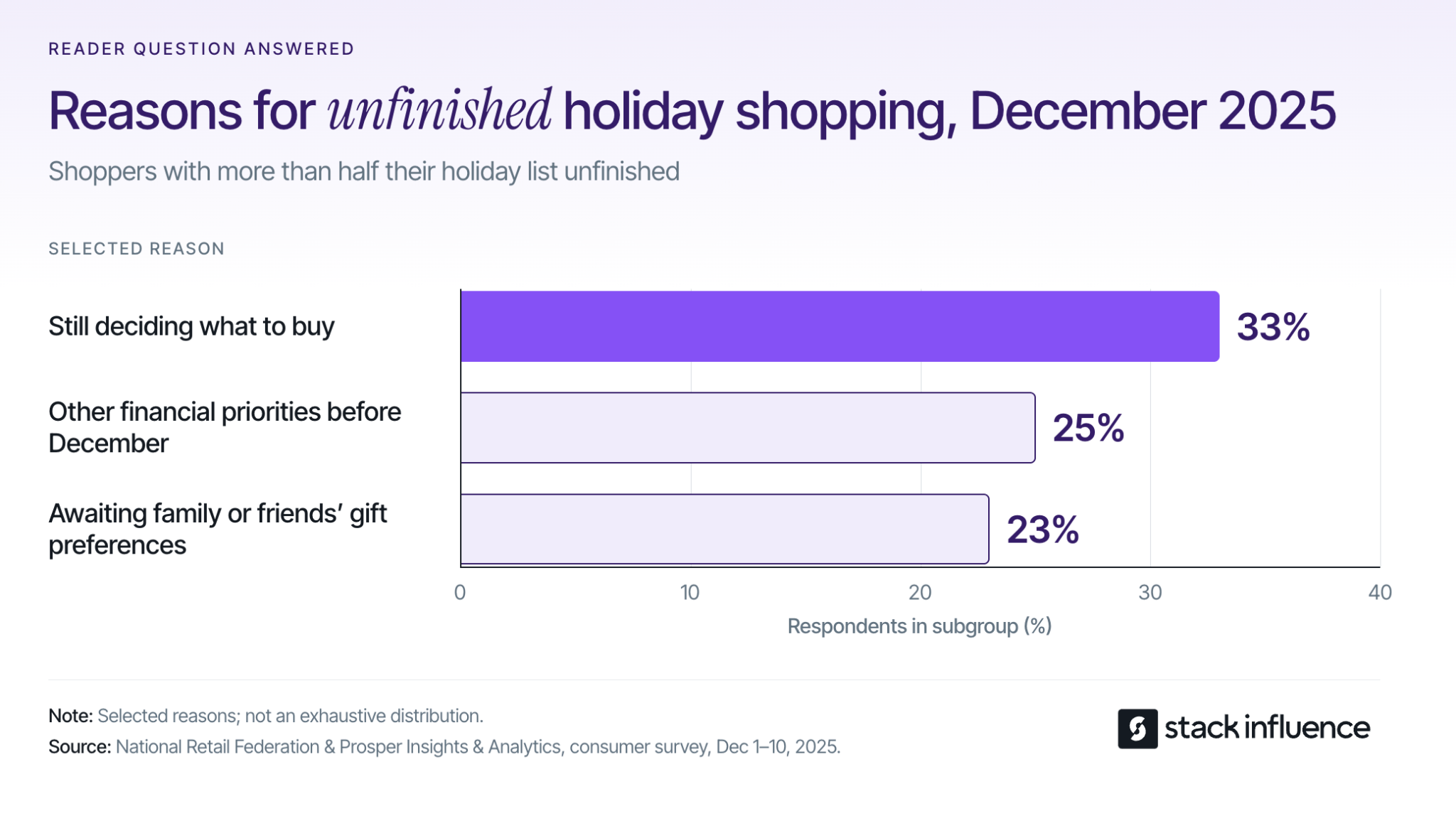
Create a focused collection such as gifts for a home coffee enthusiast, a frequent traveler, or someone setting up their first kitchen. Explain why each product belongs, who would use it, and which version to choose. Add budget filters only where your catalog offers meaningful choices.
Keep the guide useful outside your website: give email subscribers and creators a direct collection link, and let shoppers share a preferred product and variant with someone buying for them. If you run a holiday influencer campaign, give creators the same recipient criteria so their recommendations and landing pages agree.
For a small catalog, a few carefully explained products can do the job. Measure product-page visits and orders from the guide, and remove unavailable items promptly.
Recruit micro influencers and nano influencers whose content shows familiarity with the product’s use case. A useful brief asks them to show what arrives, demonstrate it in use, explain a relevant compatibility detail, and describe the recipient who would appreciate it. Give creators room to express an honest opinion.
Stack Influence’s automated product-seeding workflow connects vetted creator participation, product purchase, social-post completion, and reimbursement. Its gifted-first, completions-only model makes completion a concrete campaign milestone. For holiday planning, distinguish an accepted invitation from a finished asset you can actually use.
Work backward from the content deadline to allow product access, genuine use, creation, and agreed review. Reserve the relevant product variants before recruiting. Under the FTC’s social media disclosure guidance, free or discounted products can create a relationship that creators must disclose clearly with the endorsement.
Turn approved user-generated content, or UGC, into a focused creative test. Compare a demonstration that answers “Will this fit?” with one that explains “What comes in the box?” while keeping the audience, offer, and destination comparable. Use the same product variant in the content and on the landing page.
Confirm the placements, duration, editing permissions, and advertising rights before reusing a creator’s work. The Meta Partnership Ads guide explains how content rights and permission to advertise through a creator’s identity are separate parts of that workflow.
Test the destination on a phone, including variant selection, shipping costs, and payment. Evaluate visits to the intended product page and customer acquisition cost; a popular organic post is a candidate for testing, not a forecast of paid-ad performance.
Build a bundle around a finished experience: a travel organizer with compatible pouches, for example, or a starter kit with the consumables required for first use. Show the contents and explain the convenience. Check that the combination solves a recipient’s problem before using it to move excess stock.
Shopify’s bundle inventory documentation explains that availability depends on component quantities. Review inventory tracking and overselling settings, and watch the item that limits the number of complete bundles. Campaign traffic cannot compensate for a missing component.
Price the offer using contribution. For an illustrative $60 order, assume $33 for goods, payment, fulfillment, shipping, and expected return costs, leaving $27 before marketing. A 20% discount reduces revenue to $48 and contribution to $15 if those costs stay fixed; matching the original contribution requires 27 ÷ 15 = 1.8 times as many orders, or 80% more. This is a planning calculation, not a campaign benchmark.
Offer services that remove work for the buyer: a gift message, clearly described wrapping, a gift receipt, or an understandable exchange process. Show the actual presentation before checkout. Include the price, any extra handling time, and the applicable return conditions.
Use approved ecommerce UGC to demonstrate the packaging and first-use experience where your rights allow. Brief content creators on what is included so decorative props do not imply that buyers receive additional products.
Test the fulfillment workflow with a real sample order. Check whether messages print correctly and whether packing slips reveal prices to recipients. Track the service’s attachment rate alongside packaging cost, labor, and delivery performance.
Send different messages to subscribed browsers, previous customers, and recent purchasers. Browsers may need a recipient guide; previous customers may value genuine early access; someone who already ordered usually needs delivery information before another promotion.
Shopify supports rules-based targeting through customer segments. Use your own customer data to build relevant groups, and keep promotional sends within the audience that has opted in. A previous purchase can have been a gift, so do not automatically treat that category as the buyer’s personal interest.
For a Shopify influencer marketing program, keep the creator’s product recommendation consistent with the subscriber’s next message and destination. Suppress obsolete offers after purchase, and use actual stock or delivery changes for reminders. Review revenue per delivered message alongside unsubscribes and complaints.
Build holiday collections around current stock and realistic arrival windows. A ready-to-ship collection should exclude products waiting for replenishment, personalization, or a missing bundle component. Update product pages, ads, and email copy together when the promise changes.
Google Merchant Center’s delivery-time guidance calculates estimates using handling time, transit time, order cutoff, and business days. Use those inputs to establish your own deadlines by destination and service. Do not copy a carrier’s final mailing date without allowing for your warehouse’s work.
Give one person responsibility for changing the campaign when a cutoff is reached. Check both conversion and the proportion of orders arriving within the promised window. A deadline that wins orders but produces late gifts can create refunds and additional service work.
When parcel delivery is no longer dependable for the occasion, change the product being promoted. Online-only sellers can feature digital gift cards; businesses with a functioning pickup operation can feature eligible local inventory. Explain how and when the customer receives the gift.
Adobe’s 2025 holiday ecommerce analysis found curbside pickup represented 17.1% of U.S. online orders at retailers offering that service during November 1–December 31, rising to 39.0% on December 23. The seasonal figure includes that date, so this compares a peak day with the full season rather than independent customer groups.
Shopify’s gift-card recipient fields support a recipient email, message, and scheduled send date where the feature is enabled. Test the notifications before advertising them. For pickup, promote only confirmed stock and a collection time your staff can meet.

Build a DTC recipient welcome page with setup instructions, care guidance, compatible accessories, and a clear way to get help. Include its address or a QR code in the package. Make essential product guidance available without requiring a marketing subscription.
Then offer a separate, voluntary invitation to receive useful follow-up content. The person paying for the order and the person using the product may be different people. A replenishment email based only on the buyer’s purchase history can therefore reach someone who never used the item.
Keep buyer delivery updates and recipient education on separate paths. Measure guide engagement, voluntary recipient signups, and later purchases from those subscribers. This approach is for your own DTC customer experience; marketplace orders need the communication and packaging practices permitted by that marketplace.
Prepare useful follow-up content before holiday fulfillment consumes the team’s attention. Someone using a new travel organizer may appreciate packing advice; someone who received a starter kit may need help choosing refills. Introduce a complementary purchase when it supports that next task.
Keep gift-card redemption, belated gifting, and personal purchases distinct in campaign messages. A general clearance promotion does not answer all three needs. Use consenting customers’ stated preferences or observed activity to choose the next message, and avoid assuming that every January shopper is buying for themselves.
Compare later purchases by the original holiday campaign and customer group. Keep gift-card cash sales and redemption orders separate in the dashboard so their value is reconciled rather than credited twice. Monitor returns as well as repeat orders before deciding which holiday offer created the most lasting value.
Measure whether a campaign produces usable assets, product-page visits, profitable orders, and customers who return. Connect those stages so a high impression count does not hide weak purchasing results or an offer that loses money after fulfillment.
Before launch, assign each campaign a destination, audience, offer, owner, content deadline, and stop condition. A missing required variant or an unavailable delivery promise should trigger a campaign change.
Use a consistent measurement chain:
For a Shopify creator pilot, record participating creators’ purchases and reimbursements separately from audience orders. Do not count those creators as customers acquired through their own posts. Apply the same distinction when measuring marketplace campaigns, and reconcile the purchase receipts and reimbursement costs in the economics.
Calculate customer acquisition cost using acquisition spending divided by newly acquired audience customers. Cost per order uses orders as the denominator and can include returning customers. Include the creator and production costs allocated to that campaign in the spending basis.
For a Shopify or other DTC destination, Google Analytics’ campaign URL guidance explains how tags identify campaign traffic, including creative variants. Keep naming consistent across creator links, email, and paid ads. Use the same attribution model when comparing results, and reconcile channel reports against store orders instead of adding their totals together.
Eligible Amazon sellers can use Amazon Attribution to measure tagged non-Amazon marketing and subsequent Amazon activity. Amazon documents a 14-day last-touch attribution model. Configure measurement before publishing creator links, then allow the reporting window to mature before making a final comparison.
Review stock, delivery, and spending daily while campaigns are active. Assess creator results over comparable periods after publication, then revisit contribution after the return window and repeat purchases after a defined follow-up period. Where the audience is large enough, a randomized email holdout can help estimate additional sales; attributed orders alone do not establish causation.
Useful holiday marketing ideas stay consistent from the first recommendation to the moment a recipient uses the product. The Four Gift Questions connect your creative decisions with the value, fulfillment, and product experience that support a confident purchase.
Before expanding the calendar, check that each promotion explains the gift accurately and leads to an offer you can deliver. Bring those recipient questions and content requirements to Stack Influence when planning creator activation, so your product-seeding campaign produces demonstrations that serve the shopper’s decision.
An Amazon creator can recommend your product and earn a commission without becoming your employee or joining a brand-funded sponsorship campaign. That distinction matters when you are deciding what to pay for, what a creator should deliver, and how to measure the result.
For ecommerce sellers asking “how does Amazon affiliate work,” the useful answer goes beyond getting a tracking link. You need to understand who pays the commission, which purchases qualify, and how affiliate referrals differ from product seeding and reusable creator content.
This guide covers the U.S. Amazon.com program, with policy details checked on October 3, 2026. Other marketplaces and account-specific offers can have different terms.

Amazon affiliate marketing works through Amazon Associates: a publisher shares a tagged Amazon link, a shopper follows it, and Amazon pays the publisher when a qualifying purchase or eligible action occurs. The publisher might be a blogger, a product educator, or a social media creator.
The basic sequence is straightforward. A participant creates a link associated with their account, places it in eligible content, and directs shoppers to Amazon. Amazon then determines whether the resulting activity qualifies for commission under the program’s rules.
The Amazon Associates program is therefore a referral-income system, not a guarantee of payment for posting content. A creator can publish an excellent product demonstration and earn nothing when the referred traffic does not produce qualifying activity.
For a seller, joining Associates yourself is also different from recruiting creators to recommend your products. In the standard arrangement, Amazon sets and pays the affiliate commission. Any additional payment you negotiate with the creator belongs in a separate campaign budget.
An Amazon affiliate versus influencer comparison also helps distinguish external referral links from creator content that may appear within Amazon’s own shopping experience. Do not assume those placements use identical eligibility or commission rules.
Stack Influence’s gifted-first product-seeding workflow illustrates a different commitment: vetted creator activation, campaign coordination, UGC generation, and completed-post accountability. Its completions-only campaign model connects platform payment to completed creator posts rather than a promised number of affiliate purchases.
That distinction should shape the brief. When buying content, define the content. When funding sales incentives, define the qualifying sale. When combining the two, keep both commitments visible instead of treating “an influencer campaign” as one undifferentiated purchase.
Amazon pays standard product commissions as a percentage of qualifying revenue, with the percentage determined by product category. There is no single commission rate that applies to every Amazon product.
Amazon’s current U.S. standard commission schedule lists Grocery at 1%, Home at 3%, Kitchen at 4.5%, and Luxury Beauty at 10%. These are selected standard rates, not a complete rate card or a promise that every item marketed with those descriptions receives that classification.
The basic calculation is:
Commission = qualifying revenue × applicable commission rate.
For an illustrative purchase producing exactly $40 in qualifying revenue, the corresponding commissions would be $0.40 for Grocery, $1.20 for Home, $1.80 for Kitchen, and $4.00 for Luxury Beauty. The purchase value stays constant; only the category rate changes.
Amazon’s qualifying-revenue definition excludes charges such as shipping and taxes. A tax-inclusive checkout total is therefore not necessarily the amount used to calculate commission.
For sellers, the practical implication is that the same product price can create very different affiliate incentives. Before asking a creator to produce a detailed demonstration purely for commission, consider the actual earning opportunity rather than the product’s retail price alone.
Amazon generally pays approximately 60 days after the end of the month in which commissions were earned, subject to payment requirements. Its payment guidance also requires the relevant tax information and payment setup.
The U.S. payment terms specify minimum balances of $10 for direct deposit or Amazon gift card and $100 for payment by check.
This delay matters when discussing creator expectations. A shopper placing an order, a commission appearing in a report, and money reaching the creator are different events.
The familiar “24-hour cookie” description leaves out important conditions. Amazon’s referral-session guidance explains that the session can close before 24 hours when the shopper places an order or follows another Associate’s link; the full policy distinguishes non-digital orders for this purpose.
An eligible cart purchase can follow a longer timetable. Under Amazon’s cart and fulfillment rules, a physical product added during the qualifying session can qualify if ordered no later than 89 days after the initial click. The product must also be shipped and paid for within 180 days of purchase.
These are different deadlines, not interchangeable descriptions of one attribution window. The cart provision concerns qualifying items added during the session; it does not mean every future purchase by that shopper belongs to the original creator.
Cancellations, returns, and refunds can also disqualify purchases. Treat an order report as an intermediate signal rather than final commission income.
For campaign planning, separate the click date, order date, shipment status, and eventual earnings. That prevents a common reporting mistake: declaring a creator ineffective before eligible orders mature, or declaring the campaign profitable before reversals are accounted for.
Joining Amazon Associates requires an eligible content property, an accurate application, and compliance with Amazon’s program conditions. Registration is free, but creating an account does not guarantee final approval.
Amazon’s application review process requires at least three qualifying sales within the first 180 days before the application review. Personal orders do not count, and the submitted properties must contain substantive original content that is publicly accessible.
Applicants must also be legally able to enter contracts under the Associates Operating Agreement. A business plan should not depend on bypassing eligibility requirements.
Start by listing the exact websites or social profiles that will carry the links. Complete the account, tax, and payment information, and keep the list of publishing properties accurate.
Amazon’s SiteStripe link-creation tool lets an Associate create tagged links while browsing Amazon through the account associated with their membership. Check the product variant and selected tracking ID before copying the link.
Then test the customer-facing destination without placing a personal order to generate commission. For social placements, the published experience matters as much as the copied URL; the workflow for adding an Amazon link to an Instagram Story should include checking the live link after publication.
Amazon’s Influencer Program eligibility rules add qualification conditions and separate requirements for onsite commission income. A creator’s account features should match the placement being discussed.
For example, a commitment to publish an external social post is not the same as a commitment involving content displayed on Amazon. Use the Amazon Influencer Program approval guide to frame qualification questions, then confirm the creator’s actual access before promising a placement.
Before activating a creator partnership, write down three things: which link will be used, who pays each cost, and what the creator must deliver. This Link-Payer-Deliverable Check prevents the affiliate arrangement from becoming confused with the content agreement.
An Associate’s link is designed to support that Associate’s qualifying referral income. A brand’s measurement link serves a different reporting purpose.
According to Amazon’s Attribution guide, Amazon Attribution uses a 14-day, last-touch model. Eligible conversions must occur within that window, and credit goes to the most recent qualifying click. That is not the same rule as an Associates referral session.
The Amazon Brand Referral Bonus is another distinct mechanism. Eligible U.S. brands can receive a credit averaging 10% of qualifying sales attributed to their external marketing, subject to the program’s conditions; it is not a universal cash commission.
Amazon’s rules against combining attribution links prohibit manipulating tags to claim commissions across programs using the same traffic. Do not combine an Associates tag with an Attribution link in an attempt to collect both affiliate commission and a Brand Referral Bonus.
Agree on the supported tracking arrangement before publication. Do not silently replace a creator’s earning link with a different link after negotiating the partnership.
The standard Associates commission is paid by Amazon. Your campaign may separately include product costs, shipping, creator fees, content production, or a brand-funded sales incentive.
For eligible brand campaigns, Amazon Creator Connections provides a way to select products, set a commission rate, and define a campaign period. Confirm the account-specific eligibility, budget requirements, and settlement conditions before treating an offer as available.
Keep these amounts separate in your campaign estimate. Otherwise, you can accidentally deduct Amazon’s standard affiliate commission as though it were an additional invoice to your brand, or forget a genuine brand-funded incentive that reduces your margin.
A commission opportunity does not define a posting deadline, video length, content license, or reporting obligation. Put those expectations into the creator brief rather than assuming they follow from an affiliate link.
When finding influencers for an Amazon product, evaluate whether the creator can demonstrate the product’s actual use. Micro influencers and nano influencers should be assessed on relevance, communication, and the proposed content, not follower count alone.
For UGC creators, specify the required files, editing permissions, channels, and usage period. A brief for Amazon UGC services should distinguish a social post from a reusable video asset.
The Link-Payer-Deliverable Check gives both sides a concrete agreement: one defined tracking arrangement, an understandable cost structure, and a deliverable that can be verified.
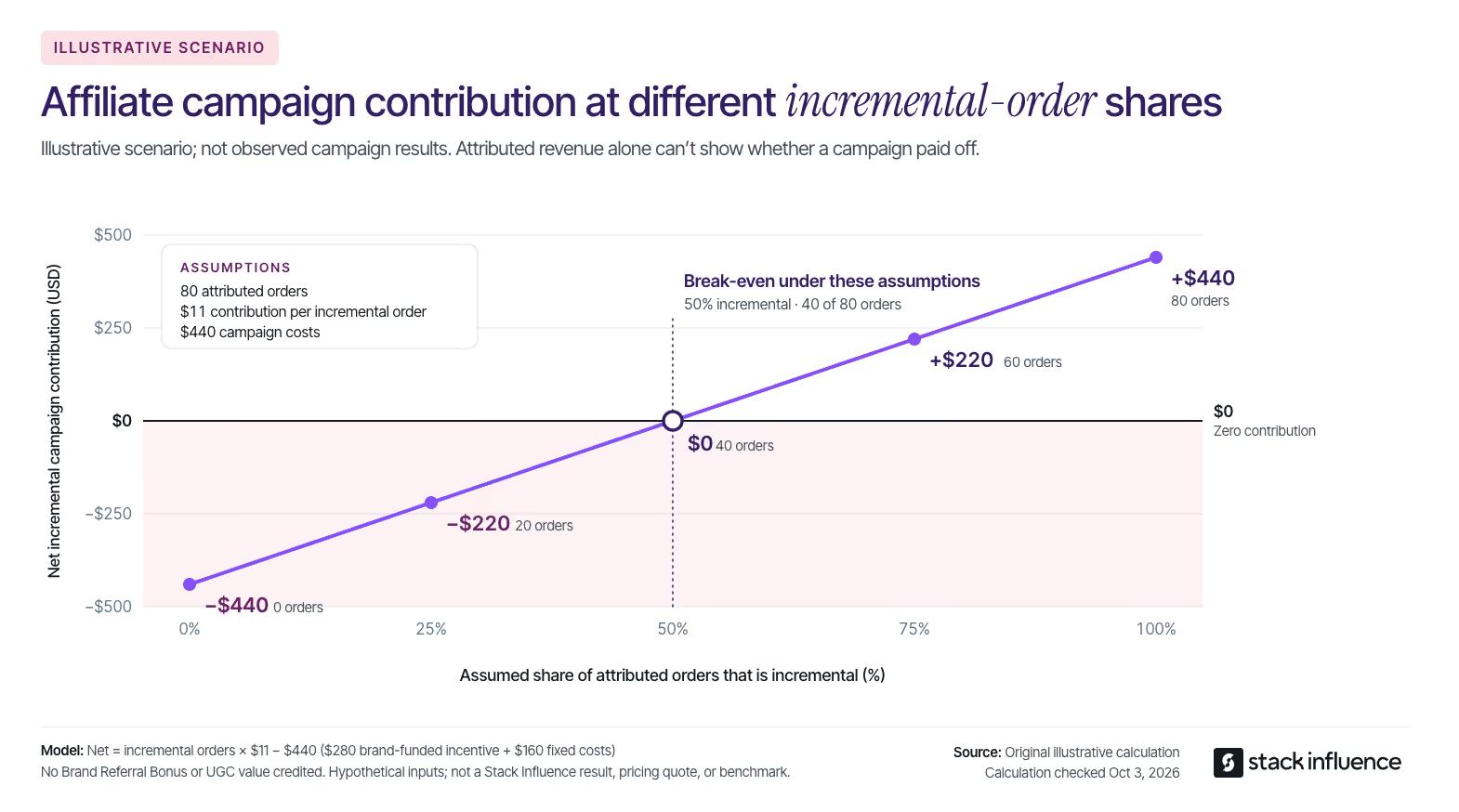
Start with delivery and traffic, then move to commercial outcomes. Completed posts and functioning links show that the campaign launched; clicks show activity; qualifying purchases and contribution margin help determine economic value.
Amazon’s Associates reporting documentation distinguishes metrics such as clicks, ordered items, shipped items, and commission income. A seller should also isolate the promoted product’s results instead of interpreting an affiliate’s total earnings as sales of the seller’s own catalog.
Keep reimbursed creator purchases separate from independent customer demand. A purchase made to obtain a campaign sample belongs in the campaign-cost assessment, not automatically in the count of customers acquired through the creator’s recommendation.
Consider a hypothetical brand-funded affiliate pilot with 80 attributed orders from independent customers at $35 per order. Attributed sales total $2,800. Assume each order contributes $11 after product costs, ordinary selling and fulfillment charges, and a return allowance, but before campaign costs.
The brand also pays an assumed 10% incentive on all 80 attributed orders, costing $280, plus $160 in combined fixed campaign costs. Total campaign cost is therefore $440. These figures are illustrative assumptions, not Stack Influence pricing, Creator Connections minimums, or observed campaign results.
Assume no Brand Referral Bonus credit and assign no financial value to later UGC reuse. The remaining question is how many of those attributed orders were genuinely additional purchases that would not have happened without the campaign.
The calculation is:
Net incremental contribution = incremental orders × $11 − $440.
At incremental-order shares of 0%, 25%, 50%, 75%, and 100%, the campaign adds 0, 20, 40, 60, and 80 orders respectively. The corresponding net incremental contributions are −440,-220, $0, $220, and $440.
Under these assumptions, the campaign breaks even when 40 of the 80 attributed orders are incremental, a 50% share. That threshold changes when margins, incentives, or fixed costs change; it is not an industry benchmark.
For an Amazon Attribution campaign, allow the relevant conversion window to mature before comparing complete reporting cohorts. For affiliate income, distinguish orders from shipped and ultimately payable activity.
Attribution assigns credit according to rules. It does not prove that every credited customer would have stayed away without the creator’s content.
Where feasible, use a credible holdout or comparison design to estimate additional demand. A simple before-and-after sales increase can also reflect pricing, seasonality, advertising, or stock availability.
The practical reporting goal is not one impressive revenue number. It is a defensible explanation of what was delivered, what was credited, what it cost, and what additional contribution the campaign plausibly created.
Disclose the commercial relationship where the recommendation appears. The FTC’s Disclosures 101 for Social Media Influencers explains that material connections include free or discounted products, not just cash payments, and that disclosures should be clear and difficult to miss.
Amazon’s Associate-identification guidance also requires clear affiliate-link disclosure and the statement: “As an Amazon Associate I earn from qualifying purchases.” Do not assume a profile statement alone explains every individual endorsement.
Paid distribution requires another check. Amazon’s April 14, 2026 policy update expanded disqualified purchases to include referrals through paid or boosted advertisements linking to Amazon, with limited exceptions. Verify an applicable exception before funding that distribution, even when you have permission to reuse the creator’s UGC.
Finally, keep promotional content separate from marketplace customer reviews. Amazon’s customer-review policy explanation describes its restriction on incentivized reviews outside authorized arrangements. Do not make an Amazon customer review a condition of product reimbursement.
How does Amazon affiliate work? Amazon connects eligible referral activity to commission income through tagged links, qualification rules, and a payment schedule. For sellers, the additional task is deciding whether that referral arrangement supports a profitable, well-defined creator partnership.
Apply the Link-Payer-Deliverable Check to one product before expanding the campaign. Confirm the tracking route, calculate the costs you actually fund, and distinguish completed content from incremental customer orders.
When your immediate goal is product demonstrations and reusable UGC, evaluate a Stack Influence product-seeding campaign around a defined content brief and completed-post accountability. Build the sales measurement alongside that workflow so the next campaign decision rests on usable content and understandable economics.
Consider an office manager buying supplies for twelve workstations. The lowest unit price may not be the easiest purchase to approve, store, receive, or repeat.
For ecommerce sellers, an Amazon B2B ecommerce strategy should solve that entire buying problem. Business pricing is one part of the offer, not the strategy itself.
This guide explains how to select business-use products, design quantity tiers, remove purchasing friction, protect delivery reliability, and measure whether larger baskets are becoming a durable business channel. The platform details below focus on the U.S. marketplace.
An Amazon B2B ecommerce strategy is a plan for selling products to organizations through Amazon Business. It differs from buying wholesale inventory to resell on Amazon: the focus here is the business customer purchasing your offer.
Start with a Reorder-Ready Offer, a five-part planning framework:
A product that fails one of these checks is not automatically a bad business product. It needs a specific repair before you pay to generate more demand.
According to Amazon’s Business seller documentation, sellers access B2B tools through a Professional selling account, currently $39.99 per month plus selling fees in the U.S. Existing Professional sellers can open B2B, then B2B Central, in Seller Central.
Amazon also provides B2B Product Opportunities and Case Pack Product Opportunities for assortment research. Use these as inputs to a shortlist, not as substitutes for checking sourcing costs and supply reliability.
Begin with products already attracting business purchases or with an obvious organizational use. A replacement supply with a clear specification offers a more testable starting point than a broad claim that an entire consumer catalog is suitable for businesses.
A larger quantity discount can reduce the price per unit while increasing the amount the buyer must authorize and store. Design offers around practical purchasing quantities, not the assumption that every business wants the largest case.
Purchasing controls are real, although they vary by organization. For example, Iowa State University’s Amazon purchasing guidance requires Amazon purchases to pass through cyBUY and procurement review before submission. That is one institution’s policy, not a universal Amazon requirement.
Consider an illustrative office-supply offer. Assume a buyer consumes 12 identical kits per month, the undiscounted price is $12 per kit, shipping is free, and taxes are excluded from the model. Suppose this buyer’s internal policy requires additional approval for purchases above $250.
Three possible order quantities produce different commitments:
Order commitment equals quantity multiplied by unit price. Months of supply equal quantity divided by monthly consumption.
The larger orders cross the hypothetical approval threshold even though each kit costs less. These figures are planning assumptions, not Amazon rules, industry benchmarks, or results from a Stack Influence campaign.
The practical response is to preserve a genuinely useful smaller purchase option alongside bulk tiers, provided its economics work. Do not encourage buyers to split transactions to evade purchasing controls; make each offer appropriate for a legitimate replenishment need.
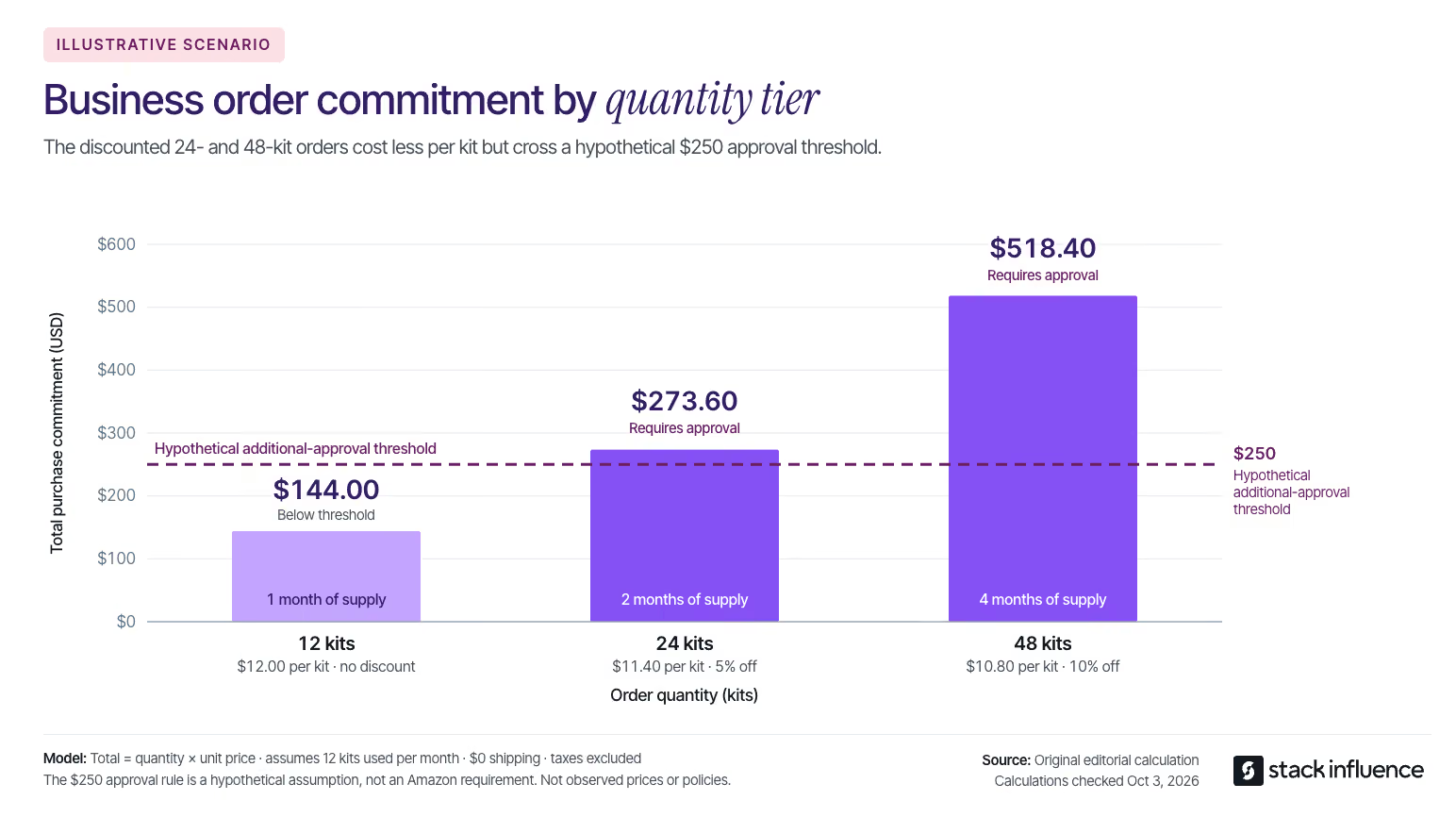
Set quantity discounts only after calculating the economics of the completed order. A discount that increases revenue can still reduce the money available to cover overhead.
Use this operating calculation:
Order contribution = product revenue after discounts − product cost − marketplace fees − fulfillment and packaging − allocated inbound and storage costs − expected returns and concessions − variable acquisition costs.
Keep taxes collected for remittance outside revenue. Include buyer-paid shipping and its associated costs consistently, and use actual category and fulfillment fees rather than a universal percentage.
Amazon’s B2B pricing guide describes business prices and quantity discounts, including percentage-off and fixed-price tiers. Choose thresholds that match how customers actually buy, then check the effective price during other promotions and automated price changes.
Amazon’s Business Discount Insights documentation provides suggested pricing opportunities and describes conditional fulfillment and referral-fee discounts. Treat recommendations as candidates for testing, and verify eligibility before including any savings in your cost model.
Evaluate at least the smallest qualifying order at each tier and the largest order your current stock can support. For seller-fulfilled products, price the actual carton and shipping service; do not assume shipping costs rise evenly with unit count.
Use margin-aware Amazon repricing controls when business prices interact with automated rules. A profitable manual offer can become unprofitable when another promotion changes its effective price.
Keep contribution separate from cash availability. Inventory may need to be purchased and delivered before the marketplace proceeds become available, so an attractive order can still create a funding gap.
Give the person authorizing the purchase enough information to evaluate the product without reconstructing the offer from photographs.
For a workplace accessory, specify dimensions, compatibility, included components, and the exact quantity received. For replenishment products, make the unit of measure and pack count unmistakable. Describe what is included rather than relying on a label such as “commercial quality.”
Amazon supports package hierarchies for units, case packs, and pallets. Distinguish ordering several units of an existing offer from creating a different packaged product; the listing structure must accurately represent what is delivered.
Apply the same discipline to images. One image can show the complete pack contents, while another demonstrates scale or compatibility. The principles in the Amazon product listing optimization guide are useful here, but the questions should come from a business purchasing decision.
Maintain accurate seller-profile information and substantiate any certifications you claim. Assign responsibility for incoming quote requests, product questions, and invoice-related issues rather than leaving them between sales and operations.
Set a response workflow for quotes: confirm the requested quantity, available stock, delivered cost, and acceptable contribution before responding through the available Amazon tools. A quote should be an executable offer, not a discount invented before fulfillment checks.
A persuasive demonstration cannot replace a missing specification. Return to the approval-evidence component of the Reorder-Ready Offer whenever a buyer asks a question that the listing should already answer.
Choose fulfillment by the product’s economics and the receiving conditions it must satisfy. Compare Amazon FBA and seller fulfillment for storage, handling, delivery reliability, and the quantities business buyers are likely to order.
For U.S. seller-fulfilled Amazon Business shipments, Amazon’s business-hour delivery requirement took effect on September 30, 2026. It requires a Business Hour Delivery Rate of at least 90%, measured over a rolling 14-day period.
Amazon’s announcement says sellers below the threshold will receive notification and recommendations. If performance has not improved by October 30, 2026, affected seller-fulfilled offers may be deactivated for Amazon Business customers; FBA and retail-offer eligibility are not affected by that action.
Review the metric in Account Health and investigate carrier and shipping-setting issues before increasing order volume. A delivery arriving by its promised date and a delivery arriving while the business is open are different operational questions.
Plan stock for business and consumer demand together. Use a cross-marketplace inventory plan when the same supply also supports Shopify or other marketplaces, and account separately for campaign inventory commitments.
Do not size the replenishment buffer from average order quantity alone. A small number of legitimate bulk orders can consume stock that normally covers many consumer purchases, so test the largest plausible order against available inventory before promoting the offer.
Promote the offer only after the purchasing and fulfillment requirements are workable. Separate advertising intended to reach business buyers from content intended to explain the product.
Eligible advertisers can use Amazon Business exclusive Sponsored Products campaigns to advertise only on Amazon Business. These campaigns support their own budgets, selected products, keywords, and bidding settings.
Start with a narrow product group and purchase-relevant search terms. A seller of desk organizers might test terms tied to office supplies, workstation organization, and the actual pack size rather than adding “wholesale” to every keyword.
Keep the test budget and success criterion explicit. Business-only placement identifies the advertising environment; it does not establish that every resulting order is incremental or profitable.
Creator content is most useful when it resolves a concrete product question. Ask a relevant creator to demonstrate assembly, show the full pack, or explain compatibility accurately rather than simply calling the product suitable for businesses.
When finding influencers for an Amazon product, examine evidence of relevant content and audiences. Micro influencers and nano influencers may be candidates, but follower count alone does not establish access to purchasing decision-makers.
Through Stack Influence’s automated product-seeding workflow, sellers can coordinate gifted-first campaigns and track completed creator posts. A business-use assignment should make its acceptance criteria specific: visible pack quantities, a truthful setup demonstration, and delivery of any contracted content files. Keep that production record separate from Amazon Business sales reporting.
Distinguish the social-post deliverable from the licensed UGC file. Specify permitted placements, edits, duration, and any separate advertising permissions before repurposing content.
The FTC’s influencer disclosure guidance explains that free products and other benefits can create a relationship that requires disclosure. Commission an honest product demonstration, not a customer review in exchange for a benefit.

Use a B2B-specific readout rather than treating overall Amazon sales growth as business-channel growth.
Amazon’s business reporting guide describes B2B and non-B2B comparisons, customer-segment views, quantity-discount reporting, and B2B traffic and sales metrics. Record the exact report, period, product level, and metric definition before comparing results.
Organize the readout around three questions: are qualified shoppers reaching the offer, what orders are they placing, and what contribution remains? Page visits and Featured Offer visibility are leading indicators; fulfilled orders and contribution are commercial outcomes.
More units per session can reflect larger baskets rather than more shoppers buying. Pair quantity metrics with actual order counts, units per order, and contribution per order.
Do not assume every report’s “order items” field represents distinct customer orders. Likewise, recurring sales of an item do not establish that the same customers are returning.
Evaluate repeat buying only after customers have had enough time to make the repeat purchase being measured.
Consider a separate illustrative dataset of 100 first-time business customers. Assume reliable, permitted customer-level records, no cancellations or returns, and a 60-day repeat-purchase window measured from each customer’s first order.
At the reporting cutoff, 40 customers have at least 60 days of follow-up, 35 have 30 to 59 days, and 25 have fewer than 30 days. Twelve of the fully observed customers reordered within their first 60 days, and they are the only customers with any repeat order by the cutoff.
Dividing 12 by all 100 customers gives a 12% mixed-age, observed-to-date repeat share. Dividing those 12 by the 40 with complete follow-up gives a 30% 60-day repeat rate for the fully observed cohort.
Both calculations are reproducible, but they answer different questions. Labeling the 12% figure a 60-day repeat rate treats customers who have not completed the window as though they have.
This is an illustrative measurement example, not a retention benchmark. The older cohort’s 30% result does not predict the newer cohorts, and 60 days is an assumed evaluation window, not a suitable reorder cycle for every product.
Use this calculation only where authorized data supports customer-level analysis. Where it does not, report recurring product-level demand as a proxy and state the limitation.
The official Amazon Attribution methodology uses a 14-day, last-touch model for qualifying off-Amazon activity. Apply tags before launch, but do not assume a tagged purchase proves the buyer was a business customer.
Use the external-traffic measurement guide to keep campaign reporting separate from incremental-demand claims. Do not add attributed sales to Seller Central sales as though they were additional transactions.
Where eligible, Amazon Brand Referral Bonus can provide referral-fee credits for qualifying external traffic. Include earned credits appropriately in the financial readout rather than assuming every B2B order receives a bonus.
A short advertising attribution window and a longer replenishment cycle serve different purposes. Maintain both views without assuming they can be joined into a complete customer journey.
Start with a small group of products rather than adding discounts across the entire catalog.
During the first month, complete the Reorder-Ready Offer checks, preserve the existing prices and baseline performance, and assign ownership of stock, questions, and delivery exceptions.
During the next month, test a defined quantity offer or business advertising campaign while keeping unrelated changes limited. Compare similar periods and record stockouts, promotions, and changes in delivery performance.
Use subsequent replenishment windows to evaluate recurring demand and contribution. A before-and-after improvement is useful evidence for the next decision, but it does not isolate causation when several conditions changed.
Expand only when the offer works operationally and the financial result supports it. A larger initial basket is not enough reason to roll the same discount across unrelated products.
A durable Amazon B2B ecommerce strategy gives customers an offer they can understand, approve, receive, and buy again without unnecessary work.
The strongest next step is not a bigger campaign. Put one repeat-use product through the Reorder-Ready Offer checks, repair the weakest part, and test whether business demand produces contribution worth repeating.
A wholesale buyer needs to reorder a case of products at a negotiated price, send the purchase for approval, and charge it to an existing account. A storefront that handles consumer checkout beautifully might still need additional configuration to complete that order correctly.
For ecommerce sellers comparing B2B ecommerce platforms, the important question is not which platform has the longest feature list. It is which system can handle your actual customers, commercial terms, and fulfillment rules without creating avoidable work.
This guide compares seven options, explains their pricing models and constraints, and provides a practical test for choosing between them.
Shopify, BigCommerce, WooCommerce, Adobe Commerce, OroCommerce, Sana Commerce, and Salesforce B2B Commerce provide seven distinct starting points for evaluation. Consider Shopify, BigCommerce, and WooCommerce when extending an existing retail operation into wholesale; investigate Adobe Commerce and OroCommerce for more elaborate purchasing workflows; examine Sana Commerce and Salesforce when the systems already managing your business should strongly influence the choice.
A B2B ecommerce platform supports online transactions between businesses, with capabilities such as company accounts, negotiated pricing, purchasing controls, and payment terms. For example, Shopify’s B2B documentation describes company-based purchasing and personalized buying experiences rather than treating every visitor as an unrelated retail customer.
This is a different decision from launching products across multiple marketplaces. Here, you are selecting the infrastructure for your own wholesale ordering experience, including the rules that govern who can buy, what they pay, and how orders reach your operational systems.
Evaluate the handoff between self-service ordering and human assistance, not just the checkout screen.
In McKinsey’s 2024 B2B Pulse research, among respondents likely to switch suppliers, 54% cited poor digital customer experiences, 51% cited missing customer tracking across channels, and 51% cited difficulty reaching the right person for help. These are stated concerns from a 2024 survey, not observed churn rates or 2026 benchmarks.
A useful demonstration should therefore include a buyer starting an order online, requesting help, and resuming without losing the agreed price or order context.
For consumer brands expanding into wholesale, product evidence and ecommerce social proof can help explain an assortment. Keep that evidence alongside, rather than in place of, the commercial details a retailer needs to place an order.
The following reviews use official product and pricing information checked on October 2, 2026. They are documentation-based evaluations, not hands-on performance benchmarks or a universal ranking.
Shopify is worth examining when a brand wants to connect direct-to-consumer and wholesale selling. Its current B2B features-by-plan documentation lists B2B availability on Basic, Grow, Advanced, and Plus, so the old assumption that every wholesale store requires Plus is outdated. Basic, Grow, and Advanced support up to three active catalog assignments across all B2B markets and require the new Shopify Markets for those catalog features.
The important constraint is customer-level pricing: assigning catalogs directly to individual companies or company locations requires Plus, which also supports unlimited B2B market catalogs. That distinction matters when comparing a few wholesale price groups with individually negotiated customer agreements.
For standard setups, Shopify Plus pricing starts at $2,300 USD per month on a three-year term or $2,500 per month on a one-year term; more complex businesses may use variable platform fees. Those are Plus prices, not the minimum cost of accessing Shopify B2B. Scope apps, custom development, and integrations separately.
BigCommerce’s B2B offering combines buyer portals, account pricing, quoting, purchasing roles, and self-service ordering with the ability to manage B2B and B2C commerce. Its appeal is the combination of a hosted commerce platform and integration options for businesses that need wholesale functionality without treating their consumer and business operations as entirely separate systems.
The public BigCommerce pricing page lists Performance plans starting at $1,499 USD per month, billed annually. That starting figure should not be read as an all-inclusive quote for your B2B implementation. Request written confirmation of the B2B capabilities, storefronts, integrations, payment arrangements, and services included.
For a distributor, the decisive demonstration is whether the buyer’s account price and permissions survive the entire ordering process and arrive correctly in the back office. Ask which parts of that connection the vendor, an implementation partner, and your team will maintain.
Adobe Commerce’s B2B capabilities include company-specific catalogs, negotiated quotes, purchasing approvals, requisition lists, and ordering through product-code uploads. These capabilities make it worth evaluating when wholesale buyers have structured procurement processes rather than a simple discount applied at checkout.
Be precise about the product being quoted. Adobe’s commerce packages and pricing distinguish Adobe Commerce as a Cloud Service, a multi-tenant software-as-a-service offering, from Adobe Commerce on Cloud, which uses dedicated cloud infrastructure. Adobe Commerce Optimizer is a storefront, catalog, and merchandising product that works with an existing transaction engine, not a like-for-like replacement for the complete commerce system.
Pricing requires a quote. The practical tradeoff is implementation scope: identify the deployment model, included B2B capabilities, integrations, and responsibility for custom workflows before comparing Adobe’s proposal with a simpler hosted-store subscription.
OroCommerce is built around B2B workflows for manufacturers, distributors, and wholesalers. Its documented capabilities include a visual workflow engine, customer-specific and tiered pricing, units and order minimums, quote management, and a built-in customer relationship management system.
The workflow engine is the distinctive evaluation point. A business with different approval rules by customer, role, or order condition should ask Oro to demonstrate those rules using representative accounts rather than a generic storefront.
Oro bases pricing on factors including deployment type, gross merchandise value, and administrator count, with a quote required. Its flexibility still needs an owner: determine who will maintain the business rules, test changes, and resolve integration exceptions after launch. A configurable workflow does not remove the need to decide how that workflow should operate.
Sana Commerce centers its offering on integration with supported SAP and Microsoft Dynamics enterprise resource planning systems. ERP software manages operational records such as inventory, customer terms, and orders; Sana’s approach uses that existing business logic to power the buying experience.
That makes Sana a particularly relevant evaluation candidate when the ERP already contains the prices and customer rules the storefront must respect. The demonstration should show your actual ERP configuration supplying those values, including an account with unusual terms.
Sana’s pricing and package information uses Essential, Pro, and Advanced plans with pricing available by request. Supported ERP options and capabilities vary by package. Confirm the exact ERP version, customizations, and required functions before assuming that an ERP-centered architecture will fit your current environment without additional work.
Salesforce B2B Commerce is worth considering when customer relationship management, sales assistance, and service interactions already revolve around Salesforce. Its documented buying capabilities include account-based product access, negotiated prices, purchasing for business locations, and splitting large orders into shipments.
The central question is whether connecting commerce to those existing customer records will remove meaningful handoffs. Ask the demonstration team to show how a sales-assisted order, a customer service request, and a buyer’s self-service activity remain connected.
The current Salesforce B2B pricing page lists Growth and Advanced editions with pricing by request and describes a gross-merchandise-value-based commercial model. Growth includes Order Management Lite, while Advanced includes full Order Management. Confirm edition entitlements, additional products, implementation services, and volume-based charges rather than assuming an existing Salesforce subscription already covers commerce.

WooCommerce provides an open-source, WordPress-based commerce foundation with control over the storefront, code, and extensions. It warrants consideration when a seller already works in WordPress and wants to assemble a wholesale setup around specific requirements. Evaluate the complete configuration, however, rather than assuming the core platform includes every B2B purchasing function.
One documented option is B2B for WooCommerce by Addify, listed at $179 for a one-year plan. The extension includes capabilities such as registration approval, customer or role-based pricing, quotation requests, and quantity controls. That price is an extension license, not the cost of hosting, implementation, maintenance, or a fully managed wholesale operation.
The tradeoff is ownership of the combined setup. Include compatibility testing, updates, backups, and support responsibility in the budget, especially when several extensions affect pricing or checkout.
Use the Five-Order Acceptance Test as a demonstration brief for your finalists. Instead of asking whether a platform “supports wholesale,” require it to complete five representative orders from start to finish.
Replace any irrelevant scenario with one of your own recurring exceptions. The point is representative coverage, not forcing unnecessary complexity.
For every test, record whether the solution is native, configuration-based, extension-based, or custom-built. Ask for the implementation cost, ongoing owner, and evidence of the completed transaction. A requirement that depends on unpriced custom work is not equivalent to a demonstrated included feature.
The useful comparison is the cost of running your required workflows, not the advertised software fee alone.
Separate implementation, migration, integrations, recurring licenses, hosting where applicable, maintenance, payment-related charges, and internal processing work. Ask how costs change with sales volume and payment arrangements; BigCommerce’s current pricing terms, for example, distinguish payment-provider fees by plan and provider category.
Then examine manual correction work. Without measured vendor-specific exception rates, the following illustrative scenario shows how to calculate that component without pretending it is an industry benchmark.
Assume Configuration A costs $400 per month in software and requires manual correction on 20% of orders. Configuration B costs $1,200 per month and requires correction on 4%. Each exception takes 15 minutes, with fully loaded labor valued at $36 per hour.
These are hypothetical inputs, not vendor prices, measured platform performance, or Stack Influence results.
Under those assumptions, exception labor costs $1.80 per order for A and $0.36 for B. At N monthly orders, modeled monthly software-plus-exception costs are $400 + $1.80 × N for A and $1,200 + $0.36 × N for B.
At 200 orders per month, A costs $760 and B costs $1,272. At 500 orders, A costs $1,300 and B costs $1,380.
At 1,000 orders, A costs $2,200 and B costs $1,560. At 2,000 orders, A costs $4,000 and B costs $1,920.
The two configurations cross at approximately 555.56 monthly orders, making B less expensive on these modeled costs at 556 whole orders or more. That conclusion depends entirely on the assumed correction rates, handling time, labor value, and fixed fees.
This is not a total-cost-of-ownership calculation. It excludes implementation, other operating expenses, payment processing, taxes, fulfillment, and ordinary order handling. Reduced correction work creates capacity; it does not automatically reduce payroll or produce additional sales.
Assign an authoritative system to each important record before migration. Decide where customer prices, company permissions, available inventory, product identifiers, and invoice status are maintained, then document how other systems receive changes.
Pay particular attention to the difference between individual units and cases. A successful checkout is not a successful integration if the warehouse receives the wrong unit of measure.
Run the Five-Order Acceptance Test again with migrated data, not just demonstration records. Include customers with unusual terms, products with pack-size restrictions, and orders that require assistance.
During the pilot, define a fallback for missing or stale information. A price lookup failure should trigger an agreed exception process rather than silently substituting a public retail price.
Also assign responsibility for failed updates, duplicate messages, and order reconciliation. Launch approval should depend on the end-to-end result and recovery process, not simply whether the storefront is online.
Measure whether buying companies can complete useful work, not just whether employees create logins. Start with a stable company identifier, consistent with the company-based account structure described in Shopify’s B2B documentation.
Use three connected measurement layers:
Review failures daily during the initial pilot. Use the first 30 days to identify stability and adoption problems, then examine 90-day cohorts where that window covers a meaningful reorder cycle. Extend the window for less frequent purchasers.
For acquisition reporting, connect campaign identifiers to the company record and completed order wherever possible. Preserve sales-assisted interactions rather than assigning all credit to the final website visit.
Compare results with a documented baseline and account mix. Changes in pricing, assortment, customer demand, or sales activity can affect outcomes, so improved results after migration do not establish that the platform alone caused them.
For DTC brands selling through retail partners, the wholesale portal and the consumer marketing program should have different objectives. The portal supports purchasing and account service; a Shopify influencer marketing program should be planned around consumer discovery, content, traffic, and attributable customer actions.
Stack Influence’s automated product-seeding workflow supports the campaign side through creator coordination, product purchase and reimbursement workflows, and verification of completed social posts. Treat that as complementary to the commerce infrastructure, with a separate campaign budget and performance review.
A useful operating step is to coordinate inventory before activating creators while preserving stock allocated to wholesale commitments. Also specify where creator assets will be used; the planning considerations in a UGC advertising brief help separate content production from the permissions and deliverables needed for later campaigns.
The right B2B ecommerce platforms to evaluate are the ones that match your customer agreements, purchasing processes, and existing systems. The final choice should rest on demonstrated order handling and a complete commercial proposal, not a polished storefront or an attractive starting fee.
Use the Five-Order Acceptance Test to narrow the shortlist, replace illustrative cost assumptions with your own measurements, and verify that every important integration has an owner.
Send your finalists the same test orders and ask them to demonstrate, price, and document each workflow before you commit. That makes the comparison more useful and the implementation easier to hold accountable.
A product costs $12 from a supplier and sells for $32 on Amazon. That looks like a strong opportunity, until fulfillment, selling fees, returns, and a lower selling price consume the difference.
Amazon reselling starts with finding products, but the buying decision needs more than a price comparison. For ecommerce sellers, the practical questions are whether the inventory is eligible, whether the numbers survive competition, and how much stock your own offer can realistically sell.
This guide focuses on the U.S. Amazon marketplace, with a worked margin calculation, current sourcing and labeling requirements, and a method for limiting each purchase.
Amazon reselling means sourcing existing products and offering them for sale through an Amazon selling account. Rather than manufacturing a new product, a reseller typically purchases inventory from another business and earns the difference between sales revenue and the costs of acquiring and selling it.
Amazon’s guide to reselling describes a process of sourcing products, listing offers, fulfilling orders, and managing the business. Where an exact product already exists in the catalog, sellers can generally match an offer to that product page, subject to applicable approvals.
The product identifier, or ASIN, stands for Amazon Standard Identification Number. A product page describes the item; your offer adds seller-specific details such as price, condition, availability, and delivery.
That distinction should shape your buying decisions. Demand for a product is not a commitment to purchase from your business, and buying inventory does not mean you own the brand or its product page.
A resale purchase can remain profitable after a price reduction only if the remaining revenue still covers its costs. Start with unit contribution, then account separately for fixed overhead and taxes before calling the result net profit.
Unit contribution equals selling price minus acquisition cost, referral fees, fulfillment, preparation and inbound costs, expected storage and return losses, and any other variable selling expenses.
Consider an illustrative Home and Kitchen product. Amazon’s U.S. selling-fee schedule lists a 15% referral fee for that category, subject to its minimum fee; other categories can have different rates and thresholds.
For this example, assume a $12 acquisition cost, $1.50 for preparation and inbound costs including any allocated placement expense, $5 for fulfillment, and $1.50 for expected storage and return losses. Those non-referral costs total $20 per unit.
The $5 fulfillment figure and both $1.50 allowances are assumptions, not Amazon fee quotes or observed averages. Assume the Professional plan and no advertising, separately charged shipping, gift wrapping, discounts, or referral-bonus credits. The monthly plan charge, owner labor, overhead, and income tax are excluded.
With those assumptions, contribution equals selling price multiplied by 85%, minus $20:
The break-even price is approximately $23.53. To retain at least $3 in contribution, the selling price needs to be approximately $27.06 or higher under the same assumptions.
This is the practical difference between a markup and a buying decision. The gap between $12 and $32 looks generous, but it does not establish how far you can reduce the price safely.
Calculate a maximum acquisition cost as well as a minimum selling price. At a conservative $26 selling price, the same $8 in non-acquisition costs and a $3 contribution target leave a maximum purchase price of $11.10: $26 × 85% − $8 − $3.
A supplier asking $12 has not necessarily offered a bad product. The offer simply misses this particular purchasing threshold.
Use the Amazon selling-cost breakdown as a checklist for expenses, then replace every illustrative allowance with current product-specific estimates. Repeat the calculation whenever size, weight, sourcing costs, or fulfillment arrangements change.
Choose suppliers based on authenticity, usable documentation, replenishment terms, and economics together. A low purchase price cannot compensate for an inventory source you cannot substantiate.
Wholesale can support repeat purchasing when the supplier has reliable stock and terms that permit your intended sales channel. Before accepting a minimum order, establish who supplies the goods, what documentation will accompany them, and whether the brand or Amazon requires authorization for your proposed activity.
Ask about lead times, damaged goods, shortages, and returns before paying. Those terms belong in the buying calculation because an attractive unit price can require an uncomfortable amount of inventory or leave little recourse for problems.
Retail arbitrage involves buying products from retail stores for resale; online arbitrage uses online retailers as the purchasing channel. Amazon’s reselling guidance on retail arbitrage allows for this model within its requirements and notes that additional documentation may be needed.
Do not assume a checkout receipt will satisfy a particular approval request. Check what your account is being asked to provide before purchasing, and retain the original records rather than treating documentation as something to reconstruct later.
Used inventory requires a separate condition assessment, not merely a lower price. Amazon’s condition guidelines distinguish condition grades and include category-specific requirements, including separate guidance for books.
Inspect each unit rather than assigning one grade to an entire batch. An item that looks unused is not automatically eligible to be listed as New, and a familiar brand name does not establish authenticity or completeness.
Check the exact product through your own selling account before placing an order. Under Amazon’s branded-product listing process, sellers search through Catalog, select Add Products, choose the condition, and follow an Apply to sell prompt when approval is required.
For brand approval, Amazon says the application can require a manufacturer or distributor invoice, or a brand authorization letter. Follow the actual request for your account rather than relying on a universal invoice-age, quantity, or documentation rule from a third-party checklist.
Keep the supplier’s identity, transaction records, product identifiers, and quantities together. A document should describe the inventory you actually purchased, not simply establish that you have bought something from the supplier before.
Next, match the physical item to the intended ASIN: brand, model, size, color, pack count, edition, and included accessories. A two-pack is not interchangeable with a single unit, even when the product photographs look similar.
Use the product-listing accuracy checks to review how the item is represented, but distinguish checking a shared page from having permission to create or change one. Amazon’s approval to match an offer does not automatically confer brand-owner privileges.
Safety checks also belong before purchase. The U.S. Consumer Product Safety Commission’s reseller guidance advises inspecting inventory for safety and compliance and checking recalled products before taking them into inventory or selling them.
Prepare the selling account and fulfillment process before committing to a large shipment. Amazon’s seller registration guide explains the business, identity, banking, and verification information involved in setting up an account.
The current selling-plan comparison lists the Individual plan at $0.99 per item sold and the Professional plan at $39.99 per month, with additional selling fees under both. Choose based on required features and expected activity, not the subscription fee alone.
With Fulfillment by Amazon, Amazon handles storage, picking, packing, shipping, customer service, and returns for enrolled inventory. Fulfilled by Merchant means you retain responsibility for fulfillment, either directly or through a service provider.
Use the Revenue Calculator on Amazon’s pricing page to compare the same product under both arrangements. Include storage, packaging, shipping, preparation, and the work involved in handling returns rather than comparing an FBA estimate with postage alone.
FBA is a fulfillment service, not product approval or a sales guarantee. You still need an eligible, accurately described product and economics that work after its actual fees.
Amazon’s announcement ending commingling introduced new requirements for inventory shipped on or after March 31, 2026. Resellers without the Brand Representative selling role in Amazon Brand Registry must use Amazon barcode stickers even when products already carry manufacturer barcodes.
Qualifying brand owners with that role can use manufacturer barcodes for eligible products. Products without a manufacturer barcode require Amazon barcode stickers under the announcement.
Do not equate a supplier’s authorization letter with the specific Brand Registry role. Confirm the barcode requirements for the inventory before arranging preparation and shipment.
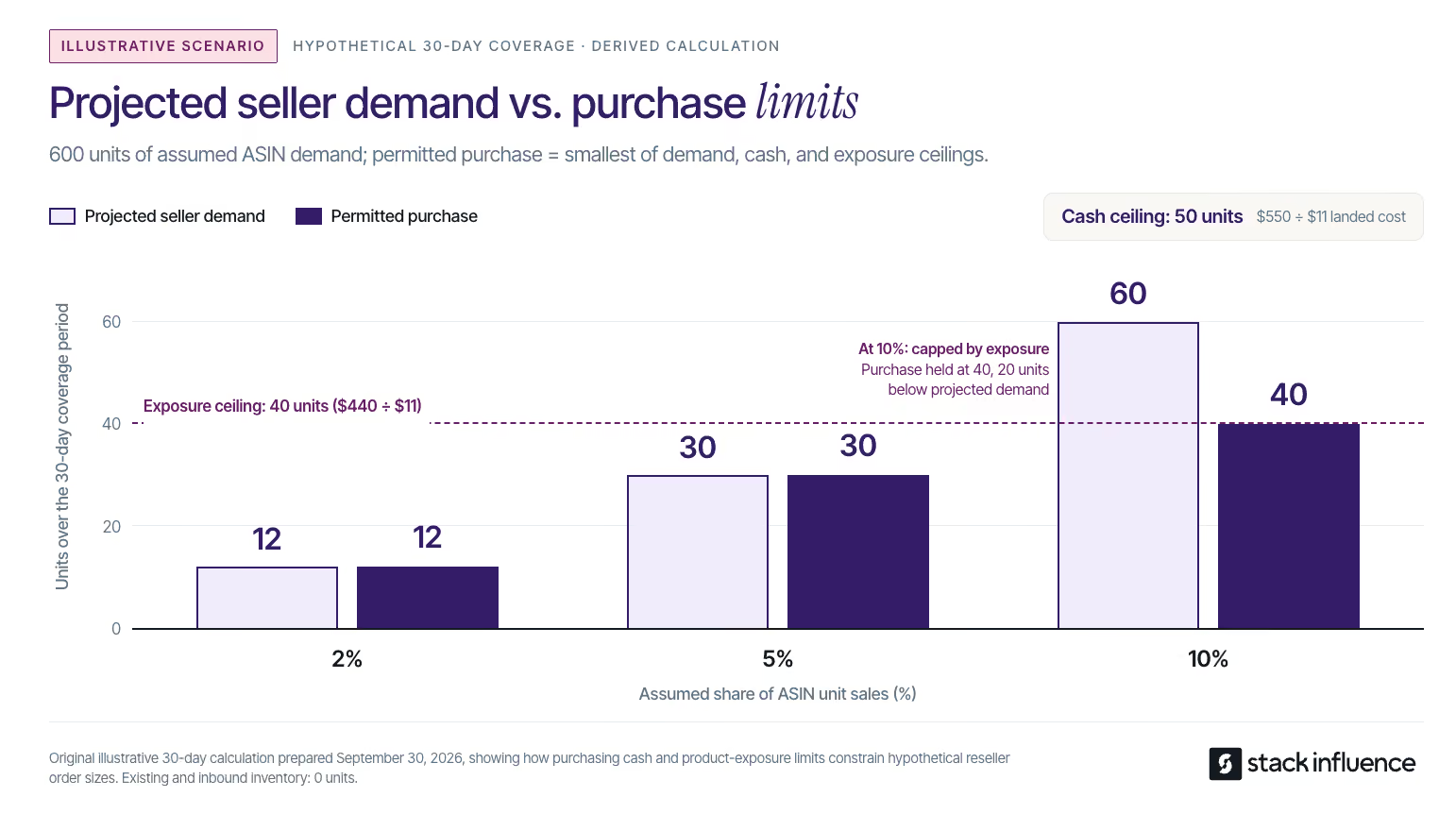
Limit each order to the smallest of three quantities: what your offer can reasonably sell, what your available cash can fund, and how much capital you are willing to expose to one product. This proposed buying rule turns a promising product into a bounded inventory decision.
Eligibility, authenticity, and acceptable unit economics come first. A product that fails those checks should not become eligible merely because you can afford it.
Estimate your own sales during the coverage period, then subtract sellable inventory and confirmed inbound stock. Use a period that reflects the supplier’s replenishment lead time and your planned reorder cycle.
Amazon’s Featured Offer guidance now describes an Offer Display containing one or more Featured Offers. Price, delivery, customer experience, and stock availability matter; total product-page demand should not be treated as your forecast.
Start with your actual sales where available. Do not divide estimated ASIN sales equally by the number of sellers or assume a Featured Offer visibility percentage is identical to an order-share percentage.
Divide cash available for this purchase by its landed unit cost, rounding down to whole units. First reserve money for expected charges, returns, operating expenses, and existing commitments.
Define landed cost consistently. Include acquisition and the upfront costs required to make the unit ready for sale, while separately reserving cash for later expenses.
Set a maximum amount of inventory capital you are prepared to have tied up in this product. Subtract existing exposure, then divide the remainder by the same landed unit cost.
The smallest ceiling controls the order. Round down further for case-pack requirements; when a supplier’s minimum exceeds your limit, negotiate the order rather than quietly removing the limit.
For a separate example, assume a product sells 600 units across all sellers in 30 days. Your hypothetical sales shares of 2%, 5%, and 10% would represent 12, 30, and 60 units respectively.
Assume a 30-day coverage period, no existing or inbound inventory, and an $11 landed unit cost. A $550 purchasing budget after reserves creates a 50-unit cash ceiling, while a $440 product-exposure limit creates a 40-unit exposure ceiling.
The permitted purchases are therefore 12 units at the 2% share assumption, 30 units at 5%, and 40 units at 10%. The last scenario is capped below its 60-unit demand estimate because the exposure limit is tighter.
These are illustrative assumptions, not observed Amazon sales or recommended market-share benchmarks. Without your own demand evidence, use a smaller test and replace the assumptions with actual order data before expanding.
Measure the first purchase as an inventory batch, not simply as part of a growing revenue total. Record when cash leaves, when units become available, what sells, and what remains unsold.
Review availability, competitive delivered price, and delivery performance weekly as early indicators. Track your own units sold after returns, realized contribution, inventory capital still tied up, and cash received as outcome measures.
Reconcile the batch after 30, 60, and 90 days as a suggested operating cadence, extending the review where returns or inventory remain unresolved. Replace estimated return and storage allowances with actual costs as information matures; do not deduct both the full allowance and the same realized cost.
Reorder when the evidence supports another purchase under the Three-Ceiling Buying Rule. Revenue growth alone does not show that the inventory is producing acceptable returns on the cash and work it requires.
Creator marketing becomes worth testing when the reseller has reliable supply, appropriate brand and content permissions, and enough contribution to fund customer acquisition. It should not be used to rescue a purchase that only works at an unrealistic selling price.
A further complication follows from Amazon’s shared product pages: generating interest in an ASIN does not guarantee that every resulting order goes to your offer. Account for that possibility when deciding how much to spend on external traffic.
For brand-supported campaigns, Stack Influence’s automated product-seeding workflow coordinates gifted-first creator participation and content completion. The operational output is completed creator content; evaluate sales outcomes separately rather than treating posts as proof of profitable demand.
According to Amazon Attribution’s eligibility documentation, eligible users include Professional sellers enrolled in Amazon Brand Registry. An ordinary resale account should not assume it has access merely because it sells on Amazon.
The Amazon Brand Referral Bonus also has enrollment requirements and provides credits against future referral fees on qualifying sales. Do not build an assumed bonus into every resale unit’s margin; use the bonus rates and credit-reconciliation guide to separate potential credits from applied credits.
Measure tagged purchases alongside your own orders, campaign costs, and inventory movement. Separate any reimbursed creator transactions from non-incentivized customer demand, and avoid treating a sales increase during a campaign as proof that the campaign caused it.
For DTC brands combining resale with an owned storefront, Shopify influencer marketing involves a different checkout and measurement environment. Keep the channels’ economics separate, and confirm content usage rights before reusing creator assets.
The FTC’s influencer disclosure guidance explains that free products and other material connections can require clear disclosure. Product gifting does not remove that responsibility.
Amazon reselling works as a repeatable business only when sourcing, eligibility, unit economics, and inventory decisions hold together. A discounted product is a lead to investigate, not a completed business case.
Before the next purchase, document the supplier, verify the exact offer, calculate the lowest acceptable selling price, and set a maximum order quantity. Use the first batch to test those assumptions, then expand only when actual sales and costs support the decision.
Build that buying record for one product before increasing your inventory budget. The benefit is not just avoiding a weak purchase; it is knowing why a sound purchase deserves more capital.