
The latest info on influencer marketing trends, micro influencer news, and the world of social media

Amazon A+ Content gives eligible sellers more room to explain a product after shoppers reach the detail page. The opportunity is not simply to make the listing look more polished. It is to answer the questions that still block a purchase after the shopper has seen the title, image gallery, bullets, price, reviews, and delivery promise.
For ecommerce sellers, the strongest A+ Content works like a visual buying guide. It explains fit, use, compatibility, materials, differences, and limitations in the order shoppers need them. This guide covers eligibility, Basic and Premium formats, the creation workflow, creator content, compliance, testing, and the metrics that determine whether the page is actually helping.

Effective Amazon A+ Content should answer the next unresolved buying question at each scroll. That principle is more useful than starting with a module catalog because shoppers do not care which template a seller selected. They care whether the page resolves uncertainty.
Use the Purchase-Question Sequence as a five-part planning method:
This approach also improves content production. From Stack Influence's experience coordinating ecommerce creator campaigns, reusable footage is easier to obtain when the brief identifies the correct product variant, the exact proof shot, prohibited claims, framing requirements, clean master files, and intended usage rights before filming begins.
Amazon states that Basic A+ Content can increase sales by up to 8%, while well-implemented Premium A+ Content can increase sales by up to 20%. Amazon labels these figures as internal data. Treat them as evidence that rich content can matter, not as a guaranteed lift or a substitute for product quality, price, inventory, reviews, and offer competitiveness.
Amazon A+ Content is an eligible seller tool for adding enhanced images, customized text, comparison content, video, interactive elements, and brand storytelling to product detail pages. It expands the information available below the primary listing content so sellers can explain products and brands more clearly at a critical point in the purchase journey.
Amazon currently describes three main content types:
A+ Content is not a replacement for the rest of the listing. The title, attributes, bullets, image gallery, price, offer, variation structure, reviews, and fulfillment promise still carry the first part of the decision. Sellers planning a full page rebuild should coordinate A+ work with the broader Amazon product listing optimization process so every section presents the same facts and positioning.
Sellers generally need a Professional selling account plus the appropriate brand or catalog permissions. Amazon's current eligibility guidance says sellers need a Brand Representative or Reseller role for a brand enrolled in Amazon Brand Registry, or qualifying generic products in their catalog.
Amazon describes Brand Registry as a free program that unlocks brand-building and protection tools. Enrollment has separate requirements, including a brand name and logo permanently affixed to the product or packaging and an eligible pending or registered trademark. A+ Content itself is free for sellers who meet the eligibility requirements, although the Professional selling account has its own fee.
Check Premium availability inside the current A+ Content Manager before planning the creative scope because the options shown in Seller Central determine what that account can publish.
Create Amazon A+ Content by confirming the product facts, opening A+ Content Manager, selecting the appropriate format and modules, applying the content to eligible ASINs, and submitting it for review. The mechanics are straightforward, but the preparation determines whether the result is useful.
Begin with the exact product variant, dimensions, materials, package contents, compatibility, care instructions, certifications, and limitations. The same facts should appear consistently across packaging, catalog attributes, bullets, images, A+ modules, customer support, and other sales channels.
GS1 US guidance on verified product information emphasizes consistent identity and core attributes across ecommerce and marketplace systems. Even when a seller is not using every GS1 tool discussed on that page, the operational lesson applies: conflicting product data weakens shopper trust and creates avoidable catalog problems.
In Seller Central, hover over Advertising and select A+ Content Manager. Choose Start creating A+ Content, select the content type available to the account, and add modules according to the Purchase-Question Sequence.
Amazon also offers AI-assisted creation for modules marked with an AI Ready badge. Generated text or imagery still requires human review. Check every claim, specification, product depiction, and variant before submission because the seller remains responsible for accuracy.
Do not start by filling every available slot. Start with the highest-risk purchase question and choose the smallest number of modules needed to answer the complete question set.
A practical sequence for a complex product might be:
Teams without internal design or catalog capacity can compare the responsibilities covered by Amazon listing services, but the seller should retain final ownership of factual accuracy and approval.
Follow the requirements visible in the seller account and current Amazon A+ Content guidelines. Amazon's current guidance says individual image files must remain under 2 MB, image resolution should be at least 72 dpi, and animated images such as GIFs are prohibited.
Avoid pricing, discounts, temporary promotions, unsupported superlatives, external contact details, or language that directs shoppers away from Amazon. Keep important text in live text fields when possible instead of embedding every claim inside an image.
Apply the content to the correct eligible ASINs, preview it carefully, then select Review and submit. Check every assigned variant because a strong module attached to the wrong product can create a more damaging mismatch than having no module at all.
Amazon's content publishing and rejection guidance says review may take up to seven business days and can take longer during the holiday season. Build that review window into launch schedules, especially when inventory, ads, creator posts, and promotions depend on the revised page going live.
Choose the A+ format according to the information the shopper needs, not according to which option looks most impressive. A simpler product may need only a few Basic modules, while a technical or demonstrable product may benefit from Premium features.
Premium modules cannot rescue weak evidence. A video that slowly rotates the package may communicate less than a Basic image showing dimensions, installation, or the product in context. The format should earn its place by reducing a specific uncertainty.
Every module should prove something that affects the purchase. Attractive branding can support recognition, but decorative content should not displace information about the product itself.
Shoppers often abandon or return products when they cannot judge size, fit, capacity, or compatibility. Baymard Institute's research on showing products in scale documents the usability problem created when ecommerce images do not give users enough context to estimate real-world dimensions.
Use an object, room, body, device, or clearly labeled measurement that creates accurate context. A scale visual should never make the product appear larger, smaller, fuller, or more capable than it is.
A setup or use sequence should focus on the moment most likely to cause hesitation. For a storage product, show what fits. For a beauty tool, show the application step that buyers may misunderstand. For an accessory, show the exact device or surface relationship that confirms compatibility.
This is also where a structured Amazon conversion rate optimization process helps. A+ changes should begin with a diagnosed objection and end with a measurable hypothesis, rather than becoming a general redesign with no clear success condition.
Comparison modules work best when the products genuinely belong in the same decision set. Compare dimensions, quantities, use cases, materials, compatibility, or included features that shoppers can verify.
Do not create a chart with vague checkmarks that makes every option look interchangeable. The purpose is to help the shopper select the right ASIN, including situations where a lower-priced or smaller version is the correct choice.
Use large, readable text, short labels, strong contrast, and one visual message per image. The W3C image accessibility tutorial recommends text alternatives that communicate the essential information or function represented by informative images.
Alt text should explain the decision-relevant information, not repeat a keyword or describe decorative details. Important specifications should also remain visible in text because an image alone is a fragile place to store critical product facts.
Licensed creator photos and videos can support A+ Content when the seller has permission for the intended use and the assets comply with Amazon's placement rules. The useful question is not whether an asset looks authentic. It is whether the asset accurately demonstrates the product, survives the technical review, and can legally be edited and published in the intended module.
Commissioned creator content is different from an Amazon customer review. Do not turn a creator quote into a supposedly independent customer opinion or ask creators to make claims they cannot support. For off-Amazon social posts, the FTC's influencer disclosure guidance explains that free products and other material connections require clear disclosure.
An Amazon-ready creator brief should specify:
The Amazon UGC services guide explains why destination, product proof, permission, and handoff should be defined before content is commissioned. Sellers can also use a product-to-creator research process to prioritize creators who already demonstrate the buyer problem instead of selecting primarily by follower count.
Stack Influence is designed for ecommerce brands that want vetted micro-influencer activation, gifted-first product seeding, campaign coordination, completed-post accountability, and UGC production managed through one workflow. Its automated product-seeding workflow can support the production of specific proof assets when the brief defines the intended Amazon placement from the start. The Amazon-focused campaign workflow can also connect creator distribution, external traffic, and reusable content, while sellers retain responsibility for listing accuracy and Amazon approval.
Weak A+ Content usually fails because it answers the wrong questions, conflicts with the listing, violates a content rule, or cannot be understood quickly on a small screen. Rejection is an operational problem, but approval alone does not mean the content will improve conversion.
Watch for these failure modes:
A broader Amazon algorithm guide for controllable seller inputs reinforces an important distinction: A+ Content can support detail-page confidence, but it does not replace accurate catalog attributes, offer reliability, inventory, fulfillment, and customer satisfaction.
Sellers should measure A+ Content with a controlled experiment when eligible, then review conversion, units, sales, and downstream customer outcomes together. A simple before-and-after comparison cannot isolate A+ Content from price changes, ads, seasonality, inventory, reviews, promotions, or traffic mix.
Use an A+ Decision Loop:
Amazon's Manage Your Experiments tool can test A+ Content and Brand Story along with other eligible listing elements. Amazon reports outcomes including conversion rate, units sold, sales, units sold per unique visitor, sample size, and a projected one-year impact for the winning version.
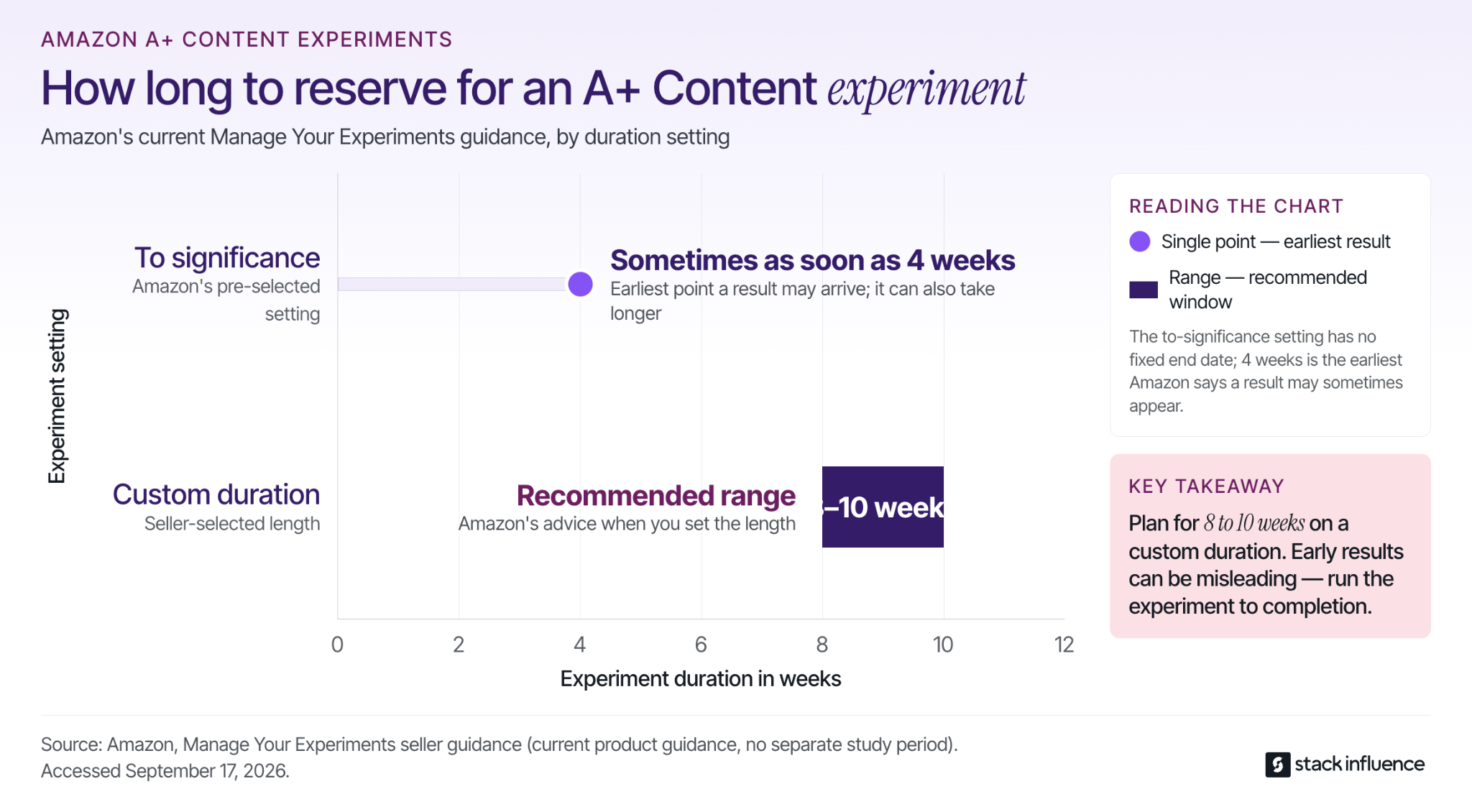
For seller-selected durations, Amazon recommends running experiments for 8 to 10 weeks. With the pre-selected to-significance setting, Amazon says results can sometimes arrive as soon as four weeks. Let the experiment finish because an early lead can reverse as the sample grows.
A+ Content should be evaluated as one part of the retail system. When external media or creator campaigns send shoppers to the page, use a disciplined Amazon traffic measurement strategy to separate traffic quality from page conversion. More visitors do not prove the A+ redesign worked, and stronger conversion does not prove which individual module caused the change unless the test isolates it.
Amazon A+ Content performs its most useful role when it turns scattered product facts into an ordered buying decision. The seller's job is to identify the remaining questions, assign the right evidence, preserve factual consistency, and test whether the new sequence improves customer outcomes.
Start with one commercially important ASIN. Write the five questions most likely to stop a qualified shopper, build only the modules needed to answer them, and create a measurement plan before publishing. When producing enough rights-cleared demonstrations is the bottleneck, evaluate a managed creator and product-seeding workflow that can turn the same question set into a repeatable content brief.
Customer acquisition cost can look healthy in an advertising dashboard while the business behind it loses money. A platform may divide media spend by purchases even when some purchases came from returning customers and the reported cost excludes creative production, software, agency fees, creator products, or internal labor.
For ecommerce sellers, useful CAC starts with a stricter question: how much did the business spend to acquire one genuinely new customer, and when did contribution profit repay that spending?
This guide explains how to calculate customer acquisition cost, establish a profit-based CAC ceiling, compare acquisition channels fairly, and measure paid advertising, product seeding, affiliate programs, and influencer campaigns without hiding important costs.
Customer acquisition cost is the average amount a business spends to acquire one new paying customer during a defined period.
The basic formula is:
Customer acquisition cost = total customer acquisition spending ÷ new customers acquired
Shopify’s ecommerce customer acquisition guide uses the same core formula and explains that acquisition spending may include advertising, content production, contractors, software, and internal team time.
The arithmetic is simple. The difficult part is defining what belongs in the numerator and denominator. Before accepting any CAC figure, apply the Four-Boundary Test.
The denominator should contain genuinely new paying customers.
Do not use all orders, all website visitors, every customer who clicked an ad, or every conversion reported by an advertising platform. Returning customers remain valuable, but the business did not acquire them again.
When a reporting system cannot distinguish first-time customers from returning buyers, label the result cost per purchase or CPA rather than CAC.
Every CAC report should state which cost layer it uses.
Media CAC helps marketers optimize campaigns quickly. Channel CAC helps ecommerce teams decide which acquisition channels deserve more budget. Fully loaded CAC shows whether the complete acquisition system can support profitable growth.
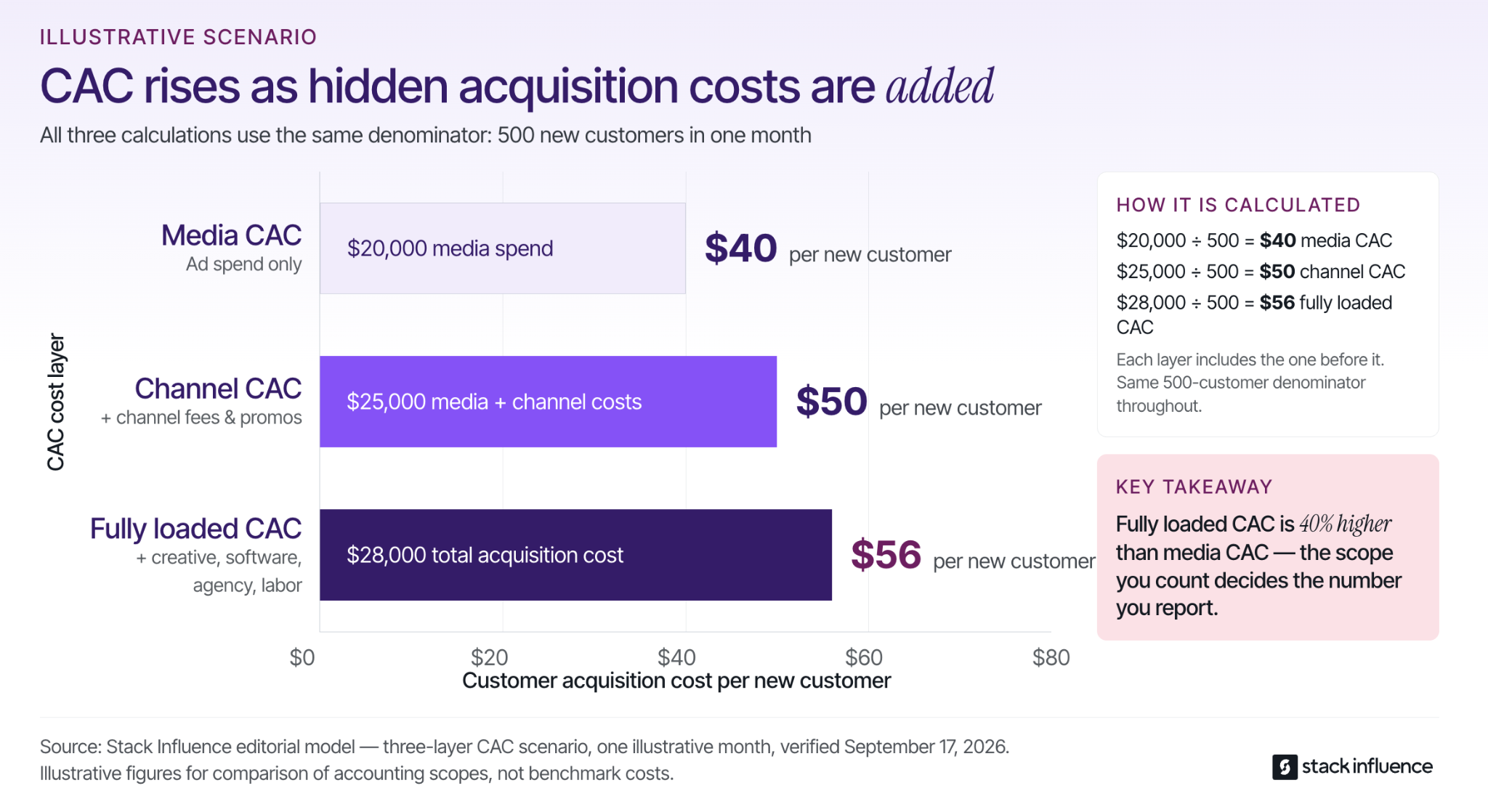
Consider an illustrative month in which an ecommerce brand acquires 500 new customers.
Direct media spending is $20,000. Creative production and channel-specific costs add $5,000. Allocated software, agency fees, and acquisition labor add another $3,000.
The three calculations are:
The advertising dashboard may show a $40 CAC while the business must recover $56 for every new customer. Fully loaded CAC is therefore 40% higher than media CAC in this illustrative scenario.
This is not an industry benchmark. It demonstrates why every reported CAC should include a clear cost-scope label.
Acquisition spending and acquired customers must cover comparable periods.
If January advertising continues generating customers in February, dividing January spending only by January customers creates a timing mismatch. The same problem occurs when one channel uses a seven-day attribution window and another uses 30 days.
Use a mature attribution window, cohort-based reporting, or a documented lag adjustment. Apply the same timing rule when comparing channels.
CAC measures acquisition efficiency, not profitability.
A $30 CAC can be unaffordable for a low-margin product. A $100 CAC may be sustainable for a high-contribution product with verified repeat purchasing and a manageable payback period.
Normal product cost, marketplace fees, fulfillment, and returns on customer orders usually belong in the contribution-margin calculation. Products and reimbursements provided to creators are campaign inputs, so their net economic cost belongs in acquisition spending.
A structured ecommerce marketing plan should define the customer boundary, cost boundary, time boundary, and profit boundary before the budget is launched.
CAC measures the cost of acquiring a new customer, while CPA measures the cost of generating a defined action and ROAS compares attributed revenue with advertising spend.
These metrics answer different questions.
The Stack Influence cost per acquisition glossary explains that CPA may be tied to a purchase, lead, registration, download, or another campaign action. A purchase CPA can include returning customers, so it should not automatically be treated as CAC.
Return on ad spend divides attributed revenue by advertising spend. ROAS does not show whether the buyers were new, whether the orders were profitable, or whether creative, creator, software, and labor expenses consumed the apparent return.
A campaign can therefore report strong ROAS but weak customer acquisition economics when many attributed orders come from existing buyers. Another campaign may produce a higher first-order CAC while acquiring a cohort that generates stronger contribution through repeat purchases.
Use CPA for action-level campaign optimization, ROAS for attributed revenue efficiency, and CAC for evaluating the cost of adding new customers to the business.
A good customer acquisition cost is lower than the contribution an acquired customer produces within a payback period the business can finance.
There is no universal target because margins, refund rates, repeat-purchase behavior, inventory cycles, and cash reserves differ across products and brands. Category averages may provide context, but they cannot determine whether a specific campaign is profitable.
Begin with first-order contribution before marketing:
Net sales
minus landed product cost
minus payment or marketplace fees
minus fulfillment and outbound shipping
minus discounts
minus expected returns, refunds, and damage
equals first-order contribution before marketing
First-order break-even CAC equals the remaining contribution.
A target CAC should sit below break-even by enough to cover overhead, profit, forecasting error, and the cash needed to purchase or manufacture more inventory. The Stack Influence guide to starting an ecommerce business applies the same contribution-first logic before a seller scales demand.
Revenue-based lifetime value is not a safe CAC ceiling unless the calculation has been converted to contribution, adjusted for realistic retention, and assigned to a specific timeline.
Consider an illustrative cohort of 100 newly acquired customers.
Assume every first order produces $30 in contribution before acquisition costs. By day 60, 30% of the cohort places a second order that produces $26 in contribution. By day 120, 12% of the original cohort places a third order that produces another $26 in contribution.
The cumulative contribution per acquired customer is:
A $36 CAC loses $6 on the first order but is recovered by day 60. A $42 CAC remains unrecovered by day 120.
These numbers are illustrative rather than ecommerce benchmarks. Sellers should replace them with their own order-level contribution and retention data.
A customer may eventually produce enough contribution to justify the acquisition cost, but the business must survive until that contribution arrives.
An inventory-based ecommerce brand may need to fund supplier deposits, production, freight, marketplace fees, refunds, and another purchase order before the customer places a second order. A long theoretical payback period can create a cash problem even when projected lifetime value looks attractive.
Track both the expected value of the customer and the number of days required to recover CAC.
Shopify sellers should use customer records to verify who is new, analytics tools to understand acquisition source, and the finance ledger to calculate the complete acquisition cost.
No single dashboard normally contains the entire numerator, denominator, and cash timeline.
Start with customer IDs and first-order dates. A customer who returns through an ad, affiliate link, creator code, or email campaign should not increase the new-customer denominator.
The Google Analytics 4 User Acquisition report focuses on how new users first found a website or app. A new user is not automatically a new paying customer, so GA4 data should be reconciled with completed commerce orders.
Shopify’s customer cohort analysis documentation explains how merchants can group customers by first-order date and follow their purchasing behavior over time. Cohorts help sellers measure contribution recovery rather than relying only on revenue retention.
A practical monthly acquisition file should include:
Lock the customer and cost definitions before comparing campaigns. Otherwise, one channel may appear more efficient simply because its report excludes expenses counted elsewhere.
Amazon sellers should use Amazon Attribution for eligible off-Amazon campaigns while keeping the metric label precise.
Amazon Attribution measures how non-Amazon channels such as search, social media, video, email, affiliates, and influencer campaigns contribute to shopping activity on Amazon.
An attributed purchase is not automatically proof of a first-time customer or an incremental sale. Unless the reporting available to the seller confirms the customer distinction, the metric should be called cost per attributed purchase rather than CAC.
Eligible sellers may also use the Amazon Brand Referral Bonus with qualifying tagged traffic. A confirmed bonus can improve contribution economics, but it should not be used to make advertising spend appear lower than it was.
Amazon FBA fees, referral fees, fulfillment, refunds, and landed product cost belong in the contribution calculation. Creator reimbursements, product seeding, external media, campaign management, and content production belong in the acquisition-cost numerator when they support customer acquisition.
The Amazon PPC versus external traffic guide explains how sellers can compare their next advertising dollar across marketplace and off-Amazon channels. The related Amazon external traffic strategy separates attributed purchases, marketplace effects, and reusable content so one result does not disguise another.
Amazon influencers add another measurement distinction. A creator’s Amazon storefront may support discovery and affiliate revenue, while a brand-managed influencer campaign may use separate product seeding, briefs, content rights, and Amazon Attribution tags.
Count new customers only when the available evidence supports that classification. Do not treat every creator purchase, storefront visit, or attributed order as a newly acquired customer.
Product seeding changes CAC economics because one campaign can produce creator participation, social distribution, reusable UGC, and customer purchases.
These outcomes have different values and should not be compressed into one sales figure.
The most important rule is to separate funded creator purchases from audience demand. If a creator buys a product and the campaign reimburses that purchase, the transaction may support marketplace execution and content production, but it is not independently funded customer demand.
For purchase-and-reimbursement workflows, reconcile the reimbursement, marketplace proceeds, product cost, fees, and related taxes so the transaction is recorded once.
Keep four separate records:
Stack Influence’s automated product-seeding workflow connects creator activation, product coordination, UGC generation, and completed-post accountability within one campaign process.
That workflow makes creator delivery measurable. CAC still requires a verified new-customer denominator and the complete acquisition cost.
A verified Stack Influence case study for Blueland recorded 211 creator promotions, 247,000 social impressions, 11,000 engagements, and 13x ROI during a three-month campaign. That campaign-specific ROI does not reconstruct CAC by itself because CAC requires the number of new customers and a defined cost scope.
Results vary by product, category, pricing, marketplace conditions, creator relevance, content quality, and campaign execution.
Product seeding also creates compliance and licensing responsibilities. The FTC’s influencer disclosure guidance explains that free or discounted products can create a material connection that should be disclosed clearly.
Brands should also define whether creator content can be reused on product pages, email, organic social media, or paid advertising before assigning content value to the campaign.

Lower CAC by improving the acquisition system, not by removing expenses from the numerator or adding repeat orders to the denominator.
Improve the offer, product page, marketplace listing, mobile experience, shipping information, social proof, and checkout flow before increasing media spend.
A small conversion-rate improvement can reduce CAC without changing the cost of traffic.
Bundles, subscriptions, higher-value offers, and products with strong repeat-purchase behavior can support a higher CAC when they produce more contribution.
Higher revenue alone is not enough. Sellers must compare contribution after product costs, fees, fulfillment, discounts, and returns.
Plan product demonstrations, comparisons, objection handling, use cases, hooks, and content rights before creators begin producing content.
One creator asset may support an organic post, product page, email campaign, Amazon listing, Shopify landing page, or paid advertisement. Reusable content can improve the economics of the campaign, but it should not be recorded as a new customer.
Compare groups of creators based on product relevance, content completion, content quality, tracked traffic, audience purchases, and asset reuse.
Do not scale a brand ambassador, sponsorship, or affiliate relationship only because one post generated high engagement.
Creators who consistently produce usable content or profitable customer demand may become candidates for affiliate programs, brand deals, brand partnerships, or ambassador programs.
The relationship should be expanded based on measurable performance and workflow reliability, not follower count alone.
Repeat purchasing does not lower the original acquisition cost.
Retention increases the contribution generated by the acquired customer and may shorten the payback period. Keep the historical CAC unchanged, then update cumulative contribution as the cohort matures.
Broken tracking links, delayed approvals, stockouts, inconsistent discounts, duplicate software, weak reporting, and unused content can all increase fully loaded CAC.
When creator content is ready for paid distribution, Meta’s partnership ads documentation explains how brands can run ads with creator or partner identities. The Stack Influence Meta partnership ads guide explains why media spend, permissions, usage rights, and creator production costs should be evaluated together.
Affiliate programs can diversify acquisition economics, but commissions do not make the channel free. The benefits of affiliate marketing for ecommerce sellers should be evaluated alongside platform fees, recruitment, creator support, discounts, commissions, and customer quality.
A useful CAC report connects campaign delivery, attribution, customer status, contribution, and payback.
Each layer answers a different question.
Attribution assigns credit among observed touchpoints. Google Ads’ data-driven attribution documentation explains that its model assigns conversion credit based on advertising interactions and account data.
Attributed credit is not the same as a controlled estimate of what would have happened without the campaign. Sellers should not treat attributed sales as automatic proof of incrementality.
Use the commerce platform as the authority for customer status. Use the finance ledger as the authority for costs. Use advertising and analytics platforms as diagnostic views that explain where customers interacted with the brand.
Review media and execution metrics weekly. Make budget decisions through monthly or cohort-based economic reviews after conversions, refunds, discounts, credits, and repeat purchases have had time to mature.
Most CAC errors come from inconsistent definitions rather than difficult mathematics.
Write four items above every recurring CAC report: customer definition, cost scope, reporting window, and profit hurdle.
That one line prevents a media CPA from quietly being presented as companywide customer acquisition cost.
Customer acquisition cost becomes useful when every team agrees on which expenses are included, which buyers qualify as new, and how quickly each customer returns contribution to the business.
Start with one product, one customer cohort, and one reporting window. Calculate a profit-first CAC ceiling, reconcile Shopify or Amazon data with the finance ledger, and scale only when the channel remains acceptable after creative, creator, technology, labor, refunds, and cash timing are included.
For product-seeding campaigns, define creator completion, customer acquisition, reusable content, and long-term creator development as separate outcomes. A managed micro-influencer workflow can then be evaluated against clear delivery and CAC rules instead of impressions or attributed revenue alone.
The goal is not simply to report a lower customer acquisition cost. The goal is to acquire customers at a cost the business can recover, finance, and scale profitably.
UGC ads are not simply casual-looking videos placed behind media spend. For ecommerce sellers, they are a repeatable creative system that turns credible product experiences into testable paid media. For content creators, they are licensed commercial assets, which means the brief, usage rights, editing permissions, account access, and exclusivity matter as much as the recording itself.
The most effective workflow connects five elements: product evidence, creator permission, controlled creative variants, native distribution, and measurable learning. This guide explains how brands and creators can build that workflow without sacrificing authenticity or commercial clarity.

A scalable UGC ad program follows a five-part control loop: source evidence, clarify permissions, build variants, distribute natively, and use performance data to improve the next brief. This structure gives the brand enough consistency to learn while protecting the creator’s ability to communicate naturally.
Begin with a product experience that can be demonstrated rather than merely praised. A useful creator brief identifies the buyer’s question, the product moment that answers it, and the type of creator who can show that moment credibly.
For example, a kitchen product may need a preparation demonstration, while a skincare product may require texture, application, and routine context. The creative concept should be based on what the buyer needs to see before purchasing.
During a three-month Stack Influence campaign for Remilia, the campaign included 115 creator promotions, 1.66 million social impressions, and 73,832 engagements. Those figures do not establish paid-ad lift, but they illustrate how multiple creator perspectives can give a brand more messages, demonstrations, and visual approaches to evaluate before allocating advertising spend.
Brands can use vetted micro-influencer campaigns to gather these product experiences through coordinated creator activation rather than relying on a single creative concept.
Decide how the content may be used before the creator records it. The agreement should define the paid channels, advertising accounts, usage period, territory, editing permissions, raw-file delivery, creator identity rights, exclusivity, and prohibited product claims.
This step protects both sides. Brands avoid discovering that a successful asset cannot legally be scaled, while creators avoid granting open-ended commercial use through an unclear content request.
The agreement should also distinguish between permission to edit a clean video file and permission to run an advertisement through the creator’s identity. These are related commercial rights, but they are not automatically the same deliverable.
Turn each creator concept into a small testing matrix instead of producing unrelated edits. The objective is to determine whether a different hook, demonstration, offer, or call to action changes performance.
Consider an illustrative production plan in which each creator source supports three opening hooks and two calls to action:
The calculation is creator sources multiplied by three hooks and two calls to action. These figures describe production capacity, not a recommendation to activate every possible combination at once.
A team might launch three or four variants, identify which opening earns attention, and then combine the winning hook with a second creator’s demonstration. This staged method produces clearer learning than launching dozens of substantially different ads simultaneously.
Choose whether the advertisement should appear through the brand identity, the creator identity, or an authorized organic post. The same video can create a different viewing experience depending on the account name, existing engagement, caption, comments, and destination.
Creator-identity advertising can preserve social context. Separately licensed brand-handle assets can give the advertising team greater flexibility for localization, new calls to action, extensive cutdowns, and cross-platform use.
Brands do not always have to choose one option. A campaign can use an authorized creator post for social context while maintaining clean licensed files for brand-owned ads and future creative testing.
Every paid result should influence the next creator brief. Winning hooks can become new opening prompts, recurring customer objections can become demonstration concepts, and weak landing-page conversion may reveal that the advertisement and product page are making different promises.
The control loop is complete only when performance data changes what the team creates next. Without that feedback stage, a brand is collecting files rather than building a creative system.
UGC ads are paid advertisements created from customer-style or creator-produced content. The content may begin as an organic customer post, a commissioned UGC video, an influencer post, or a purpose-built product demonstration, but it becomes a UGC ad when a brand uses it in paid distribution.
Shopify’s UGC marketing guide identifies customer reviews, social posts, testimonials, demonstrations, and unboxing content as common forms of user-generated content used by ecommerce brands. The paid-ad distinction matters because commercial distribution requires clearer permissions than an organic repost.
Four content categories are commonly grouped together:
A creator does not need a large following to produce valuable UGC ads. When the brand supplies paid reach, the creator’s ability to communicate, demonstrate the product, and represent the buyer can matter more than audience size.
Micro influencers and nano influencers can contribute an additional advantage when the brand also wants organic distribution. Their audience, content style, and real product use can support both the original influencer campaign and the later paid-media workflow.
The strongest UGC ad format is the one that answers a meaningful buying question with visible evidence. Brands should build a portfolio of formats rather than asking every UGC creator to record the same testimonial script.
A demonstration shows the product completing the task the buyer cares about. The important action should be visible on screen rather than explained only through voiceover.
Demonstration ads are especially useful for products with a noticeable setup process, texture, application method, feature, transformation, or functional outcome.
A problem-to-solution ad begins with a recognizable point of friction and then shows how the product changes the experience. The problem should be specific enough for the intended buyer to recognize without relying on exaggerated frustration.
The product should appear early enough that the viewer understands what the advertisement is offering. Long dramatic setups often delay the information needed to evaluate the product.
An experience-led testimonial describes a particular use case, expectation, or observation. Specificity is more persuasive than broad statements such as “I love this product.”
A creator might explain when the product is used, what made it easier to use, or which feature was unexpectedly practical. The testimonial must remain truthful and limited to the creator’s real experience.
A comparison explains a meaningful difference between the product and an alternative. The difference may involve the workflow, packaging, size, ingredients, setup process, included features, or intended use.
Brands should confirm that comparative statements are accurate and supportable. The objective is to help the buyer understand a distinction, not to introduce an unsupported superiority claim.
First-use content captures packaging, setup, fit, texture, assembly, or immediate observations. This format works particularly well when the arrival and onboarding experience affects the buying decision.
The creator should still move beyond opening the package. A useful first-use ad connects the unboxing moment to the reason the buyer might care about the product.
Objection-handling ads address questions about compatibility, size, ease of use, price, ingredients, shipping, durability, or who the product is intended for.
A broader review of common user-generated content formats can help teams match each creative format to a specific campaign purpose. The practical test is whether each concept introduces new evidence rather than placing a different creator inside the same script.
A strong production process standardizes the information required for testing without standardizing every creator’s personality. Brands should define the commercial objective and required proof while allowing creators to choose language that sounds natural.
Build each concept around one concrete uncertainty. Examples include fit, texture, installation, compatibility, taste, durability, storage, portability, or value.
Trying to answer every objection in one short video usually produces a crowded advertisement. A focused concept gives the viewer one clear reason to continue watching.
Creator-product fit is not determined only by follower count or appearance. The creator should be able to use the product naturally, communicate its purpose accurately, and create a situation that resembles the intended customer’s experience.
A useful creator match can come from profession, hobby, routine, household situation, content category, or demonstrated interest. The relevant fit depends on the product.
Specify the buyer question, mandatory product information, required shots, prohibited statements, disclosure requirements, deliverables, and deadline. Avoid scripting every sentence unless legal or technical precision requires exact language.
Excessive scripting often removes the vocal patterns and personal context that make creator content believable. A clear boundary is more useful than a rigid performance.
Request separate hooks, product close-ups, demonstrations, reactions, voiceover, clean background footage, and calls to action. Modular capture allows the editor to build controlled variants without repeatedly asking the creator to reshoot the complete advertisement.
Brands using automated product seeding can coordinate product purchasing, creator participation, campaign requirements, and completed posts before the editing stage begins.
Change one major element at a time. A team might keep the creator, product demonstration, offer, audience, and destination constant while comparing two opening hooks.
Once a hook wins, the team can test a different proof sequence or call to action. This sequence creates more useful information than changing every variable between versions.
The destination should continue the promise made in the advertisement. The price, offer, product variation, availability, and central benefit shown in the UGC ad should match the Amazon listing, Shopify page, or DTC landing page.
A strong advertisement can earn attention and still fail commercially when the destination introduces a different message. The creative and product page should function as one customer journey.
Once a clean master and the necessary rights are secured, brands can repurpose UGC across platforms by adapting duration, framing, captions, safe zones, and calls to action. Cross-platform reuse should involve purposeful adaptation rather than publishing the same unchanged export everywhere.
Meta Partnership Ads and TikTok Spark Ads allow brands to connect paid distribution with creator content, but the two formats should not be treated as identical. Each platform has its own account, authorization, post, engagement, and creative requirements.
Meta Partnership Ads allow advertisers to run eligible content through a partnership involving a creator, brand, or other business identity. Brands should confirm creator permission, the account identities displayed, the eligible asset, the advertising period, and what happens when permission ends.
A defined Meta Partnership Ads workflow can connect creator approval, content selection, account authorization, campaign setup, and reporting. This is separate from securing the right to use the creator’s clean asset in advertisements run solely through the brand’s own account.
TikTok defines Spark Ads as a native ad format that uses posts from organic TikTok accounts. A brand can use its own account’s posts or posts from another creator after receiving authorization.
TikTok states that views, comments, shares, likes, and follows generated while boosting the content are attributed to the original organic post. The platform also allows the authorization period to be configured for the campaign.
A practical TikTok Spark Ads workflow should track the selected post, authorization status, permitted duration, destination, music eligibility, creator approval, and any limits on editing or deletion.
Neither format removes the need for a separately organized content library. Authorized posts support creator identity and social context, while clean licensed files give brands greater flexibility for new hooks, resized versions, localized edits, and other channels covered by the agreement.
A UGC ad agreement should separate the production deliverable from the commercial rights attached to it. A vague phrase such as “full usage rights” does not answer the practical questions that arise when a brand begins editing and distributing the content.
A complete agreement should address:
The FTC’s social media disclosure guidance says creators should disclose a material connection when they receive money, free products, discounts, or another benefit connected to an endorsement. The disclosure should be clear, difficult to miss, and placed with the endorsement rather than hidden in a profile or after a viewer must select “more.”
Creators should quote content production, paid usage, creator-handle authorization, raw footage, revisions, and exclusivity as separate commercial components. Brands receive a clearer description of what they are purchasing, while creators can price the actual scope instead of treating every brand deal as a one-time video fee.
UGC ads should be evaluated through connected metric stages. A strong view rate does not prove that an advertisement produced profitable sales, while weak final conversion does not always mean the video failed to attract the right initial attention.
Delivery metrics show whether the platform distributed the advertisement efficiently. They include spend, impressions, reach, frequency, and cost per thousand impressions.
These metrics provide campaign context, but they do not show whether the creative persuaded anyone to investigate or purchase the product.
Attention metrics indicate whether the opening and creative sequence held the viewer. Useful measures include three-second view rate, hook or hold rate, average watch time, completion rate, and meaningful video milestones.
A weak opening can hide an effective demonstration because viewers never reach it. A strong opening can also generate attention without producing qualified purchase intent.
Intent metrics show whether attention progressed into shopping behavior. They may include click-through rate, landing-page visits, product-detail-page views, add-to-cart actions, checkout starts, and offer engagement.
The destination and offer begin influencing results at this stage, so the advertising team should not attribute every change solely to the creator or video.
Outcome metrics include purchases, revenue, cost per acquisition, return on ad spend, contribution margin, repeat purchases, and relevant marketplace movement. The appropriate outcome depends on whether the campaign is designed for direct sales, product discovery, a launch, remarketing, or another objective.
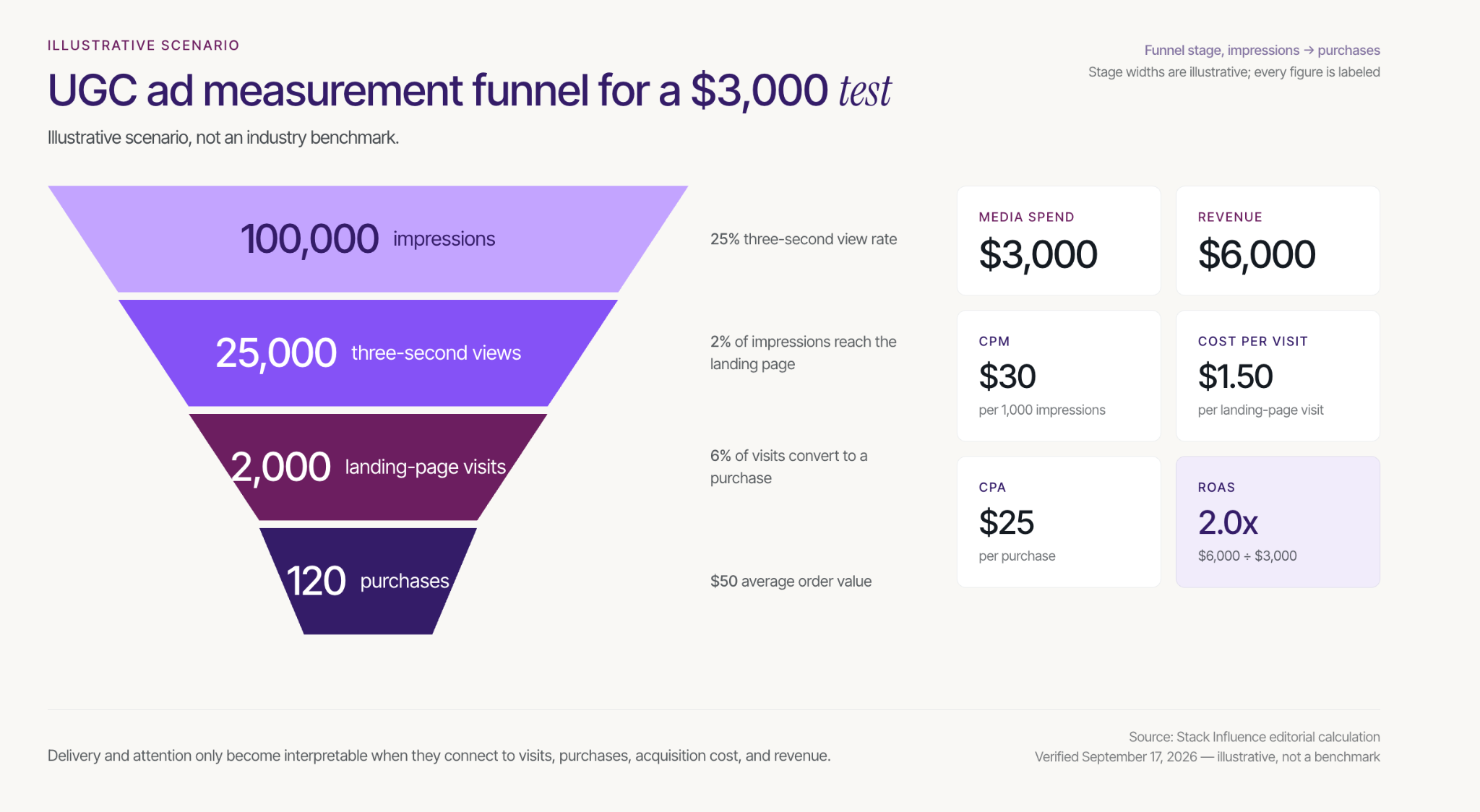
Consider an illustrative $3,000 ecommerce test with 100,000 impressions, 25,000 three-second views, 2,000 landing-page visits, 120 purchases, and $6,000 in revenue at a $50 average order value.
Those assumptions produce:
These figures are an illustrative scenario, not an industry benchmark. Their purpose is to show why delivery, attention, intent, and outcome metrics need to be interpreted together.
Meta’s A/B testing guidance recommends comparing versions through a defined test rather than changing multiple variables without control. For UGC ads, the clearest first test is usually one hook against another, one proof sequence against another, or creator identity against brand identity while the surrounding setup remains as stable as practical.
Eligible Amazon advertisers can use Amazon Attribution to measure off-Amazon marketing that sends shoppers to Amazon product pages and Stores. Available reporting includes detail-page views, add-to-cart actions, and sales, and Amazon describes the methodology as a 14-day, last-touch attribution model.
An Amazon influencer marketing workflow can connect creator activation with external traffic and marketplace measurement. Shopify and other DTC brands can use consistent campaign naming, platform reporting, UTMs, and onsite analytics to follow the same matched-metric principle.
Attribution still has limits. A credited sale means the measured touchpoint received credit under the selected platform’s rules. It does not prove that the advertisement independently caused the purchase or that the sale would not have occurred through another path.
Most UGC ad failures are operational rather than visual. A creator-style recording cannot compensate for weak product evidence, unclear rights, uncontrolled testing, or a disconnected landing page.
The corrective principle is simple: authenticity is not the absence of structure. Strong UGC advertising protects the creator’s perspective while controlling the commercial variables needed for compliance, learning, and scale.
Scaling UGC ads requires more relevant creator inputs and stronger campaign operations, not simply more video editing. Brands need a repeatable way to source creators, coordinate products, communicate requirements, verify completion, organize rights, and move approved assets into paid-media testing.
Some UGC platforms concentrate on asset production. Influencer marketing platforms can also support product seeding, creator partnerships, social posting, communication, and completion tracking. The appropriate workflow depends on whether the team needs isolated content files or a connected creator-activation process.
Stack Influence is built around gifted-first product seeding and campaign execution for ecommerce brands. The workflow supports creator sourcing, vetting, product coordination, campaign communication, completed-post tracking, UGC generation, and Amazon or Shopify campaign activity.
Its UGC production workflow connects briefing, creator participation, content submission, licensing, asset organization, and syndication. This is especially practical when the brand wants to move from individual creator relationships to a repeatable content pipeline.
The paid-media team still needs to choose the test design, budget, advertising account, destination, attribution method, and refresh rules. The operational advantage is having enough organized, permissioned creator content to keep the UGC Ad Control Loop moving.
UGC ads work best when brands and creators treat them as a connected commercial system. Product evidence shapes the concept, clear rights define what can be used, controlled variants create measurable learning, native placements preserve context, and matched metrics determine what should be made next.
For ecommerce sellers, the next step is to identify one important buyer question and build a small creative matrix around it. For content creators, the next step is to define production, paid usage, account authorization, editing rights, and exclusivity before accepting the final brief.
A disciplined UGC ads workflow gives both sides clearer expectations and gives each new creative cycle a stronger foundation than the one before it.
The first purchase order is only half the decision. A private label Amazon business also needs enough margin to acquire customers and enough cash to replenish inventory before those customers disappear into an out-of-stock listing.
For ecommerce sellers, the useful question is not simply, “Can I put my brand on this product?” It is, “Can I sell, support, and reorder this product on terms that still work?” This guide connects product research, supplier verification, launch spending, and replenishment so you can answer that question before committing inventory capital.
A private label Amazon business sells products made by another manufacturer under the seller’s own brand. As Amazon’s private-label overview explains, the seller can work with a manufacturer on branding and product specifications rather than build a factory. This refers to your brand selling on Amazon, not Amazon’s own retail brands.
The distinction from wholesale is ownership of the brand proposition. A wholesale seller resells an established brand’s products; a private-label seller develops the identity, positioning, packaging, and customer promise around its own offer.
Suppliers sometimes use “white label” for a standard product offered to multiple brands and “private label” for a more customized arrangement. Do not assume either label guarantees exclusivity: ask what is actually exclusive, in which markets, and for how long.
Amazon FBA is a separate fulfillment choice, not a business model. You can compare FBA and merchant fulfillment after deciding what to sell and who will buy it.
For example, a hypothetical desk-organizer brand might differentiate through compartments that fit a specific workspace and clearer assembly instructions. A new logo on an otherwise identical organizer gives shoppers less reason to choose it at a higher price.

Startup cost depends on the product, order quantity, testing, freight, branding, and launch plan; there is no universal private-label budget. Build the estimate from actual supplier and service quotes, then separate money you expect to spend from cash you need to keep available for replenishment.
For the U.S. store, Amazon’s selling-fee schedule lists the Professional plan at $39.99 per month and the Individual plan at $0.99 per item sold, with referral fees and applicable additional costs separate. These account fees are only one part of a launch budget.
A hypothetical cash allocation could include $5,000 for 500 units landed at $10 each, $1,500 for prelaunch samples, testing, branding, and administration, $2,000 for launch marketing, and $3,000 held for replenishment. That totals $11,500, but it is an illustrative planning envelope, not a minimum, a market average, or assurance that every product’s costs are covered. The replenishment reserve remains cash until spent and may not fund the entire next order.
Consider an illustrative U.S. sale containing one unit at $32, with no shipping charge or discount. Assume $10 in landed product cost, a 15% referral fee, $4.50 in fulfillment cost, and a $1.20 allowance for inbound placement, storage, and expected return losses.
Here, landed cost includes manufacturing, packaging, freight, and duties to the preparation location; the separate allowance covers the modeled Amazon-side inbound and holding costs. The numbers are assumptions, not quoted Amazon fees for a particular product.
The calculation is $32.00 minus $10.00 minus $4.80 minus $4.50 minus $1.20, leaving $11.50 before marketing, fixed overhead, and tax. Spending $6.00 to acquire that order leaves $5.50 before overhead and tax, not $5.50 in net profit.
To retain $3.50 per order for overhead and profit, the modeled acquisition-cost ceiling is $8.00: $11.50 minus $3.50. Replace every assumption with your product’s actual category, packaged dimensions, fulfillment estimate, and return experience before using that ceiling.
Product seeding belongs in this calculation too. Stack Influence’s product-seeding workflow links creator participation to completed social posts, but completion-based campaign spending does not make the product, reimbursement, or fulfillment free. Budget the full campaign cost rather than treating gifted inventory as having no economic value.
The Two-Order Test is a five-check decision tool: establish a customer reason to buy, a reproducible product, a cleared brand and compliance path, a purchase-ready offer, and a funded replenishment plan. The first order tests the offer; the second should be a deliberate decision based on evidence, not an emergency caused by missing stock.
Start with a specific use case rather than a broad category. “Storage products” is too vague; an organizer designed for a shallow desk drawer gives you dimensions, competing options, and customer frustrations to investigate.
Use Amazon’s Product Opportunity Explorer to investigate customer demand, search behavior, competition, and product feedback. Compare demand across time rather than treating a brief spike as a dependable sales forecast.
Read competing listings and reviews for recurring, fixable complaints: unclear sizing, awkward setup, missing accessories, weak instructions, or packaging damage. Record the complaint, your proposed change, its cost, and how a shopper could verify the improvement before buying.
Reject an idea when the only answer is “sell the same item more cheaply” and the lower price removes your acquisition budget. A large market is not enough if you cannot explain why a customer should choose your offer.
Use manufacturer directories, trade-show exhibitor lists, and supplier referrals to identify candidates. Stack Influence’s guide to sourcing products for Amazon provides context on sourcing routes, but a directory listing is a starting point rather than proof of manufacturing capability.
Send the same written specification to several candidates. Request material details, tolerances, packaged dimensions and weight, minimum order quantity, sample cost, production lead time, payment milestones, inspection access, and defect remedies.
Ask whether you are dealing with the factory or a trading company and who controls production changes. Compare quotes on the same delivery basis so a low factory price is not mistaken for a low landed cost.
Approve a physical reference sample, then document how production will be checked against it before shipment. Put packaging, labels, instructions, and any agreed exclusivity into the order documents; do not rely on a chat message saying the product will be “premium.”
Check the brand name before printing packaging. The USPTO’s guidance on similar trademarks explains why searching only for an exact name is insufficient: similar marks can create conflicts. Obtain qualified advice where trademark, design, or patent questions remain unresolved.
Confirm which product rules apply before choosing a supplier. For regulated general-use consumer products, the CPSC’s testing and certification guidance explains manufacturer and importer certification responsibilities; it also flags July 8, 2026, as the start of mandatory certificate eFiling for importers of most regulated consumer products. That does not mean every private-label product has identical testing or filing requirements.
Ask a qualified laboratory or compliance specialist to identify the requirements for your exact product, intended users, and destination market. Obtain documentation that matches the product and manufacturer, rather than accepting an unrelated test report as sufficient.
Keep the brand name consistent across packaging, catalog information, and product identifiers. GS1 US’s Amazon barcode guidance is useful when establishing legitimate UPCs or GTINs associated with your business and products.
Set up your seller account and confirm any product or category approval requirements before the bulk order becomes irreversible. Align the brand name, product identifier, model, and variation details before creating the catalog offer.
Amazon Brand Registry generally requires an eligible pending or registered trademark and branding permanently affixed to the product or packaging. The trademark information must match the application; enrollment and approval to sell a product are different questions.
Prepare images and copy that demonstrate the promised improvement. Show dimensions, included components, setup, intended use, and important limitations, then ensure the physical sample supports every claim.
Choose fulfillment using the finished package, not the supplier’s estimate for an unpackaged unit. Confirm sellable inventory, shipping expectations, listing availability, and customer-support ownership with an Amazon product launch checklist before sending paid traffic.
Record when a replacement order must be placed and when its deposit, balance, freight, and other charges become payable. Compare those dates with cash that will actually be available, not just sales appearing in a dashboard.
Preserve room to change the product after the first batch. An unusually large minimum order can tie up the money needed to fix a packaging problem, improve the specification, or order a better version.
The Two-Order Test does not require immediate scale. It requires a credible path to another order once customer response, product quality, and contribution justify it.
Start with a purchase-ready listing and a bounded marketing test that explains a specific reason to buy. Combine relevant Amazon advertising with creator demonstrations where those demonstrations help shoppers understand the product; do not compensate for an unclear offer by buying more traffic.
For advertising, set a spending limit from contribution rather than competitor activity. Review which search terms produce orders and whether those orders still meet your cost assumptions before expanding the test.
A useful creator brief describes the intended customer, the real task the product performs, claims that can be supported, the agreed deliverable, and the destination link. Give creators enough time to use the product and preserve room for an honest opinion.
When finding influencers for an Amazon product, prioritize relevant demonstrations and audience needs rather than follower count alone. Brands that work with micro influencers should also agree on content reuse, editing, paid-ad permissions, and duration instead of assuming a social post includes unrestricted rights.
Stack Influence’s gifted-first model brings vetted creator participation, product seeding, coordination, and completed-post accountability into one campaign workflow. Its practical role here is organizing content delivery, not guaranteeing sales from each creator.
The published Stack Influence launch examples include a three-month Snow campaign with 90 creator promotions, during which average monthly unit sales moved from 34 to 215. This is a campaign-period observation, not a typical private-label result or proof that creator activity alone caused the change.
Use a first campaign to identify useful product explanations and audience response. Longer-term brand partnerships or brand ambassador arrangements should follow that evidence rather than precede it.
The FTC’s endorsement guidance explains that free products and other material brand relationships can require clear disclosure. Include disclosure requirements in the brief and check the published content rather than assuming creators will handle them consistently.
Amazon’s customer product review policies prohibit compensation, free products, and reimbursement in exchange for customer reviews. Do not make an Amazon review a campaign deliverable, ask for a positive rating, or treat a reimbursed social-content campaign as a customer-review program.
For eligible products, Amazon Vine provides a separate Amazon-run route to reviews. Check its current seller and product requirements, and do not expect favorable feedback simply because a product was enrolled.
Review launch performance weekly, separating activity, customer response, and economics. Completed creator posts and usable licensed assets show delivery; visits and add-to-cart activity show response; customer orders, returns, contribution, and available cash determine whether to continue.
For eligible brands, Amazon Attribution is a free tool for measuring qualifying off-Amazon marketing and reports a 14-day attribution window. Create distinct tags for the campaigns or placements you need to compare before distributing links, and allow that conversion window to mature before treating a cohort as complete.
A reported attributed sale is not proof that the campaign created a sale that would never otherwise have happened. Compare comparable periods, record price and inventory changes, and avoid adding reports together as though every dashboard contains a separate set of customers.
Track seeded or reimbursed creator purchases separately from independent customer demand. Reconcile the campaign’s reimbursements and product costs so the same cost is not counted twice, and do not assign speculative resale value to unused creator assets to make the launch look profitable.
Eligible enrolled U.S. brands may earn the Amazon Brand Referral Bonus, which Amazon describes as averaging 10% of qualifying sales. The amount varies, offsets future referral fees, and generally has a two-month waiting period; it is not an immediate cash payment on every external order.
Apply confirmed credits when reconciling results. A disciplined Amazon external-traffic strategy should distinguish delivery, attributed revenue, and business outcomes rather than collapse them into one return figure.
Faster sales can shorten your decision window more than you expect. Treat the final check in the Two-Order Test as an inventory calculation, not a reminder to order again when the warehouse looks empty.
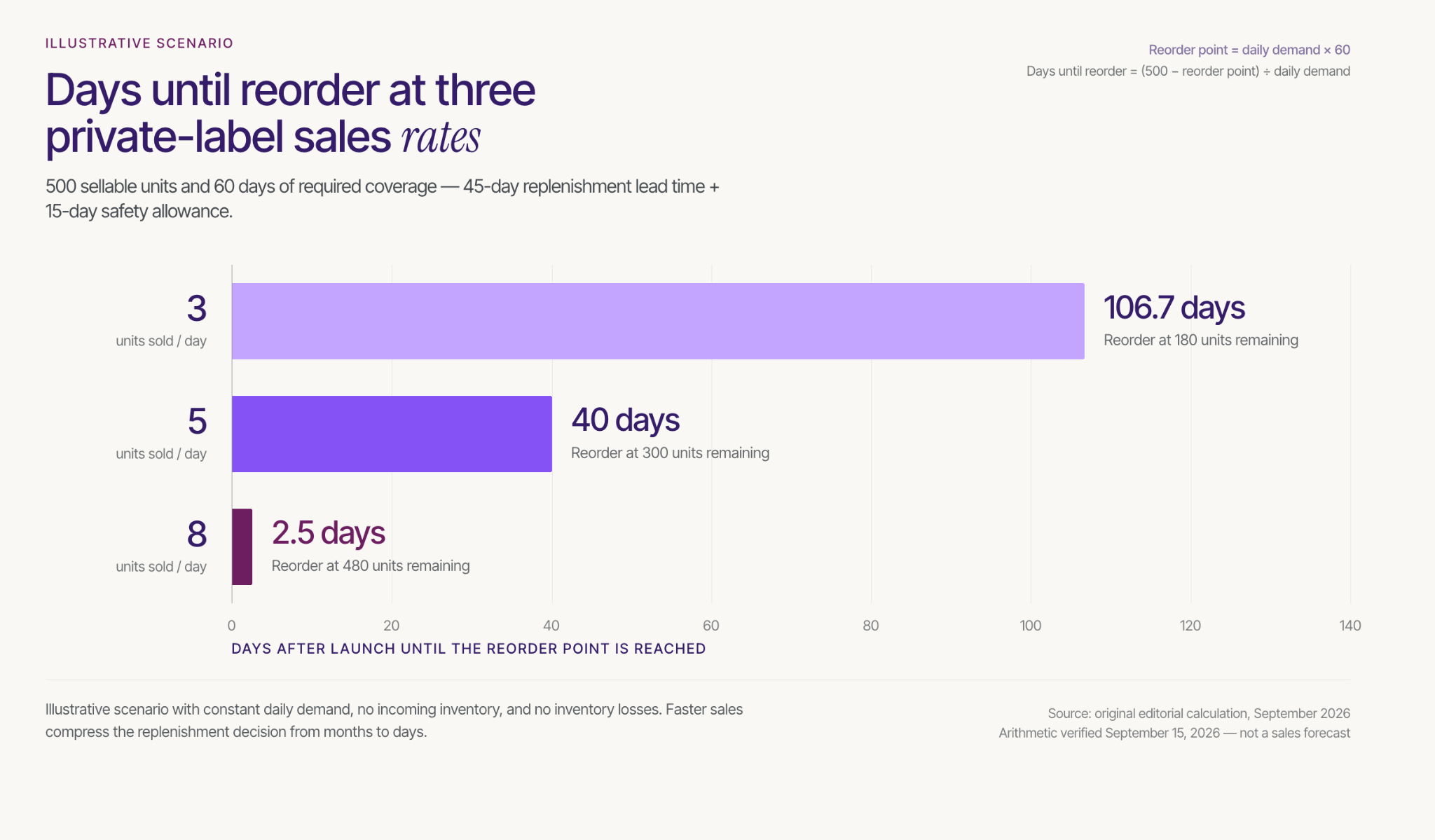
Consider a separate illustrative scenario with 500 sellable units after any sample allocation, no incoming inventory or backorders, and constant daily customer demand. Assume replenishment takes 45 days from placing the order until units are sellable, plus a 15-day safety allowance.
The reorder point is daily demand multiplied by 60 days of coverage. Days until that point equal starting inventory minus the reorder point, divided by daily demand:
These are planning scenarios, not sales forecasts. The model assumes no inventory losses or changes in demand, and its fixed safety allowance is not a statistical safety-stock calculation.
The implication is practical: the fastest scenario requires a replenishment commitment almost immediately, before a new seller has much customer evidence. Adjust the first order, supplier terms, lead time, or launch pace before that situation forces an expensive decision.
A private label Amazon business becomes more defensible when the product solves a clear problem, the supplier can reproduce it, and the economics support both customer acquisition and replenishment.
Use the Two-Order Test on one candidate product before expanding the range. For a launch-ready item, evaluate a focused Stack Influence product-seeding campaign within a defined budget, so creator content helps explain the offer while you learn whether real demand supports the next order.
A creator’s laptop-stand video can answer several buying questions: how the stand unfolds, what the setup looks like, and how it packs away. But a shopper studying a product page needs a different edit from someone encountering the product in a social feed.
For ecommerce sellers and content creators, learning how to repurpose UGC content across platforms means turning one useful source into several purposeful versions. The process involves more than resizing: each version needs the right permission, product demonstration, framing, disclosure, and next step.
Start with the buyer’s question, then build the version that answers it.

Choose one useful asset, confirm its intended uses, prepare a clean master, create destination-specific versions, and measure each published placement separately. UGC repurposing is the adaptation of customer or creator material into another useful format or context; unchanged cross-posting is only one possible distribution tactic.
For this workflow, use a Reuse Release Card: a short record connecting one source asset to one intended placement. Create a separate card when the destination, publishing account, or commercial use changes.
Record five fields:
Consider an illustrative laptop-stand campaign. One card could cover a vertical Instagram demonstration published organically by the brand, while another covers a product-page edit showing the unfolding mechanism. The footage may be shared, but the intended use and acceptance criteria are different.
This distinction matters when content arrives through influencer campaigns. Stack Influence’s UGC production workflow connects ecommerce brands with vetted micro influencers through gifted-first product seeding and campaign coordination. Completed creator content becomes an input to the reuse process; the campaign agreement determines which subsequent uses are authorized.
Apply the same discipline to spontaneous customer posts and commissioned UGC. Do not present a paid or gifted creator partnership as an unsolicited customer recommendation.
Request the original footage or a high-quality master before editing. Keep an untouched copy, a transcript, and an editable version without platform-added music or graphics when those files are included in the agreement.
Do not remove a creator’s attribution or identifying mark without permission. Ask for a clean export instead of treating a downloaded social post as the production master.
Break the footage into useful components: an opening, the product in use, a specific question answered, and a closing action. For the laptop stand, those components might be unfolding it, showing the support mechanism, placing the laptop, and packing the stand away.
Several user-generated content formats can come from that material. A demonstration may become a video, a sequence of still images, or a short written explanation paired with an approved photograph.
Resizing removes no content when the entire image is scaled proportionally, but cropping to a different shape can remove substantial frame area. The important question is whether the new frame still shows the evidence the shopper needs.
Consider a 1080 × 1920 vertical master. With a centered crop that retains the full 1080-pixel width and adds no padding, zoom, or generated background:
These are geometric calculations, not performance benchmarks. A square crop can preserve every important detail, but it can also cut away the hands demonstrating a mechanism or the product being discussed.
Keep essential action within the area shared by your planned crops. When that would make the demonstration cramped, capture another angle rather than forcing every output from one composition.
According to TikTok’s in-feed ad specifications, vertical 9:16 is recommended for non-Spark ads, while safe zones depend on factors including dimensions and caption length. Treat the 1080 × 1920 master as a practical working canvas, not a universal requirement for every platform or placement.
Every repurposed version should have a documented basis for its intended use, including relevant editing rights, music clearance, and permission to use a creator’s identity in advertising where applicable. Receiving a file, obtaining a social tag, and receiving advertising authorization are different events.
The U.S. Copyright Office’s permission guidance explains that creating a new version of someone else’s work generally requires the copyright owner’s authorization, subject to applicable exceptions. Crediting a creator is not a substitute for resolving the rights needed for a commercial campaign.
Record whether the agreement covers organic social posts, paid advertising, product pages, email, and marketplace placements. Specify the usage period, territory, permitted edits, translation rights, and any agreed approval requirements.
A practical UGC rights-management record should connect those terms to the actual files and placements. Avoid a single “approved” label that leaves the publishing team guessing whether it means approved for Instagram, approved for ads, or approved for all contracted uses.
Creators should also distinguish delivery of a finished video from delivery of raw footage and additional edit rights. Put the agreed scope in writing before the brand starts producing derivatives.
A creator’s permission does not establish the rights to every sound in the recording. Check music licenses against the destination and the intended commercial use.
TikTok’s Commercial Music Library guidance directs businesses toward commercially cleared music for TikTok activities and says other sounds require appropriate licensing. Do not assume that a track cleared for TikTok is also cleared for a Meta advertisement, a website, or an email-linked video.
The FTC’s disclosure guidance covers material connections such as payment and free products. For video endorsements, the disclosure belongs in the video, not only in its accompanying description.
Check the final edit after cropping, shortening, and translation. A disclosure that was visible in the original may disappear from a cutdown, and removing a qualifier can change what the creator actually said.
Keep the demonstration truthful rather than editing it into a stronger claim.
Change the creative because the viewer’s task changes, not simply because another platform is available. The following laptop-stand example is an editing plan, not a claim that any particular duration or format will outperform another.
Open with the product doing something useful. For this example, test a 20-second edit that begins with the stand unfolding, shows the finished setup, and closes with the next action available in that placement.
Rebuild captions for the new frame and preview them alongside interface controls. Replace destination-specific language such as “link in bio” when the version will appear somewhere that uses a different purchase path.
Keep the creator’s natural delivery when it helps explain the product. A new introduction can make the edit self-contained without turning every sentence into advertising copy.
Make the video answer a complete question without relying on the original post’s caption. “How does this laptop stand fold flat?” provides a clearer editing objective than “reuse the Reel.”
YouTube’s Shorts documentation explains that eligible square or vertical videos up to three minutes are categorized as Shorts under its current upload rules. That allowance is a ceiling, not a reason to lengthen a demonstration that already works.
Give the viewer enough context to understand the mechanism and the result. Remove references to an earlier Instagram post or a conversation the YouTube viewer has not seen.
Prepare a 4:5 or square candidate when the selected placement accepts that format, then judge whether the tighter composition improves clarity. Do not approve a crop that removes the product feature being demonstrated.
A carousel is another option. Show the stand folded, being opened, supporting the laptop, and packed away, with each panel answering a different question.
Use a sharp, approved still rather than a blurry frame simply because it came from the same video. The goal is useful product information, not the maximum number of exports.
Build the asset around a useful idea, such as a compact desk setup or a packing checklist. Pair the approved product image with a descriptive headline and a destination that delivers on that promise.
For paid static creative, Pinterest’s standard image ad specifications recommend a 2:3 aspect ratio, such as 1000 × 1500 pixels. Treat that as guidance for the specified format, not as a universal rule for all Pinterest content.
A frame showing the finished desk setup may be more useful here than the opening shot chosen for a demonstration video.
Prioritize evidence that helps someone evaluate the exact product: assembly, operation, included parts, dimensions, or packing. Remove social-only introductions and calls to action that send shoppers away from the buying task.
Shopify’s product-media documentation supports uploaded videos and YouTube or Vimeo embeds, with display depending on the theme’s capabilities. Check the finished product page on mobile instead of approving the file in isolation.
For Amazon, specify the intended placement and the account responsible for uploading before commissioning the edit. Treat product-detail content, brand-controlled placements, and creator-published content as separate handoffs; the Amazon UGC services guide explains why destination readiness belongs in the brief.
Do not assume that a social post’s completion means the content has been accepted for an Amazon placement.
Use an approved still or thumbnail to introduce the demonstration, then link to the relevant product page or hosted video. Keep the email focused on one buyer question.
Mailchimp’s video-email guidance explains that most email clients do not support embedded video and recommends a linked thumbnail approach. A creator video can therefore support an email campaign without playing inside the inbox.
Make the landing experience match the email promise. A message about folding the stand should open a page where that demonstration is easy to find.
Separate a brand-account ad using licensed creator footage from advertising that uses a creator’s account identity or existing post. The content license and platform authorization should match the actual campaign setup.
Meta’s partnership-ad permission guidance describes content-level permission for promoting individual creator posts, Stories, or Reels. TikTok’s Spark Ads documentation similarly explains the use of another creator’s organic post with their authorization.
Record the applicable authorization with the Reuse Release Card rather than assuming the video file provides it.
When testing a new opening, keep other controllable elements consistent where practical. Changing the hook, offer, audience, and landing page simultaneously makes the resulting comparison harder to interpret.
A finished file is not yet a finished placement. Review the version in its publishing environment, including the crop, disclosure, captions, product variant, destination link, and account identity.
Use a shared naming pattern such as LS01-instagram-organic-fold-demo-v02. Keep the source identifier stable and record the live URL or ad identifier after publishing.
This makes changes easier to manage. When an offer expires or a licensed use ends, the team can locate the affected placements instead of searching every channel for a vaguely named video.
Assign someone to review upcoming permission deadlines and follow the agreed renewal or removal terms. A contract may treat continued organic publication differently from an active paid campaign, so do not substitute a blanket rule for the agreement.
Stack Influence’s content-syndication workflow describes reuse across advertising, marketplace listings, websites, and other marketing materials. The practical handoff is a cleared source plus a destination-specific version, not an assumption that every placement has identical requirements.
For creators, scope additional versions before producing them. Define the number of edits, aspect ratios, revision rounds, raw-file delivery, and licensing when pricing UGC content and usage rights.
For brands, budget for those adaptations as work. Reusing footage can avoid another shoot while still requiring editing, approvals, and publishing.
Keep three reporting layers: what content exists, where it was used, and what happened after publication. Combining those layers can make a large export folder look like a successful campaign even when little content reached buyers.
For production, count source assets, approved versions, and live placements separately. A version that fails a rights or product-accuracy check should not count as deployed content.
For creative performance, review relevant leading indicators such as viewing retention and qualified clicks. For commercial performance, examine purchases, revenue, and other outcomes that match the placement’s objective.
Compare like with like. A product-page demonstration and an organic discovery video do not need the same primary metric.
Adding platform reach does not establish unique cross-platform reach because the same person may appear in more than one platform’s audience. The arithmetic requires an overlap figure, not just two totals.
Consider an illustrative 14-day campaign with only two platforms. Assume Instagram reaches 8,000 unique people, TikTok reaches 6,000 unique people, and exactly 2,000 people are present in both audiences.
Adding the platform figures gives 14,000. Subtracting the assumed overlap gives 12,000 unique people across the two platforms: 8,000 + 6,000 − 2,000.
The overlap is an explicit assumption in this example, not an observed Stack Influence result. Two platform totals alone cannot reveal it, so label their sum as summed platform reach rather than deduplicated reach.
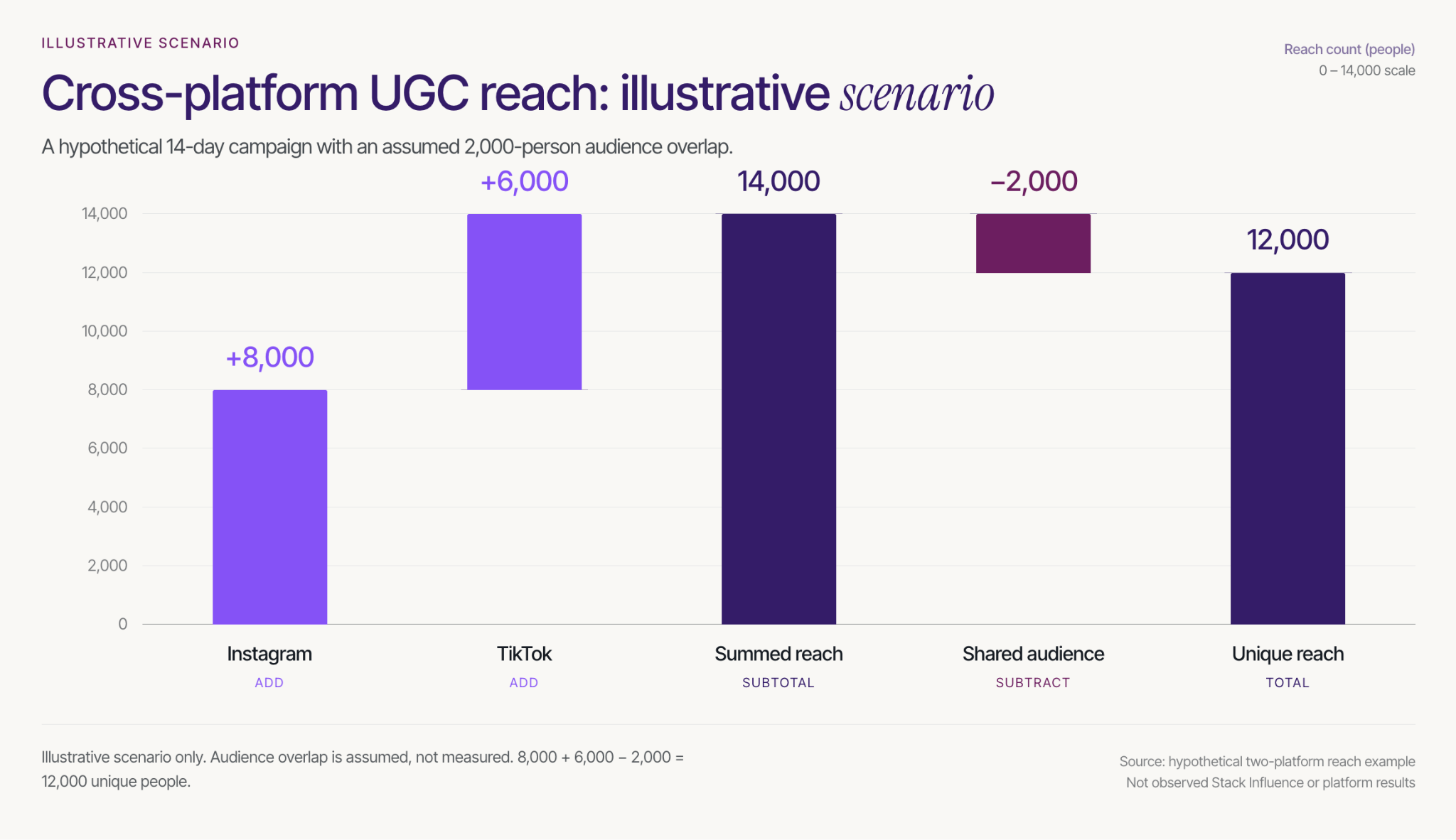
For your own storefront, use a consistent campaign-tagging convention and distinguish versions wherever the placement supports separate links. Keep the source asset identifier in the reporting record so different edits can be compared without losing their common origin.
For eligible Amazon campaigns, Amazon Attribution connects tagged non-Amazon marketing links with shopping activity and uses a 14-day, last-touch attribution model. Use distinct tags for the tactics or creatives you need to evaluate.
Review delivery and creative signals weekly, then allow the selected conversion window and reporting delay to mature before making a final comparison. A creator edit that attracts attention may still send poorly matched traffic to the product page.
Treat attributed orders as credit assigned under a measurement model, not proof that repurposing caused incremental sales. Avoid adding overlapping conversion totals from different reporting systems, and use a controlled test when the decision requires a stronger causal answer.
The practical answer to how to repurpose UGC content across platforms is to preserve the useful product evidence while changing its presentation for the next viewer.
Start with one source asset and prepare three purposeful placements, not three copies of the same post. Complete the Reuse Release Card, confirm the permissions, and measure the result appropriate to each destination.
For ecommerce sellers, that creates a clearer path from creator content to usable marketing. For content creators, it creates a clearer deliverable to scope and price. Build that first reusable content package before expanding the campaign.
A useful video does not automatically create something you can invoice. You might be helping viewers choose a product, teaching a skill, or building a loyal community while relying on a platform to decide what those views are worth.
Creator fund alternatives give content creators other ways to connect that work with compensation. The right route depends on what someone is buying: your production skills, access to your audience, a product recommendation, or something you sell directly. This guide compares seven platforms, explains where direct brand deals belong, and shows how to judge an opportunity by its payment conditions rather than its headline earnings.
Creator fund alternatives are ways to earn from creative work, recommendations, and audience relationships without depending entirely on a platform reward program. Paid UGC and sponsorships involve a buyer commissioning work; affiliate programs require qualifying purchases; memberships and digital products require customers willing to pay directly.
Keep historical fund advice separate from current programs. TikTok's Creator Rewards Program rules describe eligibility based on factors including an eligible personal account, at least 10,000 followers, and 100,000 video views in the preceding 30 days. Qualifying content and age requirements also apply, so an old Creator Fund payout example is not a current earnings forecast.
Apply the Payment-Trigger Test to each opportunity:
For a creator with strong production samples but limited reach, content-only assignments are worth investigating. For someone whose viewers already ask buying questions, affiliate programs may fit the existing content. A community repeatedly requesting tutorials or resources gives you a reason to test a paid product or membership, rather than launching one simply because the software exists.
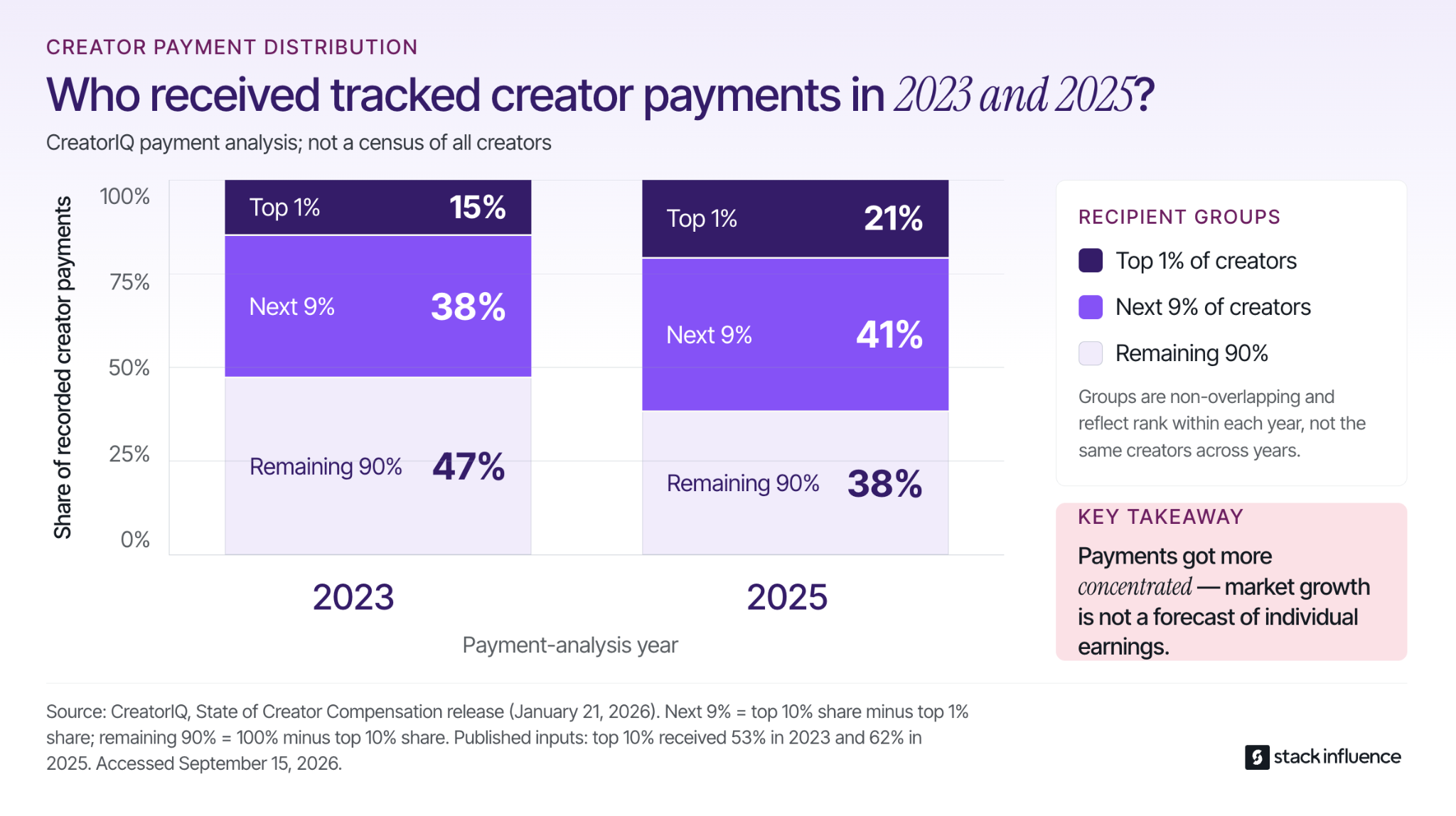
CreatorIQ's creator-compensation analysis reports that the top 10% of creators received 53% of tracked payments in 2023 and 62% in 2025; the top 1% received 15% and 21%, respectively. By subtraction, the next 9% received 38% and 41%, while the remaining 90% received 47% and 38%.
Those figures describe the company's payment analysis, not every creator's income. The lesson is to plan around offers you can secure and payments you can collect, not assume that growth in brand spending produces a predictable personal payout.
The options below cover different compensation models, not a highest-paying-to-lowest-paying ranking. This guide is published by Stack Influence, which appears first as the product-seeding option. Platform information was checked on September 15, 2026; availability and individual campaign terms can vary.
Stack Influence is a micro-influencer marketing platform built around gifted-first product seeding for ecommerce brands. Its creator program connects product participation with content creation and campaign completion, giving creators a structured way to work with brands rather than arranging every detail through separate messages. The workflow supports vetted creator participation, coordination, UGC generation, and accountability for completed posts.
For micro influencers and nano influencers, the practical opportunity is product-focused campaign experience. A useful submission demonstrates the product clearly, follows the agreed brief, and represents the creator's genuine experience. A desk organizer demonstration, for example, can show the product solving a recognizable problem rather than merely appearing beside its packaging.
The creator FAQ says applicants need at least 200 Instagram followers and original content. It also explains that campaigns provide products, with additional monetary compensation offered occasionally. The creator agreement requires participants to be at least 18, and meeting basic eligibility does not guarantee a particular campaign.
What to know: evaluate the specific product arrangement, posting requirements, approval process, and any separately stated cash compensation before accepting. Where participation involves purchasing a product and receiving reimbursement, that repayment covers the purchase rather than automatically becoming an additional production fee. Keep the product benefit and any cash fee separate when applying the Payment-Trigger Test.
This workflow is useful for creators seeking coordinated ecommerce product collaborations and experience delivering agreed content. Choose products you can meaningfully discuss, retain the campaign terms, and contact support when your genuine experience does not match what a brief appears to request.
Billo provides content-production assignments where the brand is buying an asset rather than necessarily buying access to your followers. Billo's creator guidance says a standard assignment requires uploading the video through its app; posting to your own social account is an optional add-on. Creators must be at least 18 and live in the United States, Canada, United Kingdom, or Australia.
The payment trigger is approval: earnings are credited after the video is approved, with PayPal payments made twice monthly. No social following is required for standard work, but applications and approval still stand between registration and payment. Compare the offer with the filming, editing, revisions, and permissions involved rather than assuming that an available assignment is worthwhile at any price.
For UGC creators, a portfolio that demonstrates clear explanations and competent editing is more useful here than an unsupported promise of viral reach. Start with a sample matching the kind of assignment you can reliably deliver.
TikTok Shop connects product-focused content with commerce. Its affiliate collaboration documentation distinguishes open collaborations from seller invitations to specific creators, with commissions attached to promoted products. Unlike view-based rewards, affiliate earnings depend on qualifying sales under the offer's terms.
The current U.S. creator eligibility policy requires affiliate applicants to be at least 18, based in the United States, and have at least 1,000 followers, alongside verification and compliance requirements. Affiliate creators below 5,000 followers enter a pilot program with restrictions. Other account types have different rules, so a shop-bound account's requirements should not be presented as the general affiliate threshold.
This route suits content that answers real buying questions, but it remains dependent on TikTok distribution and shoppers purchasing. Compare the product, commission, sample conditions, and cancellation rules before committing. Keep sales commissions separate from TikTok pay-per-view earnings when reviewing results.
The Amazon Influencer Program provides a storefront for product recommendations and an opportunity for eligible content to generate commissions. Amazon's onsite earnings guidance distinguishes commissions from traffic you send to Amazon from earnings when Amazon selects eligible content for shoppers already browsing its site. These use separate reporting identifiers.
Selection is not guaranteed. Amazon's current video-upload guidance says that after 10 videos are approved by moderation and onsite commission signup is completed, videos may also appear on relevant product detail pages. Uploading a video does not guarantee placement, a purchase, or ongoing monthly income.
Use this option when you can create specific, useful product explanations rather than a large collection of interchangeable recommendations. Measure qualifying commissions and keep externally referred activity separate from onsite activity. An old video may continue to contribute, but an uploaded library is not a contractual promise of passive income.
Patreon supports direct audience payments through memberships and one-time purchases. Its creator fee overview lists a standard 10% platform fee for creator pages published after August 4, 2025, with payment processing and other applicable charges separate. Qualifying continuously published legacy pages can retain different pricing.
The practical question is what a supporter receives repeatedly. A creator teaching digital illustration might offer a monthly exercise and commentary on the process, provided that schedule is sustainable. Define a benefit you can deliver before adding multiple membership tiers.
The tradeoff is an ongoing commitment to subscribers, not merely a setup task. Gross membership revenue is not the amount available after fees, and attracting supporters still requires a relationship with an audience. Test whether people will pay for the proposed benefit rather than treating follower count as a subscription forecast.
Gumroad lets creators sell digital products such as tutorials, templates, and educational resources. Its published pricing lists a charge of 10% plus $0.50 for sales through a profile or direct links, and 30% for purchases originating through its Discover marketplace. It does not charge a monthly platform fee.
This model gives you a product to sell beyond an individual sponsorship. Start with a narrow resource that solves a question your audience already asks, such as an original shot-planning template for product videos. Confirm that you own the material and have permission to include any third-party assets.
The constraint is demand: a storefront does not prove that buyers exist. You also need to account for product development, updates, support, and the applicable transaction conditions. A small paid test can provide better evidence than spending weeks building a large course before anyone has expressed purchase intent.
YouTube offers advertising and audience-payment options rather than one uniform creator fund. Its Partner Program eligibility documentation separates early access to selected features from advertising revenue sharing. For the advertising tier, the audience thresholds are 1,000 subscribers plus either 4,000 qualified public watch hours in 12 months or 10 million qualified public Shorts views in 90 days, alongside the other program requirements.
In eligible countries, earlier access to certain fan-funding and Shopping features starts at 500 subscribers, three valid public uploads in 90 days, and either 3,000 qualified watch hours in 12 months or 3 million qualified Shorts views in 90 days. Meeting a threshold does not bypass application review or feature-specific requirements.
The YouTube earnings overview specifies 55% of net Watch Page advertising revenue and 45% of the revenue allocated to a creator through the Shorts Creator Pool. These percentages have different calculation bases and are not directly comparable earnings per view. YouTube can add another distribution channel, but it still requires audience development and does not guarantee payment amounts.
Turn content skills into direct brand deals by proposing a specific deliverable to a relevant buyer, showing a matching example, and agreeing on compensation before production. You do not need creator fund membership to sell a UGC video; you need a buyer who agrees to a specific paid brief.
Separate production from influence. A content-only assignment purchases files for the brand's use; a sponsored post also purchases publishing to your audience. Micro influencers and nano influencers can offer either, but a production sample and an audience-performance report answer different buying questions.
Research a small set of brands whose products you understand, then identify one useful content concept for each. A stationery creator could propose a demonstration showing how a notebook handles project planning, supported by a relevant sample. The process for finding UGC clients should lead toward a confirmed brief and buyer, not just a growing list of brand names.
An influencer marketing agency or micro influencer agency can also be a potential buyer or coordinator. Ask who commissions the assignment, who approves it, and who pays the invoice. A label such as brand ambassador or brand partner does not establish whether the arrangement contains a fee, products, commission, or a combination.
Write down the asset count, length, revision allowance, publishing requirement, permitted uses, and payment schedule. A practical approach to pricing UGC content starts with the complete assignment rather than a universal per-video rate.
Paid advertising through a creator's identity deserves a separate conversation from ordinary reposting. The Meta partnership ads guide explains the distinction between commercial usage rights and platform permissions. Ask about the advertising period, permitted edits, and whether category exclusivity prevents other work.
Disclosure remains necessary when a material brand relationship accompanies an endorsement. The FTC's influencer disclosure guidance includes payment and free products, and says disclosures should accompany the endorsement where people will notice them. For video endorsements, the disclosure should be in the video, not only its description.
Measure each alternative from work started to money available, not only from content posted to a dashboard total. Track the amount agreed, approval status, deductions, payment due date, actual receipt date, and all time spent producing and administering the work.
Keep reimbursements matched to the expenses they repay rather than adding both to a production-income total. Record product benefits separately from spendable cash. For commissions, distinguish estimated activity from finalized earnings and money received; for direct projects, an accepted quote and an unpaid invoice are not collected fees.
Consider an illustrative $600 UGC project with $60 of direct expenses paid on day 7 and content accepted on day 14. Assume no transaction fees, refunds, taxes, or other cash costs, and that every scheduled payment arrives. This example compares negotiated payment schedules, not any platform's standard terms.
Under an upfront-plus-balance schedule, the creator receives $300 on day 0 and $300 on day 30. Cumulative project cash is therefore $300 on day 0, $240 on day 7, $240 on day 14, $540 on day 30, and $540 on day 60.
Under a later lump-sum schedule, the creator receives the entire $600 on day 60. Cumulative project cash is $0 on day 0, negative $60 on days 7, 14, and 30, and $540 on day 60.
Both schedules finish with the same $540 cash surplus before labor, overhead, and taxes. On day 30, however, their cash positions differ by $600. The payment terms change the money available during production even when the final fee and expenses are identical.
Before accepting direct work, ask when the payment clock starts: booking, delivery, approval, publication, or invoice receipt. An advance can reduce the cash you must supply, but its scope, refund conditions, and delivery obligations still need agreement.
For a completed group of projects, divide collected fees minus related cash costs by all associated hours, including pitching, administration, and revisions. Match the revenue and work to the same projects; dividing this month's receipts by this month's filming hours can mix unrelated periods. The result is a project-level cash return per hour, not a guarantee of a sustainable wage.
For affiliate work, use distinct tracking identifiers where supported and compare finalized commissions from the same content period. A tracked purchase establishes program attribution, not proof that the creator caused an additional sale. Do not add overlapping reports together as though each represents unique earnings.
Finally, record your largest payer's share of receipts and which channels bring you customers. TikTok rewards, TikTok Shop commissions, and sponsorship leads generated entirely through TikTok can still share one distribution dependency. A different payment label does not automatically create a different source of demand.
Choose one monetization question you can actually test, such as whether a specific production offer attracts a cash-paid brief or whether viewers will buy a narrow digital resource. Keep using existing reward programs where appropriate, but do not make eligibility growth the only commercial objective.
During the first week, assemble relevant samples, check account and country requirements, and define the offer. Use a creator-focused platform comparison to assess campaign models, not to create accounts everywhere. Verify invitations through official channels before sharing payment or identity information.
Use the remaining weeks to approach relevant buyers or publish the offer to an existing audience. Record the objections, work required, payment conditions, and evidence of demand. A product-only offer may support a portfolio objective, but it should not be recorded as a successful test of demand for cash-paid production.
At the end of the month, apply the Payment-Trigger Test again. Continue when the offer produces credible demand and workable economics, adjust it when the scope or buyer is wrong, and allow agreed payout periods to finish before judging collection. One month is a learning window, not a promise of income replacement.
Creator fund alternatives are most useful when they connect something you can deliver with a clear buyer and understandable payment terms. A production fee, a qualifying commission, a membership renewal, and a product reimbursement should not disappear into one undifferentiated earnings total.
Choose one offer to test, define what earns payment, and track when the money actually arrives. For eligible creators exploring ecommerce product collaborations, evaluate Stack Influence's campaign workflow against those same questions so the next opportunity builds useful experience without obscuring its compensation.
A brand replying “we would love to collaborate” is encouraging. It still does not tell you whether the offer includes a production fee, a free product, or an affiliate link that pays only when someone buys.
Learning how to find UGC clients means moving beyond collecting brand names. You need to identify a content need, show relevant work, reach the person responsible, and confirm what the business will pay for. This guide gives content creators a practical way to move from prospect research to a paid brief, without confusing a busy inbox with a growing client business.
Find UGC clients by researching relevant brands, applying to published briefs, contacting agencies, and asking for introductions, then qualifying each opportunity before proposing work. Use the Paid-Brief Filter to decide what deserves your next hour, not simply what deserves a place on a spreadsheet.
In this context, a UGC client commissions creator-made photos or videos for an agreed use. The buyer is purchasing content production; posting to your own audience may be a separate deliverable. Commissioned UGC is therefore different from an unsolicited customer post, even when the finished content has an informal style.
The filter has four checks:
Research the first three checks before contacting a brand; resolve the fourth in the conversation. A prospect becomes ready for a proposal when the buyer confirms a paid brief, not when you discover an active advertisement.
Stack Influence illustrates why compensation categories matter. Its gifted-first model connects creators with ecommerce product campaigns, and its creator FAQ explains that participants receive products, with additional monetary compensation offered on some campaigns. Evaluate the specific offer rather than automatically counting a product collaboration as paid production work.
Consider an illustrative 30-day outreach scenario: 40 delivered pitches receive 10 replies. Assume three replies confirm cash-paid briefs, four offer products only, two offer affiliate commissions only, and one remains unresolved; the other 30 pitches receive no reply during the window.
The overall reply rate is 25%, but the confirmed paid-brief rate is 7.5%. Those three briefs are not yet three clients. These invented inputs illustrate a tracking distinction, not an industry benchmark or a Stack Influence result.

Look for clients through brand research, creator-platform briefs, agency contacts, and warm introductions. Start with one channel you can research directly and one channel where buyers publish opportunities, rather than trying to maintain a profile everywhere.
Start with products you understand and can credibly demonstrate. Inspect the brand’s product pages, social posts, and customer questions, then write down one explanation that a short video could make clearer.
Use Meta’s Ad Library to research advertisements running across Meta technologies. TikTok’s Creative Center also provides ad examples and creative resources, including Top Ads. Treat both as research tools, not directories of companies currently hiring creators.
For example, a stationery brand might show attractive desk setups without demonstrating how its planner handles a changing schedule. Your proposed video could show a real rescheduling task. That gives the buyer a concrete concept to assess without claiming that its existing advertising is failing.
Record the page you reviewed, the date, the content idea, and the likely contact. An active ad does not establish the brand’s budget, profitability, or willingness to hire you; those remain questions to resolve.
Choose platforms by their campaign model and eligibility requirements, not by the number of opportunities advertised. Product campaigns, content-only assignments, and audience-based influencer campaigns can ask for different work and compensate it differently.
Stack Influence’s creator campaign process connects product selection, social content, and approval through a coordinated workflow. It is a practical route for micro influencers and nano influencers exploring ecommerce product collaborations. Read the campaign requirements and reimbursement conditions before committing, and keep any separate production fee visible in your records.
For content-production assignments, Billo’s creator guidance says standard jobs require video delivery rather than social posting. Its current eligibility rules require creators to be at least 18 and live in the United States, Canada, United Kingdom, or Australia. No social media presence is required, but acceptance and available work are not guaranteed.
The JoinBrands getting-started guide distinguishes Content Only, Content + Posting, and other job types. It also describes certification and application steps. Review the individual brief, fees, product-delivery method, and rights before deciding whether the work is worthwhile.
Do not assume every familiar platform has open registration. As checked on September 14, 2026, Shopify Collabs for creators says it is not accepting new creator signups, while merchants can continue direct invitations and accept creator applications. Confirm the available route before building an outreach plan around it.
Research agencies that show relevant product-video work, then look for a producer, creative strategist, or person responsible for creator projects. An influencer marketing agency may manage audience-based sponsorships, content production, or both, so ask which service it is buying before sending rates.
A useful opening question is: “Do you commission creator-made product videos for client accounts, and who handles those briefs?” For local businesses, propose a manageable demonstration tied to a real service or product rather than promising to transform their entire social presence.
Ask existing professional contacts for specific introductions. A photographer, editor, or social media manager can understand “a creator who films hands-only kitchen demonstrations” more easily than “someone available for any brand deal.” Agree on permissions before sharing a contact’s details, and do not approach an agency’s clients in ways that violate your agreement.
Create a small, relevant portfolio before spending heavily on outreach. Three strong samples can be a manageable starting point: a clear product demonstration, an answer to a buying question, and a short narrative showing a product in use. This is a suggested starter set, not an eligibility standard.
Use products you already own when possible. Label unpaid examples as concept or sample work, and never imply that a featured brand commissioned them. Show how you communicate an observable benefit without inventing personal experience or performance results.
Your UGC portfolio should make the buyer’s next decision easy. Put the most relevant sample first, explain what you produced, name the services you offer, and provide a business contact method. Share your general service region when useful, not your home address or private schedule.
For a production-only pitch, lead with execution rather than follower count. When a brief also purchases audience distribution, include accurate audience information separately. Someone buying a video file and someone buying access to your followers are evaluating different deliverables.
Publish selected samples on your own profiles with descriptions of the work: product demonstration, hands-only tutorial, or short-form video editing. Creators still developing those skills can use the beginner UGC creation guide before expanding their outreach list. A clear offer is more useful than repeatedly announcing that you are “open to collaborations.”
Write a pitch around an observed need, a proposed deliverable, and relevant proof. You are asking the buyer to consider a specific production assignment, not to invent a role for you.
For an imaginary lunch-container brand called Cedar Lane, a pitch could read:
Subject: A packing demonstration for Cedar Lane’s lunch container
Hi Cedar Lane team,
I create hands-only kitchen videos. Your product page explains the container’s compartments, and I have an idea for showing how a complete lunch fits inside them.
I would propose a 25-second packing demonstration with two alternative openings for your team to test. I have included a comparable sample from my portfolio so you can assess the filming and editing style.
Are you commissioning paid UGC for this product, and who handles the creative brief and budget?
Replace the imaginary details with research you actually performed, and link directly to the relevant sample. Do not claim that a concept will increase conversions, or attach a fabricated performance report to make the proposal sound stronger.
When a direct message is the available route, use it to find the right contact rather than sending a full contract discussion immediately. The broader influencer outreach guide explains how contact, qualification, and campaign coordination fit together.
As a starting routine, send one useful follow-up after about five business days. Add a clarification or a second relevant example, not a guilt-inducing reminder. Respect a refusal or request to stop, and close an unanswered conversation rather than pursuing the recipient across multiple channels.
When replies consistently offer products instead of fees, review your positioning. Make “paid content production” explicit and show production examples, rather than framing every message as a request to join a brand’s ambassador program.
Turn an interested reply into a written agreement before creating custom client work. Confirm who is buying the content, who approves it, who pays the invoice, and what happens if the project changes or is canceled. For an agency assignment, the brand appearing in the video may not be the business responsible for paying you.
Define the number of videos or photos, duration, formats, alternative openings, raw footage, delivery date, and included revision rounds. Distinguish correcting work that missed the agreed brief from producing a new concept after the brief changes. Put payment timing and any deposit or milestone arrangement in writing.
Ask where the content will appear and for how long. Organic reposting, paid advertising, editing permissions, account-based advertising permissions, exclusivity, and portfolio display should not be left to assumptions. The buyer-side guide to purchasing usable UGC shows why production, publishing responsibility, and content rights need separate decisions.
Offer a small paid pilot when the buyer wants to test the relationship. Existing samples can demonstrate your ability; you do not need to provide a complete custom campaign for free. For complex rights or exclusivity terms, obtain qualified advice before signing.
Verify unexpected offers through a company contact you locate independently. The FTC’s warning about fake brand ambassador managers describes impersonators who use apparent brand relationships to obtain money or personal information. Do not send passwords, login codes, banking credentials, or identity documents through an unverified message thread.
A legitimate platform’s documented purchase-and-reimbursement workflow is different from an unknown sender demanding money to unlock a job. Check the platform independently, understand the conditions, and confirm the offer before making a purchase. Follow account age requirements rather than using someone else’s identity to get access.
For endorsements, the FTC’s Disclosures 101 guidance explains that payment and free products can create relationships that need clear disclosure. It also says endorsements must reflect genuine experience. Do not agree to pretend you used a product, invent a result, or conceal a commercial relationship.
Track each prospect from first contact through payment, using a consistent record. Include the discovery source, relevant sample, contact date, reply category, brief status, quoted scope, agreement status, payment due date, cash collected, and time spent. Product reimbursements and product value should remain separate from earned production fees.
Review activity weekly and group outreach by the month it began. Paid briefs and requested proposals are leading indicators; signed projects, collected fees, and repeat bookings are outcomes. Keep unanswered or pending opportunities open long enough to reflect the buyer’s actual timeline, rather than counting them as wins or losses prematurely.
Use the Paid-Brief Filter to diagnose the bottleneck. No replies suggest testing the contact, relevance, or message; replies without cash budgets suggest reviewing the offer category; proposals without agreements suggest checking scope, proof, and commercial terms. These are diagnostic hypotheses, not proof that one specific factor caused the result.
Record both where you first found a lead and how the client says they discovered you. A buyer might see your work on social media and later answer an email, so the final message is not necessarily the only meaningful touchpoint. Compare similar outreach groups, and avoid declaring one channel superior after a handful of conversations.
Make the first project easy to extend without quietly expanding its scope. Deliver clearly named files, identify the approved versions, summarize the permitted uses, and confirm whether the buyer needs another product, a new customer question, or a different opening tested next.
Ask for permission before using client work, testimonials, or campaign results in your portfolio. When results are shared, record the dates, placements, and relevant context; do not claim that your video alone caused a sales increase. A specific next-project proposal is more useful than a generic request for “ongoing collaboration.”
Repeat work can reduce the acquisition time allocated to each project. Consider a separate illustrative scenario: each identical project pays $500 and incurs $50 in direct cash costs, including any project-specific platform or payment fees. Assume every invoice is paid, production takes five hours per project, and the fee, rights, and scope stay unchanged.
Allocate five hours of acquisition and administration to the first project, including unsuccessful outreach, and one hour of administration to each repeat project. Excluding fixed overhead and taxes, cumulative return after direct costs is $45.00 per hour after one project, $56.25 after two, $61.36 after three, and $64.29 after four.
The calculation is cumulative collected fees minus direct costs, divided by cumulative acquisition, administration, and production hours. Total hours are 10, 16, 22, and 28; the corresponding amounts after direct costs are $450, $900, $1,350, and $1,800. These are hypothetical inputs, not suggested rates, promised earnings, or observed creator results.
The lesson is to account for the time required to win the work. A project’s headline fee does not tell you what the relationship earns once prospecting, administration, and delivery are included.
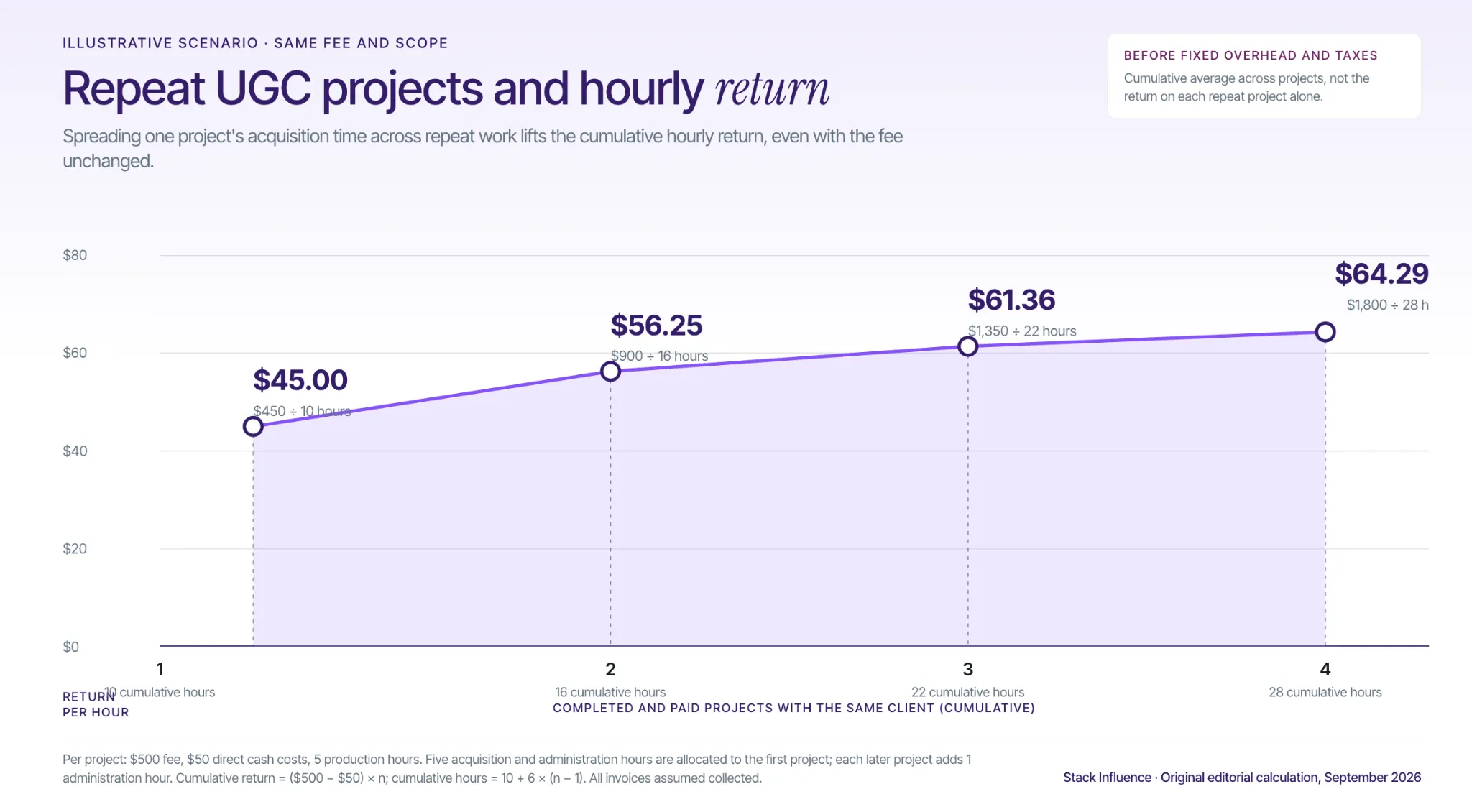
The practical answer to how to find UGC clients is to connect a real content need with relevant proof and a clearly paid brief. Platforms and outreach can introduce you to buyers, but qualification, scope, and dependable delivery determine what the opportunity becomes.
Start with one service you can demonstrate, a small shortlist of relevant businesses, and one sample matched to each pitch. Ask who owns the brief and whether there is a cash production budget, then track the conversation through payment. That gives you a client-acquisition process you can improve, rather than a longer list of brands you hope will reply.
A free product can arrive with a surprisingly expensive to-do list: a video, several photos, revisions, advertising permissions, and a purchase you must fund before reimbursement. The useful question is not just whether a brand will send something. It is what you are agreeing to provide in return.
Learning how to get free products to review as an influencer starts with choosing relevant opportunities, showing you can explain a product, and checking the terms before accepting. This guide covers where to look, what to pitch, and how to finish a collaboration without confusing product compensation with cash income.
The practical routes are creator campaigns, sampling communities, and direct brand outreach. Choose according to the work you want to do: publish social content, provide permitted product-testing feedback, or propose a specific collaboration.
Product seeding means getting products into creators' hands so they can experience and potentially feature them. A no-obligation gift and a product-for-content agreement are different arrangements, even when both are described as “gifting.”
Stack Influence's creator program connects ecommerce brands with creators through gifted-first product seeding. Its published workflow involves purchasing an approved product, trying it, creating the required social content, and submitting the post for reimbursement. That is a coordinated creator campaign, not an invitation to sell customer star ratings.
The creator eligibility FAQ lists at least 200 Instagram followers and original content, with U.S. residency required for its regular campaigns and PayPal used for payments. Its creator agreement also requires participants to be at least 18. Meeting the basic requirements does not guarantee a particular campaign.
The useful operational distinction is that product reimbursement follows qualifying participation. Review the specific offer's amount and requirements before purchasing, and do not assume that “get paid” means a separate cash sponsorship fee.
Influenster's sampling guide describes receiving products after joining, downloading the app, and sharing your interests. Build an accurate profile and contribute reviews of products you have actually used. Matching can take time, so registration is not a promise of immediate samples.
BzzAgent's campaign guide describes a different sequence: complete your profile, receive an invitation to apply, answer campaign questions, and wait for a separate acceptance confirmation. Samples are limited, and participation is currently available to residents of the United States, Canada, and the United Kingdom. Follow the posting instructions for the campaign you accept rather than assuming every assignment requires the same content.
Identify brands whose products fit something you already demonstrate, then find their creator application, partnerships contact, or press contact on the official website. Look for a specific product you can test usefully rather than asking for whatever the brand will send.
A request to join a brand's PR package list is different from proposing a guaranteed video. Ask whether the product is a no-obligation gift or compensation for agreed work. A discount code that requires you to buy something is not a free-product offer.
Write down five answers before joining a campaign or agreeing to a brand's proposal. Use the same check whether the invitation comes from an influencer marketing agency, a brand employee, or one of the influencer marketing platforms you use.
An unanswered line is a reason to ask for clarification before proceeding. Save the agreed brief and any written changes so you are not relying on a disappearing message.
Start with products you already own. You do not need a box of gifted products to demonstrate that you can create a useful review.
For a stationery-focused account, one sample could test whether a planner opens flat and another could show how its weekly layout handles a busy schedule. Show the product in use, explain one strength, identify one limitation, and say who would find it useful. Avoid presenting an unboxing as evidence of long-term durability.
A small portfolio of relevant product review videos is more informative than a profile that only says “open to collaborations.” Include a clear contact email, a short description of your subject area, and links to your strongest examples. Keep shipping addresses and other private details off public profile pages.
For nano influencers and micro influencers, make the audience context easy to understand. Share current follower numbers and relevant post results honestly, including the measurement period. Do not buy followers or present one unusually successful post as your normal performance.
Also distinguish social distribution from production work. A brand asking for creator-made UGC may want a video file for its own channels, while an influencer collaboration may require publication to your audience. Ask which deliverable the product is compensating before quoting your availability.
A good pitch answers a product question, not just a creator's wish for a sample. Name the item, explain the demonstration, and show evidence that you can deliver it.
For example, a planner creator could send this message:
Hello, I create practical stationery reviews and would like to test your weekly planner in a short video about balancing appointments and project deadlines. I can share two relevant examples of my work. Are you considering gifted collaborations, and what deliverable, shipping arrangements, timeline, and content usage rights would apply? Any published opinion would reflect my experience, with the gift clearly disclosed.
Personalize the product and demonstration, then include links to the examples you mention. Add audience information only when it is relevant and accurate. Do not promise positive coverage, a particular view count, or sales you cannot control.
Start with a manageable shortlist rather than sending an identical message to hundreds of brands. As an outreach routine, consider one polite follow-up after about a week, then move on unless the brand provides a different timeline. This is a suggested workflow, not a proven response-rate formula.
Confirm an unfamiliar invitation through contact details you find independently on the brand's official website. The FTC's scam-prevention guidance warns about impersonation, pressure to act quickly, and demands for particular payment methods.
Do not send passwords, login codes, gift-card payments, or a fee to “unlock” a collaboration. Share necessary shipping or payment information only through a verified process. A documented purchase-first campaign is different from an unknown account demanding money, but both deserve scrutiny before you spend anything.
The FTC's endorsement guidance emphasizes truthful experiences and opinions. Use the product before reviewing it, demonstrate what you observed, and identify early impressions as early impressions. Do not repeat claims you cannot support.
For U.S.-facing endorsements, the FTC's influencer disclosure guide explains that free or discounted products can create a material connection requiring disclosure. That includes products a brand sends without requesting a post. Put the disclosure with the endorsement, where people can easily notice it.
For a gifted product, an example is: “The brand sent me this planner at no cost for this review.” For reimbursement: “The brand reimbursed my purchase for this post.” The wording must describe the actual arrangement; do not call a compensated collaboration an independent purchase.
In a video, make the disclosure part of the video, not just its description. Use clear spoken and visible wording, and add the platform's required branded-content label where applicable. A brand tag or vague “collab” label does not explain the arrangement.
If the product disappoints, do not invent enthusiasm to finish the assignment. Stack Influence's product-feedback FAQ directs creators to contact campaign support when they dislike a product and says they should not feel pressured to publish something they are uncomfortable sharing. Resolve the next step in writing before assuming you should post, return, or discard the item.
A social review video and an Amazon customer review are different publishing activities with different rules. A disclosure does not make a retailer-prohibited incentive acceptable.
Amazon's customer-review policy prohibits sellers from offering compensation, including free products, discounts, or refunds, in exchange for reviews. Do not accept a seller's offer to reimburse your purchase after you leave an “honest” customer review. Calling it honest does not remove the incentive.
Amazon Vine is an Amazon-run program in which invited reviewers receive products and provide their opinions. Amazon selects Vine Voices; a brand or agency cannot promise to get you admitted. The seller enrollment process is not a creator application process.
For ordinary brand collaborations, keep the agreed work focused on permitted social content or commissioned assets. Before posting any separate retailer review of a gifted or reimbursed item, check that retailer's current policy rather than assuming your social campaign authorizes it.

Keep one record for each opportunity: where it came from, the accepted brief, delivery status, deadline, content submitted, expenses, reimbursement received, and permitted uses. Review the record monthly and distinguish pending offers from completed collaborations.
Applications and relevant pitches show activity. Accepted offers show selection. Completed work, settled reimbursements, and repeat invitations show what actually resulted. Track those stages separately so sending more applications does not look like receiving more opportunities.
For content performance, record the platform, post format, reporting window, and available metrics such as views, saves, comments, or tracked clicks. Compare similar posts over the same period. Do not claim that views caused purchases when you lack purchase data or a way to separate other influences.
For repeat creator partnerships, send a concise completion note with the live post or delivered asset, the agreed results, and one useful observation from testing. Then propose a related next assignment with its scope and compensation stated separately. The goal is a clear working relationship, not an ever-growing obligation to work for products.
Understanding how to get free products to review as an influencer means knowing how to find an opportunity, qualify for it, and judge the exchange. Relevant examples and a useful pitch open the conversation; clear terms and honest content make the collaboration manageable.
Prepare two sample reviews using products you already own, then choose one relevant opportunity and apply the Five-Line Offer Check. Eligible adult creators can explore Stack Influence's creator workflow with those requirements in mind, building a portfolio without losing track of their time, money, or content rights.
A brand asks for “one quick video.” Then the brief adds extra openings, paid advertising, raw footage, and category exclusivity. Pricing that assignment as a single video leaves several different commitments inside one fee.
Learning how to price UGC content as a creator means separating the work you deliver from the permissions you sell. This guide gives content creators a production-floor calculation, a worked quote, and a way to check whether bundles and revisions actually leave enough money for the time involved.
Charge enough to cover the complete production assignment, then price any additional licensing, audience distribution, or restrictions. There is no universal per-video rate that fits every brief. The worked example below starts with a $300 production package and reaches $550 after additional versions and paid usage, but those are illustrative quotes, not market averages.
For market context, Collabstr’s 2026 Influencer Marketing Report reports an average UGC asking price of $180 and an average final collaboration cost of $154. Its broader pricing analysis covers more than 472,000 packages and 21,000 collaborations across categories. Those figures describe its marketplace, not a standardized 30-second video with identical rights or a creator’s after-expense income.
Compare a benchmark with your own offer only after checking deliverables, usage, fees, and location. A low marketplace average does not make an unprofitable project sustainable, and a high advertised rate does not prove anyone paid it.
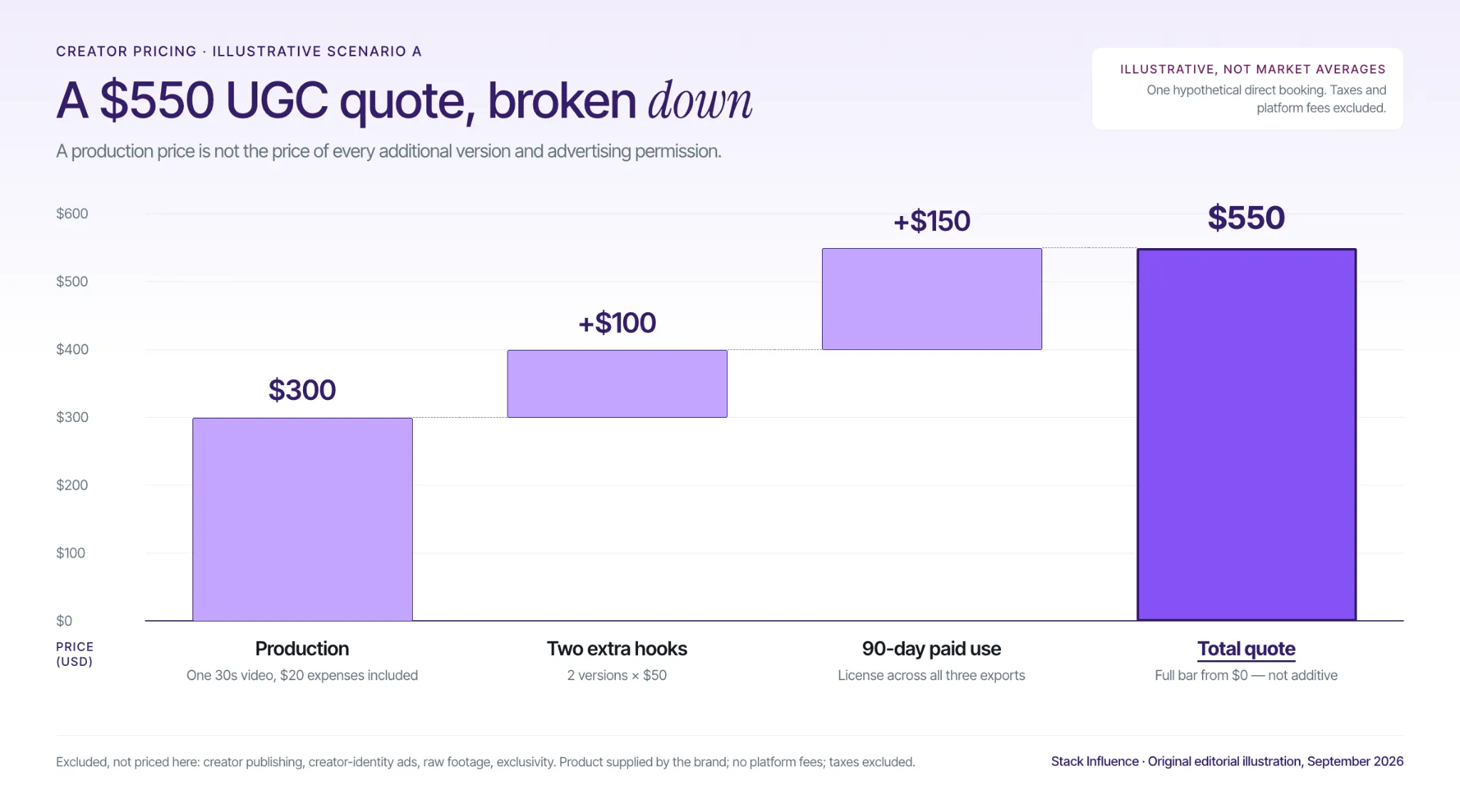
In commercial briefs, commissioned UGC means creator-made content produced for a brand, rather than an unsolicited customer contribution. Producing the asset and publishing it to an audience are separate assignments.
Micro influencers and nano influencers can sell both, but follower count should not substitute for estimating production work. When a brand also wants a post on your account, discuss audience relevance, likely distribution, and posting obligations separately.
Stack Influence’s creator campaign process illustrates another compensation model: gifted-first product seeding, where creators complete agreed requirements in exchange for product gifting or reimbursement. Evaluate that product-based collaboration separately from a cash UGC production quote. A reimbursed product purchase is not the same as an additional cash fee for your work.
Use the Five-Line Quote to identify everything the client is buying before calculating a total. Keeping the components visible makes it easier to change the scope without accidentally giving away additional work or permissions.
A line can be included in another line’s price, but it still needs a written scope. Mark publishing or exclusivity as “not included” when the client has not purchased it. Check transaction fees against the resulting total rather than hiding them inside an unexplained markup.
Start with the time required to finish the job, including communication and delivery. Use an internal hourly target that accounts for your business overhead and time you cannot bill directly, rather than treating every working hour as a paid client hour.
Consider an illustrative assignment requiring 45 minutes for briefing and scripting, one hour for filming, 90 minutes for editing, and 45 minutes for administration and the included revision. That is four hours. At an assumed internal target of $50 per project hour, plus $20 in direct expenses, the production floor is $220 before transaction fees.
The calculation is:
Production floor = project hours × internal hourly target + direct project expenses.
When a percentage-based fee applies to the entire payment, divide the required amount by the share you retain. For example, Fiverr’s earnings documentation says freelancers receive 80% of the purchase amount. Retaining $220 therefore requires a $275 order before any other applicable costs, calculated as $220 ÷ 0.80.
Your floor is a private decision threshold, not necessarily your selling price. A quote can also reflect creative expertise, a difficult demonstration, or a valuable permission package. Do not double-count overhead already built into your hourly target.
Here is an illustrative direct-booking quote in U.S. dollars, with no platform fees and taxes excluded. Assume the brand supplies the product at its own expense.
The production package costs $300, including the $20 project expense already described. It covers one 30-second vertical product demonstration, one concept, one opening hook, one call to action, captions, one consolidated minor revision round, and 90 days of organic use on named brand-owned social accounts.
Two additional opening-hook versions cost $50 each, adding $100, bringing production and version charges to $400, and bringing delivery to three finished exports. A separate $150 license covers 90 days of paid use of those three exports through the named brand-owned social accounts, with the territory and start date recorded in the agreement.
The total is $550: $300 production, $100 additional versions, and $150 paid usage. Creator-account posting, creator-identity advertising, raw footage, and exclusivity are not included, so there are no charges for those items in this example.
These amounts are assumptions for a worked proposal, not standard UGC rates or Stack Influence creator payouts. The useful result is the structure: the client can see why the complete assignment costs more than the original production package.
Price each item against its actual scope and the commitment it creates, rather than applying an automatic percentage to every deal. The $150 paid-use license in the example is one proposed price for a defined term, not evidence that every creator should charge that amount.
The U.S. Copyright Office’s ownership guidance explains that creators generally own original works when they create and record them, with important exceptions such as qualifying works made for hire and ownership transfers. Delivering a file, granting permission to use it, and transferring copyright are different arrangements.
A perpetual license concerns duration; an ownership assignment concerns who owns the rights. Do not treat “buyout,” “full rights,” and “work made for hire” as interchangeable shortcuts. Ask the client to identify the actual arrangement, and obtain qualified legal advice before accepting a broad transfer or unusually restrictive agreement.
For an ordinary license, specify the permitted accounts and channels, organic versus paid use, territory, duration, start date, and editing permissions. Stack Influence’s guide to UGC licensing rights explains why these details matter when content moves between social posts, advertising, and commerce placements.
Offer a narrower license and a broader alternative when both could meet the brief. Set renewal pricing or a renewal process before delivery, and decide what happens to existing organic posts after expiry. Avoid a vague term that starts “when the brand eventually uses it” without an activation deadline.
Quote raw footage by the work required to select, organize, and transfer usable clips, plus the editing and usage permissions being granted. “Raw footage included” should identify the clips or footage quantity, not silently promise every recording from the shoot.
Decide whether the client may create new advertisements, change the meaning of your statements, sublicense the footage, or use it beyond the original campaign. Put AI training and synthetic use of your face or voice outside the standard offer unless separately and explicitly agreed. Those are negotiation boundaries, not assumptions to leave inside a generic delivery clause.
Advertising through a creator’s identity involves more than handing over a video. TikTok’s Spark Ads creation guide describes authorized identities and creator-provided post codes as routes for using content in Spark Ads. Agree on the commercial terms before enabling the corresponding platform permission.
For a creator-identity advertising quote, define the account, approved content, duration, and permitted edits. Do not assume a content license automatically supplies every platform authorization, or that an active authorization extends the agreed commercial term.
For category exclusivity, ask which competitors are restricted, what work is prohibited, and when the restriction ends. Estimate the contribution you might reasonably lose from conflicting work, using your actual pipeline rather than imagined bookings. A narrow restriction on a few named competitors is a different commitment from avoiding an entire industry for a year.
Discount repeatable efficiencies, not every component of the deal. A shared briefing call or a single filming setup may reduce production time across several videos; separate scripts, difficult demonstrations, and additional licenses may not become cheaper just because they appear on one invoice.
For a bundle, estimate shared setup hours once, add the work for each distinct concept and export, then check the total against your production floor. Present the discount as a saving on the specified production scope. Keep broader licensing and exclusivity visible rather than quietly discounting them too.
Count finished versions before agreeing to a package. Three hooks combined with two calls to action and two aspect ratios can mean 12 exports, not three videos. Clarify whether the brand wants interchangeable components or every finished combination, since those are different editing assignments.
Apply the same discipline to photos. A frame pulled from an existing video, a separately lit product photograph, and a new lifestyle shoot require different work. Estimate the assignment rather than assuming every image should cost a fixed fraction of a video.
For retainers, specify the number of concepts, delivery batches, revisions, reserved production time, and treatment of unused capacity. A recurring payment should buy a defined service, not an unlimited queue of requests.
An unchanged project price can produce very different hourly earnings when feedback expands. The most useful check is what remains after project expenses divided by every hour spent completing the assignment.
Consider a separate illustrative three-video package paying $600, with $60 in direct expenses and six hours of planned work, including the agreed revision allowance. Assume no platform fees and no changes to the license. That leaves $540 before general business overhead and taxes, or $90 per project hour.
Now assume each additional, unpaid revision round takes 1.5 hours. One extra round increases total time to 7.5 hours and reduces the effective rate to $72. Two extra rounds mean nine hours and $60 per hour; three mean 10.5 hours and approximately $51.43 per hour.
These are scenario calculations, not observed creator earnings. They show why a package can look attractive on a rate card while becoming much less rewarding during delivery.
Define a revision round as one consolidated set of feedback within the approved brief. Agree on charges for a new concept, a changed product claim, an extra format, or a reshoot requested after script approval. Correct your own failure to meet the agreed brief rather than presenting that correction as a client-requested upgrade.
Keep the approved script, feedback, and final versions together. Alongside those files, maintain a UGC rights-management record showing what was licensed and when it expires, so a revision request does not quietly become a new usage agreement.

Send a total price with specific inclusions, exclusions, payment terms, and a lower-scope alternative when appropriate. Negotiate what changes in the assignment before discounting the same work.
For example, the illustrative $550 quote can become $450 by removing the $100 in extra hook versions while retaining the original production package and paid-use license. The client receives fewer assets, not the same package for less money.
Attach a relevant sample and explain the production problem it demonstrates: clear product instruction, an effective comparison, or an understandable objection response. Use the creator guide to UGC marketing to connect your portfolio to the ways brands use commissioned content, rather than relying on follower count alone.
Agree on any deposit or milestone payments, the balance due date, cancellation treatment, feedback deadlines, and when production starts after product receipt and brief approval. Name the paying entity when an influencer marketing agency or micro influencer agency is acting for a client. Follow the payment and communication rules of any UGC platforms involved.
Do not promise sales, virality, or a positive personal experience you have not had. The FTC’s social media disclosure guidance requires clear disclosure of material brand relationships, including paid and gifted endorsements. Include the appropriate disclosure requirements in the brief rather than treating them as optional copy changes.
Review pricing after a small batch of completed jobs, not after one rejection or one unusually successful video. A practical starting point is to examine your next five assignments and repeat the review monthly as your workload grows.
Track quoted versus actual hours, collected cash, transaction fees, direct expenses, and revision rounds. These reveal whether the problem is an inaccurate estimate, an underpriced service, or uncontrolled scope. Track booking acceptance, repeat work, and paid license renewals separately to understand demand for your offer.
Calculate effective project earnings as collected cash minus transaction fees and direct expenses, divided by actual project hours. This is a before-overhead, before-tax measure unless you explicitly deduct those costs too. Do not count a gifted product’s retail price as spendable cash.
For published influencer campaigns, identify the denominator used for engagement rate, since rates based on reach, views, or followers answer different questions. For content-only jobs, ask the brand for results tied to the actual creative, placement, test period, and advertising spend when available.
Use those results as evidence with context, not as proof that your video alone caused every sale. The offer, audience, budget, and destination can change outcomes. A performance bonus can supplement a fixed creation fee, but it should not obscure what you are guaranteed for completing the production work.
For U.S. creators, the IRS Gig Economy Tax Center notes that gig income can be reportable even when paid in goods rather than cash or not reported on an information return. Keep product-compensation records as well as payment records, and check your own tax obligations with an appropriate professional.
Knowing how to price UGC content as a creator means being able to explain what the fee covers, what changes the price, and what the work leaves you after delivery. A larger headline rate is not progress when it buys unlimited revisions or permissions you never meant to grant.
Before replying to your next brand inquiry, write the Five-Line Quote, calculate your production floor, and define the revision boundary. Use that scope to build creator partnerships that pay for the work you actually perform and the rights you consciously agree to sell.
An engaging product video can still sit unused. The footage may show the wrong variant, arrive without the rights your ads need, or depend on an Amazon publishing route nobody agreed to manage. None of those problems appears in a creator’s highlight reel.
For ecommerce sellers comparing Amazon UGC services, the buying decision starts with where the content needs to appear and who will put it there. This guide compares seven providers, explains the costs that headline prices miss, and gives you an acceptance test for buying usable content rather than an impressive-looking delivery count.
Amazon UGC services help brands source creator-made product content and, depending on the package, coordinate production, licensing, or publication. In commercial buying, “UGC” often means commissioned creator content, not an unsolicited customer contribution.
Use the Amazon-Ready Acceptance Test to define four requirements before comparing quotes:
Amazon’s product-video guidance describes seller-uploaded videos and video modules available through eligible Premium A+ Content. Check the publishing tools available in your account before commissioning content for a particular placement.
A creator’s Amazon storefront is a separate route. Amazon’s influencer video-upload documentation explains that eligible creators can publish approved videos to their storefronts and that qualifying videos may appear on relevant product pages. Buying an upload does not buy a guaranteed carousel position.
Apply the test to a food-storage container. “Make an authentic video” leaves the result open to interpretation. “Show the correct container size, demonstrate the lid fastening, and show how it stacks in a cabinet” gives the creator a concrete assignment and the seller an observable acceptance standard.
A video passes the test when it meets the agreed creative, technical, and licensing requirements. Passing your acceptance test does not replace Amazon’s own review or guarantee distribution.
Amazon UGC services use different pricing models, including per-video charges, completed-post fees, and subscriptions with separate creator payments. The useful comparison is the complete cost of an equivalent scope, not a supposed universal market rate.
Ask each provider to separate creator compensation, platform fees, product costs or reimbursements, shipping, editing, additional versions, usage rights, and publication. Also identify work your own team must perform after delivery.
For production-only comparisons, calculate:
Cost per Amazon-ready asset = total project cost ÷ assets passing the agreed acceptance test.
Consider an illustrative scenario with three hypothetical packages, each delivering 12 videos. Assume each total includes all production, product, shipping, platform, editing, and agreed licensing costs, but excludes social distribution and paid media spending:
These are assumed outcomes, not provider quotes, industry rejection rates, or Stack Influence campaign results. They illustrate why the lowest delivery price can become the highest usable-content cost, not why expensive providers necessarily perform better.
Before purchasing, ask how acceptance problems are resolved. After the pilot, replace assumed acceptance counts with your actual results. Keep social-post distribution charges separate when comparing a content-only package with an influencer campaign.
The providers below cover different parts of the content workflow. This comparison is published by Stack Influence and draws on provider documentation, not a standardized hands-on performance test; listing order is not a performance ranking. Provider details and public pricing were checked on September 10, 2026.
For sellers evaluating broader affiliate and campaign software, the Amazon influencer marketing platform comparison addresses a different purchase. Here, the focus is commissioning content and getting it ready for an intended use.
Stack Influence is a micro-influencer marketing platform built around gifted-first product seeding, vetted creator activation, and managed campaign execution. Its UGC workflow connects creator participation, product coordination, content collection, and completed-post accountability rather than leaving brands to assemble those tasks independently.
The distinction matters when a seller wants both creator participation and reusable content. The completions-only campaign model ties completed-post charges to creators finishing the agreed deliverable; product funding and the full campaign scope still belong in the budget. This is operational accountability, not a promise that every post will generate sales.
Its Amazon-focused campaign workflow is relevant when product seeding, social content, and marketplace traffic need to work together. Best-Fit Workflow: ecommerce teams that want vetted micro-influencer campaigns coordinated through completion while building a usable content library. Put the acceptance test into the campaign scope so that the intended placements, content formats, and usage terms are explicit from the beginning.
JoinBrands provides an explicit Amazon shoppable-video campaign workflow. Its Amazon campaign documentation lets brands select “Content + Posting,” specify target ASINs, and have creators publish to their Amazon Influencer accounts. Brands can use direct shipping or product reimbursement, and campaign costs include job payments plus applicable platform fees.
This is a meaningful distinction for sellers buying creator publication rather than files alone. The documentation requires the video to remain live on the creator’s account for at least 14 days before the job is completed. Confirm the required live period, delivery timing, and permissions for brand reuse; that minimum storefront commitment is not a guarantee of ongoing product-page placement.
Billo’s Partnerships Hub connects brands with vetted creators and offers optional editing, organic Instagram or TikTok posting, and paid partnership services. Brands purchase packs that fund an account balance, then use that balance for orders. Its workflow is useful for commissioning demonstrations and producing different cuts from creator footage.
The practical tradeoff is scope: editing, additional crops, and creator posting are selectable services rather than interchangeable meanings of “a video.” An Amazon seller should specify the intended Amazon export separately from social-ad versions. Billo describes a transfer of content intellectual-property rights to the brand, but the order should still identify exactly which files and services are being purchased.
Insense combines UGC sourcing with creator collaboration and workflows for Meta Partnership Ads and TikTok Spark Ads. It is relevant when a seller wants creator footage for paid social campaigns alongside content for other commerce channels, rather than an isolated product-video order.
The budget distinction is important: Insense’s pricing separates platform subscriptions from creator payments and identifies additional marketplace fees. Teams should compare the full subscription period and creator spending against their planned production volume. The advertising integrations do not, by themselves, establish an Amazon publishing deliverable, so specify Amazon files, permissions, and publishing ownership in the brief.
soona’s UGC offering sits alongside its studio-production services and uses a creator application-and-approval workflow. Its public page lists video prices from $89 to $259, depending on creator level, and describes an unlimited worldwide content license that includes Amazon use. Those are soona’s published terms, not an industry-wide price or licensing standard.
The operational tradeoff is that brands review or invite creators, ship products directly, collaborate, and approve the results. That can suit teams wanting direct involvement in content selection, but the shipment and approval workload still needs an owner. A completed production order should not be treated as an included Amazon storefront-posting service unless the scope expressly says so.
Collabstr lets brands search creators, evaluate packages, negotiate deliverables, and manage payment through the marketplace. Its categories include UGC and Amazon creators, making it relevant for sellers who want to compare individual portfolios and discuss a specific production or posting assignment before ordering.
The flexibility also creates a specification burden. A creator’s quoted package is not necessarily comparable with another creator’s package, particularly when usage rights, editing, or publication differ. Use the same acceptance test in each conversation and obtain a written scope before funding the order. The marketplace’s approval-based payment workflow is useful, but clear acceptance criteria remain the buyer’s responsibility.
Fiverr’s Amazon UGC marketplace contains individual service listings for product demonstrations, unboxing videos, and related creator work. The gig-based model makes it possible to purchase a narrowly defined assignment without treating the transaction as an ongoing influencer-management program.
The constraint is variation between sellers and packages. A starting price may cover a different duration, number of revisions, or deliverable from the next listing, so compare written inclusions rather than search-card prices. Ask for relevant product-demo samples and distinguish content production from creator posting. Reject any scope that makes compensated Amazon customer reviews part of the purchase.
A finite content license can lose useful campaign time before the first shopper sees the video. Treat the license start date as an operational requirement, not a detail to resolve after production.
Consider a separate illustrative scenario: a 90-day license begins on file delivery, cannot be extended, and allows publication only during that fixed term. A launch on delivery day leaves 90 licensed days available; delays of 14, 30, and 60 days leave 76, 60, and 30 days respectively. These are hypothetical contract assumptions, not default terms for the providers above.
The calculation is straightforward: remaining licensed days equal the greater of zero or 90 minus the publication delay. This measures available time, not the performance the content will produce during that time.
Before signing, ask whether the clock starts on delivery, acceptance, first publication, or another agreed event. Clarify renewal costs, the treatment of existing posts at expiry, and whether separately edited versions share the same term. Where a provider offers perpetual rights, a finite-license countdown may not apply, but the precise rights grant still matters.
Keep a content register with the asset owner, approved placements, license dates, and renewal contact. For Amazon and DTC brands reusing footage across channels, that register helps prevent a successful asset from becoming an unexpected permissions problem.
Pay for the agreed content or promotional deliverable, not an Amazon customer review. Amazon’s explanation of its customer-review policy prohibits incentivized customer reviews outside its permitted exceptions, including the separately administered Vine program. Calling a compensated review “honest” does not make it an acceptable campaign requirement.
Disclosure is a separate obligation. The FTC’s Disclosures 101 guidance explains that money, free products, and other material connections can require disclosure; for video endorsements, the disclosure should appear in the video rather than only in its description. The guidance also requires truthful representations of the creator’s experience.
Build disclosure and claim checks into approval. A reimbursed product purchase is not an independent customer testimonial simply because the creator completed a normal checkout, and a disclosed social endorsement is not permission to submit a compensated customer review.
Start with one product and a small set of distinct buying questions. For a storage-container launch, one creator could demonstrate capacity, another the lid mechanism, and another cabinet stacking. This is a suggested pilot structure, not a performance benchmark or a required campaign size.
Choose creators using demonstrated product-explanation skills. Clear close-ups, understandable speech, and the ability to show a feature matter more than follower count when you are buying files for brand-owned placements. For campaigns that also include distribution, add audience relevance and posting evidence; the guide to finding Amazon influencers explains an evidence-led approach to qualification.
Give each creator the correct variant, a factual product sheet, the assigned buying question, required demonstration shots, and prohibited claims. Specify the final file’s destination and format, and request any needed music-free or text-free version in advance. Do not assume an edited social post includes the separate files your publishing team needs.
For a managed product-seeding workflow, map product receipt, content completion, and reimbursement responsibilities before launch. Confirm that the retail listing and inventory are ready before activating traffic; content delivery and stock availability are separate dependencies.
Use one approval owner and a consolidated revision request. Distinguish an objective failure, such as the wrong variant or a missing agreed demonstration, from a new creative preference introduced after filming. At handoff, record which assets passed the acceptance test, which were published, and which still need work before authorizing the next production batch.
Use two linked scorecards: one for content operations and one for commercial outcomes. Combining them into a single “UGC ROI” number too early makes it difficult to tell whether a campaign has a production problem, a distribution problem, or a conversion problem.
Track delivered assets, accepted assets, published assets, revision workload, and cost per accepted asset. Delivered and accepted counts are leading indicators; publication confirms that the content has reached an intended destination. Review the register weekly during production, then check license status while content remains in use.
Stack Influence’s published Targus campaign example recorded 120 creator promotions during a three-month new-product campaign. That is evidence of campaign activity, not a count of 120 unique, licensed Amazon listing videos. Ask for the asset-level breakdown before converting any provider’s promotion total into a content-library estimate.
For qualifying off-Amazon traffic, Amazon Attribution is a free measurement tool for eligible advertisers and uses a 14-day, last-touch model. Track clicks and detail-page views as engagement indicators, then purchases, attributed sales, and contribution profit as outcomes. Use distinct placement tags and let the attribution window mature before evaluating a final click cohort. The Amazon Attribution setup guide provides implementation context.
Amazon also describes a Brand Referral Bonus averaging 10% on qualifying sales for participating US seller brand owners. Confirm enrollment and eligibility rather than treating the average as an automatic discount on every campaign sale.
For creator content discovered inside Amazon, Amazon’s onsite-commission explanation describes a separate earning and reporting route. Request the reporting a creator can share; an off-Amazon attribution tag is not a substitute for evidence of onsite exposure.
For brand-owned listing videos, compare performance over matched periods while documenting changes in price, inventory, ads, and promotions. Use a controlled test where a suitable tool supports the intended placement; otherwise, describe the result as directional. The broader influencer measurement guide helps keep campaign metrics tied to their actual definitions.
Do not add overlapping affiliate and attribution sales as though they were separate orders. Attribution assigns credit under a model; it does not establish incremental sales caused by a video. Calculate profitability using the complete campaign cost and product contribution, not revenue alone.
The right Amazon UGC services connect a clear buying question with an agreed content deliverable, usable permissions, and a responsible publishing owner. A low quote loses its advantage when the resulting footage needs unexpected revisions or cannot run where you intended.
Start by writing the Amazon-Ready Acceptance Test for one product. Compare providers against the same scope, test a manageable batch, and expand from accepted content and measured results. For a coordinated product-seeding and creator-content campaign, use that brief to discuss a Stack Influence workflow that reduces follow-up work while building a content library your team can put to use.
A desk organizer can belong in a home-office tutorial, a small-apartment makeover, or a weekly workspace reset. Those are three different creator searches, even though the Amazon listing stays the same.
Learning how to find influencers for your Amazon product starts with the demonstration a buyer needs, not the biggest account you can afford. For ecommerce sellers, this guide turns one product into searchable creator criteria, shows where to find candidates, and explains how to qualify, contact, and evaluate them without confusing content delivery with sales performance.
Build a Product-to-Creator Search Grid around one ASIN, Amazon’s product identifier, and four search inputs. The grid translates listing features into the language creators actually use:
Combine the inputs into searches such as “small desk organization tutorial,” “home office cable management,” and “desk organizer hands-on test.” Run them on the social platforms where you want content published. Inspect the posts before collecting the profiles.
For the desk organizer, a useful candidate should be able to show what fits, how the product changes the workspace, and which dimensions or compatibility limits matter. A creator whose content only displays attractive desks may need a different brief from someone who regularly tests organization products.
This grid also makes a managed campaign brief more actionable. Stack Influence is a micro-influencer marketing platform whose Amazon creator campaign workflow connects creator sourcing with gifted-first product seeding, campaign coordination, and content production. Give that workflow a product, buyer problem, and required deliverable rather than a request for a large audience.
Use the same review sample for each candidate. For example, inspect the latest 12 posts on the intended publishing channel, record their dates, and count posts that show a hands-on demonstration relevant to the buyer task. Exclude pinned posts from the sample unless they are also among the latest posts chronologically.
In an illustrative scenario, Candidate A has 9 relevant demonstrations, Candidate B has 6, and Candidate C has 2 within their respective 12-post samples. These fictional counts indicate how often each account demonstrates the intended subject, not expected sales or an industry qualification threshold.
Review the actual demonstrations before advancing anyone. A high count of repetitive, superficial clips is not stronger evidence than a smaller number of useful explanations. The audit helps you decide whom to examine closely; audience, terms, and reliability still determine the final shortlist.
Search across social content, Amazon storefronts and livestreams, native creator marketplaces, and managed sourcing workflows. Use the same Product-to-Creator Search Grid in each place so every candidate is evaluated against the same product problem.
Start with Instagram, TikTok, and YouTube searches combining the product, task, constraint, and format. Add Amazon-specific terms such as “Amazon finds” or “Amazon storefront” when you need creators who already publish shopping recommendations.
Google searches such as site:amazon.com/shop/ "desk setup" and "desk organization" "Amazon storefront" can surface additional leads. Treat them as discovery queries, not a complete creator directory. Follow the public links between the creator’s social account and storefront to check that both belong to the same person.
Amazon’s Influencer Program explanation describes a customizable recommendation page and vanity URL for participating creators. That storefront is different from your brand’s Amazon Store, and neither a storefront nor affiliate membership is necessary for a direct social-content collaboration that does not use Amazon’s affiliate tools.
A user-generated content (UGC) creator is another distinct option: the assignment may be to produce content for your brand rather than distribute it to an audience. Define the intended ecommerce UGC deliverable before judging a creator by follower count.
Browse Amazon Live when the product benefits from a real-time demonstration. Watch how the host explains features and handles practical questions, then check the creator’s public profile, storefront, and business contact information.
Record relevant demonstrations, not simply the number of products featured. A creator who can explain installation, dimensions, or everyday use gives you something concrete to evaluate.
Eligible brands can also investigate Amazon Creator Connections for Amazon-native creator campaign opportunities. Confirm access and current campaign terms in your advertising account before making it the foundation of your recruitment plan.
Meta’s Instagram creator marketplace overview describes creator and audience filters, portfolios, and partnership messages. Use those signals to check whether a promising account fits the campaign, with availability subject to the account and market.
In TikTok One’s creator discovery tools, brands can search content keywords and filter audience geography, median video views, and other attributes. Compare audience location with creator location rather than treating those fields as interchangeable.
Also review public brand mentions, tagged posts, and inbound partnership applications. These can reveal creators already familiar with your category without turning private Amazon customer information into a prospecting list.
For sellers who need coordination beyond discovery, Stack Influence’s automated product-seeding workflow connects creator participation, communication, post verification, and completion-based payment. Its gifted-first model is designed to move campaigns through completed social content, rather than stop at an exported list of profiles.

Shortlist creators whose recent work demonstrates the product’s use case, whose audience fits the intended market, and whose proposed deliverable matches your campaign. Treat follower count as context, not a substitute for those checks.
Include micro influencers and nano influencers in the search, but do not assume a smaller account is automatically more relevant or a larger account is automatically more persuasive. Compare creators against the same assignment and evidence requirements.
Ask serious candidates for recent native analytics with the reporting period visible. Request the metric that answers your question: follower geography, viewer geography, reach, and watch time are different measurements.
For example, YouTube’s audience documentation says its Top geographies report describes geography by watch time. It should not be relabeled as the percentage of viewers who can buy your product.
Review organic and sponsored posts separately, and compare similar formats. A viral entertainment clip says little about how a product tutorial will perform. Use the median of a consistent set of comparable posts to reduce dependence on one unusually large result.
Read the comments for practical questions and experiences. Repeated generic comments or unexplained audience changes justify further checking, but a suspicious-looking pattern alone does not prove fraud.
Write down where the content must appear: Instagram, TikTok, YouTube, the creator’s Amazon storefront, or your own licensed marketing channels. “Amazon video” is not a sufficiently precise deliverable.
Amazon’s onsite earnings guidance says eligible storefront content may be selected for display elsewhere on Amazon. A creator cannot guarantee a product-page placement that Amazon controls.
An Instagram post also does not automatically include a clickable path to your listing. Ask which link-bearing placement will carry the call to action and test that route on mobile.
Maintain one record per creator containing the profile, relevant post examples, audience evidence and dates, storefront when applicable, public business contact, proposed format, compensation, rights, and next action. Record an explicit reason for advancing or declining the candidate.
Contact creators through their published business email, marketplace inbox, management contact, or appropriate social message. Explain the product fit and proposed exchange before asking them to commit time.
For the desk-organizer example, a hypothetical opening could read:
Your recent small-desk reset showed how you organize everyday work essentials. We are inviting creators to a product-for-content collaboration for a compact desk organizer, with one demonstration Reel and a Story carrying the product link.
The proposed exchange is the gifted product, with publication timing agreed after delivery and no additional usage rights assumed. Are you open to reviewing the brief, or would you quote a different package for that scope?
Adapt the offer to the actual creator and budget. A creator may reasonably request a fee, different deliverables, or separate licensing terms. Do not describe a compulsory post as a no-obligation gift.
Stack Influence’s influencer outreach guide develops the messaging and follow-up process. Keep any follow-up brief, provide missing information rather than repeating the entire pitch, and stop contacting people who decline.
Separate creator compensation from product cost, shipping, platform fees, internal coordination, commissions, and licensing. A campaign can appear inexpensive at the sourcing stage while creating substantial fulfillment and follow-up work.
The distinction between open gifting and agreed deliverables in the product-seeding guide matters here: a shipped gift is not automatically a completed content asset.
During Stack Influence’s three-month Targus new-product campaign, the company recorded 120 creator promotions and 275,560 social impressions. Those figures illustrate campaign delivery and reach, not the number of profiles researched, a guaranteed response rate, or a forecast for another brand.
Use your first campaign to record how much work turns accepted invitations into completed posts. That information should shape the next recruitment budget.
Confirm the product variant, delivery method, publication window, approval scope, disclosure, files, and usage permissions before fulfillment. Agree how product problems or shipping delays will be handled without demanding an endorsement the creator cannot honestly give.
The FTC’s influencer disclosure guidance explains that free products and other material connections require clear disclosure when creators endorse a product. Check the published content, not just the original brief.
Specify organic reposting, Amazon listing use, paid advertising, editing, duration, and territory separately. Stack Influence’s explanation of UGC licensing rights helps distinguish receiving a file from obtaining permission to reuse it.
Keep Amazon customer reviews outside the compensation agreement. Amazon’s customer-review policy explanation prohibits offering incentives, including free products and refunds, in exchange for reviews. Asking for an “honest” review does not remove the incentive.
Finally, agree on the link owner and destination before publication. A creator’s affiliate link and a seller’s tracking link serve different commercial arrangements; do not replace one without agreement or assume every commission and referral benefit will combine automatically.
Judge the first campaign against the job you hired creators to perform. Content production, audience distribution, and retail demand should have separate success measures.
Track delivery with completed posts divided by agreed posts, and track content efficiency with total content-production cost divided by assets accepted for the intended use. Keep clicks, purchases, and retail revenue in a separate commerce report so a useful content asset is not mistaken for proof of sales.
Before posts go live, check listing availability and purchase readiness. Confirm the correct variation, inventory, product information, and delivery experience, whether you use Amazon FBA or another fulfillment method.
For eligible off-Amazon campaigns, Amazon Attribution reports clicks and shopping actions, including detail-page views, add-to-carts, and purchases, within a 14-day attribution window. Set up distinct tags for the creators or placements you need to compare, where the agreed link arrangement supports that tracking.
Review completion and content weekly. Evaluate commerce after the relevant attribution window has matured, then revisit returns and content reuse separately. Low-volume results are a reason to collect more evidence, not to declare a universal winner from one sale.
Include confirmed Amazon Brand Referral Bonus credits in the economics of eligible, enrolled campaigns. Amazon describes an average bonus of 10% of qualifying sales, but eligibility and the actual credit matter more than a planning assumption.
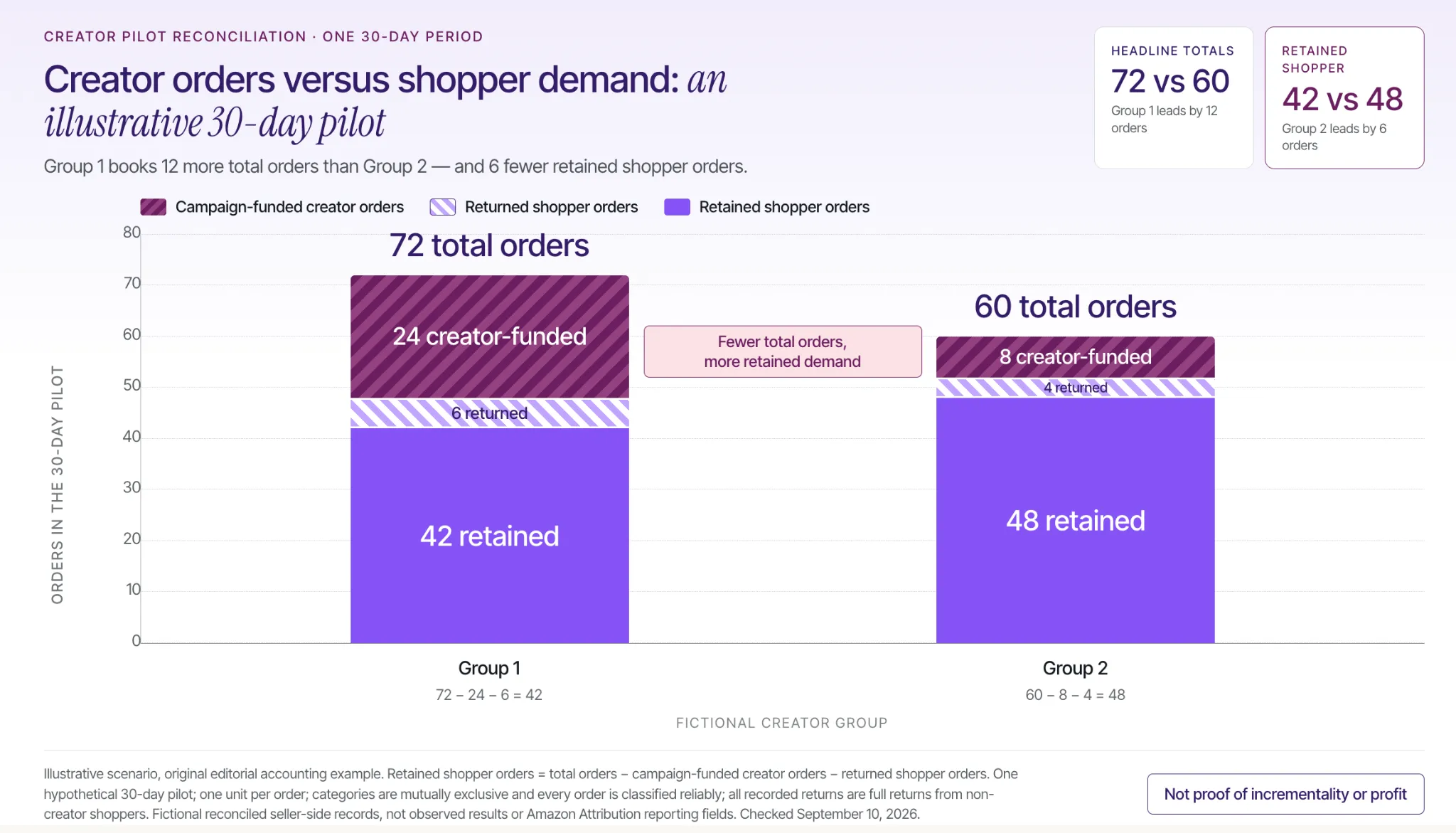
Campaign-funded creator purchases are a product-acquisition expense, not evidence that an independent shopper was persuaded to buy. Keep those transactions separate wherever your records allow, and do not use them to manufacture a sales-performance claim.
Consider an illustrative 30-day pilot with two creator groups. Assume every order is classified reliably, every order contains one unit, all recorded returns are full returns from non-creator shoppers, and the categories do not overlap.
Group 1’s reconciled ledger contains 72 total orders: 24 campaign-funded creator orders, 6 returned shopper orders, and 42 retained shopper orders. Group 2 contains 60 total orders: 8 campaign-funded creator orders, 4 returned shopper orders, and 48 retained shopper orders.
The calculation is total orders minus campaign-funded creator orders minus returned shopper orders. Group 1 has the larger headline total, but Group 2 has more retained shopper orders in this fictional example.
This is a seller-side accounting illustration, not a claim that Amazon Attribution automatically provides those classifications. Subtract only transactions confirmed to be included in the same reporting total; when separation is unreliable, disclose the uncertainty rather than inventing a precise adjustment.
Even retained shopper orders do not establish incrementality or profit. Compare the groups’ costs, contribution, audiences, and other marketing exposure before making a renewal decision.
Retain creators for the role they actually performed well. A strong demonstration may justify another licensed UGC assignment, while reliable audience-driven commerce may justify a repeat distribution partnership. Neither result requires pretending the creator succeeded at every campaign objective.
Learning how to find influencers for your Amazon product means turning a product’s buying questions into search criteria, then validating those criteria through real collaborations. Your most useful asset is not a long contact list; it is a record of who can demonstrate the product, reach relevant buyers, and complete the agreed work.
Choose one ASIN, build the Product-to-Creator Search Grid, and advance candidates only when their evidence matches the assignment. Use the first campaign to improve the next shortlist.
For sellers ready to move from sourcing to execution, evaluate a Stack Influence product-seeding campaign around that brief so creator coordination and completed content become a repeatable part of your Amazon marketing.
Your Amazon ads can look profitable while the next budget increase loses money. An external campaign can look expensive while producing useful content and purchases your ads would not otherwise capture. Neither dashboard, on its own, settles the decision.
For ecommerce sellers comparing Amazon PPC vs external traffic, the useful question is where the next dollar can produce additional contribution profit. This guide explains when to prioritize each approach, how to compare their real costs, and how to avoid mistaking attributed sales for new demand.
Prioritize Amazon PPC when a conversion-ready product has relevant shopping demand you can capture profitably. Prioritize an external test when the product needs explanation, access to a different audience, or demand beyond the opportunities your current campaigns can reach economically. Repair a weak offer before scaling either.
Amazon PPC means Amazon advertising purchased on a pay-per-click basis. For example, Amazon’s Sponsored Products documentation describes cost-per-click (CPC) ads for individual listings, with keyword or product targeting and placements on Amazon and selected outside apps and websites. This article uses Sponsored Products as the principal PPC comparison, not as a definition of every Amazon ad format.
External traffic means visitors you source through non-Amazon marketing, such as Google, creator posts, paid social, email, or publishers, and send to Amazon. The categories overlap: Google advertising can also be PPC. Google’s Search campaign guidance explicitly describes reaching people actively searching for products and services, so external traffic is not automatically cold traffic.
Use the following starting decisions:
The payment model also changes what the budget buys. Stack Influence’s automated product-seeding workflow connects gifted-first creator participation with completed content and campaign coordination. Completed-post accountability manages delivery risk; it does not guarantee that every post produces profitable customer demand.
The Next-Dollar Test evaluates a proposed budget increase rather than declaring a permanent winning channel. Record four inputs for each option: available opportunity, all-in cost, additional orders, and decision horizon.
Specify what the additional spending should accomplish. Examples include capturing a relevant query that runs out of budget, explaining a product’s unfamiliar use case, or reaching a creator’s category-specific audience.
Separate branded searches from nonbranded acquisition before comparing results. A campaign reaching shoppers already looking for your brand should not automatically set the performance hurdle for introducing the product to unfamiliar buyers.
Calculate contribution per order after product cost, Amazon fees, fulfillment, discounts, and a reasonable allowance for returns, but before acquisition spending. The Amazon advertising cost guide provides context for separating auction costs from the broader cost structure.
For PPC, include media spending and incremental management or creative costs. For external campaigns, include media, creator fees, platform charges, products or reimbursements, shipping, licensing, and campaign labor where applicable. Record each expense once, not both as a product cost and an identical campaign charge.
Use actual Amazon FBA or merchant-fulfillment charges. For reimbursed marketplace purchases, reconcile the reimbursement with seller proceeds and product costs to calculate the net seeding expense.
Estimate purchases that would not happen without the extra spending. That is different from every purchase credited to a clicked link.
Use additional contribution as the decision metric:
Additional contribution = incremental customer orders × contribution per order − additional campaign cost + qualifying referral credits not already included in margin.
When you only have attributed orders, label the estimate accordingly and test the assumption before making a large reallocation.
Compare mature results over comparable periods. An established search campaign and a creator cohort still waiting for product delivery are not at the same stage.
Include preparation, publishing, purchasing, and conversion-reporting delays in the plan. Stop broken execution promptly, but do not confuse an unfinished purchase window with proof that an audience will not buy.
Assume a $40 product, one unit per order, and a 40% contribution margin before marketing. That leaves $16 per order after the variable costs described above. Compare two additional $600 investments over the same completed measurement period, with all incremental campaign costs included and no referral credits, repeat-purchase value, or content-value allowance.
The existing PPC campaign spends $2,400 and produces 200 orders, or $8,000 in sales. Increasing spend to $3,000 produces 230 orders and $9,200 in sales. Its overall return on ad spend (ROAS) still looks respectable at approximately 3.07, calculated as $9,200 divided by $3,000.
However, the extra $600 produced only 30 additional orders. Those orders generated $1,200 in sales and $480 in contribution before marketing, leaving an incremental loss of $120. The additional cost per order was $20, above the $16 available margin.
An alternative $600 external pilot producing 50 additional customer orders would generate $2,000 in sales and $800 in contribution before marketing. It would leave $200 after campaign costs, with a $12 additional cost per order.
These are illustrative assumptions, including that the additional orders are genuinely incremental, not industry benchmarks or client results. External traffic wins this example because of its order economics, not because it is external. Different order counts could reverse the decision.
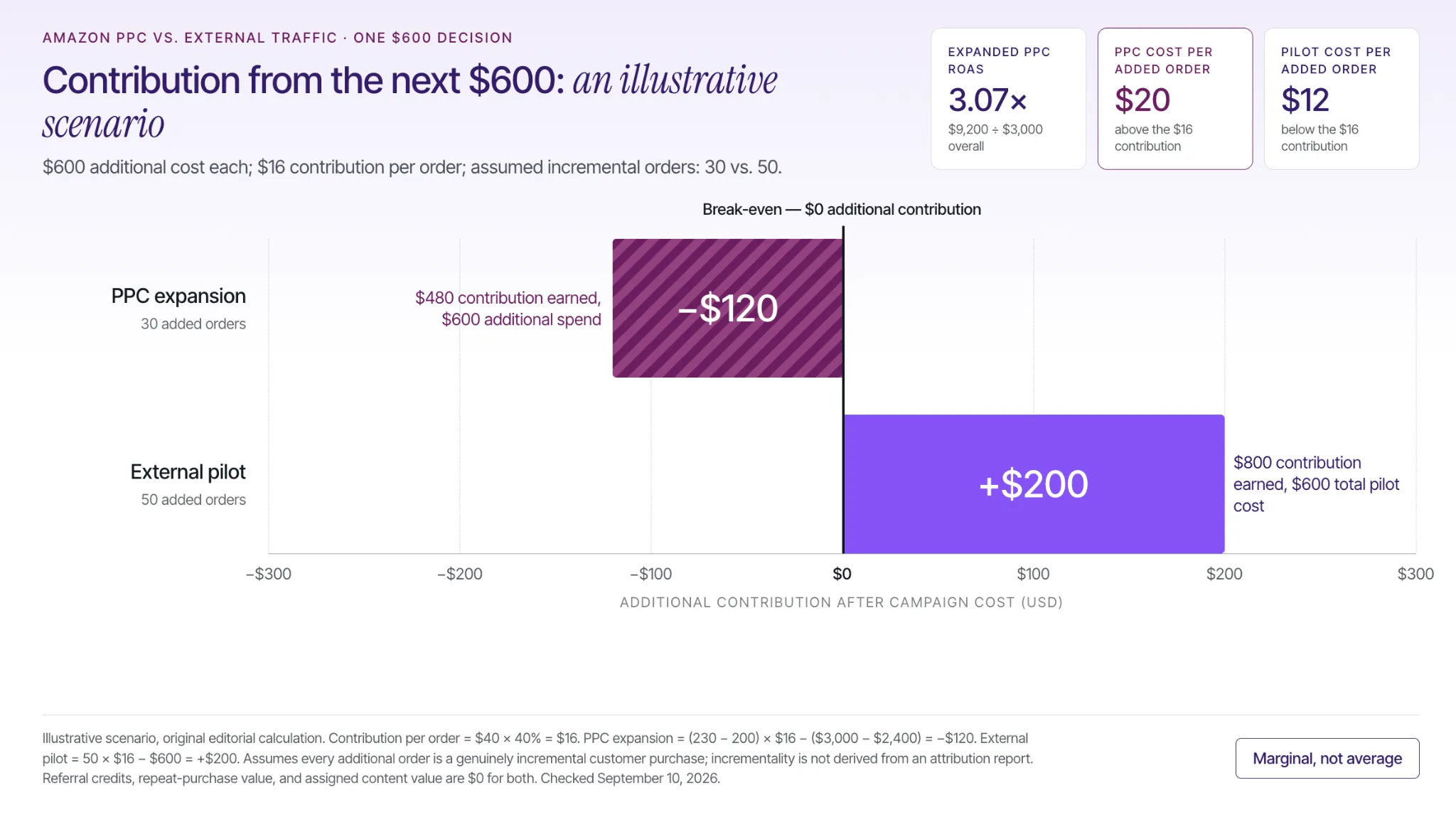
The Brand Referral Bonus can improve qualifying external campaign economics, but it is a separate, conditional fee credit. Amazon’s Brand Referral Bonus explanation describes an average bonus of 10% on qualifying sales, with actual amounts varying by category and sales price.
For U.S. sellers, the program requires the relevant Professional selling account, Brand Registry enrollment, program enrollment, and Amazon Attribution tracking. Credits offset referral fees and typically involve a two-month wait; they are not immediate cash. Amazon also excludes Amazon-sold advertising, even when those ads appear outside Amazon.
Track expected credits separately from confirmed credits. Do not add the bonus to contribution if the same credit already reduced your fee expense.
External campaigns can buy access to an audience, product explanation, and reusable creative as well as attributable purchases. Evaluate those outputs separately instead of assigning an invented dollar value to impressions and adding it to sales.
For micro influencers and nano influencers, specify whether the agreement covers a published social post, user-generated content (UGC) delivery, usage rights, or some combination. A UGC creator delivering a video file is not necessarily distributing that video to an audience. The creator-content workflow should make the deliverable and intended reuse explicit.
Reuse requires the appropriate permissions. TikTok’s Spark Ads documentation describes promoting creator posts with authorization. A brand should confirm advertising rights, authorization duration, editing permissions, and permitted channels before planning paid amplification.
Keep a content record showing which assets were delivered, approved, licensed, and actually deployed. Recognize avoided production spending only when the asset replaces work the business otherwise would have purchased. Do not count a speculative content valuation as campaign revenue.
Stack Influence’s published Targus campaign example records 120 creator promotions during a three-month new-product campaign, with average monthly unit sales increasing from 56 to 221. Those figures describe activity and sales during the campaign, not a controlled comparison against Amazon PPC.
The distinction matters when using case studies to choose a budget. Without a counterfactual, comparable PPC spending, and full campaign costs, the example cannot establish which channel caused more incremental profit. It supports evaluating creator activation as a growth experiment, not forecasting the same sales increase for another product.
Use channel reporting to understand attributed activity, then use a business-level contribution calculation and a suitable comparison design to evaluate additional demand. Attribution answers which marketing interaction received credit; it does not, by itself, establish what would have happened without that interaction.
Amazon’s Amazon Attribution product overview describes free measurement for eligible advertisers across non-Amazon marketing, including search, social, video, email, and influencer activity. Eligible professional sellers enrolled in Brand Registry are among the supported users. Confirm account and marketplace access before distributing campaign links.
Build separate tags for the creator, campaign, audience, or creative distinctions that could change a spending decision. Amazon’s Attribution setup and measurement guide documents a 14-day last-touch model: the most recent qualifying click receives credit. Allow that window to mature and check the applicable window in each Amazon advertising report rather than assuming every report uses identical rules.
Keep promoted-product sales separate from broader same-brand sales, and never add a promoted subtotal to a total that already includes it. Reconcile channel reports against actual retail sales before summing their credited orders. A shopper can encounter several marketing activities before buying, so multiple dashboards are not automatically an additive customer ledger.
A historical eBay paid-search field-experiment working paper by Thomas Blake, Chris Nosko, and Steven Tadelis illustrates the problem. The 2013 paper found that conventional attribution could substantially overstate advertising effects when existing customers would have purchased through another route. It is evidence for testing incrementality, not an Amazon PPC performance benchmark.
Where the channel and measurement system support it, use a randomized holdout with observable purchase outcomes. Otherwise, compare carefully matched products or periods while recording price, inventory, promotion, and PPC changes. Treat those observational comparisons as directional because seasonality, spillover, and product differences can remain.

Amazon-only advertising efficiency can improve while total marketing economics deteriorate. Moving costs from Amazon Ads into a creator or social budget changes where the expense appears, not whether the business pays it.
For this comparison, define Amazon-only total advertising cost of sales (TACoS) as Amazon ad spend divided by total Amazon sales. Define the all-in marketing ratio as Amazon ad spend plus all external campaign costs, divided by the same sales total. Advertising cost of sales (ACOS) instead uses ad-attributed sales as its denominator, so the three ratios answer different questions.
Consider a separate illustrative two-month scenario. Both months have a 35% contribution margin before marketing, a comparable product mix, no referral credits, and no marketing costs beyond those listed. Sales are net of refunds and discounts, and all external costs are included.
In Month A, Amazon sales are $50,000, Amazon advertising costs $10,000, and external marketing costs $0. Amazon-only TACoS and the all-in marketing ratio are both 20%.
Contribution after marketing is $7,500:
$50,000 × 35% − $10,000 = $7,500.
In Month B, Amazon sales rise to $60,000, Amazon advertising falls to $9,000, and external campaign costs reach $9,000. Amazon-only TACoS improves to 15%, but the all-in marketing ratio rises to 30%.
Contribution after marketing falls to $3,000:
$60,000 × 35% − $18,000 = $3,000.
The business gained $10,000 in sales but lost $4,500 in monthly contribution. This scenario does not establish that external traffic caused the decline; it shows why Amazon-only ratios cannot establish that reallocating the budget worked.
Return to the Next-Dollar Test whenever the channel mix changes. Track reported efficiency, total spending, and contribution together, with an explicit hypothesis for any longer-term benefit.
Keep the strongest existing PPC activity stable while testing one external hypothesis. Define the product, audience, message, destination, cost ceiling, and decision date before launching. Avoid changing the price, listing, discount, and advertising mix simultaneously.
For a creator-led test, evaluate relevant Amazon influencer candidates and brief one clear use case. Match the promoted product and variation to the destination page. Build the production schedule around product delivery and content completion rather than assuming spending produces immediate traffic.
Agree on disclosure and compliance before content goes live. The FTC’s social-media disclosure guidance treats gifts and other material connections as relationships that may require clear disclosure with the endorsement. Product claims also need appropriate support.
Separate campaign procurement from customer acquisition. When products are purchased for participating creators and reimbursed, distinguish those campaign-funded orders from independently acquired customer orders in your profitability analysis. Amazon’s customer-review policy reminder prohibits incentives in exchange for customer reviews, so do not make an Amazon review part of the compensated deliverable.
Check links, product availability, completed posts, and retail engagement while the test runs. At the decision date, increase spending only when mature purchase economics support the case, or when a separately budgeted learning or content objective has been met. Hold when the conversion window is incomplete; rebuild when the audience, message, or offer fails.
Stack Influence’s Amazon creator-campaign workflow connects sourcing, product seeding, coordination, and completed content for sellers using creators in that test. Keep its delivery scorecard separate from the commercial decision about whether the next cohort earns more budget.
The Amazon PPC vs external traffic decision is not a vote for one permanent winner. Protect demand you already capture profitably, then test whether another audience, message, or creative asset can improve the economics of the next investment.
Start with one product’s contribution margin, one incremental budget decision, and one measurement plan. For a creator-led test, evaluate a Stack Influence product-seeding campaign with a defined deliverable and profit threshold, so the outcome informs your next budget decision rather than merely adding another report.