




Amazon A+ Content gives eligible sellers more room to explain a product after shoppers reach the detail page. The opportunity is not simply to make the listing look more polished. It is to answer the questions that still block a purchase after the shopper has seen the title, image gallery, bullets, price, reviews, and delivery promise.
For ecommerce sellers, the strongest A+ Content works like a visual buying guide. It explains fit, use, compatibility, materials, differences, and limitations in the order shoppers need them. This guide covers eligibility, Basic and Premium formats, the creation workflow, creator content, compliance, testing, and the metrics that determine whether the page is actually helping.
Key Takeaways
- Amazon A+ Content is free for eligible sellers, although access requires the appropriate selling account, catalog, and brand permissions.
- Amazon reports sales increases of up to 8% for Basic A+ Content and up to 20% for well-implemented Premium A+ Content, but those figures are upper-bound internal data, not a forecast for every ASIN.
- The best module sequence follows shopper questions, not a designer's preferred layout or a brand brochure template.
- Creator photos and videos become useful A+ assets only when the brief, product facts, technical requirements, and licensing are defined before production.
- Sellers should test materially different versions with Manage Your Experiments instead of treating a before-and-after sales change as proof of causation.
Build A+ Content Around the Purchase-Question Sequence

Effective Amazon A+ Content should answer the next unresolved buying question at each scroll. That principle is more useful than starting with a module catalog because shoppers do not care which template a seller selected. They care whether the page resolves uncertainty.
Use the Purchase-Question Sequence as a five-part planning method:
- Collect hesitation: Review search terms, returns, customer questions, support tickets, reviews, competitor gaps, and sales conversations to identify what shoppers still need to know.
- Rank the questions: Put high-impact questions first, especially those involving fit, compatibility, setup, contents, materials, expected use, and meaningful product differences.
- Match evidence to each question: Use a scale image for size, a demonstration for setup, a comparison chart for variants, and concise copy for conditions or limitations.
- Sequence for mobile: Assume shoppers will skim. Each module should communicate one main point without requiring tiny embedded text or a long paragraph.
- Test the decision: Form a hypothesis about the objection being solved, then compare outcomes rather than judging the redesign by appearance alone.
This approach also improves content production. From Stack Influence's experience coordinating ecommerce creator campaigns, reusable footage is easier to obtain when the brief identifies the correct product variant, the exact proof shot, prohibited claims, framing requirements, clean master files, and intended usage rights before filming begins.
Amazon states that Basic A+ Content can increase sales by up to 8%, while well-implemented Premium A+ Content can increase sales by up to 20%. Amazon labels these figures as internal data. Treat them as evidence that rich content can matter, not as a guaranteed lift or a substitute for product quality, price, inventory, reviews, and offer competitiveness.
What Is Amazon A+ Content?
Amazon A+ Content is an eligible seller tool for adding enhanced images, customized text, comparison content, video, interactive elements, and brand storytelling to product detail pages. It expands the information available below the primary listing content so sellers can explain products and brands more clearly at a critical point in the purchase journey.
Amazon currently describes three main content types:
- Basic A+ Content: Enhanced images, customized text placements, and shoppable product comparison charts.
- Premium A+ Content: Larger images, video, interactive hotspots, image or video carousels, question-and-answer modules, and additional shoppable content.
- Brand Story: Brand-level content that explains mission, values, and catalog context while connecting shoppers to an Amazon Brand Store.
A+ Content is not a replacement for the rest of the listing. The title, attributes, bullets, image gallery, price, offer, variation structure, reviews, and fulfillment promise still carry the first part of the decision. Sellers planning a full page rebuild should coordinate A+ work with the broader Amazon product listing optimization process so every section presents the same facts and positioning.
Who Can Use Amazon A+ Content?
Sellers generally need a Professional selling account plus the appropriate brand or catalog permissions. Amazon's current eligibility guidance says sellers need a Brand Representative or Reseller role for a brand enrolled in Amazon Brand Registry, or qualifying generic products in their catalog.
Amazon describes Brand Registry as a free program that unlocks brand-building and protection tools. Enrollment has separate requirements, including a brand name and logo permanently affixed to the product or packaging and an eligible pending or registered trademark. A+ Content itself is free for sellers who meet the eligibility requirements, although the Professional selling account has its own fee.
Check Premium availability inside the current A+ Content Manager before planning the creative scope because the options shown in Seller Central determine what that account can publish.
How Do You Create Amazon A+ Content?
Create Amazon A+ Content by confirming the product facts, opening A+ Content Manager, selecting the appropriate format and modules, applying the content to eligible ASINs, and submitting it for review. The mechanics are straightforward, but the preparation determines whether the result is useful.
1. Establish One Product Source of Truth
Begin with the exact product variant, dimensions, materials, package contents, compatibility, care instructions, certifications, and limitations. The same facts should appear consistently across packaging, catalog attributes, bullets, images, A+ modules, customer support, and other sales channels.
GS1 US guidance on verified product information emphasizes consistent identity and core attributes across ecommerce and marketplace systems. Even when a seller is not using every GS1 tool discussed on that page, the operational lesson applies: conflicting product data weakens shopper trust and creates avoidable catalog problems.
2. Open A+ Content Manager
In Seller Central, hover over Advertising and select A+ Content Manager. Choose Start creating A+ Content, select the content type available to the account, and add modules according to the Purchase-Question Sequence.
Amazon also offers AI-assisted creation for modules marked with an AI Ready badge. Generated text or imagery still requires human review. Check every claim, specification, product depiction, and variant before submission because the seller remains responsible for accuracy.
3. Build the Content in Question Order
Do not start by filling every available slot. Start with the highest-risk purchase question and choose the smallest number of modules needed to answer the complete question set.
A practical sequence for a complex product might be:
- What problem does the product solve?
- What exactly is included?
- Will it fit or work with the shopper's situation?
- How is it set up or used?
- Which variant should the shopper choose?
- What limitation should the shopper understand before buying?
Teams without internal design or catalog capacity can compare the responsibilities covered by Amazon listing services, but the seller should retain final ownership of factual accuracy and approval.
4. Prepare Compliant Files and Copy
Follow the requirements visible in the seller account and current Amazon A+ Content guidelines. Amazon's current guidance says individual image files must remain under 2 MB, image resolution should be at least 72 dpi, and animated images such as GIFs are prohibited.
Avoid pricing, discounts, temporary promotions, unsupported superlatives, external contact details, or language that directs shoppers away from Amazon. Keep important text in live text fields when possible instead of embedding every claim inside an image.
5. Apply ASINs and Submit for Review
Apply the content to the correct eligible ASINs, preview it carefully, then select Review and submit. Check every assigned variant because a strong module attached to the wrong product can create a more damaging mismatch than having no module at all.
Amazon's content publishing and rejection guidance says review may take up to seven business days and can take longer during the holiday season. Build that review window into launch schedules, especially when inventory, ads, creator posts, and promotions depend on the revised page going live.
Basic, Premium, and Brand Story Serve Different Decisions
Choose the A+ format according to the information the shopper needs, not according to which option looks most impressive. A simpler product may need only a few Basic modules, while a technical or demonstrable product may benefit from Premium features.
- Use Basic A+ Content when clear images, concise explanations, and a product comparison chart can resolve the main questions.
- Use Premium A+ Content when motion, interaction, detailed demonstrations, hotspots, carousels, or question-and-answer modules materially improve understanding.
- Use Brand Story when shoppers need context about the company, values, product system, or broader catalog, and when connecting related products through a Brand Store supports the journey.
Premium modules cannot rescue weak evidence. A video that slowly rotates the package may communicate less than a Basic image showing dimensions, installation, or the product in context. The format should earn its place by reducing a specific uncertainty.
Design Modules as Evidence, Not Decoration
Every module should prove something that affects the purchase. Attractive branding can support recognition, but decorative content should not displace information about the product itself.
Show Scale, Fit, and Compatibility
Shoppers often abandon or return products when they cannot judge size, fit, capacity, or compatibility. Baymard Institute's research on showing products in scale documents the usability problem created when ecommerce images do not give users enough context to estimate real-world dimensions.
Use an object, room, body, device, or clearly labeled measurement that creates accurate context. A scale visual should never make the product appear larger, smaller, fuller, or more capable than it is.
Demonstrate the Hardest Step
A setup or use sequence should focus on the moment most likely to cause hesitation. For a storage product, show what fits. For a beauty tool, show the application step that buyers may misunderstand. For an accessory, show the exact device or surface relationship that confirms compatibility.
This is also where a structured Amazon conversion rate optimization process helps. A+ changes should begin with a diagnosed objection and end with a measurable hypothesis, rather than becoming a general redesign with no clear success condition.
Compare Products Without Creating Confusion
Comparison modules work best when the products genuinely belong in the same decision set. Compare dimensions, quantities, use cases, materials, compatibility, or included features that shoppers can verify.
Do not create a chart with vague checkmarks that makes every option look interchangeable. The purpose is to help the shopper select the right ASIN, including situations where a lower-priced or smaller version is the correct choice.
Write for Accessibility and Mobile Comprehension
Use large, readable text, short labels, strong contrast, and one visual message per image. The W3C image accessibility tutorial recommends text alternatives that communicate the essential information or function represented by informative images.
Alt text should explain the decision-relevant information, not repeat a keyword or describe decorative details. Important specifications should also remain visible in text because an image alone is a fragile place to store critical product facts.
Can UGC and Creator Content Be Used in A+ Content?
Licensed creator photos and videos can support A+ Content when the seller has permission for the intended use and the assets comply with Amazon's placement rules. The useful question is not whether an asset looks authentic. It is whether the asset accurately demonstrates the product, survives the technical review, and can legally be edited and published in the intended module.
Commissioned creator content is different from an Amazon customer review. Do not turn a creator quote into a supposedly independent customer opinion or ask creators to make claims they cannot support. For off-Amazon social posts, the FTC's influencer disclosure guidance explains that free products and other material connections require clear disclosure.
An Amazon-ready creator brief should specify:
- the exact ASIN and variant;
- the buying question the asset must answer;
- required demonstrations, angles, and product facts;
- prohibited or unsubstantiated claims;
- clean files without platform interface elements;
- music, talent, location, and third-party rights;
- editing, cropping, captioning, channel, and license terms;
- the person responsible for final Amazon submission.
The Amazon UGC services guide explains why destination, product proof, permission, and handoff should be defined before content is commissioned. Sellers can also use a product-to-creator research process to prioritize creators who already demonstrate the buyer problem instead of selecting primarily by follower count.
Stack Influence is designed for ecommerce brands that want vetted micro-influencer activation, gifted-first product seeding, campaign coordination, completed-post accountability, and UGC production managed through one workflow. Its automated product-seeding workflow can support the production of specific proof assets when the brief defines the intended Amazon placement from the start. The Amazon-focused campaign workflow can also connect creator distribution, external traffic, and reusable content, while sellers retain responsibility for listing accuracy and Amazon approval.
What Causes Weak Performance or Rejection?
Weak A+ Content usually fails because it answers the wrong questions, conflicts with the listing, violates a content rule, or cannot be understood quickly on a small screen. Rejection is an operational problem, but approval alone does not mean the content will improve conversion.
Watch for these failure modes:
- Brand story before product clarity: The page spends its strongest modules on the company's origin while basic fit, use, or compatibility questions remain unresolved.
- Conflicting facts: Dimensions, materials, quantities, or supported devices differ between A+ Content and another listing field.
- Unsupported claims: Superlatives, scientific implications, certifications, comparisons, or results are used without adequate support.
- Promotion language: Pricing, discounts, urgency, free offers, or temporary claims appear in evergreen modules.
- Image-based walls of text: Copy becomes unreadable on mobile and cannot be adapted easily.
- Generic reuse across ASINs: The same content is applied across products even though meaningful specifications or use cases differ.
- Unclear rights: Creator footage includes music, people, locations, trademarks, or testimonials that the brand cannot legally reuse as planned.
- No measurement plan: The team publishes a full redesign without preserving the original, documenting the hypothesis, or defining the decision metric.
A broader Amazon algorithm guide for controllable seller inputs reinforces an important distinction: A+ Content can support detail-page confidence, but it does not replace accurate catalog attributes, offer reliability, inventory, fulfillment, and customer satisfaction.
How Should Sellers Measure Amazon A+ Content?
Sellers should measure A+ Content with a controlled experiment when eligible, then review conversion, units, sales, and downstream customer outcomes together. A simple before-and-after comparison cannot isolate A+ Content from price changes, ads, seasonality, inventory, reviews, promotions, or traffic mix.
Use an A+ Decision Loop:
- Baseline: Save the current content and record conversion, units per unique visitor, sales, return reasons, and relevant customer questions.
- Hypothesis: State the purchase question being solved and the expected shopper behavior.
- Variant: Change the module sequence or evidence enough to create a meaningful comparison.
- Experiment: Run the eligible test to completion and avoid reading an early fluctuation as a result.
- Economics review: Check contribution margin, returns, customer feedback, and catalog effects before rolling the winner across related ASINs.
Amazon's Manage Your Experiments tool can test A+ Content and Brand Story along with other eligible listing elements. Amazon reports outcomes including conversion rate, units sold, sales, units sold per unique visitor, sample size, and a projected one-year impact for the winning version.
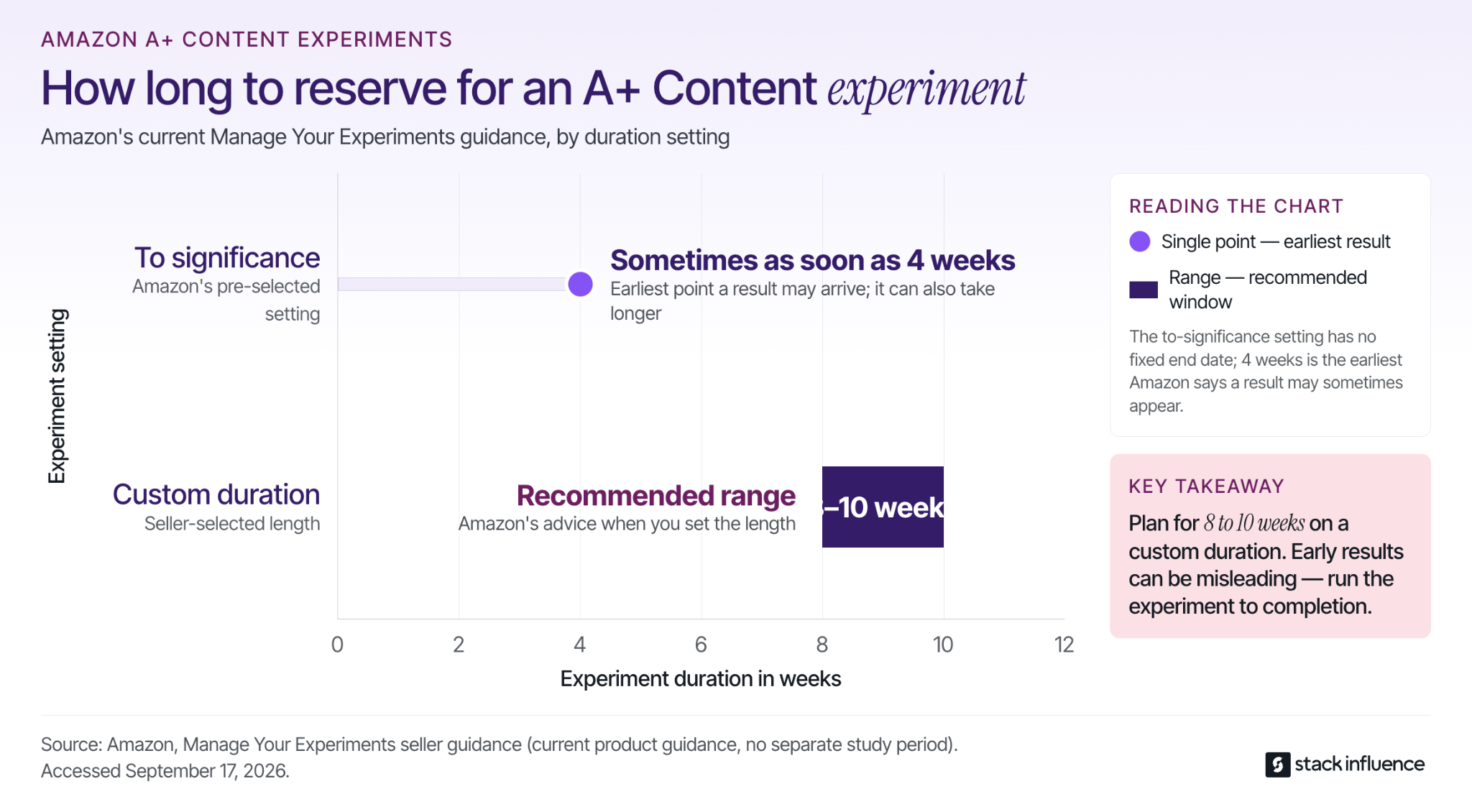
For seller-selected durations, Amazon recommends running experiments for 8 to 10 weeks. With the pre-selected to-significance setting, Amazon says results can sometimes arrive as soon as four weeks. Let the experiment finish because an early lead can reverse as the sample grows.
A+ Content should be evaluated as one part of the retail system. When external media or creator campaigns send shoppers to the page, use a disciplined Amazon traffic measurement strategy to separate traffic quality from page conversion. More visitors do not prove the A+ redesign worked, and stronger conversion does not prove which individual module caused the change unless the test isolates it.
Turn Amazon A+ Content Into a Buying Guide
Amazon A+ Content performs its most useful role when it turns scattered product facts into an ordered buying decision. The seller's job is to identify the remaining questions, assign the right evidence, preserve factual consistency, and test whether the new sequence improves customer outcomes.
Start with one commercially important ASIN. Write the five questions most likely to stop a qualified shopper, build only the modules needed to answer them, and create a measurement plan before publishing. When producing enough rights-cleared demonstrations is the bottleneck, evaluate a managed creator and product-seeding workflow that can turn the same question set into a repeatable content brief.