




Instagram is easy to open but hard to use with purpose. A content creator is not merely posting. The real job is to build a recognizable profile, publish work people remember, turn attention into relationships, and learn which ideas deserve another version.
This guide explains how to use Instagram as a creator. It covers setup, formats, audience growth, analytics, partnerships, disclosure, and security. The goal is a repeatable system in which every post teaches you something.
Key Takeaways
- Use a professional Creator account so you can access creator tools, performance insights, and partnership features.
- Define one audience promise and three repeatable content pillars before worrying about posting frequency.
- Give each Instagram format a specific job: discovery, depth, conversation, proof, or conversion.
- Evaluate content as a series, not as isolated winners and failures.
- Treat clear sponsorship disclosure and account security as part of professional creator work.
What Does Instagram Do for Content Creators?
Instagram gives content creators a connected set of publishing, discovery, communication, measurement, and partnership tools. Creators can use Reels and Explore for discovery, feed posts for a portfolio, Stories and DMs for relationships, and Insights to learn what earns attention or action.
The main surfaces serve different purposes:
- Profile: Your public home base, positioning statement, portfolio, links, and contact path.
- Feed: A mix of posts from followed accounts and recommended content.
- Reels: Short-form video built for viewing and discovery.
- Stories: Temporary updates, polls, questions, links, and behind-the-scenes context.
- Explore and Search: Discovery surfaces organized around interests, topics, and behavior.
- Direct Messages: Private conversations with followers, collaborators, and brands.
- Professional Dashboard and Insights: Performance data and tools available to professional accounts.
A strong creator connects these surfaces. Reels can introduce the work, carousels can earn saves, Stories can build familiarity, and DMs can turn interest into collaboration.
How Should You Set Up Instagram as a Creator?
Set up Instagram as a creator by making the account easy to recognize, understand, trust, and contact. Use a clear username, a recognizable profile image, a public-facing niche statement, a professional Creator account, one useful link destination, and strong account security before you begin publishing consistently.
Start with these decisions:
- Choose a memorable username. Prefer a name, creator identity, or niche that is easy to spell aloud.
- Use the name field strategically. Include the name people know and a plain-language topic when useful.
- Write a one-sentence audience promise. State who the account serves and what people can expect.
- Select a recognizable profile image. A clear face or creator mark is easier to identify at small size than a busy image.
- Add one useful destination. Send visitors to a portfolio, newsletter, storefront, media kit, or current priority page.
- Create a contact path. Use a professional email for collaborations rather than relying only on DMs.
- Pin your strongest orientation content. A visitor should quickly understand your topic, style, and value.
Instagram’s professional account setup gives creators access to tools for growth, monetization, advertising, and performance analysis. For an individual, the Creator option is usually the clearest starting point because the account represents a person and their work.
A bio becomes easier to write after the niche is defined. The creator niche selection guide explains how to connect subject expertise, audience demand, and repeatable content instead of choosing a category that is either too broad or too restrictive.
Secure the account before it becomes valuable. The Cybersecurity and Infrastructure Security Agency recommends multifactor authentication because it adds another identity check beyond a password. Turn it on, store recovery codes safely, and avoid reusing the password connected to your creator email.
Choose the Audience Before the Content
A content plan becomes clearer when it starts with a specific audience problem, desire, or identity. “Lifestyle content” describes almost anything. “Fast vegetarian lunches for college students” gives a creator a subject, viewer, constraint, and reason to return.
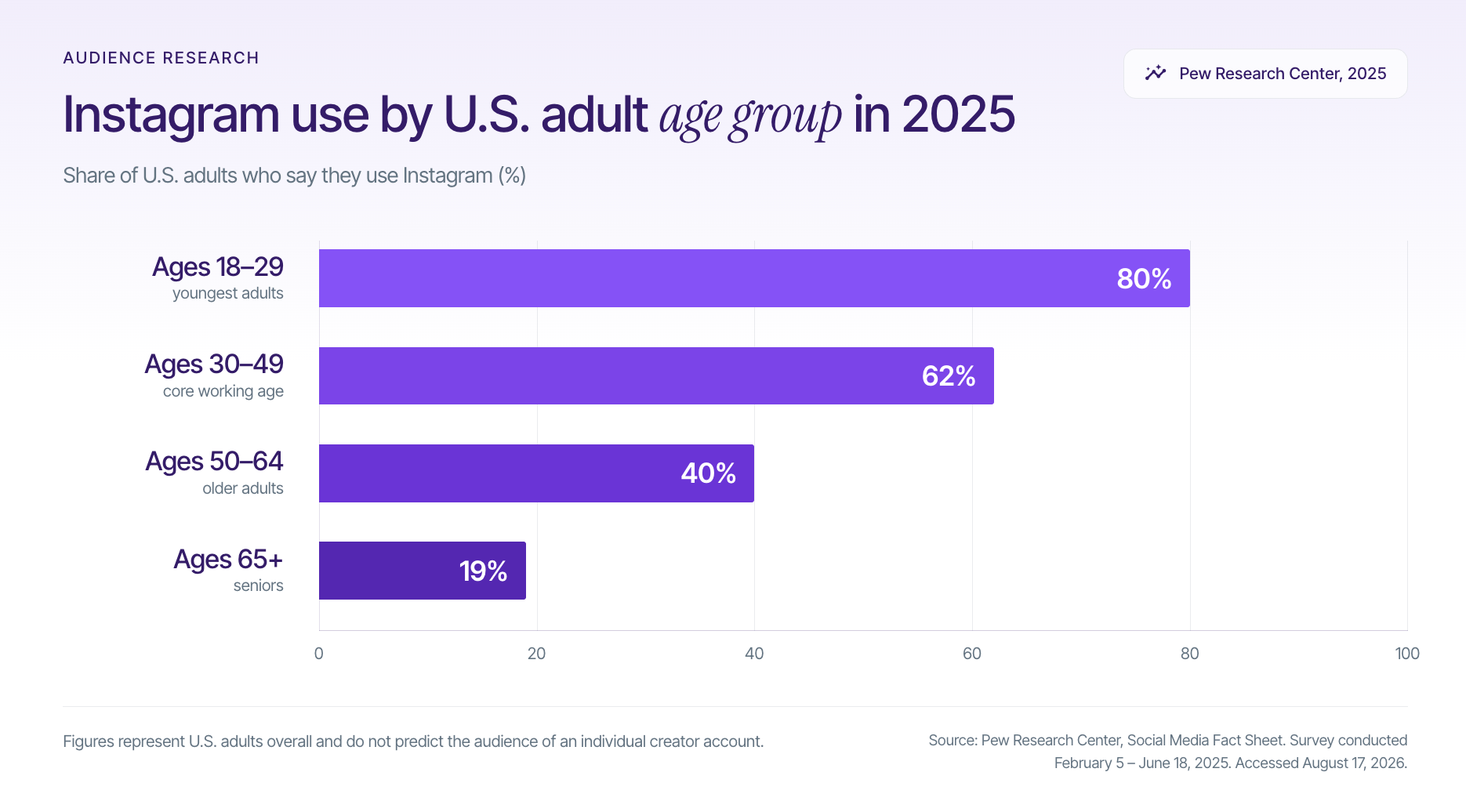
Audience selection should use evidence without turning people into stereotypes. The Pew Research Center Social Media Fact Sheet found that Instagram use varied substantially by age: 80% of adults ages 18 to 29 used Instagram, compared with 62% of adults ages 30 to 49, 40% of adults ages 50 to 64, and 19% of adults ages 65 and older. These are U.S. adoption figures, not a guarantee about the audience for any individual account.
Translate the audience choice into three content pillars:
- Teach: Explain a process, answer a recurring question, or remove confusion.
- Show: Demonstrate a skill, transformation, routine, product, or behind-the-scenes process.
- Connect: Share a perspective, story, prompt, or opinion that helps the audience recognize itself.
Three pillars create consistency without forcing every post into one format. The Instagram post ideas guide can help turn each pillar into recurring series rather than disconnected concepts.
The Instagram Creator Loop
The Instagram Creator Loop is a five-stage operating system: Promise, Publish, Participate, Parse, and Progress. It prevents creators from confusing activity with improvement because every publishing cycle begins with a clear audience promise and ends with a decision about what to repeat, revise, or stop.
1. Promise
Define the recurring value of the account in one sentence. A useful promise contains an audience, a subject, and an outcome or experience.
For example, “I help first-time apartment renters make small spaces feel intentional” is stronger than “home and lifestyle creator.” It naturally supports tutorials, demonstrations, room breakdowns, budget challenges, and partnership ideas.
2. Publish
Give every post one primary job. A Reel might introduce the account to non-followers, a carousel might explain a method, and a Story might collect questions.
Trying to maximize reach, comments, saves, clicks, follows, and sales in one post usually weakens the creative. One primary job creates a cleaner hook and call to action.
3. Participate
Instagram growth is not only a broadcasting task. Reply to substantive comments, use Stories to ask focused questions, and send thoughtful messages when a conversation genuinely belongs in private.
Comments and DMs also reveal objections, follow-up questions, and language for future hooks.
4. Parse
Review results by topic, format, hook, and intended job. Instagram’s Insights documentation explains that professional accounts can examine performance for posts, Stories, Reels, and Live content. Look for patterns across comparable posts rather than treating one spike as a permanent rule.
5. Progress
Turn a strong idea into a series, not a victory lap. Change one meaningful variable at a time, such as the opening, example, format, or level of detail, so the next result teaches you something.
The loop restarts with a sharper promise, creating a recognizable body of work and a personal dataset more useful than a generic posting rule.
Give Every Instagram Format a Different Job
Creators do not need to choose one permanent winning format. They need to match the format to the communication job and then test how their own audience responds.
- Reels for discovery and demonstration: Use motion when timing, personality, sequence, sound, or visual proof matters. Establish the subject in the first seconds.
- Carousels for depth and saves: Use multiple slides for frameworks, sequences, tutorials, checklists, and arguments that need progression.
- Single-image posts for identity and proof: Use a strong image when the visual carries the idea, such as finished work, a campaign asset, or a milestone.
- Stories for relationship and feedback: Use polls, questions, quick updates, links, and temporary context.
- Live for sustained interaction: Use Live for real-time explanation, interviews, demonstrations, or audience questions.
- DMs for qualified conversation: Use DMs to continue real interactions, not to send mass pitches or engagement bait.
Originality matters across formats. Instagram’s original content guidelines define original work as content a creator made or content that reflects a unique perspective. In April 2026, Instagram reported that original creators were receiving greater recommendation priority, with 75% of U.S. recommendations coming from original posts, reinforcing the value of creating rather than merely aggregating.
Use the Instagram Reels hashtag guide to categorize content without making hashtags the strategy. The Instagram image size guide can help prevent avoidable cropping and readability problems when preparing feed and vertical assets.
How Do You Publish an Instagram Post or Reel?
Publish an Instagram post or Reel by selecting the creation control, choosing the format, adding media, editing the asset, writing the caption, adding relevant tags or collaborators, reviewing accessibility and disclosure, and publishing or scheduling. Interface labels can change, but the creator decision sequence remains stable.
Use this pre-publish sequence:
- Choose the post’s job. Decide whether the content should earn discovery, explain something, start a conversation, show proof, or drive an action.
- Lead with the subject. Make the first frame, cover, or sentence clear without a long setup.
- Remove repetition. Cut any line or clip that restates what the viewer already understands.
- Add context in the caption. Explain what viewers are seeing, why it matters, and what to do next.
- Improve accessibility. Add readable on-screen text, accurate captions for spoken audio, and descriptive alternative text when available.
- Tag with a reason. Mention people, products, places, or collaborators only when relevant.
- Check the preview. Review cropping, cover image, spelling, audio levels, links, and disclosure before publishing.
- Record the hypothesis. Note the expected outcome so the result can confirm or challenge the idea.
Batching can reduce production friction without replacing real-time participation. The Instagram scheduling guide explains scheduling options, while the desktop posting guide is useful for creators who edit captions and assets on a computer.
Discovery Is Not the Finish Line

Reach matters only when it leads to a useful next behavior. A high-view Reel that attracts the wrong audience, creates no profile curiosity, and does not strengthen the creator’s positioning may be less valuable than a smaller post that earns saves, follows, qualified DMs, or repeat viewers.
Think of the journey as four connected transitions:
- Impression to attention: The opening makes the subject clear enough to stop the right person.
- Attention to profile visit: The content creates curiosity about the creator, not only the isolated post.
- Profile visit to follow: The bio, pinned work, and recent grid make a consistent promise.
- Follow to relationship: Repeated useful content, Stories, comments, and DMs build familiarity.
Recommendation eligibility is a prerequisite, not a growth guarantee. Instagram says professional accounts can review recommendation eligibility in Account Status, which can show whether content may be recommended to non-followers. Check it when distribution changes sharply, but continue evaluating the creative and audience fit rather than blaming every weak result on the algorithm.
Measure Instagram With the Creator Decision Ladder
The Creator Decision Ladder separates leading indicators from business outcomes. Review the ladder every four weeks and compare groups of similar posts, preferably at least three executions of an idea, before making a major strategy change.
Level 1: Delivery
Track reach, views or plays, and the share of attention coming from non-followers when that metric is available. Delivery shows whether Instagram distributed the content, not whether the content created value.
Level 2: Attention
Track watch time, completion patterns, saves, shares, meaningful comments, and Story interactions. Choose the metric that matches the post’s job rather than adding every interaction into one score.
Level 3: Audience Conversion
Track profile activity, follows, link taps, email sign-ups, and qualified DMs. Divide the desired action by the relevant exposure metric when possible, such as follows divided by profile visits, so account size does not hide improvement.
Level 4: Commercial Proof
Track collaboration inquiries, accepted brand deals, affiliate actions, portfolio assets created, repeat partners, and content licensing opportunities. A creator economy business needs evidence that attention can produce useful outcomes, not only larger public counts.
Attribution breaks down when several posts, Stories, search results, recommendations, and outside channels influence the same person. Use tagged links, campaign-specific codes, saved inquiry notes, and consistent reporting windows, but describe a post as associated with an outcome rather than automatically causing it.
How Do Creators Get Brand Deals on Instagram?
Creators get brand deals by building a clear niche, publishing repeatable proof of their creative ability, making contact information visible, presenting useful performance evidence, and approaching brands with a specific collaboration idea. Follower count can matter, but relevance, content quality, audience response, reliability, and usage rights also shape the opportunity.
Prepare four assets before outreach:
- A brand-readable profile: A visitor should understand the niche and style in seconds.
- A focused portfolio: Include three strong examples of each service or format you offer.
- A concise media kit: Show audience context, representative performance, deliverables, and contact information.
- A specific pitch: Explain why the product fits and what content concept you would create.
The Instagram sponsorship guide, creator media kit guide, and influencer outreach guide cover those steps in greater depth.
Eligible professional accounts can also explore Meta’s Creator Marketplace onboarding, which connects Instagram creators and brands through platform partnership tools. Availability and eligibility vary, so treat it as one relationship channel rather than the only route to work.
Stack Influence supports a different but complementary workflow built around gifted-first product seeding, vetted micro-influencer activation, creator coordination, UGC generation, and completed-post accountability. Creators can explore the Stack Influence creator community when they are ready to build campaign experience with ecommerce products.
Disclose every material brand connection clearly. The Federal Trade Commission’s Disclosures 101 guidance says free or discounted products count as a material connection, disclosures should be hard to miss and placed with the endorsement, and video disclosures should appear in the video rather than only in the caption. The FTC also cautions creators not to assume that a platform disclosure tool is sufficient by itself.
A longitudinal study of more than one million posts from 400 Instagram creators across four countries found major differences in use of Instagram’s paid partnership feature among disclosed posts: 31% in Brazil, 27% in the Netherlands, 10% in the United States, and 3% in Germany. The dataset covered 2010 to 2022, so it is historical rather than a current adoption benchmark, but it illustrates why creators should use clear disclosure language instead of assuming one platform label is understood or used consistently everywhere.
Protect the Account You Are Building
A creator account becomes a business asset as it accumulates content, contacts, trust, and partnership history. Build security and verification habits early.
Use a simple protection routine:
- Turn on multifactor authentication and save recovery information offline.
- Use a unique password for Instagram and another unique password for the connected email.
- Confirm collaboration requests through an official company domain or a known brand contact.
- Never send login codes, backup codes, or passwords to a person claiming to be support.
- Review connected apps and remove tools you no longer use.
- Keep contracts, briefs, approvals, and payment records outside DMs.
- Separate public creator information from private home, school, or family details.
Build a System, Not a Perfect Feed
Learning how to use Instagram as a content creator is less about mastering every button and more about connecting the right decisions. Set up a trustworthy profile, choose a specific audience, give each format a job, publish through the Instagram Creator Loop, and use the Creator Decision Ladder to improve from evidence.
The next step is practical: define one audience promise, choose three content pillars, and publish one useful idea in two different formats. That small cycle will teach you more than waiting for a perfect strategy. Once the profile contains clear proof of your work, you can begin evaluating creator partnerships and product-seeding opportunities that match the audience you are building.