
The latest info on influencer marketing trends, micro influencer news, and the world of social media

Content creators rarely lack data. Instagram, TikTok, YouTube, affiliate programs, brand portals, and storefronts all produce numbers. The real problem is turning those disconnected numbers into decisions. A social media analytics dashboard should show what to repeat, what to stop, how your audience is changing, and whether attention is becoming income.
This guide explains how to build a creator-first dashboard that supports content planning, audience growth, brand deals, UGC work, affiliate revenue, and long-term creator partnerships. The goal is not to collect every available metric. It is to create a compact decision system you will actually use.
A social media analytics dashboard is a recurring view of the metrics that help a creator evaluate content, audience growth, traffic, and income. Unlike a one-time campaign report, a dashboard updates over time and should make the next decision obvious, such as which format, topic, hook, platform, or partnership deserves more effort.
Understanding what social media analytics are is the foundation, but a dashboard is the operating interface. It may be a spreadsheet, a visual report, or connected software.
Native analytics should remain the source of truth for platform-specific performance. Instagram Insights helps creators evaluate followers and content performance, TikTok Studio provides content management and performance insights, and YouTube Analytics separates reach, engagement, audience, revenue, and trend information. A creator dashboard brings selected signals from those systems into one repeatable view.
A dashboard is also different from a sponsor recap. Your internal dashboard helps you make decisions every week. A creator-focused social media analytics report template packages selected results for a brand after a campaign, usually with deliverables, audience fit, performance, commercial signals, and recommendations.
The Creator Signal Stack prevents a common reporting mistake: treating likes, views, clicks, and revenue as if they describe the same thing. They represent different stages of performance. A useful dashboard keeps five signal layers visible so a creator can diagnose where a post succeeded, where it stalled, and what to test next.
Exposure shows whether content was distributed. Track reach, impressions, views, and the percentage of viewers who were followers versus nonfollowers when available.
Do not treat reach and impressions as interchangeable. Reach usually reflects unique accounts, while impressions or views can include repeated exposure.
Attention shows whether people stayed long enough to receive the idea. Track average watch time, completion rate, retention at key moments, and early drop-off for video.
TikTok defines video completion rate as completed views divided by total views, while YouTube provides average view duration and audience-retention reporting. Those metrics are more useful than views alone because a strong hook with weak retention requires a different fix from weak initial distribution.
Resonance shows whether the content felt useful, relatable, entertaining, or worth passing along. Track saves, shares, meaningful comments, replies, and engagement rate.
Likes can still provide context, but saves and shares often carry more diagnostic value for tutorials, product demonstrations, checklists, and opinion content. Read the comments as qualitative data too.
Action shows whether viewers moved closer to a relationship or purchase. Track profile visits, follows, website clicks, email signups, affiliate-link clicks, code uses, and conversions where attribution is available.
Use actions that match the post’s purpose. A discovery video may be successful because it creates profile visits and follows, while a product review may be judged by outbound clicks and attributed orders.
Commercial proof shows whether creator activity is becoming a durable business. Track sponsored revenue, affiliate revenue, platform payouts, UGC fees, repeat brand deals, approved assets, renewal rate, and revenue per production hour.
For UGC creators, commercial proof may exist even when the content never appears on the creator’s own account. Asset acceptance, revision rate, delivery speed, licensing value, and repeat briefs can matter more than follower growth.
The best version of the Creator Signal Stack uses one primary metric and no more than two diagnostic metrics per layer. A compact dashboard makes weak links in the performance chain easier to see.

A creator dashboard should include a small set of raw totals, normalized rates, benchmarks, and commercial outcomes. At minimum, track exposure, retention, high-intent engagement, audience growth, tracked traffic, and revenue. Add metrics only when they answer a recurring question or support a sponsor, affiliate, or content decision.
Use formulas that preserve context:
Always label the denominator. “Engagement rate” may mean interactions divided by followers, reach, impressions, or views, depending on the platform or tool.
Use medians alongside averages. One viral post can make a month’s average look healthy even when most content declined. A rolling median for the last 10 to 20 comparable posts gives a more honest baseline for pitches, forecasting, and experimentation.
Build a social media analytics dashboard by defining the decisions first, standardizing the data, collecting only necessary metrics, and adding a written interpretation layer. A creator can begin with native exports and a spreadsheet, then move to automated visualization once manual updates become frequent, slow, or error-prone.
A practical secondary structure is the Three-View Dashboard. The Content Lab tab supports weekly creative decisions, the Audience Asset tab tracks who is joining and returning, and the Commercial Proof tab records revenue, campaign delivery, UGC assets, and partner outcomes.
Creators should compare performance within the same platform and content format before making cross-platform judgments. Use consistent post ages, normalized rates, and rolling medians. Cross-platform totals can inform resource allocation, but they should not be blended into one score because networks define views, reach, retention, and engagement differently.
Apply five comparison rules:
YouTube’s own analytics guidance recommends comparing similar formats because audience behavior differs across videos, Shorts, and live content. The same principle belongs in a multi-platform creator dashboard: normalize the context before interpreting the result.
Never add followers from multiple platforms and call the total “unique audience.” The same person may follow you in several places. Report channel audiences separately unless you have a reliable deduplication method.
Creator analytics becomes commercially useful when it explains value in a format a brand can act on. A sponsor does not need your entire internal dashboard. It needs a clean view of what was delivered, who the content reached, how the audience responded, what action occurred, and what should happen next.
A strong sponsor view includes:
The same structure strengthens influencer marketing KPI discussions and improves content tracking across longer campaigns. It also gives creators stronger evidence when applying the brand deal tactics used by small creators.
Managed campaign workflows add an operational layer to the dashboard. Stack Influence is built around gifted-first product seeding, vetted micro-influencer activation, creator coordination, UGC generation, and completed-post accountability for ecommerce campaigns.
The creator’s post metrics still explain audience response, while campaign systems track participation, deliverables, and completion.
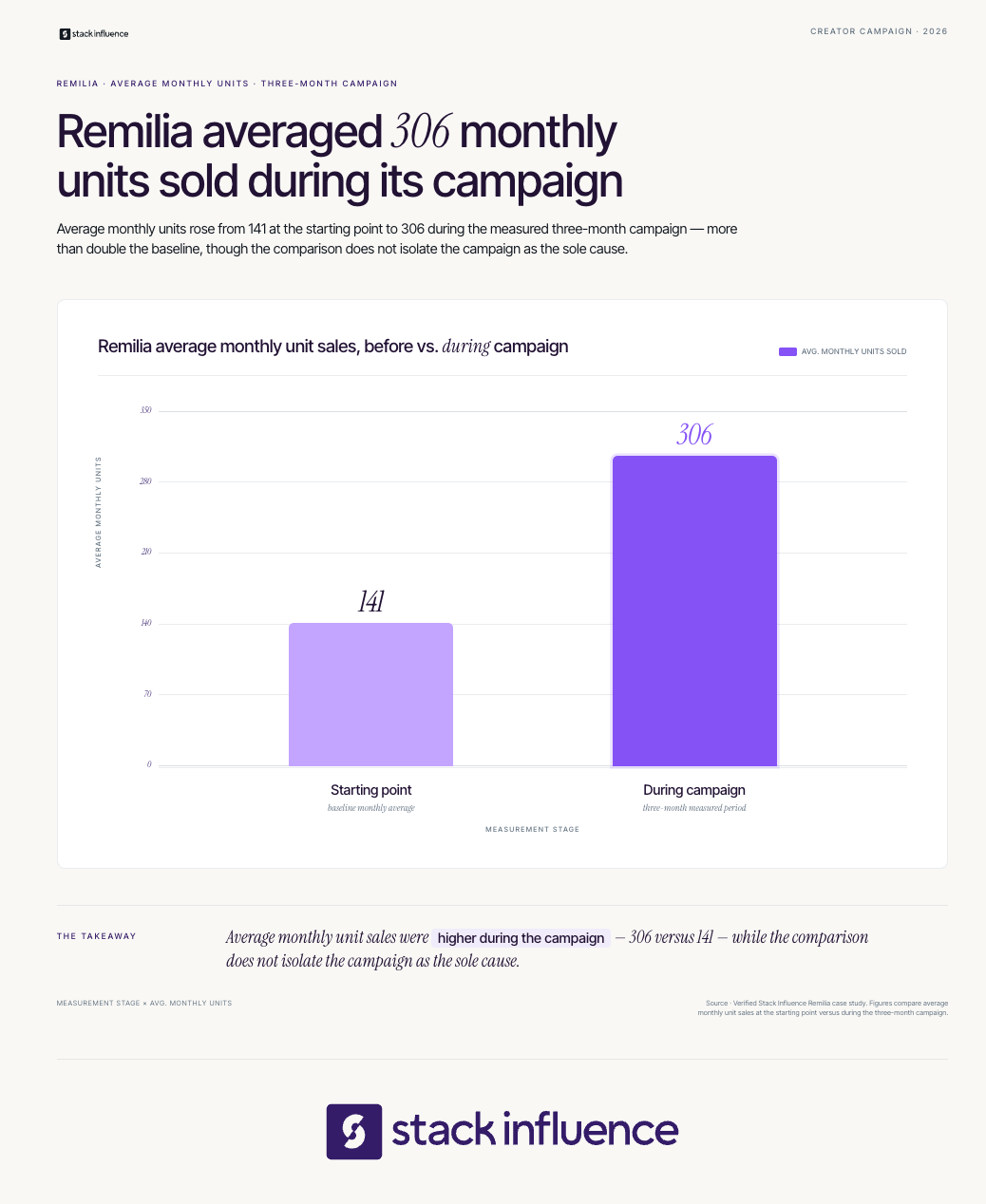
During a three-month Stack Influence campaign for Remilia, 115 creator promotions recorded 1.66 million social impressions and 73,832 engagements. Over the same measured period, average monthly unit sales moved from 141 to 306 and Amazon Best Seller Rank moved from #78,412 to #49,807.
These aggregate results do not prove that any individual post caused the marketplace changes. They show why delivery, audience response, and business outcomes should remain separate dashboard layers. Results vary by product, category, pricing, market conditions, creative quality, and execution.
Creators producing content for a brand’s channels should also document non-public value. The content creator’s guide to UGC marketing explains why UGC work is often evaluated through asset performance and commercial use, while guidance on getting brand deals on TikTok and Instagram shows how affiliate, ambassador, and content-only work can build a track record.
Ask brands for performance feedback when possible, but never invent results you cannot access.
Choose native analytics when you manage few channels, a spreadsheet when you need custom formulas and low-cost control, and connected software when recurring exports consume too much time. The right setup depends on channel count, reporting frequency, historical access, sponsor requirements, collaboration needs, and whether you must connect social activity to web or revenue data.
Native dashboards provide the closest view of platform-specific metrics and usually require no additional software. They are practical for creators who publish on one or two channels and can review each platform separately.
The tradeoff is fragmentation. Native dashboards rarely create one consistent multi-platform history, and export options, date ranges, metric names, and retention windows can differ.
A spreadsheet gives creators full control over calculations, tags, benchmarks, and commercial data. It is especially useful when affiliate income, UGC fees, sponsorships, platform payouts, and production hours must sit beside social metrics.
The tradeoff is maintenance. Manual exports and copy-paste workflows can create stale data or entry errors, so the sheet needs a fixed update routine and validation rules.
Connected tools reduce collection work and make cross-network reporting easier. Hootsuite Analytics combines major networks and report exports, Buffer Insights focuses on cross-channel performance and creator-friendly takeaways, and Sprout Social analytics supports customizable, shareable dashboards and deeper reporting workflows.
The tradeoff is that third-party tools depend on the data and refresh schedules available from each network. Before choosing one, verify supported accounts, post-level history, export formats, formula controls, attribution connections, data latency, and whether you can retain your own historical dataset.
Hootsuite, for example, notes that refresh timing varies by network because third-party dashboards rely on native platform updates.
A dashboard works best when each review has a different job. Checking everything every day encourages overreaction, while checking only once a quarter hides useful patterns.
Do not change strategy because one post underperformed. Look for repeated movement across comparable posts, then test one variable at a time. The dashboard should reduce emotional decision-making, not create more of it.
The most damaging dashboard errors are usually structural rather than technical:
A useful dashboard is not the one with the most widgets. It is the one that helps a creator make a better decision faster and explain that decision to a brand, collaborator, or future self.
A social media analytics dashboard should function as a creator’s decision system, not a museum of past numbers. Start with the Creator Signal Stack, establish a 30-day baseline, and add only the metrics that improve content, audience, partnership, or revenue choices.
Use the first version in your next weekly review and your next brand pitch. Over time, the dashboard becomes evidence of creative judgment, audience understanding, reliable delivery, and commercial value, which is far more useful than follower count alone.
B2B influencer marketing fails when brands treat expert credibility like rented ad inventory. A creator may reach thousands of people, but the campaign has little commercial value if those people are not involved in the buying decision or the content does not help them evaluate the offer.
For ecommerce sellers and content creators, the opportunity is broader than software promotion. B2B creator partnerships can support wholesale growth, agency relationships, professional-use products, Amazon seller tools, Shopify apps, logistics services, and other offers sold to businesses. This guide explains how to select credible creators, design useful content, manage product seeding, and connect influence to pipeline and revenue.
B2B influencer marketing is the practice of partnering with credible experts, practitioners, customers, or creators to influence a business purchase. The creator’s role is to educate, reduce perceived risk, and help a buying group evaluate a product or service. The intended buyer, not the fact that a brand pays a creator, makes the campaign B2B.
That distinction matters for ecommerce. An Amazon seller sending a skincare product to an Instagram creator to reach consumers is running B2C influencer marketing. A packaging supplier partnering with an Amazon FBA educator to reach sellers is running B2B influencer marketing. A hybrid brand may run both programs at the same time.
B2B influencers may be consultants, founders, analysts, customer champions, newsletter writers, podcasters, community leaders, employees, or niche content creators. Their authority usually comes from demonstrated experience and audience trust rather than celebrity status. Stack Influence’s guide to B2B influencer marketing for ecommerce sellers and creators explores this trust-transfer model in more detail.
For content creators, the commercial opportunity is to own a specific business problem. “Ecommerce creator” is broad. “Amazon catalog specialist who explains variation strategy to beauty brands” gives brands a clearer reason to sponsor, brief, and measure the partnership.
B2B influencer marketing works differently because business purchases usually involve more stakeholders, more risk, and a longer evaluation process than consumer purchases. Reach still matters, but audience relevance, expertise, evidence quality, and the creator’s ability to answer objections matter more. The strongest content helps buyers justify a decision internally.
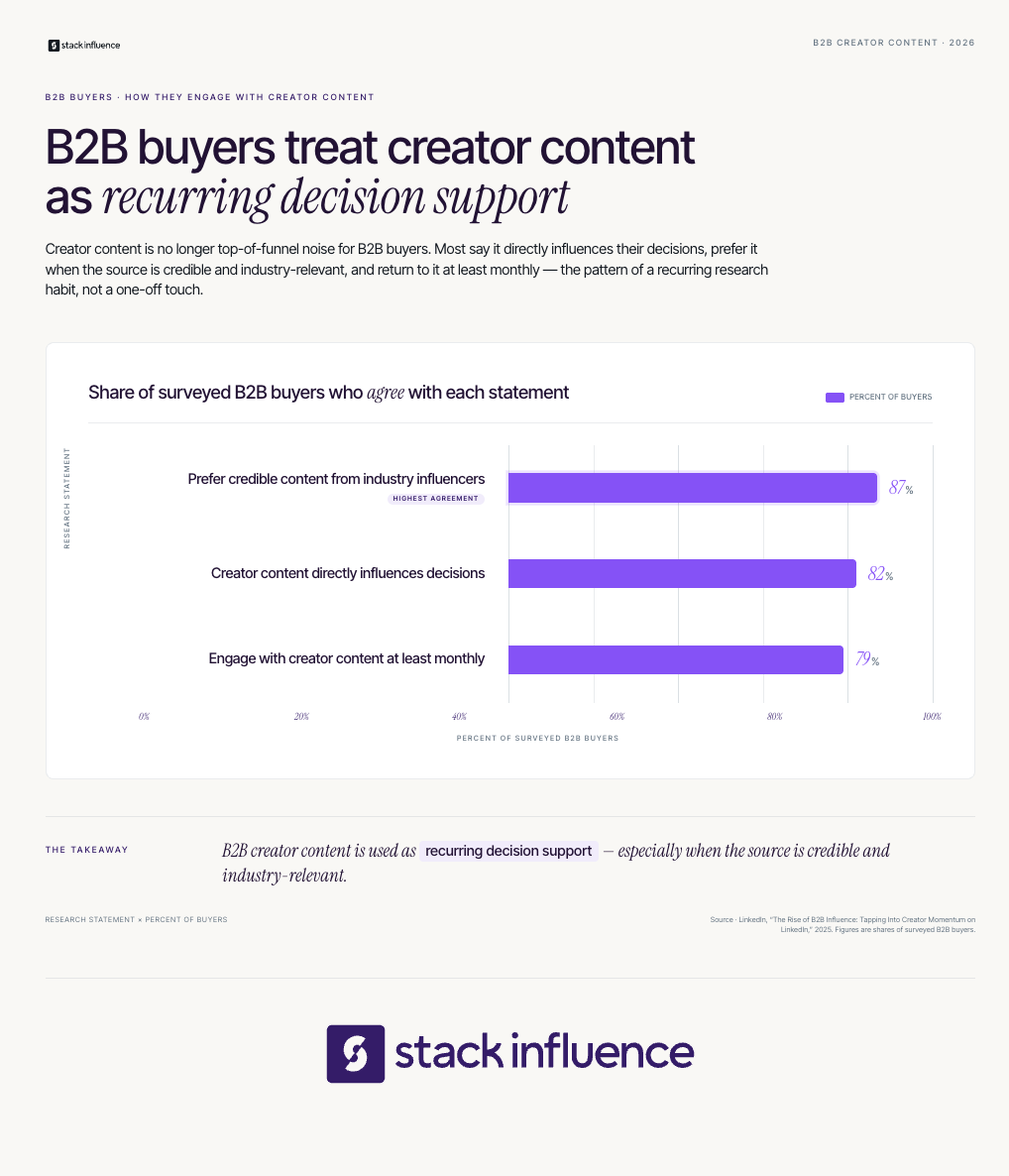
LinkedIn’s 2025 B2B creator research found that 82% of surveyed buyers said creator content directly influenced decisions, 87% preferred credible content from industry influencers, and 79% engaged with creator content at least monthly. The findings support a practical conclusion: B2B buyers use creator content as decision support, not merely entertainment.
The creator economy is also becoming a formal media category. The IAB’s 2025 creator economy report projected U.S. creator ad spend at $37 billion in 2025 and $44 billion in 2026. Those figures cover the broader creator market, not B2B alone, but they explain why brands increasingly expect professional selection, rights management, and measurement.
The practical differences are clear:
The Decision-Path Framework starts with the purchase decision and works backward to the creator, content, distribution, and measurement plan. This prevents a common mistake: choosing a popular creator first and inventing a campaign afterward.
Name the exact action the campaign should support. “Build awareness” is too vague. Better decisions include joining a wholesale program, requesting a demo, trialing a fulfillment service, switching ecommerce software, approving a professional-use product, or visiting an Amazon storefront.
Then identify the people involved and the objections each person may raise. A founder may care about growth, an operations lead about implementation, and finance about payback. One campaign can address several roles, but each asset should have one primary audience and one primary question.
Find the people the buyer already consults. Search LinkedIn discussions, YouTube channels, newsletters, podcasts, communities, webinars, conference agendas, and customer conversations. Stack Influence’s guide to LinkedIn micro influencers is useful when professional context matters more than broad consumer reach.
Do not limit the search to people who call themselves influencers. A practitioner with 3,000 relevant followers can be more valuable than a general-business creator with 100,000 followers. In B2B, audience-role density often matters more than total audience size.
Assign each piece of content to one stage of evaluation:
A repeatable influencer marketing strategy should specify the content job before the brief is written. This protects the creator’s voice while preventing vague posts that generate attention without helping a buyer act.
Decide how buyers will move from content to the next useful step. The path may lead to a guide, webinar, product page, demo, affiliate offer, Amazon listing, or sales conversation. Use one clear call to action per asset and give each creator a trackable destination.
Organic distribution can be extended through email, sales enablement, partner channels, and paid amplification. On LinkedIn, Thought Leader Ads allow advertisers to promote eligible member posts with the author’s permission for supported campaign objectives.
Treat the first activation as a test of fit, not the entire relationship. Capture what the creator learned, which objections appeared in comments, which formats held attention, and which audience segments responded. Then turn strong one-off collaborators into recurring experts, affiliates, brand ambassadors, or co-creators.
TopRank Marketing’s 2025 B2B influencer research found that 43% of respondents reported outstanding results, rising to 79% among marketers with mature programs. The study does not prove that duration alone causes better outcomes, but it reinforces the value of operational maturity and ongoing relationships.
Brands should choose B2B influencers by measuring buyer relevance and credibility before audience size. A useful creator has meaningful access to the roles involved in the purchase, demonstrated expertise, a clear content style, and dependable execution. Follower count is a screening signal, not a substitute for fit.
Use a 100-point Creator Fit Score:
A score of 75 or higher is a strong pilot candidate. A score from 60 to 74 may justify a smaller test or relationship-building period. Below 60, the brand should usually keep researching rather than forcing a partnership.
Brands can source manually, use influencer marketing platforms for discovery, engage an influencer marketing agency for strategy, or use a managed workflow for execution. Choose according to the bottleneck: research, influencer outreach, product fulfillment, creator coordination, content rights, or reporting.
The review should include comment quality, not just engagement rate. Look for questions from target buyers, peer discussion, saves, reposts, and evidence that the creator changes how people think. Then use a concise influencer outreach process that explains the audience, decision problem, deliverable, compensation, timeline, rights, and measurement plan.
For creators, the same scorecard works in reverse. Show brands who follows you, which business problem you own, what content you can produce, and how previous work affected qualified conversations or buyer behavior. That evidence is more persuasive than describing yourself as a general content creator.
The best format is the one that helps a buyer evaluate the offer and gives the brand a reusable asset. B2B influencer campaigns do not need to look like polished endorsements.
Separate content creation from distribution. A UGC creator may produce a strong tutorial for the brand’s product page, sales deck, or ads without posting it to a large personal audience. An influencer supplies both content and access to an audience. Stack Influence’s overview of UGC for ecommerce explains how creator assets can support owned and paid channels after the original collaboration.
For Shopify brands, Shopify Collabs can support direct creator invitations, gifts, discount codes, affiliate tracking, and payments. It is one example of how creator partnerships can combine content with performance-based economics.
Every paid, gifted, affiliate, employment, or other material relationship needs appropriate disclosure. The FTC’s endorsement guidance tells brands and creators to make the relationship clear, and free or discounted products can count as a material connection. Disclosure requirements belong in the brief, but creators should also understand their own responsibilities.
A B2B campaign can reach the visible user and still lose the deal because an unseen stakeholder remains unconvinced. The creator brief should therefore address both the champion who wants the product and the hidden buyer who can slow or reject the purchase.
The 2025 Edelman-LinkedIn B2B Thought Leadership Impact Report found that 64% of target decision-makers and 63% of hidden decision-makers in its U.S. survey spent more than an hour per week consuming thought leadership. It also found that 91% of hidden decision-makers associated quality thought leadership with uncovering needs they had not recognized, compared with 81% of target decision-makers.
The operational response is simple: create one asset for product enthusiasm and another for internal confidence. A demo may win the user, while an implementation checklist, risk breakdown, or business case helps the user persuade finance, operations, or leadership.
Measure B2B influencer marketing as a chain of contribution from content delivery to revenue, not as a single last-click event. Track qualified attention, intent signals, influenced accounts, pipeline movement, closed revenue, and reusable content value. Use a reporting window at least as long as the normal sales cycle.
Use the B2B Influence Contribution Stack:
Set up creator-specific links before launch. Google Analytics campaign parameters can identify referral source, medium, campaign, and creative in acquisition reporting. Pair those links with CRM campaign IDs, a consistent “How did you hear about us?” field, and sales notes that identify creator-assisted conversations.
Amazon sellers can use Amazon Attribution to measure eligible non-Amazon channels, including social, video, and affiliate or influencer campaigns. Amazon’s current documentation lists engagement and conversion metrics such as clicks, detail-page views, add-to-carts, purchases, units sold, and product sales, with a 14-day attribution window.
Interpret results in three windows. Review delivery and content quality during the first 7 to 30 days, intent during the next 30 to 90 days, and pipeline or revenue across at least one normal sales cycle. These are operating guidelines, not universal benchmarks.
Do not equate influenced pipeline with caused revenue. Creator content can contribute to a decision without receiving last-click credit, while broad “influence” reporting can also claim deals the campaign barely touched. Use multiple signals and explain the attribution method in every report.

Ecommerce brands often combine a B2B trust program with a consumer-facing micro influencer campaign. The B2B layer reaches retailers, agencies, professional users, or ecosystem partners. The consumer layer generates product demonstrations, social proof, UGC video, and marketplace traffic.
Stack Influence is built around gifted-first product seeding, vetted micro influencer activation, creator coordination, UGC generation, and completed-post accountability. Supplied company data describes a network of roughly 600,000 vetted creators and a completions-only model, sometimes called “influencer insurance,” in which platform spend is tied to completed creator posts.
This workflow is especially practical when a team wants to move from creator sourcing to shipped products, verified posts, and reusable content without managing every follow-up manually. Brands can review Stack Influence’s influencer seeding workflow, managed micro influencer campaign process, and content syndication options when planning that execution layer.
A verified Stack Influence example shows the difference between evidence and overclaiming. During a three-month Targus product campaign, 120 creator promotions generated 275,560 social impressions and 4,323 engagements, while average monthly unit sales increased from 56 to 221 during the measured period. The campaign was an ecommerce activation, not a pure B2B demand-generation benchmark, so it demonstrates execution scale rather than a guaranteed B2B outcome.
Most failures begin before the post is published.
B2B influencer marketing works when credible people help business buyers make a difficult decision with greater confidence. For ecommerce sellers, that can mean reaching wholesale partners, professional buyers, agencies, or the software and service ecosystem around commerce. For creators, it means turning expertise into useful evidence rather than chasing broad attention.
Start with one buying decision, one creator cluster, one content job, and one attribution path. Then use the first campaign to build a repeatable system for stronger creator partnerships, reusable content, and better-informed buyers. A managed product-seeding workflow can support that next step when campaign volume and follow-up become too complex to coordinate manually.
Influencer outreach fails when it is treated as a writing exercise instead of a matching and execution system. Ecommerce sellers often send polished messages to poorly matched creators, while content creators pitch brands without showing why their audience, concept, or skills fit the campaign.
Effective influencer outreach solves both problems. It helps brands find creators who can distribute, produce, or sell, and it helps creators present a credible reason for a brand partnership. This guide covers qualification, channels, pitch templates, follow-up, terms, product seeding, compliance, and measurement from both sides of the inbox.
Influencer outreach is the structured process of identifying, contacting, qualifying, and onboarding potential creator partners. Brands use it to recruit influencers, affiliates, UGC creators, and brand ambassadors. Content creators use the same process in reverse to approach brands, propose campaign ideas, and secure gifted collaborations, paid sponsorships, affiliate offers, or longer-term partnerships.
The outreach message is only one stage. A complete workflow also includes research, partner selection, offer design, negotiation, campaign activation, creator coordination, and performance review.
That broader view matters as creator marketing becomes a larger budget category. CreatorIQ’s State of Creator Marketing Report 2025-2026, based on 1,723 brands, agencies, and creators, reports that 71% of organizations increased creator-marketing investment year over year. More investment raises the cost of poor targeting, vague agreements, and unmeasured outreach.
The Five-Point Mutual-Fit Test is a pre-send framework for evaluating whether an outreach opportunity deserves attention. Brands can apply it to creator candidates, and creators can apply it to brands. A strong match passes all five points before either side spends time drafting a personalized pitch.
Follower count is not a sixth point. A nano influencer with a concentrated audience and a credible product use case may be more useful than a larger account with weak category relevance. The same principle applies to creators: a smaller DTC brand with a strong product match and clear creative opportunity may offer more portfolio value than a familiar company with no defined brief.
Brands that need a consistent vocabulary for smaller creator tiers can review this guide to what a micro influencer is. The practical lesson is to qualify the partnership around the job to be done, not around audience size alone.
A qualified shortlist should be built around the campaign role. Searching for “influencers” as one undifferentiated group mixes people with different strengths, economics, and measurement needs.
Use the Three-Role Creator Map:
One person may fill all three roles, but brands should not assume it. Define the primary role first, then vet recent content, audience conversation, prior partnerships, posting consistency, product-category conflicts, and obvious signs of inflated engagement. This guide to finding influencers for product promotion provides additional discovery methods for sellers.
Creators should build a brand shortlist with the same discipline. Start with products already used, categories that fit the audience, and companies whose current content leaves room for a distinct creator concept. A clear niche makes this easier, so creators still refining their positioning can use this niche-selection framework for influencers.

Use the channel that gives the recipient enough context to make a decision. Email is usually strongest for detailed proposals, rates, usage rights, attachments, and negotiation. A direct message works well as a warm introduction, a short follow-up, or an initial contact when no business email is available. When only a creator's social handle is visible, a quick lookup to find anyone's email from a name and a company keeps the first contact from starting as a cold DM with no fallback.
Platform-native marketplaces add structure. Meta’s Instagram Creator Marketplace announcement explains that brands can send projects with opportunity details and rates, while creators receive them in a dedicated Partnership Messages folder. Brands can also search by creator and audience attributes, and creators can build portfolios to improve discovery.
Shopify sellers can use Shopify Collabs recruiting tools to search, filter, and directly invite creators. Shopify currently limits merchants to 100 creator invitations in any seven-day period, which makes shortlist quality more important than indiscriminate volume.
As of July 2026, Shopify’s current Collabs overview states that the service is not accepting new creator signups, although merchants can still send direct invitations and accept creator applications. Existing creators can continue using the platform.
Brands comparing manual outreach with platform workflows can also review Stack Influence’s Instagram Creator Marketplace guide.
Write an influencer outreach message by making the partnership easy to evaluate. Identify the specific fit, state what you are proposing, explain the value exchange, summarize the requested work, and end with one simple next step. Personalization should prove relevance, not merely insert a name or compliment into a reusable template.
A useful first message has five parts:
Subject: [Brand] collaboration idea for your [specific content theme]
Hi [Name], I liked your recent [specific post] because [brief, genuine reason]. We are planning a campaign for [product and audience], and your [content format or perspective] looks relevant to the way customers use it.
The initial opportunity includes [gift, fee, commission, or hybrid], with a proposed [deliverable] by [timing]. We would also like to discuss [organic reposting, paid usage, or no additional usage].
Are you open to reviewing the full brief and terms?
Brands can adapt this structure using Stack Influence’s deeper outreach email guide for micro-influencers.
Subject: Content idea for [Brand or Product]
Hi [Name], I create [niche and format] for an audience interested in [relevant need]. I have been using or following [specific product, launch, or campaign], and I have an idea for [one-sentence concept] that would show [customer benefit or use case].
My relevant proof includes [audience insight, past result, portfolio example, or content skill]. I am interested in discussing a [gifted, paid, affiliate, UGC, or ambassador] partnership.
Is [concept] relevant to your current creator plans?
Creators should link a concise portfolio or media kit rather than attaching a large collection of unrelated files. These creator outreach email templates provide variations for first contact and follow-up.
Follow-up should reduce uncertainty, not add pressure. A practical sequence is one brief follow-up three to five business days after the first message, followed by a final note roughly one week later. Stop after that unless the recipient engages or a genuinely relevant new opportunity appears.
Do not resend the entire pitch. Restate the fit in one sentence, add any useful missing detail, and provide an easy way to decline. Brands should record response status and reasons, while creators should track contact names, dates, product categories, and previous outcomes.
A nonresponse is not proof that the idea was rejected. The message may have reached the wrong inbox, arrived during a launch, or required more work to evaluate than the recipient could justify.
An accepted pitch is not a complete agreement. Before shipping a product, creating content, or publishing a post, both sides should confirm the operational and commercial terms in writing.
Cover these items:
The Federal Trade Commission’s Disclosures 101 guidance says a material connection includes payment and free or discounted products, and creators should disclose that relationship clearly when endorsing a product. The FTC also states that creators are responsible for understanding and making the disclosure rather than relying entirely on another party.
TikTok’s commercial-content guidance requires creators promoting a third-party brand for payment or another incentive to turn on the content disclosure setting. The setting can label the post as a paid partnership, share post insights with a tagged brand partner, and simplify authorization for Spark Ads.
Most outreach advice overweights wording. When a campaign underperforms, the larger causes are often a mismatched list, an unattractive offer, hidden usage requests, slow product fulfillment, unclear briefs, or no system for following accepted creators through completion.
That distinction matters for ecommerce sellers. A positive reply has little value if the creator never receives the right product, cannot understand the deliverable, or disappears between acceptance and publication. Outreach quality should therefore be judged by completed, usable work, not by replies alone.
Stack Influence is built around that execution layer. The platform connects ecommerce brands with roughly 600,000 vetted creators through gifted-first product seeding, creator coordination, UGC generation, and completed-post accountability. A managed influencer product-seeding workflow is especially practical when a brand wants to activate many micro influencers without manually handling every message and follow-up.
During a three-month Stack Influence campaign for Targus, the campaign included 120 creator promotions. Average monthly unit sales increased from 56 to 221 during the measured period, while Amazon Best Seller Rank moved from #151,547 to #47,811. The case study does not isolate outreach as the sole cause, but it shows the value of connecting creator activation with fulfillment, completion, and marketplace measurement.
Results vary by product, category, pricing, marketplace conditions, creative quality, creator participation, and campaign execution.
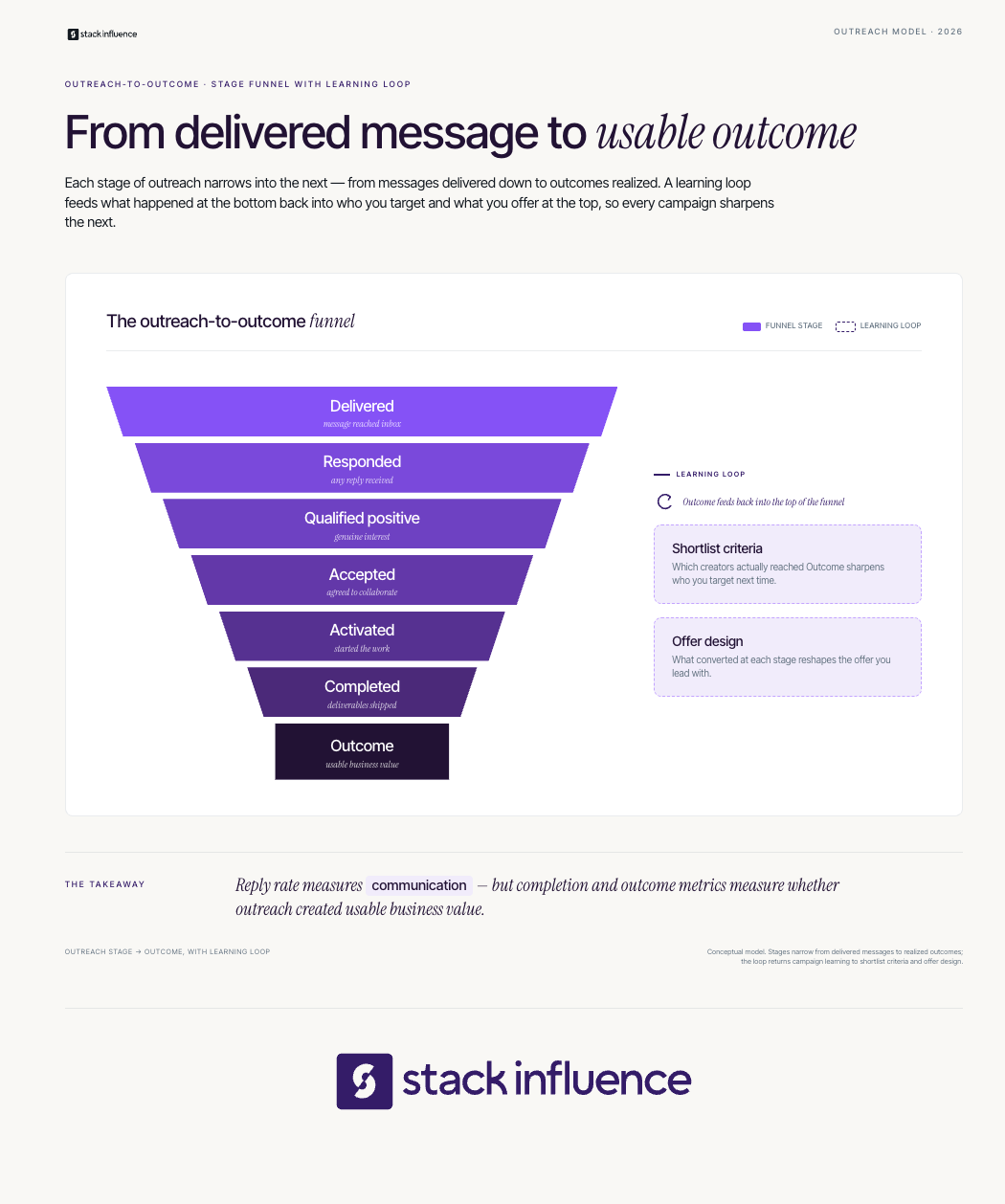
The Outreach-to-Outcome Funnel separates communication efficiency from campaign value. It prevents a high reply rate from masking weak creator fit, poor completion, or unprofitable traffic.
Track seven stages:
Calculate reply rate from delivered messages, not the original list. Then compare qualified-positive rate, acceptance rate, activation rate, completion rate, cost per completed creator, usable assets per completion, and outcome metrics tied to the campaign objective.
For Shopify influencer marketing, use creator-specific links, codes, landing pages, and store analytics, while recognizing that codes can be shared and shoppers may convert through another device. This influencer-marketing tracking guide explains how to separate delivery, content, traffic, conversion, and long-term value.
Amazon sellers can use Amazon Attribution, a free measurement solution for eligible sellers and vendors, to examine how non-Amazon channels such as social, video, email, and influencer campaigns contribute to Amazon discovery and purchases. Amazon recommends separate tags when advertisers want reporting by tactic, creative, or audience group.
Eligible US Seller Brand Owners enrolled under Amazon’s Brand Referral Bonus guidance can earn a bonus averaging 10% of product sales driven by non-Amazon marketing efforts measured with Amazon Attribution. Treat that bonus as one economic input, not as proof that every creator touchpoint received full credit.
Attribution still has limits. A shopper may view a creator post, search the brand later, click an ad, and purchase through a different path. Report attributed revenue, directional lift, content value, and repeat customer behavior separately, and do not claim that correlation proves causation.
The best outreach program gets more efficient over time. After each campaign, classify creators by reliability, content quality, audience response, traffic quality, conversion contribution, communication, and reuse potential.
Strong performers may progress from product seeding to paid UGC, affiliate relationships, brand ambassador programs, recurring launches, or paid amplification. The next offer should reflect the value already demonstrated, not simply repeat the original terms.
Brands should also document content rights before repurposing creator work across ads, product pages, email, or an Amazon listing. This guide to UGC versus brand-generated content explains why authentic creator assets and brand-owned creative play different roles.
Creators benefit from the same review. Track which brand deals strengthened the portfolio, paid fairly, respected the brief, communicated clearly, and produced useful performance evidence. That record turns future outreach from a cold request into a proof-backed proposal.
Influencer outreach works when relevance, value, execution, and measurement reinforce one another. Brands need a qualified shortlist and an offer creators can evaluate quickly. Content creators need a focused brand list, a concrete concept, and proof that they understand the customer and campaign objective.
Start with the Five-Point Mutual-Fit Test, send a concise pitch, document the terms, and follow every accepted partner through completion and outcomes. Ecommerce teams that want to reduce manual coordination can evaluate a managed product-seeding workflow that connects creator activation, UGC production, and completed-post accountability in one campaign system.
The influencer posts hit. Traffic spiked. Your Best Sellers Rank did that satisfying little climb, and somebody on the team dropped a rocket emoji in Slack. Feels like winning.
Here is the uncomfortable part. Buzz is a cost you already paid. Whether it was worth paying is a question you cannot answer from a rank chart. Revenue is loud. Profit is right. And the only scoreboard that actually settles the launch is the one nobody screenshots: the reorder decision.
Plenty of products go viral and still lose money at scale. They pull traffic, collect reviews, sell through the first batch, and quietly bleed margin on every reorder because the unit economics never made sense once you netted out ad spend, campaign cost, Amazon fees, and returns. The launch looked like a win. The SKU was a trap.
The post-launch story sellers tell themselves goes in a tidy line. Influencer buzz drives external traffic. Traffic and social proof produce reviews. Reviews and velocity lift your rank. Higher rank means more organic sales. Cue the reorder.
Every link in that chain is real. The problem is that sellers treat the last link as a formality instead of a checkpoint. By the time you are staring at a reorder quantity, the launch has already told you whether it built an asset or a liability. You just have to read it.
So walk the chain on purpose. Here is what each stage owes you, and the number that proves it delivered.
Influencer content does one thing better than almost any other channel: it manufactures social proof fast. User-generated content on a product page can convert at up to ten times the rate of pages without it, according to Emplifi's analysis of billions of sessions. That is the mechanism doing the heavy lifting, not the follower count.
But raw buzz is not the asset. Reviews are. The Spiegel Research Center at Northwestern found that displaying reviews can lift purchase likelihood by 270 percent, with the largest jump coming from the very first few reviews on a product. Going from zero to five is where the magic sits.
So the job in the first two weeks is conversion, not applause. Are the eyeballs from that influencer campaign turning into reviews on the listing? If a thousand people clicked and you have four reviews, the buzz is evaporating instead of compounding. Reputation tools like FeedbackFive exist to close that gap, turning post-purchase moments into the review velocity that makes the next thousand visitors convert.
The number to watch: review velocity in the first 14 days, not impressions.
Here is where the profit lens earns its keep. When you send outside traffic to Amazon, Amazon will actually pay you for it. The Brand Referral Bonus returns an average of 10 percent of the sale price on purchases driven by your non-Amazon marketing, and the rate runs anywhere from roughly 5 percent to 25 percent depending on category.
Read that again through a launch lens. That influencer campaign is not just buying awareness. Tagged correctly with Amazon Attribution, it is buying awareness at a 10 percent discount, because Amazon rebates a slice of the referral fee on every external sale. Miss the tagging and you leave that money on the table and you lose the data that tells you which creators actually drove revenue.
The number to watch: attributed external sales and the referral bonus you recovered, per creator.
This is the checkpoint everyone skips. A launch can nail velocity and reviews and still be a SKU you should not reorder.
Do the math the way your bank account experiences it. Take your sale price. Subtract the landed unit cost, the referral fee, the FBA fulfillment fee, storage, your true advertising cost of sale, returns, and the amortized cost of the launch itself. What is left is the number that decides everything. If that contribution margin is thin at launch pricing, it does not get better at reorder scale. It gets worse, because the honeymoon coupons end and the ad costs to hold rank do not.
This is exactly what SKU-level profitability monitoring is built for. A tool like SellerPulse surfaces margin at the SKU level so you catch a loser before you wire a supplier for batch two, not after. The launch buzz told you the product is wanted. The SKU economics tell you whether being wanted is profitable.
The number to watch: contribution margin per unit at reorder pricing, not launch pricing.
Say the margin checks out. You still have to get the quantity and timing right, and this is where good products go bad. Order too little and a viral SKU stocks out right as rank momentum peaks, handing your slot to a competitor. Out-of-stocks cost retailers roughly 1.2 trillion dollars a year globally, per IHL Group, and on Amazon a stockout does not just cost the sale. It resets the velocity flywheel you paid an influencer campaign to spin up.
Order too much and you have funded a slow-moving graveyard of long-term storage fees on a SKU whose buzz has cooled. Both mistakes are reorder mistakes, and both are avoidable with demand forecasting that respects your real lead times. Inventory tools like RestockPro exist to keep that decision grounded in velocity and lead time instead of launch-week adrenaline.
The number to watch: days of cover against supplier lead time, so you reorder on data, not vibes.
Before you approve a single reorder, the launch should be able to answer five questions. Buzz can fake the first two. Only profit answers the last three.
Did external traffic convert into review velocity in the first two weeks? Did you tag it so Amazon paid you back the referral bonus? Is contribution margin healthy at reorder pricing, not launch pricing? Do you have enough cover to avoid a momentum-killing stockout? And is the projected reorder profitable at the quantity your forecast actually supports?
Five yeses is a SKU worth scaling. A no in the back half is a launch that generated a great story and a bad investment. Better to learn that from a spreadsheet than from a warehouse full of dead stock.
Stop guessing which viral products deserve batch two. Run your post-launch SKUs through eComEngine's Profit-First SKU Audit Worksheet and get a clear reorder verdict on each one: Grade My Launch SKUs
Influencer buzz is a fantastic opening move. It is not the game. The launch story worth telling is not "we went viral." It is "we went viral, and the numbers said reorder." Walk the chain, watch the five numbers, and let profit, not applause, sign off on the next PO.
Written by:Jennifer Nunez
Jennifer Nunez is the Growth and Partnership Manager at eComEngine, a software company that helps Amazon sellers simplify operations, automate review requests, monitor account and listing activity, and make smarter inventory decisions. eComEngine’s tools include FeedbackFive, SellerPulse, and RestockPro.
Inventory decisions force ecommerce sellers into a costly tradeoff. Buy too much and cash sits in slow-moving stock. Buy too little and a promotion, product launch, or creator campaign can empty a hero SKU before replenishment arrives.
Inventory demand forecasting gives Amazon sellers, Shopify merchants, and DTC brands a disciplined way to estimate future unit demand and convert it into purchase orders. The goal is not perfect prediction. It is a repeatable system that makes uncertainty visible and connects marketing to operations.
This guide explains the methods, formulas, data inputs, campaign adjustments, and measurement cadence needed to build that system.
Inventory demand forecasting is the process of estimating how many units each SKU will sell over a defined future period, then translating that estimate into purchase orders, safety stock, channel allocation, and replenishment timing. A useful forecast includes expected demand, uncertainty, supplier lead time, and known events such as promotions or product launches.
A demand forecast estimates what customers are likely to buy. An inventory plan adds stock on hand, inbound orders, reserved units, minimum order quantities, and supplier reliability. Sales history is imperfect because stockouts can suppress recorded sales while customer interest remains high.
The capital at stake is substantial. The U.S. Census Bureau estimated manufacturers’ and trade inventories at $2,736.2 billion at the end of May 2026, with a seasonally adjusted inventory-to-sales ratio of 1.28, according to its May 2026 Manufacturing and Trade Inventories and Sales release. (Census.gov)
For an ecommerce seller, the forecast should primarily be expressed in units by SKU and period. Revenue forecasts can support finance, but they do not tell a buyer how many units to order. Forecasting must also connect to the execution risks explained in why order fulfillment breaks ecommerce growth.
The Signal-to-Stock Forecasting Framework turns sales history into an inventory decision through five linked layers. Skipping a layer can produce double-counted demand or purchase orders that ignore operating constraints.
Use the framework on a rolling cadence. Amazon seller marketing tools can inform assumptions, but each marketing signal needs a date, SKU, scenario range, and owner.
Build a reliable ecommerce forecast by cleaning SKU-level sales data, selecting a method that matches each SKU’s demand pattern, adding documented event adjustments, converting demand into inventory requirements, and backtesting the result against actual sales. The model should be updated on a rolling cadence, but every override should remain visible and measurable.
Create one record per SKU, channel, location, and period. Include ordered and shipped units, cancellations, returns, stock status, price, discount, campaign tag, and fulfillment location. Weekly data suits purchasing, while daily data helps with fast-moving SKUs and short events.
Separate consumer sales from wholesale orders, replacements, samples, and creator gifting. Product-seeding units consume stock but should not teach the model that shoppers purchased them. Flag stockout periods because fulfilled sales then understate unconstrained demand.
The retail forecasting problem is naturally hierarchical. The M5 accuracy competition evaluated 42,840 hierarchical retail unit-sales time series, illustrating why SKU forecasts should also make sense when rolled up to product, category, location, channel, and company totals. (ScienceDirect)
No single forecasting method is appropriate for every SKU. Segment products before selecting models:
Machine learning can help large catalogs, but complexity must improve out-of-sample forecasts or stock and cash decisions beyond a simple benchmark.
Forecast accuracy should be measured on periods the model did not use for fitting. The textbook guidance on forecast accuracy on unseen data explains why a model that fits historical data closely may still forecast poorly and why overfitting is a real risk. (OTexts: Online, open-access textbooks)
Use at least two complementary error measures:
Always compare the chosen model with a naive or seasonal-naive baseline. If a complex model cannot beat a sensible baseline across repeated test windows, it should not control purchase orders.

Marketing should enter the inventory forecast as a dated, SKU-specific demand adjustment, not as an informal note. Build a low, base, and high scenario for each promotion or creator campaign, reserve units for product seeding separately, and compare attributed orders with the original assumption after the campaign closes.
Create a campaign calendar with the SKU, launch date, expected tail, channel, offer, planned creator count or spend, reserved inventory, scenario range, and tracking method.
For Amazon sellers, Amazon Attribution can measure non-Amazon search, social, display, video, and email activity. Amazon reports a 14-day attribution window and metrics including clicks, detail-page views, add-to-cart actions, purchases, units sold, product sales, and new-to-brand activity. Use those results to recalibrate future campaign assumptions, while recognizing that attribution does not capture every upper-funnel effect. (Amazon Ads)
Amazon Brand Referral Bonus belongs in the margin model, not the unit-demand model. Traffic from Amazon influencers, the Amazon Influencer Program, or an Amazon storefront should still be tagged as event demand. Sellers can use this guide to Amazon influencers and their storefronts when planning the calendar.
Stack Influence is designed to coordinate vetted micro-influencer activation, gifted-first product seeding, campaign execution, and completed-post accountability. That workflow gives ecommerce teams a schedule of planned creator activity that can be incorporated into inventory scenarios rather than treated as an unstructured marketing guess.
A verified Stack Influence case study for Targus recorded average monthly unit sales rising from 56 at the starting point to 221 during a three-month new-product campaign with 120 creator promotions. The example shows why scheduled creator activity belongs in a demand scenario, but it does not establish a universal lift rate. Results vary by product, category, pricing, marketplace conditions, creative quality, and execution.
Reserve creator units, samples, replacements, and damage allowances outside the consumer-sales forecast. These influencer product seeding strategies help estimate when units leave available stock. Guidance on micro-influencers and UGC in ecommerce can inform the calendar without treating every impression as a sale.
A demand forecast becomes useful when it produces an order decision. The horizon should cover supplier lead time, freight, receiving, the next review period, and any buffer before units become sellable.
Use three linked calculations:
Suppose a SKU will sell 20 units daily, replenishment takes 30 days, reviews occur every seven days, and safety stock is 150 units. Target stock is 890 units: 20 × 37, plus 150. With an inventory position of 480, the preliminary order is 410 units before MOQ rounding.
Safety stock should cover uncertainty, not planned demand. Calculate historical under-forecast error across replenishment-length windows, then select a percentile aligned with the desired service level. A 95th-percentile under-forecast of 120 units provides a defensible starting buffer, subject to supplier and category judgment.
Do not place expected promotion lift inside safety stock. Planned lift belongs in the demand forecast; safety stock protects against the remaining error. Double-counting both is a common reason sellers accumulate excess inventory after an event.
Amazon explains that Fulfillment by Amazon stores, picks, packs, and ships enrolled inventory through its fulfillment network. Sellers still need to forecast the time required for production, freight, receiving, and transfers before units are actually available for sale. (Sell on Amazon)
Brands splitting inventory across FBA, Seller Fulfilled Prime requirements, and Amazon Multi-Channel Fulfillment need channel-specific sellable dates and allocation rules.
A forecast succeeds only when it improves availability, inventory efficiency, and cash. The Forecast-to-Cash Metric Stack prevents teams from optimizing a statistical score while ignoring operational outcomes.
Shopify’s inventory reports define sell-through as units sold divided by units sold plus ending inventory, and days of inventory remaining as ending units divided by average units sold per day. Shopify’s ABC report classifies products contributing the first 80% of revenue as A-grade, the next 15% as B-grade, and the final 5% as C-grade. (Shopify Help Center)
Review A-grade and high-risk SKUs weekly across a rolling 13-week horizon. Review supplier assumptions, cash, and campaign scenarios monthly. Revisit models and safety-stock policy quarterly or after structural change.
Compare the statistical baseline with the final consensus forecast. If overrides repeatedly worsen WAPE, bias, or inventory outcomes, require a documented event, owner, assumption, and post-event review.

Most forecast failures begin with data definitions and operating discipline rather than a lack of sophisticated software.
A small ecommerce team can establish a useful forecasting cadence in four weeks without waiting for perfect software.
Export SKU-level orders, returns, cancellations, prices, promotions, inventory status, and inbound purchase orders. Create a clean product and location hierarchy. Flag stockouts, one-time bulk orders, product-seeding units, replacements, and discontinued variants.
Classify each SKU as stable, seasonal, trending, intermittent, new, or event-driven. Create naive and seasonal-naive benchmarks, then test one additional method per segment. Record WAPE, bias, and unit error across repeated test windows.
Document true replenishment lead time, receiving time, MOQ, case pack, shelf life, and target service level. Set reorder points and safety stock for priority SKUs. Add every scheduled promotion, launch, and creator campaign to a shared event calendar with low, base, and high scenarios.
Publish a rolling 13-week forecast and exception report. Review the highest-revenue, lowest-cover, highest-bias, and longest-lead-time SKUs weekly. Lock a monthly purchasing view and schedule post-event reviews so assumptions become reusable evidence.
The forecasting process is ready when every priority SKU has a defined method, horizon, lead-time assumption, safety-stock rule, campaign scenario, error metric, and accountable owner.
Inventory demand forecasting is not a one-time spreadsheet exercise. It is an operating system that connects customer demand, marketing plans, supplier reality, fulfillment capacity, and cash. The Signal-to-Stock Forecasting Framework gives ecommerce sellers a practical way to separate what is expected, what is planned, and what remains uncertain.
Start with a rolling 13-week view for priority SKUs, measure forecast error and bias, and improve event assumptions after every promotion or creator campaign. For brands planning creator-led demand, Stack Influence supports vetted creator activation, product seeding, campaign coordination, and completed social content through one workflow. Build the inventory plan first, then scale demand at a pace the business can fulfill profitably.
Choosing ecommerce affiliate software is not a simple feature comparison. A Shopify seller turning customers into ambassadors, an Amazon FBA brand recruiting publishers, and a DTC team coordinating creators need different infrastructure. A platform can track links perfectly while leaving the real bottleneck, partner recruitment, product sampling, content production, or payout operations, untouched.
This guide compares nine current platforms and shows ecommerce sellers how to evaluate channel coverage, partner supply, activation, attribution, payouts, economics, and workload. It also explains where affiliate tracking ends, where creator activation begins, and how to run a 30-day pilot before committing to a larger program.
Ecommerce affiliate software helps an online seller recruit or onboard partners, create trackable links or codes, attribute orders, calculate commissions, approve conversions, and organize payouts. Some products focus on tracking, while others add partner marketplaces, customer referrals, creator management, product seeding, or marketplace integrations. The workflow differences matter more than the feature count.
Affiliate software generally falls into three categories:
Some platforms cover more than one category, but few handle every function equally well. Understanding the broader benefits of affiliate marketing for ecommerce sellers helps clarify which functions are essential for your particular program.
A seller with 500 willing ambassadors may primarily need tracking and payouts. A seller with no active partners may need recruitment and creator activation before advanced attribution provides meaningful value.
The Bottleneck-First Affiliate Operations Stack evaluates software according to the operational problem it removes. Instead of starting with a vendor list, map the five layers required to turn a prospective partner into profitable ecommerce revenue.
The weakest layer limits the performance of the entire program. Better tracking cannot rescue an inactive partner base, while a large creator network becomes difficult to monetize without reliable attribution and settlement.
This is also why affiliate marketing automation should be evaluated as a connected workflow. Automating commission calculations is helpful, but automating the wrong process does not resolve weak recruitment, poor creative direction, or an unprofitable offer.
The following platforms support different combinations of affiliate tracking, creator partnerships, referrals, product seeding, marketplace recruitment, and payouts. They are organized by workflow rather than presented as a universal ranking.
The comparison considers:
Published prices reflect the vendors’ public pages when this article was researched. Sellers should confirm current pricing, usage limits, transaction fees, and contract terms before purchasing.
Stack Influence supports the creator-activation layer of an ecommerce affiliate program. The platform is built around gifted-first product seeding, vetted micro-influencer participation, campaign coordination, user-generated content, and completed-post accountability. Stack Influence works with roughly 600,000 vetted creators, approximately 78% of whom are female.
The platform moves beyond profile discovery by helping brands coordinate creators through its product-seeding workflow. Products are placed with relevant creators, campaign requirements are managed, and platform fees are tied to completed posts through a completions-only model. Brands can then identify creators whose content, audience response, or attributed traffic makes them appropriate for longer-term affiliate relationships.
Best-Fit Workflow: Stack Influence is especially practical when the immediate constraint is activating micro-influencers, producing authentic UGC, and managing creator participation through completion. It can complement affiliate tracking software, Amazon Attribution, or a Shopify ambassador program by supplying the content and creator activity those systems measure.
impact.com combines affiliate, creator, referral, and broader partnership management within one platform. Its capabilities include partner recommendations, contracting, link and promotional-code tracking, product feeds, payments, fraud controls, and reporting. The Essentials tier adds access to a marketplace that impact.com says contains 90,000 partners, while higher tiers add cross-device tracking, API-based tracking, customized analytics, and advanced attribution controls.
The company’s published partnership plans begin at $30 per month for Starter, $500 per month for Essentials, and $2,500 per month for Pro. A 2.5% fee applies to partner-driven transactions, and a one-time implementation fee may depend on onboarding requirements. The tradeoff is that advanced recruitment, automation, and attribution features require a larger budget and potentially more technical implementation.
Refersion is an ecommerce-focused affiliate management platform covering recruitment, applications, first-party tracking, links, coupon codes, commissions, conversion approvals, payments, and reporting. Its marketplace and personalized partner recommendations help brands supplement their own recruitment, while product-level and customer-level commission controls support more detailed program economics.
Refersion’s current affiliate-management pricing combines a subscription with a percentage of affiliate-driven sales on its lower tiers. Launch applies a 3% performance fee, Growth applies 2%, and its sales-led Scale tier uses a flat subscription model. Sellers should compare those variable fees against expected affiliate revenue because a low starting subscription can become a larger expense as the program grows.
Social Snowball is a Shopify-focused platform for affiliate, influencer, referral, and customer-ambassador programs. A notable workflow automatically turns customers into affiliates after purchase, giving DTC brands a way to recruit from people who have already experienced the product. The platform also supports influencer management, payouts, tiered rewards, fraud prevention, code-leak controls, and post-purchase referrals.
According to its Shopify App Store listing, the Snow Day plan starts at $249 per month plus 3% of affiliate revenue. The Blizzard tier begins at $899 per month and adds TikTok Shop support, creator search, outreach, social listening, UGC tools, and no usage charges. Its Shopify-centered workflow is well aligned with DTC brands, but sellers operating primarily through Amazon or another marketplace would need additional infrastructure.
Tapfiliate is a self-managed affiliate tracking platform supporting integrations with Shopify, BigCommerce, WooCommerce, Magento, Stripe, and other commerce systems. It provides real-time reporting, recurring commissions, coupon tracking, deep links, product feeds, payment integrations, webhooks, REST API access, and server-to-server tracking.
Tapfiliate’s current plans list Launch at $89 per month and Scale at $179 per month. Launch includes 50 affiliates, 5,000 monthly clicks, and 500 monthly conversions, while Scale raises the included volumes and removes the affiliate limit. Sellers should account for click and conversion overage fees, and they will still need a deliberate recruitment and partner-activation process because the software’s core strength is program infrastructure.
GoAffPro is a Shopify affiliate and referral app with a free starting plan. The free tier includes unlimited affiliates, unlimited attributed revenue, a branded portal, analytics, welcome emails, and a post-checkout recruitment prompt. This makes it useful for testing whether an affiliate program can attract participation before taking on a larger software expense.
The Premium tier is listed at $49 per month in its Shopify App Store pricing and adds functions such as multi-level structures, advanced analytics, bulk email, portal customization, and a custom domain. Its self-service model gives sellers considerable control, but recruitment, partner communication, campaign design, and content activation remain responsibilities the internal team must organize.
Levanta is a creator-affiliate platform built for brands selling through Amazon, Shopify, and Walmart. It combines creator discovery, custom commission offers, product sampling, performance tracking, creator payouts, and tax reporting. This cross-channel structure is particularly relevant to Amazon sellers that also operate a DTC store and want one partner program spanning multiple purchase destinations.
Levanta’s cross-channel brand platform supports Amazon, Shopify, and Walmart integrations. Its published brand pricing lists Levanta Gold at $750 per month plus 3.5% of affiliate sales revenue, while Enterprise pricing is customized. The economics and workflow are oriented toward established marketplace or omnichannel programs, so sellers should validate expected affiliate volume, margin, and partner recruitment needs before committing.
The right ecommerce affiliate software is the platform that removes the seller’s biggest operating constraint without creating unacceptable margin or workload pressure. Start with channel fit, then score partner supply, activation, attribution, payouts, integrations, economics, and team capacity. A feature-rich system is still a weak choice when the program cannot recruit or support active partners.
Use a one-to-five score for each of these factors:
Shopify sellers should also consider whether the affiliate program will operate independently or as part of a broader Shopify influencer marketing playbook. A creator producing reusable content may create value beyond directly tracked orders, while a coupon publisher may create measurable transactions without producing brand-owned creative assets.
Calculate the complete cost before comparing platforms:
Total program cost = software subscription + setup fees + performance fees + affiliate commissions + product costs + payout expenses + internal labor + leakage and refund costs
Next, calculate contribution profit after discounts, cost of goods sold, fulfillment, returns, commissions, and platform expenses. Attributed revenue alone can make an uneconomical program appear successful.
Measure affiliate performance as a chain from partner activity to contribution profit, not as a single revenue number. Track delivery, traffic, conversion, and economics separately, then reconcile the affiliate platform against Shopify, GA4, Amazon, or another transaction source. Use a consistent attribution window and treat marketplace or ranking changes as correlated outcomes rather than automatic proof of causation.
The Four-Layer Affiliate Measurement Stack separates leading indicators from financial outcomes.
Delivery metrics reveal whether the program is producing activity:
Recruitment totals are not enough. The active-affiliate rate and time to first promotion show whether partners are actually moving through the activation process.
Traffic metrics show whether partner activity produces qualified visits:
Shopify explains that its marketing reports attribute sales only when traffic can be connected to a trackable marketing effort, including externally managed campaigns using UTM parameters. This is one reason Shopify revenue reports and affiliate dashboards may not match exactly.
Conversion metrics connect traffic to customer behavior:
Google’s recommended ecommerce events for GA4 include view_item, add_to_cart, begin_checkout, purchase, and refund. Consistent event implementation makes it easier to identify where affiliate traffic drops out of the purchase journey.
Economics metrics determine whether attributed activity creates profitable growth:
Delivery and traffic are leading indicators. Contribution profit and customer value are outcome metrics. A program can generate impressive clicks and attributed revenue while losing money after discounts, commissions, returns, product costs, and software fees are deducted.
Amazon sellers need an attribution layer that can measure activity occurring outside Amazon. Amazon Attribution is a free measurement product for eligible advertisers that tracks how non-Amazon search, social, display, video, email, affiliate, and influencer campaigns contribute to Amazon engagement and purchases. Amazon currently reports a 14-day attribution window and metrics including clicks, detail-page views, add-to-cart actions, purchases, units, product sales, and new-to-brand orders.
Eligible brands can also review Amazon’s Brand Referral Bonus, which may return a portion of qualifying sales generated through non-Amazon marketing. Because eligibility, attribution, and bonus terms can change, Amazon sellers should confirm current program rules inside Seller Central before building the incentive into campaign forecasts.
The Amazon Influencer Program serves a different participant. It is an extension of Amazon Associates for qualifying creators and gives each approved influencer an Amazon page, commonly called an Amazon storefront, where recommended products can be organized. It does not replace the seller’s creator-recruitment, product-seeding, or campaign-management workflow.
Brands connecting external creators with marketplace sales can combine Amazon influencer marketing solutions with a carefully structured Amazon Attribution and Brand Referral Bonus guide. Each creator, channel, campaign, or creative variation should receive a distinct tag when practical, allowing the seller to compare outcomes without combining every promotion into one attribution bucket.
No affiliate dashboard provides a complete causal record of customer behavior. Common gaps include:
For that reason, sellers should reconcile partner-level data weekly and evaluate cohorts over longer periods. A seven-day view can diagnose broken links or inactive partners, while 30-day and 60-to-90-day views provide better evidence about refunds, repeat purchases, content reuse, and broader marketplace movement.
The most overlooked affiliate-program failure is not inaccurate tracking. It is having too few relevant partners producing useful promotion. A technically perfect dashboard creates no value when approved affiliates never publish, creators receive no product, or the offer gives partners little reason to participate.
This distinction is central to affiliate versus influencer marketing. Traditional affiliate programs usually begin with measurable transactions, while creator programs may begin with product experience, content, trust, and audience exposure. The strongest ecommerce workflows can connect the two by using creator campaigns to identify partners who later earn performance-based commissions.
Activation depends on several operational inputs:
This is why gifted influencer campaigns can serve as an affiliate-development pipeline. Product seeding lets creators experience the item before recommending it, while campaign completion data helps a brand identify which partners are responsive, credible, and capable of producing useful content.
A verified Stack Influence case study provides one operational example. During a three-month new-product campaign for Targus, 120 creator promotions generated 275,560 social impressions and 4,323 engagements. Average monthly unit sales increased from 56 to 221, while Amazon Best Seller Rank improved from #151,547 to #47,811 during the measured period.
Those figures do not establish that creator activity alone caused every marketplace change. They show why campaign delivery, content production, traffic, sales, and marketplace metrics should be evaluated together instead of reducing performance to the affiliate dashboard’s final revenue total.
Launch with a controlled partner cohort, a limited product set, tested tracking, and preapproved economics. The first 30 days should confirm that links, codes, commissions, cancellations, disclosures, payouts, and reporting work before the program expands. Measure activation and contribution profit, then scale only after the complete operating loop is reliable.
Select a small group of suitable products and calculate the maximum sustainable commission. Account for discounts, cost of goods sold, fulfillment, returns, software charges, performance fees, and partner payouts.
Document:
Create test affiliates and complete controlled orders across the devices and purchase paths customers are likely to use. Confirm that links, discount codes, product-level commissions, taxes, refunds, and cancellations appear correctly in both the affiliate platform and the store’s transaction records.
Test at least:
Begin with a manageable cohort rather than opening the program to anyone who applies. Give each partner a concise brief, approved brand assets, product information, tracking instructions, and a clear explanation of how and when commissions are paid.
Brands working with creators should incorporate the FTC endorsement guidance into the brief. The FTC states that material relationships between advertisers and endorsers should be disclosed clearly, including relationships involving payment or free products.
Compare recruited partners with active partners, then trace each promotion through clicks, conversions, refunds, commissions, and contribution profit. Interview several active and inactive partners to understand where onboarding or activation broke down.
Use the results to:
Programs using pay-for-performance affiliate deals should resist judging the pilot on attributed revenue alone. Some conversions may still be inside a return window, and creator content may continue producing traffic after the first 30 days.
Choosing ecommerce affiliate software is a bottleneck decision, not a contest to find the dashboard with the longest feature list. Sellers first need to determine whether the program lacks partners, activation, attribution, payout infrastructure, cross-channel visibility, or internal management capacity.
Map those needs against the Bottleneck-First Affiliate Operations Stack, calculate the full program economics, and shortlist the platforms that solve the most important constraint. A controlled pilot can then reveal which option produces active partners, reliable data, and sustainable contribution profit.
For brands whose central challenge is creator activation rather than link generation, the logical next step is to evaluate a managed product-seeding workflow that connects vetted creators, authentic content, campaign coordination, and completed-post accountability.
Seller Fulfilled Prime can give Amazon sellers Prime visibility without sending every unit into Amazon FBA, but it also transfers the Prime delivery promise to the seller’s own fulfillment operation. That tradeoff makes SFP less of a shipping setting and more of an operating system for inventory, labor, carriers, customer promises, and demand planning.
For ecommerce brands, the key question is not simply whether the Prime badge could help. It is whether each SKU can support fast, free delivery at a reliable contribution margin. This guide explains the 2026 requirements, trial, costs, FBA comparison, readiness framework, measurement model, and the often-overlooked connection between marketing volume and fulfillment risk.
Seller Fulfilled Prime is an Amazon program that lets qualified sellers display the Prime badge on products they store, pick, pack, and ship through their own operation or a third-party fulfillment partner. Sellers must pass a trial and continually meet Amazon’s delivery-speed, tracking, cancellation, and customer-experience standards.
Amazon’s official Seller Fulfilled Prime program page explains that sellers can choose enrolled products, storage facilities, integrated carriers, and packaging while retaining control of fulfillment. Amazon handles post-order customer service, returns, refunds, and adjustments for SFP items, while the seller handles pre-order buyer questions.
SFP is best understood as a qualified version of Fulfilled by Merchant. Standard FBM gives the seller control over inventory and shipping, but it does not automatically add Prime branding. The Amazon FBA versus FBM guide provides a broader comparison of those fulfillment models.
Seller Fulfilled Prime became more demanding on July 6, 2026, when Amazon increased several delivery-speed thresholds. The current rules measure the percentage of Prime customer page views that display qualifying delivery dates, not the percentage of orders ultimately delivered within those windows. Sellers therefore must manage both displayed promises and actual delivery performance.
Current minimum delivery-speed requirements are evaluated by product size tier:
The July update raised standard-size one-day coverage from 30% to 40%, standard-size two-day coverage from 70% to 75%, oversize one-day coverage from 10% to 15%, and extra-large two-day coverage from 15% to 25%. Amazon’s upcoming Seller Fulfilled Prime changes also describe a zip-code-level delivery-promise tool planned for September 2026.
Amazon is temporarily excluding weekend page views from speed-metric evaluation from May 31 through October 17, 2026. That transition does not remove the program’s weekend fulfillment obligations, so sellers should not treat it as permission to pause weekend operations.
A seller can ship accepted orders on time yet miss the speed requirement if too many shoppers see slower dates before ordering. Templates, cutoffs, inventory location, and carrier coverage all influence the displayed promise.
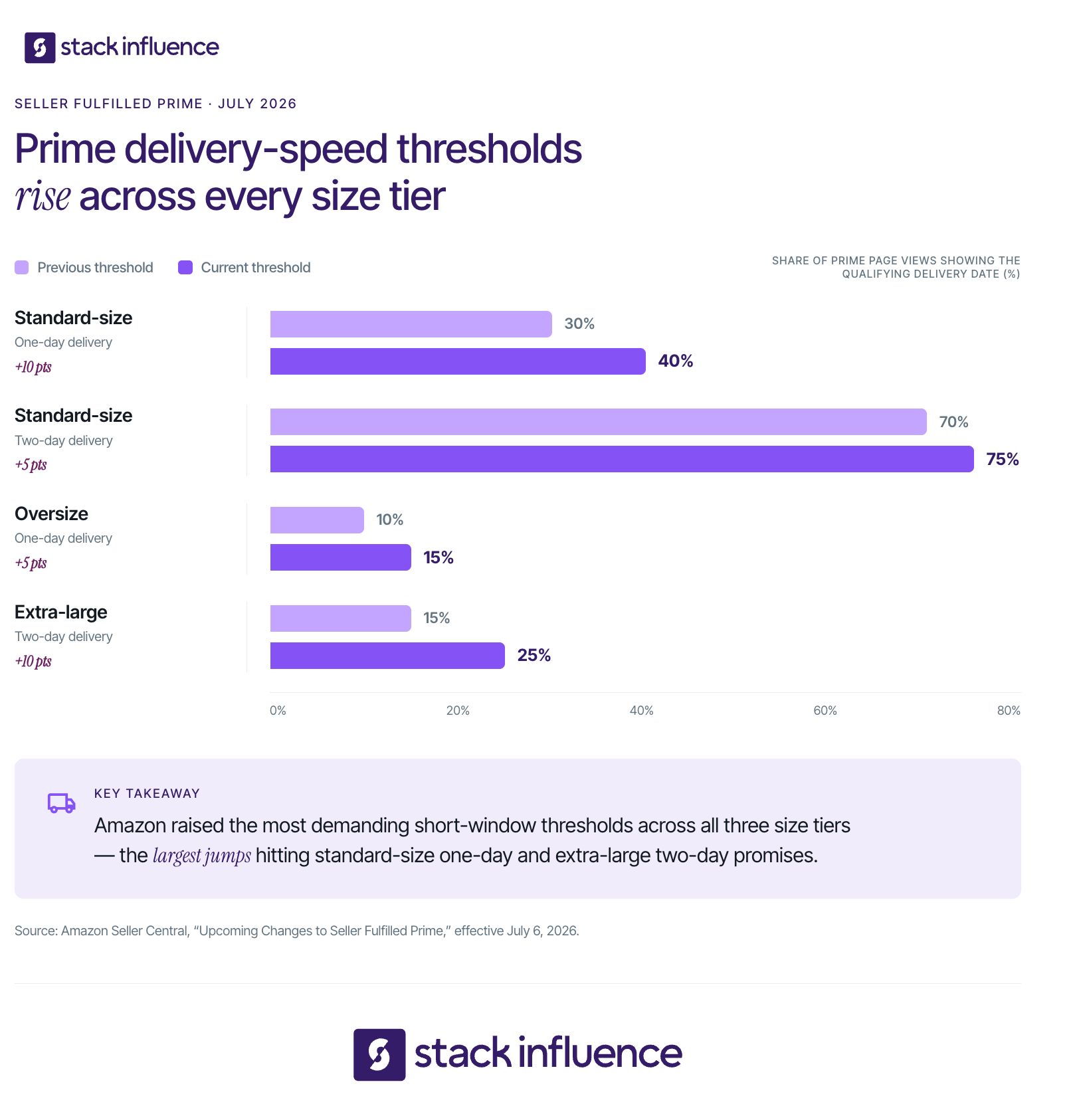
Seller Fulfilled Prime enrollment has three stages: prequalification, a monitored trial, and ongoing compliance. A Professional selling account and domestic United States default ship-from address are required. Amazon then evaluates recent merchant-fulfilled performance, trial volume, delivery promises, tracking, cancellations, and continued weekly performance.
Amazon’s current SFP trial and enrollment requirements state that sellers must meet the following criteria during the preceding 90 days:
Newer sellers should build a stable FBM record first. The guide to becoming an Amazon seller in 2026 places fulfillment choice within broader marketplace readiness and unit economics.
Amazon’s public program page describes the SFP trial as 30 days. During the trial, enrolled offers do not display the Prime badge. The seller must ship at least 100 Prime trial packages and meet the applicable speed and performance thresholds.
The core trial and enrollment performance thresholds include:
Treat the trial as an audit, not a learning period. Carrier mappings, weekend staffing, cutoffs, exception handling, inventory accuracy, and capacity limits should work before the first tracked week. Amazon currently limits sellers to three trial attempts per calendar year.
Amazon reviews SFP performance weekly. Repeated failure can disable Prime offers and lead to disenrollment, while the seller’s performance dashboard and business reports identify the requirements causing the problem. Amazon also lets sellers cap daily same-day, one-day, and two-day Prime order volume according to dependable warehouse capacity.
Seller Fulfilled Prime works by combining merchant-controlled fulfillment with Amazon-controlled Prime eligibility and customer-facing delivery promises. The seller chooses eligible SKUs and fulfillment locations, configures Prime shipping coverage, passes the trial without displaying the badge, and then maintains weekly standards after Prime branding becomes active.
A practical workflow is:
Sellers can use Amazon Buy Shipping to purchase labels, compare integrated carrier services, automate tracking confirmation, and access certain account-health protections when eligibility conditions are met. Amazon also allows sellers to connect supported carrier accounts and use their own negotiated rates.
Seller Fulfilled Prime does not have one universal per-order program price. Amazon’s public page lists the Professional plan at $39.99 per month plus normal selling fees, while the seller pays its own warehousing, labor, packaging, postage, surcharges, returns, software, and exception costs. The real answer depends on each SKU and delivery zone.
Amazon’s selling plan pricing should be separated from the fulfillment economics. Amazon announced a 2% SFP fee in 2023 but withdrew it before implementation, and the current public SFP page does not list that fee. Reuters reported the reversal.
Use the SFP Cost Stack to calculate contribution margin for every candidate SKU:
The basic SKU equation is:
SFP contribution margin = selling price minus referral fees, product cost, pick-and-pack cost, packaging, outbound shipping, return reserve, and allocated operating costs.
Do not use one nationwide shipping average. Model local, regional, and long-distance scenarios because a profitable nearby order can become unprofitable when a distant destination requires premium service. This is one reason order fulfillment can break ecommerce growth while topline sales are rising.
Seller Fulfilled Prime and Amazon FBA can both produce Prime-eligible offers, but they assign operational responsibility differently. With FBA, inventory enters Amazon’s network and Amazon performs fulfillment. With SFP, the seller or its fulfillment partner controls inventory and shipping while meeting Amazon’s Prime standards. Many brands use both by SKU.
Amazon’s official FBA and FBM comparison confirms that sellers can combine fulfillment methods across eligible products. The right comparison is therefore not “SFP or FBA for the entire catalog.” It is “which method creates the strongest service level and contribution margin for this SKU?”
A hybrid model can place fast-moving standard-size products in FBA and use SFP for oversized, customized, seasonal, fragile, or multichannel inventory when Prime economics work.
The Prime Promise Readiness Model is a six-gate framework for deciding whether a SKU should enter Seller Fulfilled Prime. Do not begin the trial with a red gate. Yellow gates require documented mitigation, while green gates have been proven through live merchant-fulfilled orders.
Measure likely delivery dates by destination and size tier. A fast warehouse can still fail if its location, carrier map, or cutoffs do not create enough qualifying page views.
Document cutoffs, weekend picking, pickups, holidays, staffing, and backups. The process must work during ordinary and peak shifts without depending on one experienced employee.
Use more than one viable service where possible. Track first scans, transit consistency, zone coverage, pricing, and claims. Resilience requires an alternative that can preserve the promise during disruption.
Set a verified daily ceiling by shift and package type. Use Prime order controls before the warehouse reaches its maximum, accepting only the volume that can be fulfilled reliably.
Run the SFP Cost Stack for normal, distant-zone, return, and peak-labor scenarios. A SKU passes only if the business is comfortable with the downside case, not merely the blended average.
Assign owners for page-view speed, delivery, tracking, cancellations, shipping cost, inventory exceptions, and order caps. Dashboard access without a response process is not monitoring.
Before registration, run a four-week shadow trial using the intended SKUs, cutoffs, staffing, carriers, and weekend schedule. Compare displayed promises, actual delivery, cost per order, and exception rates against the live SFP requirements. This exposes structural problems before the Prime badge and enrollment are at risk.
The most overlooked SFP risk is successful demand generation. A seller may pass at ordinary volume, then miss cutoffs when a promotion, email, paid campaign, or creator post causes a spike. Marketing and fulfillment need one shared capacity calendar.
Amazon sellers using the Amazon Influencer Program or trying to find Amazon influencers and their storefronts should forecast hourly order concentration, not just total sales. A storefront feature or coordinated posts can compress demand into a few hours.
Stack Influence is designed around gifted-first product seeding, vetted micro-influencer activation, campaign coordination, UGC generation, and completed-post accountability. For an SFP seller, the practical use case is pacing creator activations against inventory, warehouse throughput, carrier pickups, and Prime order limits instead of treating marketing and fulfillment as separate plans.
This also matters for DTC brands running Shopify influencer marketing. Campaigns may draw from shared Shopify, FBA, and SFP inventory, so set channel safety stock and routing rules before content goes live.
The safest release pattern is controlled waves. Start with a small creator cohort, observe hourly order arrival and shipping cost, then release the next group only if capacity remains green. Stack Influence’s Amazon influencer marketing workflow is particularly practical when a brand wants product seeding, creator coordination, and completed content managed as a connected campaign.

Measure Seller Fulfilled Prime as a chain from eligibility to economics to commercial outcomes. Sales can hide deteriorating service, while perfect shipping metrics can hide unprofitable transportation. Separate leading indicators from outcome metrics.
Review these daily and weekly:
These are leading indicators because a decline can threaten future Prime availability before revenue visibly changes.
Track shipping cost, labor, premium-service usage, first-scan failures, exceptions, returns, and contribution margin. Segment by SKU, warehouse, carrier, service, and destination because blended averages conceal damaging orders.
Measure sessions, conversion rate, Featured Offer share, units, revenue, cancellation-adjusted sales, and contribution profit. Amazon says Prime branding can improve the likelihood of becoming the Featured Offer and gaining visibility, but a seller’s before-and-after results still do not prove that SFP alone caused a commercial change.
Use a four-week pre-period and post-period when seasonality is stable. Compare enrolled SKUs with similar non-enrolled products and annotate price, promotion, advertising, stockout, review, and competitor changes instead of attributing every movement to the badge.
Eligible brand-registered Professional sellers can use Amazon Attribution to measure non-Amazon search, social, display, video, and email activity. The reporting includes clicks, detail-page views, add-to-cart activity, purchases, units, sales, and new-to-brand metrics within Amazon’s stated attribution window.
The Amazon Attribution and Brand Referral Bonus guide explains how the tools connect. Amazon’s Brand Referral Bonus can credit an average of roughly 10% of qualifying attributed sales against referral fees, with rates varying by category. Configure tags by channel or creator to pace demand against capacity.
Seller Fulfilled Prime is worth evaluating when a seller already has dependable merchant fulfillment, advantageous carrier rates, suitable inventory locations, and SKUs whose margins can absorb Prime-level delivery. It is less about avoiding FBA and more about using the seller’s own network where that network creates a better operational and economic result.
SFP is especially practical when:
A seller should delay enrollment when the model depends on optimistic postage estimates, one critical employee, one fragile carrier service, inaccurate inventory, or untested weekend processes. The Prime Promise Readiness Model should show six green gates before the trial begins.
Seller Fulfilled Prime is not simply a way to add a badge to merchant-fulfilled listings. It is a commitment to make and keep a Prime delivery promise while protecting contribution margin. The best next step is to model candidate SKUs, run a four-week shadow trial, and enroll only the products whose coverage, operations, carrier resilience, capacity, economics, and monitoring are ready.
Once the fulfillment system is stable, connect marketing calendars to inventory and daily Prime capacity. That turns SFP from a risky badge chase into a controlled ecommerce growth capability.
Shopify’s advertised subscription is only the first layer of its actual cost. Payment processing, apps, themes, domains, tax tools, marketplace connections, retail hardware, and customer acquisition can raise the monthly total considerably.
For founders, DTC brands, and Amazon sellers adding a direct-to-consumer channel, the useful question is not only “how much does Shopify cost?” It is “what will Shopify cost at my sales volume, with my payment mix and operating stack?” This guide answers both questions using current U.S. pricing and a practical cost model.
Shopify costs $5 per month for Starter, while a full online store starts with Basic at $39 month to month or $29 per month on annual billing. Grow costs $105 or $79, Advanced costs $399 or $299, and Shopify Plus starts at $2,300 per month for standard three-year agreements.
As of July 2026, the current U.S. plan prices are:
The annual option is an effective monthly rate, not a monthly installment plan. Shopify charges $348 upfront for Basic, $948 for Grow, and $3,588 for Advanced. Paying month to month for 12 months totals $468, $1,260, and $4,788 respectively, so annual billing saves $120 on Basic, $312 on Grow, and $1,200 on Advanced.
Shopify’s billing overview confirms that the full annual amount is collected upfront in exchange for a lower effective monthly price.
Shopify also advertises a three-day free trial and, for many new accounts, a promotional rate of $1 per month for the first three months. Treat that as an introductory offer, not the long-term price used in a profitability forecast. The official Shopify pricing page displays the current promotion and standard rates.
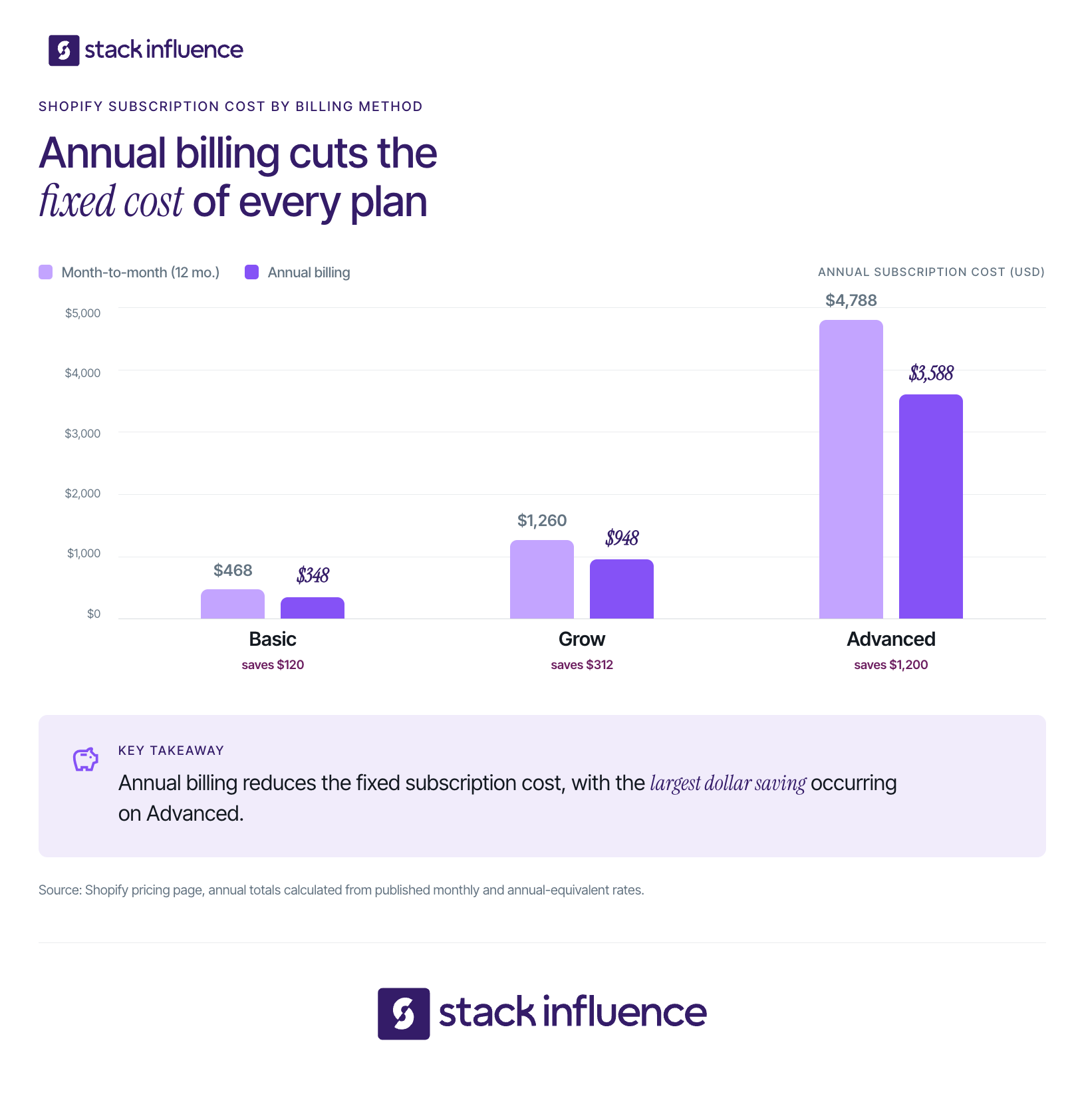
The cheapest plan is not always the lowest-cost plan after transaction fees, staff needs, and operational add-ons are included.
The Shopify Starter plan is a lightweight option for social, messaging, email, and shareable product links. It costs $5 per month, includes a simple storefront and checkout, and charges a 5% transaction fee with Shopify Payments. It is designed for testing demand rather than building a fully customizable standalone website.
Basic is the normal starting point for a standalone ecommerce store. It includes a full online store, unlimited products, hosting, SSL, inventory management across up to 10 locations, and reporting, but no additional staff accounts.
Its U.S. standard online card rate is 2.9% plus 30 cents, and its third-party-provider surcharge is 2%.
Grow adds five staff accounts, lowers the standard online rate to 2.7% plus 30 cents, and reduces the third-party-provider surcharge to 1%. It becomes practical when team access or processing savings recover the higher subscription.
Shopify recommends considering expected sales volume and payment setup when evaluating a plan upgrade.
Advanced supports 15 staff accounts, enhanced support, higher API limits on selected interfaces, a 2.5% plus 30-cent standard online rate, and a 0.6% third-party-provider surcharge.
High-volume sellers should compare its $299 annual-billing equivalent against processing savings and operational requirements rather than upgrading solely because revenue reached a predetermined level.
Shopify Plus adds enterprise checkout customization, priority support, higher API capacity, unlimited staff accounts, expanded B2B capabilities, and included POS Pro locations. Standard U.S. pricing starts at $2,300 per month on a three-year term or $2,500 on a one-year term, while complex businesses may use a variable platform fee.
Shopify Plus pricing explains the contract structure and notes that migration, custom development, third-party apps, and themes can create additional expenses.
A defensible Shopify budget separates platform fees from the broader cost of running and growing an ecommerce business. This prevents software costs, pass-through transaction costs, and customer-acquisition spending from being blended into one unhelpful number.
Use this six-layer cost stack:
The core monthly formula is:
Shopify total cost = plan fee + payment fees + third-party transaction fees + apps + channel add-ons + tax-tool fees + amortized one-time costs.
Inventory, fulfillment, and marketing should then be layered on to calculate the total cost of operating the store. This distinction is especially useful when building a complete ecommerce launch cost checklist.
Shopify takes a payment-processing fee on each sale, and the amount depends on the plan, card type, country, and payment gateway. In the United States, standard online Shopify Payments rates are 2.9% plus 30 cents on Basic, 2.7% plus 30 cents on Grow, and 2.5% plus 30 cents on Advanced.
For a $100 standard online card order, the processing cost is:
Premium card rates are higher at 3.5%, 3.3%, and 3.1% plus 30 cents respectively. Shopify also lists an additional 1% for international online payments on these plans. The exact card mix matters because two stores with the same revenue can have different payment costs.
Using Shopify Payments avoids Shopify’s separate third-party transaction surcharge. If a seller uses an outside payment provider, the provider’s own processing fees still apply, then Shopify adds 2% on Basic, 1% on Grow, 0.6% on Advanced, or 0.2% on Plus.
Shopify Payments is available only in supported countries and for eligible businesses. Sellers should verify Shopify Payments country eligibility before building a forecast that assumes Shopify Payments rates.
The plan break-even test identifies the sales volume at which lower payment rates recover the extra subscription cost. It is more reliable than choosing a plan from a generic label such as “small business” or “growing brand.”
Use this equation:
Monthly break-even card volume = additional monthly plan cost ÷ processing-rate reduction.
Using Shopify’s current U.S. standard online card rates produces the following estimates:
The fixed 30-cent fee is the same across these three standard online rates, so it cancels out of this simplified comparison. The result changes for in-person sales, premium cards, international payments, refunds, and mixed gateways. Shopify also notes that exact upgrade economics vary by region and payment setup.
The third-party-provider calculation can move the upgrade point much lower. With annual billing, Basic to Grow saves one percentage point in Shopify’s added surcharge, creating a simple break-even near $5,000 in monthly third-party-processed volume.
Grow to Advanced saves 0.4 percentage points, creating a break-even near $55,000 per month. These calculations do not include the external provider’s own processing fees.

The base plan includes hosting, unlimited bandwidth, and SSL, but it does not eliminate every technology and operating expense. Shopify states that it has no setup fee, yet optional and usage-based charges can still create a meaningful difference between the advertised price and the amount on the monthly bill.
Every store receives a free myshopify.com address. A branded domain is purchased or renewed separately, and the price depends on the top-level domain selected.
Shopify’s domain purchasing guide states that domains are registered for one year, renew annually, and are billed separately from the plan. Shopify does not provide email hosting, so a business email service is another independent expense.
Shopify offers free themes, while premium themes are one-time purchases for an individual store. The official Shopify Theme Store currently displays paid examples at $230, $320, $350, and $360.
A theme price is not the same as a finished storefront budget. Photography, copy, custom sections, accessibility work, migration, and developer support can cost more than the theme itself.
App expenses can be recurring, usage-based, or one-time. Some developers also bill merchants outside Shopify, which means those charges might not appear in the Shopify admin.
Shopify’s app billing documentation recommends reviewing each app’s billing cycle, usage charges, and external subscription terms. A disciplined budget should assign each paid app to a measurable job, then remove overlapping tools.
Casual in-person selling is included with paid plans, but permanent retail locations may need POS Pro. Shopify POS pricing lists POS Pro at $89 per month per location when billed yearly, with hardware purchased separately.
A one-location retailer on Basic therefore has a known software floor of $118 per month on annual-equivalent pricing before card processing, hardware, apps, and domain costs.
Shopify currently includes 50 synced marketplace orders per month. After that, its pricing page lists a 1% fee on synced marketplace orders, capped at $99 per month. This matters for Amazon sellers using Shopify as a central catalog or order-management layer.
Shopify Tax pricing changed for stores created on or after May 13, 2026. For a U.S. non-Plus store created on or after that date, Shopify Tax is free until $100,000 in lifetime global sales, then charges 0.35% on applicable transactions, capped at 99 cents per order.
Stores created before May 13, 2026 use a $100,000 annual threshold. For U.S. stores on Basic, Grow, or Advanced, the post-threshold rate is 0.35%, with a 99-cent maximum per order and a $5,000 annual maximum per region. Review the current Shopify Tax pricing against the store’s creation date.
These examples isolate the annual-billing plan equivalent and standard online card fees. They exclude apps, domains, themes, premium cards, international payments, taxes, refunds, shipping, and marketing.
These scenarios demonstrate why the subscription price alone can be misleading. Processing costs become the dominant Shopify expense as sales volume increases. The calculations use Shopify’s published U.S. plan prices and standard online card rates.
A Shopify subscription creates the commerce infrastructure, but it does not create demand by itself. Ecommerce brands still need a separate acquisition and retention budget for advertising, email, SMS, affiliates, creator partnerships, content, and conversion work.
A Shopify influencer marketing budget should separate creator activation, product cost, shipping, content rights, amplification, and measurement. The Shopify influencer marketing playbook, ecommerce influencer-seeding workflow, and guide to UGC for ecommerce show how those costs connect to storefront traffic and reusable creative.
Stack Influence is a micro-influencer marketing platform built around gifted-first product seeding, vetted creator activation, campaign coordination, UGC generation, and completed-post accountability. Its Shopify creator campaign solution belongs in the growth layer rather than the Shopify software fee.
Amazon sellers operating Amazon FBA and Shopify should also maintain separate channel ledgers. Amazon storefront activity, Amazon influencers and the Amazon Influencer Program, Amazon Attribution, and the Brand Referral Bonus belong to the Amazon channel.
Amazon’s official guide explains that Amazon Attribution measures the on-Amazon impact of non-Amazon marketing. It uses a 14-day, last-touch model, and eligible U.S. seller brand owners can use attributed traffic in connection with the Brand Referral Bonus program.
The right Shopify plan is the lowest tier that supports your current team, sales channels, reporting, and payment economics without forcing unnecessary workarounds. Most new standalone stores can begin on Basic, while Grow and Advanced become more attractive when staff access, operational features, or lower transaction rates justify the higher subscription.
Use this decision sequence:
Do not upgrade only because revenue crossed a round number. Run the fee calculation, identify the operational feature that removes work or risk, and compare the annual savings with the annual commitment.
A monthly cost review should connect Shopify expenses to order economics rather than merely compare invoices. Track:
Leading indicators include order count, average order value, card mix, app count, and staff requirements. Outcome metrics include contribution margin, acquisition cost, payback period, repeat purchase rate, and profit.
Review subscriptions monthly and rerun the break-even test quarterly or after a material sales shift. Use a consistent attribution window and separate correlation from causation. The influencer marketing ROI checklist provides a parallel model for creator-led growth.
The minimum Shopify price is $5 per month, but a full ecommerce store generally starts at $39 monthly or an effective $29 with annual billing. The real total depends on sales volume, card mix, gateway choice, apps, theme, domain, retail setup, marketplace activity, tax tools, and the growth systems surrounding the store.
Build two forecasts before choosing a plan: a 12-month fixed-cost model and a variable-cost model tied to orders and revenue. Then apply the break-even test rather than upgrading by instinct. Once the platform budget is clear, allocate the remaining capital to inventory, fulfillment, retention, and measurable customer acquisition so the store has both infrastructure and demand.
Finding a TikTok account becomes difficult when the display name is common, the username changed, or the only clue is a video, sound, topic, or screenshot. Content creators face an even broader task: locating collaborators, researching UGC creators, finding brands, and making their own profiles easier to discover.
A useful TikTok user finder is not a secret lookup box. It is a sequence that starts with the strongest public clue, adds context, verifies the result, and respects privacy. This guide explains that sequence and shows how to turn creator discovery into partnerships, brand deals, and a more searchable TikTok presence.
A TikTok user finder is a method or tool used to locate a TikTok profile from available clues. Those clues may include an @username, display name, profile link, QR code, mutual connection, video topic, hashtag, sound, screenshot, or public business detail. Safe finders use public information or data shared with permission.
TikTok profiles include several identifiers:
Prioritize the username and profile URL when locating a known account. TikTok allows a username change once every 30 days, and the profile link changes with it, so an old handle may stop leading to the expected account. TikTok explains the distinction in its official username guidance.

The TikTok Finder Ladder is a five-level framework for choosing the fastest and least invasive search method. Begin with the strongest available clue, then move down only when the earlier level fails. The ladder reduces wasted scrolling and lowers the chance of confusing a similar-looking profile with the correct creator.
Search an exact @username, open a direct profile URL, or scan a creator's QR code. TikTok's Discover and Search documentation says search can surface people, posts, sounds, hashtags, and other content, with filters that help narrow results.
Use this order:
Use contacts, mutual connections, shared links, and existing followers when you know the person and have a legitimate reason to connect. These clues can help when a creator uses a nickname or recently changed usernames.
TikTok may suggest accounts through synced contacts, mutual connections, followers, and shared links. Users can disable these settings and remove previously synced contact data, so review TikTok's suggested-account controls before uploading an address book.
Search for what the creator makes, not only who you think they are. Combine a niche, format, product, location, or memorable phrase:
Check videos, users, sounds, hashtags, mentions, Duets, Stitches, and recurring collaborators. A distinctive caption fragment or spoken phrase can be more useful than a common display name.
Use a web search when TikTok results are too broad or an old handle may still appear on indexed pages. Google supports quotation marks for exact phrases and the site: operator for domain-restricted searches in its search-refinement guidance.
Try searches such as:
Treat each result as a lead. Verify the current bio, recent posts, linked website, and other public profiles before contacting the account.
Use creator marketplaces, influencer marketing platforms, or managed networks when the goal is finding qualified partners rather than one known account. These systems may support campaign briefs, niche matching, applications, creator vetting, outreach, approvals, and completion tracking.
In May 2026, TikTok announced Creator AI Search inside TikTok One. The system interprets campaign briefs and analyzes profiles to recommend relevant creators, reflecting a shift from handle-based lookup toward context-based matching.
To find a TikTok user by username or name, search the exact handle first, filter for accounts, and verify the result through its bio, recent videos, posting style, and linked pages. When you only know a display name, add a niche, city, profession, brand, school, or public content topic to reduce ambiguity.
Use this sequence:
Do not rely on follower count as the identity test. Impersonators, fan pages, inactive profiles, and similarly named creators can all create false confidence. Save the confirmed profile URL and note why the account matters, especially when building a collaboration shortlist.
You can find someone without a username through a QR code, permission-based contact matching, mutual connections, public content clues, linked profiles, or a screenshot of a public post. Choose the method that fits the clue you already possess. None of these approaches should bypass a private account or reveal information the person did not publish.
A QR code is the cleanest method when you can contact the person directly. TikTok lets users share profiles and display personal QR codes, which is useful at events, classes, brand activations, and creator meetups. Its sharing instructions explain how profiles and content can be shared.
Contact matching may suggest an account when synced information and both users' discovery settings allow it. It is not a universal reverse phone or email lookup.
Only sync contacts when you are comfortable sharing address-book data with TikTok. The platform allows users to stop syncing and remove prior contact data. TikTok also applies more restrictive default discovery settings to users ages 13 to 17, as explained in its teen privacy guidance.
Search a distinctive spoken phrase, caption, product, event, recipe, location, hashtag, or sound. Review your likes, favorites, watch history, messages, and shared links when available. Then follow tags, mentions, Duets, and Stitches around the remembered post.
Google Lens can search an uploaded screenshot and return similar images or webpages containing related imagery, according to Google's image-search documentation. Use this to locate the original public post, product, event, or webpage, not to identify a private person.
A visual similarity result is not proof of identity. NIST's face-recognition evaluation documents false-positive matches and demographic differences, so face-based finder claims require caution and independent verification.
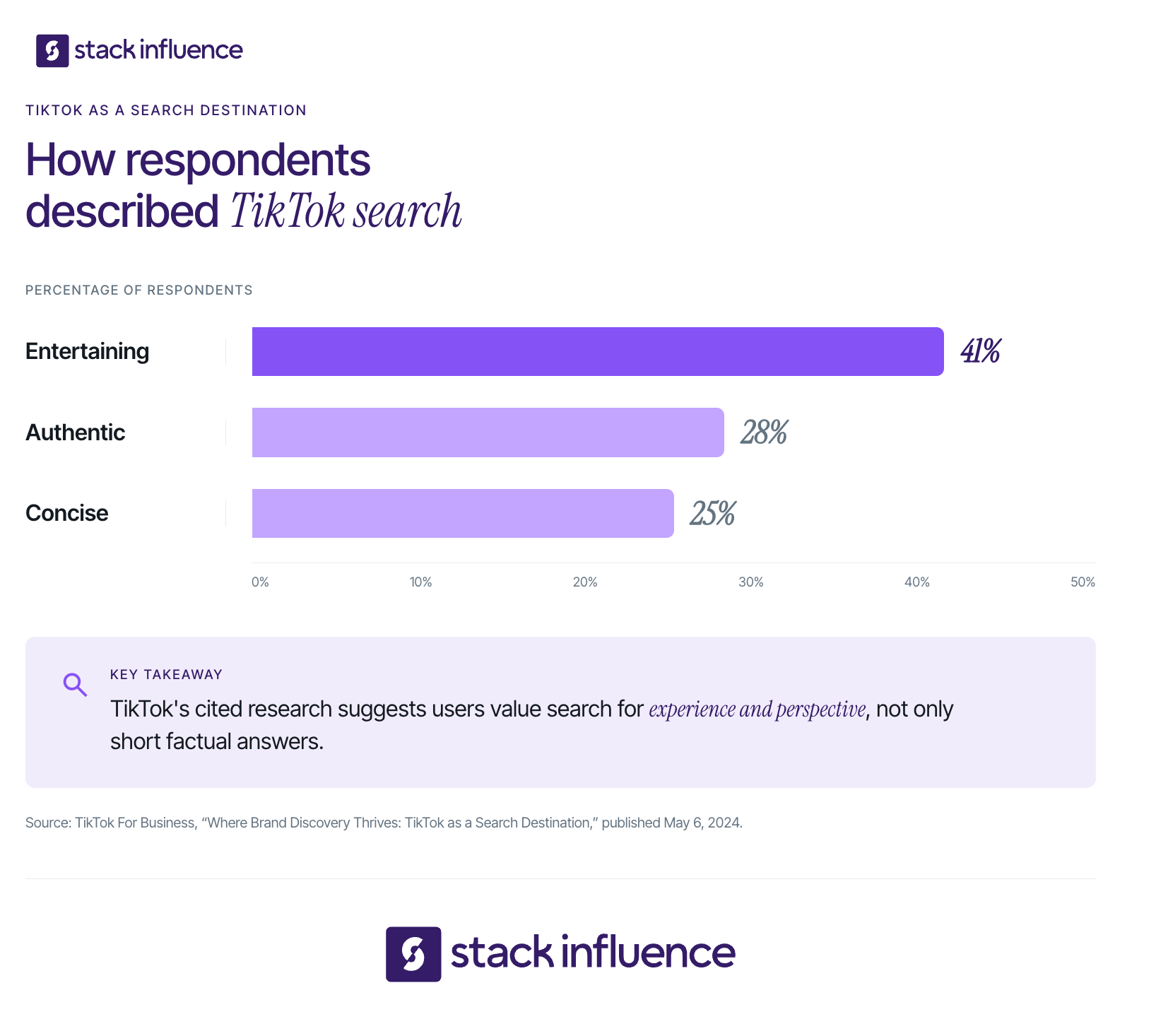
Content creators find stronger collaborators by searching narrow topic clusters, following content relationships, and qualifying accounts for relevance rather than popularity alone. Start with a specific audience problem or format, then explore hashtags, sounds, mentions, Duets, Stitches, and recurring community interactions. The result should be a focused shortlist, not a giant directory.
According to TikTok's 2025 search report, the platform handles billions of searches each day and search volume increased 40 percent year over year. Separate TikTok research found that respondents described TikTok search as entertaining (41 percent), authentic (28 percent), and concise (25 percent). These are platform-reported findings, not guaranteed creator outcomes.
Choose three to five topic clusters that reflect your real niche. A fitness creator might search beginner apartment workouts, mobility for desk workers, and budget home gym reviews instead of fitness influencer.
For each cluster:
TikTok's Creator Search Insights can surface topics people search for. Pair that research with Stack Influence's guide to TikTok search and creator discoverability and its content creator guide to TikTok marketing.
Finding a profile is only the beginning. Use the 5-Check Creator Match Filter before following, pitching, collaborating with, or recommending an account:
Do not dismiss nano influencers or micro influencers because their audiences are smaller. A focused creator may be more relevant than a larger general-interest profile. Stack Influence's article on how micro-influencers earn brand deals explains the value of niche clarity, while its UGC creator definition distinguishes content production from audience distribution.
Many TikTok user finder tools confuse access with accuracy. They promise private accounts, exact locations, hidden contact details, or identity matches from a face, although more data does not guarantee a current or correct result. The safest approach is to separate profile lookup, creator discovery, and identity lookup because each solves a different problem.
The first two categories can support legitimate research when their methods are transparent. Identity lookup carries greater privacy and misidentification risk. Never treat a facial or cross-platform suggestion as confirmed identity.
Do not enter a TikTok password, verification code, or recovery information into a finder. Avoid tools that require unexplained downloads, claim to unlock private posts, or advertise unverifiable accuracy. Use the least invasive signal that answers the question: a handle for identity, a niche query for collaboration, and a creator platform for campaign execution.
Account discovery becomes commercially useful when it leads to a respectful next step. For content creators, that may be a peer collaboration, UGC project, product-seeding opportunity, affiliate relationship, brand ambassador program, or paid sponsorship.
The IAB 2025 Creator Economy report expects U.S. creator advertising spend to reach $44 billion in 2026 and identifies finding the right creators as brands' leading challenge. For brands looking for influencers, a specific, searchable profile can therefore be more valuable than a vague account with a larger but unfocused audience.
Make your own profile easier to find:
Approach a relevant creator or brand with context:
Hi [Name], I found your work while researching [specific topic]. I create [format] for [audience], and I have an idea for [concrete collaboration]. Here is a relevant example: [portfolio link]. Would you be open to discussing it?
Before pitching, review Stack Influence's guides to getting brand deals on TikTok and Instagram, building a UGC portfolio, and planning UGC marketing work.
Stack Influence supports creator activation by connecting ecommerce brands with roughly 600,000 vetted creators through gifted-first product seeding and completed-post accountability. Creators can review the current workflow through the Stack Influence creator community.
When a brand pays you, gives you a free product, offers a discount, or provides another benefit for coverage, disclose the relationship clearly. The FTC says material connections include financial relationships and free or discounted products, and creators are responsible for obvious disclosure. Review its social media influencer disclosure guidance.
Measure a TikTok user finder workflow from discovery through collaboration, not by the raw number of profiles collected. Track relevant accounts found, qualification rate, outreach responses, completed partnerships, and the content or business outcome connected to each project. This distinguishes productive research from a spreadsheet that never creates a useful relationship.
Use the Discovery-to-Collaboration Metric Stack:
Search yield and qualification rate are leading indicators. Response and completion test positioning and outreach. Content and business results are lagging indicators.
Review outreach after 14 days, then assess published content at 7 and 30 days. Use trackable links, discount codes, or a brand's attribution system when relevant. Attribution remains imperfect because a viewer may discover a creator in one place and act through another, so treat correlated movement as evidence to investigate rather than proof of causation.
The right TikTok user finder depends on the job. Use an exact username, URL, or QR code for a known account. Use public content clues and web search when the handle is missing. Use creator discovery systems when the goal is building partnerships or influencer campaigns.
For content creators, the larger advantage is becoming findable. Clarify your niche, publish around consistent topic clusters, maintain a current portfolio, and approach relevant accounts with a specific idea. Start by auditing your username, bio, pinned posts, and portfolio, then build a five-account collaboration shortlist. That turns TikTok search into a repeatable path toward stronger creator partnerships, brand deals, and useful UGC opportunities.
A creator niche is not just a topic. It is the repeatable reason a particular audience follows you, remembers you, and trusts your recommendations. Learning how to find your niche as an influencer means identifying the overlap between what you can create consistently, what a defined audience wants, and what potential brand partners can understand.
The goal is not to trap yourself in one label or chase the narrowest category possible. The goal is to develop a clear content promise, test it with real posts, and refine it using evidence. This guide gives content creators a five-part Niche Fit Framework, a 30-day testing sprint, a measurement scorecard, and a practical way to turn niche clarity into creator partnerships.
An influencer niche is a focused content territory built around a particular audience, need, and point of view. It tells people what kind of value they can expect from your account. A useful niche is narrower than a broad category such as beauty or technology, but flexible enough to support repeatable series, community discussion, and brand collaborations.
A practical niche formula is:
Topic + audience + recurring outcome + distinctive lens
“Technology” is a category. “Affordable mobile filmmaking tools for student creators” is a niche because it identifies the subject, audience, purpose, and angle. A format is different: short-form video, livestreams, carousels, podcasts, and UGC video describe how you communicate. Instagram’s creator education on defining a content niche likewise connects niche with a creator’s unique style.
Creators who want a deeper explanation of focused communities can also review Stack Influence’s guide to niche micro-influencers. It explains why “micro” describes audience size while “niche” describes content concentration, two ideas that are related but not identical.
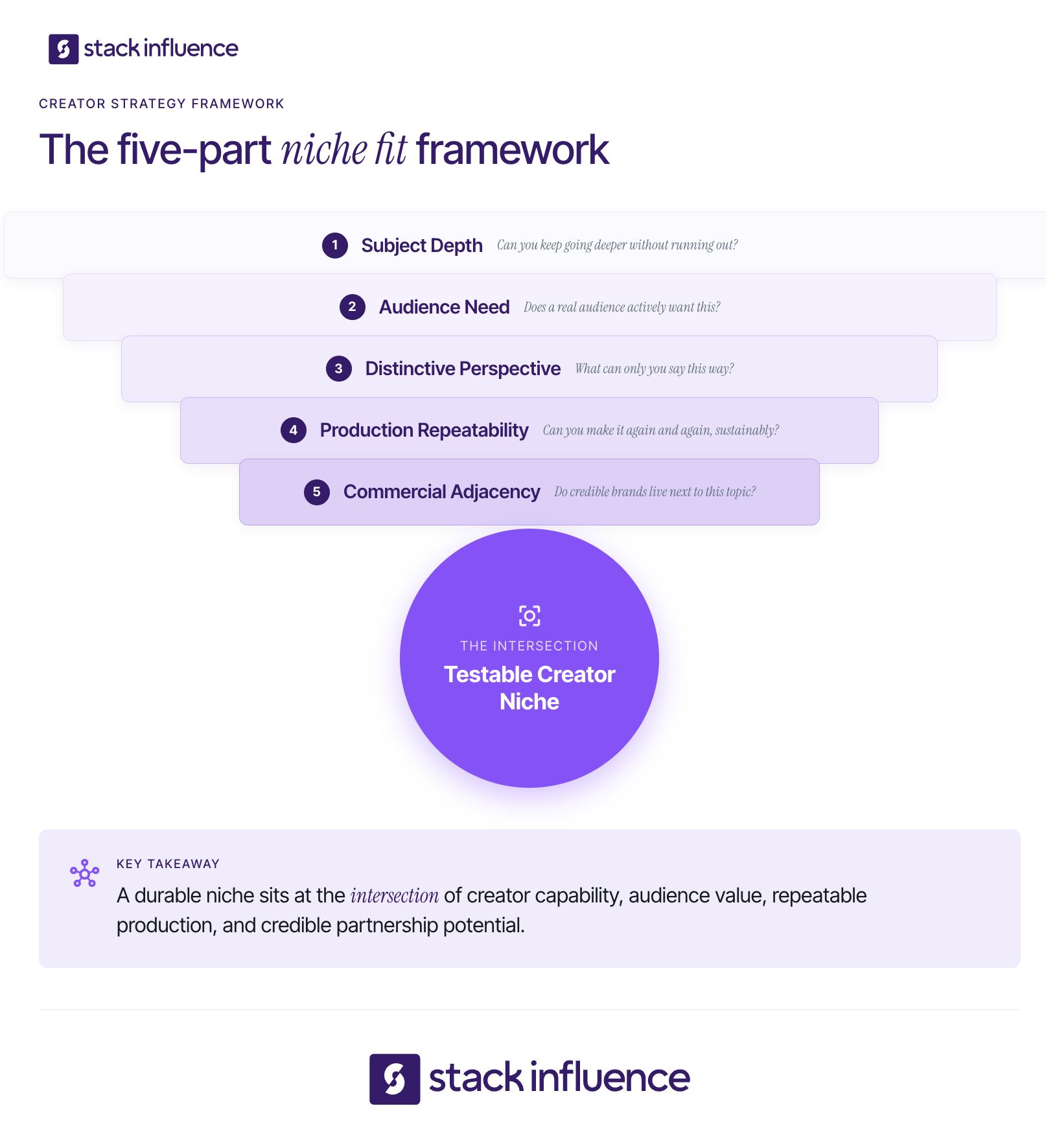
The Niche Fit Framework helps creators judge an idea before spending months building around it. A promising niche should pass five tests: subject depth, audience need, distinctive perspective, production repeatability, and commercial adjacency.
Choose a subject you can explore beyond surface-level trends. You do not need formal credentials, but you need enough experience, curiosity, access, or documented learning to support useful content.
Use the 50-Idea Test: list 50 posts without copying another feed. A topic with room for tutorials, comparisons, stories, mistakes, reviews, and experiments has more depth than one that produces only a few trend-led ideas.
A niche becomes valuable when it connects to a recurring audience question, aspiration, identity, or problem. “I like coffee” describes your interest. “I help beginners make better coffee in small kitchens” describes audience value.
Look for repeated language in comments, searches, reviews, and messages. Words such as “easy,” “budget,” “beginner,” “small-space,” or “time-saving” often reveal the constraint that turns a broad topic into a useful niche.
Your perspective shapes what you include, exclude, and emphasize. Two creators can cover the same topic while serving different audiences because their standards and storytelling differ.
A distinctive lens might be:
The lens only needs to be consistent enough that followers can describe your account to someone else.
A niche must fit your real time, budget, location, skills, and equipment. Build three content pillars, each with several recurring series. A mobile filmmaking creator might use equipment reviews, shooting tutorials, editing breakdowns, and creator challenges. Repeatable structures reduce creative fatigue without making every post identical.
Commercial adjacency means products, services, or partnerships can fit naturally without confusing your audience. It is a fit test, not a reason to choose a topic you do not care about.
List three groups of potential partners:
This map prepares you for brand deals, product seeding, affiliate work, ambassador relationships, and UGC projects. Stack Influence’s product seeding guide explains how relevant gifted collaborations can build portfolio proof and open longer-term relationships.
Your niche should be narrow enough that a new visitor understands the account within a few posts, but broad enough to support at least 50 strong content ideas and several recurring series. Start with one clear audience and outcome. Expand only when the new subject serves the same people or strengthens the same content promise.
Use this positioning sentence:
I create [content type] for [specific audience] so they can [recurring outcome], using [distinctive lens].
Examples include:
A useful niche usually contains three layers:
Do not narrow only by adding adjectives. “Minimalist, authentic, aesthetic lifestyle content” still does not identify an audience need. “Five-minute desk reset routines for remote workers in small apartments” is clearer because it creates a repeatable promise.
Test a creator niche by publishing a controlled set of posts across three content pillars, then comparing discovery, engagement depth, audience loyalty, and production effort. A 30-day sprint with 12 posts can expose early patterns. It is not enough to prove long-term success, but it is far more reliable than choosing from intuition alone.
Step 1: Choose three content pillars. Select three distinct but related angles inside the proposed niche. A skincare creator might test ingredient education, routine demonstrations, and product comparisons.
Step 2: Create four posts per pillar. Twelve posts provide multiple attempts without requiring months of commitment. Use at least two formats, but avoid changing every variable at once.
Step 3: Test one variable at a time. Compare hooks, lengths, or explanations while keeping the subject stable so results are easier to interpret.
Step 4: Collect qualitative evidence. Save recurring questions, direct messages, search phrases, and the words viewers use to describe the value. Audience language can improve your original niche statement.
Step 5: Keep the strongest two pillars. Continue the pillars that create both audience response and sustainable production. Rework or remove the weakest pillar, then run another cycle.
Platform tools make the sprint more rigorous. Instagram Trial Reels can show experimental Reels to non-followers first. TikTok’s Creator Search Insights surfaces searched topics and content gaps. YouTube’s content-planning guidance recommends grouping videos by topic, format, series, audience, or other attributes, then comparing performance over a shared period such as 90 days.
Creators building around social search can extend the exercise with Stack Influence’s guide to TikTok search strategy for creators. The central idea is to build a connected body of content around a topic rather than treating every post as an isolated attempt at virality.
Niche-market fit exists when the right people discover your content, consume it deeply, return, and recognize a consistent reason to follow. One viral post can create reach without proving niche strength, especially when those viewers ignore what you publish next.
Use the Niche Signal Stack to evaluate five areas:
Score each area from zero to five after the sprint. Treat 18 to 25 as a strong candidate, 13 to 17 as a signal to refine, and 0 to 12 as insufficient proof. This is a working decision rubric, not an industry benchmark.
YouTube’s audience guidance separates new, casual, and regular viewers and recommends consistent topics, familiar formats, community interaction, and branding to develop loyalty. It also says monthly audience is a better estimate of active audience size than subscriber count because subscribers do not necessarily return.
Document these signals in your influencer media kit. A niche statement is stronger when it sits beside evidence such as repeat-viewer growth, search discovery, saves, audience demographics, qualified comments, and examples of content that brands can evaluate quickly.

Brands care about niche fit because creator relevance affects whether a recommendation feels useful, credible, and appropriate to the audience. A creator with broad reach may create awareness, but a smaller creator with a concentrated audience can make the product feel like a natural part of an existing conversation.
A 2023 Journal of Retailing and Consumer Services study surveyed more than 7,500 people and found that stronger follower-influencer congruence increased the effects of experience and content usefulness on purchase behavior. CreatorIQ’s State of Safety research, based on more than 1,700 marketers across 17 industries, reports that suitability surpassed follower count as the top creator-selection criterion among its respondents.
Stack Influence sees the same issue from the campaign-execution side. The platform works with roughly 600,000 vetted creators, but brands do not need a generic list of people who post. They need creators whose category, audience, content style, and product use align with a specific campaign.
During a four-month Stack Influence campaign for Happy Viking, 222 creator promotions coincided with average monthly unit sales increasing from 180 to 440 and the product gaining 171 new ranking keywords. The example does not prove that niche fit alone produced the outcomes. Results vary by product, category, pricing, marketplace conditions, creative quality, creator participation, and execution. It does show why brands invest in category-relevant creators instead of treating every follower as interchangeable.
For micro influencers and nano influencers, this creates an important advantage. A smaller audience can still be commercially useful when the creator can demonstrate products credibly, produce authentic UGC, and communicate with a recognizable community. Stack Influence’s guide to brand deals for small creators explains how niche positioning, engagement quality, a professional media kit, and relevant outreach work together.
Your niche becomes brand-deal positioning when you translate it into a clear audience, content capability, and commercial use case. Brands should be able to understand whom you reach, what you create, why your content is credible, and how the partnership could fit their customer journey. A strong pitch sells relevance and execution, not just follower count.
Start with a creator positioning line:
I create [format] for [audience] about [topic], helping them [outcome] through [distinctive approach].
Then build a proof package:
Influencers and UGC creators can use the same niche differently. An influencer also offers audience distribution, while a UGC creator may be hired for the asset itself. A UGC niche can describe production expertise, such as “natural-light skincare demonstrations for sensitive-skin brands.” Stack Influence’s content creator guide to UGC marketing explains how creators can package those skills for paid, organic, and ecommerce uses.
Product seeding can also provide low-friction portfolio proof when the product genuinely matches your niche. Stack Influence is built around gifted-first product seeding, vetted micro-influencer activation, creator coordination, UGC generation, and completed-post accountability. Its creator community benefits include niche-matched product opportunities, portfolio building, and the possibility of developing one-off collaborations into ambassador or affiliate relationships.
Repeated alignment can turn a one-off sponsorship into a stronger relationship. The Stack Influence guide to long-term micro-influencer brand partnerships covers communication and ongoing collaboration.
A creator niche should guide experimentation, not prevent growth. The healthiest approach is to commit long enough to collect meaningful evidence, then adjust the audience, topic, promise, or format when repeated signals point in a better direction.
Consider refining or pivoting when:
Do not pivot because one post underperforms or rebuild your identity around one viral hit. Look for repeated patterns across comparable content. Instagram’s content-optimization guidance recommends experimenting with formats and styles, reviewing Insights, and asking the audience for feedback before shifting focus.
A gradual expansion is often safer than a complete reset. Keep the audience constant and add a related subject, or keep the topic constant and develop a new format. This preserves the account’s content promise while giving you room to evolve.
Most niche problems come from unclear positioning or weak testing, not a lack of possible topics. Avoid these common mistakes:
Learning how to find your niche as an influencer is a process of definition, publishing, measurement, and refinement. Start with one audience, one recurring outcome, and one distinctive lens. Turn that idea into three content pillars, publish 12 structured tests, and evaluate the full Niche Signal Stack rather than chasing views alone.
The result should be more than a label in your bio. It should be a repeatable content system that helps followers understand your value and helps brands recognize where you fit. Once the evidence is clear, use the niche statement to sharpen your portfolio, pitch relevant creator partnerships, and evaluate product-seeding opportunities through Stack Influence.
Shopify influencer marketing is easy to start and surprisingly hard to scale. An ecommerce seller can send products to a few content creators in a week, yet still end up with inconsistent posts, weak attribution, and UGC the brand cannot confidently reuse.
The goal is not to collect mentions. It is to build a repeatable system that converts inventory into credible content, qualified store traffic, sales, and long-term creator partnerships. This guide explains how to select creators, structure product seeding, route traffic into Shopify, measure contribution margin, and turn strong performers into affiliates or brand ambassadors.
Shopify influencer marketing is a commerce strategy in which a Shopify brand works with creators to generate product awareness, social content, store traffic, and sales. Campaigns may use gifted products, paid deliverables, affiliate commissions, or longer-term ambassador relationships. The defining feature is that the creator journey connects to a Shopify storefront and measurable customer action.
The channel includes more than brand sponsorship. A seller might seed a hero product to nano influencers, commission a UGC video from a specialist creator, pay a larger influencer for a launch, or offer commission to creators who can reliably convert shoppers.
Shopify’s native Shopify Collabs tools let merchants invite creators, accept affiliate applications, send gifts or discount codes, track affiliate sales, and manage creator payments. Collabs is useful as the store-level affiliate and relationship layer, while other influencer marketing platforms may support creator discovery, campaign execution, content approvals, or product-seeding logistics.
The strategic advantage of a Shopify store is control. DTC brands can change the landing page, bundle, discount, checkout experience, email capture, post-purchase flow, and retention offer without sending the shopper into a third-party marketplace.

Creator marketing has become a distinct budget category, but greater spending has also increased pressure to prove business outcomes. The IAB’s 2025 Creator Economy Ad Spend & Strategy Report projected U.S. creator ad spend at $37 billion in 2025 and $44 billion in 2026, up from $13.9 billion in 2021 and $29.5 billion in 2024. The report also identified creator selection and measurement as major challenges.
For Shopify sellers, the channel can create three assets at once:
Weak programs optimize only one asset, usually reach. Strong programs design creator selection, content, conversion, and measurement together.
The Seed-to-Sale System is a six-stage operating model for turning creator participation into measurable ecommerce value. Each stage solves a different failure point: poor unit economics, weak creator fit, unclear compensation, broken conversion paths, missing content rights, or no process for retaining winners.
Choose one hero product or a tightly related bundle before recruiting creators. The product should have enough gross margin to absorb landed product cost, fulfillment, discounts, commissions, returns, campaign software, and any cash creator fees.
The strongest seed product is also easy to understand and demonstrate. A visually obvious use case, clear customer problem, reliable inventory position, and strong product page give creators a better story and shoppers a better chance of converting.
Creator selection should begin with the customer problem, not a follower threshold. A small skincare creator who consistently explains sensitive-skin routines may be more useful for a targeted product than a larger lifestyle account with little category authority.
Use a creator scorecard that covers audience relevance, content quality, engagement authenticity, commercial fit, and reliability. A micro-influencer activation workflow can reduce the manual work involved in sourcing, vetting, briefing, tracking, and following up with many creators.
Match compensation to the work. Product seeding can support authentic product trials and broad creator activation. Paid brand deals are more appropriate when the brand needs guaranteed deliverables, precise production requirements, exclusivity, or access to a creator’s established reach. Affiliate commissions reward attributable sales, while hybrid offers combine product, cash, and performance incentives.
A practical product-seeding strategy should define eligibility, the product offer, expected timeline, content requirements, approval rules, and what happens if a creator does not complete the agreed deliverable. An automated product-seeding workflow can connect ordering, creator communication, post verification, reimbursement, and asset collection.
Gifted products still create a material connection. The FTC’s social media disclosure guidance says creators should disclose when they receive free or discounted products and place the disclosure where people can easily notice and understand it.
Every creator should send traffic into a deliberate storefront experience. Use a product-specific landing page or collection, a fast mobile layout, consistent message matching, and an offer that does not undermine margin.
Assign each creator a unique affiliate link, discount code, or UTM structure. Shopify Collabs affiliate links and codes can track referred purchases, while Shopify marketing reports and GA4 provide additional views of sessions, customer actions, and purchases. The tracking system must be tested before the post goes live, not after traffic starts arriving.
A social post and a reusable content asset are not automatically the same thing. The agreement should specify usage duration, channels, editing rights, paid-media rights, raw-file delivery, creator-handle advertising, and whether the brand can create cutdowns or derivative versions.
Organize approved ecommerce UGC assets by product, creator, hook, format, and performance. Strong assets can then move into a content-syndication workflow across product pages, email, organic social, and advertising.
Meta’s partnership ads documentation says advertisers can run ads with creators or other partners, while TikTok’s Spark Ads guidance says brands can use a creator’s organic post with authorization. Those formats make creator permissions and usage rights an operational requirement, not a paperwork detail.
Do not treat every creator relationship as a one-off campaign. Move creators who produce strong content, qualified traffic, or profitable sales into a structured retention path.
A simple progression is product seeding, repeat activation, affiliate tier, ambassador relationship, and paid amplification. An ambassador and affiliate program gives high-performing creators a reason to keep producing while allowing the brand to concentrate support on proven partnerships.
The right Shopify influencers resemble credible customers, communicate the product’s value clearly, and can complete the required workflow reliably. Follower count is a useful filter, but it is not a performance forecast. Ecommerce sellers should evaluate fit across audience, creative ability, engagement quality, buying context, and operational dependability.
Use this five-part scorecard:
Nano influencers and micro influencers can be especially practical when a seller needs many niche content perspectives rather than one expensive burst of reach. Stack Influence’s guide to micro-influencers and UGC in ecommerce explains how smaller creators can support both content production and store growth.
The right operating model depends on which work the ecommerce team wants to own. Creator databases support manual research and shortlist building. Shopify Collabs supports affiliate relationships inside the Shopify ecosystem. A managed influencer marketing platform or agency can coordinate creator activation, product seeding, follow-up, content completion, and reporting.
Stack Influence is a micro-influencer marketing platform built around gifted-first product seeding, vetted creator participation, campaign coordination, UGC generation, and completed-post accountability. Its Shopify influencer marketing workflow is designed for ecommerce sellers that want creator sourcing and campaign execution connected to storefront traffic and content production.
The platform works with roughly 600,000 vetted creators, and approximately 78% of the network is female. Its completions-only model, sometimes described as “influencer insurance,” means brands pay for completed creator posts rather than losing platform budget to creator drop-off. A managed creator campaign is particularly practical when the goal is to activate many creators without manually coordinating each shipment, reminder, approval, and post.
A verified Stack Influence case study illustrates campaign scale: during a three-month Blueland campaign, 211 creator promotions generated 247,000 social impressions and 11,000 engagements. Average monthly unit sales increased from 542 to 2,562 during the measured period, while Amazon Best Seller Rank improved from #36,544 to #5,808. The campaign was measured on Amazon rather than Shopify, so it should not be treated as a Shopify benchmark or proof of causation. Results vary by product, category, pricing, marketplace conditions, creative quality, and execution.
Shopify influencer marketing should be measured as a chain from creator delivery to contribution profit, not as a single engagement rate. Sellers need leading indicators for execution, conversion metrics for short-term performance, and compounding metrics for content reuse and customer value. No single attribution model captures every creator-influenced purchase.
Use the Creator Commerce Metric Stack:
Shopify’s marketing reports and attribution models can compare first-click, last-click, and last non-direct views, depending on the report. Shopify also documents how to set up GA4 for a Shopify store, including ecommerce events such as product views, add-to-cart actions, and purchases. Google’s recommended ecommerce events provide a consistent event vocabulary for online sales analysis.
Use three review windows:
Attribution will still miss some influence. Shoppers may watch a creator, return directly, search the brand later, switch devices, share a code, or buy after the reporting window. Treat attribution as decision support, not perfect truth.
Calculate creator CAC using total campaign cash costs divided by attributed new customers. Calculate contribution profit after subtracting product cost, fulfillment, discounts, creator commissions, creator fees, platform costs, and refunds. Do not call a campaign profitable because gross revenue exceeded creator fees.

The retail value of a gifted product is not the brand’s economic cost. Use landed cost of goods, pick-and-pack expense, shipping, taxes, and expected returns when modeling a product-seeding campaign.
Four other costs are easy to overlook:
The corrective insight is simple: influencer marketing efficiency comes from the entire system. A cheap post can be expensive when it creates no usable content, no trackable traffic, and hours of follow-up. A higher-cost activation can be efficient when it creates sales, reusable creative, and a creator relationship that keeps producing.
A 90-day rollout gives a Shopify seller enough time to test operations, creative, conversion, and creator retention without committing to a large unproven program.
Choose the hero SKU, calculate contribution margin, define the customer problem, finalize the landing page, install tracking, establish disclosure rules, and document usage rights. Create the creator scorecard and campaign brief before outreach.
Activate a few dozen creators when product economics allow. Test at least two creator segments, several content hooks, and more than one offer structure. Keep the product and landing-page experience stable enough to compare results.
Separate operational failures from creative and conversion failures. A creator who never posts is an execution issue. A post with engagement but no clicks may have a weak call to action. Clicks without add-to-cart activity usually point toward message mismatch, offer weakness, or the product page.
Increase volume around creator profiles, hooks, offers, and content formats that generated qualified traffic or profitable customers. Move reliable creators into affiliate or ambassador tiers, and reuse authorized content across the storefront and paid channels.
Shopify influencer marketing becomes durable when creator selection, product economics, content rights, conversion paths, and measurement operate as one system. Ecommerce sellers should start with a focused product, run a controlled creator pilot, learn from the full metric stack, and expand only the parts that produce useful content and profitable customer behavior.
The next step is to map one hero SKU through the Seed-to-Sale System. For teams that want creator sourcing, product seeding, campaign coordination, and completed content managed together, evaluating a structured micro-influencer workflow can reduce operational drag and make the channel easier to scale.
TikTok can put a video in front of a million people, but a million views do not automatically produce a million monetized views. For content creators, the real question behind TikTok pay per view is not simply how many people watched. It is how many views qualified, what RPM TikTok assigned, and whether the video was eligible for the Creator Rewards Program at all.
This guide explains the current payout model, realistic reported benchmarks, qualification rules, and a practical way to combine platform rewards with UGC, affiliate income, product seeding, and brand partnerships.
TikTok does not pay a fixed amount for every visible view. Eligible creators earn through the Creator Rewards Program using revenue per 1,000 qualified views, or RPM. Independent creator disclosures suggest that 1 million qualified views may produce several hundred to roughly one thousand dollars, but TikTok does not guarantee a public rate.
TikTok’s official rewards documentation explains the calculation method but does not publish a standard RPM. A June 2026 analysis by Uppbeat compared disclosed creator results and found earnings ranging from $362 to $1,035 per 1 million qualified views. The sample average was about $807, equivalent to an RPM near $0.80.
Using that observed range only as a rough planning reference:
Those figures are not a rate card. They reflect a limited set of creator disclosures, and your actual RPM can fall outside the range.
The simplest planning formula is:
Estimated standard reward = qualified views ÷ 1,000 × displayed RPM
For example, 100,000 total views do not produce $80 at a $0.80 RPM unless all 100,000 views qualify. If 60,000 qualify, the same RPM produces an estimated standard reward of $48. TikTok may also apply an additional reward based on content quality, so the creator dashboard remains the source of truth.
Creators comparing revenue channels can use Stack Influence’s guide to five TikTok monetization paths to see why view-based rewards should be evaluated alongside other income sources.
TikTok pays eligible creators through the Creator Rewards Program, not through a universal per-view fee. The program combines a Standard Reward based on qualified views and RPM with an Additional Reward tied to well-crafted, engaging, specialized content. Videos must meet both account-level and video-level requirements before they can collect rewards.
According to TikTok’s current Creator Rewards Program rules, a creator generally must meet the following requirements.
An eligible video begins collecting rewards after it reaches 1,000 qualified For You feed views. Older videos posted before approval do not become retroactively eligible simply because they later go viral.
This is why old articles about the former Creator Fund can create confusion. The current system rewards longer, original videos through Creator Rewards and evaluates more than raw view count.
A qualified TikTok view is a unique, authentic view on an eligible video that comes through the For You feed and meets TikTok’s watch-duration rules. TikTok excludes fraudulent, paid, promoted, and very short views. As a result, the public number beneath a video can be much larger than the view count used for rewards.
TikTok’s How Rewards Work documentation identifies several practical filters.
Think of monetization as a funnel. Total views sit at the top. TikTok then filters for eligible video status, For You distribution, unique real viewers, and sufficient watch duration. Only the remaining qualified views enter the RPM calculation.
Track both total views and qualified views. The ratio between them reveals whether your apparent reach is turning into monetizable reach.
Qualified-view rate = qualified views ÷ total views × 100
A video with 500,000 total views and 250,000 qualified views has a 50% qualified-view rate. Improving that rate can matter as much as adding more top-line views.

Two creators can receive different rewards from the same number of qualified views because TikTok’s RPM is variable. TikTok’s optimized rewards formula considers originality, play duration, search value, audience engagement, and advertising value. The result is a payout model that rewards the quality and commercial context of attention, not only its volume.
Originality means more than avoiding a direct repost. TikTok looks for content created, filmed, and produced by the creator. Duets, Stitches, copied clips, lightly modified compilations, and other reused formats may be ineligible or less valuable within the rewards system.
Play duration includes average watch time and finish rate. A 75-second tutorial that holds viewers for most of its runtime can create more valuable attention than a one-minute video that loses most viewers immediately.
The first five seconds determine whether a view can qualify, but the rest of the video still matters. Build a clear promise at the start, deliver useful information without filler, and give viewers a reason to stay through the payoff.
TikTok assigns value to content that answers topics people actively search for. TikTok’s Creator Search Insights tool surfaces popular queries and content gaps, while search value is also part of the Creator Rewards formula.
A creator should not force every post into an SEO format. Instead, identify repeatable questions in your niche and produce original one-minute answers. Stack Influence’s guide to why TikTok search changes everything for creators explains how search visibility can also strengthen a creator’s commercial portfolio.
Likes, comments, and shares contribute to audience engagement, but TikTok does not pay a fixed amount for each interaction. Engagement matters because it signals that the content created value and may influence the rewards formula.
TikTok also considers an account’s advertising value, which the platform says is determined by the community’s ad watch time. TikTok does not publish a simple country-by-country or niche-by-niche rate card, so creators should rely on their own dashboard instead of assuming that a supposedly “high RPM niche” guarantees better pay.
One of the most important Creator Rewards rules is easy to overlook: advertisements, paid promotions, and sponsored content are not eligible for rewards. A brand deal can still be financially valuable, but creators should not forecast Creator Rewards income from the same sponsored video.
This creates a practical content-planning decision. Organic educational or entertainment videos can pursue qualified-view revenue. Sponsored posts should be priced around the deliverable, audience access, production work, usage rights, exclusivity, and campaign value.
TikTok’s content disclosure guidance requires creators promoting a brand, product, or service to turn on the disclosure setting. In the United States, FTC disclosure guidance says a material connection must be made obvious when a creator receives money, free products, discounts, or another incentive.
The rule applies to gifted product seeding as well as cash sponsorships. (Federal Trade Commission) A creator can learn the mechanics of professional outreach in Stack Influence’s guide to getting brand deals on TikTok and Instagram, but every agreement should still be disclosed accurately.
A durable TikTok creator business uses three separate income lanes: platform pay, performance pay, and partnership pay. The lanes reward different outcomes and follow different eligibility rules. Separating them prevents creators from treating every video as if it should earn through every monetization method at once.
Platform pay is money earned directly through Creator Rewards. It depends on platform rules, regional availability, account status, qualified views, and TikTok’s assigned RPM.
Creator Rewards suits original videos that are at least one minute long and can generate qualified For You feed views. Use platform pay as a measurable baseline, not the entire business model. TikTok can change eligibility, formulas, or feature availability, while a creator has limited control over the assigned RPM.
Performance pay connects content to an action such as an affiliate sale, TikTok Shop order, lead, booking, or referral. A smaller creator can sometimes earn meaningful performance income without reaching Creator Rewards eligibility because the commercial result matters more than raw reach.
Track product clicks, conversion rate, commission per sale, refunds, and revenue per 1,000 views. A video with 20,000 targeted views and ten sales can be more valuable than a broad viral post that produces no action.
Performance content should still protect audience trust. Recommend products you can discuss honestly, disclose incentives, and avoid letting every post become a sales pitch.
Partnership pay includes brand deals, UGC production, product seeding, brand ambassador work, licensing, and longer creator partnerships. TikTok One connects creators, advertisers, and brands, while influencer marketing platforms and agencies support additional campaign workflows.
UGC creators are often paid for the content asset rather than the size of their audience. A brand may value a clear product demonstration, strong hook, raw footage, alternate edits, or permission to use a UGC video in advertising. Stack Influence’s content creator guide to UGC marketing explains how to package that production value separately from reach.
Product seeding can also help nano influencers and micro influencers build proof. Stack Influence connects ecommerce brands with roughly 600,000 vetted creators through a gifted-first model designed around creator activation, campaign coordination, UGC generation, and completed-post accountability. Creators can review the Stack Influence creator community and its campaign process to understand how structured product collaborations work.
A verified Stack Influence case study for Magic Spoon recorded 3,448 creator promotions, 5.82 million social impressions, and 211,000 engagements over a 12-month campaign. The example shows why brands may evaluate an influencer campaign through content volume, engagement, and ecommerce support rather than a single platform RPM. Results vary by product, category, creative quality, audience fit, and campaign execution.
Brand demand is substantial. The Interactive Advertising Bureau’s 2025 report says U.S. creator advertising spend rose from $29.5 billion in 2024 to a projected $37 billion in 2025 and was expected to reach $44 billion in 2026. That market does not guarantee an individual deal, but it explains why professional positioning can matter more than waiting for TikTok’s per-view payout to become large.

Creators increase sustainable TikTok income by improving qualified-view efficiency, building commercially useful skills, and matching each video to the right revenue lane. The goal is not to maximize views at any cost. It is to create attention that can become rewards, audience trust, attributable action, reusable content, or a stronger case for future partnerships.
Use this five-step qualified-view workflow:
Do not turn every one-minute video into padded content. Longer eligibility does not excuse weak pacing. One useful method is to script three parts: promise, proof, and payoff.
Creators with small audiences should also package evidence early. Stack Influence’s nano influencer marketing guide shows how niche trust and UGC proof can support brand conversations before a creator becomes large. A current influencer media kit should include recent views, average watch time, engagement, audience information, search-performing posts, prior UGC examples, and campaign outcomes you can verify.
Creators should measure TikTok income with a revenue stack that separates attention, monetization efficiency, and business outcomes. Track qualified-view rate and RPM for Creator Rewards, conversion metrics for affiliate content, and deliverable economics for partnerships. A single public view count cannot explain whether a video was profitable, repeatable, or commercially useful.
Use the Creator Revenue Scorecard:
Use consistent seven-day and 30-day reporting windows, then reconcile against TikTok’s monthly payout records. TikTok says Creator Rewards payments are processed on the 15th of the month, subject to its payout rules and account setup.
Attribution is weakest when you mix revenue types. An organic tutorial may generate Creator Rewards, introduce a viewer to your profile, and influence a later purchase that is not credited to the original post. A sponsored UGC video may create no Creator Rewards but still produce a fee, licensing value, and repeat work.
Measure each lane by its intended job. Do not call a post unsuccessful merely because its direct per-view payout was low if it created qualified leads, a reusable asset, or a repeat partnership. Likewise, do not call a viral post profitable until you compare revenue with production time and downstream results.
Keep complete records. IRS gig economy guidance states that gig income is taxable in the United States even when it is part-time or not reported on an information return, and non-cash compensation can also create tax obligations. Creators should record cash payments, commissions, and gifted compensation, then seek qualified tax guidance for their situation.
TikTok pay per view is best understood as variable compensation for qualified attention, not a fixed price attached to every play. The Creator Rewards dashboard tells you what TikTok paid. Your broader creator business depends on what the same skills can earn through performance, UGC, product seeding, brand sponsorships, and repeat creator partnerships.
Start by calculating your qualified-view rate and effective RPM across your last ten eligible videos. Then choose one additional revenue lane that matches your strengths. Creators who combine reliable content with clear measurement give themselves more ways to turn attention into durable income.