
The latest info on influencer marketing trends, micro influencer news, and the world of social media

Opening a Temu store is relatively simple. Operating that store without creating margin problems, inventory conflicts, shipping failures, or compliance risks takes considerably more planning.
The Temu Seller Center is the starting point for ecommerce sellers that want to register, publish products, process orders, manage fulfillment, and use marketplace promotions. This guide explains how the portal works, what U.S. sellers need to prepare, which costs deserve attention, and how to turn a new Temu account into a controlled marketplace expansion rather than an uncontrolled catalog upload.
The Temu Seller Center is the web dashboard local and cross-border merchants use to apply, create a shop, list products, manage orders, configure fulfillment and returns, access promotions, and monitor operations. For U.S. ecommerce sellers, it functions as the control layer connecting catalog data, inventory, logistics, customer orders, and Temu’s marketplace requirements.
The official Temu Seller Center publicly identifies several core functions:
Temu’s public U.S. page estimates that account creation takes about one minute, the seller application takes about 10 minutes, and application results are normally available within one business day. Those are platform estimates, not guaranteed approval times. Incomplete documentation, inconsistent business information, or category-specific reviews can extend the process.
The Seller Center also supports Temu’s Local Seller Program. According to a July 2026 ShipStation guide to the Local Seller Program, the program is active in 37 markets, although seller eligibility, available categories, logistics options, and regional selling privileges vary by country.
Businesses and qualifying individual sellers can apply through the registration flow available for their country. U.S. applicants should expect to verify the legal seller, business representative, address, bank information, tax details, and contact information. The exact documents requested depend on the seller type, location, ownership structure, and product category.
A seller should prepare the following before beginning:
Every name, address, and identification number should match the supporting document character for character. Small differences in legal suffixes, punctuation, old addresses, or bank account names can trigger additional verification.
U.S. sellers should also understand the INFORM Consumers Act. The Federal Trade Commission’s seller guidance defines a high-volume third-party seller as one that reaches at least 200 transactions and $5,000 in gross revenue from new or unused consumer products during a continuous 12-month period within the previous 24 months. Covered marketplaces must collect and verify information from qualifying sellers, and certain sellers must keep that information current.
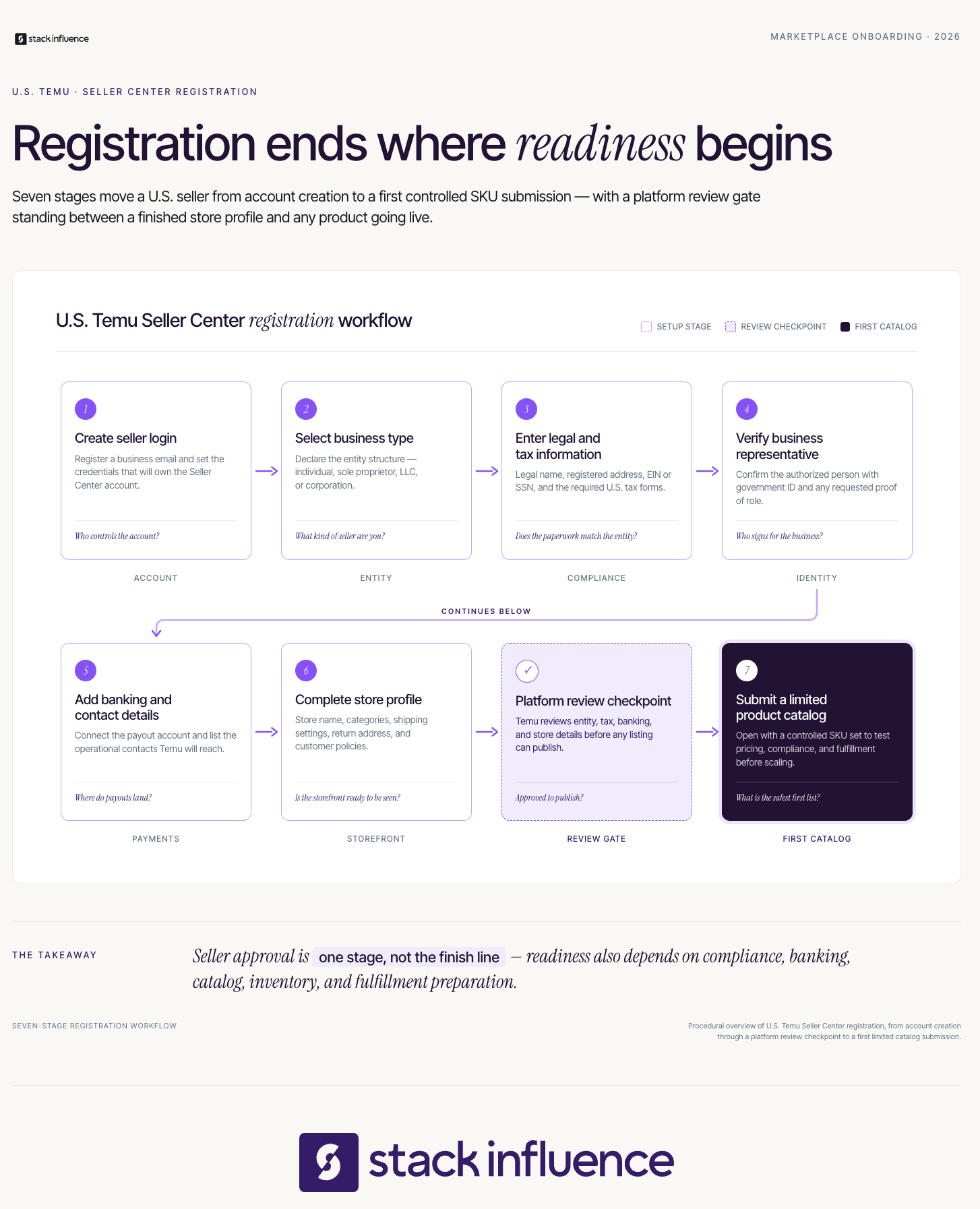
Registering involves creating login credentials, identifying the seller entity, verifying the business representative, supplying payout information, and completing the store profile. Temu reviews the application before the seller can begin normal operations. Sellers should finish their compliance and fulfillment planning before submitting products, rather than treating approval as permission to list every available SKU.
A practical registration sequence is:
Shopify’s current U.S. Temu seller walkthrough describes a similar sequence: create the account, submit verification documents, build the seller profile, add listings, and configure fulfillment. It also notes that U.S. merchants can use domestic fulfillment rather than relying on the marketplace’s original cross-border model.
The Five-Gate Temu Launch Framework helps sellers determine whether a product should go live. A SKU should pass all five gates before inventory is exposed to marketplace demand: verification, catalog readiness, unit economics, fulfillment reliability, and demand readiness.
This sequence prevents a common mistake: treating account approval as proof that every product is operationally ready.
Compliance must be confirmed at the product level, not merely at the business-account level. A verified seller can still experience rejected listings, removals, recalls, or account problems if an individual product lacks the correct safety, labeling, authorization, or intellectual property records.
Build a compliance folder for each SKU containing:
The CPSC Online Sellers’ Safety Guide explains that businesses manufacturing, importing, or selling consumer products online remain responsible for applicable product safety requirements. Marketplace approval does not replace federal safety obligations.
Sellers should also confirm that every photograph, logo, description, character, design, and branded term is authorized. Temu’s Intellectual Property Policy describes its reporting portal, listing-removal process, counter-notice procedure, and policy for repeat infringers.
A Temu launch should begin with approximately 10 to 25 carefully selected SKUs. This is large enough to test demand across several product types, but small enough to identify listing, price, fulfillment, and return problems before they spread across the full catalog.
Choose products with:
Use an inventory demand forecasting process to separate normal channel demand from launch promotions. Sellers should reserve inventory by channel or maintain a dependable real-time synchronization system so a Temu order does not consume stock already promised to Amazon, Shopify, wholesale, or retail customers.
Every listing should also contain accurate dimensions, scale references, variant information, materials, instructions, and real-life product context. A complete ecommerce product photography system should combine a clean main image, several viewing angles, a size or scale image, detail shots, and realistic lifestyle content.
The price displayed to a customer is not the same as the seller’s profit. Before approving a SKU, calculate contribution margin at the order level.
Use this formula:
Contribution margin per order = net seller proceeds minus product cost, pick-and-pack expense, shipping, return reserve, advertising, promotional cost, and variable labor
The model should include:
Do not copy an Amazon or Shopify price into Temu and assume the economics remain unchanged. Each channel has different shipping, fulfillment, customer acquisition, return, and promotional costs.
Fulfillment readiness means every order can be shipped, tracked, delivered, returned, and reconciled within the requirements shown in the seller’s account. Temu’s U.S. landing page states that the company does not directly provide logistics services, but offers integrated logistics solutions and seller protection tools.
A scalable ecommerce order fulfillment workflow should define:
Shopify merchants can use the official Temu sales channel to configure product details, synchronize inventory, import orders, update tracking, create labels, manage returns, and process refunds through Shopify. Review the current Shopify Temu channel documentation before connecting a production catalog.
Sellers using ShipStation can connect a Temu store with the access token generated for that integration. The current ShipStation Temu integration instructions explain the connection sequence.
Returns should be treated as a product-data problem as well as a logistics problem. An ecommerce returns management system should identify which SKUs, variants, claims, photographs, and customer expectations are producing preventable returns.
A technically complete listing still needs a reason for shoppers to choose it. Before launch, confirm that the product has competitive imagery, a clear title, understandable benefits, accurate specifications, realistic use cases, and enough margin to support testing.
Start with a controlled plan:
The objective is not immediate scale. The objective is learning whether the product can survive the channel’s economics and operational requirements.
Creating listings may carry little or no upfront platform cost, but selling on Temu is not cost-free. Sellers must account for shipping, fulfillment, returns, discounts, advertising, storage, customer service, software, and inventory financing. Exact charges can vary by country, category, seller model, promotion, and account agreement.
Shopify’s June 2026 seller guide states that Temu does not currently charge listing fees, while sellers remain responsible for shipping costs and may incur storage or handling fees when using partner fulfillment. Temu’s public U.S. landing page does not provide one universal, detailed seller fee table. Sellers should therefore treat the agreement and rate information displayed inside their own Seller Center as the source of truth.
Before launching, document these cost categories:
Avoid relying on a universal fee percentage quoted by an unaffiliated blog. Confirm the current terms for each category and recalculate margin whenever the platform, carrier, or promotion changes.
Temu sellers should measure the complete path from listing approval to contribution margin. Revenue and order count alone cannot reveal whether a product is creating profitable demand or merely moving inventory at an unsustainable cost. Leading indicators should identify operational problems before they appear in refunds, poor customer experiences, or account-level performance.
Use the Seller Center Scorecard:
Review the scorecard at three cadences:
Attribution becomes less reliable when shoppers encounter the product through several channels. A customer may see creator content, compare the product on Amazon, visit a Shopify store, and eventually buy on Temu. Treat platform-attributed sales as one decision signal, not perfect proof that a single impression or advertisement caused the order.
The greatest Temu risk for many established ecommerce brands is not account setup. It is allowing the new marketplace to interfere with pricing, inventory, positioning, or retailer relationships elsewhere.
Channel conflict can appear when:
DTC brands should create a Temu-specific assortment and profit-and-loss view. A controlled assortment might use different bundles, pack sizes, colors, accessories, or entry products while protecting the core product architecture used on Shopify, Amazon, and wholesale channels.
Amazon sellers should also avoid assuming that Amazon FBA inventory will automatically fulfill Temu orders. Amazon and Temu are separate marketplaces. Any multichannel fulfillment arrangement must be deliberately connected, tested, costed, and checked against the tracking, packaging, delivery, and returns requirements displayed in the seller’s account.
Seller Center can publish products and process orders, but it cannot create every reason a shopper should care about an unfamiliar brand. Strong marketplace growth usually combines reliable operations with product education, customer proof, useful creative, and external discovery.
A Shopify influencer marketing system can help a DTC brand generate demand before the shopper enters a marketplace. The same brand may also use micro-influencers and UGC in ecommerce to create demonstrations, unboxings, tutorials, comparison content, and realistic product photography.
Stack Influence is a micro-influencer marketing platform built around gifted-first product seeding, vetted creator participation, campaign coordination, UGC generation, and completed-post accountability. The workflow is designed for ecommerce brands that want to turn product inventory into authentic creator content without manually coordinating every creator relationship.
An ecommerce UGC workflow can give a Temu seller more visual material for social media, advertising, email, product education, and other approved uses. Sellers should document content rights before reusing any creator asset.
A verified Stack Influence example shows how external creator activation can support marketplace demand. During a three-month new-product campaign for Targus, 120 creator promotions coincided with average monthly Amazon unit sales increasing from 56 to 221. The example was measured on Amazon, not Temu, and should not be treated as a Temu performance forecast or proof of single-channel causation. Results vary by product, price, category, creative quality, marketplace conditions, and execution.
For brands evaluating this workflow, these influencer product seeding strategies explain how creator selection, product experience, follow-up, content expectations, and campaign scale affect the quality of the resulting demand.

Temu Seller Center, Amazon Seller Central, and Shopify can all manage ecommerce activity, but they serve different channel roles. Temu and Amazon are marketplaces with their own customer environments and operating rules. Shopify is an owned storefront platform that can also function as a central system for connecting products, inventory, orders, and external sales channels.
These systems do not have to compete for ownership of the entire business. A seller can use Shopify as an operational hub, Amazon for high-intent marketplace demand, and Temu as a controlled additional channel. The important requirement is one reliable source of truth for inventory, SKU mapping, costs, and performance.
The Temu Seller Center gives ecommerce sellers a practical way to register, publish products, manage orders, configure fulfillment, and test another marketplace. The portal itself is only the operating interface. Profitable expansion depends on what the seller builds around it.
Start with a limited assortment, verify every product, model contribution margin, synchronize inventory, test fulfillment, and review results at the SKU level. Once those fundamentals remain stable, expand the catalog and demand strategy deliberately.
For ecommerce brands that also need authentic product demonstrations and reusable creator content, the next logical step is evaluating a structured product-seeding campaign that supports marketplace discovery without weakening operational control.
If you have watched a TikTok LIVE, you may have seen a space-themed animation sweep across the screen after a viewer sends a Galaxy. For content creators, the important question is not only how much is a Galaxy on TikTok and what is it, but also how much of the viewer’s spending can eventually reach the creator.
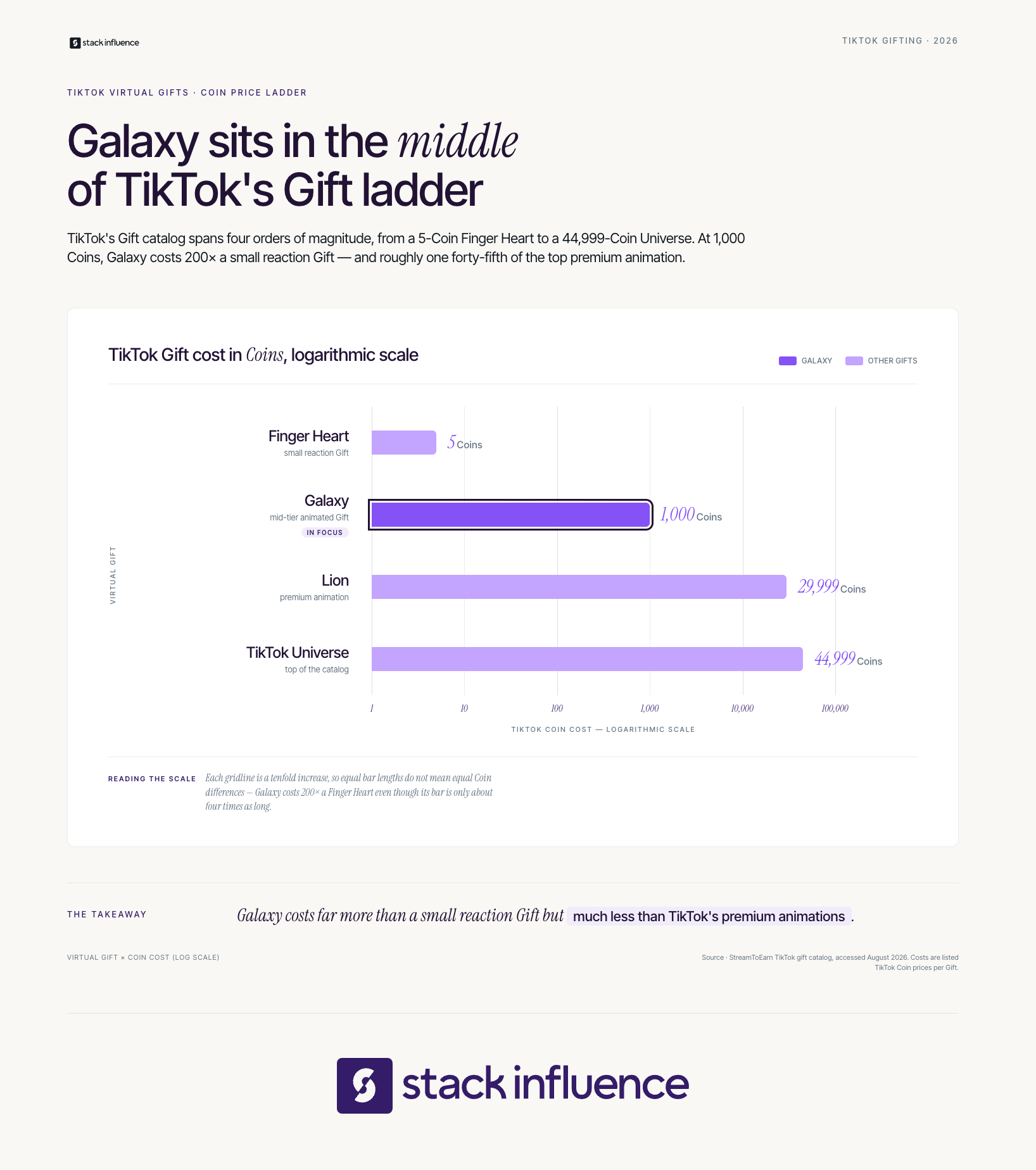
A Galaxy is a virtual TikTok Gift purchased with Coins. It is currently listed at 1,000 Coins, while its cash cost and creator payout vary. This guide explains the full money flow, eligibility rules, realistic earnings, and the metrics creators should track instead of relying on viral payout estimates.
A Galaxy on TikTok is an animated virtual Gift that an eligible viewer can send to a creator, usually during a LIVE. The viewer pays with TikTok Coins, the effect appears publicly in the stream, and TikTok may award the creator Diamonds that can later qualify for withdrawal under the platform’s rules.
As of August 2026, a current TikTok gift catalog lists the Galaxy at 1,000 Coins. The same catalog lists the Finger Heart at 5 Coins, the Lion at 29,999 Coins, and the TikTok Universe at 44,999 Coins, which places the Galaxy well above casual reaction gifts but far below TikTok’s highest-priced animations. Gift catalogs can differ by market and can change, so the creator’s or viewer’s in-app gift tray is the final check.
The Galaxy serves three purposes at once:
Creators who need a broader foundation can review this guide to TikTok LIVE Gifts. The key distinction is that the Galaxy is the Gift animation, Coins are what viewers spend, and Diamonds are the separate reward unit associated with creators.
A Galaxy currently costs 1,000 TikTok Coins. In U.S. dollar terms, current 2026 estimates generally place 1,000 Coins at about $10 to $15, but there is no universal cash price. TikTok shows the controlling price at checkout, and the total can vary by bundle, region, currency, taxes, and purchase channel.
Current third-party estimates illustrate the spread. Socialtradia places 1,000 Coins at roughly $10 to $11 through TikTok’s website, while Otto estimates a Galaxy at about $15. These figures should be treated as a range, not a fixed price, because neither estimate overrides the amount shown on the official TikTok Coins purchase page.
TikTok’s Virtual Items Policy states that the Coin price is displayed at the point of purchase and that the exchange rate between Coins and Gifts is displayed when the Gift is selected. The policy also gives TikTok the ability to modify Coins, Gifts, exchange rates, and Diamond conversion terms.
For creators, the practical answer is:
This distinction matters because many articles incorrectly turn the viewer’s estimated purchase cost into the creator’s estimated income.
The Five-Layer Galaxy Value Check separates every stage between a viewer’s wallet and a creator’s bank account. Creators should use all five layers because no single layer represents the complete value of a Galaxy.
The Galaxy’s catalog cost is currently 1,000 Coins. This is the most stable number in the calculation, but TikTok can still change Gift availability or Coin requirements by region or over time.
Checkout cost is the amount the viewer actually paid to obtain the Coins used for the Galaxy. A viewer may have purchased a larger bundle at a different per-Coin rate, paid local taxes, or used a different currency.
That means two viewers can send the same 1,000-Coin Galaxy after paying different effective cash amounts.
The Gift event is the public animation and interaction inside the LIVE. TikTok’s policy explains that gifting is public, so the recipient and other users can see the sender’s identity and Gift details. The event may create a memorable community moment, but the animation itself is not cash.
TikTok uses Diamonds to recognize creator popularity and contributions. The platform’s policy says Diamonds are based on Gifts at a conversion rate determined by TikTok, and TikTok’s Diamond guidance does not promise one permanent conversion formula.
This is why creators should not rely on the common claim that TikTok always sends exactly half of a Gift’s purchase value to the creator. TikTok’s own documentation does not guarantee a universal 50 percent payout.
Net deposit is the money that reaches the creator after TikTok applies the withdrawal rate shown in the account, plus any applicable payment-provider charges, currency conversion, withholding, or taxes. TikTok’s policy says the withdrawal rate is displayed at withdrawal and that compensation can depend on multiple factors, including the number of Diamonds accrued.
The Five-Layer Galaxy Value Check leads to one corrective conclusion: a Galaxy is a 1,000-Coin Gift, not a guaranteed $15 tip and not a guaranteed creator payout. For a broader view of how Gifts compare with other income sources, see these TikTok monetization paths.
Creators can receive Galaxy Gifts only when TikTok Gifts are available in their location and their account meets the relevant eligibility rules. TikTok currently requires creators to be at least 18 years old, or 19 in South Korea, to access Gifts or collect Diamonds during a LIVE, plus LIVE eligibility and an account in good standing.
TikTok’s LIVE Gifts eligibility requirements include age, regional availability, LIVE access, and compliance with the Community Guidelines and Terms of Service. TikTok also says certain government, political, and public-interest accounts cannot collect Diamonds through LIVE Gifts.
The platform’s current TikTok LIVE requirements say creators must be at least 18 to go LIVE and must meet a local minimum-follower threshold. TikTok does not present one universal follower number on that page, so creators should check the LIVE option inside their own account rather than assuming every market uses the same threshold.
Video Gifts have a separate rule set. TikTok’s Video Gifts eligibility rules require an eligible location, age 18 or older, at least 10,000 followers, an account at least 30 days old, a recent public video, a Personal Account, and good standing. Availability of the Galaxy itself can still differ between LIVE and Video Gift trays.
Creators who are below TikTok’s minimum age cannot collect Gifts or Diamonds and should not try to bypass the restriction.
An eligible viewer sends a Galaxy by opening a creator’s LIVE, tapping the Gift icon, selecting Galaxy from the available tray, and confirming the 1,000-Coin send. If the viewer lacks enough Coins, TikTok may offer an official recharge flow. The Gift then appears publicly in the LIVE and the viewer’s Coin balance decreases.
The basic flow is:
TikTok’s policy limits Coin and Gift purchases to users who are at least 18 years old, or the age of majority in their jurisdiction. Viewers should use TikTok’s official purchase flow and should not attempt to bypass age or regional restrictions.
TikTok Gifts are for viewer appreciation, not a purchase of influence, friendship, or guaranteed attention. Creators can thank gifters and build community while keeping the experience welcoming for viewers who never spend money.
The best LIVE hosts make gifting optional. They use clear stream topics, recurring segments, audience questions, demonstrations, and genuine conversation rather than repeatedly pressuring viewers to spend.
A Galaxy is economically meaningful, but its biggest strategic value may be what it reveals about audience commitment. A viewer willing to spend 1,000 Coins is signaling stronger intent than someone who taps Like, yet one large Gift still does not prove that the creator has a repeatable business.
Three risks can distort Galaxy income:
TikTok’s public documentation explains Gifts, Coins, and Diamonds, but it does not promise that receiving a Galaxy will increase distribution in the For You feed. Treat any reach increase around a Gift as an observation to test, not proof that the Galaxy triggered an algorithmic boost.
This is also why creators should not compare their income using screenshots from other accounts. Different regions, Coin purchase prices, withdrawal terms, audience behavior, and tax situations can produce different results.
A stronger creator business combines fan support with other paths. Stack Influence’s overview of ways TikTok creators make money covers alternatives such as brand partnerships, affiliate income, and memberships, which can reduce dependence on unpredictable LIVE Gifts.
The LIVE Gift Revenue Scorecard measures whether gifting is becoming a repeatable creator-income stream. Track each LIVE individually, then review seven-day and 28-day trends so one Galaxy does not distort the full picture.
Track unique viewers, average concurrent viewers, peak concurrent viewers, LIVE duration, average watch time, and new followers. These are leading indicators because Gifts usually require attention and trust before they occur.
Track comments per minute, shares, questions answered, repeat commenters, and the percentage of the stream spent on planned segments. Strong engagement without Gifts can still indicate a format worth improving.
Track total Gift events, unique gifters, Galaxy count, estimated Coins represented, Diamonds credited, and Gifts per 100 unique viewers. Record the actual Diamond balance shown by TikTok rather than converting Coins with a third-party formula.
Add one concentration metric:
Top Gifter Share = Coins represented by the largest gifter ÷ total Coins represented by all Gifts
A lower Top Gifter Share generally indicates broader community support. A very high share means the income result depends heavily on one person and may be difficult to repeat.
Track the withdrawal value displayed by TikTok, payment charges, currency conversion, taxes reserved, and net cash received. The net figure, not the Gift animation or estimated Coin purchase cost, is the creator’s financial outcome.
Track profile visits, Shop clicks, affiliate orders, email signups, brand inquiries, UGC portfolio views, and repeat LIVE attendance. These outcomes show whether LIVE activity supports the creator’s wider business, even when gifting fluctuates.
Use the Five-Layer Galaxy Value Check for each notable Gift and the LIVE Gift Revenue Scorecard for each reporting period. The combination separates a fun moment from a dependable trend. Creators can strengthen that wider system with a practical TikTok marketing guide for content creators and an understanding of the broader creator economy.

LIVE Gifts work best as one part of a diversified creator-income mix. TikTok monetization can also include Creator Rewards, TikTok Shop affiliate commissions, subscriptions where available, brand deals, UGC production, product seeding, and off-platform products or services.
For creators building commercial partnerships, these resources explain brand deal tactics for small creators, how to get brand deals on TikTok and Instagram, and how to develop a stronger UGC marketing portfolio. Gifts reward community attention, while brand partnerships and UGC compensate creators through a separate commercial workflow.
Stack Influence is a micro-influencer marketing platform that connects ecommerce brands with roughly 600,000 vetted creators through gifted-first product seeding and completed-post accountability. Eligible creators can explore the Stack Influence creator community as one route to product collaborations that does not depend on viewers purchasing Coins.
Creators must also separate fan Gifts from sponsored content. The FTC’s influencer disclosure guidance says material brand relationships, including free products, should be disclosed clearly, and disclosures in a LIVE should be repeated periodically so late-arriving viewers can see them.
Finally, keep records. The IRS Gig Economy Tax Center states that gig income is taxable even when it is part-time, not reported on an information return, or paid through cash, goods, or virtual currency. Creators should record withdrawal statements, platform reports, payment fees, business expenses, and product compensation, then seek qualified tax guidance for their location.
When someone asks how much is a Galaxy on TikTok and what is it, the most accurate answer is that Galaxy is a 1,000-Coin virtual Gift that viewers can send to eligible creators, usually during a LIVE. Its viewer cost is commonly estimated at about $10 to $15, but the creator’s payout is not fixed publicly by TikTok.
Use the Five-Layer Galaxy Value Check before estimating earnings, then measure gifting with the LIVE Gift Revenue Scorecard. The smartest next step is to build a repeatable LIVE format, track actual Diamond and withdrawal data, and develop additional income paths so one animated Gift supports your creator business without defining it.
Launching an ecommerce store once required separate hosting, shopping-cart software, payment integration, security work, and ongoing technical maintenance. Shopify combines much of that infrastructure into one hosted platform, which is why the question “what is Shopify?” matters to new sellers, established DTC brands, and retailers moving online.
But Shopify is not a product supplier, a marketplace that automatically brings buyers, or a guarantee of sales. This guide explains what Shopify does, how the platform works, what it costs in 2026, how it differs from Amazon, and how to turn a finished storefront into a measurable growth system.
Shopify is a hosted commerce platform that lets businesses create an online store, accept payments, manage products and inventory, fulfill orders, analyze performance, and sell across online and in-person channels. Because Shopify provides the software, hosting, checkout, and administrative dashboard, sellers can operate an ecommerce business without building the underlying technology from scratch.
Shopify’s own platform overview describes the product as a unified system for selling online and in person. In practical terms, Shopify is software as a service: the merchant pays for access to a maintained commerce system rather than purchasing and maintaining a custom ecommerce stack independently.
The category matters because ecommerce remains a large and growing part of retail. The U.S. Census Bureau’s first-quarter 2026 report estimated seasonally adjusted U.S. retail ecommerce sales at $326.7 billion, up 9.8% from the first quarter of 2025, and equal to 16.9% of total retail sales.
Shopify can support physical goods, digital products, subscriptions, memberships, ticketed experiences, and services, subject to applicable laws and platform policies. It provides the store infrastructure, but it does not choose a winning offer, create demand, or operate the business for you.
Sellers still control:
For a practical launch sequence, Stack Influence’s guide to setting up a Shopify store covers the major configuration steps from account creation through optimization.
The clearest way to understand Shopify is as a five-layer operating stack. Each layer solves a different ecommerce problem, and a store becomes harder to scale when one layer is missing or disconnected from the others.
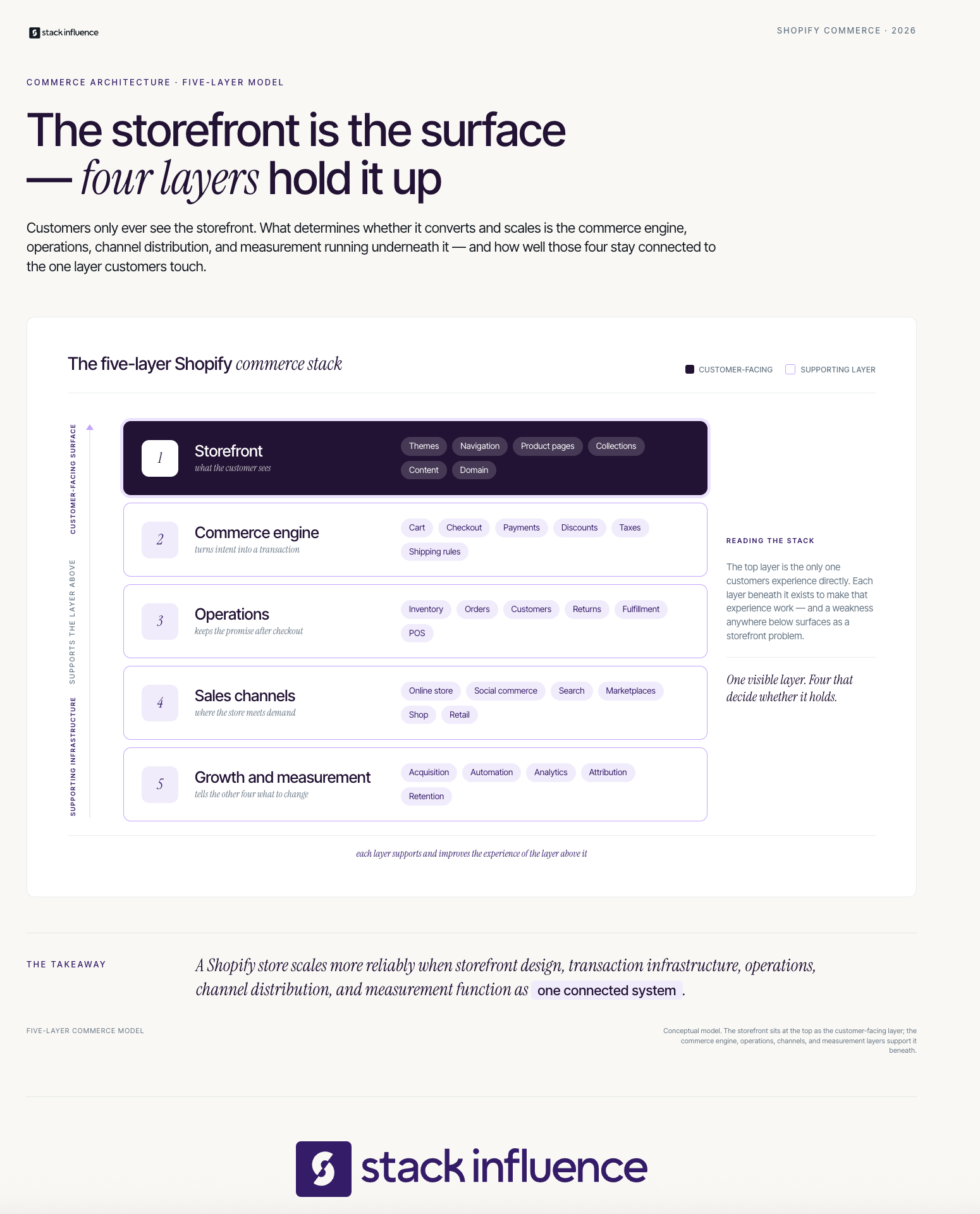
The storefront is the customer-facing website. Shopify gives sellers themes, page templates, product pages, collection pages, navigation, a blog, domain connections, and mobile-responsive design tools.
The storefront should answer four questions quickly: What is the product, who is it for, why should the shopper trust it, and what should the shopper do next? A polished theme cannot compensate for unclear positioning or missing purchase information.
The commerce engine turns browsing into an order. It includes the cart, checkout, discounts, payment processing, tax settings, shipping options, fraud tools, and order confirmation flow.
Shopify includes hosted commerce infrastructure, an SSL certificate, and PCI-compliant checkout support. The PCI Security Standards Council’s merchant guidance emphasizes that secure commerce still depends on people, processes, and technology, so merchants need strong account controls and careful app permissions.
The operations layer covers products, variants, inventory, customer records, orders, returns, shipping labels, fulfillment status, and in-person selling through Shopify POS. Sellers can fulfill internally, connect a third-party logistics provider, use dropshipping or print-on-demand apps, or coordinate inventory across several locations.
Choose the operating model before the app stack. Defining fulfillment, support, and returns first makes it easier to select only the software the business needs.
Shopify can function as the central catalog and order hub for more than the brand’s website. According to Shopify’s sales-channel documentation, merchants can connect social commerce channels, Google, marketplaces such as Amazon, the Shop channel, and other supported destinations while managing products and orders from the Shopify admin.
Give every channel a defined role. The website can develop direct customer relationships, marketplaces can capture high-intent demand, and social channels can connect discovery with purchase. Stack Influence’s Instagram Shopping guide explores that social-commerce connection.
The final layer includes customer acquisition, email and SMS, discounts, automation, analytics, attribution, and retention. Shopify supplies useful tools, but the seller must still decide which audience to target, which offer to make, and how much can be spent to acquire a customer profitably.
This is the layer that converts a functioning website into an operating growth system. Without it, a Shopify store may be technically complete but commercially invisible. Many sellers benefit from the use of various tools like this one to enhance their operations and drive growth in their ecommerce business.
Shopify works by storing a merchant’s catalog, storefront settings, checkout configuration, customer records, and order data in one cloud-based admin. A seller configures the store, publishes products, connects payments and fulfillment, attracts shoppers, and then uses Shopify to process orders and monitor performance as customers move from discovery to purchase.
A practical setup sequence is:
The sequence matters. Validate economics and workflows before buying apps, then change one major variable at a time so the team can identify what improves conversion or creates a problem.
Shopify’s total cost combines the platform subscription with payment processing, optional transaction fees, apps, themes, development, fulfillment, marketing, and operating labor. The subscription is only the visible starting point, so sellers should calculate expected monthly platform cost and per-order economics before choosing a plan or installing paid software.
As of August 2, 2026, Shopify’s U.S. pricing page lists these standard plans:
Pricing, payment rates, offers, and feature availability can vary by country, billing term, payment provider, and future platform updates. Shopify also states that third-party transaction fees may apply when a merchant uses an outside payment provider instead of Shopify Payments.
A more useful cost equation is:
Evaluate an app by the process it replaces or the profit it creates, not only by its monthly fee. Overlapping apps can increase cost while fragmenting reporting.
Shopify’s main strength is operational consolidation. It provides a maintained commerce foundation while preserving control over branding, merchandising, customer experience, and channel strategy.
Planning for these tradeoffs helps keep Shopify a coherent operating system rather than a collection of disconnected tools.

Shopify is primarily a brand-controlled commerce platform, while Amazon is primarily a marketplace with existing shopper demand and standardized marketplace rules. Shopify gives sellers more control over the storefront and customer journey; Amazon gives sellers access to marketplace discovery, with Amazon FBA available as an optional inventory and fulfillment service.
The practical difference is where the customer relationship begins:
Many ecommerce brands use both. A creator campaign, paid ad, or email may route shoppers to a Shopify product page in one case and an Amazon listing in another.
Measurement also differs. Amazon’s official Amazon Attribution guide explains that eligible sellers can measure non-Amazon marketing activity and may earn a Brand Referral Bonus averaging 10% of qualifying product sales measured through Amazon Attribution. Stack Influence’s Amazon Attribution guide explains the campaign-link workflow from the seller’s perspective.
The most important Shopify misconception is that launching a store creates a customer-acquisition engine. Shopify makes the transaction possible, but demand must come from search, advertising, social content, email, partnerships, marketplaces, referrals, or an existing audience.
A balanced acquisition mix may include:
For creator-led acquisition, the goal should be more specific than “get influencers to post.” A connected Shopify influencer marketing playbook links creator selection, offer design, tracking, content rights, and contribution margin. The guide to influencer product seeding strategies explains how product gifting can support content and awareness.
Creator operations become more demanding as volume grows. Brands need qualification criteria, product logistics, communication, approvals, content tracking, disclosure rules, and a reuse plan. The guides to micro-influencer marketing campaigns and finding ecommerce content creators cover those decisions.
Stack Influence is designed for Shopify brands that want vetted micro-influencer activation, gifted-first product seeding, creator coordination, UGC generation, and completed-post accountability managed through one workflow. The platform works with roughly 600,000 vetted creators and uses a completions-only model, which ties platform spending to completed creator posts rather than simple creator outreach. Stack Influence’s Shopify solution focuses on that execution layer. Results still vary by product, offer, audience, content, margin, and campaign execution.
Gifted products and paid creator relationships also require transparent disclosure. The Federal Trade Commission’s endorsement guidance says influencers and brands should clearly disclose material relationships and follow applicable rules for endorsements and reviews.
Shopify sellers should measure performance as a connected funnel: acquisition creates visits, onsite behavior reveals intent, conversion produces orders, unit economics determines whether those orders are profitable, and retention determines long-term value. No single metric, including revenue or return on ad spend, can explain whether the store is becoming healthier.
Use the Shopify Commerce Metric Stack:
Shopify Analytics documentation explains that the platform combines store activity, visitor, transaction, and report data in one reporting environment. For deeper cross-channel analysis, Google’s ecommerce event setup guidance explains that events such as product views, add-to-cart actions, checkout activity, and purchases must be configured to populate ecommerce reporting in Google Analytics.
Attribution will never be perfect. Cross-device behavior, privacy restrictions, private sharing, delayed purchases, shared codes, and refunds can separate the real journey from the report.
Combine tagged links, platform analytics, codes, post-purchase surveys, blended acquisition cost, contribution margin, and controlled tests where possible. A tracked sale supports a decision, but it does not prove that one touchpoint caused the purchase.
A Shopify store is ready to launch when the business can operate the customer promise, not merely publish a theme. Use this checklist before increasing traffic:
Six or seven “yes” answers indicate strong readiness, four or five reveal gaps to close, and three or fewer suggest validating the offer and operating model before heavy design or traffic spending.
The practical answer to “what is Shopify?” is that Shopify is the commerce infrastructure behind an online business, not the entire business itself. It can unify the storefront, checkout, orders, inventory, channels, and reporting, but product quality, customer demand, fulfillment, economics, and execution still determine the outcome.
Before choosing a theme or adding apps, write down one product promise, one target customer, one fulfillment path, one acquisition loop, and one measurement model. That turns Shopify from a website project into an operating system that the team can test and improve.
For Shopify brands using creator-led acquisition, the logical next step is to evaluate a managed product-seeding workflow that connects qualified creator participation, completed content, store traffic, and contribution-margin measurement before campaign volume increases.
Sending a product to a creator looks simple. The difficult part is deciding whether the package is a genuine gift, a product-for-content exchange, or the first step toward a longer creator partnership.
For ecommerce brands, the question “what is influencer seeding?” is really about turning inventory into product experience, authentic content, and useful market feedback without confusing hope with a guaranteed deliverable. For content creators, it is about understanding what the brand expects, what rights are being requested, and whether the product genuinely fits the audience.
This guide explains the models, workflow, compliance rules, measurement stack, and practical decisions both sides should make before a product ships.
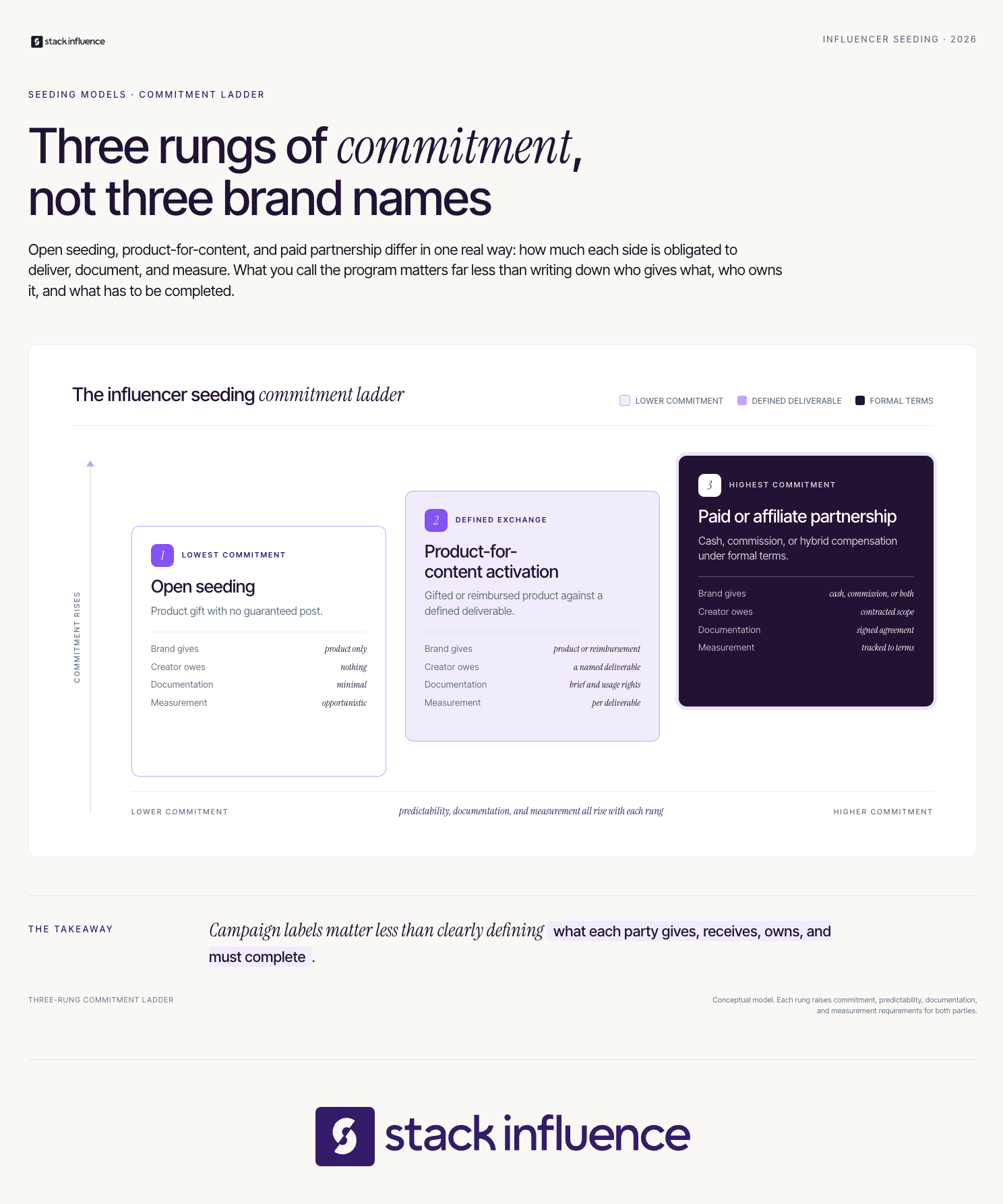
Influencer seeding is a marketing practice in which a brand places free or reimbursed products with selected creators so they can experience the product and potentially share it with their audiences. Traditional seeding carries no posting obligation; structured product-for-content programs add agreed deliverables, deadlines, and completion tracking.
The word “seeding” reflects the strategy’s purpose. A brand places products within relevant communities, then observes which creators use them naturally, make credible content, attract meaningful audience response, or show potential for a deeper partnership.
For ecommerce sellers, influencer seeding for ecommerce can support launches, UGC, external traffic, creator discovery, and affiliate recruitment. For content creators, it can provide product experience, portfolio material, and a path toward paid work.
Influencer gifting is the broad act of giving a creator a product, while influencer seeding is the planned use of gifting to test fit, generate awareness, or build a creator pipeline. A sponsorship is different because compensation is tied to defined deliverables. Industry usage overlaps, so the agreement matters more than the label.
A gift may carry no expectation. A seeding campaign is more intentional, with a target creator profile, product selection, timing, follow-up, and measurement. A sponsorship or structured product-for-content activation states what the creator must produce and receive.
The decisive question is: “What has each side actually agreed to do?”
Influencer seeding becomes easier to manage when brands and creators identify the commitment level before discussing content. The Commitment Ladder separates three arrangements that are often blended together.
This ladder protects both sides. Brands can choose the predictability they need, while creators can judge whether compensation matches the work and rights requested. Running an influencer seeding campaign should begin with this exchange, not a shipping list.
Ecommerce brands use influencer seeding to let relevant creators experience a product, generate authentic discussion, produce UGC, and identify promising partners before making larger commitments. Creators use seeding to discover products, demonstrate content skills, serve their audiences, and build relationships that may develop into affiliate, ambassador, UGC, or paid brand deals.
The quality of the match matters more than simply maximizing reach. A 2021 Journal of Business Research study on influencer, product, and consumer congruence, involving 372 followers, found that stronger congruence supported more favorable product attitudes and higher purchase and recommendation intentions.
Brands commonly use seeding for:
Creators can gain brand access, portfolio examples, audience-relevant content, and evidence that may support repeat campaigns, licensing, affiliate income, or sponsorships.
The tradeoff is predictability. Open seeding cannot guarantee content. Structured product-for-content campaigns improve accountability but must be treated as real commercial exchanges.
The Seed-to-Scale Loop turns packages into a repeatable learning system. Its five stages are Select, Evaluate, Establish, Deliver, and Diagnose.
Choose one primary campaign outcome before choosing creators. Awareness, content production, product feedback, affiliate recruitment, external traffic, and attributed sales require different briefs and measurement.
The product should be easy to demonstrate, sufficiently stocked, safe for the intended audience, and valuable enough to justify a creator’s time. Include unit cost, fulfillment, shipping, replacements, reimbursements, and inventory opportunity cost in the budget.
“Get buzz” is difficult to evaluate. “Identify creators who can produce credible demonstrations for this category” creates a usable decision.
Creator selection should begin with relevance, not follower count. Review recent topics, visual style, audience conversations, posting consistency, prior brand work, and the ability to show the product credibly.
Nano influencers and micro influencers let brands test multiple niche communities without depending on one large account. A focused process for finding micro influencers can score five dimensions:
Creator fit works in both directions. Creators should examine the product, brand values, claims, deliverable, and audience relevance before accepting.
Write down whether the product is an unconditional gift or compensation for a required deliverable. For structured campaigns, specify the platform, format, deadline, talking points, prohibited claims, revision process, reimbursement method, exclusivity, and what counts as completion.
Free product can create a material connection. The FTC’s Endorsement Guides Q&A says brands that send free products should tell creators how to disclose the gift clearly and should monitor resulting tagged posts.
Platform tools add another compliance layer. Meta’s branded content guidance says branded content should use the paid partnership label. TikTok’s commercial content disclosure setting is required when a post promotes a brand, product, or service, and YouTube’s paid promotion disclosure controls require creators to identify videos containing paid product placements, sponsorships, endorsements, or other commercial relationships. Legal obligations can vary by jurisdiction, so platform labels should supplement, not replace, clear disclosure.
Content rights need the same precision. The U.S. Copyright Office explains that the creator of original expression is generally the author and copyright owner unless ownership changes through a written agreement or a valid work-made-for-hire arrangement. A product gift does not automatically grant a brand perpetual ad, website, email, or marketplace rights. Brands should define UGC licensing rights before reuse begins.
Fulfillment is part of campaign strategy. Confirm the creator’s address, preferred variant, size, shade, or flavor; send tracking; explain what is inside; and provide a real contact for delivery problems.
A useful brief reduces uncertainty without scripting a false opinion. Include intended use, verified claims, filming suggestions, disclosure language, brand handles, deadlines, and support. A thoughtful influencer seeding kit can make the product easier to demonstrate.
The follow-up must match the agreement. For open seeding, thank the creator and invite honest feedback without implying that a post is owed. For a structured activation, remind the creator of the documented deadline and resolve product or fulfillment problems before evaluating completion.
Record outreach, acceptance, delivery, product experience, completion, content quality, audience response, traffic, sales, and follow-up. Excellent content can remain valuable UGC even when immediate sales are limited.
Place creators into clear next steps:
Each cohort should improve creator criteria, the brief, product choice, fulfillment, and measurement for the next cohort.
Brands most often fail at influencer seeding by sending products before defining the exchange, creator fit, rights, and measurement plan. The resulting problem looks like creator underperformance, but it is usually an expectation and operations failure. Better outcomes begin with fewer assumptions, clearer terms, and a campaign design that matches the desired level of predictability.
Common mistakes include:
The corrective insight is simple: influencer seeding is partly a creator strategy, but it is equally an inventory, rights, fulfillment, and evidence system.
Content creators should evaluate a seeding offer as a business agreement, even when the only compensation is product. Before accepting, confirm whether posting is optional or required, what the product is worth to the creator, what content is expected, when it is due, how the brand may reuse it, and whether the creator can remain honest.
A creator checklist should cover:
The FTC’s Disclosures 101 guidance says free or discounted products are material connections and that disclosures should be hard to miss, placed with the endorsement, and expressed in clear language. Creators remain responsible for their own disclosures, even when a brand provides instructions.
Creators should save the agreement, final brief, rights terms, approvals, and proof of delivery. Clear records protect the relationship and simplify repeat partnerships.

Influencer seeding should be measured as a sequence of evidence, not with one headline KPI. Brands need to separate operational delivery, content output, audience response, commerce, and relationship value. Leading indicators show whether the campaign is functioning; outcome metrics show whether it created business value; attribution determines how confidently the two can be connected.
The Seeding Evidence Stack contains five layers:
A brand’s influencer marketing tracking should be configured before outreach. For a DTC site, Google Analytics URL builder guidance explains how UTM parameters identify campaign traffic by source, medium, campaign, and creative. Creator-specific codes can add another signal, especially when links are not clickable.
Shopify brands can combine UTMs, codes, checkout data, and affiliate reporting. The Shopify influencer marketing playbook provides the ecommerce workflow, while Shopify Collabs documentation confirms that merchants can send gifts or discount codes, track affiliate sales, recruit creators, and manage payments.
Amazon sellers need marketplace-specific tracking. The Stack Influence Amazon Attribution guide explains the setup context, while Amazon’s official Amazon Attribution guide states that attribution tags measure non-Amazon traffic using a 14-day, last-touch model. Eligible U.S. seller brand owners can also enroll in the Brand Referral Bonus, which Amazon describes as averaging 10% of qualifying product sales driven and measured through non-Amazon marketing.
No attribution method captures everything. Followers may view a post, search the brand later, buy on another device, purchase from a retailer, or convert outside the tracked window. Report directly attributed results separately from directional evidence such as branded search, product-page traffic, conversion-rate movement, marketplace rank, and content reuse.
A practical review cadence is to inspect fulfillment and completion weekly, evaluate commerce within the relevant attribution window, and compare longer pre-campaign and post-campaign trends without claiming that correlation proves causation.
Scaling requires a workflow that connects creator selection, product movement, communication, content collection, rights, and completion status. Spreadsheets can support a small pilot, but manual follow-up becomes fragile when a brand activates many micro influencers across products or marketplaces.
Stack Influence is a micro-influencer marketing platform built around gifted-first product seeding, creator coordination, UGC generation, and completed-post accountability. The platform works with roughly 600,000 vetted creators, and its completions-only model ties brand platform spend to completed creator posts rather than uncompleted activations.
That model is a structured product-for-content workflow, not no-obligation PR gifting. Brands define campaign requirements, creators opt into participation, and the automated product seeding workflow supports activation through completion. This is especially practical for ecommerce teams that want authentic creator content without manually coordinating every participant.
A verified Stack Influence case study provides one measured example. During a three-month new-product campaign for Targus, the campaign included 120 creator promotions. Average monthly unit sales increased from 56 to 221 during the measured period, while Amazon Best Seller Rank moved from #151,547 to #47,811. The case study does not isolate seeding as the sole cause, and results vary by product, category, pricing, marketplace conditions, creative quality, creator participation, and execution.
The operational lesson is more important than any single result: scale becomes useful only when the brand can distinguish product sent, content completed, assets cleared for use, traffic measured, and creators worth activating again.
The practical answer to what is influencer seeding is not simply “sending free products.” Influencer seeding is a controlled way to place products with relevant creators, learn who fits, produce credible content, and decide which relationships deserve more investment.
Brands should choose the commitment level first, document disclosure and usage rights, make fulfillment easy, and measure the campaign from delivery through commerce. Creators should accept offers that match their audiences, make the exchange explicit, and protect the right to communicate honestly.
For ecommerce teams ready to act, the next step is to map one product, one creator profile, one content goal, and one attribution method before the first package ships. A managed product-seeding workflow can then turn that pilot into repeatable creator activation and a growing library of useful UGC.
Instagram Stories can turn a product demonstration into a direct shopping path, but only when the destination, tracking, and disclosure are set up correctly. A plain Amazon URL sends traffic but does not earn affiliate commission. A tagged Associates link can earn on qualifying purchases, while an Amazon Influencer storefront works better for curated collections.
This guide explains how to add an Amazon link to an Instagram Story, choose the right link type, publish a clear Story, disclose any material connection, and measure what happens after viewers tap.
Choose the link based on what you want the viewer to do. Use a product link for one featured item, an Amazon Influencer storefront or Idea List for a collection, an Associates link when you want commission tracking, or a brand-supplied URL when a campaign requires its own attribution.
A direct product link takes the viewer to one Amazon product detail page. This is the clearest destination when your Story demonstrates a specific item, color, model, or size.
Anyone can share an ordinary Amazon product URL, but a standard URL does not contain your Amazon Associates tracking tag. You will not receive affiliate commission simply because someone purchases after clicking an untagged link.
An Associates link is a special tagged URL connected to your Store ID or Tracking ID. Amazon uses the tag to identify eligible purchases that resulted from your referral.
Creators should generate these links through Amazon’s official tools. The Amazon Associates Program guide provides additional background on tagged links, commissions, and program participation.
The Amazon Influencer Program gives approved creators a customizable storefront and vanity URL. A storefront is useful when your Story references several products or when you want followers to browse your broader recommendations.
An Idea List creates a more focused destination inside the storefront. For example, a beauty creator could link to “Drugstore Makeup Favorites,” while a home creator could use “Small Kitchen Essentials.” Amazon’s social-sharing guidance for influencers specifically encourages creators to share storefront links through social media and use Story Highlights to extend the visibility of product content.
A seller may provide a specific Amazon URL for a product-seeding campaign, sponsorship, or affiliate partnership. That URL might contain the brand’s own tracking parameters, including Amazon Attribution parameters.
Use the supplied URL exactly as instructed. Do not automatically replace it with your own affiliate link or append an Associates tag. Amazon’s Associates Program Policies warn against attempting to claim Associates commission and another program’s attribution from the same traffic.

To add an Amazon link to an Instagram Story, copy the correct Amazon URL, create a Story, open the sticker tray, choose Link, paste the URL, customize the sticker text, place a clear disclosure beside it when needed, test the destination, and publish the completed Story.
Decide whether the Story should send viewers to one product, an Idea List, your complete Amazon storefront, or a brand-provided campaign link.
The visual promise and the destination should match. A Story saying “Here is the exact tripod I use” should open the tripod’s product page, not a storefront containing dozens of unrelated products. This destination-first approach is one of the most important principles when deciding where to put an Amazon affiliate link.
For a non-affiliate link, open the product page in Amazon and use the Share option to copy the URL.
For an affiliate link, sign in to the Amazon shopping app with the account connected to Amazon Associates. Amazon’s Mobile GetLink instructions direct Associates to open a product page, tap the floating Share button, select the appropriate Store ID or Tracking ID, and choose Copy Associates Link. Mobile GetLink currently creates links for product detail pages.
For a storefront or Idea List, open the public page and copy its shareable URL. Check that you are viewing the public version rather than an owner-only editing page.
Open the copied link in a browser before adding it to Instagram. Confirm that it leads to the correct product, size, color, model, and Amazon marketplace.
A U.S. Amazon link may create unnecessary friction for followers who primarily shop through another country’s Amazon store. The right marketplace depends on your audience and the Amazon Associates programs in which you participate.
Open Instagram and start a new Story. Record a video, take a photo, or upload an existing asset from your phone.
The Story should demonstrate why the product is relevant before asking viewers to leave Instagram. Show the item being used, explain the problem it solves, or identify the type of person who may find it useful.
Open the Story sticker tray and select Link. Paste the Amazon URL into the link field.
Instagram’s current Stories guide explains that creators can use the Link sticker for external websites, products, articles, and other URLs. The sticker text can also be customized before publishing.
Replace vague sticker text with a specific action:
Specific language tells viewers what will happen after they tap.
Place any required disclosure directly on the Story and close to the recommendation or link sticker. Do not hide it behind another sticker, place it at the extreme edge of the screen, or rely only on a profile disclosure.
Then add one clear call to action. For example: “I linked the exact version I use below.”
Review the Story for spelling, sticker placement, readability, and disclosure visibility. Check that the link opens the intended Amazon page and contains the correct affiliate or campaign tracking.
Publish the Story, then view it from another account or device when possible. This final check catches incorrect links, unavailable products, and visual elements that cover the disclosure.
The Five-Layer Story Link Check is a pre-publish framework for preventing the most common Amazon Story mistakes. A link should pass all five layers before the Story goes live.
Tracking integrity includes account setup. Amazon’s application guidance for social networks says creators should list the exact URL of the social profile they use and place tagged Associates links on their declared sites. The guidance also says participating social pages should be publicly available.
Run the Five-Layer Story Link Check again before saving a Story to a Highlight. Products, variants, availability, campaign terms, and links can change after the original Story was published.

An Amazon affiliate Story should disclose the commission relationship on the Story itself, close to the link sticker, in language viewers can immediately understand. Amazon also requires the account-level Associate statement. A profile-only disclosure is not enough for the individual Story, and Instagram’s partnership label does not replace clear on-frame wording.
Amazon’s social media disclosure guidance says a link-level disclosure must be clear and conspicuous. Amazon gives examples such as “(paid link),” “#ad,” and “#CommissionsEarned.” It also requires the statement, “As an Amazon Associate I earn from qualifying purchases,” to be associated with the creator’s account.
The Federal Trade Commission’s influencer disclosure guidance says disclosures in Instagram Stories should be superimposed over the content and visible long enough to be noticed and read. The FTC also advises creators not to rely only on a profile page, a disclosure hidden among links, or the platform’s built-in disclosure tool.
Useful disclosure formats include:
When the recommendation is part of a paid or gifted brand collaboration, use Instagram’s Paid partnership label when required by Meta’s branded-content rules. Keep a plain-language disclosure on the Story as well, particularly when an affiliate link is involved.
For video Stories, include the disclosure visually. Saying it aloud as well can make the relationship clearer for viewers who are listening, while on-screen text remains necessary for people watching without sound.
More taps usually come from making the recommendation useful before presenting the link. Show the product in context, explain one specific benefit, address a likely question, and use link-sticker text that matches the destination. A short sequence of connected Story frames often communicates more value than one crowded promotional slide.
Use a simple Show, Prove, Point sequence:
For example, a creator could first show a cluttered charging setup, then demonstrate a charging organizer, and finally link to the exact model. The Story earns the click by resolving a specific problem.
Product demonstrations can also become samples for a UGC creator portfolio. Strong product content shows brands that you can communicate naturally, follow campaign requirements, and produce assets that fit social platforms.
Creators pursuing brand deals on Instagram should save examples that combine clear storytelling, product use, disclosure, and measurable action. These examples are more persuasive than screenshots of follower counts alone.
A useful measurement system connects Instagram exposure to Amazon activity. Commission income is an outcome metric, but it does not explain why a Story succeeded or failed.
Use this four-stage metric stack:
Calculate Story Link Tap Rate as:
Link sticker taps ÷ Story reach × 100
Instagram’s Story Insights documentation identifies link taps among the available Story interaction metrics. Amazon’s Associates reporting guidance says its reports include clicks, ordered items, shipped items, conversion rates, and Tracking ID performance.
Use a dedicated Tracking ID for Instagram Stories when available. A separate ID makes it easier to distinguish Story traffic from bio links, blog links, YouTube descriptions, and other affiliate placements.
Amazon generally gives shoppers 24 hours after arriving through an Associates link to place qualifying items in their cart. If an eligible item is added during that window, Amazon says it may remain commission-eligible if purchased before the cart expires, usually within 90 days. The session can end sooner when the customer completes an order or enters Amazon through another Associate’s link.
Interpret the numbers as a connected funnel:
This distinction is central to understanding affiliate marketing versus influencer marketing. Affiliate links measure a direct performance path, while creator content can also create awareness, trust, reusable UGC, and longer-term brand value.
A Story containing an organic Link sticker is not the same as a paid Instagram Stories ad. Meta’s Story boosting guidance says Stories containing link stickers are not eligible for ordinary boosting. A paid Stories ad uses an advertising call-to-action rather than the organic Link sticker.
This matters when a brand wants to amplify creator content. Decide before publishing whether the asset is intended for an organic Story, a partnership ad, a brand-owned ad, or several separate versions.
Do not build one URL that tries to serve every attribution system. An Associates link is meant to track creator-referred commission, while a seller’s Amazon Attribution URL is meant to measure the brand’s external marketing traffic. Confirm which party owns the tracking objective before the Story goes live.
Keep a simple link log containing the publication date, Story topic, product, destination URL, Tracking ID, disclosure wording, and results. This record makes it easier to identify broken Highlights, compare product categories, and prepare campaign reports.
An Amazon Story is more than an affiliate placement. It can demonstrate product storytelling, UGC production, compliant disclosure, audience relevance, and the ability to generate measurable action.
Save your strongest examples, record their link-tap results, and add them to an influencer media kit. Creators can also use these examples when pitching brands or pursuing opportunities available to micro-influencers seeking brand partnerships.
Stack Influence is a micro-influencer marketing platform built around gifted-first product seeding, vetted creator activation, campaign coordination, UGC generation, and completed-post accountability for ecommerce brands. The platform works with roughly 600,000 vetted creators, with approximately 78% of the creator network identified as female.
Knowing how to add an Amazon link to an Instagram Story is only the starting point. The strongest creator workflow connects the right destination, valid tracking, visible disclosure, useful content, and consistent measurement.
Start with one product you genuinely use, build a three-frame Show, Prove, Point sequence, run the Five-Layer Story Link Check, and record the results. Each well-executed Story can improve your affiliate process while producing stronger proof for future creator partnerships.
An ASIN number looks like a small catalog code, but it controls far more than product identification. For Amazon sellers, the correct ASIN determines which detail page receives an offer, which variation shoppers see, which inventory records connect to fulfillment, and which product receives advertising or external traffic.
This guide explains how ASINs work, where to find them, when to reuse or create one, and how to prevent catalog mistakes. It also introduces a governance framework for Amazon FBA sellers, private-label brands, resellers, DTC brands, and multichannel ecommerce teams.
An ASIN number is the 10-character combination of letters and numbers Amazon assigns to a product in its catalog. ASIN stands for Amazon Standard Identification Number, so the phrase “ASIN number” is technically repetitive, but it remains the wording many sellers use when searching for the identifier.
Amazon uses ASINs to distinguish products, group seller offers for the same item on one detail page, organize catalog records, and connect products to advertising workflows. Amazon Ads also states that versions and variations receive distinct ASINs, making the identifier important at the specific product level, not merely the brand or product-family level. Amazon's official ASIN guidance explains these catalog and advertising functions.
One ASIN can support multiple sellers offering the exact product. The ASIN identifies the product record; each seller controls price, quantity, condition, and fulfillment.
The safest way to manage Amazon identifiers is to stop treating them as interchangeable. Each code answers a different operational question, and confusing them can produce duplicate listings, mislabeled inventory, or unreliable reporting.
The ASIN is Amazon's internal catalog identifier. Sellers use it in catalog and advertising workflows, and multiple sellers can attach offers when they sell an exact product match.
A Global Trade Item Number is a standardized identifier used across supply chains and retail systems. Amazon commonly uses GTINs to search for an existing listing or support creation of a new one, while UPC and EAN are common GTIN formats. GS1's GTIN standard and Amazon's GTIN guide explain the relationship.
This distinction matters for multichannel ecommerce. An ASIN belongs to Amazon's catalog, while a GTIN can connect product identity across Amazon, Google, Shopify, warehouses, and retail partners. Google's identifier guidance and Shopify's barcode reference show why the ASIN should not replace a product's global identifier.
Map Shopify variants, GTINs, seller SKUs, and Amazon child ASINs in separate fields. Stack Influence's Shopify and Amazon integration guide covers the broader workflow.
A stock keeping unit is created by the seller. Different sellers can use different SKUs for offers on the same ASIN, and a business may encode color, size, warehouse, or supplier in its SKU structure.
An FNSKU is an Amazon-specific fulfillment identifier used with Fulfillment by Amazon. The ASIN identifies the catalog product, while the FNSKU helps fulfillment operations identify inventory tied to a seller's offer.
Books are the special case. Amazon identifies books through ISBNs, and the International ISBN Agency explains that each ISBN identifies a specific title, edition, and format. A paperback, hardcover, and ebook may therefore require separate identifiers. The International ISBN Agency's definition provides the authoritative context.

You can find an ASIN number in the product's Amazon URL, the Product Information or Product Details section, Seller Central inventory records, and Amazon listing files. For variation products, select the exact size, color, style, or pack before copying the code so you capture the buyable child ASIN rather than another variation.
Use these four methods:
Amazon's current new-ASIN listing guide confirms that sellers can search by GTIN in Add Products, match an existing catalog item, or create a listing when no match exists.
Record the ASIN beside the full variation name. “B0XXXXXXXX, blue, 24-ounce, two-pack” is safer than saving the code alone when a parent page can switch the selected child.
Reuse an existing ASIN when your item is an exact match for the product already represented on the detail page. Create a new ASIN only when the product is genuinely absent from Amazon's catalog and you are authorized to create the listing. Creating a duplicate page for an existing product violates Amazon's detail-page rules.
Amazon's product detail page rules tell sellers not to create duplicate pages and to use only GTINs they own or are authorized to use.
Before matching an offer, verify all identity-defining attributes:
Resellers should also confirm that their seller account can list the exact ASIN in the intended condition and fulfillment channel. The Stack Influence retail arbitrage guide explains why scanning a product is not the same as confirming listing eligibility.
To create a new ASIN, search Amazon's catalog by GTIN first, choose Create a New Listing only when no exact match appears, complete the product and offer fields, and submit the detail page for review. Amazon assigns the ASIN after it accepts the new catalog record, although brand or category approval may be required.
Follow this sequence:
Amazon also supports bulk creation and matching through inventory spreadsheets. Maintain one source-of-truth sheet connecting each GTIN, seller SKU, child ASIN, product title, variation, and marketplace.
A parent ASIN is a virtual catalog record that connects related variations, while a child ASIN is the buyable product representing a specific variation. Amazon's variation relationship guidance describes the parent as a connector and the child as the purchasable item.
Consider a water bottle available in three colors and two sizes. The parent organizes the family, but each color-and-size combination needs its own child ASIN because each combination can have separate inventory, images, price, and sales history.
Correct variation families usually share the same core product and differ only through an Amazon-approved theme such as size, color, style, or flavor. Do not use a variation family to combine unrelated products, materially different models, accessories, or bundles simply because placing them together might consolidate traffic.
For operational work, default to the child ASIN. Advertising, inventory planning, replenishment, creator briefs, attribution tags, and direct product links should identify the exact buyable variation. The parent can remain in catalog governance records as the family-level reference.
The ASIN Integrity Check is a six-part prepublication framework for preventing catalog and campaign errors. Run it before creating a listing, importing a catalog, launching ads, or distributing product links to creators and affiliates.
An evidence record shortens troubleshooting by showing what was submitted, which identifiers were used, and whether the catalog still matches the physical product.
A correct ASIN is the join key between Amazon's catalog, seller offers, inventory, ads, analytics, and external traffic. Weak ASIN governance creates downstream errors even when the product copy and creative are strong.
The ASIN is therefore not an SEO keyword field or a barcode substitute. It is the catalog address through which Amazon's commercial systems find the product.
ASIN governance continues after listing creation. Every ad, creator brief, affiliate link, landing page, and analytics tag should route shoppers toward the intended buyable child ASIN.
Stack Influence is a micro-influencer marketing platform built around gifted-first product seeding, vetted creator activation, campaign coordination, UGC generation, and completed-post accountability. For an Amazon campaign, a strong product record includes the child ASIN, canonical product URL, variation name, current price, stock status, and approved messaging before creators publish.
This prevents a common failure: content features one variation while the link opens another. Sellers planning influencer partnerships for Amazon products should define a response if the featured child goes out of stock or loses eligibility. Teams learning how to collaborate with Amazon influencers can add the same check to creator instructions.
A verified Stack Influence case study for Targus recorded 120 creator promotions during a three-month new-product campaign. Average monthly unit sales increased from 56 at the starting point to 221 during the measured campaign period, while Best Seller Rank moved from #151,547 to #47,811. The result is a specific campaign example, not a forecast, and outcomes vary by product, category, pricing, marketplace conditions, creative quality, and execution.

Measure ASIN performance as a connected signal stack: catalog health, offer availability, traffic, conversion, advertising, external attribution, and marketplace outcomes. Review the exact child ASIN first, then roll results up to the parent family or brand only after confirming that every included variation is comparable and active.
Use the ASIN Signal Stack:
Amazon describes Amazon Attribution as a free measurement solution for eligible advertisers measuring non-Amazon channels, including social and influencer campaigns. Its reports use a 14-day attribution window and include clicks, detail page views, add-to-carts, purchases, units sold, and product sales.
Create separate tags for reporting by creator, channel, tactic, or creative, and select the exact promoted products during setup. Stack Influence's Amazon Attribution guide explains the workflow, while the Amazon Brand Referral Bonus guide covers referral credits in contribution analysis.
Use three review windows. Check the first seven days for broken links, wrong variations, stock problems, and tracking failures. Use the relevant attribution window for direct response, then review 30-to-90-day trends for catalog, rank, keyword, and repeat-purchase movement. Longer windows add context but also add more possible influences.
Most ASIN failures come from identity shortcuts. The fastest fix is to return to the physical product, its authorized identifier, and the exact catalog record.
A monthly catalog audit should flag duplicates, inactive children, mismatched images, stale URLs, missing inventory mappings, and campaigns pointing to discontinued variations. That maintenance protects shopper experience and reporting reliability.
An ASIN number is not merely a code to copy from an Amazon page. It is the catalog identity that connects the physical product to offers, variations, FBA inventory, advertising, external traffic, and performance reporting.
Start by matching the exact product, validating the GTIN, mapping every buyable child, and storing the identifiers in one source of truth. Once that foundation is stable, Amazon sellers can scale listing optimization, creator activation, paid media, and attribution with fewer routing errors and clearer product-level decisions.
For brands planning a creator or product-seeding campaign, the practical next step is to audit the child ASINs, stock status, destination links, and measurement tags before outreach begins. That preparation gives content creators a reliable product destination and gives the ecommerce team cleaner data after traffic arrives.
Retail arbitrage looks simple from the clearance aisle: buy a product below its marketplace price, list it, and keep the difference. For ecommerce sellers, the harder work begins after the scan. Fees move, competing offers multiply, inventory ages, returns arrive, and Amazon may request stronger sourcing documentation than a basic store receipt provides.
This guide explains how retail arbitrage works in 2026, how to evaluate products before buying them, which risks deserve the most attention, and how to measure real profit instead of attractive revenue.
Retail arbitrage is the practice of buying discounted products from physical stores and reselling them at a higher price through a marketplace such as Amazon. Profit is the remaining spread after marketplace fees, fulfillment, prep, shipping, returns, taxes, travel, and unsold inventory. It is a sourcing model, not a guaranteed-profit formula.
Amazon’s own reselling guidance describes retail arbitrage as purchasing products from retail stores at lower prices and reselling them for profit. The working process is straightforward: find a discounted item, match the exact listing, confirm selling eligibility, estimate all-in profit, and fulfill the order.
Retail arbitrage differs from three adjacent ecommerce models:
Retail arbitrage lowers the commitment required to test Amazon, but the seller has limited control over replenishment, price, documentation, and the product detail page.
Retail arbitrage is generally legal in the United States when a seller lawfully purchases authentic goods and resells them without misrepresentation. Legal resale rights do not override Amazon’s listing rules, brand restrictions, documentation demands, condition standards, safety obligations, or intellectual-property policies. A lawful store purchase can still create marketplace enforcement risk.
For copyrighted goods, the first-sale doctrine provides one legal foundation for resale. In the Supreme Court’s Quality King decision, the Court explained that the lawful owner of a copy may resell it after the first authorized sale. That principle does not protect counterfeit, altered, recalled, restricted, or inaccurately described inventory.
Amazon applies separate marketplace requirements. Its public reselling guide tells sellers to keep purchase orders, invoices, and transaction records, while Amazon’s invoice requirements for policy appeals explain that invoices help verify legitimate sourcing.
A retail receipt proves that a purchase occurred, but it may not establish the supply chain Amazon wants to verify during every authenticity, approval, or policy review. The risk is not that every retail-arbitrage listing will fail. The risk is buying inventory before discovering that the requested evidence is unavailable.
Treat documentation as a pre-purchase question. Preserve the full receipt, payment record, store location, purchase date, item photographs, UPC, model or lot information, and a clear mapping from each purchased unit to its ASIN. For brands or categories with stricter requirements, retail sourcing can still leave a proof gap.
Business compliance also varies by location. The U.S. Small Business Administration’s licensing guidance notes that required permits depend on business activity and location, including state, county, and city rules.
The Five-Gate Retail Arbitrage Buy Test prevents a strong-looking price spread from hiding a fatal weakness. Every product should pass Permission, Proof, Profit, Pace, and Exit before it enters the cart. One failed gate is enough to decline the purchase.
Confirm that your exact seller account can list the exact ASIN in the intended condition and fulfillment channel. Check category, brand, product, hazmat, expiration, and FBA restrictions. Opening a listing in a scanning app does not prove that your account can sell it.
Ask whether you could defend the product’s authenticity, condition, source, and quantity months later. Documentation should connect the purchased unit, listing, and payment record. Higher-risk inventory deserves stronger evidence, not merely a higher projected margin.
Calculate profit after purchase cost, sales tax when applicable, referral fees, fulfillment, inbound shipping, prep, labels, storage, returns, software, travel, and markdown risk. Run the calculation again at a lower selling price so a modest price drop does not turn the unit negative.
Estimate how quickly the inventory can convert back into cash. Review price history, offer count, sales-rank movement, seasonality, stock levels, and likely competition after the clearance deal spreads. A lower return that repeats quickly can be more useful than a larger return that takes a year.
Define the response if the item does not sell as expected. The exit might be a store return, controlled markdown, another marketplace, local sale, or liquidation. Record the return deadline and estimated downside before purchase, not after the listing stalls.
The framework changes the buying question from “Can this item make money?” to “Can I buy, prove, sell, and exit this item without exposing the account or trapping capital?”
Retail arbitrage has no universal startup cost because inventory, selling plans, supplies, travel, software, and fulfillment choices vary. A seller can begin with a small multi-SKU test, but the budget must also cover fees and a reserve for returns or markdowns. The right starting amount is risk capital, not essential-expense money.
Amazon’s current selling-fee page lists an Individual plan at $0.99 per item sold and a Professional plan at $39.99 per month, before referral and optional service fees. Based only on those charges, 40 Individual-plan sales cost $39.60 and 41 cost $40.59, so Professional becomes cheaper at 41 monthly units.
Use this unit-profit formula:
Selling price minus product cost, nonexempt sales tax, referral fee, fulfillment, inbound freight, prep, labels, storage, return allowance, and allocated overhead equals expected net profit.
For example, a $30 sale with a $10 product cost, $8.50 in marketplace and fulfillment fees, $1.50 in prep and inbound shipping, and a $1 return or markdown reserve produces $9 in expected net profit. That is a 90 percent return on inventory cost and a 30 percent net margin on revenue. Use the live ASIN and fulfillment method for actual estimates.
Also track profit per sourcing hour, profit per route, travel cost, and inventory still unsold after 30, 60, and 90 days. This beginner’s guide to selling on Amazon covers the broader account and fee setup.
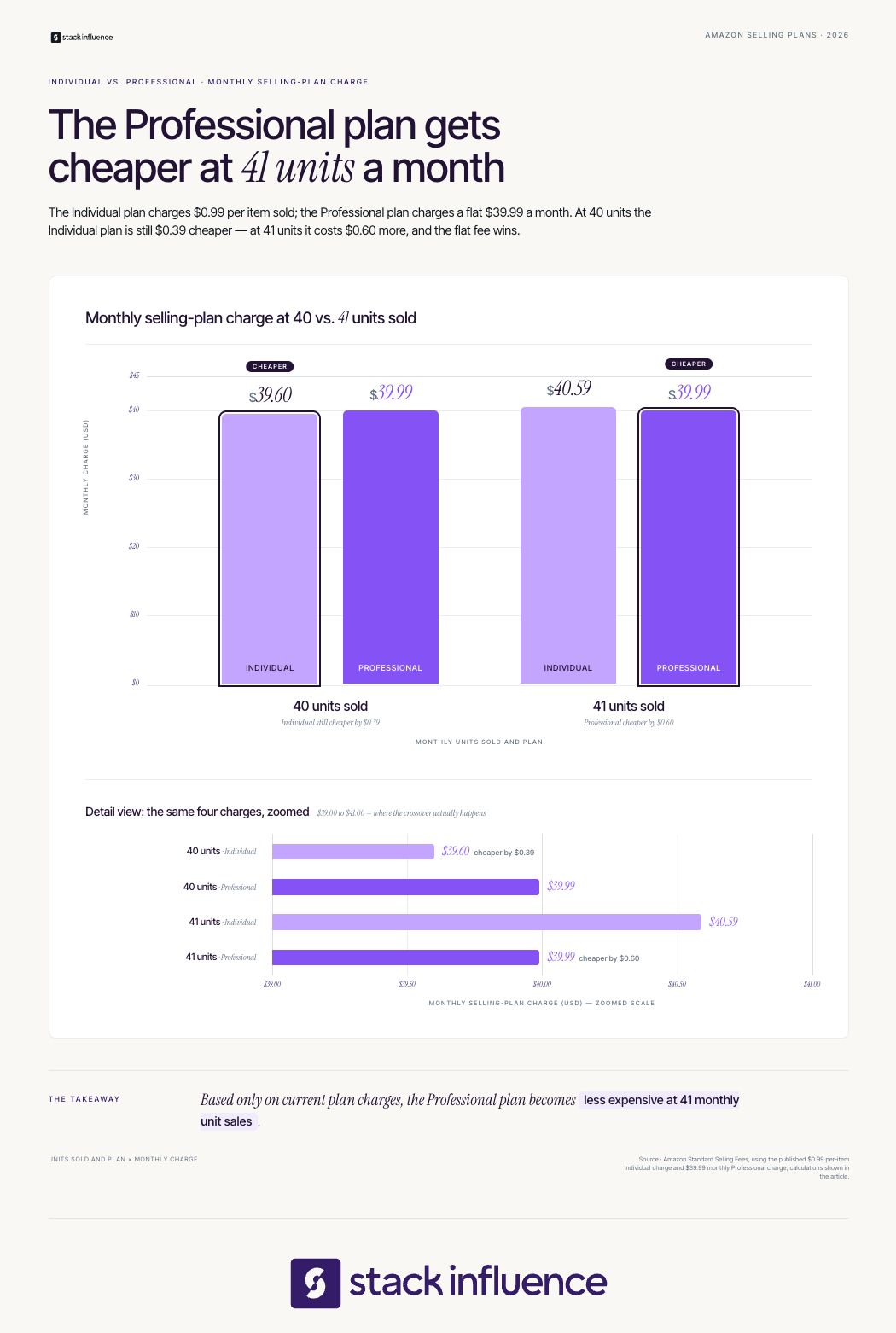
Start retail arbitrage by creating a compliant seller account, setting conservative buying rules, and testing a few units across several products. The first sourcing cycle should validate listing permission, documentation, fee estimates, sell-through, condition handling, and the complete cash-conversion process. Maximum revenue is not the goal of the first trip.
The IRS recordkeeping guidance advises businesses to retain supporting documents such as sales slips, bills, invoices, receipts, deposit records, and canceled checks. Keep searchable digital records that connect purchases, inventory, sales, and tax entries.
Sales-tax treatment requires separate attention. The Streamlined Sales Tax Governing Board’s exemption guidance explains that eligibility and registration rules vary by state. A resale certificate affects unit economics only when the seller qualifies and the retailer accepts it, so confirm local requirements with a qualified adviser.
Better retail arbitrage candidates are authentic, sealed, easy to match to an exact ASIN, permitted for the seller’s account, supported by defensible records, and profitable at a lower selling-price scenario. They also have understandable demand, manageable competition, low handling risk, and an exit route if the original estimate fails.
Look for six characteristics:
Use extra caution with ingestibles, topical products, batteries, hazmat goods, serial-numbered items, warranties, baby products, short-dated inventory, and listings with frequent counterfeit complaints. A two-pack is not interchangeable with a single unit, and a revised formula or model may require a different ASIN.
Fulfillment choice should follow the exact SKU economics. Through Fulfillment by Amazon, Amazon stores inventory, picks and packs orders, ships products, and handles customer service and returns. Costs vary by product and include fulfillment and storage charges.
FBA can suit standard-size, fast-moving products with enough margin to absorb its fees. Fulfilled by Merchant can preserve control for bulky, fragile, slow, or condition-sensitive inventory. Many sellers use both rather than treating fulfillment as one permanent account-wide choice.
This FBA versus FBM guide explains the operational differences in storage, shipping, control, Prime eligibility, and returns.
Retail arbitrage should be measured as an inventory and cash-flow system, not as a collection of exciting flips. The Four-Layer Arbitrage Scorecard connects unit profit to capital efficiency, inventory quality, and account safety.
Track actual net profit per unit, net margin, ROI on inventory cost, fee variance, and minimum safe price. Replace estimates with settlement data after each sale.
Measure 30-day sell-through, average days in inventory, cash-conversion time, profit per sourcing hour, and profit per route. These metrics show whether inventory is funding the next cycle quickly enough.
Monitor returns, stranded inventory, aged units, markdown losses, damage, and the share of purchases unsold after 30, 60, and 90 days. Revenue can increase while inventory quality declines.
Track documentation coverage, restricted-listing attempts, authenticity or condition complaints, recall checks, and unresolved account-health issues. A profitable SKU is not valuable when its records cannot support the business.
Review active prices daily, SKU performance weekly, sell-through at 30 days, and category performance every 90 days. Do not treat a price increase, rank change, or Featured Offer win as proof that one action caused a sale because competition, seasonality, stockouts, and fulfillment speed can change together.
Pricing automation helps only when the minimum price includes every real cost. This guide to Amazon repricer tools explains why minimum and maximum boundaries matter.
Retail arbitrage is difficult to scale because supply is inconsistent, sourcing consumes labor, competition compresses price, and retail documentation may be weaker than commercial invoices. Growth can add stores, buyers, vehicles, prep work, and cash tied in inventory before it creates a repeatable or transferable ecommerce asset.
Four constraints shape the model:
Scaling should improve systems rather than simply expand mileage. Standard procedures, buyer training, centralized prep, SKU purchase limits, documentation standards, and category specialization can increase consistency. Sellers should compare that added complexity with authorized wholesale or owned-brand economics.

Retail arbitrage can teach ASIN matching, fee analysis, fulfillment, inventory discipline, returns, repricing, and marketplace compliance through relatively small tests. The next model should be chosen according to the control the seller wants to gain.
Common progression paths include:
Creator marketing becomes more practical when the seller owns the brand or is authorized to market it. An owned-brand team can apply influencer product-seeding strategies and learn how to collaborate with Amazon influencers to support awareness, reusable UGC, and traffic around replenishable inventory.
Stack Influence is a micro-influencer marketing platform built around gifted-first product seeding, vetted creator activation, campaign coordination, UGC generation, and completed-post accountability. The workflow is designed for ecommerce brands moving from product availability to managed creator participation and content production.
Most retail arbitrage failures begin before purchase. The seller notices the current price gap but ignores the conditions required to collect it.
Avoid these mistakes:
The U.S. Consumer Product Safety Commission’s reseller guidance states that recalled products cannot legally be offered for sale and directs resellers to check its recall database. Marketplace policies also change, so review official notices and reliable monthly ecommerce seller updates instead of relying on a static sourcing checklist.
Retail arbitrage can help ecommerce sellers learn research, marketplace fees, fulfillment, inventory control, and cash-flow discipline with smaller commitments than many sourcing models. Its simplicity disappears when documentation, safety, returns, price competition, and unsold stock are ignored.
Evaluate 20 candidate products with the Five-Gate Retail Arbitrage Buy Test, then purchase only small quantities that pass Permission, Proof, Profit, Pace, and Exit. The results will show whether to keep refining arbitrage, move toward wholesale, or use the marketplace knowledge to build an owned brand.
Your competitors leave a visible trail across social media: the topics they repeat, the formats they favor, the creators they partner with, the ads they keep running, the questions customers ask, and the offers they push. Most teams collect this information without turning it into a decision.
A useful social media competitor analysis gives ecommerce brands, social media managers, and content teams a disciplined way to interpret that trail. The goal is to identify meaningful signals, reject distorted ones, and choose what deserves a controlled test on your own channels.
From Stack Influence’s campaign work, the most useful competitive reviews connect creative activity with creator participation, audience response, and commerce outcomes. This guide shows how to build that kind of system.
Social media competitor analysis is the structured process of comparing how selected brands earn attention, engage audiences, use paid and creator content, and move people toward a business outcome. A useful analysis normalizes time periods and metrics, separates observation from inference, and converts findings into testable decisions for your own channels.
A one-time audit produces a snapshot, while a recurring system reveals durable patterns. Competitor analysis should also extend beyond direct rivals to adjacent brands and accounts competing for the same audience attention.
Start with what social media analytics measures for ecommerce teams, then add a relevant external benchmark. Rival IQ’s 2025 benchmark report covers 2,100 brands across 14 industries, illustrating why industry context matters more than a universal “good engagement rate.”
The Competitive Signal Loop turns public social activity into decisions and prevents research without a clear business question.
The loop should repeat, not end. A lightweight content tracking system lets the team preserve observations, test results, and strategic decisions instead of restarting from zero every quarter.
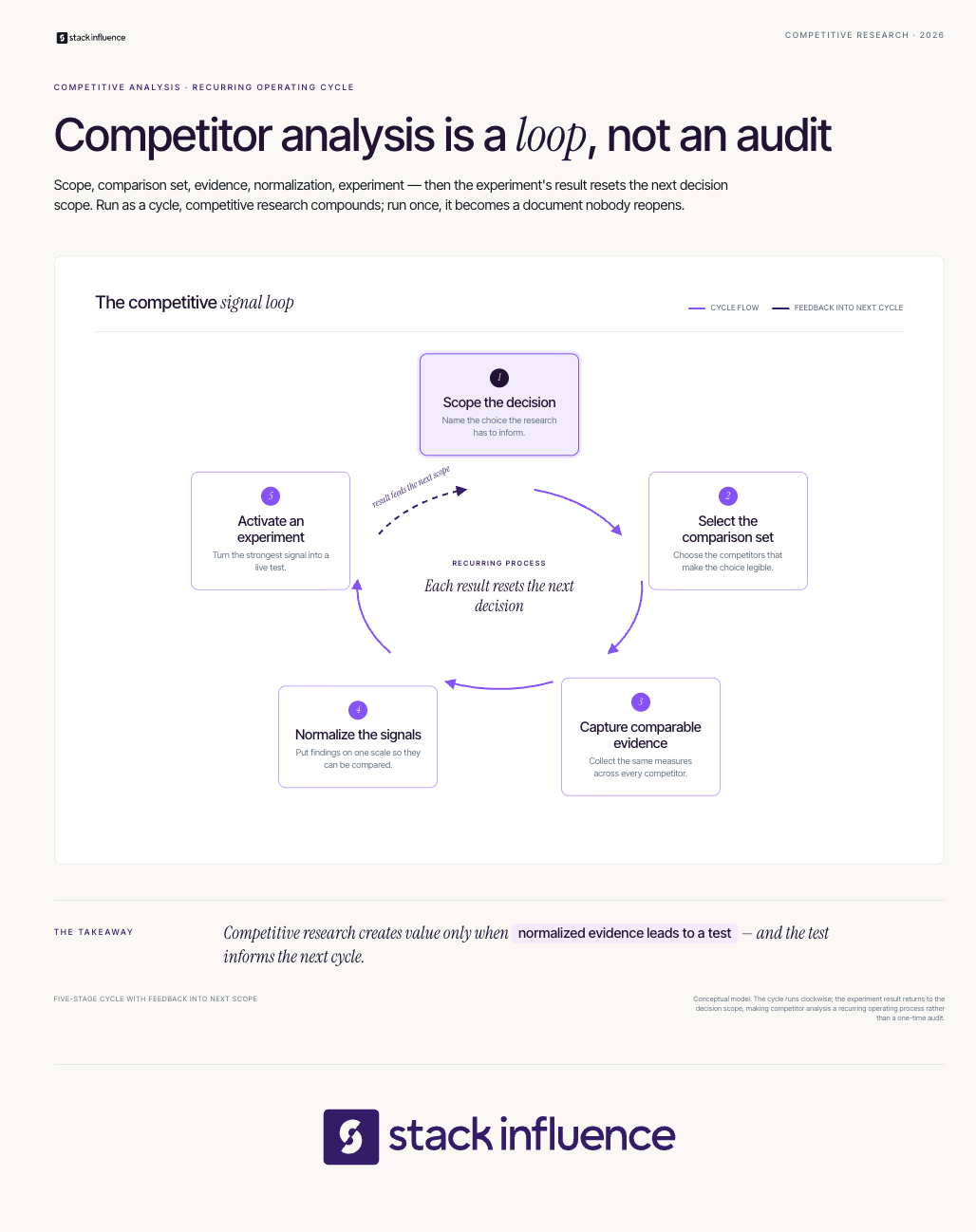
Analyze a compact portfolio of competitors that explains both your commercial market and your audience’s attention market. A practical starting set includes three direct competitors, two adjacent brands, one attention leader, and one emerging challenger. The exact number matters less than choosing accounts that answer different strategic questions.
Use four competitor types:
Pair larger reference brands with closer operational peers. A global company’s media budget, celebrity access, or distribution advantage may make its visible results difficult to reproduce.
Ecommerce teams should connect social research with marketplace research. The same competitor may use creator videos to generate awareness, search ads to capture demand, and optimized marketplace listings to convert it. A broader Amazon competitor analysis can reveal whether the social strategy aligns with pricing, reviews, keywords, and product positioning.
Collect data that explains a competitor’s publishing system, creative choices, audience response, paid support, creator activity, and conversion path. Follower count alone is not enough. The evidence set should show what the competitor repeatedly does, how people respond, and what action the content appears designed to produce.
Capture the following fields for each account:
Use platform-native sources before relying on third-party estimates. Meta’s Ad Library shows ads currently running across Meta technologies, while TikTok’s Top Ads dashboard surfaces high-performing auction ads that can be filtered by variables such as region and objective. These tools help separate an organic content pattern from a creative idea receiving paid distribution.
LinkedIn Page admins can use competitor analytics to compare follower and organic content metrics and review trending competitor posts from the prior 30 days. On YouTube, the Audience tab can show what your own viewers watch outside your channel, which helps identify attention competitors and collaboration opportunities.
A guide to social media listening tools can help teams capture recurring complaints, category phrases, product requests, and shifts in audience conversation that profile metrics miss.
Normalization is what turns a spreadsheet into analysis. Without it, a team may compare a boosted video with an organic carousel, an established account with a new challenger, or a follower-based engagement rate with an impression-based rate and reach the wrong conclusion.
Use consistent formulas and label every denominator:
LinkedIn defines Page engagement rate as interactions divided by impressions, with interactions including clicks, reactions, comments, and shares. That definition should not be compared directly with a tool using followers as the denominator.
Apply the same discipline to trend data. Google explains that Google Trends data is normalized by time and location and then scaled from 0 to 100. It reflects relative search interest, not absolute search volume, and Google recommends treating it as one data point rather than proof that a topic is “winning.”
A useful social media analytics dashboard should record the formula, source, date range, and data-access limitation beside every metric. That small habit prevents false precision later.
Strong competitor analysis explains why a content pattern may work. It does not stop at “Reels performed well” or “this post went viral.” The analyst should code the strategic components inside the post.
Evaluate each content sample through eight lenses:
This coding method exposes reusable principles without copying surface details. The real lesson may be a fast demonstration, a specific objection, and a realistic use setting rather than a particular audio track or visual style.
For ecommerce teams, the broader ecommerce social media marketing workflow helps connect those creative choices to discovery and conversion. The relationship between micro-influencers and UGC in ecommerce is especially important because creator content can appear on creator profiles, brand feeds, ads, product pages, and marketplaces.
Turn every meaningful finding into a written hypothesis, a controlled test, a success rule, and a follow-up decision. A competitor pattern is not a strategy until your team explains why it may work for your audience and designs a test that can confirm, reject, or refine that explanation.
Use this four-part conversion:
For example, an observation might be that several competitors use customer-style product demonstrations in their most discussed posts. The hypothesis could be that realistic use reduces uncertainty better than polished product photography. The test would compare a creator-led demonstration with the brand’s standard creative while using the same product, offer, audience, and measurement window.
An influencer seeding workflow for ecommerce can turn that hypothesis into a repeatable creator test rather than a one-off post. The result should still be evaluated on its own evidence, not assumed from competitor performance.
Most basic audits undercount the system behind a competitor’s feed. A brand may support organic posts with paid media, distribute products to UGC creators, activate brand ambassadors, sponsor micro-influencers, syndicate creator content, or direct traffic to Amazon, Shopify, and retail partners.
Classify creator posts carefully. The FTC’s disclosure guidance for social media influencers states that a material connection can include payment, employment, a family relationship, or free or discounted products. Meta also requires the paid partnership label for organic branded content on Instagram. A visible disclosure is useful evidence, but the absence of one does not prove that a post had no commercial relationship.
Influencer marketing and competitor analysis intersect at the surrounding creator network. Track:
Stack Influence is a micro-influencer marketing platform built around gifted-first product seeding, vetted creator activation, campaign coordination, UGC generation, and completed-post accountability. Its workflow is designed for ecommerce brands that want to move from a competitive insight, such as insufficient real-world product demonstrations, into a structured creator-content program.
The Magic Spoon case study shows why the scorecard should extend beyond social engagement. During a 12-month hero-product campaign, 3,448 creator promotions generated 5.82 million social impressions and 211,000 engagements. Average monthly unit sales increased from 1,937 to 7,867 during the measured campaign period, while Amazon Best Seller Rank moved from #828 to #181. These outcomes occurred during the campaign and should not be treated as a forecast for another brand.
Additional Stack Influence customer stories show how creator volume, engagement, marketplace rank, and sales can be reported together.

Measure competitor performance with a four-layer scorecard covering delivery, resonance, intent, and business outcomes. Public competitor data is strongest at the first two layers and weakest at the final two. Treat unavailable conversion data as unknown, not as permission to invent an estimate or assume that visible engagement produced profit.
Use four measurement layers:
Attribution is strongest when your own campaign uses tagged links, platform reporting, creator-specific identifiers, controlled landing pages, and a defined baseline. The guide to tracking influencer-driven leads and sales explains how awareness and conversion signals can be connected without claiming that one visible metric caused the final result.
Use a 30-day view for creative decisions and a quarterly view for durable shifts in positioning, creator activity, channel investment, and customer conversation. Keep the windows consistent across competitors.
A 30-day cycle can establish a comparable baseline while producing an immediate content decision. Later cycles become faster once the competitor set, coding rules, formulas, and reporting format are established.
Choose one business question, such as which creative format to test for a launch or which audience objection deserves more content. Confirm the competitor set, platforms, date range, metric definitions, and your own baseline.
Collect the agreed content sample for every account. Code each post by topic, hook, format, proof, creator role, CTA, offer, and audience response. Save links and screenshots with dates because posts, captions, and ad status can change.
Calculate normalized metrics, identify repeated creative structures, read comments, and separate paid from organic signals. Prioritize patterns that appear across multiple posts or competitors rather than one viral outlier.
Run one or two focused experiments with predetermined success rules. Record what changed, what stayed constant, what happened, and what the team will do next. A clear reporting cadence is more valuable than a large dashboard nobody uses.
Keep the scorecard connected to the content calendar, creator pipeline, campaign briefs, and measurement dashboard.
The most damaging mistakes make a polished report look more certain than the evidence allows.
The purpose of social media competitor analysis is not to create a prettier benchmark deck. It is to reduce uncertainty before your team invests time, inventory, creator relationships, and media budget.
Choose a focused competitor set, collect comparable evidence, normalize the metrics, separate paid and organic activity, and turn the strongest pattern into a controlled experiment. For ecommerce brands that identify a creator-content gap, evaluating a managed Stack Influence product-seeding workflow can provide a practical next step toward vetted participation, completed UGC, and a more measurable campaign system.
An ecommerce brand can have a polished logo, a competitive product, and a full content calendar yet still sound interchangeable. The same problem affects content creators whose captions, pitches, and sponsored posts change personality every week. When the language is inconsistent, audiences must repeatedly work out who is speaking, what the speaker values, and whether the message feels credible.
Brand voice solves that problem by making communication recognizable without making every sentence identical. This guide shows ecommerce sellers and content creators how to define a voice, adapt it by situation, protect it across creator partnerships, and measure whether it improves recognition, clarity, trust, and commercial performance.
Brand voice is the consistent verbal personality a business or creator uses across communication. It governs word choice, sentence rhythm, point of view, humor, formality, and the values implied by a message. The voice stays recognizable, while tone changes to match the channel, situation, and audience's emotional state.
The American Marketing Association's branding definitions distinguish identity, positioning, and perception. Brand voice is the verbal layer that expresses those choices, determining whether a brand sounds practical, playful, exacting, reassuring, rebellious, or restrained.
Mailchimp's public voice-and-tone guide offers a useful distinction: voice remains relatively stable, but tone shifts with the reader's situation and emotional state. That is why a shipping-delay email should not sound like a product-launch caption, even though both should still feel as if they came from the same company.
Keep four related concepts separate:
This distinction becomes especially important when combining UGC and brand-generated content. Brand content can follow the company voice closely. Creator content should carry the same product truth and positioning while preserving the creator's own manner of speaking.
Brand voice matters because buyers and followers encounter a business through many disconnected moments. A recognizable verbal identity reduces friction across product pages, social posts, emails, support replies, creator videos, and marketplace listings. It also helps teams produce content faster because fewer decisions must be reinvented in every draft.
Nielsen Norman Group research on tone and brand perception found measurable differences in friendliness, trustworthiness, and willingness to recommend when only the wording style changed. In one bank comparison, a more conversational version increased friendliness by 0.7 points, trustworthiness by 0.3 points, and willingness to recommend by 0.4 points on five-point scales. The same research found that trustworthiness explained 52% of the variability in desirability, while friendliness added another 8%.
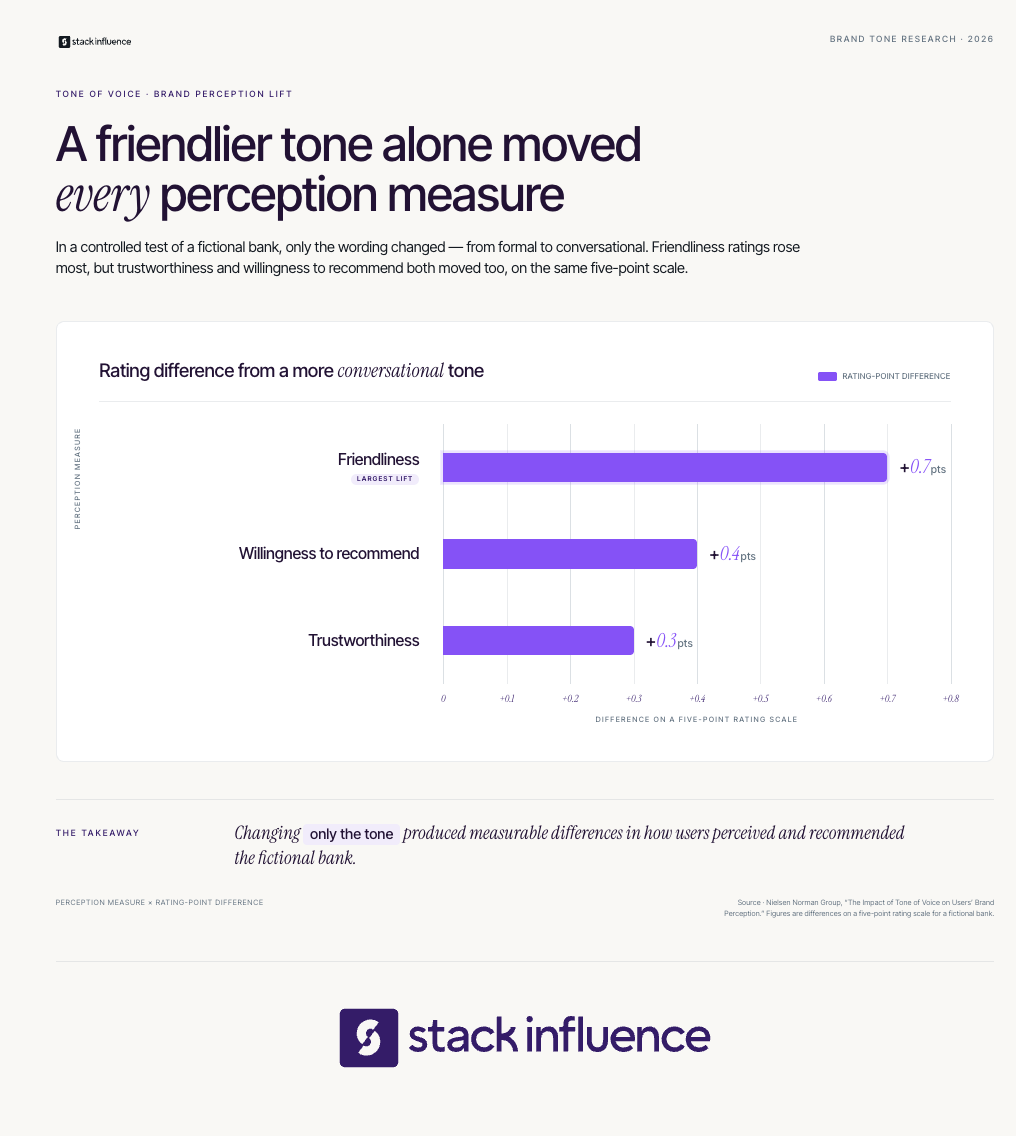
For ecommerce sellers and content creators, a useful brand voice creates five advantages:
The Brand Voice Operating System converts broad personality words into six components that guide content: audience reality, brand promise, personality boundaries, language rules, a tone matrix, and governance. Each component answers a different production question, so the system remains useful when a brand adds new products, channels, employees, agencies, or creator partnerships.
Design the voice around the audience's language, knowledge, concerns, and buying situation. Review support tickets, product reviews, search queries, creator comments, sales calls, and interviews. Record what people misunderstand, what creates hesitation, and what proof changes their mind.
The goal is not to imitate every phrase. It is to choose the clarity, formality, and reassurance the audience needs. The federal government's plain-language guidance similarly emphasizes writing for a specific audience and testing whether that audience understands the content.
The brand promise states the dependable change the product or creator helps the audience make. It should be narrower than a mission statement and more durable than a campaign slogan. A cookware seller might promise tools that make everyday cooking less complicated.
Use the promise to filter language. Dense technical phrasing contradicts a promise of simplicity, while vague superlatives weaken a promise of expertise. Every voice rule should make the promise easier to believe.
Choose three traits, then define what each is and is not. “Helpful, not patronizing,” “confident, not absolute,” and “playful, not careless” give contributors boundaries instead of vague adjectives.
Nielsen Norman Group's four tone-of-voice dimensions offer a calibration tool: formal or casual, serious or funny, respectful or irreverent, and matter-of-fact or enthusiastic. Place the brand on each spectrum, then note how it should shift in high-stakes situations.
Language rules translate personality into observable choices. Specify sentence length, point of view, contractions, technical vocabulary, capitalization, product terminology, banned clichés, and when humor is appropriate.
Microsoft's brand voice guidance shows how broad traits become concrete practices, including leading with the key point, using everyday words, avoiding jargon, and making next steps obvious.
Useful rules might include:
A tone matrix shows how the stable voice changes by situation. Record the audience's likely state, the goal, the tonal adjustment, and anything to avoid.
For example:
A voice guide needs an owner, approved examples, a revision process, and a record of what the team learns. Store strong and weak samples from product pages, emails, support replies, creator posts, and ads.
Review the guide quarterly or after a major audience, product, or positioning change. Update it when repeated evidence shows audience confusion, inconsistent interpretation, or a genuinely new communication context.
A usable brand voice guide should fit on one page before it expands into a larger style system. It needs enough detail to guide a writer or creator without requiring a branding workshop. Include the audience, promise, three bounded traits, language rules, tone shifts, approved examples, prohibited claims, and an owner.
Use this structure:
Consider a refillable home-care brand with three traits:
“Refill the bottle in under a minute and reuse it for the next clean” fits those traits. “Transform your entire life with our revolutionary refill” is inflated and asks the reader to accept more than the product proves.
For creator campaigns, convert the guide into an influencer brief. During the influencer outreach process, explain the product truth, audience, deliverable, rights, disclosure requirement, approval process, and creative freedom before acceptance.
The strongest creator brief locks the truth and releases the phrasing. The brand controls accurate product information, disclosures, prohibited claims, and the campaign objective. The creator controls the hook, pacing, examples, visual style, and natural vocabulary.
TikTok's analysis of more than 300 top Creator Marketplace videos found that high-engagement creator work tended to avoid rigid scripts, use a natural hook, apply trends selectively, and match the right community. The operational lesson is broader than TikTok: creator partnerships become less believable when the brand's preferred phrasing replaces the creator's established communication style.
Use three control layers:
Disclosure belongs in the fixed layer. The FTC endorsement and disclosure guidance explains that material connections between brands and endorsers should be disclosed clearly. A gifted product can create such a connection, so disclosure language should be planned before content is produced rather than added as an afterthought.
This balance is especially important in influencer seeding, where the product itself is part of the value exchange. A repeatable influencer marketing strategy should preserve creator credibility while keeping claims, rights, logistics, and measurement consistent.
Stack Influence is built around gifted-first product seeding, vetted micro-influencer activation, creator coordination, UGC generation, and completed-post accountability. With roughly 600,000 vetted creators, concise message guardrails are more useful than scripting every individual expression.
During a verified 12-month Magic Spoon campaign, 3,448 creator promotions generated 5.82 million social impressions and 211,000 engagements, while average monthly unit sales increased from 1,937 to 7,867 during the measured period. The case study does not isolate brand voice as the cause, but it illustrates why scaled creator programs need messaging that survives many individual interpretations.

Brand voice should remain recognizable across channels, but its tone, density, structure, and pacing should change. A product page needs evidence and scanning clarity, while a short-form video needs a fast hook and natural speech. The governing personality stays stable; the delivery adapts to the audience's task and emotional state.
Use channel-specific rules:
A Shopify influencer marketing program may send audiences from creator content to a storefront, landing page, email sequence, and retargeting ad. The words should not be identical at every stage, but the promise, terminology, evidence standard, and personality should feel continuous.
Measure brand voice as a chain of effects rather than a single KPI. Start with whether people recognize the speaker and understand the message, then evaluate resonance, commercial behavior, and production efficiency. Use controlled tests and qualitative feedback because clicks or sales alone cannot explain whether the voice itself created the difference.
The Voice Measurement Stack includes five layers:
A creator or seller can organize performance in a social media analytics dashboard, while keeping sponsored, organic, affiliate, and brand-owned content in separate benchmark groups. A content tracking workflow should record the voice version, hook, format, audience, rights, and outcome.
Use a simple test protocol:
Treat correlation carefully. A creator post can coincide with higher traffic, sales, or marketplace rank without proving that wording caused the result. Brand voice measurement is strongest when controlled experiments, qualitative evidence, and commercial data point in the same direction.
Most brand voice failures come from weak implementation rather than a lack of creativity. Avoid these recurring problems:
The corrective principle is simple: define the stable truth, specify observable language choices, adapt tone to context, and keep learning from real audience response.
A small ecommerce team or independent creator can build and deploy a credible voice system in one month.
Collect 20 to 30 assets across product pages, emails, captions, support replies, creator collaborations, and ads. Mark what sounds distinctive, what creates confusion, and where the personality changes without a strategic reason.
Write the audience reality, promise, three bounded traits, language rules, tone matrix, and approved examples. Ask people outside the writing team to describe the personality they perceive.
Rewrite one product page, email, support reply, social post, and creator brief. Test recognition, comprehension, and performance where practical, then record disagreements that reveal unclear rules.
Publish the guide, assign an owner, update templates, and brief employees, freelancers, agencies, and creators. Schedule a quarterly review and define which measurements will trigger an update.
A strong brand voice is not a collection of clever phrases. It is a repeatable system that helps ecommerce sellers and content creators express a clear promise with recognizable personality, appropriate tone, credible evidence, and less production friction.
Start by auditing 20 existing assets, defining three traits with boundaries, and building a tone matrix for the moments your audience experiences most often. Then test the system on one product page and one creator brief. Once the language holds together at small scale, use it to guide product seeding, UGC, brand partnerships, and every customer touchpoint that follows.
This article was last updated on September 10th, 2026.
Social platforms have rewritten their rules more times in 2026 than most creators can keep track of, and the ones who spot each change first are the ones who ride it before everyone else catches on. A single algorithm tweak or new monetization feature can reshape what gets reach and what gets buried in a matter of days.
This is our running record of every major social media change in 2026, updated all year with the latest platform news, feature releases, and creator economy trends. Newest updates sit at the top, so you can scan what just happened or scroll back through the full year.
Want the biggest moves as they break? The Creator Chronicle drops every Thursday. Subscribe and get it in your inbox first.
The social media landscape will keep shifting through the rest of 2026, which is exactly why this page exists. Bookmark it and check back throughout the year for every platform update, algorithm change, and creator economy trend as it happens, all in one place.
If part of your growth plan is landing brand collaborations, Stack Influence matches creators with brands through gifted product campaigns, no paid sponsorships, just free products in exchange for authentic content. It is one more way to turn a growing audience into real partnerships.
Get the biggest moves before they hit this page: subscribe to the Creator Chronicle, every Thursday.
This article was last updated on July 23rd, 2026.
Social platforms rewrite their rules constantly, and the creators who spot a change first are the ones who ride it before everyone else catches on. A single algorithm tweak or new monetization feature can reshape what gets reach and what gets buried in a matter of days.
This guide is updated every week with the latest social media news, feature releases, and creator economy trends, so you have one place to check what actually moved. New items go to the top as they happen.
Want it before it lands here? The Creator Chronicle drops every Thursday with the week's biggest platform shifts. Subscribe and get it in your inbox first.
Also worth bookmarking:
Social media news moves faster than any single creator can track alone, which is exactly why this page exists. Bookmark it and check back each week for the latest platform updates, algorithm shifts, and creator economy trends before they filter out to everyone else.
If part of your growth plan is landing brand collaborations, Stack Influence matches creators with brands through gifted product campaigns, no paid sponsorships, just free products in exchange for authentic content. It is one more way to turn a growing audience into real partnerships.
Get the week's biggest moves before they hit this page: subscribe to the Creator Chronicle, every Thursday.
This article was last updated on August 2nd, 2026.
Marketplace rules and platform features shift almost weekly, and a single title-length cap or fee change can quietly erode margin or bury a listing that was ranking fine yesterday. Staying current is how sellers protect both their profit and their search position.
This guide is updated every week with the latest eCommerce news and seller-relevant platform changes, from Amazon seller news to TikTok Shop updates and broader eCommerce trends. New items land at the top as they break.
Want these updates delivered as they happen instead of waiting for them to hit this page? Subscribe to The Merchant Memo and get it in your inbox first.
Also worth bookmarking:
This page grows every week, so the deeper into the year we get, the more useful it becomes as a single scan of the marketplace, fee, and platform changes that actually move the needle for sellers. Bookmark it and check back after each weekly update lands.
If you're a seller looking to fill the gap between organic reach and paid ads, worth noting: Stack Influence connects Amazon and Shopify brands with everyday creators for gifted-product collaborations, a workflow that touches several of the trends covered above, from social platforms becoming commerce channels to brands leaning harder on creators for distribution.
Want every update like this as it happens, rather than waiting for it to hit this page? Subscribe to The Merchant Memo for the weekly version.