




Amazon storefront creation begins with a distinction that many guides miss: Amazon uses “storefront” to describe two different products. Ecommerce sellers can build a Brand Store for their own catalog, while approved content creators can build an Influencer storefront containing products they recommend.
Those storefronts have different eligibility rules, ownership models, revenue goals, and analytics. This guide explains both paths, then shows sellers and creators how to structure, launch, promote, and measure a storefront that helps shoppers make their next decision.
Key Takeaways
- Amazon Brand Stores belong to eligible brands, while Influencer storefronts belong to approved creators.
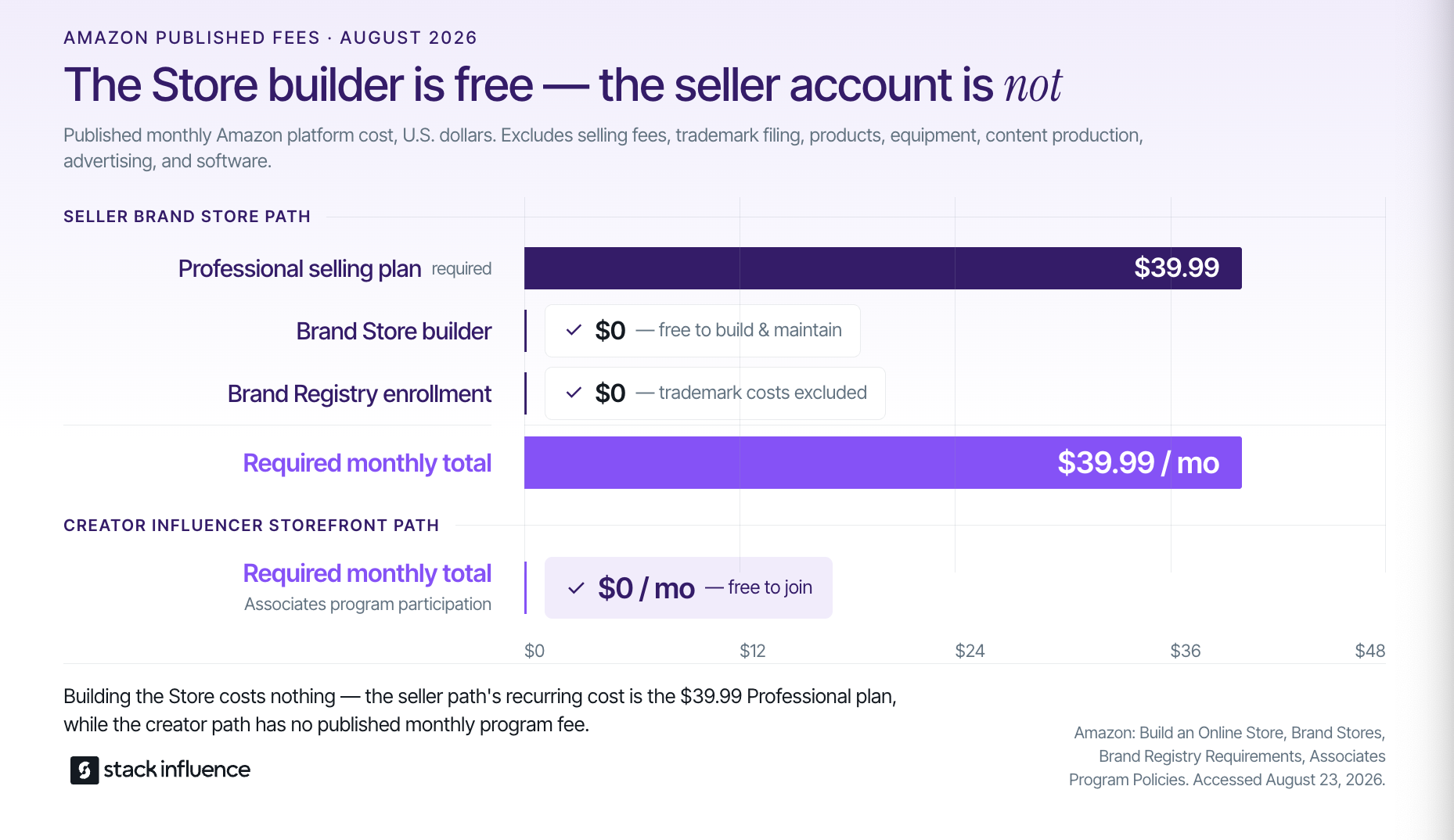
- The Brand Store builder is free, but sellers need a Professional selling plan that currently costs $39.99 per month plus selling fees.
- Effective storefronts organize products around shopper needs instead of displaying an undifferentiated catalog.
- Sellers should create source tags, and creators should organize tracking IDs, before sending traffic.
- Storefront creation is not a one-time design project. Amazon’s published data supports reviewing and refreshing Brand Stores within 90 days.
Amazon Storefront Creation Starts With the Right Store Type

A seller Brand Store and a creator Influencer storefront may look similar to shoppers, but they perform different jobs. Amazon describes Brand Stores as free, multi-page brand destinations for Brand Registry sellers, vendors, and agencies. The Amazon Influencer Program gives approved creators a customizable page for curating recommendations and earning commissions.
- Seller Brand Store: A brand-owned shopping destination containing the seller’s products, brand story, category pages, product collections, videos, and Store Insights.
- Creator Influencer storefront: A creator-owned recommendation destination containing Idea Lists, photos, videos, livestreams, and products from multiple brands.
- Amazon affiliate links: Tracked links that may point to individual products without requiring the affiliate to operate an Influencer storefront.
Creators deciding between the last two models can use this Amazon affiliate versus influencer comparison to understand how direct links, storefront curation, and creator commissions fit together.
The published recurring platform costs are also different. Amazon currently lists its Professional selling plan at $39.99 per month plus selling fees, while creating and maintaining the Brand Store itself costs $0. Brand Registry is free, although obtaining a trademark can create separate legal and filing costs. Amazon’s Associates policies state that the program is free to join, so the creator storefront path has no published monthly program fee.
Ownership matters after launch. A seller controls its Brand Store, but a creator controls the creator’s Influencer storefront. A brand partnership may secure specific content deliverables or usage rights, but it does not automatically transfer ownership of the creator’s Amazon page, audience, or broader product recommendations.
The Storefront Decision Path
The Storefront Decision Path is a five-part framework for turning a storefront from a product collection into a usable shopping destination. It applies to both brands and creators, although each storefront uses different content and reporting tools.
- Arrival Promise: Tell visitors immediately what they will find. A seller might lead with a product benefit, while a creator might define the audience or use case behind the recommendations.
- Orientation: Give visitors recognizable paths into the catalog. Nielsen Norman Group’s menu-design research recommends clear, specific, familiar wording rather than clever or internally defined labels.
- Evidence: Show products in context through demonstrations, comparisons, use cases, customer-focused explanations, or properly licensed UGC. Evidence should answer a buying question instead of merely decorating the page.
- Selection: Help shoppers narrow their options. Baymard Institute describes an ecommerce category page as an orientation hub that guides shoppers toward the right subcategory or product type.
- Measurement: Assign trackable traffic sources before promotion begins. Sellers can use Brand Store source tags, while creators can separate campaigns or channels through available tracking IDs and Associates reports.
For a skincare seller, the path might move from “Sensitive-Skin Essentials” to cleanser, moisturizer, and treatment pages. For a home creator, it might move from “Small-Space Organization” to kitchen, closet, bathroom, and renter-friendly Idea Lists.
The framework prevents a common mistake: treating product quantity as proof of storefront quality. A useful storefront reduces decision effort. A large storefront without orientation can increase it.
How Do Sellers Create an Amazon Brand Store?
Amazon sellers create a Brand Store by using a Professional selling plan, enrolling an eligible brand in Brand Registry, building pages through Amazon’s Store builder, previewing the mobile and desktop experiences, and submitting the finished store for moderation. The builder is no-code, but account, trademark, branding, and catalog requirements come first.
- Confirm the selling account and catalog. Amazon’s seller storefront guide lists a Professional selling plan, Brand Registry enrollment, Amazon Ads registration, eligible product listings, and Store design as the main setup sequence.
- Complete Brand Registry eligibility. Amazon’s current Brand Registry requirements include a pending or registered eligible trademark, matching brand information, product categories, and an image showing the brand name permanently affixed to the product or packaging. Amazon warns that removable stickers, digital mockups, and discrepancies between the application and trademark record can cause problems.
- Verify the trademark path. The USPTO trademark basics explain what trademarks protect and how the federal process works. Sellers should treat trademark registration as a legal and brand-protection process, not merely a box to check for Store access.
- Plan the page hierarchy before designing. Start with the homepage and add only the category, audience, need-state, hero-product, or seasonal pages that make product selection easier. The guide to building an Amazon brand explains how the Store fits into a broader brand system.
- Build the Store. Amazon’s Brand Store builder guidance instructs sellers to sign in to the advertising account, open Brand Content, select Stores, and choose Create Brand Store. Sellers can add a display name, a logo of at least 400 by 400 pixels, a Store description, templates, subpages, text, images, videos, and product collections.
- Test the shopping path on mobile. Preview every page on an actual phone, check image cropping and text size, and confirm that important categories remain visible without depending entirely on the collapsed mobile menu. Amazon reported that 78% of Brand Store visits came from mobile devices in Q1 2024.
- Submit the Store for moderation. Check product accuracy, spelling, image quality, links, inventory, and Amazon’s content acceptance policy before submission. Amazon says moderation can take up to 24 hours, although Brand Registry enrollment and other account approvals are separate processes with their own timing.
Do not wait until launch day to decide where outside traffic should land. A broad creator campaign may need the homepage, while content focused on one product problem should usually link to the most relevant category page or product detail page.
How Do Content Creators Build an Influencer Storefront?
Content creators build an Influencer storefront by applying to the Amazon Influencer Program with an eligible social account, completing approval, configuring their public page, creating focused Idea Lists, adding useful shoppable content, and promoting tracked recommendations. Approval depends on Amazon’s assessment, not one universally guaranteed follower threshold.
- Apply through the Influencer Program. Amazon currently accepts Influencer Program applications connected to YouTube, Instagram, Facebook, or TikTok accounts. The program is an extension of Amazon Associates, but it adds a customizable storefront and creator-focused content tools.
- Prepare a public, original content profile. Amazon’s application review guidance says participating sites should contain robust original content and gives about 10 posts as a rule of thumb. Its general social-network guidance says pages should be established and have a substantive organic audience, “in most cases” at least 500 followers or likes. That wording is guidance, not a guaranteed Influencer Program approval formula.
- Set up the storefront identity. Choose a recognizable profile image, description, and positioning statement that match the social account used to build audience trust. Amazon generates the vanity storefront URL, and changes are generally handled through a manual request for qualifying reasons.
- Create shopping-specific Idea Lists. Amazon instructs creators to manage lists through the storefront owner view, where they can rename lists and add descriptions. Strong titles describe a situation or shopper need, such as “Dorm-Room Kitchen Basics,” rather than vague categories such as “My Favorites.”
- Add content that resolves uncertainty. Use photos and videos to demonstrate fit, scale, setup, texture, use, or a meaningful comparison. Amazon says approved videos appear on the creator storefront, and creators who upload 10 moderated videos and complete onsite-commission signup may also have relevant videos discovered on product detail pages.
- Disclose material relationships. Amazon’s disclosure guidance requires a clear, conspicuous disclosure near affiliate links or recommendations and requires the Amazon Associate identification statement. The FTC’s influencer disclosure guide also says creators should disclose free products, discounts, payments, and other relationships of value.
- Promote a relevant destination. Link to the entire storefront when followers need several recommendations, but send product-specific content to a focused Idea List or individual product when that route better matches the post. This guide explains how to add an Amazon link to an Instagram Story without making the follower search for the featured item.
A creator storefront should reflect the creator’s actual editorial point of view. Filling it with unrelated products may create more links, but it weakens the reason a follower would return for the next recommendation.
Design for Findability, Not Decoration
The strongest storefront designs make products easier to locate, compare, and understand. Large banners and polished UGC can support that goal, but visual production cannot compensate for confusing navigation or an unclear first screen.
For seller Brand Stores, a practical homepage order is:
- A short value proposition
- Category or use-case tiles
- Hero products or bestsellers
- Demonstration or proof content
- A clear route into the next relevant collection
Amazon recommends giving important categories homepage tiles because mobile navigation collapses into a dropdown. Its purchase-friction guidance also recommends eight products for a homepage product grid, since larger grids can create excessive scrolling on mobile.
For creator storefronts, list names should combine a recognizable product need with useful context. “Travel Tech Under $50,” “Beginner Home-Gym Equipment,” and “Products I Use for Curly Hair” communicate more than “Tech,” “Fitness,” or “Beauty.”
Sellers incorporating creator assets should also confirm usage rights, campaign terms, product accuracy, and Amazon content requirements before placing UGC in a Brand Store. An Amazon-compliant UGC guide can help teams separate content production from the rights and approval work required for reuse.
Connect Brand Stores and Creator Storefronts Without Confusing Ownership
Seller and creator storefronts work best as connected destinations, not interchangeable assets. The seller’s Brand Store organizes the brand catalog, while creator storefronts curate recommendations through an independent creator voice.
Before activating Amazon influencers, a seller should prepare:
- An accurate product detail page
- A usable Brand Store or relevant Store subpage
- Inventory for the campaign period
- Source-tag or attribution conventions
- A written content and usage-rights plan
- Clear disclosure instructions
- A process for checking live links and out-of-stock products
Stack Influence is a micro-influencer marketing platform built around gifted-first product seeding, vetted creator activation, campaign coordination, UGC generation, and completed-post accountability. Its approved company materials state that the platform works with roughly 600,000 vetted creators, helping ecommerce brands manage the execution layer between creator selection, product delivery, content completion, and campaign tracking.
Brands can use this guide to start finding Amazon influencers and their storefronts, then evaluate a managed Amazon creator campaign workflow when creator sourcing, product seeding, communication, and completion tracking need to operate as one process.
The operational sequence matters. Finish the retail destination first, assign the measurement route second, activate creators third, and refresh the Store with approved assets after performance and content quality can be evaluated.
Measure With the Storefront Signal Ladder
The Storefront Signal Ladder separates early behavior from business outcomes. It prevents sellers and creators from treating one click, one sale, or one short reporting window as a complete performance explanation.
- Acquisition signals: Tagged Store visits, creator clicks, traffic sources, and channel-specific tracking IDs show whether promotion generated attention.
- Navigation signals: Pages per visitor, list engagement, category-page visits, and product clicks show whether visitors found a useful route.
- Commerce signals: Ordered items, shipped items, conversion rate, units, sales, and commission income show whether browsing became a measurable transaction.
- Maintenance signals: Out-of-stock items, stale collections, low-converting pages, broken routes, and time since the last refresh indicate whether the storefront still matches the traffic being sent.
Amazon Brand Store Insights includes visitors, visits, views per visitor, first-time Store visitors, orders, units, and estimated sales generated within 14 days of a visitor’s last Store visit. Source tags can be created for different marketing routes, with no stated quantity limit or expiration.
Amazon Associates reporting surfaces clicks, ordered items, shipped items, conversion rates, earnings, and performance by Tracking ID. Creators should separate recurring channels or campaigns when possible so a high-performing Instagram Story, YouTube description, or email placement does not disappear inside one blended total.
Sellers measuring off-Amazon campaigns can use an Amazon Attribution guide to plan tagged paths beyond Store Insights. Teams using paid Amazon traffic should also connect landing-page decisions to the wider Amazon marketing services workflow.
Amazon currently publishes two related 90-day Store-refresh benchmarks. One official optimization guide reports that Brand Stores updated within 90 days had 11% more repeat visitors and 13% higher attributed sales per visitor, based on Amazon internal 2024 data. Another official purchase-friction guide reports 9% more repeat visitors and 10% higher attributed sales per visitor, based on Amazon internal global data dated October 24, 2024.
The defensible synthesis is a directional range: 9% to 11% more repeat visitors and 10% to 13% higher attributed sales per visitor in Amazon’s reported comparisons. Those figures show an association with recent Store updates, not a guaranteed lift or proof that refreshing alone caused the difference.
Use this review cadence:
- Launch day: Record the page structure, featured products, inventory state, source tags, tracking IDs, and baseline metrics.
- After 14 days: Review the first meaningful seller attribution window without treating incomplete data as a final result.
- After 30 days: Compare traffic sources, pages, Idea Lists, product clicks, and commerce outcomes.
- Before 90 days: Refresh stale messaging, seasonal products, unavailable items, low-performing routes, and approved content.
Attribution becomes less certain when price changes, ad spend, inventory, reviews, seasonality, creator output, or promotions change simultaneously. Treat the reporting chain as evidence for decisions, not automatic proof of causation.
Common Amazon Storefront Creation Mistakes
Most storefront problems begin before the design is submitted. They come from selecting the wrong store type, failing to define the shopper’s next decision, or sending traffic without a measurement plan.
Avoid these mistakes:
- Using “Amazon storefront” without specifying Brand Store or Influencer storefront
- Applying with an incomplete, private, or inconsistent creator profile
- Starting seller Store work before Brand Registry requirements are ready
- Naming pages with internal product language shoppers may not recognize
- Sending every campaign to the homepage
- Designing on desktop without testing the live mobile sequence
- Publishing creator recommendations without required disclosures
- Assuming a creator partnership transfers unlimited content rights
- Combining every traffic source under one tag or Tracking ID
- Leaving unavailable, seasonal, or irrelevant products live indefinitely
- Treating attributed sales as proof that one isolated action caused the result
A storefront should become easier to use as the catalog grows. If every new product makes navigation harder, the architecture needs revision before more traffic arrives.
Amazon Storefront Launch Checklist
- Confirm whether the project is a seller Brand Store or creator Influencer storefront.
- Verify the required account, program, trademark, and approval status.
- Write a one-sentence arrival promise.
- Organize products by shopper need, category, or use case.
- Test every page, list, image, video, and link on mobile.
- Add compliant affiliate and brand-partnership disclosures.
- Create source tags or tracking conventions before promotion.
- Record baseline metrics on launch day.
- Assign a 14-day, 30-day, and pre-90-day review cadence.
- Remove stale claims, expired promotions, and unavailable products.
Build the Storefront Around the Next Decision
Successful Amazon storefront creation is not primarily about filling a template. Sellers need a Brand Store that explains and organizes their catalog, while content creators need an Influencer storefront that turns trusted recommendations into focused shopping paths.
Choose the correct storefront type, build around recognizable buyer needs, connect every traffic source to a measurement convention, and keep the destination current. Sellers planning creator-led traffic can then evaluate whether managed product seeding and campaign coordination would help turn storefront readiness into consistent creator participation and reusable content.