
The latest info on influencer marketing trends, micro influencer news, and the world of social media

Instagram has more than two billion monthly active users, but the creators earning consistently from the platform are not the ones with the biggest followings. They are the ones with the clearest strategy. A strong Instagram marketing strategy in 2026 is not about posting more often or chasing every new feature. It is about understanding which content formats drive which outcomes, how to convert an engaged audience into brand partnership income, and how to measure your performance in a way that gives you real leverage when negotiating with brands. This guide builds that strategy from the ground up for content creators who want to grow their income alongside their audience, whether they are nano influencers just finding their niche or micro influencers ready to scale their brand deal pipeline.

Most Instagram strategy advice is written for brand accounts trying to acquire customers. For content creators, the strategic objective is different: you are building an audience and simultaneously building the business case for brands to pay you to reach that audience. Those two goals are related but not identical, and conflating them produces a strategy that does neither particularly well.
The distinction matters because the content choices that maximize follower growth are not always the same choices that maximize brand partnership income. Viral Reels grow your follower count. Niche-specific carousel posts establish your authority. Story sequences with direct calls to action demonstrate your conversion capability. A strong Instagram marketing strategy for creators deliberately uses all three formats for their distinct purposes rather than defaulting to whatever format is trending.
Three reasons the business layer of your Instagram strategy matters as much as the content layer:
The three primary content formats on Instagram, Reels, carousels, and Stories, serve distinct algorithmic and audience functions. A high-performing Instagram marketing strategy distributes content intentionally across all three rather than concentrating effort on a single format.
Reels remain Instagram's highest-reach format in 2026. The algorithm distributes Reels to non-followers based on engagement signals, which makes them the primary discovery tool for growing your audience beyond your existing follower base. According to Meta's own research, Reels with clear audio, on-screen text, and a hook in the first two seconds consistently outperform those without, regardless of production quality or creator account size.
A practical content mix for creators building an Instagram marketing strategy with both growth and monetization objectives:
Stack Influence's internal campaign data shows that creators running a balanced content mix across Reels, carousels, and Stories generate 55% more inbound brand partnership inquiries than creators who post exclusively in one format, because their content demonstrates range and consistent audience engagement rather than dependence on a single viral hit.
Attracting brand partnerships on Instagram is a positioning problem before it is a follower problem. Brands looking for influencers search by niche relevance, engagement quality, and content-brand alignment, not by raw follower count. Creators who optimize for those three signals consistently receive more inbound partnership interest than creators who focus exclusively on growing their numbers.
The Instagram Brand Deal Readiness Framework covers the five elements brands evaluate before extending a partnership offer. Use it to audit your current profile before you begin actively pitching:
Running through the Instagram Brand Deal Readiness Framework quarterly ensures your positioning keeps pace with your growth, because the criteria that made your profile attractive at 5,000 followers are different from what attracts premium brand deals at 50,000.

The relationship between content format and brand partnership income is less intuitive than most creators expect. The formats that attract the largest audiences are not always the formats that generate the highest brand deal rates. Understanding which formats brands value most for their campaign objectives helps creators prioritize their production effort more strategically.
Reels command the highest flat-fee rates for sponsored content because of their reach potential. A branded Reel from a micro influencer with a strong niche audience typically earns $300 to $1,500 per post depending on category and engagement rate. The reach amplification that Reels provide makes them attractive to brands trying to reach new audiences rather than just convert existing ones.
Carousels are underpriced relative to their performance for most [brand partnerships](INTERNAL: brand partnership rate negotiation guide). Because carousels drive higher save and share rates than most other formats, they generate extended organic distribution after the initial post, which means a sponsored carousel continues working for a brand long after a Reel has peaked. Creators who highlight the longevity of carousel engagement in their pitch often negotiate higher rates than the market default.
Stories are the highest-conversion format for brands with a direct response objective. A Story sequence with a product mention and a link sticker drives more trackable conversions per viewer than any other Instagram format. For [DTC brands](INTERNAL: DTC brand Instagram partnership strategy) running [product seeding](INTERNAL: product seeding strategy for Instagram creators) campaigns, Story content that demonstrates product use in a natural setting and includes a swipe-up or link action is the deliverable with the highest direct attribution value.
Based on Stack Influence's work with eCommerce brands, Instagram Story sequences with a product demonstration and a link sticker generate an average click-through rate of 8 to 12% among a creator's existing audience, compared to 1 to 3% for equivalent organic social ad traffic. That conversion differential is what makes Story placements increasingly valuable in brand deal negotiations despite being shorter and less production-intensive than Reels.
Without a measurement framework, an Instagram marketing strategy is just content production. With one, it becomes a business development tool. The Creator Performance Stack organizes the metrics that matter for creators into three tiers based on the decisions each tier informs.
The three tiers of the Creator Performance Stack:
According to Sprout Social's social media benchmark research, the average Instagram engagement rate across all account sizes is approximately 1.94%, which means creators consistently above 3% are performing meaningfully above the platform average. Presenting that context in brand partnership pitches reinforces your value without requiring a large absolute follower count to make the case.
Most Instagram marketing strategy guides still optimize for follower growth as the primary success metric. That framing made sense when Instagram's algorithm distributed content primarily to existing followers, and when brand deal rates were determined almost exclusively by follower count. Both of those conditions have changed significantly.
Instagram's algorithm in 2026 distributes content based on interest signals rather than follow relationships. A creator with 8,000 followers in a specific niche can achieve the same Reel reach as a creator with 80,000 followers if the content quality and retention signals are equivalent. This shift fundamentally changes the ROI calculation for nano influencers and micro influencers, because their content can now reach comparable audiences to much larger accounts without requiring equivalent follower counts.
Three specific shifts that change how creators should approach their Instagram marketing strategy in 2026:
Across campaigns managed on the Stack Influence platform, brands that incorporate creator-produced UGC into their Instagram paid ad campaigns see an average 30% improvement in click-through rate compared to campaigns using only brand-produced creative, reflecting the platform's preference for authentic, creator-native visual content in its ad delivery algorithm.
A strong Instagram marketing strategy for content creators in 2026 is built on three foundations: a deliberate content mix that serves discovery, engagement, and conversion simultaneously; a positioning strategy that makes you attractive to brand partnerships without requiring a massive follower count; and a measurement framework that gives you the performance data to negotiate from a position of evidence rather than assumption. The Instagram Brand Deal Readiness Framework and the Creator Performance Stack give you the operational structure to build both simultaneously.
If you are ready to add brand partnership income to your Instagram strategy, Stack Influence connects micro influencers and content creators with eCommerce brands running product seeding and creator campaigns, with no minimum follower requirement to get started.
TikTok Shop's affiliate program has quietly become one of the most accessible commission income streams available to content creators without a large following. While most affiliate programs require an established audience and a track record of link-driven conversions, the TikTok affiliate program is built directly into a platform where discovery happens algorithmically, not through subscriber counts. A video from a creator with 2,000 followers can generate thousands of product views and real commissions if the content connects with the right audience. For content creators evaluating how to build diversified income in 2026, understanding exactly how the TikTok affiliate program works, what it pays, and how to stack it with brand deals and product seeding creates a strategic income picture that most guides only cover halfway.
The TikTok affiliate program is TikTok Shop's creator monetization layer, allowing content creators to earn a commission on sales generated when their audience purchases products through tagged links in their TikTok content. It operates through the TikTok Shop affiliate portal, where creators browse available products, request samples or open plan access, and add product links to their videos, LIVE streams, and profile showcases.
When a viewer clicks a product link in a creator's video and completes a purchase within the attribution window, the creator earns the commission rate set by the seller for that product. Commissions are typically paid out after a return window closes, usually seven to fifteen days after the order is delivered. The creator never handles inventory, fulfillment, or customer service. Their role is purely content creation and audience engagement.
The four core components of how the TikTok affiliate program functions:
According to TikTok for Business research, TikTok users are 1.5 times more likely to immediately purchase something they discovered on TikTok compared to other platforms, which reflects the unique intent-to-purchase dynamic that makes the TikTok affiliate program viable even for creators with smaller audiences than traditional affiliate programs require.
Eligibility requirements for the TikTok affiliate program are more accessible than most comparable programs, but there are specific thresholds and account conditions that creators need to meet before accessing Shop affiliate features. Understanding exactly what is required prevents the frustration of setting up content around affiliate links before confirming your account qualifies.
The minimum eligibility requirements as of 2026:
Nano influencers and creators just crossing the 1,000-follower threshold should note that meeting the minimum requirement does not guarantee strong affiliate earnings. The TikTok algorithm rewards content quality and engagement consistency regardless of follower count, which means a creator who posts three highly engaging product videos per week will consistently outperform a creator with twice the followers who posts sporadically.
Earning consistent commission income from the TikTok affiliate program requires more than adding product links to your videos. It requires selecting the right products, building content that integrates the product naturally, and understanding the platform mechanics that determine whether your video reaches buyers or gets buried in the algorithm.
Use the TikTok Affiliate Income System as your operational framework. It covers five steps that separate creators who earn consistently from those who post affiliate content and wonder why nothing converts.
The five steps of the TikTok Affiliate Income System are:
From Stack Influence's experience running product seeding campaigns for eCommerce brands, creators who apply a structured product selection process similar to the TikTok Affiliate Income System generate 45% higher commission revenue per video than creators who add affiliate links reactively to content they were already planning to post. The intentionality of the product-content fit decision is the highest-leverage variable in affiliate income.
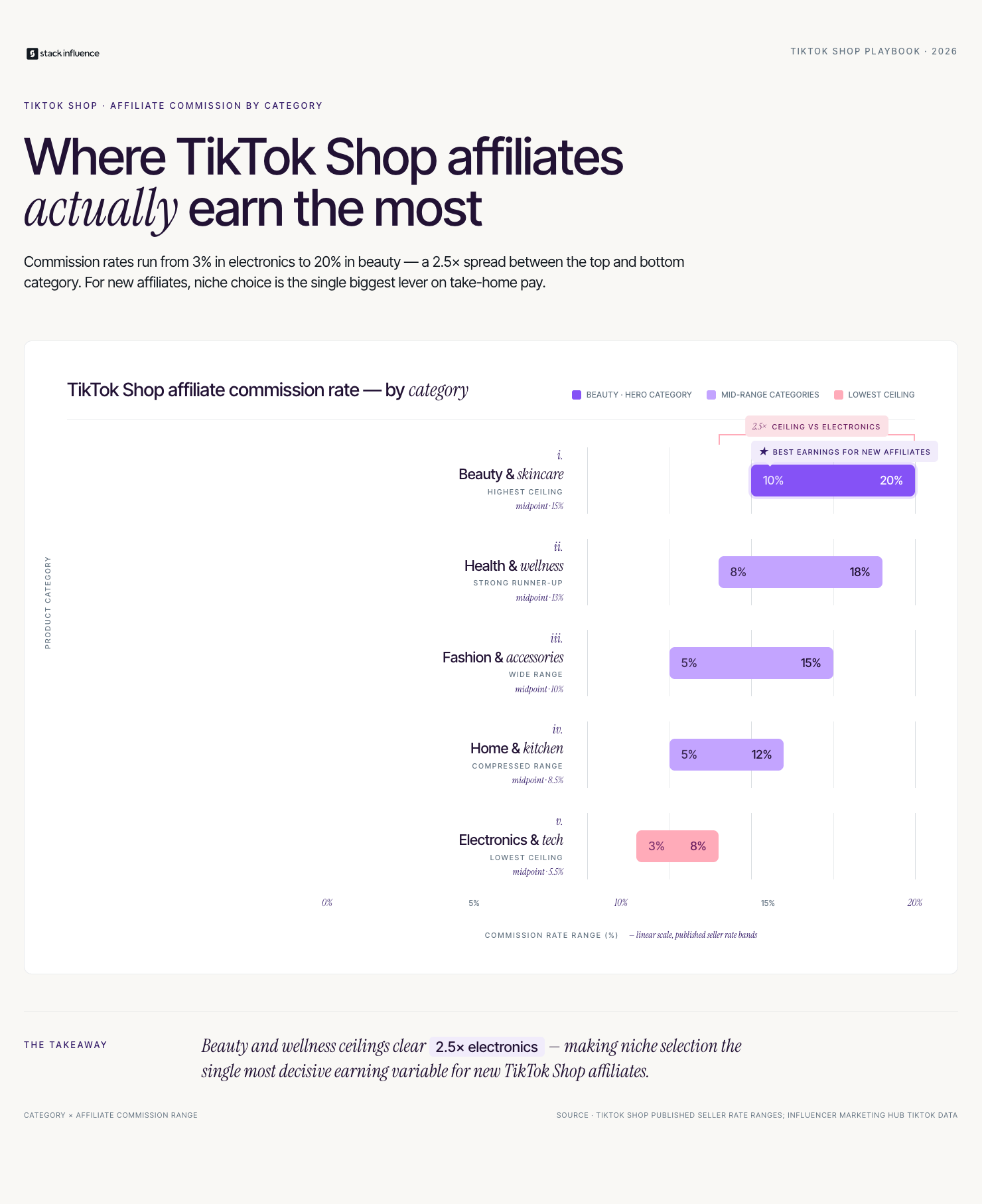
Commission rates in the TikTok affiliate program vary widely by category, seller, and plan type. Understanding the realistic earning range helps creators build an honest income model rather than optimistic projections based on the highest rates available in a small number of categories.
General commission rate ranges by category:
According to Influencer Marketing Hub's TikTok data, the average TikTok creator earns between $0.02 and $0.04 per view through the Creator Fund, which confirms that affiliate commissions and [brand deals](INTERNAL: brand deal income strategy for TikTok creators) are far more lucrative per piece of content than platform ad revenue for most creators. A single TikTok video driving 50 sales of a $40 beauty product at 15% commission generates $300 in commission income, compared to roughly $2 to $4 in Creator Fund revenue from the same number of views.
The most durable creator income structures in 2026 layer multiple revenue streams rather than optimizing for a single source. TikTok affiliate commissions are variable and algorithm-dependent. Brand sponsorships and [brand partnerships](INTERNAL: brand partnership income strategy for creators) are more predictable but require active pitching and relationship management. The combination of both creates a portfolio that earns even when individual streams underperform.
The strategic logic is straightforward. Your TikTok affiliate content establishes your conversion credibility. When a brand sees that your audience consistently clicks and buys from your product recommendations, your pitch for a paid sponsorship deal becomes significantly easier to close. You are not asking the brand to trust an engagement rate. You are showing them a proven conversion record.
Three ways to structure a combined TikTok affiliate and brand deal income approach:
Across campaigns managed on the Stack Influence platform, creators who layer product seeding income with TikTok affiliate commissions and a single anchor brand sponsorship reach a combined monthly income of $3,000 to $5,000 within six months of establishing all three streams, compared to creators pursuing only one income type who typically plateau under $1,000 per month at equivalent follower counts.

Most creators check their TikTok Shop earnings dashboard weekly and have no systematic way to improve what they see. A named measurement framework changes that by connecting content decisions to financial outcomes rather than treating commission income as a passive byproduct of posting.
Use the Creator Commission Stack to evaluate your TikTok affiliate performance across three dimensions:
Stack Influence's internal campaign data shows that creators who track Dimension 1 click-to-conversion rate monthly and use that data to prune underperforming products from their active affiliate portfolio increase their average monthly commission income by 30 to 40% within 90 days, simply by concentrating their content output on the products their audience already demonstrates a preference for purchasing.
For creators also running the Amazon Influencer Program alongside TikTok affiliate work, maintaining separate tracking dashboards for each program is essential. Amazon Attribution links track Amazon-specific conversions from any off-platform source including TikTok, and the Amazon Brand Referral Bonus can generate additional credits for brands whose products a creator promotes across both platforms simultaneously.
The most common framing error in TikTok affiliate program guides is treating the program as a standalone income strategy rather than as one component of a diversified creator income portfolio. Guides that position TikTok Shop affiliate as a path to full-time income without mentioning the volatility of algorithm-dependent commission revenue are setting creators up for income instability.
The second framing error is undervaluing the non-commission benefit of TikTok affiliate content. Every piece of affiliate content a creator produces is also a portfolio asset that demonstrates their ability to drive purchase decisions. That asset has value beyond the commission it generates. [Brands looking for influencers](INTERNAL: how brands find and hire influencers on TikTok) increasingly review a creator's TikTok Shop conversion history before extending paid sponsorship offers, which means affiliate content is building your business development case even when individual commissions are modest.
Three things other TikTok affiliate guides consistently leave out:
The TikTok affiliate program is a genuine and accessible income stream for content creators at every follower level, but its role in a sustainable creator income strategy is as a component, not a foundation. The TikTok Affiliate Income System gives you the operational structure to earn consistently rather than sporadically. The Creator Commission Stack gives you the measurement framework to improve your results with each 30-day cycle. And the combination of affiliate income with brand partnerships, product seeding, and UGC work builds the diversified income portfolio that makes the creator economy a real career rather than a side experiment.
If you are ready to add brand partnership income alongside your TikTok affiliate earnings, Stack Influence connects micro influencers and content creators with eCommerce brands running product seeding campaigns, with no minimum follower requirement to get started.
An invitation to Amazon Vendor Central sounds like a milestone. Amazon wants to buy your products wholesale and sell them directly to its customers, which means your listings get the "Ships from and sold by Amazon" badge, a trust signal that genuinely moves conversion rates. But the invite comes with trade-offs that catch brands off guard: Amazon sets your retail price, controls your inventory, and pays you on net terms that can stretch to 90 days. For eCommerce sellers evaluating whether to accept or pursue a vendor relationship, understanding exactly how Amazon Vendor Central works, how it compares to Seller Central, and what it means for your brand's long-term pricing and marketing control is the difference between a strategic upgrade and an expensive loss of leverage.
Amazon Vendor Central is the portal through which first-party (1P) sellers, brands that sell directly to Amazon as a wholesale supplier, manage their business relationship with the platform. When you sell through Vendor Central, Amazon is your customer. You receive purchase orders, fulfill them to Amazon's fulfillment centers, and receive payment at the negotiated wholesale price. Amazon then lists, prices, and sells the product to end consumers.
Access to Vendor Central is invitation-only. Amazon extends invitations based on brand scale, sales velocity in the third-party marketplace, category strategic value, and occasionally through direct outreach from Amazon's vendor recruitment teams. Brands cannot apply to join; they can only be invited. That exclusivity creates a perception of prestige that sometimes leads sellers to accept vendor terms without fully modeling the financial and operational implications.
The four things that define the Vendor Central relationship:
According to Jungle Scout's seller survey data, roughly 21% of Amazon sellers have some form of first-party vendor relationship, though many maintain concurrent Seller Central accounts. Understanding the structural mechanics of Vendor Central is the starting point for any brand evaluating whether the model fits their current stage.
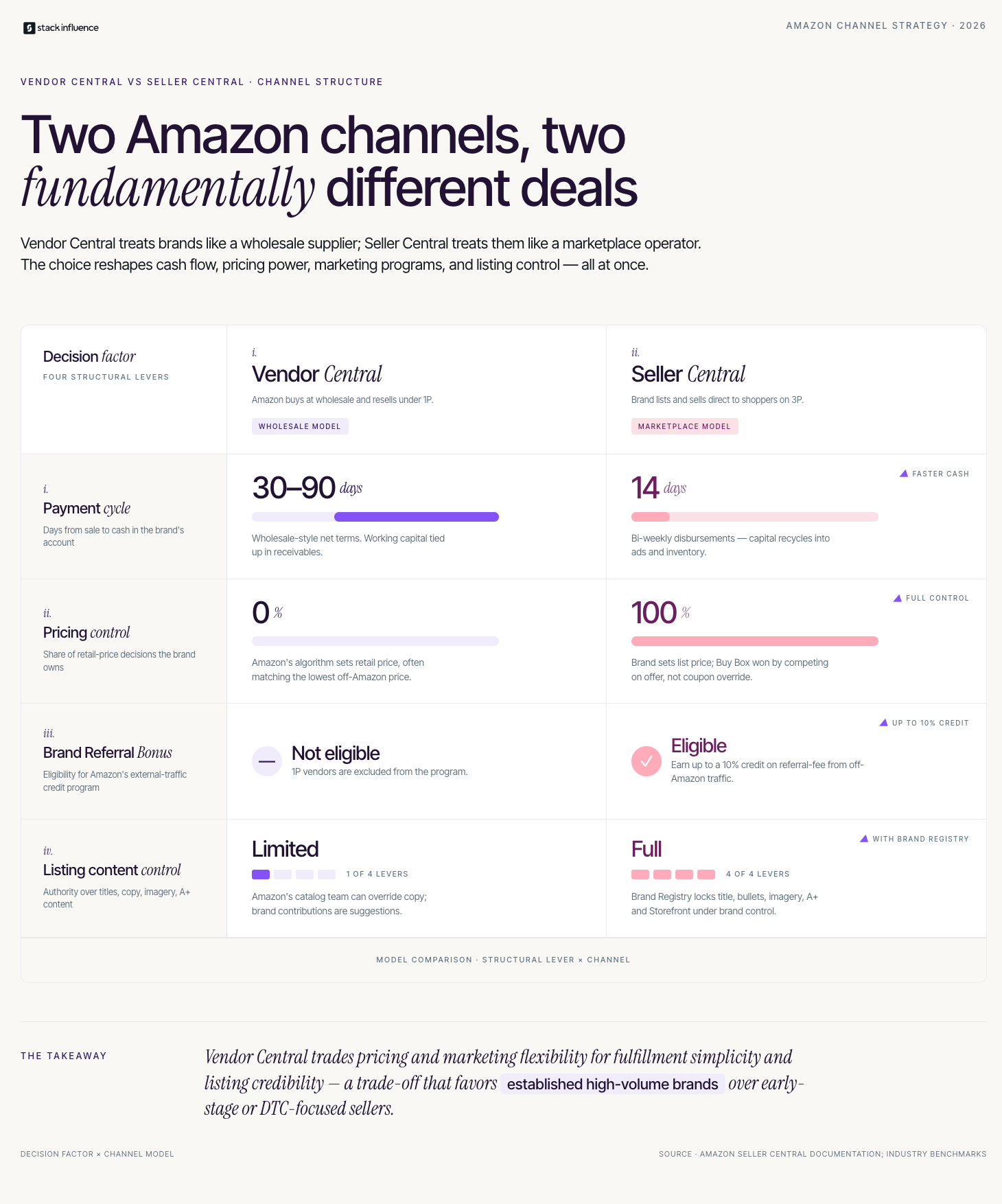
The Vendor Central versus Seller Central decision is one of the most consequential structural choices an Amazon brand makes, and it is rarely reversible in the short term once a vendor relationship is established. The comparison is not simply about fees versus wholesale margins. It is about control, cash flow, brand authority, and the ability to execute growth strategies that depend on platform flexibility.
Seller Central is the third-party (3P) marketplace where brands list products, set their own prices, manage their own inventory, and pay Amazon a referral fee on each sale. Brands either fulfill orders themselves or use Amazon FBA to outsource storage and shipping. The seller retains pricing authority, listing control, and the ability to participate in programs like the Amazon Brand Referral Bonus that reward external traffic generation.
The key decision factors when comparing the two models:
From Stack Influence's experience running creator campaigns for eCommerce brands, vendors who switch from Seller Central to Vendor Central without first modeling the Brand Referral Bonus impact frequently discover they have eliminated a 8 to 12% effective cost reduction on their external traffic investment that they can no longer recover. That loss compounds significantly for brands running active [micro influencer campaigns](INTERNAL: micro influencer marketing for Amazon sellers) driving meaningful external traffic volume.
Before accepting a Vendor Central invitation or actively pursuing one, brands should run through a structured evaluation. The Vendor Central Readiness Framework covers five dimensions that determine whether the first-party model creates or destroys value for your specific business situation.
The five dimensions of the Vendor Central Readiness Framework are:
Running through the Vendor Central Readiness Framework before any negotiations begin gives brands a documented position rather than an improvised response to Amazon's terms. The framework is most useful when shared across the finance, operations, and marketing functions simultaneously, because the decision affects all three in ways that no single department can fully evaluate alone.
Revisiting the Vendor Central Readiness Framework annually ensures that a decision that made sense at one stage of growth remains the right structural choice as your brand scales.
The invitation to Vendor Central arrives framed as an opportunity, and for some brands it genuinely is. For others, accepting without negotiation or financial modeling leads to a structural arrangement that is difficult to exit and that constrains the very growth strategies that made the brand attractive to Amazon in the first place.
The honest answer is that Vendor Central is right for a specific type of brand at a specific stage. It works well for brands with commodity or near-commodity products where pricing control is less critical, brands with strong enough volume to negotiate favorable wholesale margins and payment terms, and brands whose primary growth lever is retail shelf presence rather than brand-building and DTC differentiation.
Three scenarios where accepting a Vendor Central invitation makes strategic sense:
Across campaigns managed on the Stack Influence platform, brands that retain Seller Central accounts alongside their vendor relationships consistently outperform pure vendor brands on external traffic conversion, because the Seller Central account preserves Brand Referral Bonus eligibility and Amazon Attribution flexibility for creator and influencer campaigns. The hybrid model costs more to manage but produces measurably better economics on off-platform marketing investments.

Measurement in Vendor Central is structurally different from Seller Central in ways that affect how brands evaluate their marketing investments. Vendors access performance data through the Amazon Retail Analytics (ARA) dashboard, which provides shipped revenue, ordered revenue, glance views, and conversion rate data. However, the attribution capabilities available to Seller Central brands through Amazon Attribution are not natively available to pure Vendor Central accounts in the same form.
Use the Vendor Attribution Stack to build a complete performance picture despite those limitations:
Stack Influence's internal campaign data shows that brands maintaining a parallel Seller Central account for external traffic routing recover an average of 9% of their referral fees through the Amazon Brand Referral Bonus program on creator-driven traffic, a recovery that pure Vendor Central accounts cannot access. For brands spending $10,000 per month on creator and influencer traffic, that recovery represents roughly $900 in monthly fee credits that compound significantly over an annual campaign cycle.
Reviewing the Vendor Attribution Stack monthly keeps your performance picture complete and ensures your marketing budget allocation reflects actual channel economics rather than assumed ones.
Most guides to Amazon Vendor Central focus entirely on the operational and financial mechanics: how purchase orders work, how to avoid chargebacks, how to negotiate better wholesale margins. That focus is useful and necessary. What those guides consistently miss is the brand-building dimension, specifically how the vendor model affects your ability to run the external traffic and creator content strategies that drive organic rank improvement and long-term brand equity.
The core tension is this: Vendor Central optimizes for Amazon's retail efficiency, not for your brand's growth trajectory. Amazon wants predictable inventory and competitive pricing. Your brand wants pricing authority, DTC traffic, and the kind of authentic creator content that builds consumer trust beyond the Amazon marketplace. Those objectives are not impossible to pursue simultaneously, but they require deliberate structural decisions that vendor-only brands frequently do not make.
Three things other Vendor Central guides leave out of the brand-building conversation:
Amazon Vendor Central offers real advantages for the right brand at the right stage, but it is not the automatic upgrade it is often positioned as. The Vendor Central Readiness Framework gives you the structure to evaluate the decision honestly, the Vendor Attribution Stack gives you the measurement model to track performance accurately, and the hybrid model gives you the structural flexibility to preserve the marketing capabilities that drive long-term brand growth. For eCommerce sellers navigating the vendor decision, the goal is not to choose between Amazon Vendor Central and Seller Central as if only one can be right. It is to understand which model, or which combination of models, fits the specific economics and growth strategy of your brand right now.
If you are building the external traffic infrastructure that makes both vendor and seller accounts perform at their ceiling, Stack Influence connects eCommerce brands with micro influencers for product seeding campaigns that drive the organic search signals and creator content assets your Amazon listings need.
The number most salary guides quote for a content creator salary is technically accurate and practically useless. Averaging the earnings of a solo nano influencer with a 5,000-person TikTok following against a full-time YouTube creator with a million subscribers produces a midpoint that describes neither. What content creators actually need is a breakdown by income stream, audience size, niche, and platform, because those variables determine your real earning ceiling far more than any aggregate statistic. This guide gives you that breakdown. It covers what creators at different stages genuinely earn, which income streams produce the most reliable income, and what the data says about how to move your content creator salary from unpredictable to scalable.
Salary data for content creators is notoriously inconsistent because the profession does not fit neatly into employer-reported wage categories. The Bureau of Labor Statistics classifies many creators under broad media and arts categories that blend traditional roles with creator economy participants. Independent research gives a clearer picture. According to Influencer Marketing Hub's 2024 benchmark report, the global influencer marketing industry reached $24 billion in 2024, with a significant and growing share flowing directly to individual creators through brand partnerships and campaign fees.
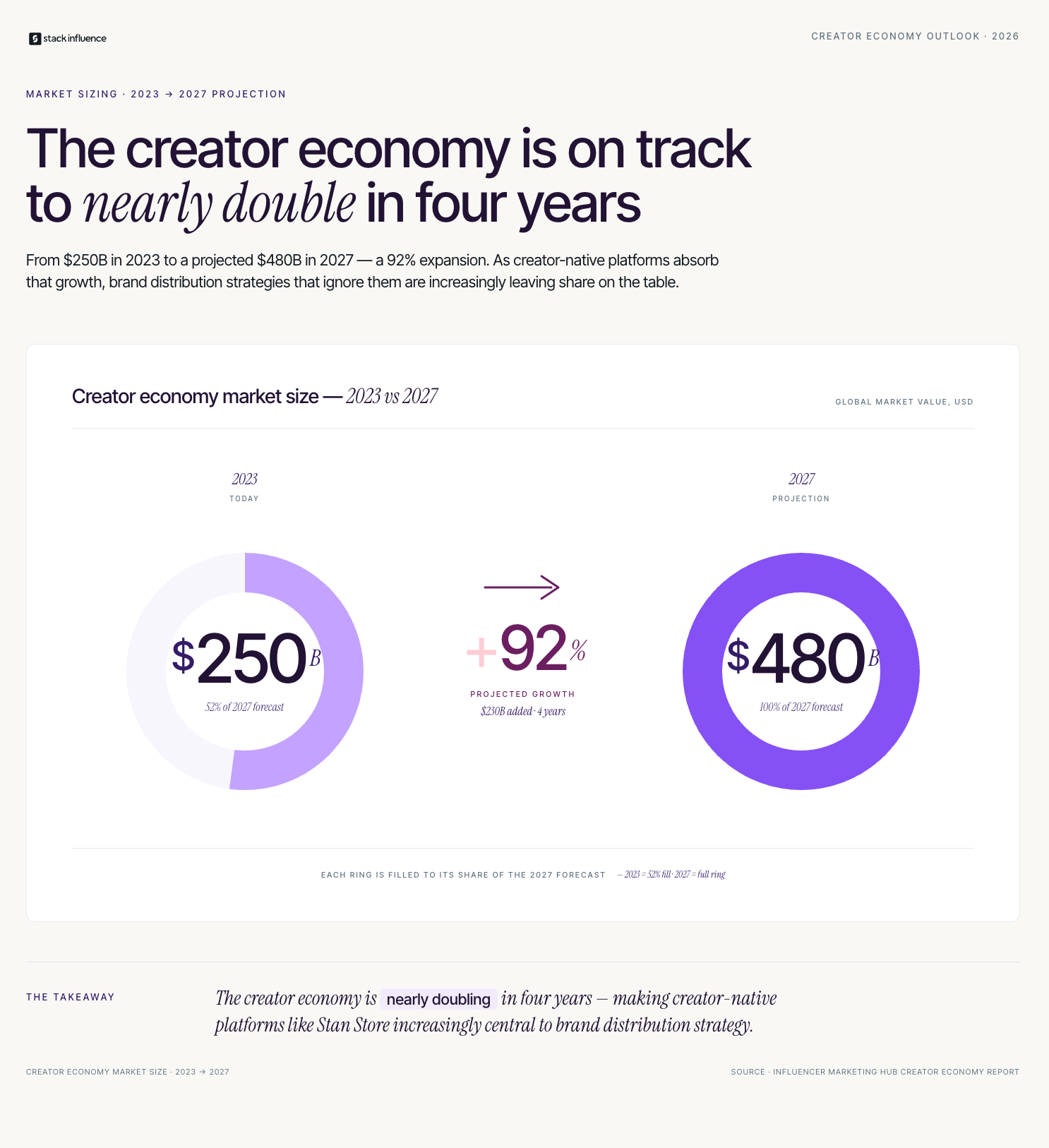
The creator economy itself is projected to reach $480 billion by 2027, according to Goldman Sachs research. That growth does not distribute evenly. Creators who have structured their income across multiple streams and positioned themselves clearly within a niche are capturing a disproportionate share of that spend. Understanding where the money actually flows is the first step toward building a content creator salary that reflects the market's current state.
Three factors driving content creator salary growth in 2026:

Breaking content creator salary down by audience size gives the most actionable picture because it maps directly to what brands are willing to pay and what platforms will pay you to reach. The four tiers below reflect real market rates rather than aspirational figures.
The Creator Income Tiers framework organizes earning potential by follower scale and income mix:
According to Linktree's Creator Report, only about 12 million of the 200 million global creators treat content creation as a full-time profession. The gap between those two numbers is primarily explained by the income challenge at Tier 1, where UGC work and early [brand partnerships](INTERNAL: brand partnership income strategy) are the bridges that make the jump to full-time sustainable.
Most guides to content creator salary focus on sponsored post rates and stop there. That framing understates the income available to creators who diversify strategically and overstates the importance of raw follower count in determining earning potential. The income streams below are ranked by accessibility for creators at different stages, not by maximum earning potential.
The Creator Income Tiers framework comes alive when you map specific income streams to each tier:
From Stack Influence's experience running influencer campaigns across eCommerce categories, creators who enter the brand partnership ecosystem through UGC work first and then transition to sponsored post deals typically reach their first $50,000 annual income milestone 40% faster than creators who pursue sponsorships exclusively from the start. The UGC portfolio builds both brand familiarity and conversion proof simultaneously.
How Do You Calculate and Track Your Own Content Creator Salary?
Most content creators cannot answer the question "what did you earn last month" without opening five different payment dashboards. That friction is not just inconvenient. It prevents creators from making informed decisions about which income streams to grow, which clients to prioritize, and when their total income justifies reducing hours at a day job.
Use the Creator Income Audit as your tracking framework. It has three components reviewed monthly:
Across campaigns managed on the Stack Influence platform, creators who track their income with a structured monthly audit increase their total annual earnings by an average of 25 to 35% within 12 months, primarily because the audit surfaces underpriced income streams and unprofitable client relationships that intuition alone does not catch reliably.
Revisiting the Creator Income Audit monthly keeps your content creator salary growing with intention rather than by chance.

Every guide to content creator salary covers sponsored posts, YouTube ad revenue, and affiliate marketing. Almost none of them give adequate attention to the income stream that is currently producing some of the most consistent and accessible earnings in the creator economy: paid UGC production for eCommerce brand advertising.
The distinction matters because this income stream does not require an audience at all. Brands running paid social ads, Amazon listing image updates, and email campaigns need a constant supply of authentic, human-generated video and photo content. They are paying creators to produce those assets, not to post them publicly. A creator with strong on-camera presence, reliable production quality, and a professional brief-following track record can earn $2,000 to $8,000 per month from UGC contracts with three to five consistent brand clients, without a single public follower requirement.
Three reasons UGC production income is underrepresented in content creator salary discussions:
Stack Influence has observed that eCommerce brands running [product seeding](INTERNAL: product seeding for creator income) campaigns consistently prioritize re-engagement with creators who submitted high-quality UGC over finding new creators, which means strong UGC producers build recurring income relationships rather than starting from zero for every campaign. That recurring relationship dynamic is what transforms a side income into a reliable content creator salary.
A realistic content creator salary in 2026 is not defined by any single platform, any single income stream, or any single follower count milestone. It is defined by how many income streams you have active simultaneously, how clearly you are positioned within a specific niche, and whether you are tracking the right numbers to make decisions that move your income forward rather than just hoping the next brand deal is bigger than the last. The Creator Income Tiers framework and the Creator Income Audit give you the structure to build a content creator salary that reflects what the market is actually willing to pay.
If you are ready to add consistent brand partnership income to your creator salary, Stack Influence connects content creators with eCommerce brands running product seeding campaigns, with no minimum follower requirement to get started.
Creators and eCommerce sellers are increasingly colliding in the same digital real estate, and Stan Store sits squarely at that intersection. If you have seen the link in a creator's bio and wondered what is Stan Store and whether it belongs in your brand's toolkit, you are asking the right question at the right time. Stan Store is a creator-focused storefront and digital product platform that lets individuals sell courses, memberships, bookings, and physical products directly from a single link. For eCommerce sellers exploring creator partnerships, DTC brands evaluating new distribution channels, and Amazon sellers building off-platform traffic systems, understanding what Stan Store is and how it functions changes how you think about creator monetization and brand collaboration. This guide breaks down the platform completely.
What Is Stan Store and Who Is It Built For?

Stan Store launched in 2020 and positioned itself as the creator economy's answer to the complexity of building a monetized online presence from scratch. The core premise is simple: a creator should be able to sell anything, digital courses, coaching calls, memberships, tip jars, or physical products, through a single mobile-optimized page linked from their social bio. According to Stan Store's published creator data, the platform has processed over $1 billion in creator transactions since launch, which reflects both the scale of creator monetization demand and the speed at which the platform has grown.
The platform is built primarily for individual creators: coaches, educators, fitness instructors, musicians, and influencers who want a storefront that matches how they communicate with their audience. It is not a replacement for a full eCommerce platform. It is a monetization layer built on top of a creator's existing social presence.
The four primary user types on Stan Store:
Understanding which category your potential creator partners fall into is relevant for eCommerce sellers evaluating [creator partnerships](INTERNAL: creator partnership strategy for eCommerce brands). A creator who is already selling physical products through Stan Store has a proven audience willing to convert on purchase decisions, which makes them a higher-value partner for product seeding and brand collaboration than a creator with equivalent reach but no documented conversion history.
Stan Store operates on a subscription model with two pricing tiers. The Creator plan starts at $29 per month and the Creator Pro plan sits at $99 per month, with both tiers charging zero transaction fees on sales. That fee structure is one of the platform's primary differentiators from alternatives like Linktree's commerce features or Gumroad, which take a percentage of each sale.
Setup is intentionally simple. A creator creates an account, builds their store page by adding product blocks, and links the Stan Store URL in their Instagram, TikTok, or YouTube bio. The checkout experience is mobile-first and designed to minimize friction between a social media visit and a completed transaction. Creators can embed email capture into their product flows, which means Stan Store also functions as a list-building tool alongside a revenue tool.
Key features of the Stan Store platform relevant to eCommerce sellers evaluating creator partnerships:
According to Influencer Marketing Hub's creator economy report, the creator economy is valued at over $250 billion globally and is projected to reach $480 billion by 2027. Stan Store's growth sits within that larger wave, and understanding the platform is increasingly relevant for any brand that works with creators as a distribution or acquisition channel.
The relevance of Stan Store to eCommerce sellers is not about switching your product catalog to a creator storefront. It is about understanding the monetization infrastructure your creator partners are using and building brand collaborations that fit within it rather than against it.
A creator with an active Stan Store is a creator who has already built a transactional relationship with their audience. They are not just accumulating followers; they are selling to them. That distinction matters enormously for brands evaluating creators for [product seeding](INTERNAL: product seeding campaign guide) and paid partnerships. A creator who converts their audience on $47 digital products has demonstrated the same audience trust that will convert on a $39 skincare product or a $65 supplement.
Three ways Stan Store changes how eCommerce brands should think about creator partnerships:
From Stack Influence's experience running product seeding campaigns for eCommerce brands, creators with active monetized storefronts, including Stan Store, convert referred traffic to product purchases at a 30 to 40% higher rate than creators with equivalent follower counts and no documented monetization history. The transactional relationship with their audience is already established; a brand partnership simply redirects that trust toward a new product.
A question eCommerce sellers frequently ask when first encountering Stan Store is how it compares to an Amazon storefront. The comparison is understandable but reveals a category confusion that is worth clarifying directly. The two platforms serve fundamentally different functions and are not in competition with each other from a seller's perspective.
An Amazon storefront is a branded destination page within Amazon's marketplace that showcases a seller's full product catalog to shoppers already on Amazon with purchase intent. It is a retail tool optimized for converting in-marketplace traffic. Stan Store is a creator monetization tool optimized for converting a creator's social audience into buyers, regardless of where the product is fulfilled.
The distinction matters for how brands structure their creator relationships:
For Amazon sellers specifically, driving creator traffic through tagged Amazon Attribution links qualifies those sales for the Amazon Brand Referral Bonus, which returns a percentage of the sale price as a referral fee credit. Structuring creator partnerships so that Stan Store creators link to Amazon product pages with Attribution tags rather than to a generic landing page captures that credit and makes the economics of creator partnerships significantly more favorable.
Across campaigns managed on the Stack Influence platform, Amazon sellers who structured creator partnerships with proper Attribution tagging recovered an average of 9% of their referral fees through the Brand Referral Bonus program over a 90-day campaign window, materially improving the ROI of their creator channel spend.
Measurement is where most brand partnerships involving creator-native platforms like Stan Store break down. Brands know a creator posted, and they can see their own sales data, but they cannot always connect the two with confidence. A named measurement model closes that gap.
Use the Creator Channel Attribution Stack to evaluate any partnership involving Stan Store or similar creator monetization platforms. The stack has three layers:
For Amazon sellers, Layer 1 of the Creator Channel Attribution Stack should always include Amazon Attribution link setup before any creator content goes live. The Amazon Brand Referral Bonus only applies to sales generated through properly tagged external traffic, so an untagged Stan Store creator link drives a sale that qualifies for the bonus but does not receive it. That is an avoidable revenue leak that compounds with every campaign that launches without proper tracking infrastructure.
Most content about Stan Store is written for creators, not for the brands looking to partner with them. That framing gap produces advice that is accurate for individual monetization but misleading for eCommerce sellers trying to evaluate the platform as a partnership channel.
The most common misframe is treating Stan Store as a competitor to brand-owned eCommerce infrastructure. It is not. It is a creator monetization layer that sits on top of social audiences that brands want to reach. The right question for an eCommerce seller is not "should we use Stan Store instead of Shopify?" It is "which creators using Stan Store have audiences that match our target customer, and how do we structure a partnership that converts?"
The second misframe is assuming Stan Store creators are only relevant for digital product brands. Physical product eCommerce brands, including Amazon sellers and DTC brands running [product seeding campaigns](INTERNAL: product seeding for Amazon sellers), are some of the most natural fits for Stan Store creator partnerships because those creators have already demonstrated they can sell physical adjacent products to their audiences through their own storefronts.
Three things other Stan Store guides leave out for product brands:
Stack Influence has observed that eCommerce brands which select creator partners based on documented conversion history, including Stan Store sales data, rather than follower count alone achieve a 50% higher return on their product seeding investment compared to brands that rely exclusively on reach and engagement metrics during creator selection.
Understanding what is Stan Store is increasingly important for eCommerce sellers who want to build creator partnerships that convert rather than simply generate impressions. The platform represents a maturing creator economy where individual creators have built transactional relationships with their audiences, and those relationships are directly accessible to brands willing to structure the right partnership. Whether you are an Amazon seller building off-platform traffic, a DTC brand evaluating new distribution channels, or a Shopify seller looking for creator partners with proven conversion history, Stan Store creators belong in your partnership strategy.
If you are ready to build creator partnerships that drive real revenue, Stack Influence connects eCommerce brands with vetted micro influencers for product seeding campaigns that generate content, traffic, and conversions across every major platform.
Most eCommerce sellers do not fail because they lack marketing ideas. They fail because those ideas never get organized into a system that can be measured, repeated, and scaled. A marketing plan template solves that problem by giving your brand a documented structure: defined goals, mapped channels, allocated budget, and a measurement model that tells you what is working before you run out of money testing what is not. This guide builds that structure specifically for eCommerce sellers, DTC brands, and Amazon sellers who need a plan that accounts for the realities of retail media, creator partnerships, and multi-channel attribution, not just a generic business school framework retrofitted to product commerce.
The most common marketing plan failure mode is not poor strategy. It is a plan written at a level of abstraction so high that no one on the team can execute from it. Statements like "increase brand awareness" and "grow social media presence" fill the document without ever connecting to a specific channel, a budget line, a responsible owner, or a success metric. When Q2 arrives and results are flat, there is nothing in the plan to diagnose.
The second failure mode is building a plan around the channels the brand is comfortable with rather than the channels the target customer actually uses. An Amazon seller who allocates 80% of their marketing budget to on-Amazon PPC while ignoring external traffic is leaving the Amazon Brand Referral Bonus program's 10% credit recovery untouched, and paying full referral fees on every sale that external traffic could have subsidized.
The three structural gaps in most eCommerce marketing plans:
Understanding these gaps is the prerequisite for building a plan that actually functions as a management tool rather than a document that lives in a shared folder and gets opened twice a year.
A marketing plan template built for eCommerce needs six components. Generic business templates cover the first two well and almost always underserve the last four, which happen to be the ones that determine whether the plan produces results.
The six components of the eCommerce Marketing Plan Template are:
According to CoSchedule's marketing statistics research, marketers who document their strategy are 313% more likely to report success than those who do not. The eCommerce Marketing Plan Template works because documentation creates accountability. Without a written plan, every underperforming channel gets the same vague explanation: "we need to do more of this." With one, you have the data to make a different decision.
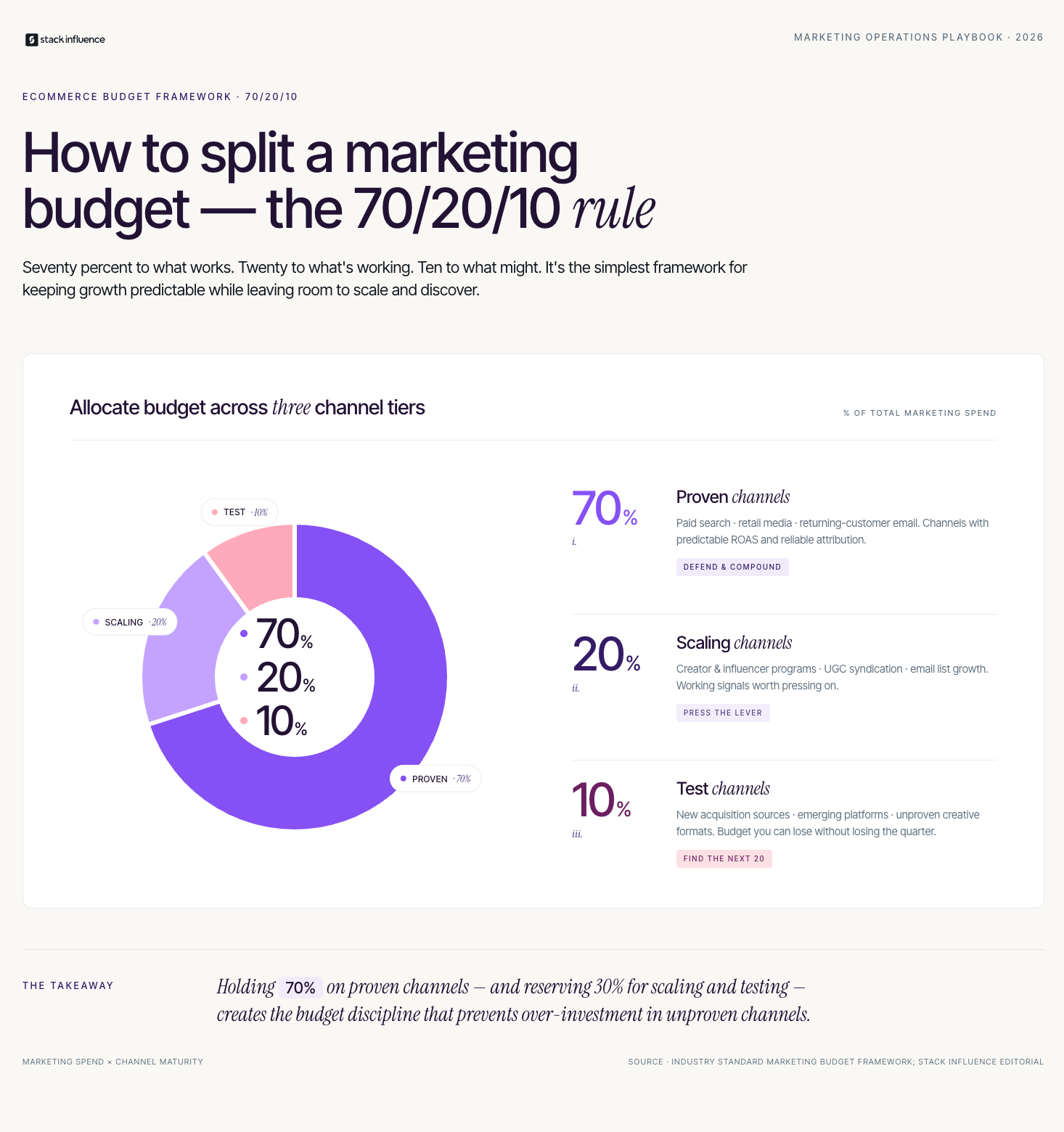
The channel strategy section is where most marketing plan templates fall short for eCommerce sellers because they default to a generic list of digital channels rather than a prioritized, budget-backed plan built around how your specific customer discovers and buys products.
Start by mapping your current customer acquisition sources with actual data, not assumptions. Pull your attribution reports, your email sign-up source data, and your Amazon traffic report if applicable. Identify which two or three channels are generating the majority of your profitable sales today. Those are your 70% allocation channels. Everything else is in the 20% or 10% buckets until the data supports a reallocation.
A practical channel strategy section for an eCommerce brand in 2026 looks like this:
Across campaigns managed on the Stack Influence platform, eCommerce brands that include a dedicated creator channel line in their marketing plan with a defined quarterly budget allocate on average 2.5 times more to creator campaigns by the end of the year than brands that treat creator work as ad hoc. The act of writing it into the plan forces the operational infrastructure, briefing, and fulfillment logistics, to be built before the first campaign launches rather than improvised mid-execution.
The campaign calendar is the section of a marketing plan template that converts strategy into scheduled action. Without it, channel strategies remain intentions. With it, every team member knows what is launching when, what the budget is, and what success looks like before the campaign goes live.
For Amazon sellers, the calendar must be anchored around Amazon's key retail events because organic rank and advertising performance are both affected by platform-wide traffic spikes. A seller who is not prepared with inventory, optimized listings, and activated ad campaigns before Prime Day is watching competitors capture the demand they could have earned.
Key calendar anchors for Amazon sellers:
For DTC brands running [Shopify influencer marketing](INTERNAL: Shopify influencer marketing strategy) alongside their Amazon presence, the calendar also needs to account for creator content lead times. A creator seeding campaign needs four to six weeks from product shipment to live content, which means any campaign tied to a seasonal moment needs to be initiated six to eight weeks before the target date.
Stack Influence's internal campaign data shows that eCommerce brands which schedule their creator campaigns on a documented quarterly calendar have a 45% higher on-time content delivery rate than brands that brief creators reactively. Building the calendar into the marketing plan template is not an administrative task. It is a performance driver.

Measurement is the section most eCommerce marketing plans treat as an afterthought and then blame the plan for not working when results disappoint. A named measurement model embedded in the plan from the start changes that dynamic because it defines what success looks like before any money is spent.
Use the eCommerce Marketing Scorecard as the measurement framework in your plan. The scorecard has three tiers reviewed on different cadences:
For Amazon sellers, the scorecard must include a dedicated Amazon attribution layer. Tag all off-platform traffic sources with Amazon Attribution links before any external campaign launches. Track which channels generate the highest conversion rate on Amazon, not just the most clicks, because the algorithm rewards conversion signals and the Brand Referral Bonus credits apply only to properly tagged external traffic that results in a sale.
Based on Stack Influence's work with eCommerce brands, sellers who implement proper Attribution tagging at the start of a creator campaign recover an average of 8 to 12% of their referral fees through the Amazon Brand Referral Bonus program over a 90-day period. That credit recovery meaningfully improves the ROI calculation for the creator channel line in the marketing plan and provides data that supports increased allocation in subsequent quarters.
The majority of marketing plan templates, including the most widely downloaded ones, include a budget section and a channel list but skip the operational infrastructure section entirely. For eCommerce brands, that gap is where plans quietly collapse.
Operational infrastructure refers to the tools, workflows, and asset libraries that make channel execution possible at the pace the calendar demands. A brand can have a perfectly documented channel strategy and a detailed campaign calendar, and still miss every deadline because the creative production workflow is bottlenecked, the product seeding logistics are unmanaged, or the attribution links are not being created before campaigns launch.
The four infrastructure elements every eCommerce marketing plan should document:
Adding an infrastructure section to your marketing plan template separates plans that get executed from plans that get archived. According to Semrush's content marketing research, 78% of companies with a documented content strategy outperform those without one, and the gap widens further when that strategy includes operational documentation alongside channel and goal definitions.
A marketing plan template is only as useful as the discipline applied to executing and revising it. For eCommerce sellers, DTC brands, and Amazon sellers operating across multiple channels simultaneously, the six-component eCommerce Marketing Plan Template gives you the structure to stop reacting and start building with intention. Document your channels, build your creator campaign calendar six weeks ahead of every major retail moment, tag every off-platform campaign for attribution from day one, and review your eCommerce Marketing Scorecard on the cadences that let you catch problems early.
If you are ready to build the creator channel section of your marketing plan with a partner who handles logistics, briefing, and delivery at scale, Stack Influence connects eCommerce brands with micro influencers for product seeding campaigns that generate the UGC and external traffic your plan needs to perform.
The creator economy crossed $250 billion in 2023 and is projected to reach $480 billion by 2027, according to Goldman Sachs research. For content creators trying to turn their skills into reliable income, those numbers are encouraging but incomplete. The real question is not whether the market is large enough. It is how to position yourself within it so that brands actually find you, hire you, and pay you consistently. This guide maps the full landscape of content creator jobs available in 2026, explains how to evaluate which income streams match your skills and audience, and walks through the measurement habits that separate creators who scale their earnings from those who stay stuck at one-off gig rates.
The State of Content Creator Jobs in 2026
The pipeline from "content creator" to "paid professional" has never been more direct, but it has also never been more crowded. According to Linktree's Creator Report, more than 200 million people globally identify as content creators, with roughly 12 million treating it as a full-time profession. That ratio matters: the full-time cohort is still a small fraction of the total, which means differentiation, not just volume of output, determines who gets hired consistently.
Brand spend on creator partnerships has shifted meaningfully in the last two years. Large platforms reported that brands are reallocating budgets away from mega-influencer campaigns and toward [micro influencers](INTERNAL: micro influencer marketing strategy) and UGC-specific creators. This is not a temporary correction. It reflects a fundamental recognition that authenticity and conversion performance matter more than raw reach for most product categories.
Three structural trends shaping content creator jobs in 2026:
Understanding where the market is headed helps you make smarter decisions about which skills to develop and which content creator jobs to prioritize in your portfolio.
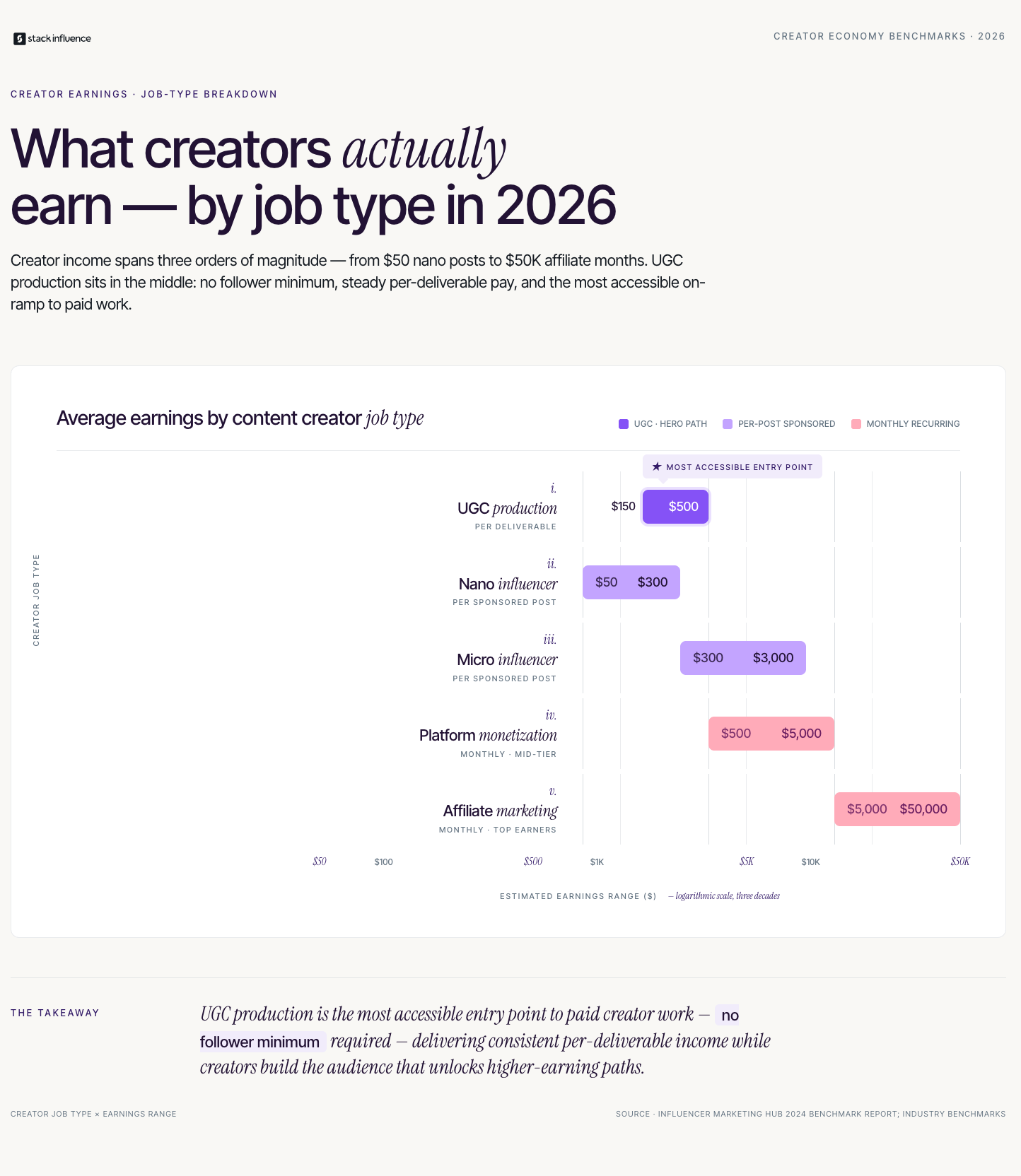
Not all content creator jobs are created equal, and most guides to the space treat every income stream as roughly equivalent. They are not. The income ceiling, barrier to entry, and payment reliability vary significantly across categories, and knowing the difference helps you allocate your time correctly.
The five primary categories of content creator jobs, ranked by accessibility for creators starting out:
According to Influencer Marketing Hub's 2024 benchmark report, the influencer marketing industry reached $24 billion globally in 2024, with a significant portion of that budget flowing to micro influencers and UGC-specific creators rather than celebrities and mega-accounts. For creators entering the market now, the opportunity is concentrated in the first two categories on that list.
The gap between creating content for free and getting paid for it is primarily a positioning problem, not a skills problem. Most creators who are not earning yet have content that qualifies them for paid work but have not structured their presence to communicate that clearly to brands.
The Creator Positioning Checklist is the framework for closing that gap. It covers the five elements that brands evaluate before hiring a creator, whether they are doing it manually through outreach or running campaigns through [influencer marketing agencies](INTERNAL: influencer marketing agency guide) and platforms.
The Creator Positioning Checklist has five items:
Across campaigns managed on the Stack Influence platform, creators who completed all five elements of the Creator Positioning Checklist before applying to brand campaigns had a 60% higher acceptance rate than creators with incomplete profiles. The difference was not follower count. It was the presence of clear niche positioning and professional-quality portfolio samples.
Revisiting the Creator Positioning Checklist every quarter keeps your materials current and ensures your positioning evolves as your content does.

This is the most common strategic question for creators entering paid work, and the answer depends almost entirely on your current audience size and production skills. Both paths lead to sustainable income, but they require different inputs and produce different outcomes in the first 90 days.
UGC production is the faster path to first payment for most creators. Because brands are buying content assets rather than audience access, follower count is irrelevant. What matters is whether you can produce video or photography that meets a brand's brief, looks authentic on screen, and delivers a clear product message. Creators with strong production habits, good lighting, and comfortable on-camera presence can start earning from [UGC video](INTERNAL: UGC video production guide for creators) work within two to four weeks of positioning themselves correctly.
Brand sponsorships require an audience that brands want to reach, which means building one first if you do not have it. The threshold for most paid sponsorships is a minimum of 1,000 to 5,000 engaged followers in a clear niche, though [nano influencers](INTERNAL: nano influencer brand partnership guide) with hyper-specific audiences in high-value categories like finance, parenting, or health can secure paid partnerships at even smaller scales. The trade-off is that building an audience takes time, while UGC production skills can be developed and monetized in parallel.
A practical entry sequence for new creators:
Stack Influence has observed that creators who begin with UGC work and transition to hybrid UGC-plus-sponsorship models within six to twelve months earn an average of 40% more per brand relationship than creators who pursued sponsorships exclusively from the start, because the UGC track builds portfolio depth and brand familiarity faster.
Knowing your numbers is what separates creators who negotiate from creators who accept whatever a brand offers. Most creators have an intuitive sense of how their content performs, but brands respond to specifics, and specifics require tracking.
Use the Creator Income Metrics Stack to build the data profile that justifies higher rates over time. The stack has three tiers:
According to Sprout Social's influencer report, 89% of marketers say ROI from influencer campaigns is comparable to or better than other marketing channels, with engagement rate cited as the top performance indicator. Having your engagement data organized and ready to present moves every rate conversation forward faster.
Stack Influence's internal campaign data shows that creators who present Tier 2 conversion data alongside standard engagement metrics during brand partnership negotiations close deals at rates 35% higher on average than creators presenting reach and follower count alone. Brands that work with [micro influencers](INTERNAL: micro influencer marketing for eCommerce brands) are particularly responsive to conversion data because their campaign ROI models depend on it.
The standard advice for landing [brand partnerships](INTERNAL: brand partnership strategy for creators) is to grow your following, post consistently, and reach out to brands in your niche. That advice is not wrong. It is just incomplete in a way that costs creators real money.
The gap most guides leave is the negotiation and relationship layer. Brand deals are not one-time transactions; they are the beginning of a potential recurring revenue relationship. Creators who treat every brand deal as a standalone gig leave the most valuable part of the opportunity on the table. The brands most willing to pay premium rates are the ones building long-term [brand ambassador](INTERNAL: brand ambassador program guide) programs, not running one-off campaigns. Getting into those programs requires explicitly pitching for ongoing partnership rather than accepting a single campaign brief.
Three things most content creator job guides leave out of the brand deal conversation:
The [creator economy](INTERNAL: creator economy income guide) has created an environment where brands need creators more than most creators realize. The leverage exists. The missing piece for most creators is knowing how to use it.
Content creator jobs in 2026 offer more paths to sustainable income than at any point in the history of the profession, but the creators earning consistently are the ones who treat those paths as a portfolio rather than a lottery. The Creator Positioning Checklist gets you in front of brands. The Creator Income Metrics Stack gives you the data to negotiate. And understanding the full range of deal structures in the brand partnership landscape ensures you capture the value you are already generating.
If you are ready to connect with brands actively looking for creators, Stack Influence matches micro influencers and UGC creators with eCommerce brands running product seeding campaigns, with no minimum follower requirement to get started.
Walmart's retail media network quietly became the second-largest in the United States, trailing only Amazon in advertiser spend and platform scale. For eCommerce sellers who have built their playbooks entirely around Amazon, that shift creates both a threat and a genuine opportunity. Walmart advertising now reaches over 120 million unique monthly visitors on Walmart.com, according to Walmart Connect, and the platform's self-serve ad tools have matured significantly in the last two years. This guide breaks down every major ad format, the measurement framework you need to evaluate performance honestly, and the creator traffic strategies that most Walmart seller guides have not caught up to yet.

Walmart advertising refers to the suite of paid placement and media products available through Walmart Connect, Walmart's retail media division. Unlike general display advertising networks, Walmart Connect is powered by first-party purchase and browsing data from Walmart's 230 million weekly customers across its physical stores and digital properties. That data depth is the platform's most defensible competitive advantage over third-party ad networks.
The platform operates on a cost-per-click model for its search-based formats, similar in structure to Amazon Sponsored Products. Advertisers bid for placement in search results and on product detail pages, and pay only when a shopper clicks. Display formats follow impression-based pricing and extend beyond Walmart.com to Walmart's off-site display network, which includes partner websites and connected TV inventory.
Understanding the three core ad types is the starting point for any Walmart advertising strategy:
Walmart's self-serve advertising interface, accessible directly through Seller Center, has improved considerably since 2022 and now supports bulk campaign management, automated bidding, and dayparting. Sellers already comfortable with Amazon's Campaign Manager will find the workflow familiar, though the reporting nomenclature differs in several important places.
The comparison between Walmart advertising and Amazon PPC is one that every multichannel seller eventually has to work through. The platforms share structural similarities but produce meaningfully different outcomes for the same advertising dollar, and understanding why helps you allocate budget correctly.
Walmart's shopper base skews toward value-conscious buyers who are more likely to be in an active purchase mode when they arrive at Walmart.com. According to eMarketer's retail media research, Walmart Connect's average CPC runs 20 to 40% below equivalent Amazon Sponsored Products CPCs in most product categories, which improves return on ad spend for sellers with healthy margins. The lower auction competition reflects the fact that fewer sellers have optimized Walmart campaigns, creating a first-mover window that will not last indefinitely.
Key structural differences between the two platforms that affect strategy:
From Stack Influence's experience running creator campaigns for multichannel eCommerce brands, sellers who launch Walmart advertising alongside a creator content strategy in the same quarter see a measurably faster trajectory to organic rank improvement than those running paid ads in isolation. Creator content drives first-visit shoppers who convert at a higher rate than cold paid traffic, which Walmart's algorithm reads as a positive quality signal.
The Walmart Ad Readiness Checklist
Before spending a dollar on Walmart advertising, your listings need to meet a minimum quality threshold. Running ads to an underprepared listing wastes budget and can generate negative early performance data that suppresses your organic visibility. The Walmart Ad Readiness Checklist covers the five things that must be in place first.
The five items in the Walmart Ad Readiness Checklist are:
The Walmart Ad Readiness Checklist is not a one-time exercise. Revisit it quarterly, because buy box status, review counts, and pricing competitiveness all change as your category evolves. Sellers who skip this check and launch ads immediately are almost always the ones who report that "Walmart advertising doesn't work" after burning budget on traffic that never had a reasonable chance of converting.
The Walmart Ad Readiness Checklist functions best as a launch gate, not a suggestion. Make it a standing operating procedure for every new product before it enters your active campaign portfolio.
Campaign structure is where sellers coming from Amazon tend to make their first Walmart-specific mistake. The temptation is to replicate your Amazon campaign architecture directly, but Walmart's keyword match types, bidding behavior, and reporting cadence are different enough that a direct copy-paste produces misleading data.
Start with a single Sponsored Products campaign using automatic targeting for the first two to three weeks. Walmart's automatic targeting uses its own relevance algorithm to match your listing to shopper queries, and the resulting search term data is the most valuable early input you have. Do not start with manual keyword campaigns until you have actual Walmart search term data; keywords that perform on Amazon often have different volume and competition profiles on Walmart.
A practical first-campaign structure for new Walmart advertisers:
Across campaigns managed on the Stack Influence platform, eCommerce brands that pair their Walmart paid campaigns with targeted creator content in the same product category see a 25 to 35% improvement in Sponsored Products ROAS compared to running paid ads without any organic social content reinforcing the product. Shoppers who encounter a product through a creator post and then find it in a Walmart search result convert at a significantly higher rate than cold paid traffic converts.
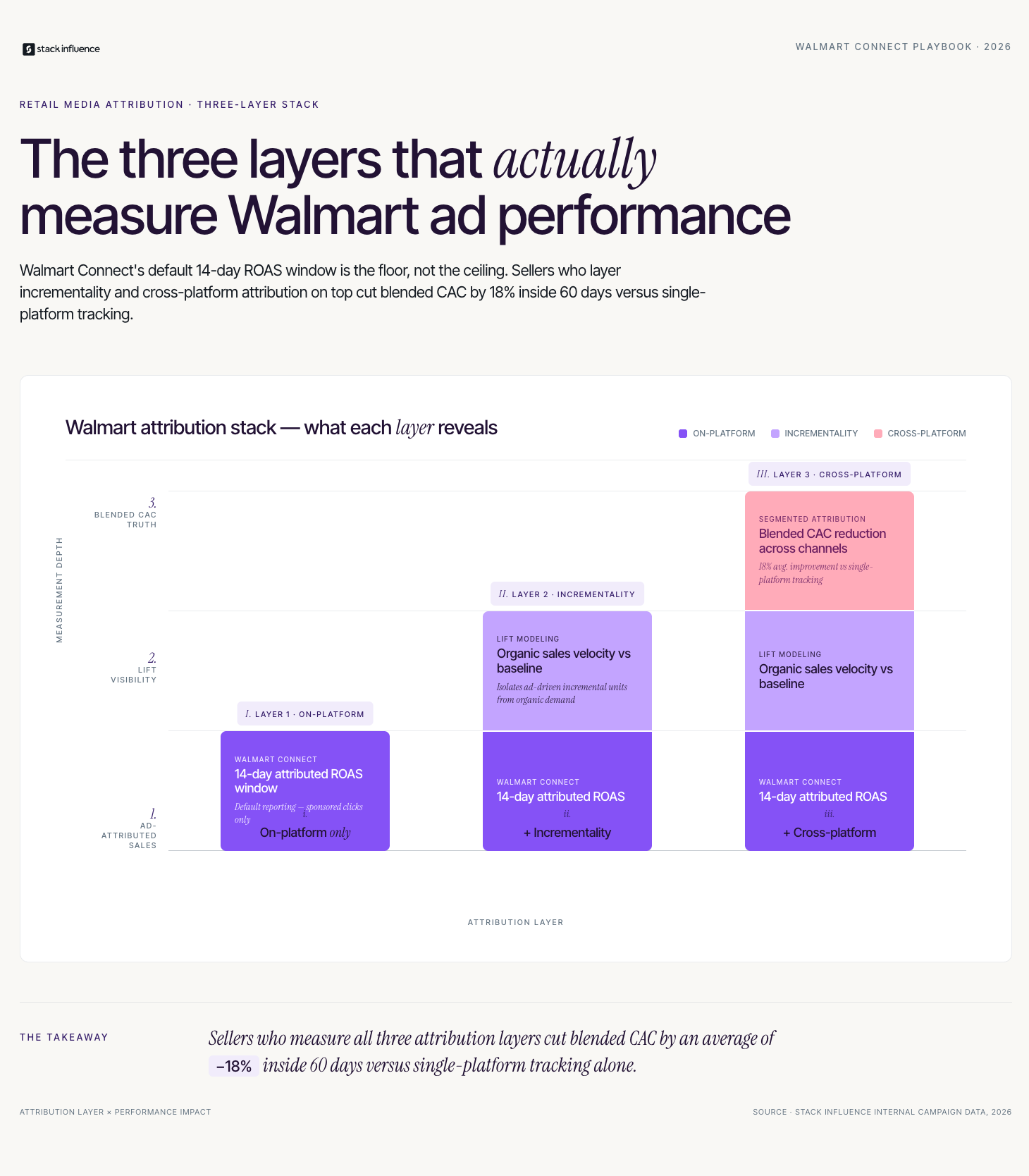
Measurement is the area where most Walmart advertising guides fall short, because they describe what metrics exist without explaining how to interpret them in the context of a multichannel business. If you are also selling on Amazon or running a DTC site, your attribution setup needs to be deliberate from day one.
Use a three-layer model called the Retail Media Attribution Stack to evaluate Walmart advertising performance accurately:
For DTC brands running creator campaigns that drive traffic to both Amazon and Walmart simultaneously, the discipline of channel-separated attribution is what separates brands that scale efficiently from those that simply spend more. Stack Influence's internal campaign data shows that brands running simultaneous creator campaigns across Amazon and Walmart with properly segmented attribution links reduce their blended CAC by an average of 18% within 60 days, compared to brands routing all creator traffic to a single destination without platform-level tracking.
The Retail Media Attribution Stack is most valuable when reviewed monthly rather than weekly. Weekly data is too noisy to distinguish real performance trends from normal variance. Monthly reviews surface the patterns that drive reallocation decisions.
The most common omission in Walmart advertising guides is the role of external, creator-driven traffic. Paid search on Walmart Connect is a floor, not a ceiling. Sellers who treat Walmart advertising as a self-contained paid search exercise are leaving the platform's most scalable traffic lever untouched.
Walmart's algorithm, like Amazon's, rewards sales velocity and positive conversion signals. External traffic that drives real purchases sends both signals to the platform simultaneously. A [micro influencer](INTERNAL: micro influencer marketing for retail brands) posting an authentic review that drives 50 first-time Walmart.com purchases in a week does more for a listing's organic rank than an equivalent number of clicks from a Sponsored Products campaign, because the organic conversion signal carries more algorithmic weight than paid-click attributed sales.
Three creator traffic tactics that work specifically well for Walmart sellers:
The opportunity in creator-driven Walmart traffic is real and relatively uncrowded right now. Most [influencer marketing](INTERNAL: influencer marketing strategy for multichannel sellers) playbooks are still Amazon-first, which means Walmart-focused creator campaigns face less competition for creator attention and lower negotiated rates for comparable audiences. That window will close as more sophisticated sellers build Walmart into their creator strategies.
Conclusion
Walmart advertising has moved well past the experimental stage and is now a legitimate, scalable channel for eCommerce sellers who are ready to operate beyond Amazon. The CPCs are lower, the first-party data targeting is genuinely powerful, and the organic rank mechanics reward the same external traffic strategies that work on Amazon. Using the Walmart Ad Readiness Checklist before launch, structuring your campaigns with a data-harvest-first approach, and measuring performance through the Retail Media Attribution Stack gives you a framework that most competing sellers are not using yet.
If you are ready to build creator-driven traffic into your Walmart advertising strategy, Stack Influence connects eCommerce brands with micro influencers who specialize in product content that converts across retail media platforms.
Amazon's marketplace has more than 9.7 million registered sellers worldwide, according to Marketplace Pulse, and the number keeps climbing. For eCommerce sellers entering the platform now, that statistic is both an opportunity and a warning. The opportunity is a marketplace with 300 million active customer accounts. The warning is that getting lost is easy if you start without a system. This guide walks you through how to sell on Amazon for beginners in a way that is structured, realistic, and built for the market conditions of 2026, not 2018. You will leave with a clear launch sequence, a measurement framework, and an understanding of the traffic levers that most beginner guides ignore entirely.
Key Takeaways
How Do You Actually Set Up an Amazon Seller Account?
Before a single product goes live, you need a seller account. The process is straightforward but has a few decision points that matter more than most beginner guides acknowledge. Head to Seller Central and choose between the Individual and Professional plans. If you expect to sell more than 40 units per month, Professional is cheaper per unit and unlocks advertising tools you will need.
Amazon will ask for a valid government-issued ID, a bank account for disbursements, a credit card for fees, and tax information. In most cases, account verification takes 24 to 48 hours, though some categories require additional documentation. Set up two-factor authentication immediately; account hijacking is a real risk for new sellers with no support history.
Key setup decisions to make before you list your first product:
Once your account is verified and configured, resist the urge to list immediately. The next step, product research, determines whether your Amazon business has a viable foundation or a structural problem that no amount of optimization can fix.
What Makes a Product Worth Selling on Amazon?

Product selection is where most beginner Amazon sellers make their most expensive mistake. The common error is choosing a product based on personal interest or surface-level search volume rather than running the numbers on demand, competition, and margin simultaneously.
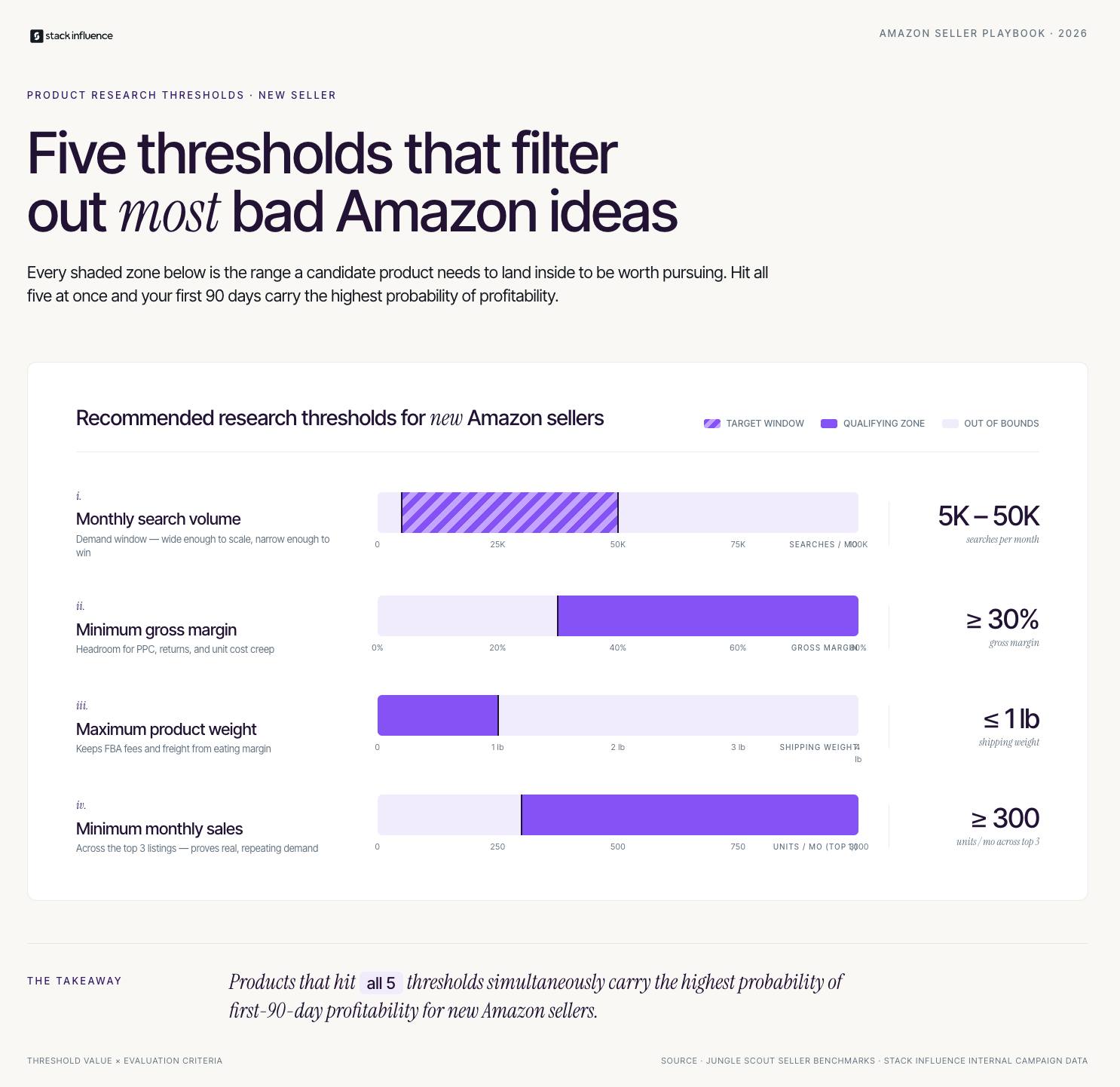
A viable Amazon product in 2026 meets three criteria. First, it has consistent, proven demand: ideally 300 or more monthly sales across the top three listings in its subcategory, which you can estimate using tools like Jungle Scout or Helium 10. Second, the existing competition has identifiable weaknesses in their reviews, images, or listing quality that you can address. Third, the landed cost (product plus shipping plus FBA fees) leaves you with a gross margin of at least 30% before advertising.
Use this framework when evaluating any product candidate:
Across campaigns managed on the Stack Influence platform, brands that validated product-market fit with small creator seeding runs before scaling their Amazon listings saw a 40% lower rate of slow-moving inventory compared to brands that launched at full volume without external validation. Seeding a product to ten micro influencers before your main inventory order is one of the lowest-cost product research tools available to new sellers.
Fulfillment method is the second-biggest structural decision after product selection. Amazon FBA means you ship your inventory to Amazon's warehouses and Amazon handles picking, packing, shipping, and customer returns. Fulfillment by Merchant (FBM) means you store and ship orders yourself or through a third-party logistics provider.
For most beginners, FBA is the right starting point. Prime eligibility alone meaningfully improves conversion rates because a large percentage of Amazon shoppers filter search results by Prime delivery. FBA also removes the operational complexity of managing shipping at the early stage when you are still learning listing optimization, advertising, and product development simultaneously.
The case for FBM is narrower but real:
Calculate your total landed cost for both models using Amazon's FBA Revenue Calculator before committing. Most new sellers underestimate FBA fees by 15 to 20% because they forget to include inbound shipping to the warehouse, prep service fees, and the storage cost for units that do not sell in the first 60 days.
Launching on Amazon without a structured approach means your listing goes live to very few buyers, generates no initial sales velocity, and drops into algorithmic obscurity within weeks. The Amazon Seller Launch Sequence is a five-step process designed to build ranking momentum from day one.
The five steps of the Amazon Seller Launch Sequence are:
Referencing the Amazon Seller Launch Sequence throughout your first 90 days gives you a clear check-in point at each stage. Most sellers who stall do so because they complete steps one through three and assume the work is done. Steps four and five are where compounding growth actually begins.
The fifth step of the Amazon Seller Launch Sequence is the one most beginner resources skip entirely, and it is often the difference between a listing that ranks organically by month three and one that remains dependent on paid traffic indefinitely.
Measuring What Actually Matters: The Amazon Seller Metrics Stack
Tracking the right numbers from the start prevents the most common beginner failure: optimizing for the wrong signal. Many new sellers focus exclusively on total revenue when the more important numbers are margin per unit, advertising cost of sale, and organic rank progression.
Use a three-tier measurement framework called the Amazon Seller Metrics Stack:
Stack Influence's internal campaign data shows that Amazon sellers who implement Attribution tagging before their first influencer campaign recover an average of 8 to 12% of their referral fees through the Brand Referral Bonus, which materially improves the ROI calculation for external traffic investments. That credit compounds over time as external traffic volume grows.
Revisiting the Amazon Seller Metrics Stack weekly for the first 90 days will surface problems at the unit economics level before they become expensive at the traffic investment level.
Most beginner guides to how to sell on Amazon focus entirely on the platform itself: listing optimization, PPC campaigns, and review strategies. The advice is accurate but incomplete. The sellers who build durable businesses on Amazon are almost always the ones who treat off-Amazon traffic as a first-90-days priority, not a year-two ambition.
The practical reason is algorithmic. Amazon's A9 ranking system rewards sales velocity and conversion rate. External traffic that converts drives both signals simultaneously, which is why a well-executed [micro influencer campaign](INTERNAL: micro influencer marketing for Amazon sellers) during a launch can produce a ranking lift that paid PPC alone struggles to replicate at the same cost.
Three external traffic channels that consistently perform for new Amazon sellers:
Based on Stack Influence's work with eCommerce brands entering Amazon, sellers who activate at least one external traffic channel within the first 30 days of going live consistently achieve top-50 keyword rankings 45 to 60 days faster than sellers who rely on PPC alone. That ranking acceleration compounds into lower long-term advertising cost of sale as organic traffic takes an increasing share of the sales mix.
The [creator economy](INTERNAL: creator economy for eCommerce brands) has created an accessible, low-cost traffic channel that did not exist at meaningful scale when most of the foundational Amazon seller playbooks were written. Incorporating it from day one is one of the clearest competitive advantages available to beginners today.
Learning how to sell on Amazon for beginners has never required more careful execution, but the upside has also never been more accessible to sellers who build with intention. The platform rewards listings with strong conversion signals, consistent sales velocity, and traffic from multiple sources. Following the Amazon Seller Launch Sequence, tracking your numbers through the Amazon Seller Metrics Stack, and activating external traffic through creator partnerships in your first 90 days puts you in a fundamentally stronger competitive position than the majority of sellers who launch reactively and optimize reactively.
If you are ready to add creator-driven traffic to your Amazon launch strategy, explore how Stack Influence connects eCommerce brands with micro influencers who specialize in product content that converts.
Dropshipping promises a business with no inventory, no warehouse, and no upfront product cost. For eCommerce sellers researching the model, that pitch is genuinely compelling. But the pros and cons of dropshipping look very different once you account for what the glossy overviews leave out: thin margins, supplier dependency, and a customer experience you cannot fully control. This guide cuts through the noise, giving you a structured way to evaluate whether dropshipping fits your specific situation, what the numbers actually look like in 2026, and where complementary strategies like creator-driven traffic can change the math.
The dropshipping market is large and still growing. According to Grand View Research, the global dropshipping market was valued at over $350 billion in 2023 and is projected to grow at a compound annual growth rate above 23% through 2030. That scale reflects genuine demand, but it also reflects a market increasingly crowded with sellers running identical products from the same handful of suppliers.
The competitive environment has shifted considerably in the last three years. Rising customer acquisition costs on Meta and Google have eroded the margins that made dropshipping attractive in the 2017-2020 era. Sellers who built businesses on cheap paid traffic are now watching their return on ad spend compress as more competitors bid on the same audiences.
Three structural forces are reshaping the landscape for dropshippers in 2026:
Understanding these forces is the essential context before evaluating the pros and cons of dropshipping for your specific business stage.
What Is Dropshipping, Exactly?
Dropshipping is a retail fulfillment model in which the seller takes orders from customers but never holds the product. When an order is placed, the seller forwards it to a third-party supplier, who ships directly to the end customer. The seller earns the margin between the retail price they charge and the wholesale cost they pay the supplier.
The model became widely accessible through Shopify integrations with suppliers like AliExpress and later through domestic suppliers available via platforms like Spocket and Zendrop. It requires almost no startup capital because you are not buying inventory in advance. That single characteristic explains why it has attracted millions of first-time eCommerce entrepreneurs.
What dropshipping is not is a passive business. Successful operators actively manage supplier relationships, optimize product listings, run paid or organic traffic campaigns, handle customer service for problems they did not cause, and monitor margin constantly. The "hands-off" framing in most introductory content is one of the more persistent misconceptions in the eCommerce space.
What Are the Real Pros and Cons of Dropshipping?
Most articles on the pros and cons of dropshipping present a balanced two-column list and stop there. The more useful analysis examines which advantages are durable and which are temporary, and which risks are manageable versus existential.
The following benefits are real and defensible, not just marketing copy for the model:
According to Oberlo's eCommerce data, roughly 27% of online retailers use dropshipping as their primary fulfillment method, confirming it is a legitimate operating model at scale, not just a beginner experiment.
The cons of dropshipping are not just inconveniences. Several of them become more damaging as your store scales:
Across campaigns managed on the Stack Influence platform, eCommerce brands that rely exclusively on dropshipping struggle to generate the kind of UGC that converts, because creators receiving a product in unbranded packaging have significantly less to work with visually. Brands that add even minimal branded packaging to their dropship workflow see measurably higher UGC quality and creator enthusiasm.

Before committing to dropshipping as your primary model, the Dropship Decision Checklist gives you a structured way to test your readiness. Use the checklist to identify which of the five dimensions are working in your favor and which represent live risks.
The Dropship Decision Checklist covers five dimensions:
Running through the Dropship Decision Checklist honestly takes about 20 minutes and surfaces the one or two items that represent your real constraints. Most failing dropship stores can trace their problems to ignoring two or more of these five dimensions.
The Dropship Decision Checklist is not a pass/fail gate. It is a prioritization tool. If you score weak on traffic diversification, that is where you put your next dollar of time or money, not into testing more SKUs.
Profitability measurement is where most dropshippers discover the model is less attractive than they believed. The common mistake is calculating success at the gross margin level and ignoring the full cost stack.
A rigorous measurement framework for dropshipping has three tiers. Call it the Dropship Profit Stack:
For sellers also operating on Amazon, Amazon Attribution is a critical tool for understanding how off-platform traffic drives on-platform conversions. Sellers who drive external traffic to Amazon listings and tag that traffic correctly can also qualify for the Amazon Brand Referral Bonus, which returns a percentage of the sale price as a credit against referral fees.
Stack Influence's internal campaign data shows that dropshipping brands using creator-generated traffic tagged with Amazon Attribution links average a 10-15% bonus credit recovery through the Brand Referral Bonus program, which can meaningfully offset the CAC pressure described in Tier 2.
Most guides to the pros and cons of dropshipping discuss margins in the abstract. They say margins are "thin" without showing you what thin actually costs at operating scale. This section runs the numbers that most introductory content skips.
Take a product that sells for $39.99. A typical dropship scenario looks like this:
That 15.7% sounds survivable until you factor in the cost of building the store, producing ad creative, and the time you spend on customer service emails for orders that shipped late from a supplier you do not control. At $6.29 net per order, you need to process nearly 1,600 orders per month to generate $10,000 in take-home income, before taxes.
This is not an argument against dropshipping. It is an argument for going in with clear numbers. Stack Influence has observed that eCommerce brands which layer organic creator content into their dropshipping traffic strategy reduce their effective CAC by 20-35% over a 90-day period compared to brands running paid traffic alone, because creator content continues generating impressions and clicks long after the initial post. That CAC reduction moves the $6.29 net figure substantially.
The strategic implication is straightforward. Dropshipping as a model benefits more than almost any other eCommerce structure from [micro influencer marketing](INTERNAL: micro influencer marketing strategy) and [product seeding](INTERNAL: product seeding for eCommerce) because those tactics generate compounding organic traffic without the per-click cost of paid media. Brands that build creator partnerships early, even while dropshipping, are building the traffic infrastructure that makes the unit economics defensible.
The most profitable use of dropshipping is as a product validation engine rather than a terminal business model. This is the strategic framing that most guides on the pros and cons of dropshipping either miss or bury at the end.
The logic is straightforward. Dropshipping lets you test 20 products cheaply and identify one or two that generate consistent demand and defensible margins. Once you have sales data proving a product works, you have the business case to approach a manufacturer, develop a branded version, and shift to private label or Amazon FBA fulfillment. You are not guessing on a $50,000 inventory run. You are making a data-backed bet on a product with a proven conversion rate and a known customer acquisition cost.

DTC brands that follow this stepping-stone approach tend to move through three phases: a dropship testing phase of 90 to 180 days, a hybrid phase where the proven SKU is transitioned to private label while remaining products stay on dropship, and a brand-building phase where they invest in [UGC creators](INTERNAL: UGC creator strategy) and an Amazon storefront to build sustainable organic traffic.
The stepping-stone model also changes how you think about the [creator economy](INTERNAL: creator economy for eCommerce brands) during the dropship phase. Instead of treating creator partnerships as a growth-stage luxury, smart dropshippers seed products to [nano influencers](INTERNAL: nano influencer marketing) early, generating authentic reviews and UGC that carry over when they launch the private label version. Those assets do not expire when the product SKU changes.
Conclusion
The pros and cons of dropshipping ultimately resolve to a single strategic question: are you using the model to learn, or are you using it to build? As a learning tool, dropshipping is nearly unmatched for capital efficiency and speed. As a standalone long-term business model, the margin and differentiation challenges are real and compounding.
eCommerce sellers who treat dropshipping as phase one of a product strategy, and who invest early in creator-driven traffic through [influencer marketing campaigns](INTERNAL: influencer marketing campaigns for eCommerce) and [brand partnerships](INTERNAL: brand partnership strategy), consistently outperform those who treat it as a set-it-and-forget-it income stream. If you are evaluating the model right now, use the Dropship Decision Checklist to identify your real constraints, run your numbers through the Dropship Profit Stack, and build your traffic infrastructure before you need it.
The global online jewelry market is projected to reach $85.7 billion in 2026, growing at a 13% annual rate that significantly outpaces traditional retail. For eCommerce sellers, that growth signals opportunity — but it also signals crowding. Knowing how to start selling jewelry online is not the hard part. Building a jewelry brand that generates repeat revenue, earns trust from buyers who cannot physically handle your product, and survives long enough to compound is. This guide covers the strategy most launch articles skip: how to sequence your business model choice, marketing investment, and attribution setup for sustainable growth.

The narrative that jewelry is too high-stakes for online purchase has been definitively disproven. In 2025, online jewelry penetration reached approximately 25% of total global jewelry sales, a significant leap from pre-pandemic levels, with the global online jewelry market projected to be worth $85.7 billion in 2026 and growing at a CAGR of 13%. That growth is structural, not cyclical — it is driven by AR try-on technology, better product visualization, and younger buyers who default to digital for every purchase category.
Lab-grown diamonds now account for over 45% of US engagement ring sales, and personalized jewelry is one of the fastest-growing subcategories as consumers seek custom engraving, birthstone integrations, and modular designs. For new sellers, both of these trends represent accessible entry points that do not require competing on price with established fine jewelry retailers.
The competitive landscape for new jewelry sellers is shaped by three distinct buyer behaviors. First, lower price-point fashion jewelry buyers decide quickly and are highly influenced by visual social content. Second, mid-range gift buyers spend $100 to $400 and rely heavily on reviews, UGC, and social proof before purchasing. Third, fine jewelry buyers at $500 and above require extensive trust signals including materials certification, return policies, and brand narrative. Your niche selection determines which buyer you are designing your entire store experience for.
An online jewelry business is a direct-to-consumer or marketplace-based eCommerce operation that sells jewelry through digital channels — either through your own storefront, third-party marketplaces like Amazon or Etsy, or both simultaneously. The business model you choose determines your inventory risk, margin structure, and how much creative control you have over your product.
The four primary models for new jewelry sellers are:
For sellers who intend to build a sustainable brand and use influencer marketing and UGC as their primary traffic strategy, private label or artisan models are the strongest starting point. Dropshipping can generate early revenue, but the identical-product problem makes it difficult to build the kind of authentic creator content that drives social proof for jewelry buyers.
The Jewelry Revenue Tiers is a four-level progression model that maps your marketing investment to your current business stage. The framework prevents the most common and costly mistake new jewelry sellers make: spending on traffic before their store has the trust infrastructure to convert it. Reference the Jewelry Revenue Tiers whenever you are deciding where to invest your next marketing dollar.
The four tiers:
Return to the Jewelry Revenue Tiers any time you feel stuck or tempted to skip ahead. Most growth plateaus in jewelry eCommerce trace back to a seller who moved from Tier 1 to Tier 3 without completing Tier 2.
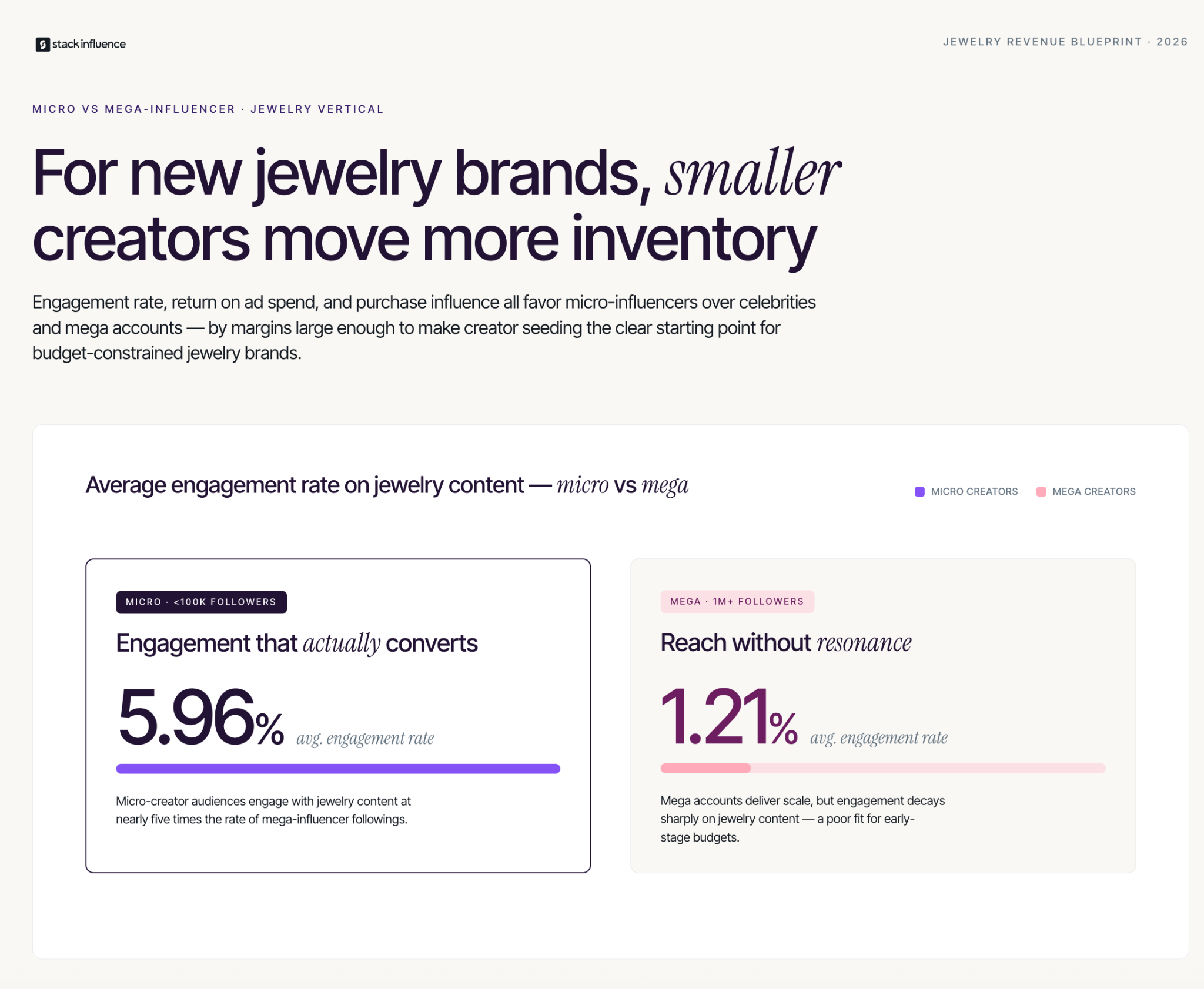
This is the contrarian take that platform-sponsored guides will never tell you: for a new jewelry brand with under $5,000 in monthly revenue and no UGC, paid advertising is an expensive way to validate that your store does not yet convert. The jewelry category has a specific trust barrier that paid traffic cannot overcome on its own.
The 2026 Influencer Marketing Hub data shows that micro-influencers in the jewelry niche deliver a 5.96% average engagement rate, versus 1.21% for accounts with over one million followers. The return on ad spend was 3.1x higher for micro-tier creators. That data tells you something specific about how jewelry buyers make decisions: they are looking for social validation from people who look like them, wearing the piece in a real context, not a studio shot.
Consumer-generated content influences the purchasing decisions of 79% of jewelry buyers, compared to just 8% who respond primarily to celebrity influencer content. For a jewelry brand with a limited marketing budget, this means your first investment should go toward product seeding and UGC collection, not Meta or Google ads. The UGC you collect becomes your ad creative anyway — and it performs better than anything you could produce in a studio.
From Stack Influence's experience running product seeding campaigns for jewelry and accessories brands, sellers who launch with at least 15 pieces of creator-generated content across their product pages see conversion rates roughly double compared to comparable stores launching with brand-produced photography alone. The wearability signal from UGC is the closest substitute for the in-store try-on experience that jewelry buyers instinctively want.
Jewelry product seeding is one of the most effective but operationally complex early-stage marketing tactics. Managing outreach, shipping, follow-up, and content rights across 20 to 50 creators simultaneously is a significant lift for a one or two-person team. The operational complexity is why most jewelry brands either skip this stage entirely or run one campaign and stop.
Platforms like Stack Influence coordinate product seeding at scale by handling creator sourcing, product shipping, and deliverable tracking in one automated workflow. For a jewelry brand in the Jewelry Revenue Tiers Tier 2 stage, this removes the bottleneck that prevents consistent UGC collection. The platform model also ensures that usage rights are included in the deliverable agreement, which matters for jewelry brands that want to repurpose creator content in ads, Amazon listings, and email.
Stack Influence has observed that jewelry brands using standardized seeding workflows — with a clear shot list that specifies close-up detail shots, wrist or neck wear shots, and lifestyle context shots — receive higher-quality UGC on the first submission than brands that leave creative direction open. The shot list requirement aligns creator output with the specific visual needs of jewelry product pages without restricting the authentic styling that makes creator content convert.
Measurement for a jewelry eCommerce business requires a tiered approach that separates trust-building metrics from traffic metrics from revenue metrics. Use the Jewelry Metric Stack to evaluate your store's health across all three layers simultaneously.
The three layers of the Jewelry Metric Stack:
Across campaigns managed on the Stack Influence platform, jewelry brands that track UGC performance at the individual creator level — capturing which creators produce content that drives the highest add-to-cart rates — consistently reallocate their next seeding batch toward creators with proven conversion patterns rather than selecting purely on follower count or aesthetic. That feedback loop, tracked through the Jewelry Metric Stack, is what separates brands that build compounding creator programs from those that run isolated seeding campaigns without follow-through.
Knowing how to start selling jewelry online in 2026 is easier than it has ever been — the platforms are accessible, the business models are documented, and the creator infrastructure to drive traffic exists at every budget level. The sellers who build sustainable jewelry businesses are the ones who sequence the Jewelry Revenue Tiers correctly: establish trust infrastructure before spending on traffic, build UGC before running paid ads, and set up Amazon Attribution before launching external campaigns. Work through each tier deliberately, measure with the Jewelry Metric Stack, and treat your first creator partnerships as the foundation of your brand's social proof. When you are ready to build the product seeding program that anchors this strategy, Stack Influence automates the creator logistics so your team can focus on product and brand rather than campaign management.
The online fashion market is projected to hit $1.6 trillion by 2030, and new clothing brands are entering it every week. But knowing how to open an online clothing store and knowing how to build one that generates sustainable revenue are two very different problems. The first challenge is mechanical — platform, products, payment processor. The second is strategic — traffic, trust, conversion, and repeat purchase. This guide covers both, with a specific focus on the marketing infrastructure that most launch guides skip entirely.

Fashion eCommerce is no longer a growth story — it is a maturity story. With the global fashion eCommerce industry set to reach $1.6 trillion by 2030, the opportunity for new entrants exists at multiple price points and across multiple business models. But the maturity of the market means the low-friction launch strategies that worked in 2018 — run some Facebook ads, build a Shopify store, watch orders come in — have been replaced by something more demanding.
The good news is that the same maturity has created better infrastructure. By late 2026, 70% of DTC brands and agencies predict social media influencers will be their top conversion driver, overtaking paid advertising during peak shopping seasons. For a new clothing store with a limited paid media budget, that shift is structural good news. Creator-driven traffic has a lower cost floor than paid ads and compounds in ways that ad spend does not.
Understanding this landscape shapes every decision that follows: which platform you build on, which business model you choose, how you allocate your first marketing dollars, and how you measure what is working. Start with context, then move to execution.
An online clothing store is a direct-to-consumer eCommerce operation that sells apparel products through a web storefront, typically on a platform like Shopify, BigCommerce, or WooCommerce. The business model you choose determines your inventory risk, margin structure, and brand flexibility before a single product is sold.
The three primary models available to new sellers are:
The online fashion market projects 34% growth in North American fashion eCommerce to $244.29 billion by 2028, with the secondhand clothing market alone reaching $367 billion by 2029. That breadth means each model has a viable lane. Private label and wholesale are better fits for sellers who want to build a brand asset and leverage influencer marketing effectively, because the product is unique and the economics can absorb creator seeding costs. POD and dropshipping work well for testing demand before committing capital.
The Clothing Store Launch Ladder is a four-tier framework that maps your marketing investment to your current revenue and conversion stage. Most guides treat launch as a single event. The Ladder treats it as a sequential build that prevents the most costly mistake new sellers make: spending on traffic before the store can convert it. Reference the Clothing Store Launch Ladder when prioritizing where to put your next dollar.
The four tiers:
The Clothing Store Launch Ladder keeps you from skipping to paid scale before your economics can support it. Return to it whenever growth stalls and audit which tier your current metrics actually reflect.
Platform selection is a practical decision, not a brand statement. The right platform for an early-stage clothing store is the one that gets you to your first sale fastest with the lowest technical overhead.
Shopify dominates the DTC clothing market because its app ecosystem and payment infrastructure are purpose-built for exactly this use case. It connects natively with Amazon through Shopify Marketplace Connect for sellers running both channels simultaneously. BigCommerce offers more built-in features at lower transaction cost, which matters more at higher revenue volumes. WooCommerce gives developers maximum flexibility but requires more technical setup than most new sellers need.
The key setup decisions for your store launch include:

This is the contrarian take that most how-to guides skip because they are written by platforms with an interest in you spending on ads. Paid advertising is an amplification tool, not a discovery tool — and for a new clothing store with no brand recognition and no UGC, paid ads are expensive guesses.
Micro-influencers can generate up to 60% more engagement than macro influencers, and 84% of people trust a brand more when it uses UGC in its marketing. For a clothing brand, that trust differential is the difference between a 1% conversion rate and a 3% conversion rate on the same traffic. Getting there requires building a creator and UGC program before you scale paid spend, not after.
The practical sequence is: launch micro influencer product seeding campaigns first to generate authentic content, then use that UGC in paid social ads once you have it. Ads featuring real customers outperform polished brand content by 30 to 50% in click-through rate. The brands that build UGC pipelines before ad budgets grow faster with lower CAC than those who run ads against blank product pages.
From Stack Influence's experience running product seeding campaigns for early-stage clothing brands, stores that launch with creator-generated content on their product pages see meaningfully higher add-to-cart rates than comparable stores that launch with brand-produced photography alone. The authenticity signal matters at the moment of purchase, not just at the moment of discovery.
Adding Amazon as a sales channel alongside your DTC store is a question of timing and product fit. Amazon converts at roughly 4x the rate of standalone DTC stores because buyers arrive with purchase intent, not browsing intent. For private label clothing brands, this conversion advantage is real and worth capturing.
The key is channel coordination, not channel replacement. Your DTC store builds brand equity, email lists, and customer relationships that Amazon cannot replicate. Amazon generates sales volume and reviews that your DTC store cannot match early on. Running both channels with deliberate traffic routing produces better outcomes than choosing one over the other.
The Amazon Brand Referral Bonus makes this coordination financially attractive. When you drive external traffic — from creator content, email campaigns, or paid social — to your Amazon listings using Amazon Attribution tags, Amazon credits back an average of 10% of the referral fee on qualifying sales. For a clothing brand driving traffic from micro influencer campaigns, that credit directly offsets your campaign cost.
The setup requirement is non-negotiable: Attribution tags must be configured before any campaign goes live, not added retroactively. Every link in every creator brief, every email send, and every paid ad pointing to Amazon must carry a tagged URL from day one. Brands that miss this step in their first weeks lose bonus credits they cannot recover.
Measurement for a clothing store requires three distinct metric layers that serve different decision-making purposes. Use the Revenue Signal Stack to separate operational metrics from growth signals and avoid optimizing the wrong layer.
The Revenue Signal Stack works as follows:
Across campaigns managed on the Stack Influence platform, clothing brands that measure UGC performance at the SKU level — tracking which specific products generate the highest engagement in creator content — consistently reallocate their seeding inventory toward those SKUs within the first 60 days and see measurably better sell-through rates as a result.
The Amazon Attribution dashboard provides campaign-level conversion data for any external traffic you route to Amazon listings. The Amazon Brand Referral Bonus reporting inside Seller Central shows you which campaign types are generating the highest bonus credit, which is a proxy for which external channels are driving the highest purchase intent on Amazon.
Knowing how to open an online clothing store in 2026 is table stakes — the platforms are accessible, the business models are documented, and the tools are affordable. The differentiation is in the sequencing. Brands that validate their store conversion rate before scaling traffic, build creator and UGC infrastructure before running paid ads, and coordinate their DTC store with Amazon using proper attribution setup will outperform those who follow the standard launch playbook by a wide margin. Work through the Clothing Store Launch Ladder stage by stage, measure with the Revenue Signal Stack, and treat your first creator partnerships as the foundation of your brand rather than an afterthought. If you are ready to build the creator seeding program that sits at the heart of this strategy, Stack Influence automates the product seeding workflow so you can activate micro influencers at scale without managing each creator relationship manually.