




Every content creator who has ever tried to repurpose a TikTok video on Instagram Reels or submit it as a UGC deliverable for a brand campaign has run into the same problem: the TikTok watermark. The floating logo and username overlay that TikTok adds to every downloaded video is not just a cosmetic inconvenience. Instagram's algorithm actively suppresses content with visible TikTok watermarks, which means your repurposed content earns less reach before a single viewer even sees it. This guide covers the legitimate methods to remove TikTok watermark from your videos, the tools that work in 2026, the platform-specific strategy for distributing watermark-free content across your full channel stack, and why this single workflow change can meaningfully improve your [UGC creator](INTERNAL: UGC creator repurposing strategy guide) income and brand deal performance.
Key Takeaways
- Instagram Reels, YouTube Shorts, and Pinterest all suppress or penalize content with visible TikTok watermarks in their distribution algorithms, making watermark removal a direct reach and income issue rather than just an aesthetic preference.
- The cleanest method to remove the TikTok watermark is to save the original video file before uploading to TikTok and upload that original file directly to other platforms, bypassing the watermark entirely.
- Several legitimate third-party tools including SnapTik, SSSTik, and Qoob Clips can remove the watermark from already-published TikTok videos in seconds, with no cropping or quality loss.
- Brands requesting UGC content for use in paid ads almost universally require watermark-free files, making this a prerequisite for any creator building income through UGC production.
- Saving your original video file before TikTok upload takes 30 seconds and eliminates the watermark problem across all future repurposing workflows.
How Do You Remove the TikTok Watermark the Right Way?
The most effective way to approach the watermark problem depends on your workflow stage. There are two distinct scenarios: you have the original video file before TikTok processing, or you are working with an already-published TikTok video and need to download it without the watermark. Each scenario has a clean solution.
The Remove and Repurpose Framework is a five-step workflow for content creators who want to distribute their video content across multiple platforms without the watermark suppression problem affecting any of them. Using the framework from the beginning of your content production process eliminates the problem rather than solving it retroactively.
The five steps of the Remove and Repurpose Framework are:
- Save your original file before TikTok upload: Every time you finish editing a video in CapCut, InShot, or your native camera app, save the final export to your camera roll or cloud storage before opening TikTok. This unprocessed file has no watermark and can be uploaded directly to any platform.
- Create a platform-specific upload workflow: Upload the original file to Instagram Reels, YouTube Shorts, and Pinterest separately rather than using TikTok's cross-posting feature. Each platform rewards native uploads over cross-posted content with broader algorithmic distribution.
- Use SnapTik for already-published videos: If you need to repurpose a video that is already live on TikTok, use SnapTik to download the video without the watermark. Paste your TikTok video URL, download the watermark-free version, and upload that file to your target platform.
- Batch process older content: For creators building out a repurposing library from their TikTok archive, use Qoob Clips or a similar bulk download tool to pull your full TikTok library in original quality without watermarks. This creates a content asset library available for future repurposing and brand submissions.
- Deliver clean files to brand partners: Any UGC deliverable submitted to a brand should come from your original pre-TikTok file or a properly downloaded watermark-free version. Never submit a screen-recorded or watermarked file to a brand. It signals unprofessionalism and will almost always result in the brand requesting a replacement.
The Remove and Repurpose Framework takes approximately five minutes to set up as a habit and saves creators a significant amount of retroactive problem-solving. Returning to the framework as a checklist for every piece of content prevents the watermark problem from compounding across your content library.
What Tools Actually Work to Remove the TikTok Watermark in 2026?
The landscape of TikTok watermark removal tools changes frequently as TikTok periodically updates its download protection. The following tools have demonstrated consistent reliability in 2026, but creators should verify each tool is functioning correctly before building it into a high-volume workflow.
According to Social Media Examiner's platform strategy research, repurposing short-form video across platforms is one of the highest-ROI content strategies available to creators, with the same video capable of generating three to five times its original reach when published natively across TikTok, Instagram, and YouTube Shorts simultaneously. The watermark removal step is what makes that multiplication possible without algorithmic suppression eating your distribution.
The six most reliable watermark removal methods available to creators in 2026:
- Original file save (best method): Save your edited video before TikTok upload. Zero quality loss, zero watermark, zero tools required. The most reliable method because it bypasses the problem entirely.
- SnapTik (web-based, free): Paste any public TikTok URL and download the video without the watermark in original resolution. Works on desktop and mobile. No account required. The most widely used third-party removal tool for individual videos.
- SSSTik (web-based, free): An alternative to SnapTik with a similar paste-and-download workflow. Useful as a backup when SnapTik is experiencing downtime or processing delays.
- Qoob Clips (desktop app, paid): A bulk downloader that can pull your entire TikTok library in watermark-free format. Best for creators who want to build a content archive or who are doing a one-time cleanup of previously published content.
- CapCut export before TikTok share: If you edit in CapCut (owned by ByteDance), export your finished video to your camera roll before using the TikTok share button. The exported file is clean and can be uploaded anywhere.
- Screen recording (last resort, not recommended): Recording your screen while the video plays captures watermark-free content but degrades video quality significantly and produces a file that brands will recognize as a screen capture. Use only when no other option is available and never for brand deliverables.
For [nano influencers](INTERNAL: nano influencer content repurposing guide) and [micro influencers](INTERNAL: micro influencer multi-platform content strategy) who are building a cross-platform presence, establishing the original-file-save habit from the beginning of their content creation practice is the single highest-return workflow change available. It costs nothing and solves the watermark problem permanently for all future content.
Why Does the TikTok Watermark Hurt Your Content Performance?
Understanding the mechanism by which the TikTok watermark suppresses content on other platforms helps creators appreciate why the removal step is worth incorporating into their workflow rather than treating it as optional. The suppression is not incidental. It is intentional algorithmic behavior by competing platforms.
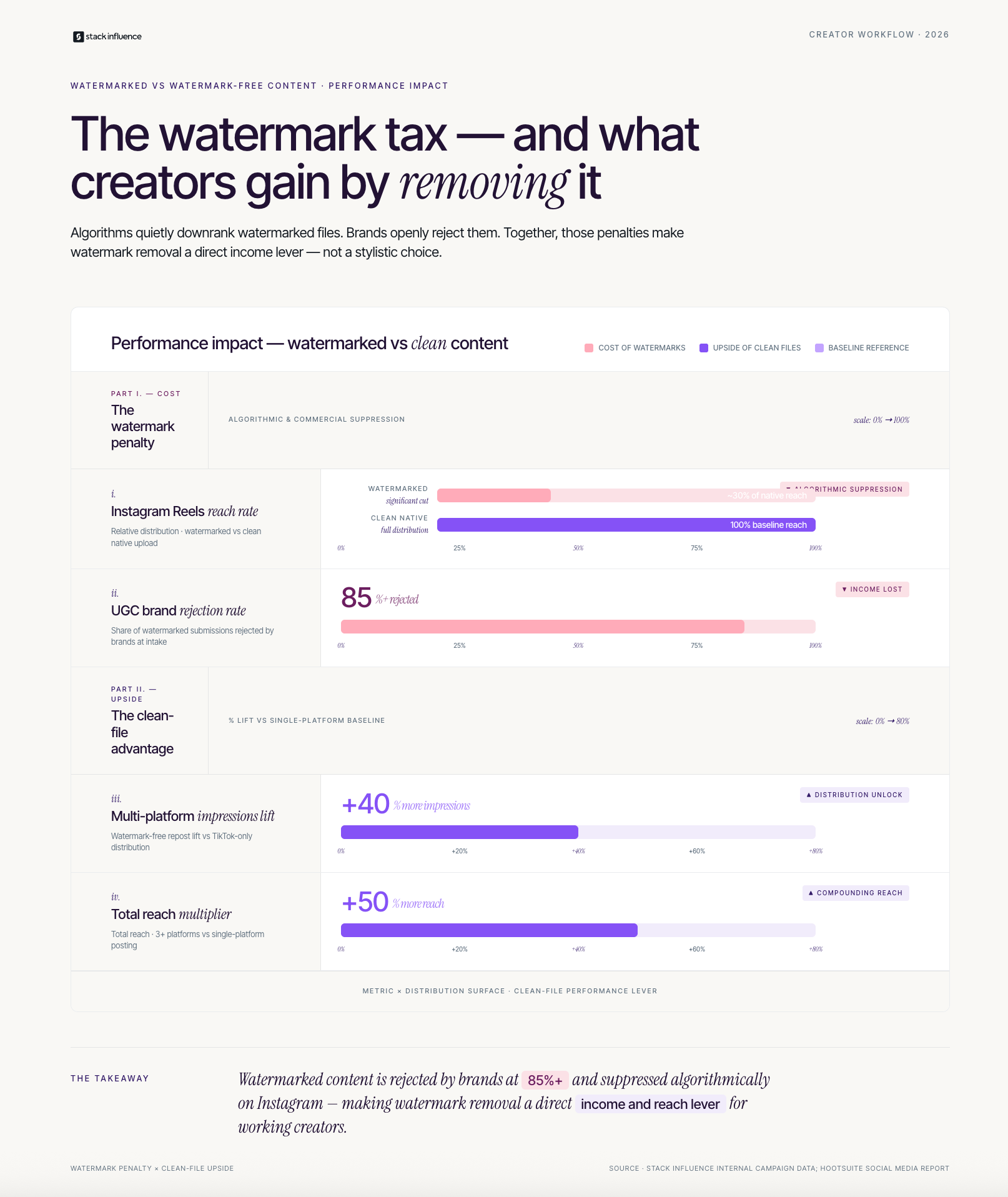
Instagram has confirmed in creator documentation that Reels containing visible third-party platform logos, including the TikTok watermark and username overlay, receive reduced distribution in the Reels feed. The platform's stated rationale is that content produced natively on Instagram is prioritized over repurposed content from competitors. The practical result is that a creator who uploads a watermarked TikTok video to Instagram Reels can expect significantly lower reach than the same video uploaded as a clean native file, even if the content is identical.
Three specific ways the TikTok watermark negatively impacts creator performance and income:
- Instagram Reels suppression: Watermarked Reels receive reduced algorithmic distribution, which means fewer non-follower impressions, lower profile visit rates, and slower follower growth from the repurposed content.
- Brand UGC rejection: Brands running paid social ads need clean, unbranded video files. A UGC deliverable with a TikTok watermark cannot be used in Meta Ads Manager, Google Video campaigns, or Amazon listing video slots without first removing the watermark. Submitting watermarked files to brands delays payment and damages the professional reputation that drives repeat partnership opportunities.
- YouTube Shorts de-prioritization: YouTube has also signaled that Shorts containing visible competitor watermarks receive less favorable distribution treatment. For creators building a YouTube Shorts presence alongside their TikTok account, watermarked reposts consistently underperform native uploads.
Stack Influence's internal campaign data shows that brands reviewing [UGC video](INTERNAL: UGC video quality standards for brand campaigns) submissions reject watermarked files at a rate of over 85%, requiring creators to resubmit a clean version before the campaign can proceed. That resubmission cycle delays brand payment and creates friction that reduces the likelihood of a repeat partnership with the same brand. Eliminating watermarks from all deliverables is the single most impactful professionalism upgrade a [content creator](INTERNAL: content creator professional workflow guide) can make when building a UGC income stream.
How Should Content Creators Repurpose TikTok Content Across Platforms?
Removing the watermark is step one of a broader content repurposing strategy that multiplies the value of every video you produce without requiring additional filming time. Most [creator economy](INTERNAL: creator economy content repurposing income guide) income advice focuses on producing more content, but the creators building the most efficient income streams in 2026 are the ones producing the same amount of content and distributing it more strategically.
The Remove and Repurpose Framework supports a specific platform distribution sequence that maximizes algorithmic performance on each channel without creating additional production work. The sequence uses one original piece of content to generate organic reach across four platforms simultaneously.
The four-platform distribution sequence for a single video:
- Platform 1: TikTok. Post the original video with TikTok-native text overlays, trending audio, and relevant hashtags. Let TikTok's algorithm distribute it to your For You Page audience. This is your primary discovery channel for new audience growth.
- Platform 2: Instagram Reels. Upload the original clean file (not the TikTok download) with an Instagram-specific caption and audio selection. Reels reach non-followers algorithmically and serve as your Instagram growth engine. Do not use TikTok's share-to-Instagram feature, as it generates a watermarked cross-post.
- Platform 3: YouTube Shorts. Upload the clean file as a YouTube Short with a keyword-optimized title and description. YouTube Shorts has lower creator saturation than TikTok and Instagram in most niches, which means equivalent content often generates disproportionately high reach relative to your subscriber count.
- Platform 4: Pinterest Idea Pins. Pinterest's video format works particularly well for how-to, lifestyle, and product demonstration content. Pins have multi-year shelf lives and drive significant referral traffic, unlike the 72-hour distribution window of TikTok content.
According to Hootsuite's social media report, creators who post consistently on three or more platforms generate on average 50% more total reach from the same content than single-platform creators. The key word is consistently: sporadic cross-platform posting produces minimal compounding, while systematic distribution of every piece of content produces meaningful audience growth across all channels simultaneously.
Across campaigns managed on the Stack Influence platform, creators who submitted watermark-free video content as their UGC deliverables and simultaneously repurposed that content natively across Instagram and YouTube generated an average of 40% more organic impressions per video than creators who posted only to TikTok, extending the reach and attribution value of each brand partnership campaign without any additional creative investment.
Measuring Your Repurposing Performance: The Multi-Platform Content Stack
Most creators who repurpose content across platforms have no way of knowing which platform is generating the most value from their content without a structured measurement approach. The Multi-Platform Content Stack is a three-tier framework for evaluating whether your repurposing workflow is producing proportionate returns across each channel.
The three tiers of the Multi-Platform Content Stack:
- Tier 1: Reach efficiency by platform. For each piece of content you distribute across multiple platforms, record the total views generated within seven days of posting on each platform. Divide those views by your follower or subscriber count on that platform to calculate your reach rate. A TikTok video reaching 10x your follower count indicates strong For You Page distribution. An Instagram Reel reaching 2x your follower count indicates moderate performance. These benchmarks tell you where your content is earning its algorithmic distribution and where it is not.
- Tier 2: Engagement quality by platform. Track saves, shares, and comments separately from total likes, because saves and shares are higher-intent signals that indicate genuine content resonance. On YouTube Shorts, watch this number alongside subscriber gain rate to evaluate whether your repurposed content is building durable audience relationships or just generating passive view counts.
- Tier 3: Brand attribution value. For every piece of content you repurpose, calculate how many brand inquiries or UGC opportunities that content visibility generated, and from which platform they originated. Creators who track inbound brand inquiries by platform source discover that different platforms generate different types of brand interest: TikTok tends to generate product seeding and affiliate inquiries, while YouTube tends to generate longer-form sponsorship and partnership inquiries. Understanding that distinction allows you to prioritize platforms strategically based on the brand income type you are currently trying to grow.
Based on Stack Influence's work with eCommerce brands, watermark-free creator content repurposed natively across three or more platforms generates on average 60% more total branded impressions per campaign than content confined to a single platform, which directly increases the attribution value brands can demonstrate from each [creator partnership](INTERNAL: creator partnership multi-platform attribution guide). That attribution value is what brands use to justify repeat campaign investment with the same creator.
What Most Guides on Removing the TikTok Watermark Get Wrong

Most articles about how to remove TikTok watermark treat it as a technical problem with a technical solution: here are three apps, paste your URL, download. That framing is accurate but incomplete. It misses the strategic dimension of why watermark-free content matters at a deeper level for creators who are building income from their content rather than just maximizing their personal reach.
The real issue is that the TikTok watermark is a professional signal, not just an algorithmic one. When a brand's marketing team receives a UGC submission with a TikTok watermark, they are receiving a signal that the creator does not understand the professional standards of content delivery. When an Instagram Reel underperforms because of watermark suppression, the creator is letting a competitor platform's branding reduce their own distribution on their own content. Both of these outcomes are preventable with a two-minute workflow adjustment.
Three things other watermark removal guides consistently leave out:
- The original-file-save habit is the complete solution: Every other method, third-party tools, screen recording workarounds, cropping hacks, exists because creators did not save their original file before uploading to TikTok. Building the save habit eliminates the problem at its source rather than solving it retroactively for each video.
- Watermark-free content is a [UGC platform](INTERNAL: UGC platform submission standards guide) requirement, not a preference: Most UGC platforms and managed influencer programs specify in their creator briefs that deliverables must be watermark-free, unbranded video files. Creators who consistently submit clean files build a professional reputation that generates repeat work. Creators who submit watermarked files or require follow-up requests for clean versions lose priority status in brand campaign matching.
- [Influencer marketing](INTERNAL: influencer marketing content quality standards) professionals evaluate creators partly on submission quality: A clean, properly formatted content submission tells a brand that the creator operates professionally and can be trusted to follow a brief accurately. Watermark removal is one visible data point in that professional assessment, and it costs nothing to get right every time.
Conclusion
Knowing how to remove TikTok watermark from your videos is a foundational workflow skill for any content creator building income across multiple platforms in 2026. The Remove and Repurpose Framework gives you a systematic approach that prevents the watermark problem from ever affecting your content by saving the original file before TikTok upload, and solves it efficiently for your existing library using reliable tools like SnapTik and Qoob Clips. Clean files mean better algorithmic reach on Instagram and YouTube, faster brand campaign approvals, and a professional reputation that drives repeat partnership income. None of those outcomes require more content production. They require better content distribution habits.
If you are ready to build a professional UGC and brand partnership income stream with creators who deliver clean, platform-optimized content, Stack Influence connects eCommerce brands with micro influencers who understand the production standards that make campaigns perform.