




A useful YouTube Shorts strategy starts with a specific viewer, a repeatable reason to watch, and a way to decide what to improve. Choose a few related series, make each video deliver one clear payoff, and compare results before expanding your schedule.
For the next 30 days, your goal is to learn which ideas attract the audience you want and give those people a reason to return. This guide provides a practical publishing plan, a sample script, and two worked examples for interpreting your results.
Key Takeaways
- Build repeatable series around one audience need so each upload helps you learn what to make next.
- Evaluate the opening, continued viewing, and subscriber gains separately. Each answers a different question.
- Choose a sustainable schedule and compare videos at the same age, while allowing for differences in topic and traffic.
- Use related videos to offer a relevant next watch, and treat early results as evidence for another test.
Build Your Shorts Strategy Around One Viewer

Start by completing this sentence: “I make Shorts for people who want to ___, and each video helps them ___.”
For example: “I make Shorts for beginner creators filming products at home, and each video helps them solve one filming problem.” That promise gives you a useful boundary. A lighting demonstration belongs; an unrelated celebrity reaction needs a separate reason to be there.
Next, choose one primary outcome for the month. You might prioritize subscribers interested in your niche, viewers continuing to a longer tutorial, or a portfolio of clear demonstrations. Record other results, but use your main objective to decide which ideas deserve another attempt.
YouTube’s Shorts discovery guidance explains that recommendations reflect viewer personalization and performance, including the choice to watch, viewing duration, and satisfaction signals. That supports a practical starting point: make the intended audience and the value of each video easy to recognize.
Choose Three Series You Can Develop
For the beginner filming channel, try these editorial examples:
- Quick Fixes: Demonstrate one change, such as moving a background object out of the shot.
- Product Tests: Compare a tool under clearly stated conditions and show the result.
- Behind the Scenes: Explain one decision from a real shoot, including what you would change next time.
Write four distinct ideas for each series. This creates a 12-video starting plan without requiring 12 unrelated concepts. For product demonstrations, Stack Influence’s guide to making a product review video offers additional planning and filming guidance.
YouTube’s advice on learning what content to create recommends grouping videos by characteristics such as series or audience and checking whether an exceptional upload is distorting the comparison. Keep your series labels consistent so you can revisit those patterns.
Make Each Short Deliver One Clear Payoff
Write the payoff before the opening line. Decide what viewers should understand, see, or be able to do when the video ends. Then choose the opening image that makes that outcome immediately relevant.
A creator demonstrating a desk setup could open with the actual problem: a distracting background visible in the finished shot. The rest of the Short should show the adjustment and its result. An introduction about the creator’s day would add little to that particular promise.
Here is an illustrative 30-second script:
- Seconds 0–3: Show the original shot beside the revised shot. Say, “Watch what changes when I move this shelf out of frame.”
- Seconds 3–8: Show the filming position and identify the distracting object.
- Seconds 8–23: Move the object, record again, and compare the two clips using the same framing.
- Seconds 23–30: Summarize the change and introduce a relevant follow-up, such as choosing a background color.
Use those timings as a drafting aid. Give an important demonstration enough time to make sense.
During editing, check the video with sound on and off. Keep speech understandable, correct captions, and make the key action visible on a phone. Cut repeated explanations, but retain the context needed to understand the result.
Write a title that names the actual problem, such as “Clean Up a Busy Product Video Background.” Use relevant topic words and hashtags only where they describe the video. Avoid making the title promise a transformation that the footage never demonstrates.
Choose Length by Comparing Seconds and Percentage
Use the time required to deliver the idea clearly. YouTube’s three-minute Shorts guidance says standard-channel uploads made on or after October 15, 2024 can qualify as Shorts when they are square or vertical and no longer than three minutes.
The available duration gives you room for a fuller demonstration. It does not tell you how much time your particular explanation needs.
When comparing lengths, distinguish average view duration from average percentage viewed. YouTube’s retention metric definitions base both measures on people who stayed to watch, using engaged views and their associated watch time.
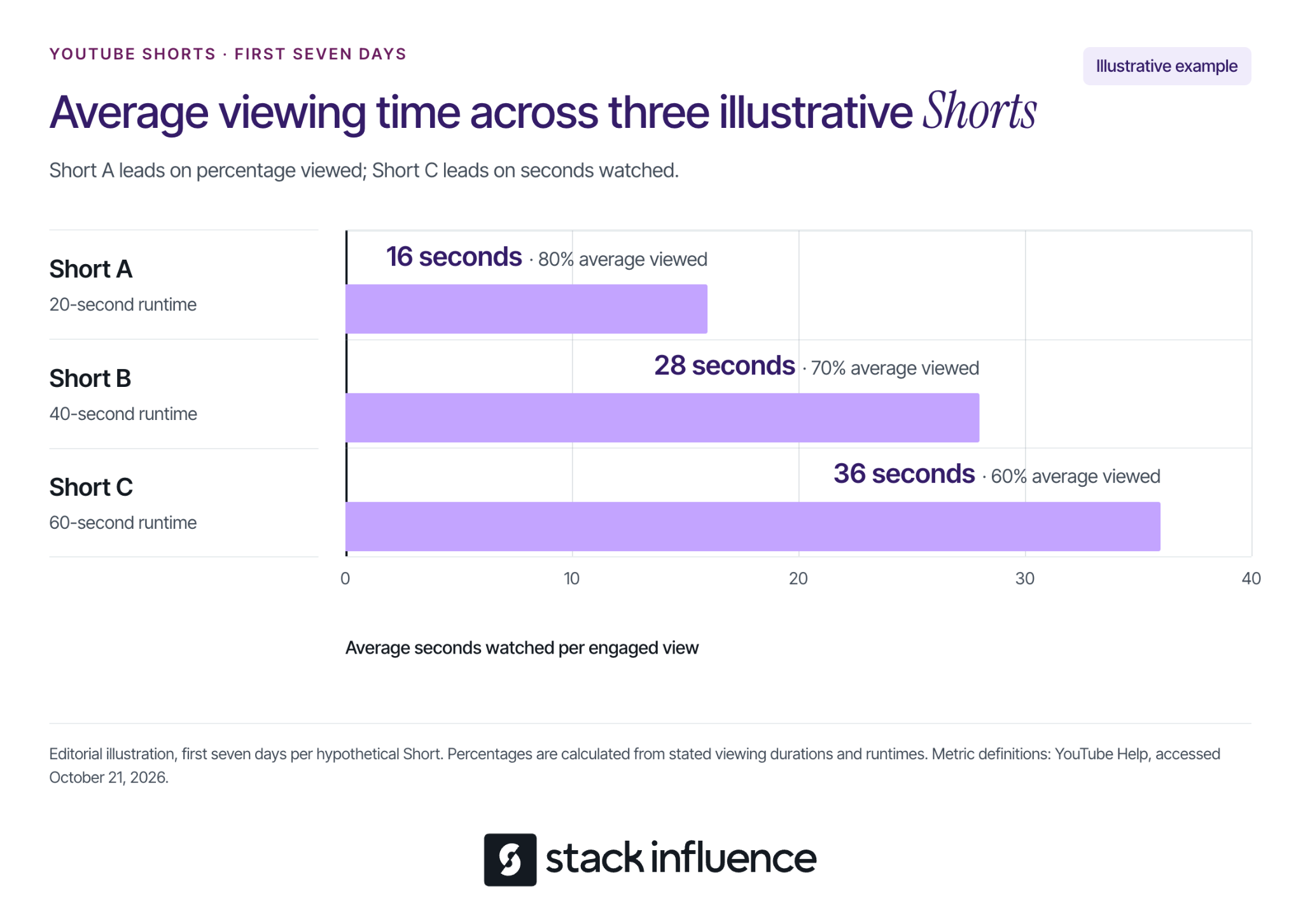
Consider this illustrative example. Assume three different Shorts from one channel, organic viewing only, each measured over its first seven days, with no repeat viewing:
- Short A: 20-second runtime, 16-second average view duration, and 80% average percentage viewed.
- Short B: 40-second runtime, 28-second average view duration, and 70% average percentage viewed.
- Short C: 60-second runtime, 36-second average view duration, and 60% average percentage viewed.
The calculation is average view duration divided by runtime, multiplied by 100. For Short B, 28 ÷ 40 × 100 = 70%.
Short A has the highest percentage viewed. Short C has the most seconds watched per engaged view. Neither measure, on its own, establishes the best video or the best length for future uploads.
These invented figures teach the distinction; they are not performance targets. For your channel, compare similar subjects and formats, then examine where viewers leave. A detailed test and a single visual tip can reasonably need different amounts of time.
Run a Sustainable 30-Day Publishing Plan
Use three Shorts per week as an adjustable starting schedule. Across four weeks, that gives each of your three series four uploads. Reduce the schedule if it leaves insufficient time to make the videos useful.
YouTube states that no minimum posting cadence is required for videos to perform well. Its Shorts upload schedule tips recommend considering production time and sustainability, including filming in batches.
Week 1: Establish Your Starting Point
Publish one Short from each series. Keep the production process manageable, and record what each upload was intended to achieve.
For every Short, save its series, topic, opening, runtime, publication date, production time, and intended next action. Add a review date seven days after publication. A simple content calendar can keep filming, editing, and review dates together.
Week 2: Change One Creative Choice
Publish another installment of each series. Choose one main adjustment, such as showing the result before explaining the problem.
Keep other major choices reasonably similar where practical. If you simultaneously change the topic, length, style, and opening, it becomes harder to identify which change deserves another test. Separate uploads still reach different audiences, so this is an observational learning exercise.
Week 3: Develop the Audience’s Questions
Publish a third installment of each series using questions from comments or gaps you noticed while reviewing the earlier clips. Turn a specific question into a complete demonstration.
If people ask how the same setup works in a smaller room, show that situation. Keep a record of the question that inspired the video so you can judge whether the response addressed it.
Week 4: Repeat the Promising Ideas
Publish the fourth installment of each series, concentrating on the clearest lessons from earlier uploads. Give each installment a distinct problem, example, or result.
Batch related filming tasks together, such as recording several demonstrations while the same camera and lighting are ready. Review music permissions and any restrictions shown in Studio before publishing.
Days 29–30: Decide What to Continue
Review only videos whose first seven days have elapsed when making that comparison. The final week’s uploads may need a later review after their full windows close.
Choose which series to continue, which needs a different opening or payoff, and which requires too much production effort for your current goals. Seven days is a suggested review interval, not a deadline for a Short’s performance to finish developing.
Measure What Happens After the First View
Open YouTube Studio, go to Analytics, and select Content and then Shorts. YouTube’s Shorts analytics guidance explains the available reports, including feed appearances, the choice to view versus swipe away, and subscriber changes.
YouTube’s explanation of Shorts view counting states that, since March 31, 2025, Shorts views count starts and replays without a minimum watch-time requirement. Keep that distinction in mind when a large public count looks more impressive than the rest of the results.
Read the measures in this order:
- Initial choice: Check Stayed to watch, the share of viewing decisions that continued past the opening seconds.
- Continued viewing: Read average view duration and average percentage viewed together. Engaged views count occasions when people stayed beyond the initial seconds, excluding loops.
- Audience outcome: Look at subscribers gained and whether comments suggest interest in another video on the same subject.
- Context: Check traffic sources, the topic, and video age before comparing uploads.
A high average percentage viewed describes the group that stayed. It does not establish that most people encountering the Short stopped scrolling. Do not calculate Stayed to watch by dividing engaged views by public views.
Compare Subscriber Gains With a Consistent Denominator
If your goal is building a subscriber audience, calculate a custom ratio: subscribers gained per 1,000 engaged views.
Use subscribers gained attributed to the selected videos. YouTube’s subscriber metric documentation distinguishes video-specific reporting from channel-wide subscriptions. Keep the subscriber and engaged-view figures at the same video and reporting-window scope.
Here is a separate illustrative scenario. Assume four Shorts per series from one channel, no paid promotion, and each Short measured over its own first seven days:
- Quick Fixes: 4,000 engaged views and 24 attributed subscribers gained, giving 6 subscribers per 1,000 engaged views.
- Product Tests: 12,000 engaged views and 36 attributed subscribers gained, giving 3 subscribers per 1,000 engaged views.
- Behind the Scenes: 6,000 engaged views and 12 attributed subscribers gained, giving 2 subscribers per 1,000 engaged views.
For each series, divide the sum of subscribers gained by the sum of engaged views, then multiply by 1,000. Quick Fixes therefore produces 24 ÷ 4,000 × 1,000 = 6. Pool the underlying counts instead of averaging the individual videos’ ratios.
Product Tests generates the most subscriptions in this example, while Quick Fixes generates more subscriptions relative to engaged views. Your decision also needs production effort and the audience you want to serve.
These figures are invented, and the ratio is an editorial analysis tool. It is neither an official recommendation signal nor a unique-person conversion rate. Inspect individual uploads before treating a series-level pattern as worth repeating.
Give Interested Viewers a Relevant Next Watch
Choose a next video that continues the same task. A Short demonstrating cleaner framing could lead to a complete home filming setup. The connection should be understandable from the Short itself.
YouTube lets creators add a related video to a Short after upload. The feature requires advanced feature access, and the destination must be a public or unlisted video from your channel that follows Community Guidelines.
In YouTube Studio, open Content, select the Short, choose a Related Video, and save. Point viewers toward that continuation with a specific invitation, such as “The full setup walkthrough is linked with this Short.”
Check the route you are asking viewers to use. YouTube’s link-sharing guidance says ordinary URLs in Shorts descriptions and comments are not clickable; related-video links and channel profile links are clickable.
If you also create longer videos, review the Viewers across formats report to see audience overlap. An overlap does not establish that a particular Short caused someone to watch a longer video.
Use Weak Results to Choose Your Next Change
Turn a disappointing result into a specific hypothesis. Compare against your own relevant uploads and inspect the video before changing your entire strategy.
- Few viewers stay: Test an opening that identifies the problem or shows the result more clearly.
- Viewers stay but leave before the payoff: Move the demonstration earlier, remove repeated setup, or make the explanation easier to follow.
- Viewing is strong but subscriptions are limited: Make the channel’s recurring value clearer and suggest a relevant follow-up.
- One series looks strong because of one upload: Inspect its other episodes before increasing production.
- Several measures improve but distribution remains limited: Consider topic demand, competition, and seasonality before assuming a technical problem.
These are hypotheses to investigate, not diagnoses proven by a single metric. Keep a brief decision note: “Next time I will change ___ because the video and its results suggest ___.”
For creators pursuing brand collaborations, retain demonstrations that show how you explain a product honestly and clearly. Keep their actual results and reporting periods with the clips so your portfolio does not depend on a single public view count.
If product collaborations are part of that goal, review how Stack Influence creator collaborations work and check the requirements of each available opportunity.
Choose Your Next Batch With a Clear Reason
Start with one audience promise, three useful series, and a schedule you can sustain. Make each Short worth watching on its own, then compare the viewing experience with the audience outcome you wanted.
At your next review, choose one change you can explain and test again. That gives your YouTube Shorts strategy a practical direction for the following month.